-
-
-
-
-
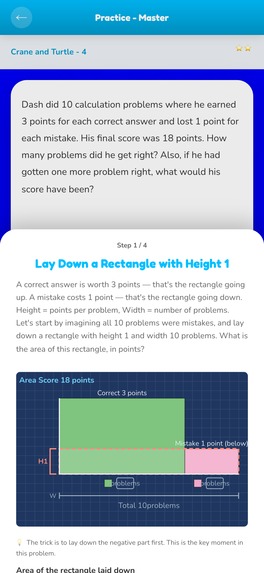
The step sheet: the solution built one stage at a time, in order.
-
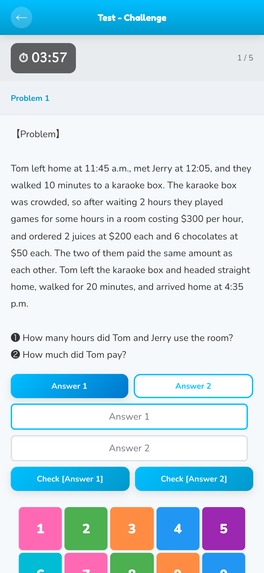
Test Mode. Five problems, timed, with typed answers — not multiple choice. Run out of time and the problem scores nothing.
-
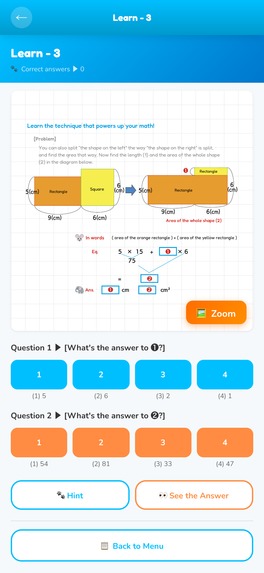
Learn the Method. A worked example splits one shape into two rectangles, then asks you for the two answers.
-
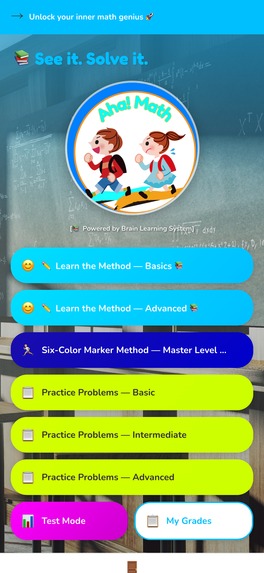
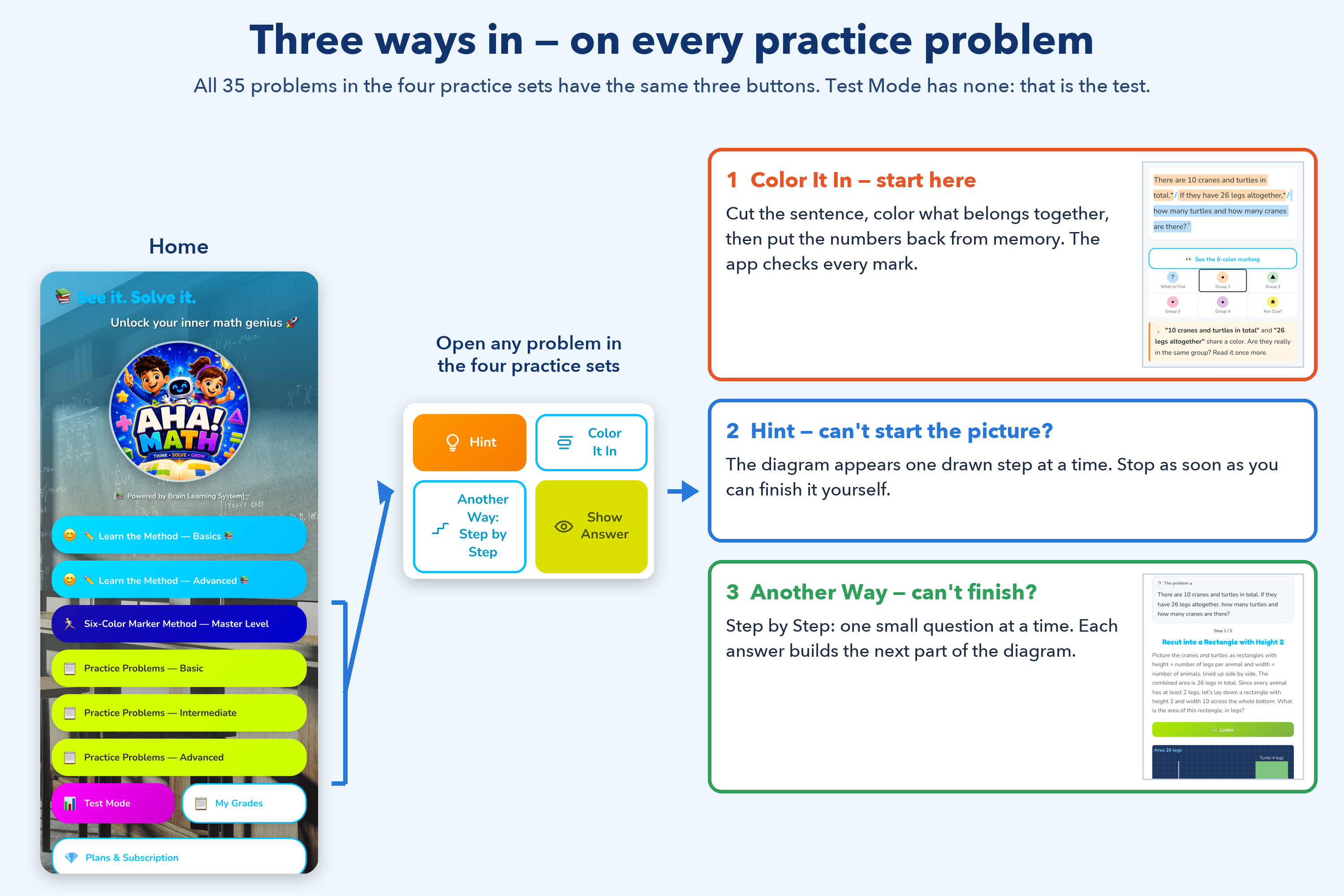
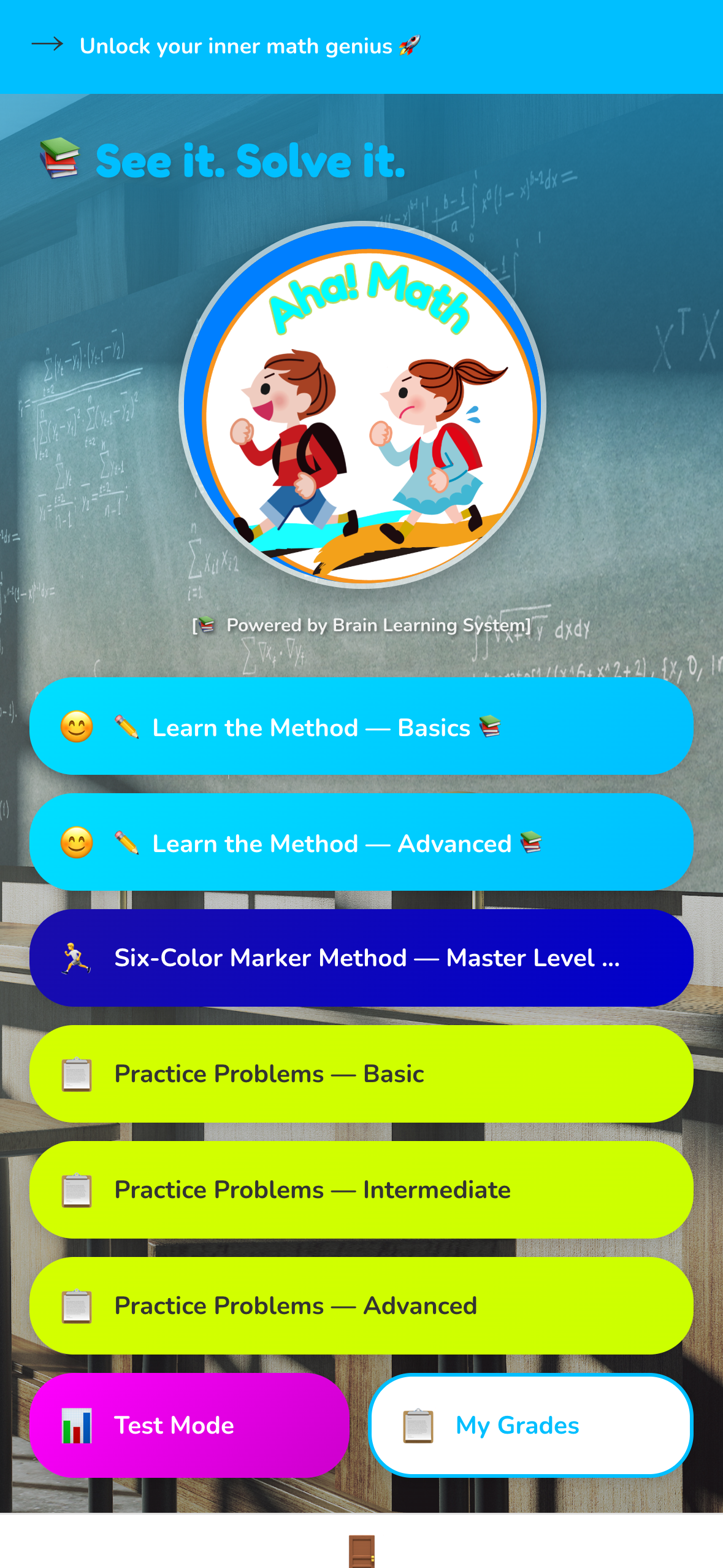
Home. The method, graded practice, timed tests and grades — all in one list.
-
-
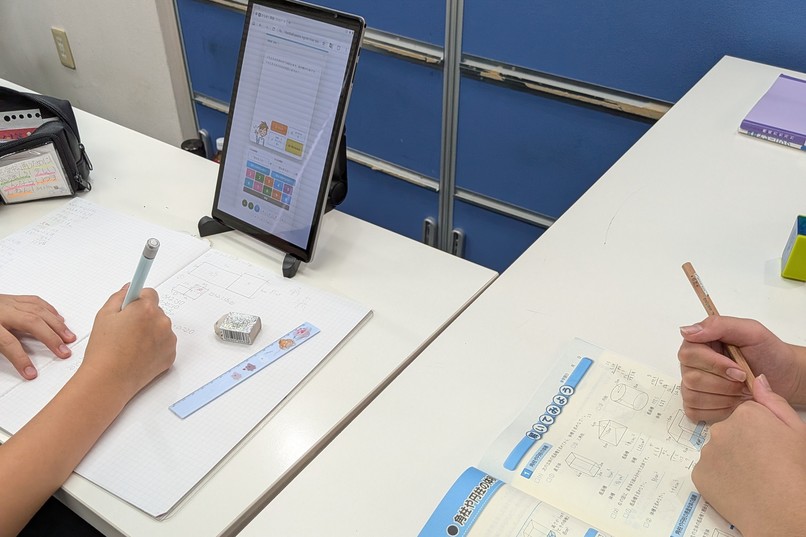
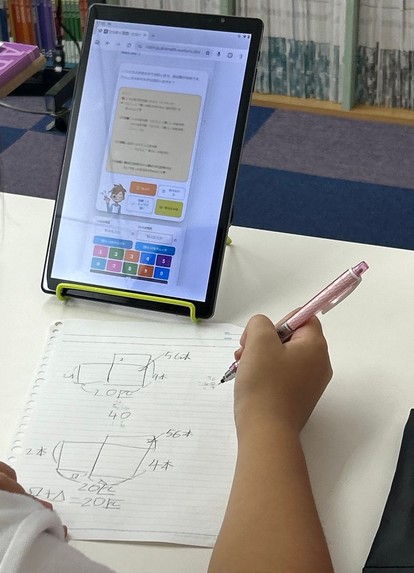
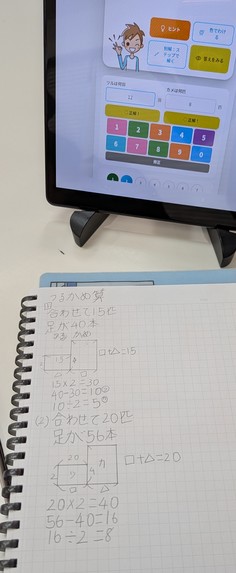
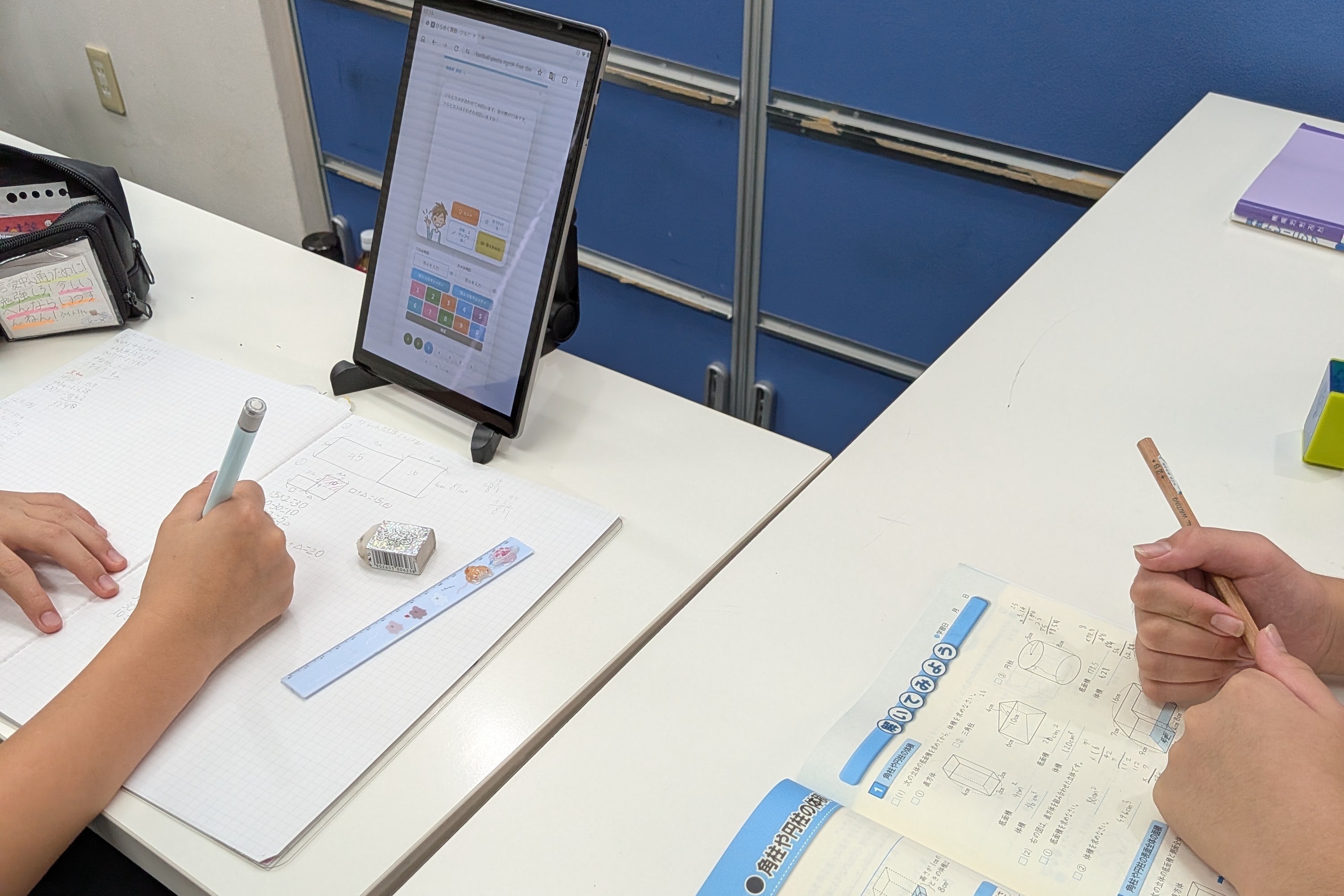
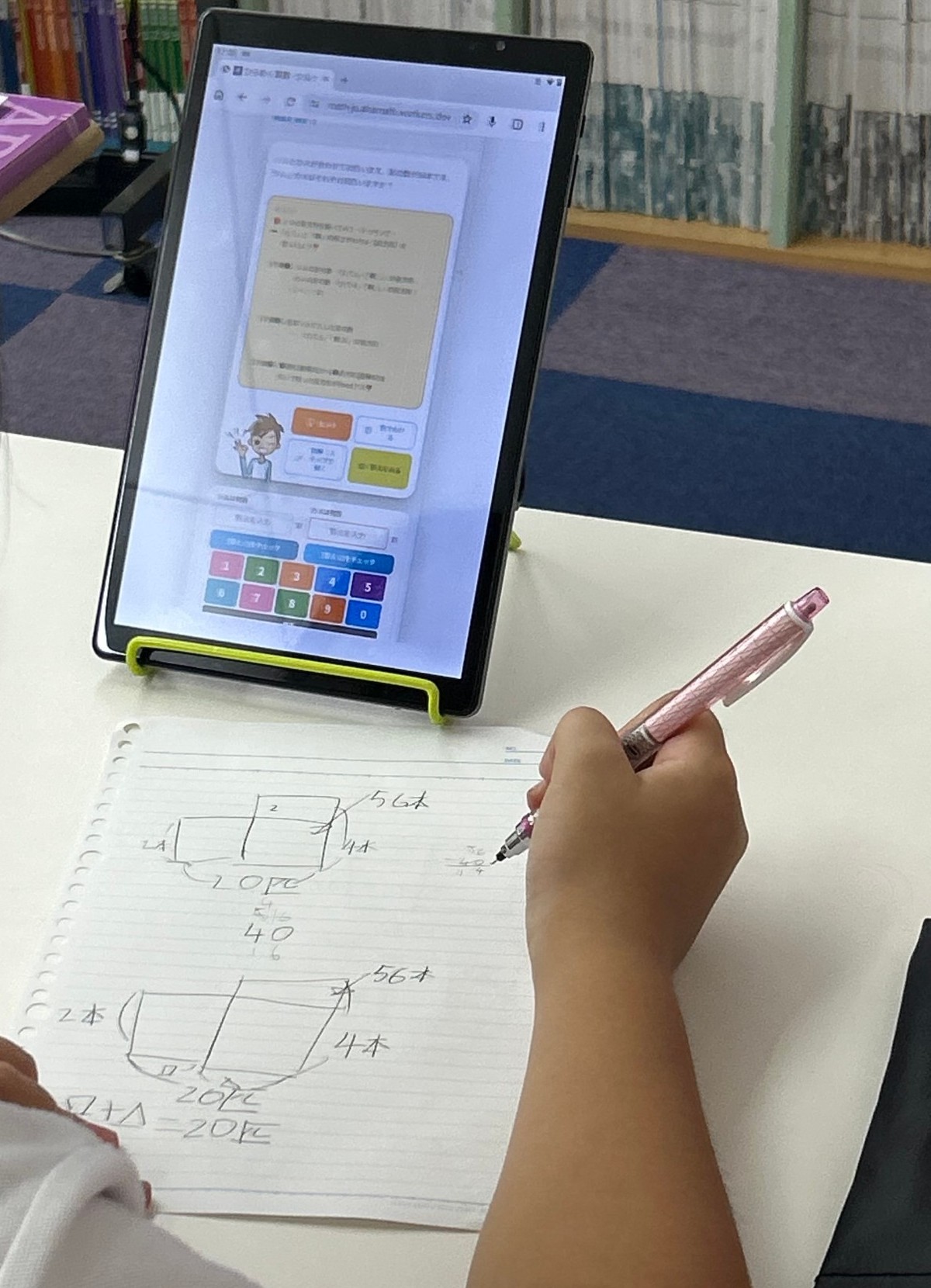
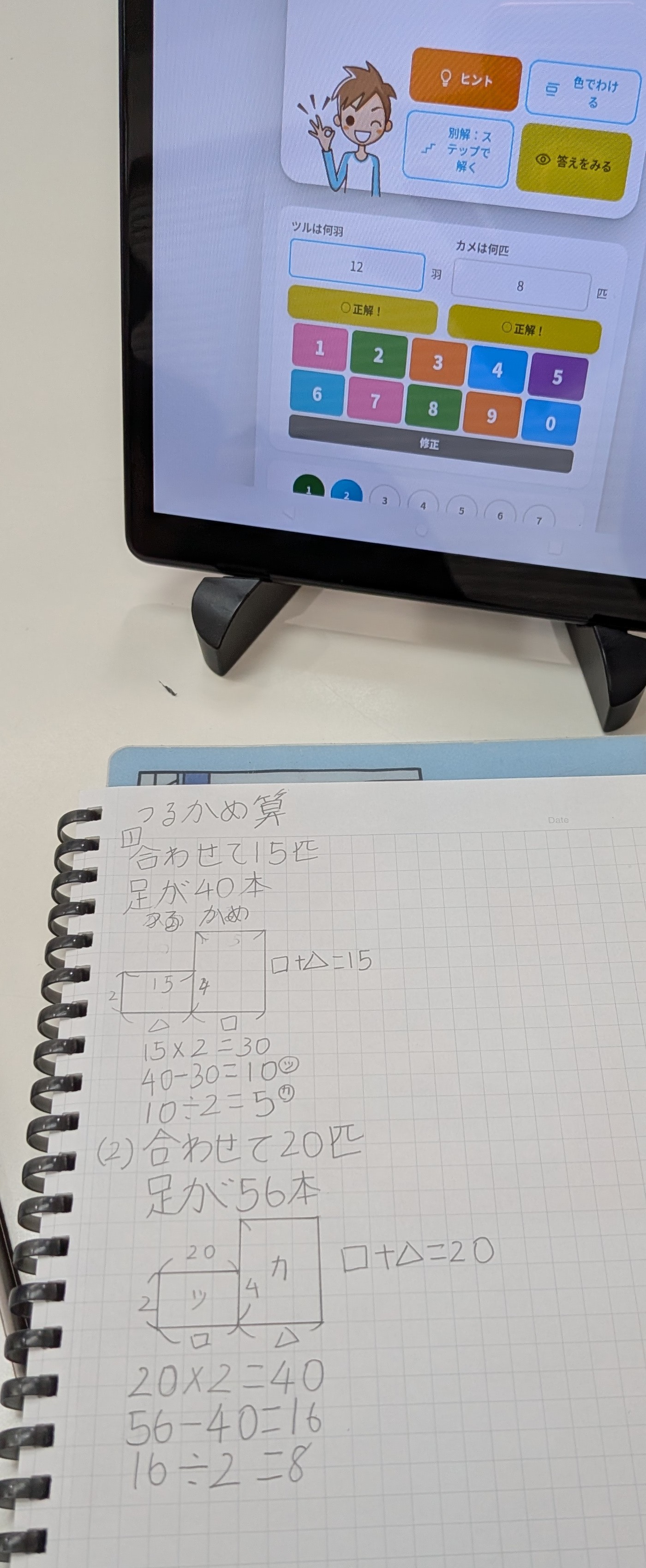
Our own students, in class: paper on the desk, the app on the tablet.
-
-
-
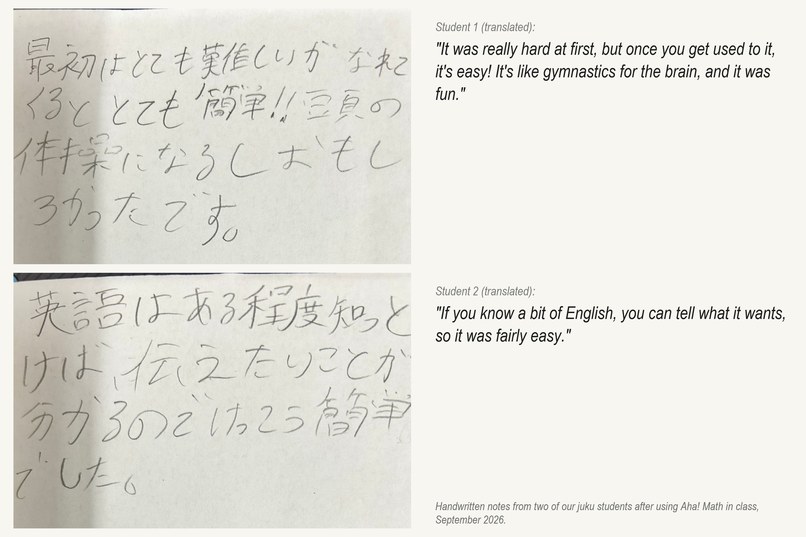
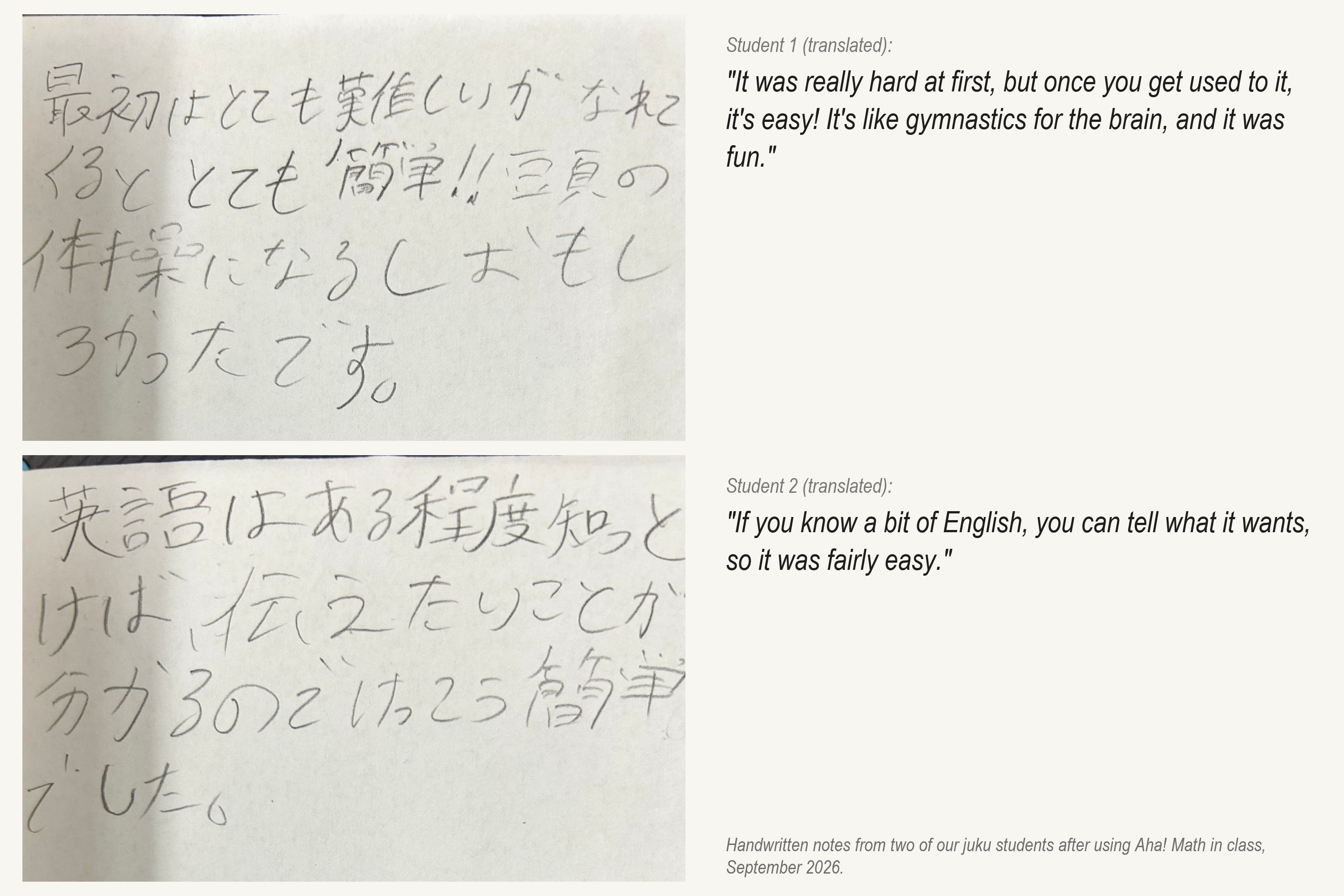
Notes from two students after using the app in class, translated. The second one is why a Japanese interface is next.
-
-
App icon, 1024 x 1024, uncropped (current App Store icon).
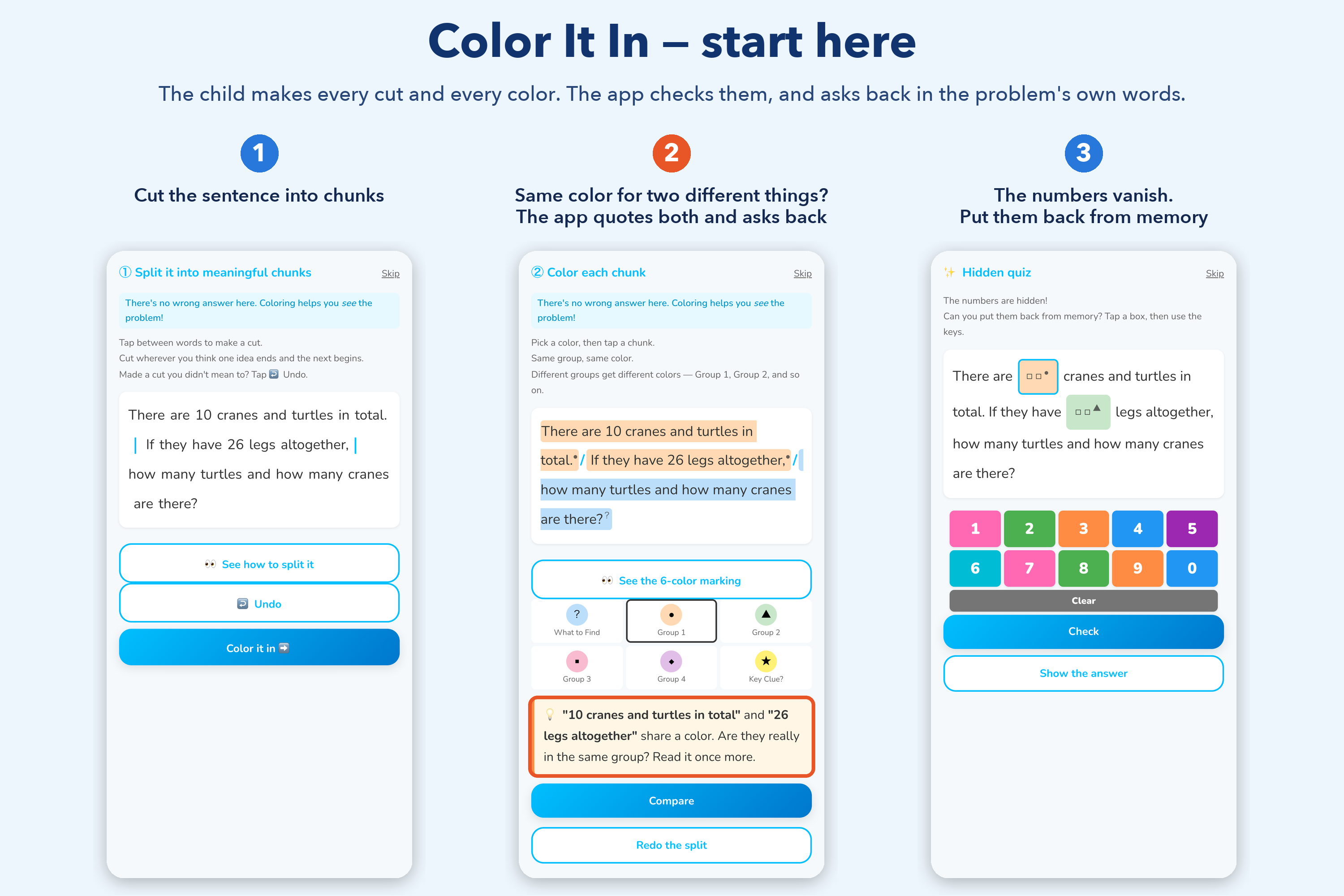
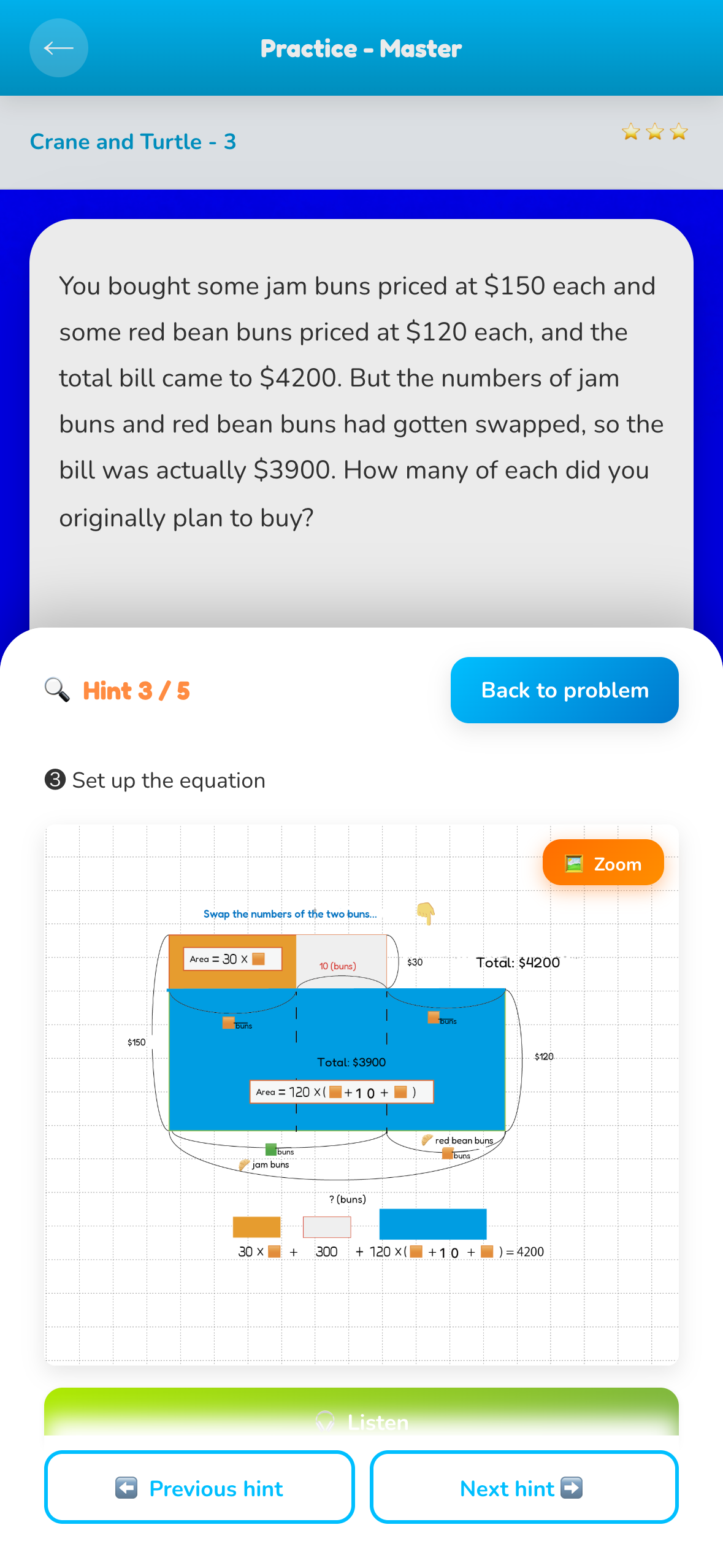
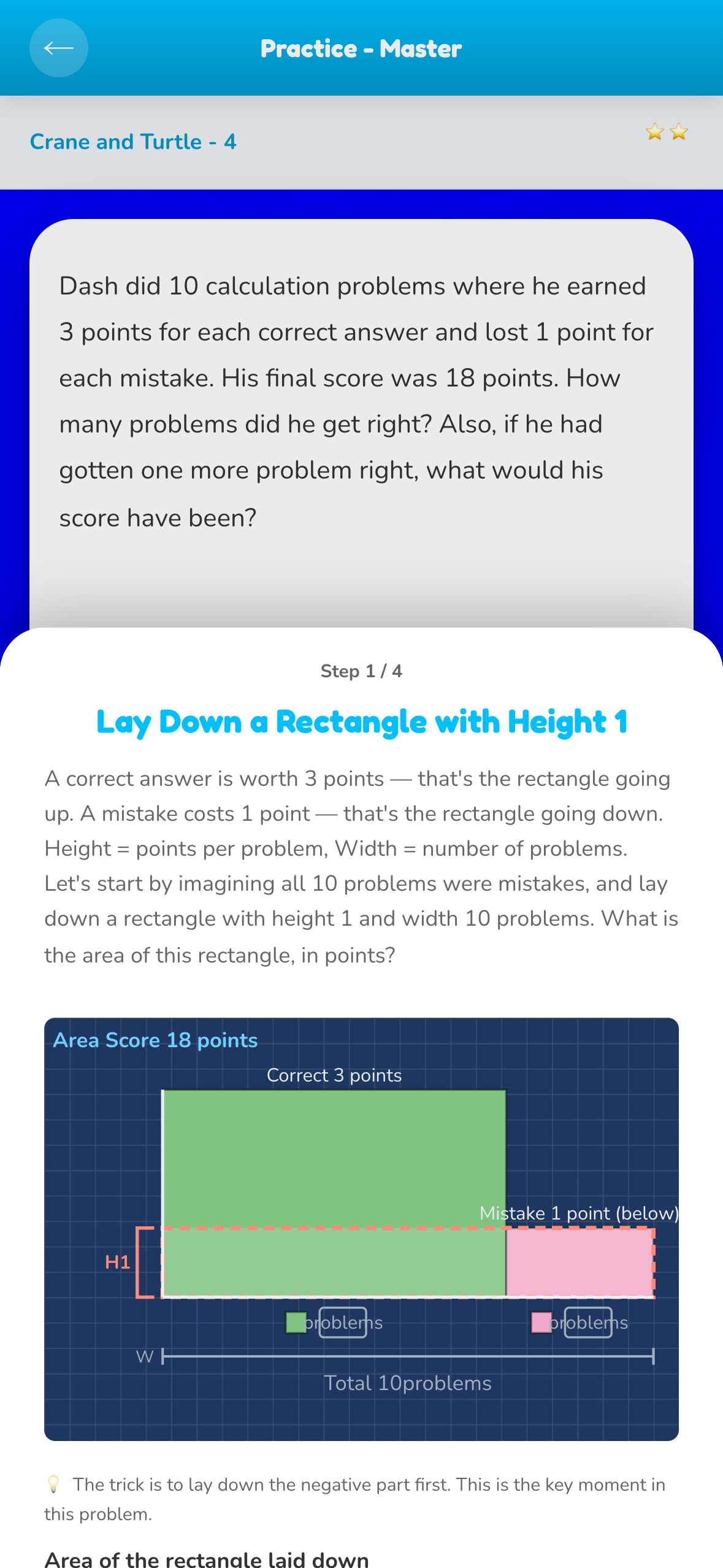
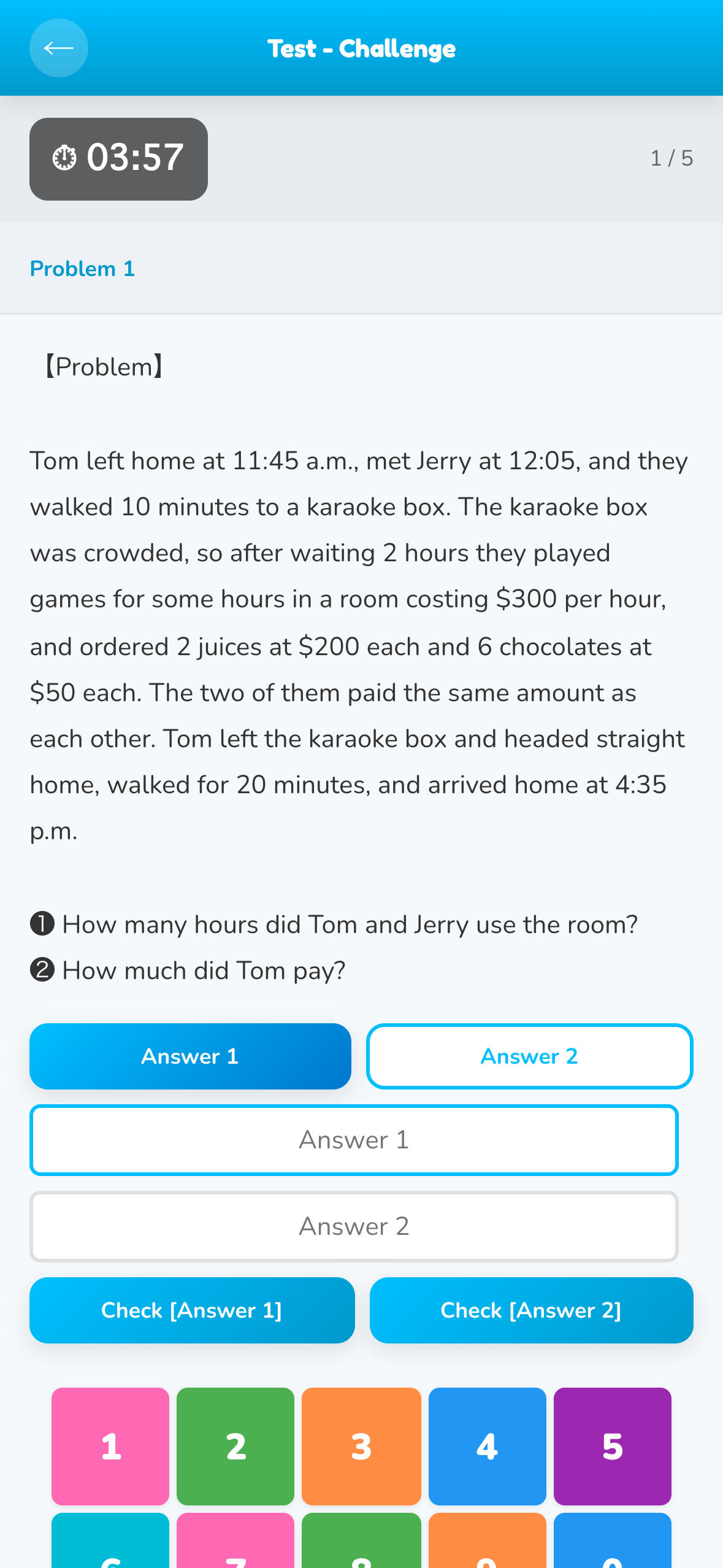
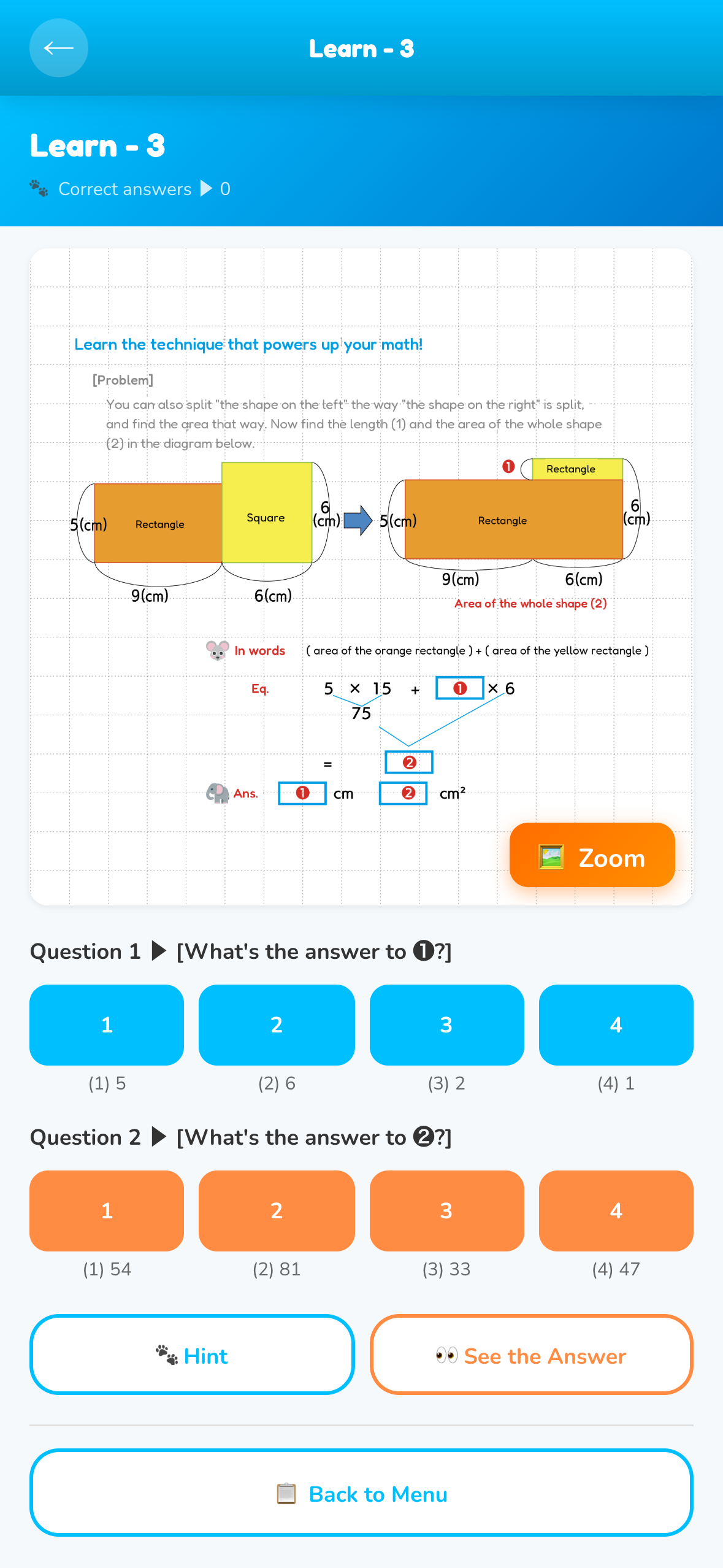
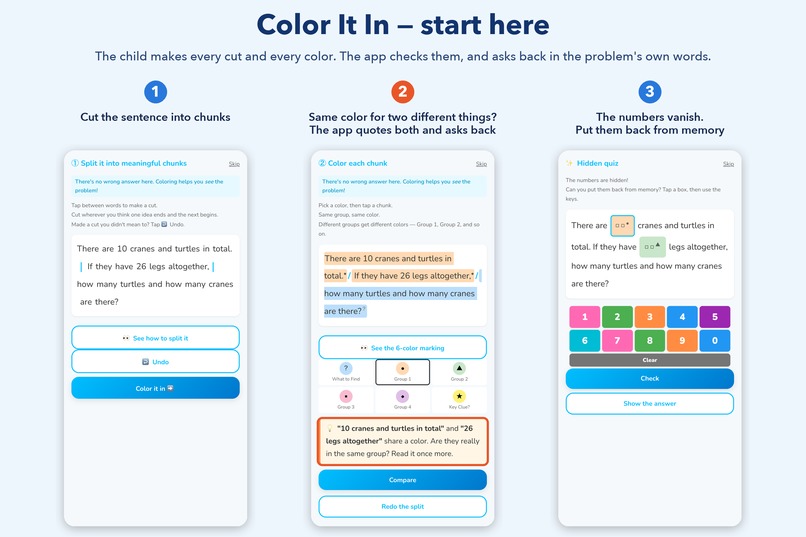
Words? Hard. Picture it. What you're told fades; what you notice yourself stays. That is a rule from thirty years in one classroom, not a research finding. So the app never fixes a wrong mark: when two chunks share a colour but do not belong together, it quotes both back and asks, "Are they really in the same group?" The child has to notice.
Read this once, at normal speed: "Dash did 10 calculation problems where he earned 3 points for each correct answer and lost 1 point for each mistake. His final score was 18 points. How many problems did he get right?"
If a number showed up before you decided to think, that is the moment Aha! Math is built for. Learning apps usually start at solving. This one starts one step earlier, with what goes into the child's head: the child cuts the sentence with slashes, colours the chunks (six colours, their choice; blue for what the question asks), types the numbers back from memory, answers with the text hidden, then pictures it as rectangles. The app never cuts or colours for the child. (Fast answer: 6, because 18 ÷ 3 = 6. Correct: 7.)
In one breath: Aha! Math is a word-problem app for children of about 8 to 12, made by a juku (a Japanese after-school academy) in Osaka that opened in 1989. The child cuts the sentence into chunks, colours the numbers that belong together, and pictures the problem as rectangles; the app checks every mark and never makes one for the child. Everything is free for 14 days, no card, no account; then one subscription priced by school term, from $1.99 a month on the US App Store. No ads. On the App Store since Sept 16 and on Google Play since Sept 24, one codebase. Entered for the Peace Prize, #BuildInPublic, HAMM and Design.
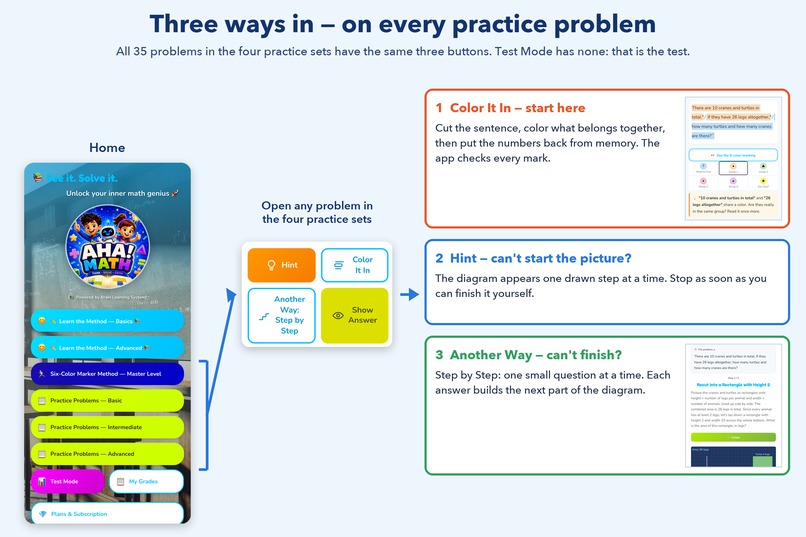
Try it first (three minutes): open any problem in the four practice sets (Master Level or Practice Problems) and tap Color It In before anything else: cut the sentence, colour what belongs together, recall the numbers with the text hidden. Then Hint draws the picture one step at a time; if it still won't come, Another Way: Step by Step. Words, colours, picture: skip the first step and the hint feels impossible. The full path is in the notes for judges and at the top of our Design answer.
Built for: the middle of the class — the child who can do the arithmetic and still stalls on the sentence.
What it trains: attention. A child reads a problem once, top to bottom, and believes they have read it; but only what attention actually catches reaches awareness, and the rest slips past. Children who stall have made that quick read a habit. Every slash and every colour in the app is there to switch attention on for one piece of the problem at a time, so the information the problem needs is consciously taken in, not skimmed.
Why this matters: Our juku in Osaka opened in 1989, and I have taught there for more than thirty years. Research on how children learn has come a long way in that time. What a child actually does when stuck on a word problem has not: read it, stall, hear "read it again, more carefully," read it again. I still see it in my own classroom.
We did not build this app from a theory. We watched what a child's hand did before the answer came, kept the movements that visibly made the next problem easier, and dropped the rest: cut the sentence, colour the numbers that belong together, draw it. We cannot tell you why it works. We can show you that it does, and you can check every claim on this page in the app in about three minutes (see the notes for judges).
What the app does that a teacher cannot: The method has one cost. Someone has to check every slash and every colour at the moment it goes wrong, for each child. No teacher can do that for thirty children at once, so for thirty years the checking stayed with the teacher in the room. The app checks one child's marks, every time, without getting tired; and Professor Aha, its AI tutor, instructed never to state the answer, explains the diagram when no teacher is in the room. Most maths apps solve the problem for the child, or explain the solution to the child. This one never cuts or colours for the child: the cutting and colouring are the child's, and the app checks every mark.
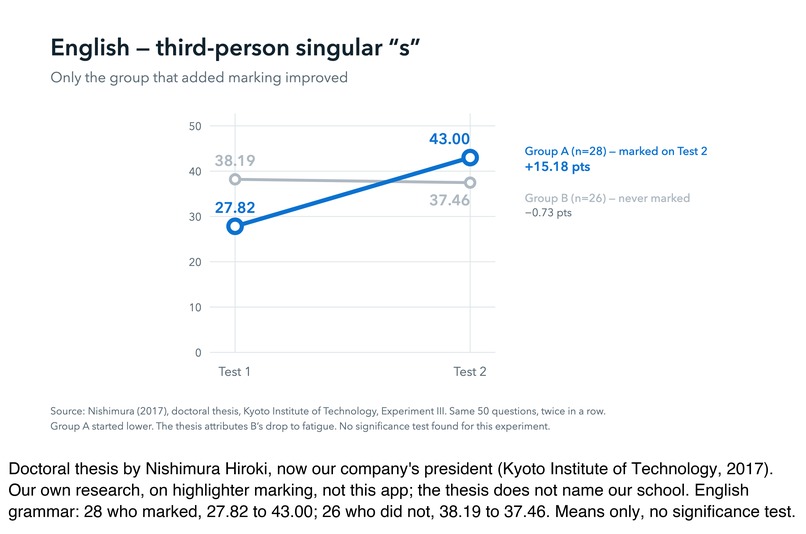
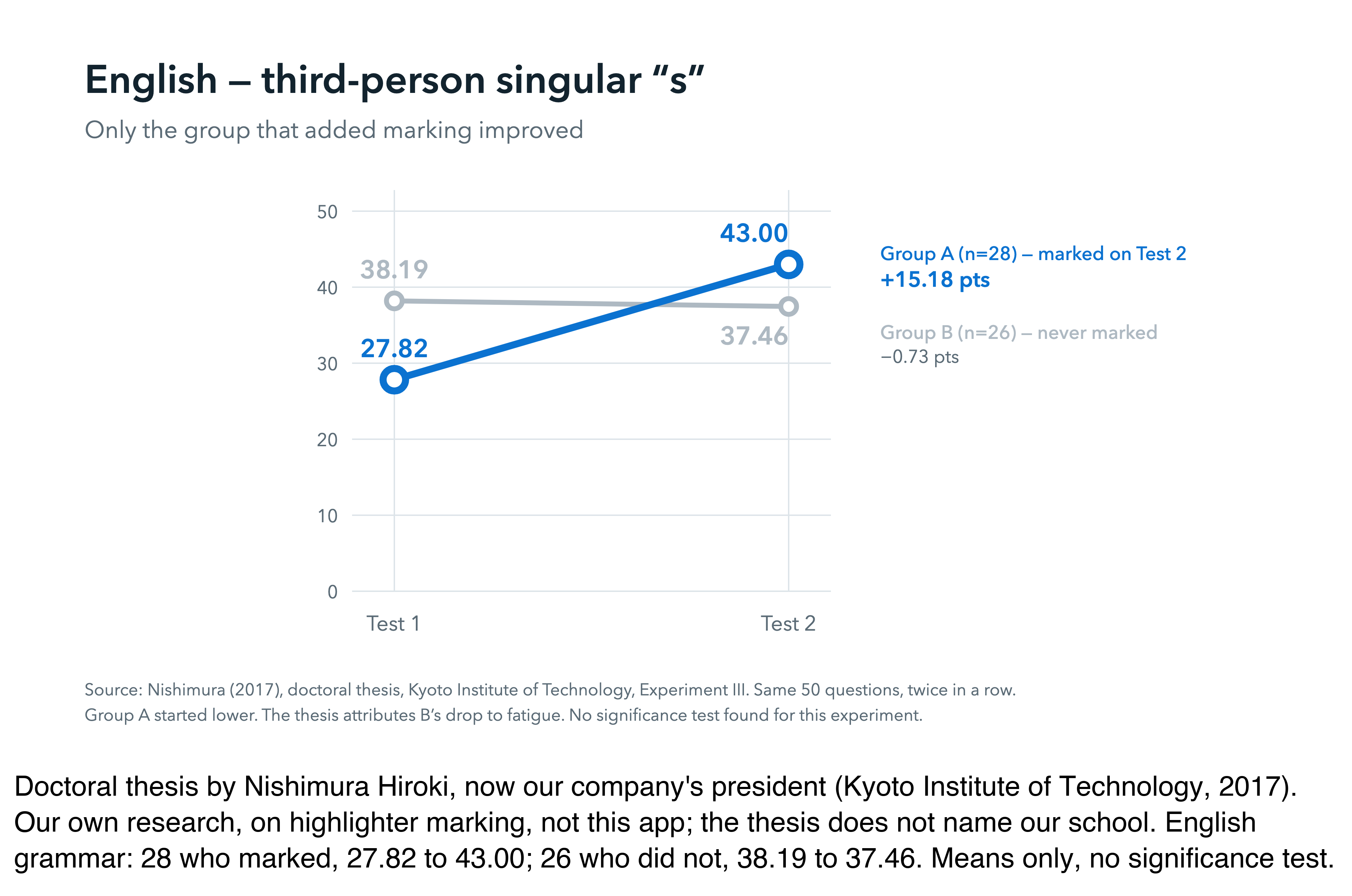
What we do not claim: that research proves the method (the thesis studied marking with highlighters in grammar, reading and computation, not word problems and not this app, and it is our own research); that the app has users beyond the numbers in our notes for judges; or that we know why the hand movements work. What we claim is checkable in the app in about three minutes.
Entered for, and why:
- RevenueCat Peace Prize — who benefits: the child of 8 to 12 who stalls on the sentence and has no teacher beside them. What changes: every slash and colour is checked at the moment it goes wrong, by the app, and the child ends with a picture they made, not an answer they were handed. 14 days free, no card.
- #BuildInPublic Award — three App Store rejections, one information request and one Google Play rejection, the first two rejections written up in public with their causes the week they happened; a RevenueCat paywall review posted in full; three of our questions became checks in another developer's rejection scanner; one user's report became a fix the same day.
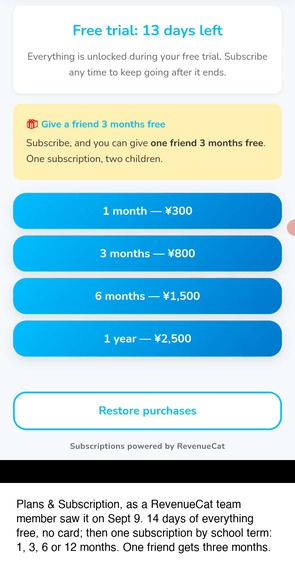
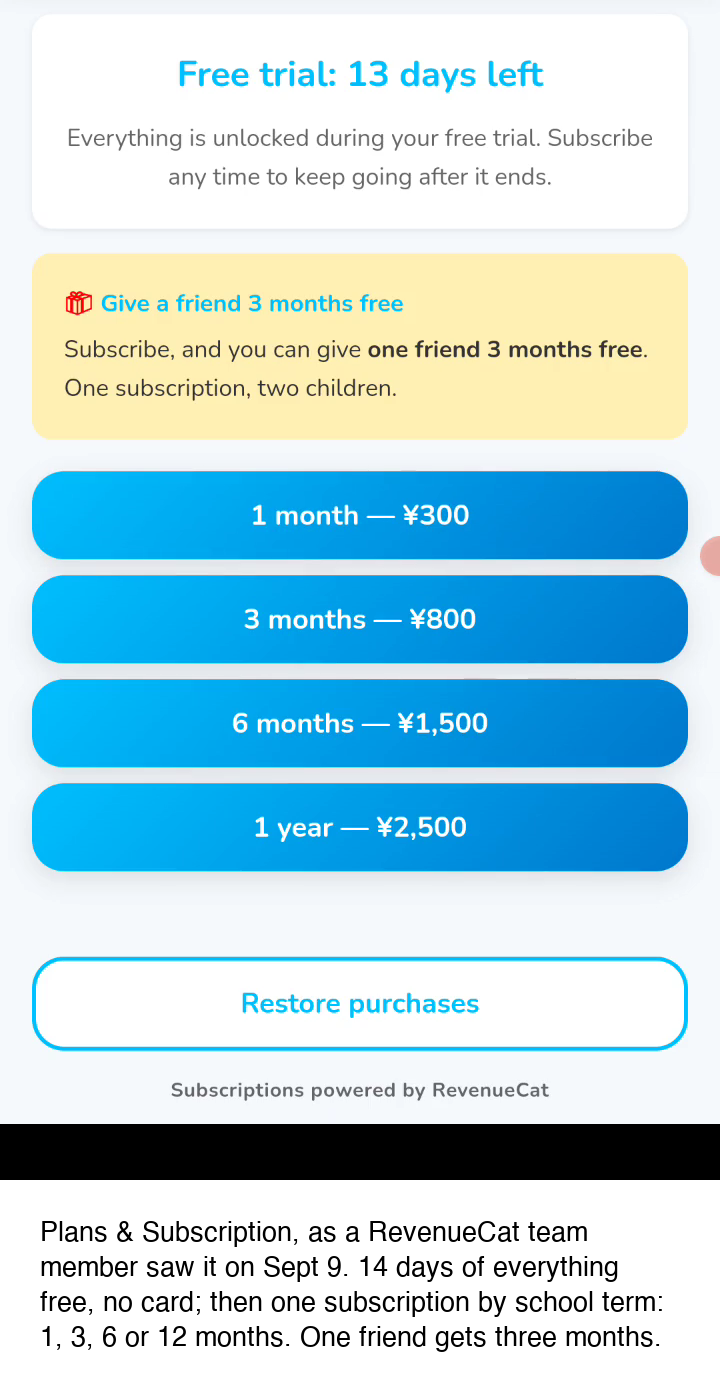
- HAMM Award — one subscription, on purpose (the users are children), priced by school term, the way parents already pay for learning. 14 days free, no card, no ads.
- RevenueCat Design Award — entered for a unique user experience, not for animation: the child marks, the app never does, and the grader checks how the numbers were grouped, not which colour was picked.
Inspiration
I am Hiroshi Matsumoto. ARC Shingakukai, our juku (after-school academy) in Osaka, Japan, opened in 1989; I have taught there for more than thirty years, and I founded and chair the company that runs it, ARC EDU Co., Ltd., which publishes this app. For decades I watched the same scene: a child freezes in front of a word problem — not because they can't calculate, but because they can't see what the words are saying.
Meanwhile I kept asking myself where my own intuition fires when I solve a problem. The honest answer: the moment words become a picture. I built a classroom method around that observation — slash the text into chunks, mark matching quantities in matching colors, hunt for the hidden numbers (if a problem gives you distance and time, it has already given you speed), then redraw the whole thing as rectangles. We learned the names research gives these steps only afterwards, and we do not claim that research proves our method.
In 2008, President Family, a national Japanese magazine for parents, ran a four-page feature on the early form of the classroom method this app grew from; today we call it the 6-Color Marker Method®. Its marking step was also the subject of a 2017 doctoral thesis at Kyoto Institute of Technology by Nishimura Hiroki, who saw the method in my classroom, joined our company, and is now its president. Two things to be clear about: it is our own research, not an outside evaluation, and it studied marking with highlighters, not this app (the thesis does not name our school). The full text is open on the university repository, in Japanese; the group sizes and the numbers we quote are in the video's description on YouTube and, for the judges, at the end of our Peace Prize answer. Our teachers have also published with KADOKAWA; that book is on English vocabulary, not maths, so take it as who we are, not as evidence for this app. What a thesis cannot do is check each child's marks after class. Aha! Math is our attempt to put that checking in every child's pocket.
What it does
AHA! Math transforms the invisible skill of reading a word problem into something visible, teachable, and practiced:
- Chunk — slice the problem text with "/" so working memory isn't flooded
- Color — mark paired quantities in the same color
- Picture — rebuild the problem as rectangles, then hunt for the rectangle where you know both the height and the width — and re-cut the shape to make one
- Vertical calculation — equals signs go down, not right, so every line stays a true equation
The hints walk the child, one drawn step at a time, to the "AH!" — the flash when a hard problem suddenly looks easy. That flash, not the right answer, is the product.
How it works: three ways up the same mountain
Aha! Math looks small: 35 practice word problems (plus Test Mode, five timed problems per run, and Learn the Method, 48 cards). All 35 problems and their hint diagrams are original: the problems written, and every diagram drawn in Illustrator, by Hiroshi Matsumoto for our classrooms; the crane-and-turtle problem type itself is a classic of Japanese schooling. Every practice problem has three routes, and the routes are the product.
Color It In — start here. Slash the sentence, colour the numbers that belong together, then recall them with the text hidden. Nothing is solved here. This trains the reading that every route below depends on.
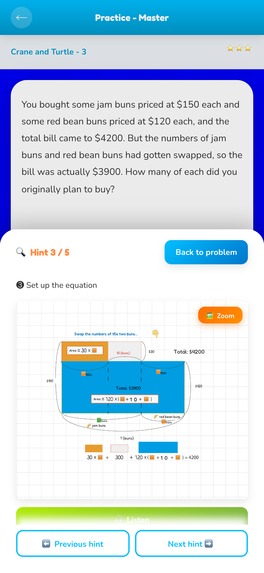
Hint — when you can't start. The figure appears one drawn step at a time. The early hints stop at a picture you still have to finish; on some problems the last one works the calculation through so you can check yourself. This is the classroom method: struggle with the picture until it gives.
Another Way: Step by Step — when you can't finish. The same problem broken into stages, each with the one thing to look at and the one move that gets you forward. Gentler, closer to a textbook answer, for beginners or for anyone who got stuck on route 2.
Start with route 1. A child who can already see the picture goes straight to Hint; a child who opens Hint cold tends to get stuck, because route 1 was the missing step. Thirty-five problems climbed three ways teach more than a hundred climbed once; the second and third ascent are where the mountain stops being a puzzle and becomes a shape you know.
How we built it
The app went through three bodies before this one. The first was an AppSheet prototype, built to test the feature set before any design existed. The second was built in Adalo, where the UI and the hint system went through trial and error: how much to show, when to stop, what a hint looks like when it refuses to give the answer. Every hint diagram was drawn by hand in Illustrator, one problem at a time. What survived every rewrite was the diagrams. The AppSheet and Adalo versions were classroom prototypes used only by our own students and were never published on any store; the first public release of Aha! Math is the App Store version of Sept 16, 2026.
A veteran juku principal and AI coding partners (Anthropic's Claude, Opus and later Fable, working through Claude Code). I supplied more than thirty years of classroom material and the pedagogy; AI turned it into a Capacitor 8 app: a vanilla JavaScript single-page app built with Vite, shipped to iOS and Android from one codebase, with RevenueCat for subscriptions and a Cloudflare Worker in front of Google Gemini for the tutor. My job in those sessions was to forbid things and demand proof: the diagram before any equation in every hint, no colour ever graded, no answer from the AI tutor. RevenueCat powers the model: 14 days of everything, free, then one subscription unlocks everything. No ads.
A note on this text: I write in Japanese. An AI assistant helped me put it into English, and AI coding agents wrote most of the code under my instructions. Every fact, number and claim here is mine. Before the deadline I had every sentence checked against the shipped code; several claims failed, and I corrected this page, not the app (see Corrections at the end of this page).
Challenges we ran into
Grading the ungradable. Marking has no single right answer — the goal is careful reading, not perfect boundaries. Early builds nagged kids with vague feedback ("almost!"). We rebuilt scoring around anchors (is every key number colored? do paired quantities share a color?) and designed a "hide-the-text quiz": after marking, the problem vanishes and the child answers from memory. If they can, the marking worked. No fuzzy judgment needed.
Shipping as first-timers. A corporate Google Play developer account for ARC EDU Co., Ltd. (D-U-N-S number, DNS records), production-access testing with real students, and a Google Play rejection because reviewers could not get past our login screen; we removed the login, and the app now starts with no account. Every stumble is in our #BuildInPublic posts. The iOS build went out from my individual developer account because that was faster before the deadline, which is why the App Store lists me by name while its copyright line names the company; the listing moves to the company account after judging.
Accomplishments that we're proud of
Our own students have used it in class, and their feedback comes back on paper. Two notes written in class in September 2026, translated by us; the Japanese originals are in the gallery: "It was really hard at first, but once you get used to it, it's easy. It's like a workout for the brain, and it was fun." and "If you know a bit of English, you can tell what it wants, so it was fairly easy." The second one is why a Japanese interface is next.
What we learned
Drawing every diagram by hand turned out to be the real curriculum work. For each problem I had to decide what picture the sentence could become, how many different pictures were possible, and which one a ten-year-old would actually understand and carry to the next problem. Many of the diagrams behind the Hint button are not the ones a textbook answer would use; they exist because they were the version that made a child say "oh". We tried them in our own classes, and the word that kept coming back was omoshiroi — "this is fun". That is where the name comes from. The "Aha!" in Aha! Math is not the moment the answer appears. It is the moment maths becomes interesting.
Experience first, explanation after. Our first onboarding lectured kids about cognitive science; nobody read it. Now the app puts a sentence in the child's hands before saying a word about theory — the same principle the method itself teaches.
Build in public log (Sept 7 onward)
A post on X almost every day since Sept 7, every one tagged #Shipaton #buildinpublic and cross-posted to the Shipaton Discord #post-engagement-boost. Newest first; the full link list is in the Build in Public answer.
- Sept 27 — What an AI check of this page against the shipped code found, and what I corrected: https://x.com/arcedu_ink/status/2104209402811290051
- Sept 25 — A user's Android report (hint sheet under the three-button navigation bar), fixed the same day in v1.4.31: https://x.com/arcedu_ink/status/2103460151902781673
- Sept 25 — Now on Google Play too (Android live from Sept 24; iOS since Sept 16): https://x.com/arcedu_ink/status/2103256453385732587
- Sept 23 — Quoting a builder of interactive fiction on the same rule from the other side: https://x.com/arcedu_ink/status/2102753292648587667
- Sept 22 — A RevenueCat team member's five paywall findings. Four change, one stays: https://x.com/arcedu_ink/status/2102387105213345807
- Sept 21 — The AI tutor is forbidden to give the answer, and the consent sheet before the first question: https://x.com/arcedu_ink/status/2102031842828526047
- Sept 20 — The grader checks how the numbers were grouped, not which colour. On purpose: https://x.com/arcedu_ink/status/2101669312255987978
- Sept 20 — Public answer to "what if the child cuts in the wrong place?": https://x.com/arcedu_ink/status/2101465637730361694
- Sept 19 — Cut it yourself: an uncut sentence, and the sample marking the next morning: https://x.com/arcedu_ink/status/2101303378899026132
- Sept 18 — A ten-second reading test. First number that comes to you, not the right one: https://x.com/arcedu_ink/status/2100959980098932739
- Sept 17 — A student's verdict, kept on the wall: "Lots of problems. Hard.": https://x.com/arcedu_ink/status/2100585375790186715
- Sept 16 — Live on the App Store: https://x.com/arcedu_ink/status/2100033708439035999
- Sept 12 — The core idea: the child marks the sentence up, the app never does. Five replies: https://x.com/arcedu_ink/status/2098770877504766187
- Sept 11 — First word of a RevenueCat team member's paywall review (the five findings in full: Sept 22): https://x.com/arcedu_ink/status/2098405729321578701
- Sept 8 — Rejection #1 from Apple (3.1.2), and the dead link I found myself the next day: https://x.com/arcedu_ink/status/2097318911742210421
- Sept 7 — The demo video, first post: https://x.com/arcedu_ink/status/2096963580344320420
- Demo video, with the award categories named at the start: https://www.youtube.com/watch?v=JQqfCinkuCs
- Long write-up on HackerNoon: submitted Sept 24 (tag #shipaton); the link will be added when it is published.
What's next
A Japanese interface for the children the method came from, the paywall changes a RevenueCat team member suggested, word-problem packs beyond the one type it ships with (crane-and-turtle problems: two kinds of thing, one total count, one total of legs or points), and institution licenses for free schools; all after judging ends, so the app you test is the app in the video. As the saying goes, talent is evenly distributed and opportunity is not. This app is one way to put a teacher's method where no teacher is.
Android: on Google Play since Sept 24. v1.4.31 (released Oct 1) cleans the same five hint diagrams and keeps the hint sheet above the three-button navigation bar; the store can take an hour or so to show the new version everywhere. On iOS, judge the version the App Store serves; what each version changed is in the notes for judges.
Corrections made on this page
- Sept 24: the thesis was called library-only; its full text is open online, and its experiment was described more carefully.
- Sept 25: "no hint ever states the answer" was wrong (some final hints work the calculation through; the AI tutor is the part forbidden to answer). "Not by streaks" was wrong: My Grades shows a day streak.
- Sept 26: Test Mode is five problems per run, not 12; the friend-code address is [email protected], as in the app; revenue is $1.93 as RevenueCat reports it.
- Sept 27: "refuses to do either until the child has cut and coloured" overstated it; Hint and Show Answer are available from the start, and the page now says so.
Built With
- android
- capacitor
- cloudflare-workers
- css
- google-gemini
- google-play
- html
- ios
- javascript
- node.js
- revenuecat
- storekit
- vite
- wkwebview


Log in or sign up for Devpost to join the conversation.