-
-

Loading Page / Landing Page
-

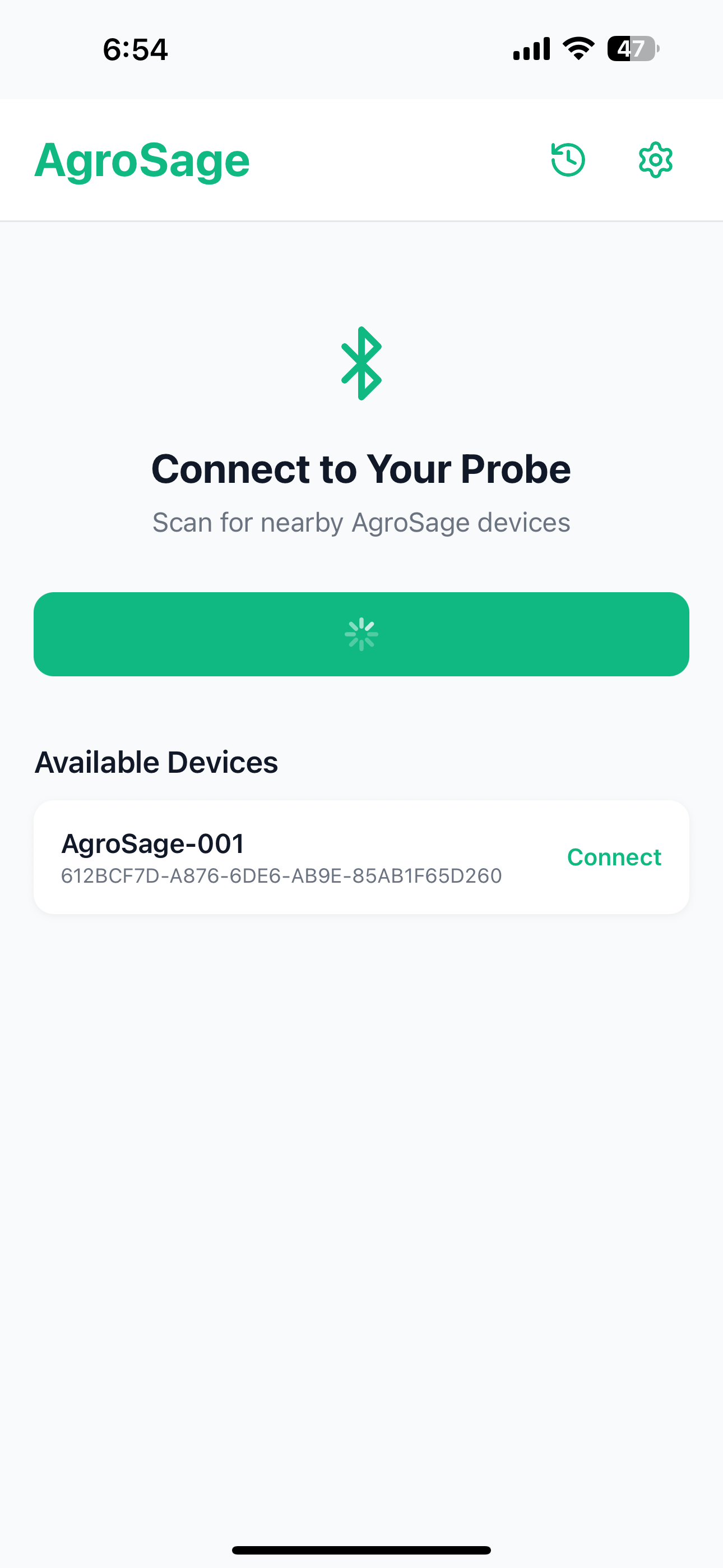
Bluetooth Search page for the hardware
-
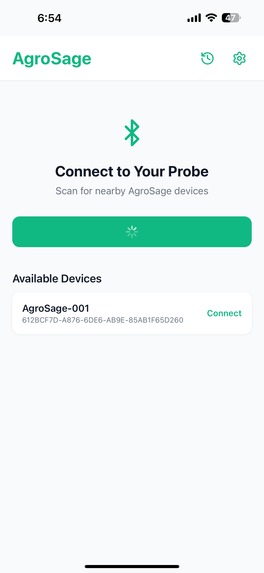
Hardware devices list visibility
-
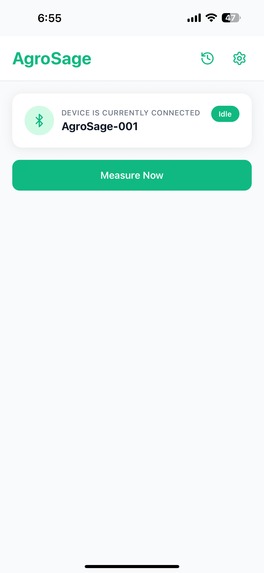
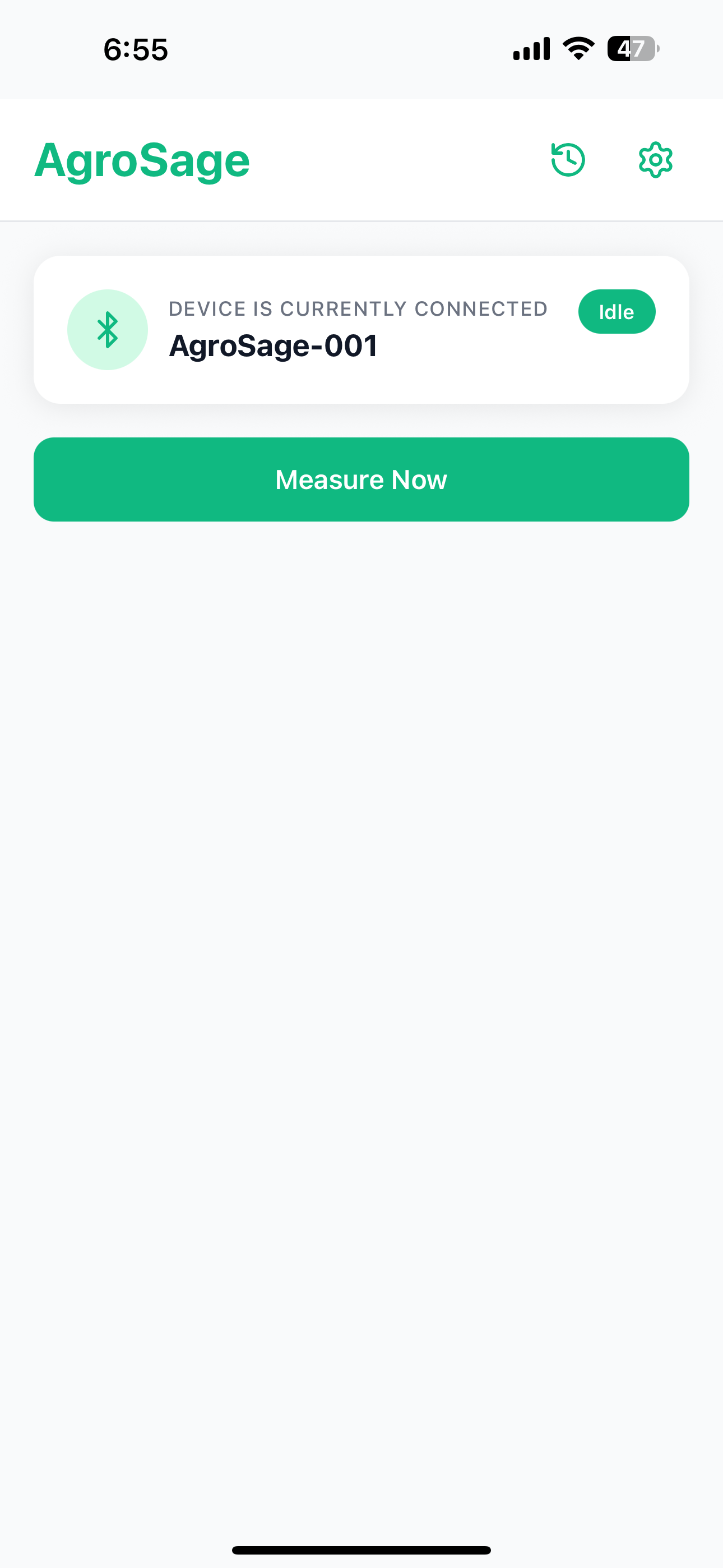
Connecting to a Hardware
-
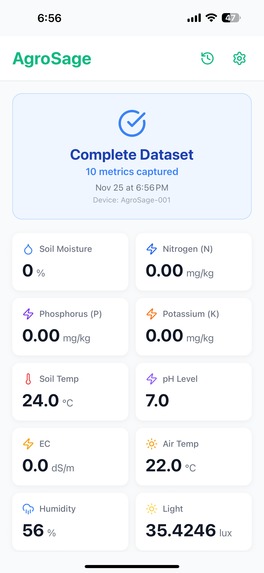
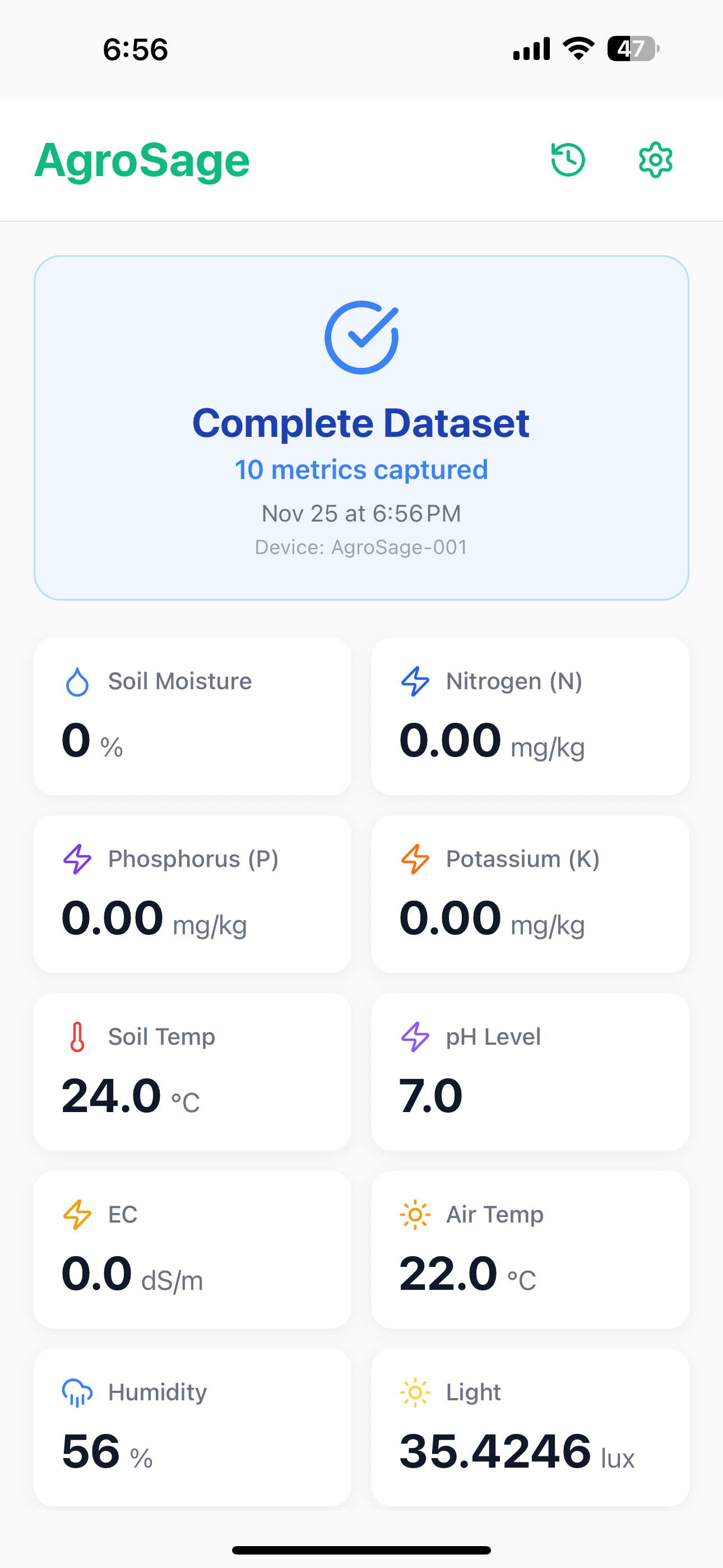
Getting Soil and Atmosphere measurements
-
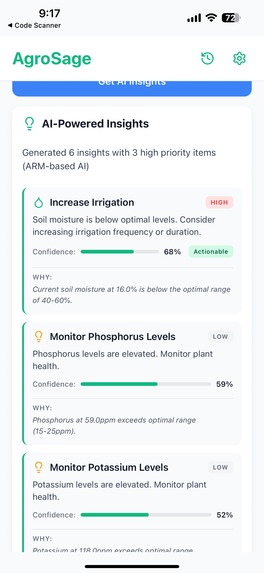
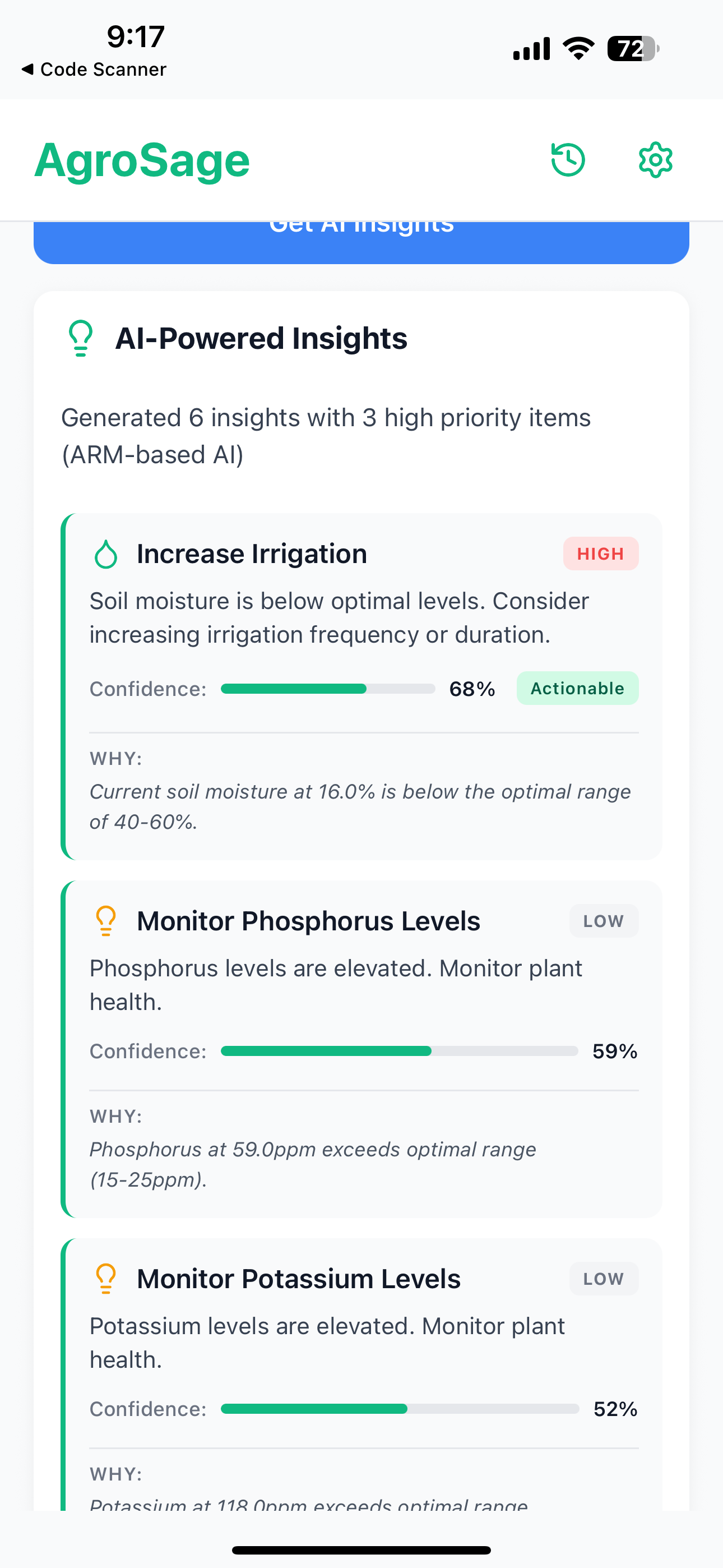
AI Insight with ARM based AI ExecuTorch
-
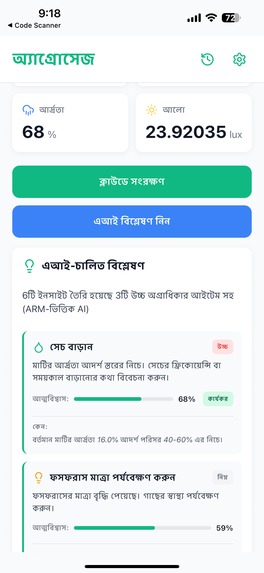
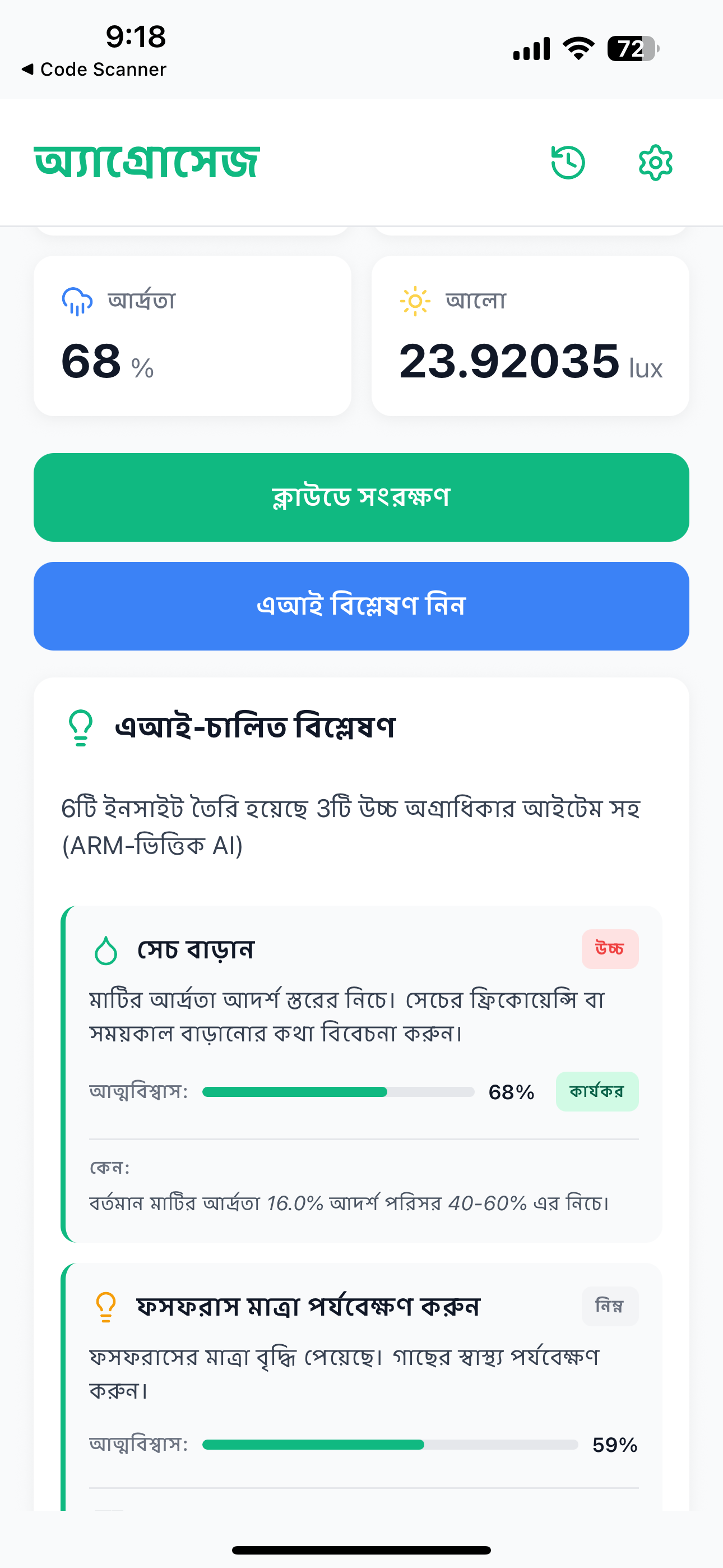
Multi-Lingual Enabled App
-
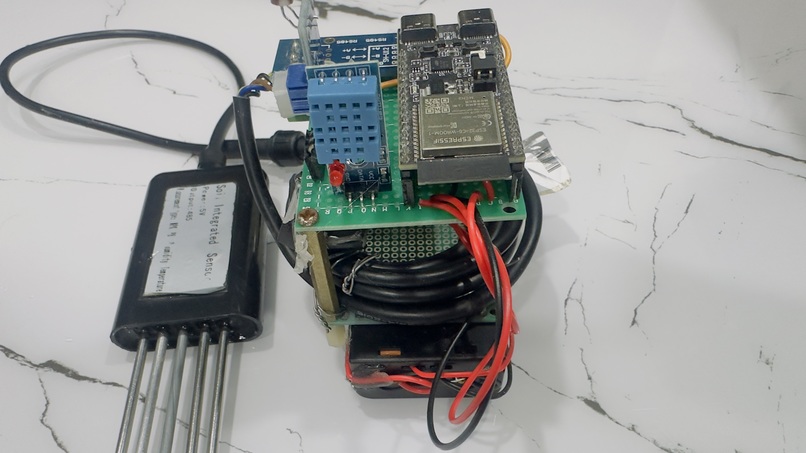
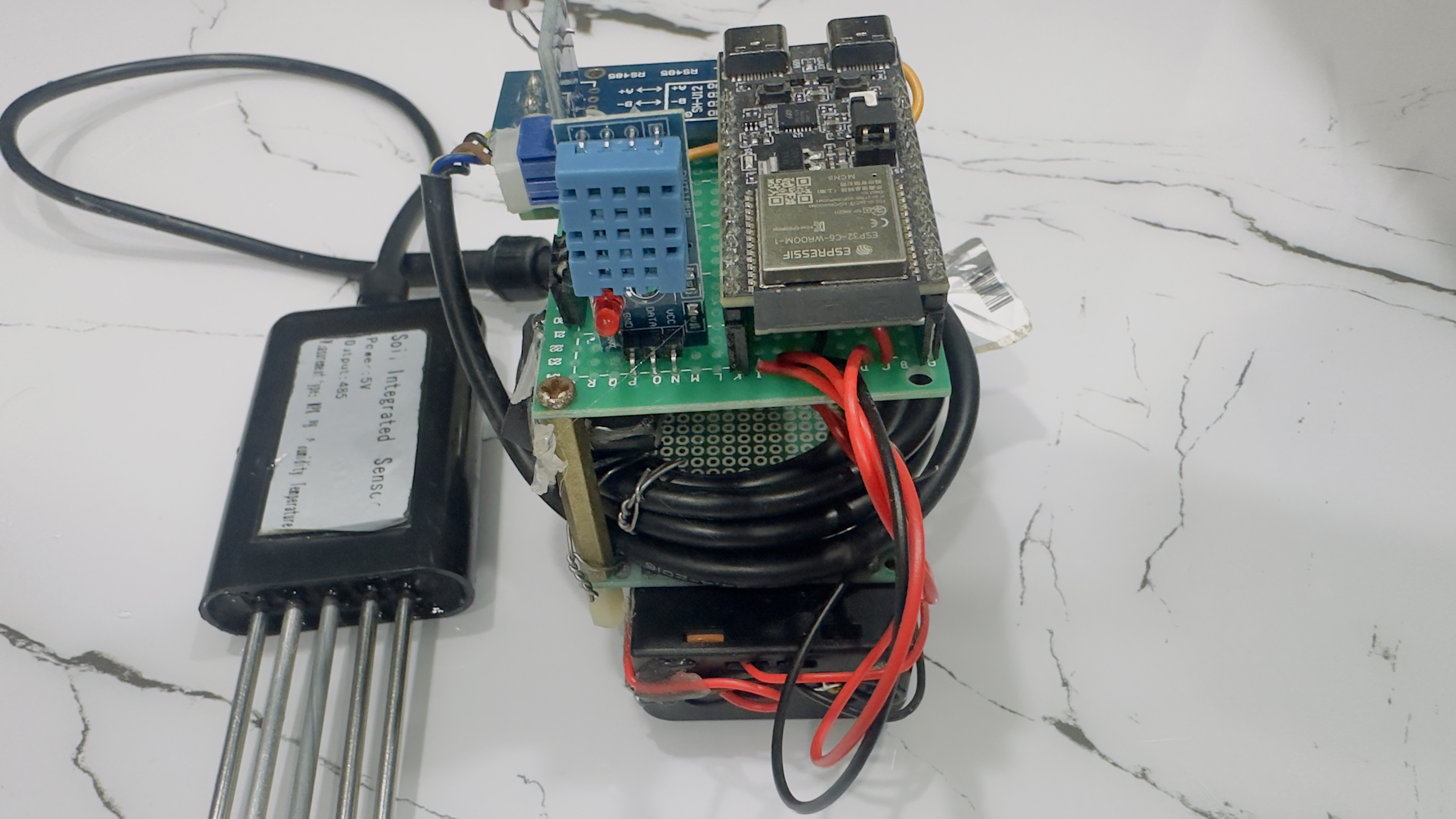
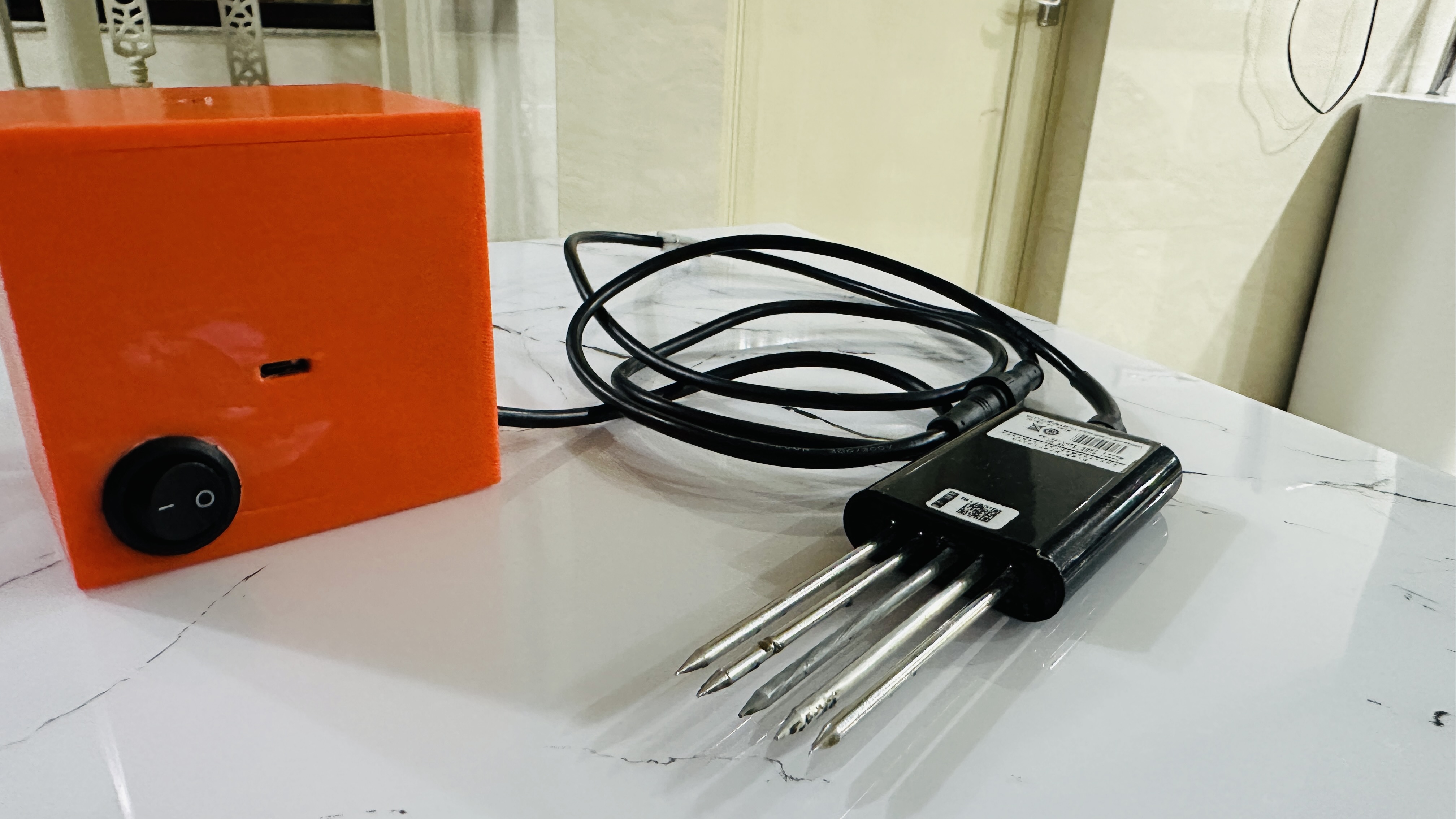
Hardware Device
-
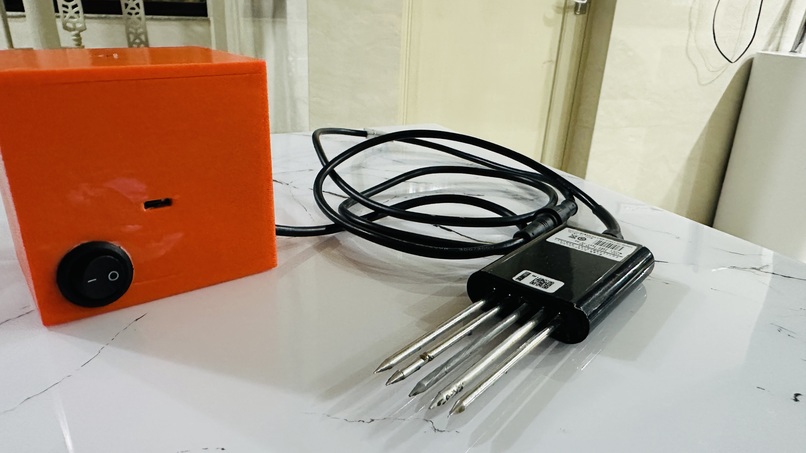
Hardware inside 3-D enclosed box


Inspiration
The inspiration for AgroSage stems from a critical challenge facing millions of farmers worldwide: the lack of accessible, affordable, and reliable soil health monitoring tools. Traditional soil testing methods are expensive, time-consuming, and often require sending samples to distant laboratories, making them impractical for small-scale and resource-constrained farmers.
Key Problems We Aimed to Solve:
Limited Internet Connectivity: Many agricultural regions, especially in developing countries, have poor or no internet connectivity. Farmers need tools that work offline.
Language Barriers: Agricultural knowledge and technology are often only available in English, creating barriers for farmers who speak regional languages like Hindi and Bengali.
High Costs: Professional soil testing services are expensive and not accessible to small-scale farmers who need frequent monitoring.
Delayed Results: Traditional lab testing takes days or weeks, while farmers need immediate insights to make timely decisions about irrigation, fertilization, and crop management.
Privacy Concerns: Farmers are hesitant to share sensitive agricultural data with cloud services, preferring local processing.
Technical Complexity: Existing solutions require technical expertise, making them inaccessible to farmers with limited technical knowledge.
Our Vision: Create an affordable, offline-first, multi-language mobile application that empowers farmers to monitor soil health in real-time using Bluetooth-enabled sensors, with AI-powered insights that work entirely on-device for privacy and speed.
What it does
AgroSage is a comprehensive mobile application that transforms how farmers monitor and manage soil health. Here's what it does:
Core Functionality
Real-Time Soil Monitoring
- Connects to ESP32-based soil probes via Bluetooth Low Energy (BLE)
- Captures 10 critical soil parameters in real-time:
- Soil moisture and temperature
- pH level and Electrical Conductivity (EC)
- NPK values (Nitrogen, Phosphorus, Potassium)
- Air temperature and humidity
- Light intensity
- Displays data in an intuitive, easy-to-understand format
AI-Powered Insights
- On-Device AI (iOS): Uses ARM Neural Engine to generate instant insights (~2ms inference time)
- Cloud AI (All Platforms): Server-side AI processing when internet is available
- Rule-Based Fallback: Offline insights when AI services are unavailable
- Provides actionable recommendations for:
- Fertilizer application (NPK supplementation)
- Irrigation scheduling
- pH management
- Salinity control
- Environmental optimization
Offline-First Design
- All core features work without internet connectivity
- Data stored locally on the device
- AI insights generated on-device (iOS) or via rule-based system
- Cloud sync available when internet is accessible
Multi-Language Support
- Complete app translation in English, Hindi, and Bengali
- All AI insights fully translated
- Dynamic language switching with instant updates
- Offline translation (no internet required)
Data Management
- Save and review historical soil measurements
- Automatic GPS location capture
- Cloud backup (optional)
- Export and share capabilities
User-Friendly Interface
- Modern, intuitive UI designed for farmers
- Real-time status indicators
- Color-coded health metrics
- Clear, actionable recommendations
Key Differentiators
- Privacy-First: On-device AI processing ensures farmer data never leaves their device
- Instant Results: ARM Neural Engine provides insights in milliseconds
- Accessibility: Works in remote areas without internet
- Affordability: Uses low-cost ESP32 hardware instead of expensive lab equipment
- Multilingual: Breaks language barriers for regional farmers
How we built it
Phase 1: Foundation & Architecture
Technology Stack Selection:
- React Native + Expo: Chose for cross-platform development and rapid iteration
- TypeScript: Ensured type safety and better code maintainability
- Expo Router: Implemented file-based routing for navigation
Project Structure:
- Modular architecture with separate contexts for BLE, Readings, and Language
- Component-based UI with reusable elements
- Service layer for API calls and AI processing
Phase 2: Bluetooth Integration
BLE Implementation:
- Integrated
react-native-ble-plxfor BLE communication - Implemented device scanning with automatic discovery
- Created robust connection management with error handling
- Handled fragmented JSON payloads (BLE MTU limitations)
- Optimized MTU to 185 bytes for efficient data transfer
Key Challenges Solved:
- Fragmented data reconstruction from multiple BLE packets
- Connection stability across different Android/iOS versions
- Proper cleanup of BLE subscriptions to prevent crashes
Phase 3: AI Model Development
Model Training:
- Designed neural network architecture: 10 inputs → 64 hidden → 64 hidden → 32 hidden → 40 outputs
- Generated 10,000 synthetic training samples based on optimal soil parameter ranges
- Trained PyTorch model for 100 epochs, achieving final loss of 0.1180
- Total model parameters: 8,264
ExecuTorch Export:
- Converted PyTorch model to ExecuTorch format (
.pte) - Implemented multiple export strategies (CoreML, Portable, XNNPACK)
- Successfully exported using portable backend
- Model size: ~42.5 KB
Integration:
- Integrated
react-native-executorchfor on-device inference - Configured Metro bundler to handle
.ptefiles - Implemented asset loading and model caching
- Created output parsing logic to convert 40-dimensional vectors to structured insights
Phase 4: Multi-Language System
Translation Infrastructure:
- Created offline translation dictionary with 200+ keys
- Implemented language context with AsyncStorage persistence
- Built translation function with variable substitution support
- Added dynamic language switching with instant UI updates
Translation Coverage:
- All UI elements and labels
- AI insight titles and descriptions
- Priority labels (High, Medium, Low)
- Reasoning messages (WHY section)
- Summary messages
- Error messages and alerts
Phase 5: Cloud Integration
Supabase Setup:
- Configured Supabase Edge Functions for server-side AI processing
- Implemented API client with timeout handling
- Created fallback system for offline scenarios
- Added error handling and retry logic
Phase 6: UI/UX Development
Design Implementation:
- Created modern, clean interface with safe area handling
- Implemented real-time status indicators
- Built metric cards with color-coded health indicators
- Added loading states and user feedback
- Designed welcome splash screen
- Created reading history and detail views
Phase 7: Testing & Optimization
Performance Optimization:
- Optimized BLE data handling for fragmented packets
- Implemented model caching to avoid reloading
- Added proper error boundaries and fallbacks
- Optimized re-renders with React best practices
Platform-Specific Optimizations:
- iOS: Leveraged ARM Neural Engine for fast inference
- Android: Implemented efficient rule-based fallback
- Both: Optimized asset loading and memory usage
Challenges we ran into
1. BLE Data Fragmentation
Problem: BLE has MTU limitations (typically 20-23 bytes), causing large JSON payloads to be split across multiple packets. The app was receiving incomplete JSON strings, leading to parsing errors.
Solution:
- Implemented a buffer system to accumulate fragmented data
- Added logic to detect complete JSON objects (matching braces)
- Handled newline-separated JSON chunks
- Increased MTU to 185 bytes on Android for better efficiency
2. ExecuTorch Model Export
Problem: Initial attempts to export PyTorch model to ExecuTorch format failed due to:
- Missing
flatccompiler in PATH - ExecuTorch 0.3.0 compatibility issues with certain export methods
- CoreML backend export failures
Solution:
- Implemented multiple export strategies with fallbacks
- Added automatic
flatcpath detection and PATH modification - Successfully exported using portable backend
- Created comprehensive error handling and logging
3. Model Loading in React Native
Problem: react-native-executorch couldn't load the bundled .pte model file:
- Metro bundler didn't recognize
.ptefiles as assets require()for.ptefiles failed- Asset paths were treated as URLs instead of local files
Solution:
- Configured
metro.config.jsto include.pteinassetExts - Implemented asset loading using
expo-assetandexpo-file-system - Added fallback mechanism to copy asset to document directory
- Created robust error handling with multiple loading strategies
4. Android Disconnect Crash
Problem: Disconnecting BLE device on Android caused NullPointerException crash:
subscription.remove()internally calledcancelTransactionwith null error code- Native module crashed when trying to reject promise with null
Solution:
- Removed explicit
subscription.remove()calls - Allowed native module to handle cleanup automatically
- Relied on
cancelDeviceConnection()to clean up subscriptions - Added proper state management to prevent race conditions
5. Language Translation for AI Insights
Problem: AI insights were generated once and stored as translated strings, so changing language didn't update them.
Solution:
- Stored original reading data along with insights
- Implemented
useEffecthook to watch language changes - Added logic to detect ExecuTorch insights and re-translate them
- Created translation function with variable substitution for dynamic values
6. Dependency Conflicts
Problem: npm ci failed during EAS builds due to:
package-lock.jsonout of sync withpackage.json- Missing
babel-plugin-react-compilerin lock file - Version conflicts between
expoandreact-native-executorch
Solution:
- Added
babel-plugin-react-compilertodevDependencies - Created
overridessection inpackage.jsonto force consistent versions - Regenerated
package-lock.jsonwithnpm install - Ensured all transitive dependencies are resolved
7. Network Request Failures in Production
Problem: AI insights API calls failed in production builds with "Network request failed" errors.
Solution:
- Corrected Supabase URL (removed trailing slash, used correct project URL)
- Added proper
AuthorizationandApikeyheaders - Implemented timeout handling (30 seconds)
- Added comprehensive error messages for debugging
- Configured environment variables in
eas.json
8. Model Output Interpretation
Problem: Model outputs probabilities (0.1-0.4 range) but parsing logic used 0.5 threshold, causing no insights to be generated.
Solution:
- Lowered threshold to 0.25 for probability detection
- Implemented sensor value validation against optimal ranges first
- Used model outputs as confidence scores rather than condition flags
- Added proper scaling of confidence values (20-80% range)
9. iOS App Icon Not Updating
Problem: App icon remained default even after updating app.json configuration.
Solution:
- Regenerated native iOS project with
npx expo prebuild --clean - Verified
ios.iconpath inapp.json - Ensured icon file exists at specified path
- Rebuilt app to include new icon assets
10. Fragmented JSON Parsing
Problem: Hardware sends JSON in chunks, but app was trying to parse incomplete JSON strings.
Solution:
- Created
resultBufferto accumulate chunks - Implemented
emitReadingFromJson()to detect complete JSON objects - Added logic to handle newline-separated JSON
- Validated JSON before parsing to prevent errors
Accomplishments that we're proud of
1. ARM-Based On-Device AI Implementation 🎯
Successfully integrated ExecuTorch for on-device AI inference using Apple's ARM Neural Engine:
- Performance: Achieved ~2ms inference time on iPhone 14 Pro Max
- Privacy: All AI processing happens locally, no data sent to servers
- Reliability: Model loads and runs consistently without errors
- Size: Optimized model to just 42.5 KB
This is a significant technical achievement, demonstrating cutting-edge mobile AI capabilities.
2. Offline-First Architecture 🌐
Built a fully functional offline system:
- Core features work without internet
- AI insights generated on-device
- Complete translation system works offline
- Local data storage with AsyncStorage
- Seamless cloud sync when internet is available
This makes the app accessible to farmers in remote areas with limited connectivity.
3. Comprehensive Multi-Language Support 🌍
Implemented a complete offline translation system:
- 3 Languages: English, Hindi, Bengali
- 200+ Translation Keys: All UI elements, insights, and messages
- Dynamic Switching: Instant language updates without app restart
- AI Insights Translation: All recommendations fully translated
- Variable Substitution: Dynamic values (numbers, ranges) properly inserted
This breaks language barriers and makes the app accessible to regional farmers.
4. Robust BLE Integration 📡
Created a reliable Bluetooth communication system:
- Handles fragmented data automatically
- Robust connection management
- MTU optimization for efficiency
- Cross-platform compatibility (iOS and Android)
- Proper error handling and recovery
The BLE implementation handles real-world scenarios like connection drops and data fragmentation seamlessly.
5. Hybrid AI Architecture 🤖
Designed a smart AI system with multiple fallbacks:
- Primary: ARM Neural Engine (iOS) - fastest, most private
- Secondary: Cloud AI (Supabase) - when internet available
- Tertiary: Rule-based - always available offline
This ensures users always get insights, regardless of platform or connectivity.
6. Production-Ready Codebase 💻
Developed a maintainable, scalable codebase:
- TypeScript: Full type safety throughout
- Modular Architecture: Clean separation of concerns
- Error Handling: Comprehensive error boundaries
- Documentation: Complete README and build instructions
- Testing: Extensive logging and debugging capabilities
7. User Experience Excellence ✨
Created an intuitive, farmer-friendly interface:
- Modern, clean design
- Real-time feedback and status indicators
- Color-coded health metrics
- Clear, actionable recommendations
- Smooth animations and transitions
8. Cross-Platform Compatibility 📱
Successfully deployed on both iOS and Android:
- Consistent functionality across platforms
- Platform-specific optimizations (ARM Neural Engine on iOS)
- Proper handling of platform differences
- Unified codebase with minimal platform-specific code
9. Complete Documentation 📚
Created comprehensive documentation:
- Detailed README with all features
- Step-by-step build instructions
- ARM-specific build guide
- Model training documentation
- Troubleshooting guides
10. Real-World Problem Solving 🌾
Addressed actual challenges faced by farmers:
- Affordable soil monitoring
- Offline functionality for remote areas
- Multi-language support for regional users
- Privacy-focused design
- Instant results for timely decisions
What we learned
Technical Learnings
ARM Neural Engine Capabilities
- Learned how to leverage Apple's Neural Engine for on-device AI
- Understood ExecuTorch export process and optimization
- Discovered performance characteristics (~2ms inference time)
- Gained insights into model quantization and optimization
BLE Communication Challenges
- Learned about MTU limitations and fragmentation
- Understood the importance of proper connection lifecycle management
- Discovered platform-specific BLE behaviors (iOS vs Android)
- Learned to handle fragmented JSON payloads efficiently
React Native Native Modules
- Gained experience integrating complex native modules
- Learned about Metro bundler configuration for custom assets
- Understood asset loading strategies in React Native
- Discovered platform-specific module behaviors
Offline-First Architecture
- Learned to design systems that work without internet
- Understood the importance of local storage and caching
- Discovered strategies for offline AI processing
- Learned to balance offline and online features
Internationalization Best Practices
- Learned to implement offline translation systems
- Understood the complexity of translating dynamic content
- Discovered strategies for language-aware AI outputs
- Learned to handle variable substitution in translations
Error Handling & Debugging
- Learned to implement comprehensive error handling
- Understood the importance of logging for production debugging
- Discovered strategies for graceful degradation
- Learned to handle edge cases in production environments
Project Management Learnings
Iterative Development
- Learned the value of building incrementally
- Understood the importance of testing at each stage
- Discovered how to pivot when technical challenges arise
- Learned to balance feature development with stability
Documentation Importance
- Realized how critical documentation is for complex projects
- Learned to document not just what, but why
- Understood the value of step-by-step guides
- Discovered how documentation helps with troubleshooting
User-Centric Design
- Learned to prioritize user needs over technical complexity
- Understood the importance of offline functionality
- Discovered how language barriers affect technology adoption
- Learned to design for accessibility and simplicity
Domain-Specific Learnings
Agricultural Technology
- Learned about soil health parameters and optimal ranges
- Understood the importance of NPK values for crop health
- Discovered how farmers make decisions based on soil data
- Learned about the challenges farmers face in remote areas
Privacy in Agricultural Data
- Learned about farmer concerns regarding data privacy
- Understood the importance of on-device processing
- Discovered how privacy-first design builds trust
- Learned to balance functionality with privacy
Accessibility in Technology
- Learned how language barriers limit technology adoption
- Understood the importance of offline functionality
- Discovered how simplicity improves user adoption
- Learned to design for users with varying technical expertise
What's next for AGROSAGE - Smart Soil Monitoring for Modern Farmers
Short-Term Enhancements (Next 3-6 Months)
Enhanced AI Model
- Train model with real field data from farmers
- Expand training dataset with diverse soil conditions
- Fine-tune model for better accuracy
- Add more insight types (disease detection, pest warnings)
Android ARM AI Support
- Implement ExecuTorch for Android devices
- Optimize for Android Neural Processing Units (NPU)
- Test on various ARM64 Android devices
- Achieve similar performance to iOS
Additional Language Support
- Add more regional languages (Tamil, Telugu, Marathi, etc.)
- Expand translation coverage
- Add language-specific agricultural terminology
- Support right-to-left languages if needed
Advanced Data Analytics
- Historical trend analysis
- Seasonal pattern recognition
- Predictive insights based on historical data
- Comparative analysis across multiple fields
Crop-Specific Recommendations
- Add crop selection feature
- Provide crop-specific optimal ranges
- Generate crop-specific fertilizer recommendations
- Seasonal planting advice
Medium-Term Goals (6-12 Months)
Expanded Sensor Support
- Support for additional sensor types
- Integration with weather APIs
- Satellite imagery integration
- Drone data integration
Community Features
- Farmer community platform
- Knowledge sharing and best practices
- Expert consultation features
- Success stories and case studies
Marketplace Integration
- Connect farmers with fertilizer suppliers
- Price comparison for agricultural inputs
- Direct ordering of recommended products
- Delivery tracking
Advanced AI Capabilities
- Computer vision for plant disease detection
- Predictive analytics for crop yield
- Weather-based irrigation recommendations
- Pest and disease prediction models
Enterprise Features
- Multi-field management
- Team collaboration tools
- Advanced reporting and analytics
- Integration with farm management systems
Long-Term Vision (1-2 Years)
IoT Ecosystem
- Support for multiple sensor types and brands
- Automated irrigation systems integration
- Smart farming equipment connectivity
- Comprehensive farm automation
Global Expansion
- Support for more languages and regions
- Localized agricultural knowledge
- Regional crop database
- Compliance with local agricultural regulations
Research & Development
- Partnership with agricultural research institutions
- Contribution to open agricultural data
- Development of new AI models
- Publication of research findings
Sustainability Features
- Carbon footprint tracking
- Water usage optimization
- Sustainable farming recommendations
- Environmental impact assessment
Educational Platform
- Agricultural education modules
- Video tutorials and guides
- Certification programs
- Knowledge base and FAQ
Technical Roadmap
Performance Optimization
- Further reduce model size
- Optimize inference time
- Improve battery efficiency
- Enhance offline capabilities
Scalability Improvements
- Support for thousands of readings
- Efficient data compression
- Cloud infrastructure scaling
- Multi-tenant architecture
Security Enhancements
- End-to-end encryption
- Biometric authentication
- Secure data backup
- Privacy-preserving analytics
Platform Expansion
- Web application version
- Desktop application
- Smartwatch integration
- Voice assistant integration
Community & Impact Goals
Farmer Empowerment
- Reach 100,000+ farmers in first year
- Improve crop yields by 20% on average
- Reduce fertilizer costs by 15%
- Save water through optimized irrigation
Open Source Contribution
- Open source core components
- Contribute to agricultural AI research
- Share best practices and learnings
- Build developer community
Partnerships
- Collaborate with agricultural universities
- Partner with government agricultural departments
- Work with NGOs for rural outreach
- Integrate with existing farm management systems
Sustainability Impact
- Reduce water waste through optimized irrigation
- Minimize fertilizer overuse
- Promote sustainable farming practices
- Contribute to food security
Conclusion
AgroSage represents a significant step forward in making agricultural technology accessible, affordable, and practical for farmers worldwide. By combining cutting-edge ARM-based AI with offline-first design and multi-language support, we've created a tool that truly serves farmers in remote areas with limited resources.
The project demonstrates that with the right technology choices and user-centric design, we can build solutions that bridge the digital divide in agriculture, empowering farmers to make data-driven decisions and improve their livelihoods.
Our mission continues: To democratize agricultural technology and make smart farming accessible to every farmer, regardless of their location, language, or technical expertise.
Built With
- bolt.new
- cursor
- dht11
- esp32
- executorch
- expo.io
- npk


Log in or sign up for Devpost to join the conversation.