Inspiration
Navigating a massive campus like Texas A&M University (TAMU) usually means constant rushing between classes. We often found ourselves wondering: "Where is the closest place to grab quickly before my next lecture?" or "Are any of my friends grabbing lunch near the Engineering building?" We wanted to build an elegant, persistent-map experience—heavily inspired by Apple's "Find My"—that effortlessly resolves the daily spatial and temporal puzzle of collegiate dining.
What it does
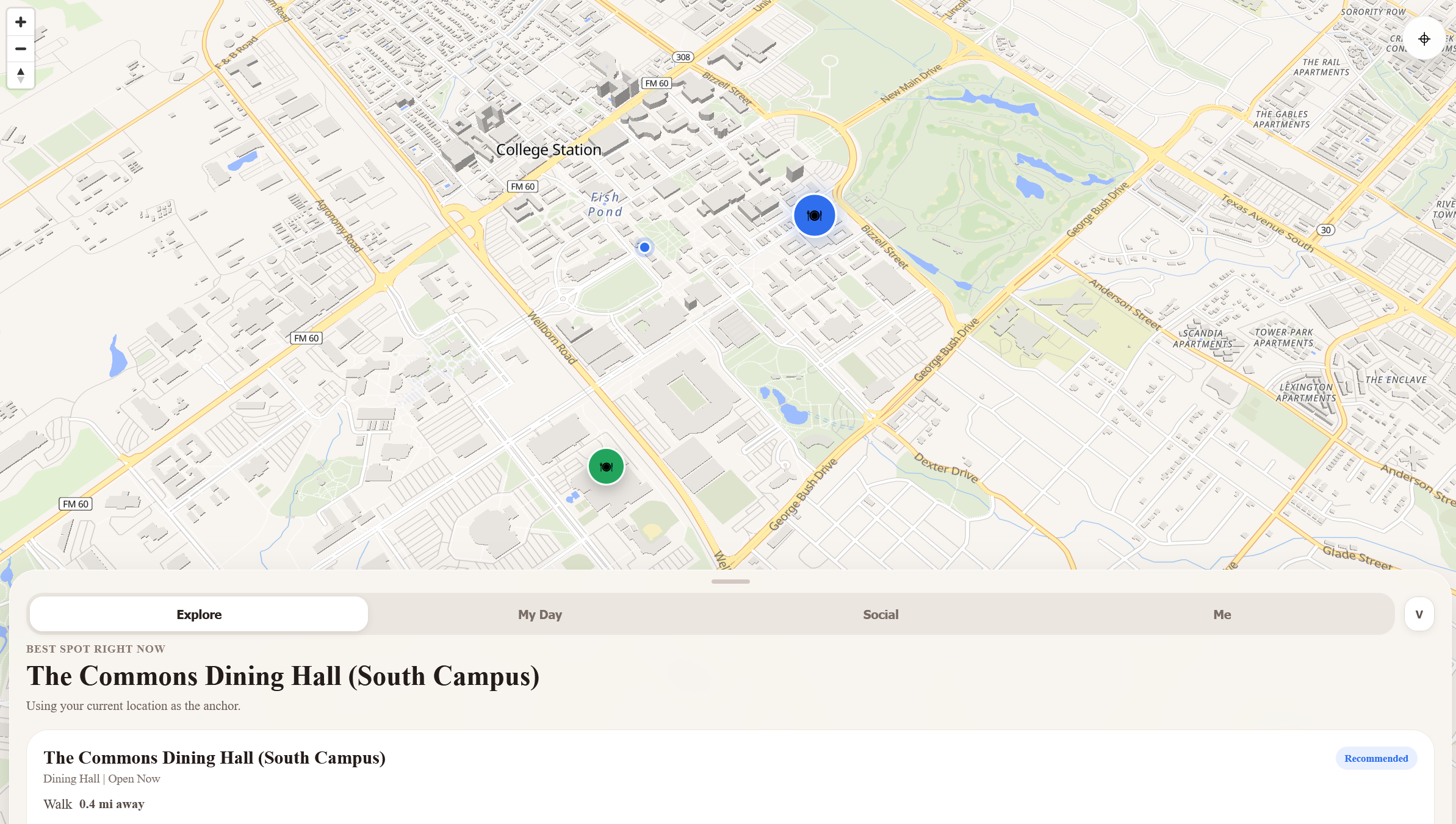
aggieDine is a seamless cross-platform Web and Mobile application that reimagines student dining navigation. It abandons clunky traditional layouts for an interactive map with a dynamic, gesture-driven bottom-sheet architecture.
- Explore: Anchors to your live GPS coordinates to locate and recommend optimal dining spots.
- My Day: Reads your class schedule array and proactively computes the most efficient food options bridging the geographic gap between your current location and your next lecture hall.
- Social: View active group dining invites, coordinate meetups cleanly, and reduce the friction of picking a spot among friends.
- Me: View your own dining profile, menu catalogs, and comprehensive calorie/macro data tied to real-time open/close statuses.
How we built it
We utilized React Native and Expo to heavily consolidate our implementation, ensuring a single monolithic frontend could deploy natively to iOS/Android environments while simultaneously delivering a fluid mobile-web experience.
- Cross-Platform Map Engine: We partitioned our map structures conditionally. On native devices, we relied on standard Map views, while on the web, we bridged high-performance vector tiles (
MapLibre GL). - Fluid UI/UX: We built a custom paginating Bottom Sheet utilizing PanResponders to natively track pointer velocity. We strictly mapped our visual hierarchy over the map via Z-axis manipulation—dynamically increasing heavy dual-layer shadow properties (
boxShadow: 0px 32px 64px ...) only when specific dining locations are brought into focus.
The Proximity & Scheduling Engine
To efficiently figure out which spot to recommend, we implemented the Haversine formula to calculate spherical great-circle distances. Given the user at latitude $\phi_1$ and longitude $\lambda_1$, and a dining hall at $\phi_2, \lambda_2$, the distance $d$ is computed dynamically client-side:
$$ a = \sin^2\left(\frac{\Delta\phi}{2}\right) + \cos(\phi_1) \cdot \cos(\phi_2) \cdot \sin^2\left(\frac{\Delta\lambda}{2}\right) $$ $$ c = 2 \cdot \text{atan2}\left(\sqrt{a}, \sqrt{1-a}\right) $$ $$ d = R \cdot c $$
Where Earth's radius $R \approx 6371 \text{ km}$. For our My Day feature, aggieDine employs an objective function to minimize geographic deviation subject to temporal constraints. The application essentially tries to minimize the total combined distance of the vector path: $\text{User} \rightarrow \text{Restaurant} \rightarrow \text{Next Class}$.
$$ \arg\min_{L \in \text{Dining}} \Big( d(L, \text{User}) + \omega \cdot d(L, \text{NextClass}) \Big) $$
(where $\omega$ acts as an arbitrary urgency weight depending on how close $T_{current}$ is to the start of the next class).
Challenges we ran into
- Cross-Platform Map Parity: React Native Maps relies strictly on native compilation, which catastrophically fails on web builds. We spent significant time crafting web-safe fallback layers and standardizing map overlays natively across environments.
- Visual Contexts & Hierarchy: Balancing elevation across iOS, Android, and Web browsers required massive style tuning (flattening cards when unselected and boosting them heavily upon interaction) to prevent the map pins and info cards from morphing into an indistinguishable flat mess.
- Temporal Event Parsing: Calculating offsets mathematically between localized mobile timezone data, floating-point hours, and a student's parsed standard-time schedule introduced constant edge cases for our recommendation engine.
Accomplishments that we're proud of
- Achieving a beautifully fluid and gesture-driven native feel on the bottom-sheet layout—it legitimately looks and behaves like a premium first-party iOS app running right in the web browser.
- Successfully creating a unified codebase for Web, iOS, and Android without sacrificing custom interactive map pins or UI fidelity.
- Designing an intelligent scheduling algorithm that automatically links spatial GPS bounds with upcoming class itineraries seamlessly in the background.
What we learned
- How to strictly implement platform-agnostic React Native components alongside aggressively platform-dependent mapping libraries.
- The nuances of gesture responder systems to build sliding, paginated bottom sheets.
- UI/UX design physics involving layer elevation, localized dropshadows, and visual hierarchy for dense data layers.
What's next for aggieDine
- Real-Time Capacity Integration: Displaying live busyness markers on the map using crowd-sourced check-ins.
- Deep Dietary Filtering: Pushing deeper into the calorie information by surfacing precise macro insights directly on the map pins.
- Live Friend Pathing: Expanding the social feature to include temporary, localized GPS breadcrumbs when walking to an accepted meal invite so groups can perfectly time their arrivals without leaving the interface.
Built With
- amazon-web-services
- chatgpt
- claude
- cognito
- dynomo
- expo.io
- fastapi
- gemini
- lambda
- node.js
- python
- react
- typescript

Log in or sign up for Devpost to join the conversation.