What Inspired Us
As data scientists working closely with teams in industries like insurance, transportation, and manufacturing, we repeatedly saw this problem:
Teams had significant amount of data on AWS—especially in S3—but lacked the MLOps infrastructure or personnel to make use of it.
They wanted to train models to make custom small models, tune them, and validate predictions—but without learning SageMaker Studio, Docker, or setting up a CI/CD pipeline. Most importantly, they didn’t want to move their data outside their AWS perimeter.
That’s when the idea hit us:
💡 What if we could build an MLOps agent that behaves like a junior ML engineer—working natively inside AWS, orchestrating tasks, training models, and reporting results—all by just chatting with it?
The timing was perfect—AWS Bedrock Core Agent had just launched. That became the core of our solution.
🧠 What We Learned
- AWS Bedrock Agents are incredibly powerful—but require careful orchestration of toolchains, policies, and memory.
- The Core Agent architecture is ideal for building reasoning workflows with low latency and strong permissions control.
- Prompt chaining + declarative planning lets the agent reason across multiple steps: model selection → data validation → training → result explanation.
- Sometimes, building less is building smart: A minimal interface plus a strong agent backend is more effective than a bloated dashboard.
We also deepened our understanding of:
- AWS IAM and role-based access for agents
- Fine-tuning strategies across different model families
- Agent memory and reasoning limits
- Compute runtime orchestration and cost optimization for training models.
How We Built It
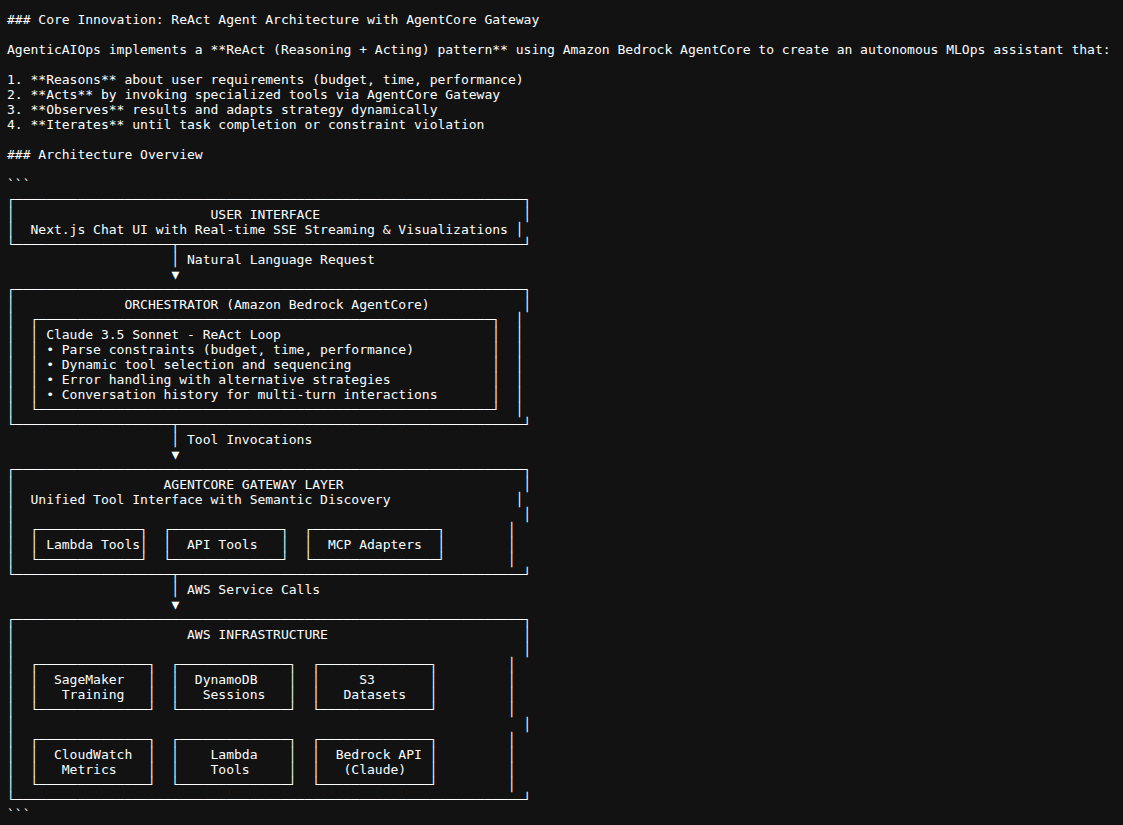
We used the AWS Bedrock Core Agent with a mix of tools and internal orchestration:
Architecture Components
| Layer | Tools Used |
|---|---|
| Frontend | Chat interface (React, Streamlit prototype) |
| Agent Layer | AWS Bedrock Core Agent + Claude Sonnet |
| Planning & Tooling | Custom toolchain: S3 loader, model selector, trainer, summarizer |
| Data | User-uploaded CSV files in S3 |
| Models | Foundation models from Bedrock + fine-tuning with onboarded algorithms |
| Storage | S3 buckets for inputs, model artifacts, logs |
| Permissions | IAM roles for Bedrock, S3, and Lambda agents |
Agent Workflow
Key Workflow Components:
- Architecture:
- ReAct Pattern (Current): Dynamic tool calling via Think-Act-Observe loop
- ReAct Loop (Think-Act-Observe):
- Think: Claude 3.5 Sonnet reasons about which tools to use
- Act: Invoke Gateway tools (max once per tool)
- Observe: Process tool results and add to conversation context
- Repeat: Continue until task complete or max 10 iterations
- AgentCore Gateway:
- Production Mode: Uses Gateway API (gtw-xxxxxxxxx)
- Development Mode: Local fallback (gtw-local-fallback)
- Tools: check_sagemaker_quotas, list_s3_datasets, launch_sagemaker_training, prepare_dataset
- Streaming Architecture:
- Server-Sent Events (SSE) stream real-time updates to frontend
- Event types: agent_thinking, workflow_step, conversational_response, jobs_launched, etc.
- State Management:
- LangGraph StateGraph manages workflow state
- DynamoDB persists conversation history
- AgentState tracks messages, thinking_messages, candidates, jobs, results
graph TB
    Start([User Request]) --> API[FastAPI Endpoint]
    API --> DB[(DynamoDB<br/>Store Message)]
    DB --> Orchestrator[Orchestrator Agent]

    Orchestrator --> Mode{Architecture<br/>Mode?}

    %% ReAct Pattern (Modern)
    Mode -->|ReAct Pattern| RouteIntent{Classify<br/>Intent}
    RouteIntent -->|Conversation| Response[Generate Response]
    RouteIntent -->|Data Query| DataOps[S3 Dataset Operations]
    RouteIntent -->|Training| ReactAgent[ReAct Agent Loop]

    ReactAgent --> Think[THINK<br/>Claude 3.5 Sonnet]
    Think --> Decision{Action<br/>Type?}
    Decision -->|Tool Call| Act[ACT<br/>Invoke Tool]
    Decision -->|Final Answer| Answer[Extract Answer]

    Act --> Gateway[AgentCore Gateway]
    Gateway --> Tools[Lambda Functions<br/>• Quotas<br/>• Datasets<br/>• Training<br/>• Preparation]
    Tools --> Observe[OBSERVE<br/>Format Results]
    Observe -->|Continue| Think
    Observe -->|Complete| Answer

    %% Legacy Pipeline
    Mode -->|Legacy Pipeline| Legacy[Multi-Node Pipeline]
    Legacy --> Steps[Parse → Search → Estimate<br/>→ Select → Train → Monitor<br/>→ Evaluate → Present]

    %% Convergence
    Answer --> SaveDB[(DynamoDB<br/>Save Response)]
    Response --> SaveDB
    DataOps --> SaveDB
    Steps --> SaveDB

    SaveDB --> Stream[SSE Stream]
    Stream --> Frontend[Next.js Frontend]
    Frontend --> UI[Real-time Chat UI]

    %% AWS Services
    Gateway -.-> AWS[AWS Services<br/>SageMaker • S3 • Lambda • Bedrock]

    %% Styling
    classDef modern fill:#e1f5ff,stroke:#01579b,stroke-width:2px
    classDef legacy fill:#fff3e0,stroke:#e65100,stroke-width:2px
    classDef data fill:#e8f5e9,stroke:#1b5e20,stroke-width:2px

    class RouteIntent,ReactAgent,Think,Act,Observe,Answer modern
    class Legacy,Steps legacy
    class DB,SaveDB,AWS data
⚠Challenges We Faced
IAM Permission Complexity
AWS Bedrock Agents require precise permissions. Setting up least-privilege roles while debugging “AccessDenied” errors slowed us down.Fine-Tuning Cost vs Latency Tradeoffs
We tried multiple fine-tuning options—from Amazon JumpStart to direct embedding—but had to balance cost, accuracy, and latency.
3 User Experience in Chat Format
We iterated a lot on prompts to make the experience feel truly agentic—not just another chatbot, but one that plans and acts.
Final Thought
We wanted to show that agentic workflows can bring real-world MLOps to businesses who have data, but not the time or team. With AWS-native tools and careful orchestration, a single agent can power an entire ML lifecycle—securely, scalably, and conversationally.
And most of all—we had fun.
Built With
- amazon-web-services
- bedrock
- bedrockagentcore

Log in or sign up for Devpost to join the conversation.