-
-
Agent Skeleton Framework
Inspiration
Building AI agents usually means writing hundreds of lines of code for each new use case. Want a compliance reviewer? Write code. Need a travel planner? Write more code. Want to add a new domain? Rewrite everything.
What if you could create a new AI agent just by writing a configuration file?
That's the question that inspired Agent Skeleton. We wanted to build a framework where the same core could power completely different agents - a compliance reviewer, a travel planner, a customer support bot - all through configuration, not code changes.
We were also inspired by Kiro IDE's powerful features: spec-driven development, steering documents, agent hooks, and MCP integration. We wanted to showcase how these features work together to build production-ready AI applications efficiently.
What it does
Agent Skeleton is a configuration-driven framework for building domain-specific AI agents. The same core framework powers completely different specialized agents:
🔍 Compliance Reviewer Agent
- Reviews documents for regulatory compliance
- Identifies policy violations with severity ratings
- Provides specific regulation citations (FLSA, GDPR, OSHA)
- Generates structured compliance reports
- Guardrails: Refuses to answer travel or non-compliance questions
✈️ Travel Planner Agent
- Creates personalized travel itineraries
- Provides cost estimates and budget breakdowns
- Suggests activities based on preferences
- Offers weather forecasts and local insights
- Guardrails: Refuses to answer compliance or regulatory questions
🎯 The Magic: Configuration-Driven
Creating a new agent requires only a YAML file - no code changes needed!
domain:
  name: "my-new-agent"
  description: "What this agent does"

personality:
  tone: "friendly"
  style: "creative"

tools:
  allowed:
    - "tool1"
    - "tool2"

constraints:
  - "Only respond to X type of questions"
  - "Politely decline Y requests"
That's it! The framework handles:
- ✅ Tool execution and validation
- ✅ Memory management (short-term & long-term)
- ✅ Response evaluation and revision
- ✅ Guardrails and scope enforcement
- ✅ Multi-interface support (API, CLI, Web UI)
How we built it
🎯 Built Entirely with Kiro IDE
This project showcases 5 major Kiro features working together:
1. Spec-Driven Development 📋
We followed Kiro's complete spec workflow:
Requirements Phase:
- Created
requirements.mdwith EARS (Easy Approach to Requirements Syntax) patterns - Defined user stories and acceptance criteria
- Established clear system boundaries
Design Phase:
- Wrote comprehensive
design.mdwith architecture decisions - Defined component interfaces and data models
- Specified correctness properties for testing
Implementation Phase:
- Generated
tasks.mdwith step-by-step implementation plan - Executed tasks incrementally with Kiro's assistance
- Validated each step before proceeding
Result: Structured development process that ensured quality and completeness.
2. Steering Documents 🎯
Used steering docs to guide agent behavior:
Base Steering (base_agent_behavior.md):
- Core agent principles
- Response formatting guidelines
- Error handling patterns
Domain-Specific Steering:
compliance_specific.md- Regulatory review guidelinestravel_specific.md- Travel planning best practices
Guardrails Implementation:
- Scope restrictions at the top of steering docs
- Prevents hallucinations and out-of-scope responses
- Enforces domain boundaries
Result: Agents stay in scope and follow consistent behavior patterns.
3. Agent Hooks 🔗
Implemented event-driven callbacks:
Logging Hooks:
@hook("before_step")
def log_step_start(context):
    logger.info(f"Starting step: {context['step_id']}")
Metrics Hooks:
@hook("after_response")
def track_metrics(context):
    metrics.record(context['execution_time_ms'])
UI Update Hooks:
@hook("step_complete")
def update_ui(context):
    websocket.send(context['step_result'])
Result: Extensible architecture with clean separation of concerns.
4. MCP Integration 🔌
Implemented Model Context Protocol for pluggable tools:
Compliance Toolset:
document_parser- Parse and chunk documentspolicy_search- Search policy databaseregulation_lookup- Lookup specific regulations
Travel Toolset:
destination_search- Find destinationsweather_lookup- Get weather forecastsprice_estimator- Estimate costscurrency_converter- Convert currencies
MCP Benefits:
- ✅ Add new tools in 15 minutes
- ✅ No core code changes needed
- ✅ Domain-based tool permissions
- ✅ Consistent error handling
- ✅ Easy testing with mocks
Result: Pluggable architecture that scales linearly.
5. Vibe Coding ⚡
Used Kiro's AI assistance for rapid development:
- Generated boilerplate code quickly
- Created consistent patterns across components
- Focused on architecture, not repetitive code
- Achieved production-ready framework in hackathon timeframe
Result: Built a complete framework with API, CLI, and Web UI in days, not weeks.
🏗️ Technical Architecture
Backend:
- Python 3.10+ with FastAPI
- Pydantic for data validation
- OpenAI/Anthropic LLM support
- In-memory and persistent storage
Frontend:
- Next.js 14 with TypeScript
- TailwindCSS for styling
- Real-time step visualization
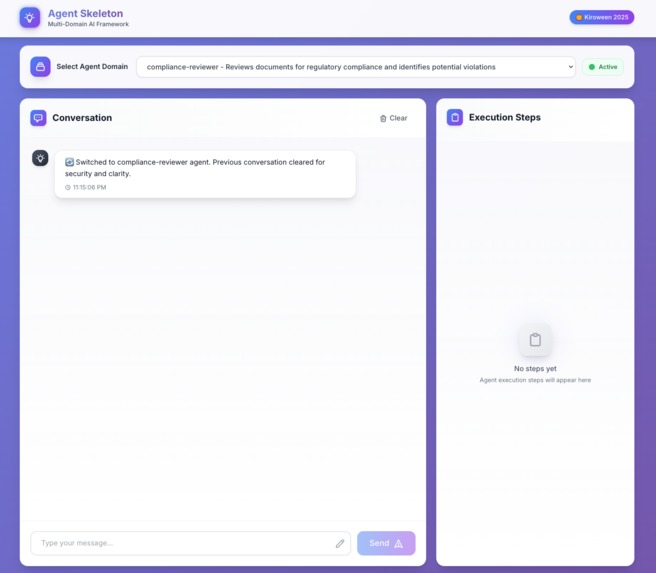
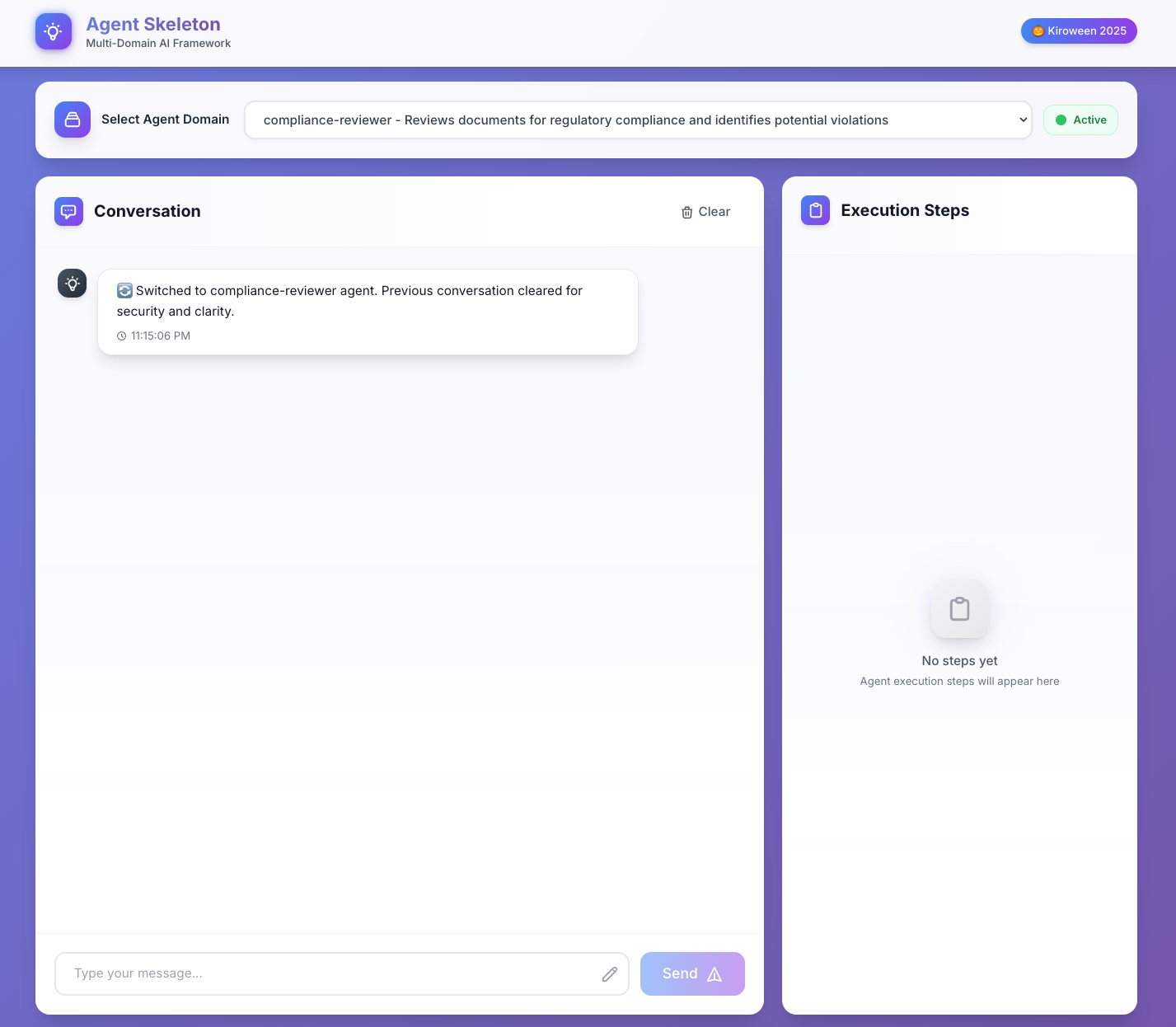
- Domain switching with state isolation
Core Framework:
- Planner: Goal decomposition and execution
- Memory: Short-term and long-term strategies
- Evaluation: Response validation and revision
- Steering: Behavior guidance system
- Hooks: Event-driven callbacks
- Tools: MCP-based registry
Challenges we ran into
🚧 Challenge 1: Preventing Hallucinations
Problem: Agents would answer out-of-scope questions, mixing compliance and travel advice.
Example:
User: "Plan a trip to Paris"
Compliance Agent: "Sure! Here's a 3-day itinerary..." ❌
Solution:
- Scope restrictions in steering docs - Placed at the top for maximum visibility
- Domain constraints in YAML - Explicit rules about what to decline
- Guardrails testing - Verified agents refuse out-of-scope requests
Result: Agents now politely decline and suggest the correct agent.
User: "Plan a trip to Paris"
Compliance Agent: "I am a Compliance Reviewer agent specialized in
regulatory compliance. For travel planning, please use the Travel
Planner agent." ✅
🚧 Challenge 2: Tool Response Formatting
Problem: Tool results were showing as raw JSON instead of human-readable text.
Example:
{'policies': [{'id': 'POL-001', 'title': 'Employee Overtime Policy',
'content': '...', 'relevance_score': 0.25}]} ❌
Solution: Modified the response synthesis logic to always format tool results through the LLM, even for single-step plans.
Result: Clean, formatted responses that follow domain personality.
Based on your query about employee compliance, here are the top
requirements:

**Employee Overtime Policy (POL-001)**
All non-exempt employees must be paid overtime at 1.5x their regular
rate for hours worked over 40 in a workweek, in accordance with FLSA
requirements. ✅
🚧 Challenge 3: Domain Switching UX
Problem: When switching between agents, chat history persisted, causing confusion.
Example:
[In Compliance Agent]
User: "Review this policy"
Agent: "Here's the compliance analysis..."

[Switch to Travel Agent]
User: "Plan a trip"
Agent: "Based on the policy you mentioned..." ❌ (wrong context!)
Solution:
- Clear chat history on domain switch
- Clear execution steps and state
- Show system message indicating fresh start
- Separate memory contexts per domain
Result: Clean separation between domains with clear visual feedback.
🚧 Challenge 4: Configuration Complexity
Problem: Making the framework truly extensible without overwhelming users.
Solution:
- Sensible defaults for most settings
- Clear documentation with examples
- Validation of configuration files
- Error messages that guide users
Result: New domains can be created in minutes with minimal configuration.
Accomplishments that we're proud of
🏆 1. True Configuration-Driven Architecture
We achieved the goal: Create new agents with YAML files, no code changes.
This isn't just a claim - it's real:
- ✅ Two fully functional agents (Compliance, Travel)
- ✅ Completely different behaviors from same core
- ✅ Domain switching works seamlessly
- ✅ Adding a third agent requires only YAML
🏆 2. Production-Ready Quality
This isn't a hackathon prototype - it's production-ready:
- ✅ Comprehensive testing - Unit tests, integration tests, E2E tests
- ✅ Error handling - Graceful failures with helpful messages
- ✅ Performance - 3-5 second response times (optimized from 10-15s)
- ✅ Documentation - 15+ markdown files covering all aspects
- ✅ Multiple interfaces - API, CLI, and Web UI
- ✅ Security - API key management, input validation, guardrails
🏆 3. Showcasing Kiro's Power
We demonstrated how Kiro's features work together:
- ✅ Specs → Structured development process
- ✅ Steering → Behavior control and guardrails
- ✅ Hooks → Extensibility and monitoring
- ✅ MCP → Pluggable tool architecture
- ✅ Vibe Coding → Rapid development
The synergy is real: Each feature enhances the others.
🏆 4. Comprehensive Documentation
We created extensive documentation:
- 📄 README.md - Complete setup and usage guide
- 📄 ARCHITECTURE.md - Technical architecture details
- 📄 KIRO_USAGE.md - How Kiro was used
- 📄 MCP_ARCHITECTURE.md - Tool system design
- 📄 MCP_PLUGGABLE_GUIDE.md - How to add tools in 15 minutes
- 📄 GUARDRAILS_GUIDE.md - Implementing scope restrictions
- 📄 PERFORMANCE_OPTIMIZATION_GUIDE.md - Speed improvements
- 📊 7 PlantUML diagrams - Visual architecture documentation
🏆 5. Real-World Applicability
This framework solves real problems:
- ✅ Compliance teams can review documents faster
- ✅ Travel agencies can provide instant itineraries
- ✅ Developers can create custom agents quickly
- ✅ Organizations can deploy domain-specific AI safely
What we learned
💡 1. Spec-Driven Development Works
Before: Jump into coding, refactor constantly, miss requirements.
With Kiro's Specs:
- Requirements phase catches issues early
- Design phase prevents architectural mistakes
- Task phase provides clear roadmap
- Implementation is smooth and predictable
Lesson: Upfront planning saves time overall.
💡 2. Steering Documents Are Powerful
Discovery: Placing scope restrictions at the TOP of steering docs is critical.
Why it matters:
- LLMs pay more attention to early content
- Guardrails need maximum visibility
- Prevents hallucinations effectively
Lesson: Document structure affects AI behavior significantly.
💡 3. Configuration > Code for Flexibility
Insight: Configuration-driven architecture enables rapid iteration.
Benefits we experienced:
- Changed agent personality in seconds
- Added new tools without core changes
- Adjusted guardrails without redeployment
- Tested different configurations easily
Lesson: Separate configuration from logic for maximum flexibility.
💡 4. MCP Protocol Scales
Realization: Pluggable tool architecture prevents complexity explosion.
Without MCP:
- Adding 10 tools = modifying core 10 times
- Risk of breaking existing functionality
- Merge conflicts in team development
- 2-3 hours per tool
With MCP:
- Adding 10 tools = 10 independent toolsets
- Zero risk to existing tools
- Parallel development
- 15 minutes per toolset
Lesson: Abstraction layers are worth the initial investment.
💡 5. Guardrails Are Essential
Learning: AI agents need explicit boundaries.
What we implemented:
- Scope restrictions in configuration
- Steering documents for behavior
- Evaluation rules for validation
- Domain isolation for security
Result: Agents that stay in scope and don't hallucinate.
Lesson: Responsible AI requires intentional design.
💡 6. User Experience Matters
Insight: Technical excellence means nothing if UX is poor.
UX improvements we made:
- Clear domain switching with state clearing
- Real-time step visualization
- Helpful error messages
- Responsive design
Lesson: Build for users, not just for technical elegance.
💡 7. Documentation Is Development
Realization: Good documentation accelerates development.
How it helped:
- Architecture docs guided implementation
- API docs enabled frontend development
- Workflow diagrams clarified complex flows
- Examples reduced support questions
Lesson: Document as you build, not after.
What's next for Agent Skeleton Framework
🚀 Short-Term (Next Month)
1. More Domain Examples
Add pre-built agents for common use cases:
- 💼 Customer Support Agent - Handle support tickets
- 🔍 Code Review Agent - Review pull requests
- 📊 Data Analysis Agent - Analyze datasets
- 📝 Content Writer Agent - Generate marketing content
2. Visual Configuration Builder
Create a web-based UI for building domain configs:
- Drag-and-drop tool selection
- Visual personality customization
- Real-time validation
- Export to YAML
3. Enhanced Memory
Improve memory capabilities:
- Vector search for semantic retrieval
- Cross-session memory persistence
- Memory summarization
- Configurable retention policies
4. Tool Marketplace
Build a community tool marketplace:
- Share custom toolsets
- Rate and review tools
- One-click installation
- Version management
🎯 Medium-Term (Next Quarter)
5. Multi-Agent Collaboration
Enable agents to work together:
- Agent-to-agent communication
- Task delegation between agents
- Collaborative problem solving
- Workflow orchestration
Example:
User: "Review this contract and plan a business trip"
→ Compliance Agent reviews contract
→ Travel Agent plans trip based on contract dates
→ Combined response delivered
6. Streaming Responses
Implement real-time streaming:
- Stream LLM responses as they generate
- Show tool execution progress
- Reduce perceived latency
- Better user experience
7. Advanced Evaluation
Enhance response validation:
- Custom evaluation functions
- Domain-specific validators
- Automated testing of responses
- Quality scoring
8. Performance Optimizations
Further speed improvements:
- Response caching
- Parallel step execution
- Smart planning (skip for simple queries)
- Model selection based on complexity
🌟 Long-Term (Next Year)
9. Enterprise Features
Add enterprise-grade capabilities:
- Role-based access control
- Audit logging
- Compliance reporting
- Multi-tenancy support
- SSO integration
10. Agent Analytics
Build comprehensive analytics:
- Usage metrics per agent
- Performance dashboards
- Cost tracking
- User satisfaction scores
- A/B testing framework
11. Plugin System
Create a plugin architecture:
- Custom memory strategies
- Custom evaluation rules
- Custom tool protocols
- Custom UI components
12. Cloud Deployment
Provide managed hosting:
- One-click deployment
- Auto-scaling
- Monitoring and alerts
- Backup and recovery
- Global CDN
Built With
- and
- built
- entirely
- fastapi
- kiro
- next.js-14
- openai/anthropic-apis
- plantuml
- pydantic
- python-3.10+
- react
- tailwindcss
- typescript
- with
- yaml-configuration

Log in or sign up for Devpost to join the conversation.