-
-
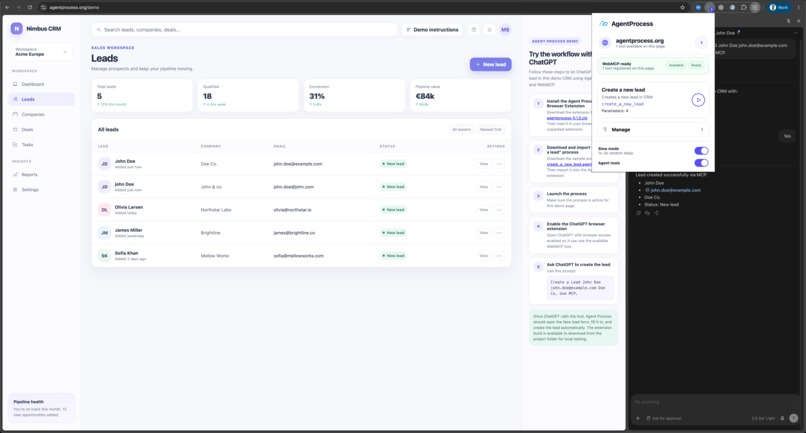
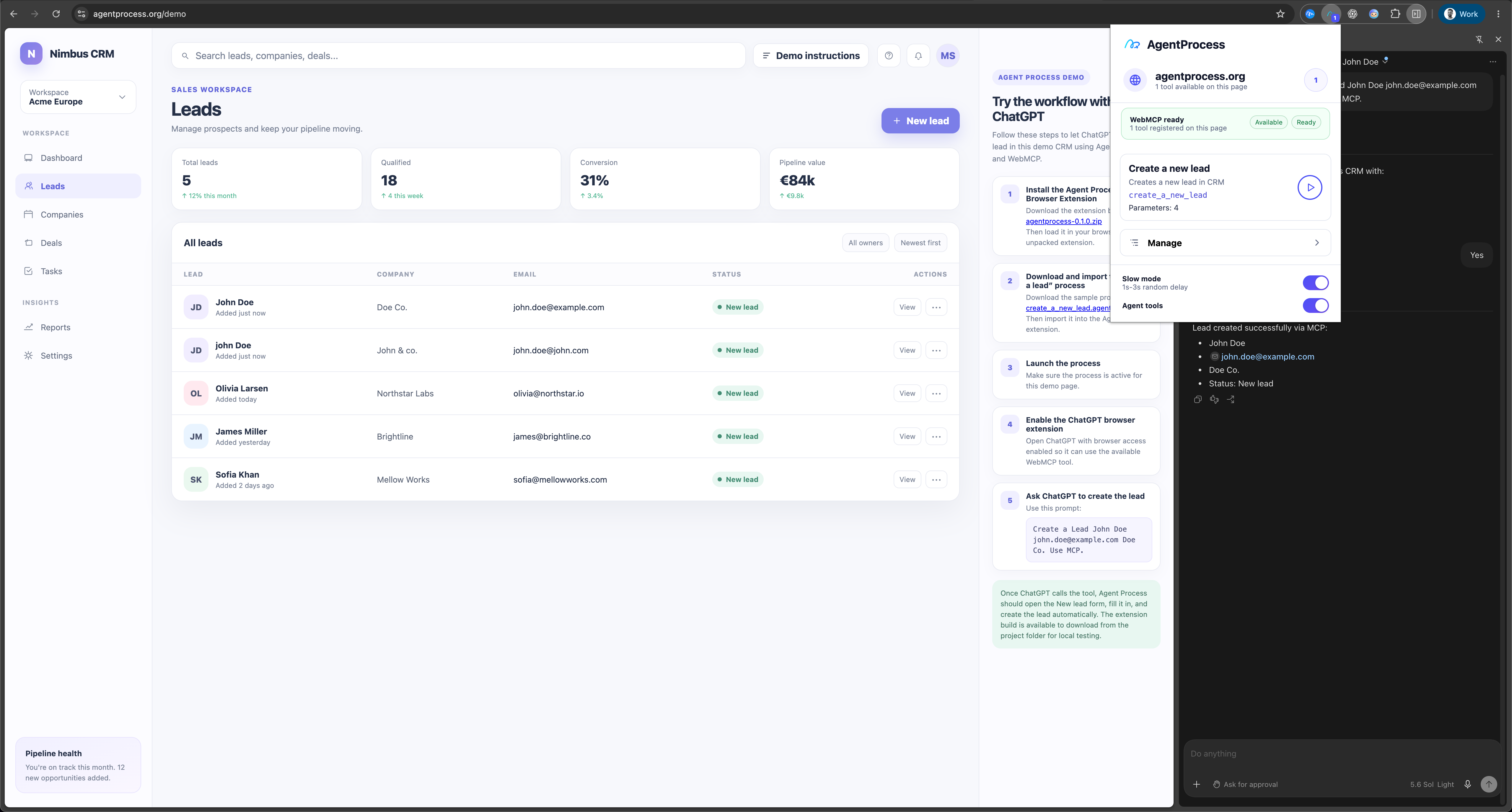
Running
-
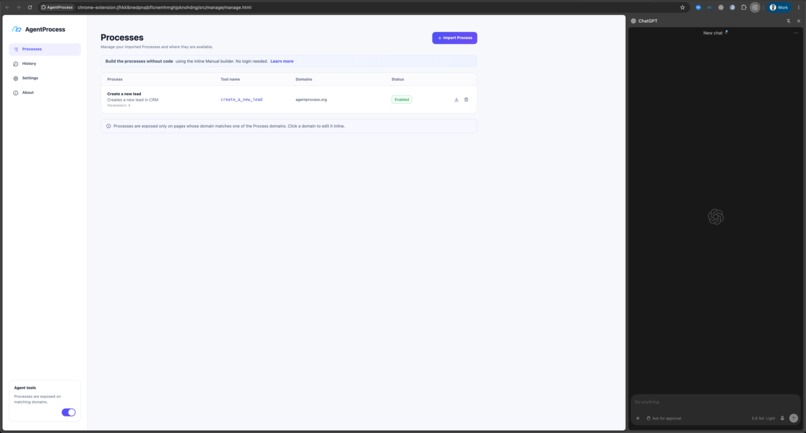
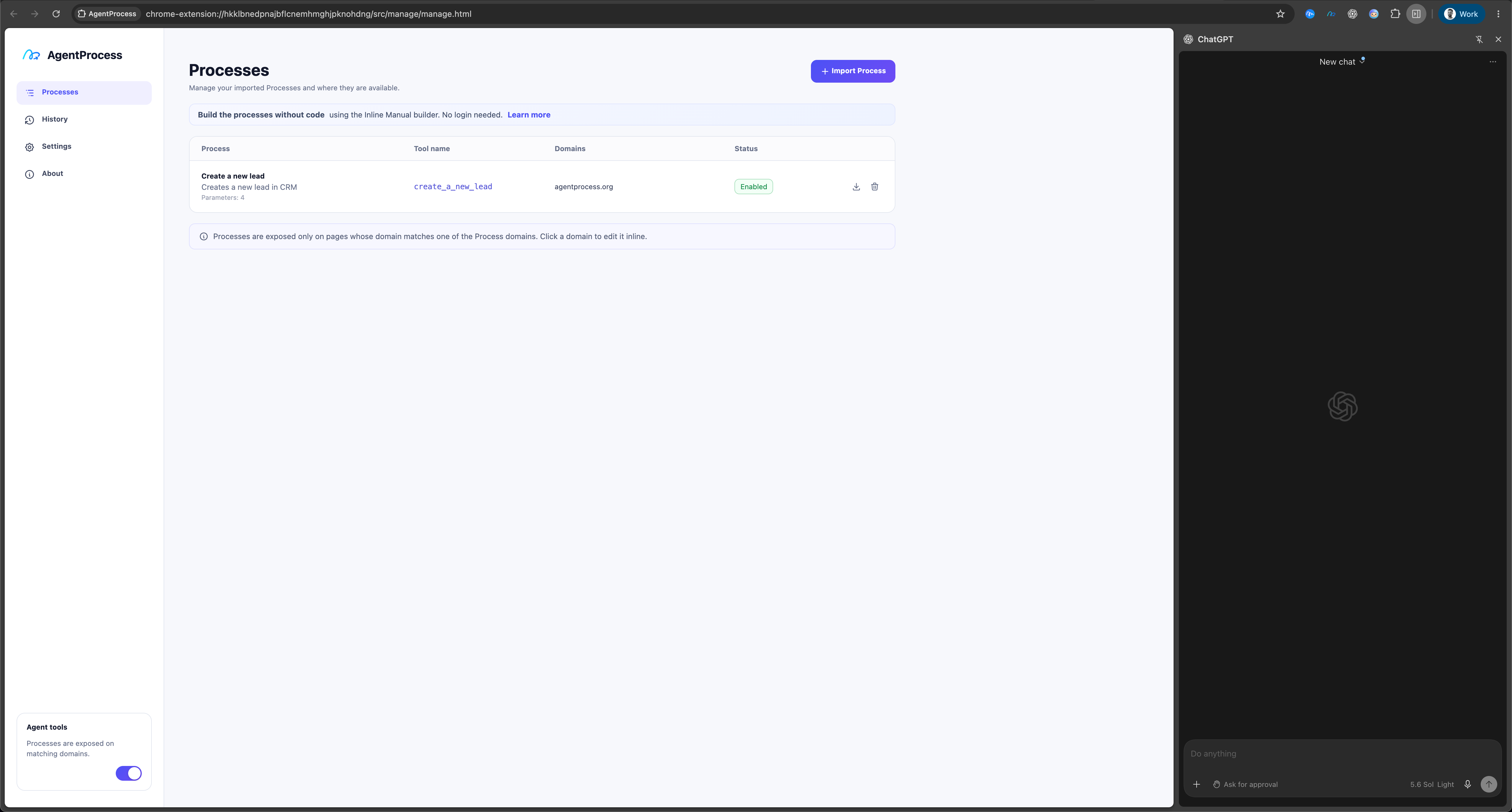
List of processes - Tools
-
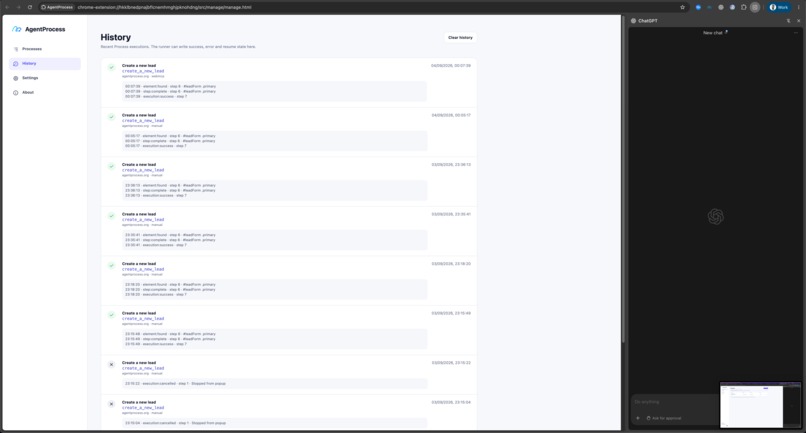
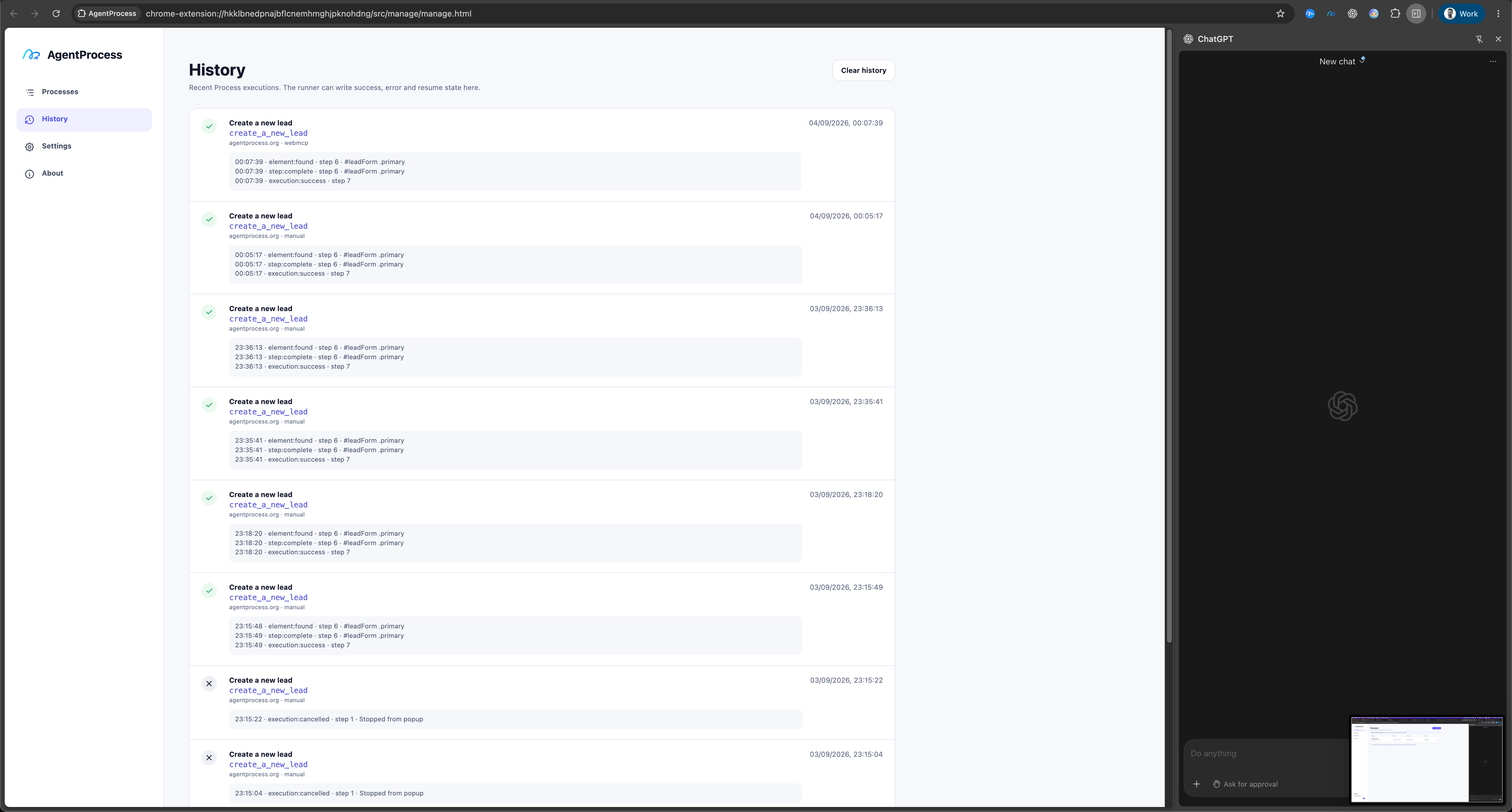
History of execution
-
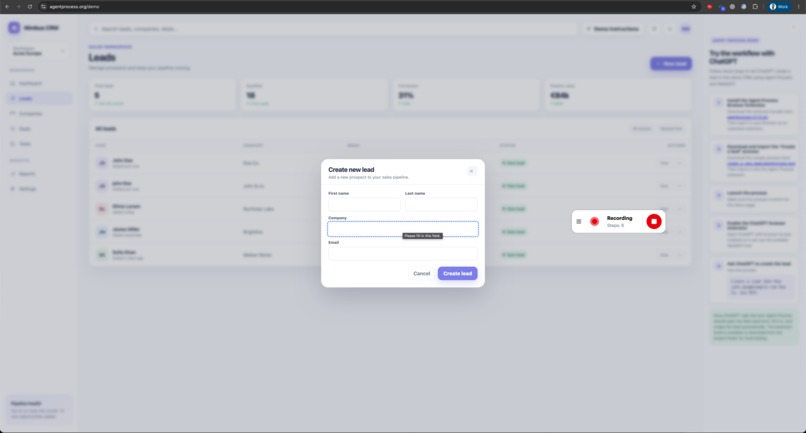
No-code Recording using Inline Manual Builder
-
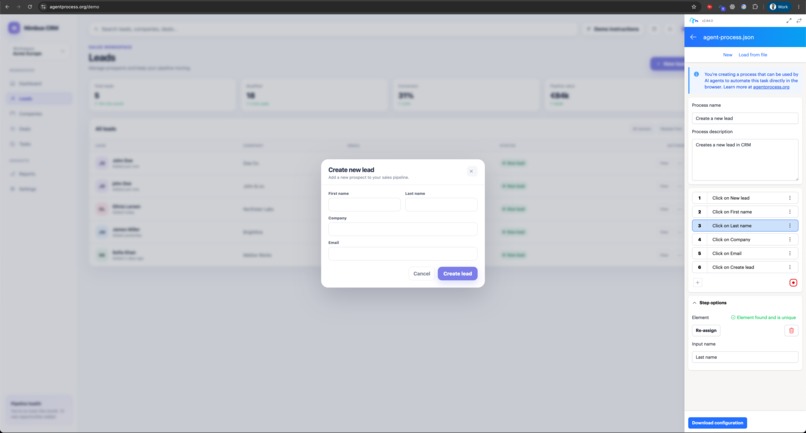
No-code Recording using Inline Manual Builder
Inspiration
AI assistants are getting better at using websites, but they still often have to figure out the interface from scratch every time.
We wanted to make it easy for anyone to teach their AI assistant a repeatable process on top of any website, regardless of whether that website has MCP or WebMCP implemented.
Even when a website already exposes MCP functions, users are still limited to the tools and workflows the developer decided to provide. We wanted users to be able to create their own personalized workflows around the way they actually work.
Instead of asking an agent to understand the whole UI and decide what to click every time, a user can record a process once and reuse it.
This can be useful for repetitive internal workflows, sharing processes between colleagues, making execution more predictable, reducing token usage, and making tasks faster and easier to debug with an execution log.
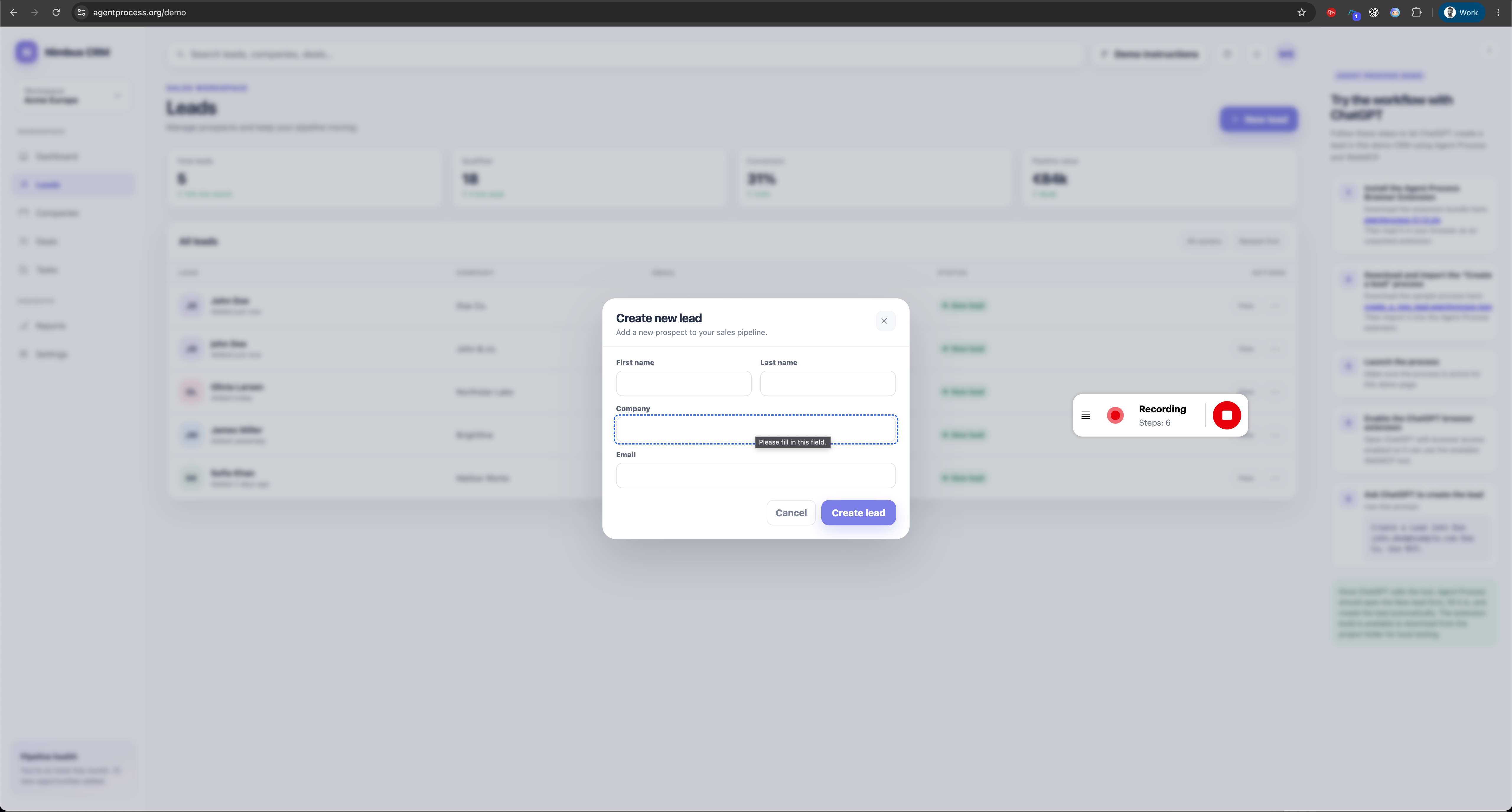
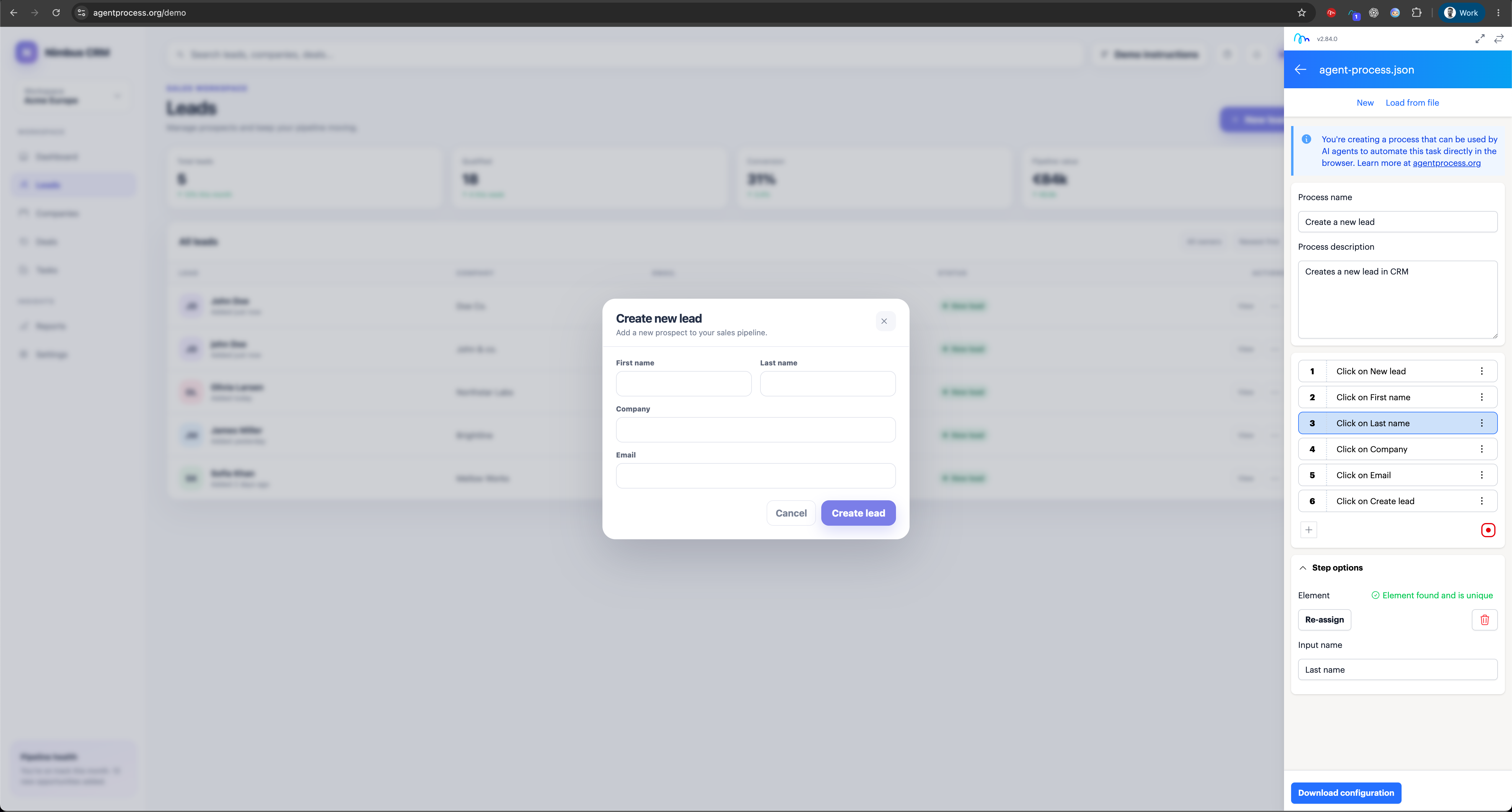
We also wanted the creation side to be completely no-code. We reused the Inline Manual Builder so a user can simply record what they are doing in the browser and turn that workflow into an Agent Process.
What it does
Agent Process is a browser extension that lets users turn repeatable workflows on almost any website into WebMCP tools that AI assistants can use.
A process can be created in two ways: by importing a JSON definition with the individual steps, or by recording the workflow using the Inline Manual Builder. The user can also define inputs that the AI assistant should provide when the process is executed.
For example, you can create processes such as:
Create a lead Add a customer Create a ToDo Publish an article Update a record in a CRM
The Agent Process extension then exposes these processes as WebMCP tools directly in the browser.
When an AI assistant calls one of these tools, Agent Process executes the predefined browser interactions instead of requiring the AI to inspect the interface and figure out every step again.
Processes can include parameters, for example values that should be entered into forms, so the same process can be reused with different data every time it runs.
This effectively lets users create their own personalized WebMCP tools on top of existing websites.
The website itself does not need to implement WebMCP, expose an API, or be modified in any way.
How we built it
We built Agent Process as a browser extension that combines WebMCP with our existing Inline Manual process-recording technology.
The Inline Manual Builder acts as the no-code recorder and editor. It captures the individual steps of a workflow, the elements being interacted with, and the parameters that can be provided when the process is executed.
These processes are exported as JSON and imported into the Agent Process extension. The extension registers them as WebMCP tools, executes the predefined browser interactions when a tool is called, and records the result in an execution history log.
We used Codex extensively to build the browser extension, with supervision, testing, and product decisions from our team.
Our previous experience building browser-based product guidance with Inline Manual helped us move quickly, especially around reliable element targeting, working with dynamic web applications, handling overlays and different browser behaviors, and executing interactions on third-party websites.
Challenges we ran into
The biggest challenge was discovering that the ChatGPT browser extension does not currently automatically discover or use WebMCP tools in the way we initially expected. To make the integration work reliably, we currently need to add custom instructions telling ChatGPT to look for and use the available WebMCP tools.
That made testing the complete experience slightly different from our original assumption, but it also gave us a much better understanding of how WebMCP discovery currently works in practice and where some of the limitations are for browser-based AI assistants.
Our use of MCP is also slightly different from the typical implementation. We are not adding tools to an application we own; we are adding them on top of any existing website. While exploring the architecture, we even built our own MCP server before realizing that a traditional MCP server was not the right fit for what we wanted to achieve.
WebMCP running directly in the browser turned out to be the key piece. Without browser-level WebMCP support, exposing personalized tools on top of arbitrary websites in this way would be much more difficult.
On the Agent Process side, development went relatively smoothly thanks to our previous experience building Inline Manual and working with browser applications.
Browser automation itself still comes with the usual challenges: every website behaves differently, with dynamic interfaces, overlays, delayed elements, and different frontend frameworks. Those are challenges we already know well from Inline Manual, though, and are separate from the WebMCP API itself.
Accomplishments that we're proud of
We are proud that we managed to make WebMCP useful on top of websites that were never designed for it.
A user can take an existing website, record a process without writing code, turn that process into a reusable WebMCP tool, and let an AI assistant execute it with parameters.
We are also proud that the process remains fully under the user’s control. Instead of being limited to whatever MCP tools an application developer decides to expose, users can create workflows that match the way they actually work.
Another accomplishment is that we were able to reuse our existing Inline Manual recording technology in a completely new way. Something originally built for creating product guidance can now also be used to teach AI assistants how to perform tasks.
The early feedback has been especially encouraging. People immediately understand the idea of recording a process once and then letting an AI assistant reuse it, which makes us think there is something genuinely useful here beyond the hackathon.
What we learned
We learned a lot about how WebMCP works in practice, how tools are exposed inside the browser, and how AI assistants currently discover and use them.
We also learned that our use case sits somewhere between traditional MCP and browser automation. We are not exposing backend capabilities from an application we own. Instead, we are giving the user a way to define their own tools on top of an existing interface.
One of the most important things we learned is that AI does not always need to figure out how to complete a task from scratch.
If the user already knows the exact process, it can be more efficient to record that process once and let the AI decide when to use it and what parameters to provide.
In our testing, this approach can make execution faster, transparent and more predictable, reduce the amount of page analysis the AI needs to do, and potentially save tokens.
It also gives us better control over what actually happens in the browser and provides a clear execution log when something succeeds or fails.
That changed how we think about browser agents. Full autonomy is useful when the path is unknown, but for repetitive and well-understood tasks, a reusable process can often be the better tool.
What's next for Agent Process
The current version supports a limited set of browser interactions, so one of our next priorities is expanding the types of actions that can be recorded and executed reliably across different websites.
We also want to make the recording experience much smoother. The goal is that a non-technical user can simply open the Inline Manual Builder, perform a task once, and end up with a reusable Agent Process without needing to understand selectors, JSON, or WebMCP.
Sharing is another big part of what we want to build next. Today, processes are exported and imported manually. We would like to create a backend where teams can maintain a shared library of processes and make them automatically available to colleagues and their AI assistants.
From there, we can see Agent Process becoming a form of team process memory: a shared collection of repeatable workflows that captures how a team actually works, not just what individual applications expose.
We would also like to explore a public process library or marketplace, where people can publish and reuse processes for common applications instead of recording everything themselves.
Another direction is composable processes. A larger workflow could be built from several smaller Agent Processes, allowing users to combine existing actions into more complex workflows.
Cross-application workflows are already possible to some extent, but they are still clunky. We want to make it easier for a single process to move naturally between different websites, tabs, and applications.
We are also interested in AI-generated processes. Instead of always recording a workflow manually, an AI assistant could perform a task once, turn the successful execution into a reusable Agent Process, and let the user review or refine it.
We also want to improve process maintenance. Websites change, so processes need a simple way to be updated, tested, versioned, and monitored when something stops working. AI can help here too by understanding changes in the interface on the fly, adapting the affected step, and continuing the process instead of simply failing.
Longer term, we see Agent Process becoming a reusable layer between people, AI assistants, and the websites they use every day: users define how they want a task to be done once, and their AI assistants can reuse that knowledge whenever they need it.
Built With
- codex
- vite
- vue


Log in or sign up for Devpost to join the conversation.