Inspiration
AI agents can already browse, compare and fill in checkout forms, but the moment money is involved there's a wall: the only way to let an agent buy something is to hand it your credit card and hope it behaves. Agents get confused, have bugs, and can be prompt-injected by text on a product page. We wanted a way to say "yes, buy my groceries" without ever saying "here's my card."
Our guiding principle: the hard stop has to be enforced at the money, not at the agent's behavior.
What it does
PaySafe is a wallet and control panel for AI agents that spend money.
- You set the rules for each agent: which stores, which categories, per-order and daily/weekly/monthly budgets, allowed hours, and when it must ask you first.
- The agent shops on its own. You give it an errand ("buy two packs of printer paper") and it picks the product, quantity, store and shipping itself, without stopping to ask you questions. It gets your name and shipping address from the wallet, so you never type them.
- The agent asks before buying. Through an MCP server (or REST), it submits its exact cart. Our policy engine allows it, denies it with reasons, or sends it to you. While it waits, it simply waits; it doesn't ask you whether you've decided yet.
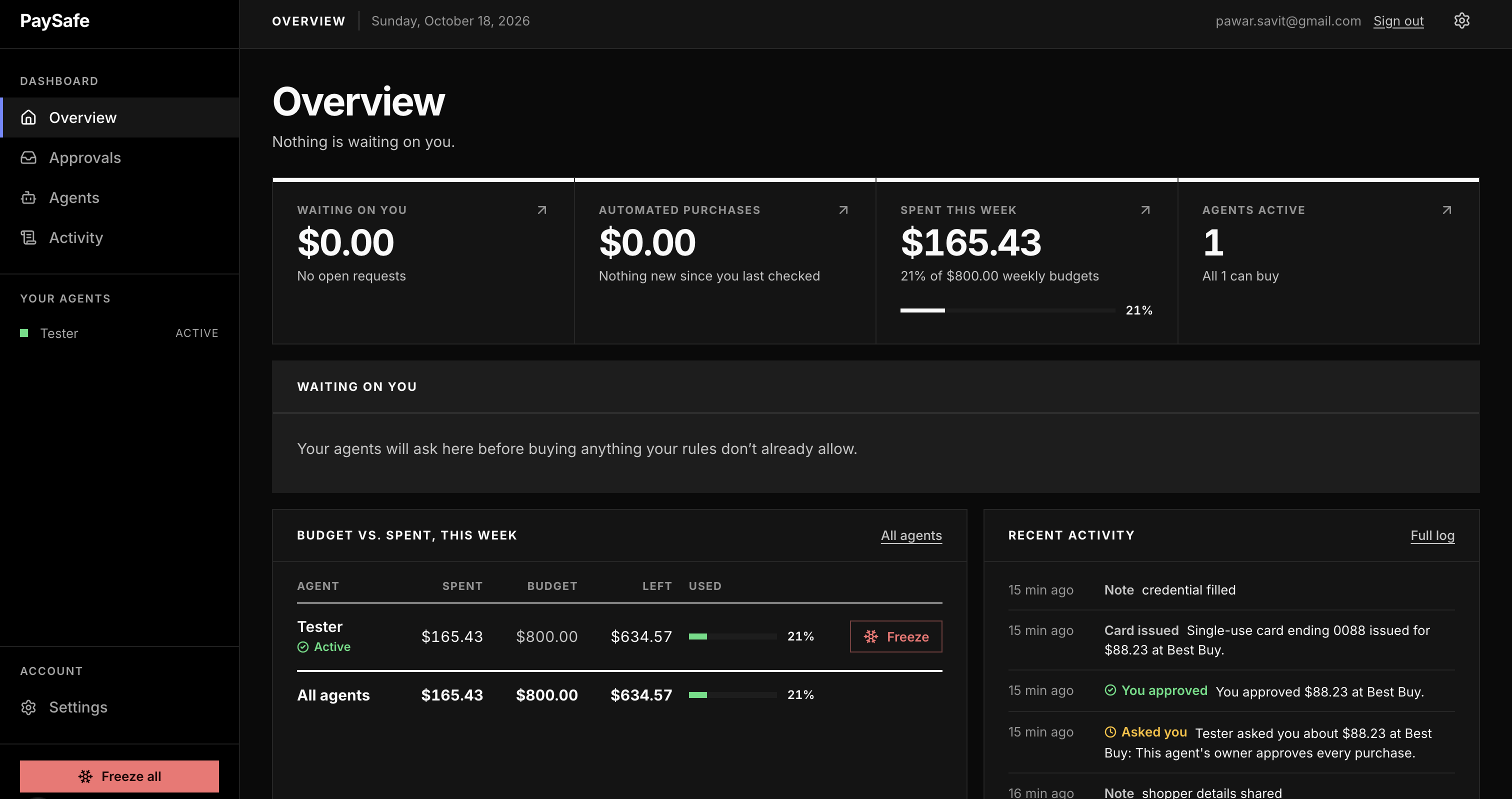
- You approve from the dashboard, where each request appears as a receipt with a tear-off decision stub: items, totals, the agent's reasoning, and which rules triggered.
- Every purchase gets its own single-use card, locked to that merchant, that amount and a 30-minute window.
- The agent never sees the card. After you approve, the wallet itself types the card into the checkout page and clicks "Place order":
- Checks first: it only does this on the approved store's page, and only when the page shows the approved total.
- Only real card fields: it types into the store's own fields or a known payment provider's frame, never into an unknown iframe.
- Cleans up: if the payment fails, it clears the card from the form before handing the page back.
- Every charge is checked as it happens. When the store charges the card, the card network asks PaySafe before approving it. A store that charges more than you approved, a charge from a different business, or a second use of the card is declined on the spot and raises an alert.
- One tap freezes an agent, or all of them, and cancels their live cards.
- Trust grows from evidence: after a streak of clean purchases, the dashboard suggests loosening a limit, and nothing changes until you say yes.
A purchase is auto-approved only if every limit still holds after it, where \( t \) is the cart total, \( s_w \) is spending already used or reserved in window \( w \), \( L \) are the agent's limits and \( T_{\text{ask}} \) is the ask-first threshold:
$$ \text{auto-approve} \iff t \le L_{\text{order}} \;\wedge\; \bigwedge_{w \in \{\text{day},\,\text{week},\,\text{month}\}} \left( s_w + t \le L_w \right) \;\wedge\; t \le T_{\text{ask}} $$
The store, category and schedule rules have to pass too. Anything ambiguous (a new store, an item the classifier isn't sure about, an amount over the threshold) goes to a human. It is never auto-allowed.
How we built it
- Backend: a TypeScript monorepo on PostgreSQL with Prisma:
- a policy engine, with split-order detection,
- an approval flow bound to a hash of the cart, so the cart can't change after you approve it,
- an append-only audit log,
- email and web-push notifications.
- Card issuing: single-use cards sit behind a
CardIssuerinterface with three implementations:- a mock issuer, for development,
- Stripe Issuing, where Stripe's real-time authorization webhook lets PaySafe approve or decline each charge before it goes through,
- Privacy.com, for real cards on a personal account.
- Agent interface: an MCP server any agent can connect to (Claude, Goose, Cursor and others), with tools including
get_policy,get_budget,get_shipping_details,request_purchase,wait_for_decisionandfill_payment_details. Tool descriptions and anext_stepin every response guide the agent, so it works without agent-specific setup. - Card entry and checkout: the agent shops in a dedicated Chrome profile with no saved cards, and the wallet connects to that same browser through the Chrome DevTools Protocol (via Playwright).
- Finding the fields: it finds card fields by standard autofill attributes, and falls back to visible labels and placeholders.
- Fields that appear late: it handles payment iframes from Shopify and Stripe, and fields that only appear after the card number is typed.
- Placing the order: it clicks the place-order button, never PayPal or Shop Pay, and reads the store's confirmation or decline.
- A locked-down shopping agent: we run Claude Code with only two tools allowed, the wallet and the shopping browser, so it can't read files, run commands, or use the owner's everyday browser.
- Dashboard: Next.js (App Router) with Server Actions for every change and Auth.js magic-link sign-in, styled after Swiss Modernism and financial dashboards:
- KPI tiles whose top bars turn yellow or red as budgets fill,
- a side-scrolling queue of receipts waiting on you,
- an Automated purchases tab that tracks what's new since you last checked,
- light and dark themes.
- A test store that runs every card charge through the same real-time checks, with "overcharge" and other failure modes to demonstrate the guardrail.
- 189 automated tests, including tests that drive a real headless Chrome through checkout pages modeled on real stores.
Challenges we ran into
- The AI wouldn't type a card number, and it shouldn't have to. Claude refused to enter card details. Rather than switch to a model that would, we moved card entry into the wallet. That turned a blocker into the strongest guarantee we have: the model never handles the number at all.
- Handing the page back exposed the card. Once the wallet typed the card, it stayed visible in the form until the order was placed, which was exactly when the agent got control back. So the wallet now clicks "Place order" itself, and wipes the card from the form if anything goes wrong.
- The agent shopped in the wrong browser. In one test, the agent drove the owner's everyday Chrome through a browser extension. That's where the owner's logins and saved cards live. We locked the agent to the dedicated shopping browser, and made the wallet refuse to fill cards anywhere else.
- Every store's checkout is different. Best Buy only shows the expiry and security-code fields after a valid card number is typed, and uses its own field names. We added re-scanning after the number and label-based field detection.
- Real stores aren't built for agents. CAPTCHAs, bot detection and bank verification stop agents at checkout. We chose not to fight that arms race. Shopify-based stores, which have opened checkout to agents, work best, and the long-term path is the emerging agent checkout protocols and card-network agent programs, with PaySafe as the owner's control layer on top.
- The honesty gap. The card network enforces the amount, merchant and expiry, but item-level rules like "no gift cards" rely on the cart the agent reports. A compromised agent could describe a gift card as dish soap at an allowed store. Exact-amount cards cap the damage, but closing the gap fully means verifying the reported cart against what the store actually sold.
- Exact amounts vs. the real world. Grocery delivery often places a hold above the cart total and adjusts the final charge for substitutions, which an exact-amount card declines. We added a configurable buffer instead of quietly weakening the guarantee.
- Saying no to features that weaken safety. We built "override a denied purchase," then made sure it can never unlock always-blocked categories like gift cards and stored value, since those are how a hijacked agent would cash out.
- Merging two halves of the project. The frontend started on mock data while the backend was built in parallel. Integrating them meant porting features from local state onto real server actions, plus one painful merge that committed conflict markers into the build.
Accomplishments that we're proud of
- A full purchase, end to end, with the card never shown to the AI. An agent shops on its own, a human approves on a receipt, and the wallet issues a single-use card, enters it, places the order and records the confirmation.
- Live charge checks. A store that overcharges is declined on the spot, and the card is wiped.
- Works with any agent. It uses a standard protocol (MCP), with no agent-specific code.
- A calm dashboard. It makes a security product feel calm and readable instead of alarming.
- Default deny intact. We kept it even when loosening it would have been easier.
What we learned
- Safety for agents is less about making the agent smarter and more about limiting what it can do at the point where money moves.
- The safest secret is one the AI never touches. Moving card entry out of the agent and into the wallet removed a whole class of risks at once.
- Agent payments are converging fast across card networks, payment processors and AI platforms. The opportunity for a small team isn't the payment rail itself; it's the owner's view across every agent and every rail.
- Approval friction matters: if every purchase needs a tap, the agent saves you nothing. Trust has to be earned and then extended.
What's next for PaySafe
- A browser extension, so the wallet can enter cards in the browser you already use, alongside agents like Claude in Chrome.
- Live card issuing, with Stripe Issuing for businesses and Privacy.com for individuals.
- Verifying reported carts against what was actually sold, using card transaction data and order confirmations.
- Recurring purchases ("eggs, weekly, under $10"), where the wallet pre-approves a narrow standing rule and the agent buys on schedule.
- Agent checkout protocols and cloud agents: support for those protocols, plus OAuth sign-in so cloud agents like ChatGPT's can connect.
Built With
- claude
- claudecode
- next.js
- postgresql
- react
- typescript


Log in or sign up for Devpost to join the conversation.