-
-
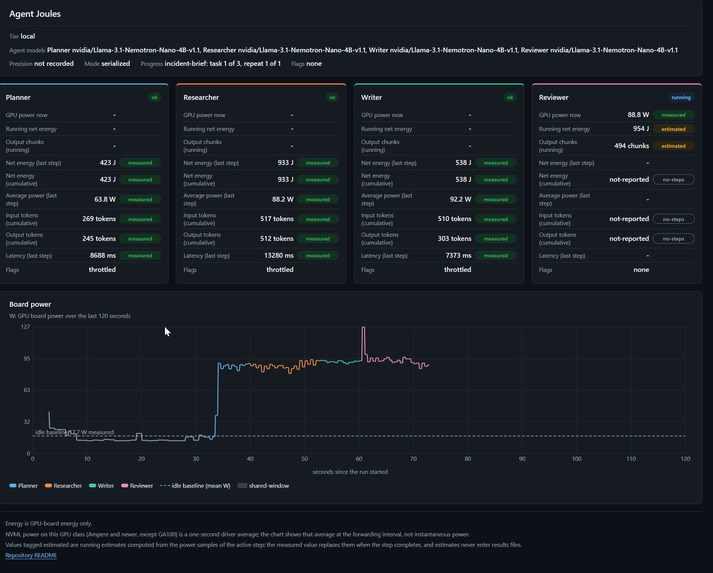
Dashboard showing local execution of 4 agents on Llama-3.1-4B (Oct 2026). Tracks GPU power, per-step energy, 120s board draw, and metadata.
-
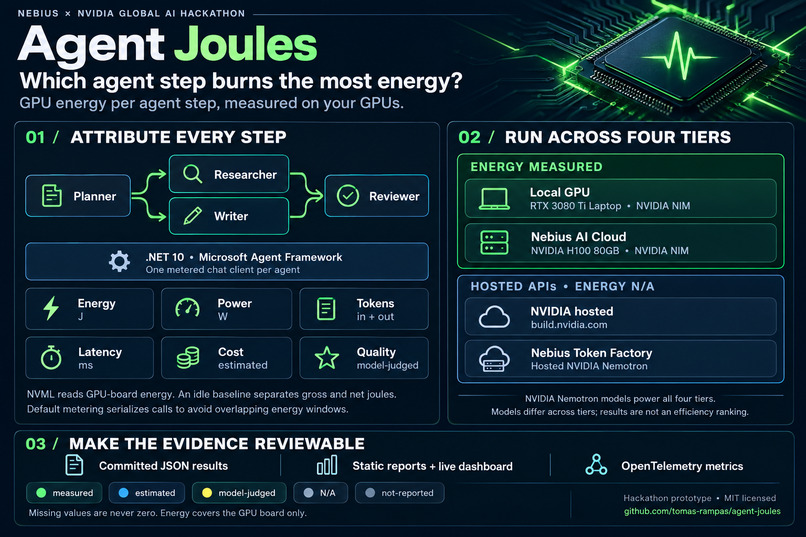
Agent Joules measures GPU energy per AI agent step, alongside tokens, latency, cost and quality across four deployment tiers.
Inspiration
I could see how many tokens my agents used and how long they took. But I could not answer a simple question: which step used the most energy?
When a workflow involves several agents, the total GPU consumption only tells part of the story. I wanted to see which agent was responsible for which part, so I could decide where to start improving the workflow.
Before building, I looked at existing research and tools, including The Price of Prompting, TokenPowerBench, Watt Counts and greenToken. I found useful work on inference energy, but I did not find a ready-made solution for measuring individual agent steps in my .NET Microsoft Agent Framework workflow.
That became the focus of Agent Joules.
What it does
Agent Joules is a .NET 10 command-line tool and library that measures individual steps in a Microsoft Agent Framework workflow.
It wraps each agent’s chat client with metering middleware. For every model call, it records tokens, latency and estimated cost where pricing is configured. On a GPU I control, it also measures GPU-board energy and power through NVIDIA NVML. A Nemotron judge model adds an output quality score.
The demo workflow has four agents: Planner, Researcher, Writer and Reviewer. The Planner starts, the workflow branches into Researcher and Writer, and the Reviewer joins their outputs.
The same workflow runs across four tiers:
- Local GPU: NVIDIA Nemotron served through an NVIDIA NIM container.
- Nebius AI Cloud: a Nemotron NIM container and the meter sharing an NVIDIA H100 80GB GPU.
- NVIDIA hosted API: Nemotron served through build.nvidia.com.
- Nebius Token Factory: hosted NVIDIA Nemotron inference.
Energy is measured on the laptop GPU and the Nebius H100, with results reported separately. Hosted API energy is N/A because those endpoints do not expose a GPU meter.
Every metric carries one of five labels: measured, estimated, model-judged, N/A or not-reported. A missing value is never replaced with zero.
The intended user is a developer building agent workflows. The measurements help identify which step to investigate before changing prompts, output budgets, caching or deployment.
How I built it
The core is Microsoft.Extensions.AI IChatClient middleware. Each agent gets its own metered client, with the agent’s identity attached when the client is created.
NVML is accessed through P/Invoke. When the GPU supports an energy counter, the meter reads the difference between the start and end of a call. Otherwise, it samples power and integrates it over time using the actual sample timestamps.
A measured idle baseline separates gross energy from net energy:
Net joules = gross joules − idle watts × elapsed seconds.
By default, calls are metered one after another, including the workflow’s fan-out branches. This prevents overlapping energy measurement windows.
Concurrent mode is also available. Overlapping steps receive a shared-window flag, and total energy is calculated over the union of their measurement windows. Their individual energy values therefore cannot simply be added together.
A hosted Nemotron judge scores each output from one to five against a committed rubric. These scores are labelled model-judged. Judge calls are tracked separately and excluded from workflow metric totals.
The command line includes probe, run, report, validate, calibrate and dashboard replay. Results are saved as JSON. The reporting command generates a static HTML page and an SVG chart with medians, ranges, measurement flags and explicit missing values.
The live dashboard shows progress and per-agent metrics. Replay makes recorded results accessible without a GPU or API key. OpenTelemetry exports metrics for integration with other monitoring tools.
Challenges I ran into
Getting NIM running on my laptop took several attempts.
I gave it a 90-minute time box. The first container start was killed during engine building. After switching to the BF16 vLLM profile, the requested context length still exceeded the available GPU KV-cache capacity.
The fourth start worked after setting NIM_MAX_MODEL_LEN=16384. The model endpoint returned HTTP 200 after 32 minutes and 6 seconds from the beginning of the attempt.
I kept NIM as the local runtime, so the Ollama fallback was not needed. This was a successful deployment on this laptop, not a claim of official support for its GPU.
The hardest cloud obstacle was obtaining an instance that could start. My initial Nebius VM with two L40S GPUs failed twice with “Resource exhausted”. No measurements were collected on that hardware.
I switched to a single H100 instance in the same region. It ran the Nemotron NIM container alongside the NVML meter and completed all 36 workflow steps.
Measurement also needed care. The laptop GPU drives the display, its power limit can change, and background activity contributes to its readings. I kept these limitations visible in the results.
Accomplishments that I'm proud of
I got the measurement code working on both my laptop and a Nebius AI Cloud H100, with committed results that others can inspect.
Local GPU results
In the published local campaign of 27 October 2026, median net GPU energy per four-agent workflow execution was 2,827.00 J, with a range of 2,628.82–5,587.73 J.
This covered three tasks repeated three times: nine workflow executions and 36 agent steps.
The configuration was:
- NVIDIA GeForce RTX 3080 Ti Laptop GPU, 16 GB.
- Driver 616.92.
- NVIDIA NIM 1.8.5.
- 100% GPU offload.
- Model:
nvidia/Llama-3.1-Nemotron-Nano-4B-v1.1, BF16.
The idle baseline was flagged unstable, and every step recorded software power-cap throttling. Energy covers the GPU board only.
Across this campaign, the Researcher consumed 9,338.50 J, or 28.2% of the 33,134.24 J summed across all steps. The Reviewer accounted for 27.5%, the Writer 23.6% and the Planner 20.8%.
The video shows a separate demonstration recording, where the Reviewer accounts for approximately 35.5% of cumulative net energy. These are different runs, not fixed rankings of agent roles.
For me, the useful finding is where to investigate first. A more focused prompt, less repeated context or a different output budget might help. Those changes still need testing; these measurements do not yet demonstrate energy savings.
Nebius AI Cloud results
On the NVIDIA H100 80GB HBM3, median net energy per four-agent workflow execution was 929.87 J, with a range of 648.52–1,803.81 J across nine executions.
This tier used nvidia/nemotron-3-nano in FP8 through NVIDIA NIM.
The hardware and model differ from the laptop configuration. I therefore report these results separately, without claiming that one tier is more efficient.
Cost and latency
These figures cover three tasks repeated three times on each tier.
Local NIM
- Model: nvidia/Llama-3.1-Nemotron-Nano-4B-v1.1
- Estimated GPU electricity cost: EUR 0.0028.
- Recorded wall-clock duration: 480.85 seconds.
- Median model-call latency: 12.46 seconds.
Nebius Token Factory
- Model: nvidia/NVIDIA-Nemotron-3-Nano-30B-A3B
- Estimated token cost: USD 0.0057.
- Recorded wall-clock duration: 70.14 seconds.
- Median model-call latency: 1.72 seconds.
build.nvidia.com
- Model: nvidia/nemotron-3-nano-omni-30b-a3b-reasoning
- Cost: N/A because no price was configured for this endpoint.
- Recorded wall-clock duration: 358.37 seconds.
- Median model-call latency: 8.37 seconds.
Local cost covers estimated GPU electricity at an assumed EUR 0.30/kWh. Token Factory cost covers estimated hosted token charges. An unavailable price is reported as N/A, not zero.
The models, environments and cost bases differ. These results describe the recorded workload, not a like-for-like benchmark. Hosted energy is N/A, and judge calls are excluded from workflow metric totals.
What I learned
Deciding how to attribute energy was as important as reading the meter. Separate clients and non-overlapping windows make each measurement easier to explain, although they do not remove background GPU activity.
The laptop supports the NVML energy counter, and the meter selected the counter method. I also compared it with power sampling over the same calibration window.
On 25 October 2026, over 69.02 seconds:
- The counter measured 5,753.40 J.
- Power sampling at 10 Hz measured 5,780.36 J.
- The relative difference, calculated as
(counter − sampling) / counter, was −0.4685%.
Sampling returned approximately 0.47% more energy than the counter. All three values are labelled measured. This shows close agreement for that window, not proof of accuracy across every workload.
I also learned to keep missing data explicit. A hosted API can report tokens and latency without exposing any energy measurement. Reporting N/A is more useful than inventing a precise-looking estimate.
A result needs its hardware, model, baseline, measurement method and flags beside it. Otherwise, it is too easy to draw the wrong conclusion.
What's next for Agent Joules
First, I want to change one agent’s prompt or output budget and repeat the same workload on the same hardware. The question is whether energy can fall without losing useful output quality.
I also want to add an energy-budget guardrail that can reroute a step when its joule budget runs out, compare quantisation settings, and test another datacenter GPU alongside the H100.
NIM on Nebius AI Cloud is already working. The next task is to build on those measurements.
Agent Joules is open source under the MIT licence. Setup instructions, committed results and reports are available in the repository:

Log in or sign up for Devpost to join the conversation.