-
-
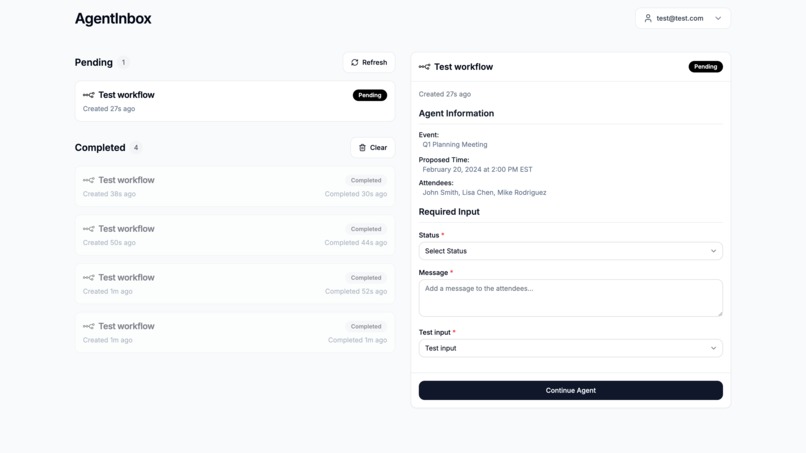
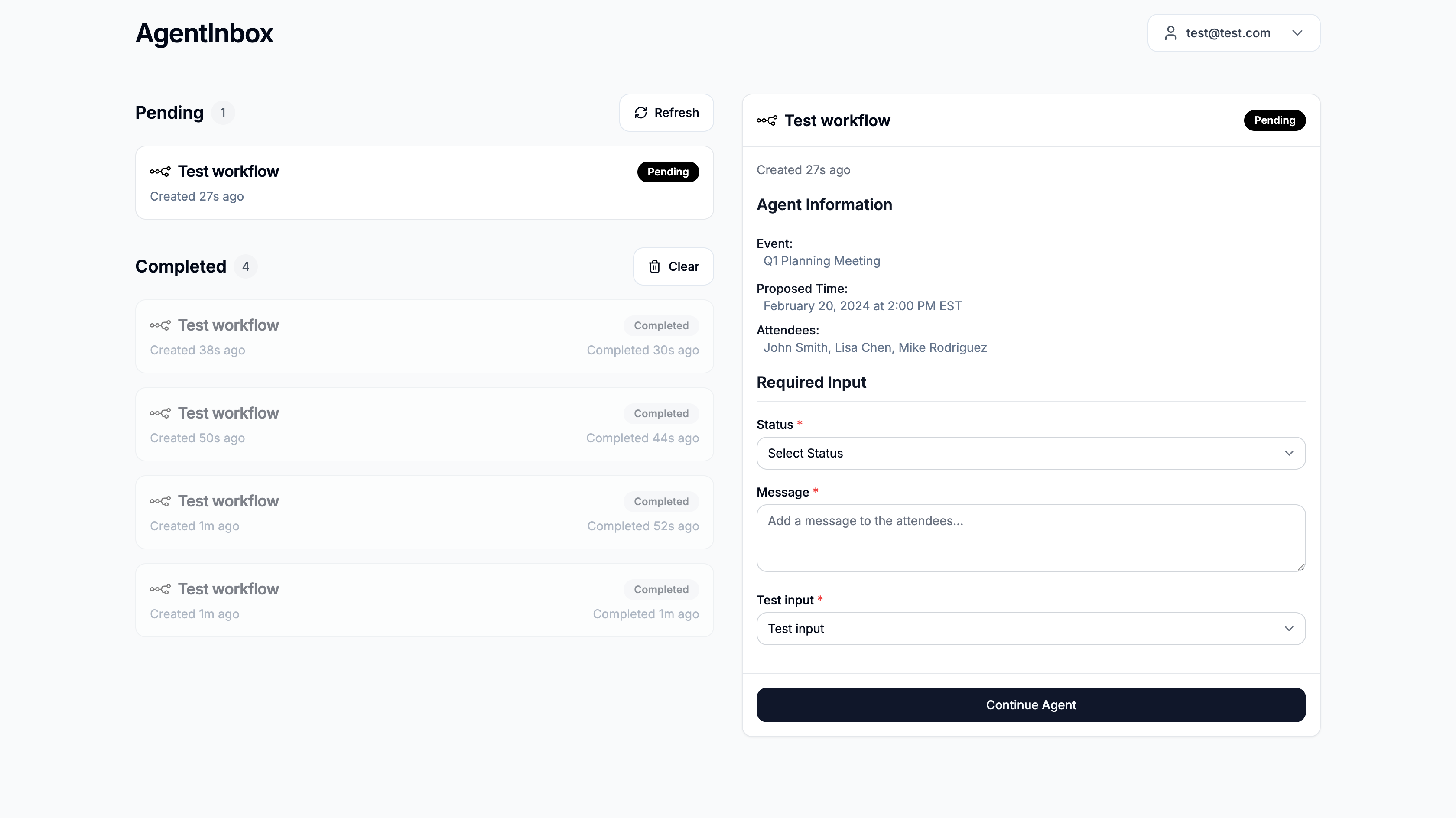
The Agent Inbox dashboard.
-
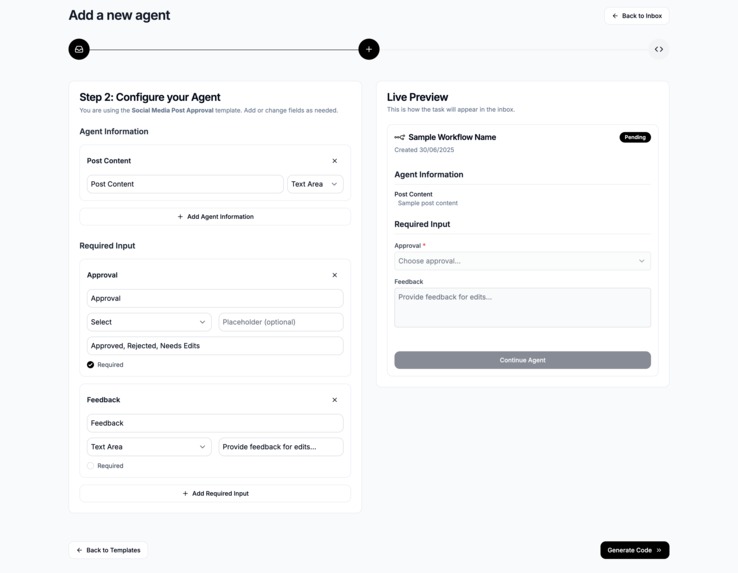
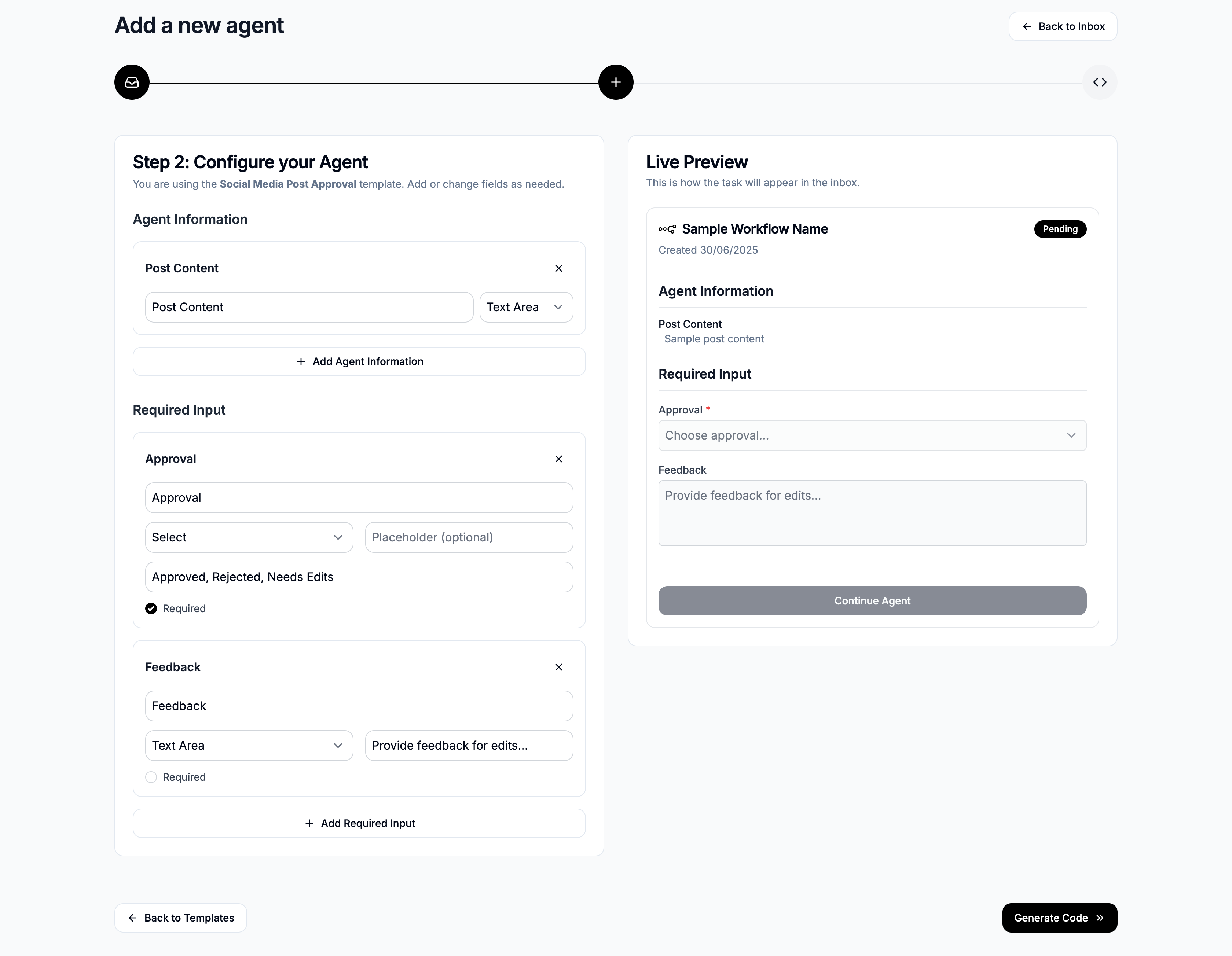
Agent Inbox template builder.
-
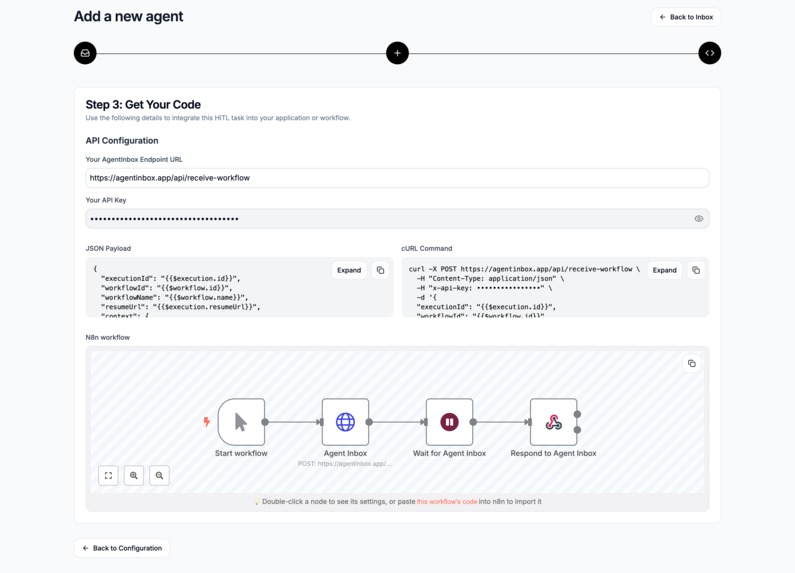
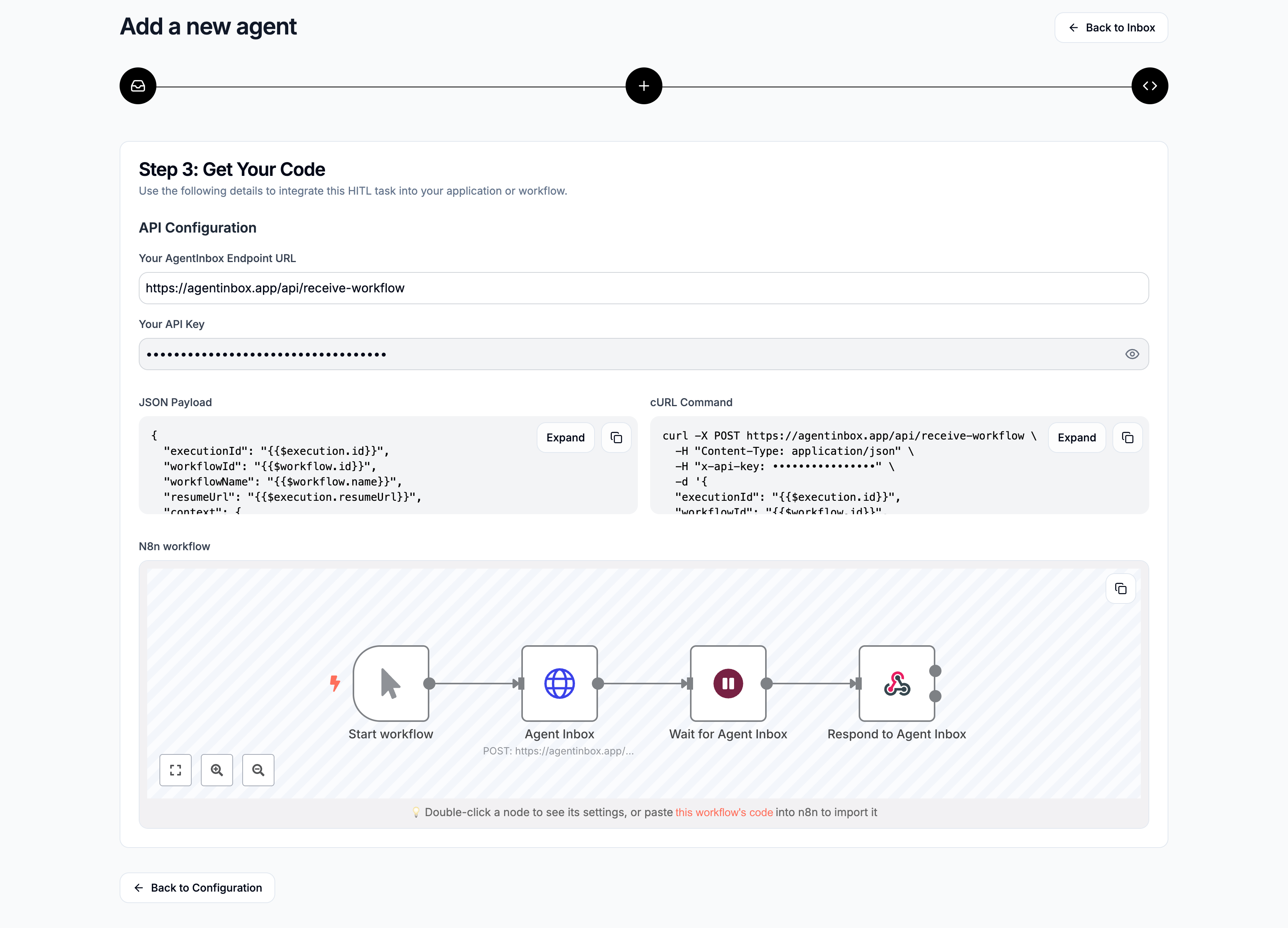
Agent Inbox n8n workflow generator.
-
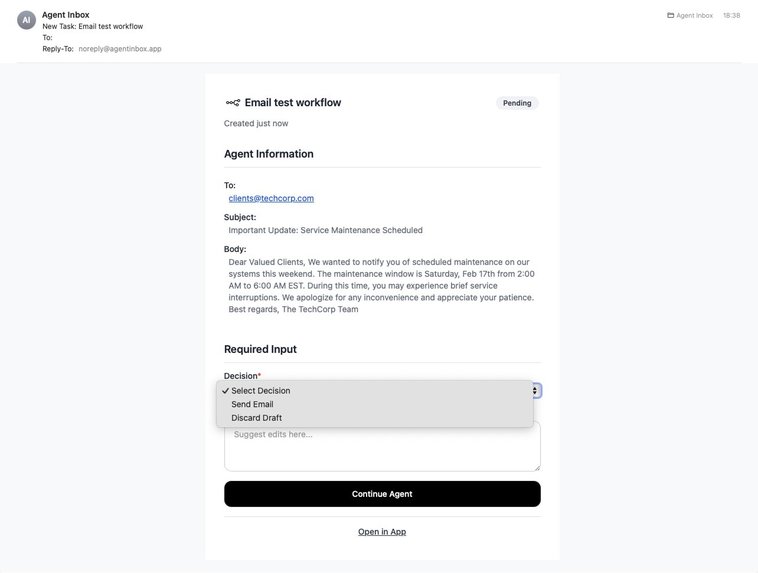
Agent Inbox email task.

Inspiration
My name is Ward, a design engineer that has been interested in the UX of AI since my Master's in Industrial Design in 2021. The first week ChatGPT's API (GPT 3.5) became available in 2023, I built an application with it for my thesis. From this moment I knew that generative AI would forever change the way humans interact with computers.
Since then, I've worked on numerous projects exploring human-AI interaction, using low-code tools like n8n (a workflow automation tool) and AI coding tools like Bolt.
While creating agents in n8n, I noticed that many of my automations were ineffective without human input. It was the human-in-the-loop moments that made the automation truly valuable. But this wasn't easy, it often required building custom interfaces.
That's why I built AgentInbox: to help agent builders create human centered AI solutions by seamlessly adding human input into their n8n workflows.
What it does
AgentInbox allows users to add human input to any n8n workflow.
The application:
- Builds input forms for any information you require for your workflow. Templates are provided for common scenarios like content moderation, social media post approval, alert escalation, and scheduling confirmation, etc.
- Generates integration code automatically, including API endpoints, JSON payloads, cURL commands, and n8n workflows. It integrates seamlessly with n8n through webhooks and API calls
- Manages task queues with notifications and email alerts.
Users can choose from templates or build custom agents from scratch, configure the information they want to display and collect, then get ready-to-use code for integrating with their existing n8n workflows.
How we built it
Bolt was used to provide structure to the project and was actively leveraged to experiment with various UI/UX approaches throughout the development process. The insights from these experiments were later integrated into the main project (Bolt is great at design).
Frontend:
- Next.js 14 with React and TypeScript for the UI
- Tailwind CSS for responsive, modern styling
- Lucide React for consistent iconography
- Custom UI components including task cards, forms, and interactive previews
Backend:
- Supabase for authentication and database
- API routes in Next.js for handling webhook endpoints and user management
- Resend for handling email notifications
Key Features:
- Template system with predefined workflows for common use cases
- Dynamic form generation that auto-creates field keys from labels
- Code generation for multiple integration methods (REST API, cURL, n8n)
- Responsive design that works on desktop and mobile devices
Integration Tools:
- Webhook endpoints for receiving workflow data
- API key authentication for secure integrations
- n8n workflow preview for visual workflow preview
- Email notification system for task alerts
Challenges we ran into
User Experience Design: Balancing the need for low-code developers to configure complex workflows while keeping the actual usage simple enough for non-technical users. This required interviews and multiple iterations on the interface design and user flow.
Template Flexibility: Creating pre-built templates that were useful out-of-the-box while still allowing complete customization for unique use cases required thoughtful abstraction of common patterns.
Integration Complexity: Creating a system that could generate working code for multiple platforms (raw APIs, cURL, n8n workflows) while ensuring all generated code was functional and secure was technically challenging.
Email Integration: Implementing email notifications that allow users to continue workflows directly from within emails proved challenging across different platforms. Ensuring consistent functionality between web-based email clients and native mail applications on Mac required extensive testing and optimization.
Progressive Web App (PWA) Implementation: Converting the application into a PWA that displays properly on mobile devices while maintaining full functionality was challenging. Making the app installable on both desktop and mobile home screens for optimal user experience required careful configuration of service workers, manifest files, and responsive design considerations.
Accomplishments that we're proud of
Seamless n8n Integration: Successfully created a system that generates complete, working n8n workflows with proper node connections and webhook configurations - making integration truly one-click.
End-to-End Functionality: Built a complete platform from user authentication through task creation, approval workflows, and integration - everything needed to add human-in-the-loop functionality to n8n.
Intuitive Design: Created a clean, modern interface that simplifies complex workflow configuration for non-technical user, and ensures the application is fully responsive and installable as a PWA on both desktop and mobile devices.
What we learned
API-First Architecture: Learned the value of designing for integration from the ground up - making the system work well with existing tools and workflows.
Progressive Disclosure: Found that revealing complexity gradually (template → configuration → code) helps users understand the system while maintaining flexibility for advanced use cases.
Human-AI Interaction Design: Designing systems that amplify AI with strategic human input, reinforcing the need to align with human decision-making patterns.
What's next for Agent Inbox
Explore Rich Interaction: We’re exploring more ways for humans to contribute to workflows. E.g., guided decision trees, diagrams, sliders, grids, or voice replies. Aiming to enable more context-specific, relevant and subtle input to agents.
Platform Integrations: Expand beyond n8n to support Zapier, Make.com, Power Automate, and other popular automation platforms.
Mobile Application: Develop a native mobile app for a smoother user experience
Built With
- nextjs
- react
- resend
- shadcn
- supabase
- tailwind
- vercel
- webhook

Log in or sign up for Devpost to join the conversation.