-
-
Agent Identity Manager
📝 Read the full blog post on Medium: AIM: Agent Identity Manager
Inspiration
Most AI agent demos treat identity as an afterthought. You ask an assistant to schedule a meeting, and it creates events, drafts emails, and sends messages, all before you can say "wait." The agent had access, so it used it. No guardrails. No audit trail. No way to see what happened until the damage was done.
We wanted to flip that. What if identity and permissions were the centerpiece of an agentic AI experience, not a checkbox bolted on at the end? What if you could watch, in real time, as an agent hit a permission boundary, got blocked, requested step-up consent, and had every credential exchange brokered through a vault?
That's AIM: a system where the real question isn't "what can the agent do?" but "can you see what it's doing, and did you say it could?"
What it does
AIM (Agent Identity Manager) is a narrative-driven control center that lets you govern one AI with another. You create an assistant, assign it a role (like Scheduler or Executive Assistant), and run real-world scenarios against Google Calendar, Drive, Docs, and Gmail, while the system enforces permission boundaries, brokers credentials through Auth0 Token Vault, and logs every decision.
Key capabilities:
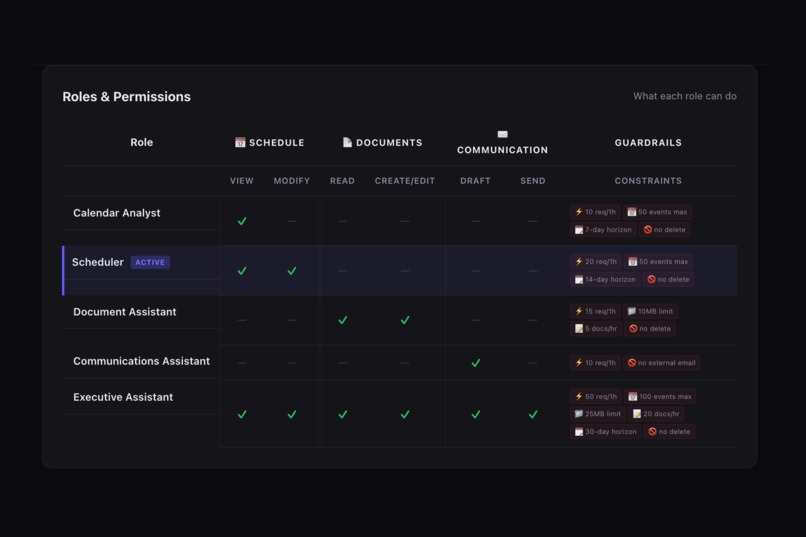
- Role-Based Access Control (RBAC): Five roles with distinct permission sets across Schedule, Documents, and Communication domains, each with guardrails like rate limits, data caps, and time horizons.
- Predictive Dry Run Mode: Preview any scenario before execution. See which steps need consent, which OAuth scopes are involved, which guardrails apply, and which steps touch Token Vault.
- Step-Up Consent: When an agent lacks a permission, execution pauses with a blocking modal showing the required scope and risk level. Users can allow once, allow always, or deny.
- Token Vault Transparency: Every credential exchange through Auth0 Token Vault is surfaced in the audit log with latency timing. Vault badges appear on completed steps. The agent never sees raw tokens.
- AI-Powered Control Agent: A Gemini-powered chat interface that lets you assign roles, modify permissions, and simulate actions through natural language.
- Production-Aware Audit Log: Every action (approved, denied, or vault event) is logged with ISO timestamps, OAuth scopes, step-up auth flags, and vault latency.
How we built it
The frontend is React 19 with Vite 7, designed around a state machine with four views: SIGNED_OUT, NO_AGENT, IDLE, and EXECUTING. The UI follows progressive disclosure, showing only what's relevant to the current moment. Advanced controls (the Control Agent chat and Roles Matrix) are hidden behind a toggle to keep the default experience clean.
The backend is Express 4 on Node.js, handling auth, role management, scenario execution, audit logging, and all Google API interactions. Scenarios execute step-by-step with live progress, pausing for consent when a permission boundary is hit. Execution context flows between steps: a doc URL created in step 2 is automatically referenced in the email drafted in step 3.
Auth0 provides the entire identity layer: OIDC authentication, Token Vault for credential brokering, Connected Accounts for the Google OAuth flow, and Token Exchange for scoped access per action. Each scenario step maps to a specific OAuth scope (calendar.events, drive.file, gmail.compose, gmail.send), and Token Vault brokers the right credential for the right scope.
The Control Agent uses Gemini (gemini-3.1-flash-lite-preview) to parse three structured intents (ASSIGN_ROLE, UPDATE_PERMISSIONS, and SIMULATE_ACTION) so users can modify the permission model through natural language and see results rendered inline in the chat thread.
Deployment is Firebase Hosting for the frontend and Google Cloud Run for the backend.
Challenges we ran into
Making Token Vault visible, not hidden. The whole point of AIM is transparency, but most auth flows are designed to be invisible. We had to design UI patterns (vault badges on execution steps, separate vault entries in the audit log with latency timing, OAuth scope labels on every action) that surface what Token Vault is doing without overwhelming the user.
State-driven UI that doesn't lose context. AIM shows different views depending on state, not all panels simultaneously. When execution starts, it takes over the full viewport; when it ends, you're back to the scenario picker with an updated audit log. Getting transitions to feel seamless while preserving all execution results took significant iteration.
Flowing context between scenario steps. When step 2 creates a Google Doc, step 3 needs that doc's URL to include in the email draft. We built an execution context pipeline that passes outputs from each step to the next, handling failures gracefully. If step 2 is blocked, step 3 still knows why and reports it.
Guardrails beyond allow/deny. Binary permissions are easy. Expressing constraints like "20 requests per hour, 50 events max, 14-day calendar horizon, no deletes" and making those constraints visible in the dry run, the roles matrix, and the execution flow required a flexible permission model that goes well beyond a simple boolean table.
Accomplishments that we're proud of
- Dry Run mode that gives users full predictive visibility into what a scenario will require before a single API call fires, including which steps need consent, the exact OAuth scopes, and the guardrails that would apply.
- A real end-to-end flow, not a mock. AIM creates real Google Calendar events, real Google Docs, and sends real emails through Gmail, all with credentials brokered through Token Vault.
- The audit log captures every action with production-grade metadata: timestamps, OAuth scopes, step-up auth flags, Token Vault events with latency in milliseconds, and success/denied/error status.
- Natural-language role management: using the Control Agent to say "Set my assistant to Executive Assistant" and watching the permissions table update instantly, then re-running the same scenario with different results.
- The permission model itself: five roles with grouped permissions across three domains, each with granular guardrails, all mutable at runtime through the Control Agent.
What we learned
Transparency changes the trust equation. When users can see every credential exchange, every permission check, every audit entry, they trust the system more and make better decisions about what to allow.
Dry run is underrated. The ability to preview a scenario before execution turns authorization from a reactive blocker into a proactive planning tool. It's the feature that makes the demo click for people.
Token Vault solves a real architectural problem. Without it, every agent framework ends up with raw OAuth tokens in environment variables or databases. Token Vault makes credential exchange a first-class, auditable, brokered operation. That's better security and better architecture.
Roles need more than allow/deny. In practice, you need guardrails (rate limits, data caps, time horizons) that constrain how much an agent can do, not just whether it can. This is the direction agent authorization needs to go.
What's next for Agent Identity Manager
- Multi-agent orchestration: managing permissions across multiple agents that collaborate on a task, with cross-agent audit trails and trust delegation.
- Dynamic guardrail adjustment: using the trust score to automatically tighten or relax constraints based on an agent's track record.
- Broader API coverage: extending beyond Google Workspace to support Slack, GitHub, Notion, and other platforms through Token Vault.
- Policy-as-code: exporting role configurations and guardrails as declarative policies that can be version-controlled and reviewed.
- User-defined scenarios: letting users describe tasks in natural language and having the system decompose them into steps with automatic permission mapping.
Bonus Blog Post
Token Vault Changed How I Think About Agent Credentials
When I started building AIM, I assumed credential management would be the boring plumbing I'd wire up and forget about. I was wrong. Token Vault turned out to be the most design-shaping decision in the entire project.
The first version of AIM passed Google OAuth tokens directly to the agent's execution pipeline. It worked, but it felt wrong. The agent had raw access tokens sitting in memory, and there was no way to distinguish "the agent used a credential" from "the agent had a credential." Everything was invisible.
Switching to Token Vault forced a better architecture. Every credential exchange became an explicit, auditable event. When Sarah the Scheduler creates a calendar event, the backend performs a token exchange through Auth0, scoped to calendar.events. That exchange shows up in the audit log with latency timing in milliseconds. The agent never touches the raw token.
This visibility unlocked the dry run feature. Because each action maps to a specific OAuth scope brokered through Token Vault, I could predict what a scenario would need before executing it. That became AIM's signature feature: showing users which steps need consent, which scopes are involved, and which will hit Token Vault, all before a single API call fires.
The biggest surprise was how Token Vault changed the trust conversation. When users can see that credentials are brokered (not stored), exchanged (not passed), and logged (not silent), they're more willing to grant permissions. Transparency doesn't just improve security. It improves the user experience.
If I were building any agent system from scratch today, Token Vault would be the first integration, not the last.

Log in or sign up for Devpost to join the conversation.