Inspiration
Between having a full-time job and being the father of two young kids, personal coding projects had pretty much vanished from existence. The advent of AI and so-called vibe coding has made them a reality again for me. I don't think I've ever made so many cool little personal projects as I have recently.
However, every time I got excited about implementing fun AI features, I hit the wall that API rates are simply far too expensive for simple, free, personal everyday apps. AI subscriptions want you to use their apps and can't be easily integrated into third-party ones.
So I thought, wouldn't it be cool if I could plug the Codex I get from my OpenAI subscription into my personal vibe-coded shopping list app? So that I could get the power of frontier models in my tiny, simple personal app? What would it take to do so? And how could I allow others to do the same?
That's how the idea behind Agent Connect came to be.
What it does
It's a framework for giving AI features to apps by leveraging users' coding agents from their subscriptions.
There are two sides to it.
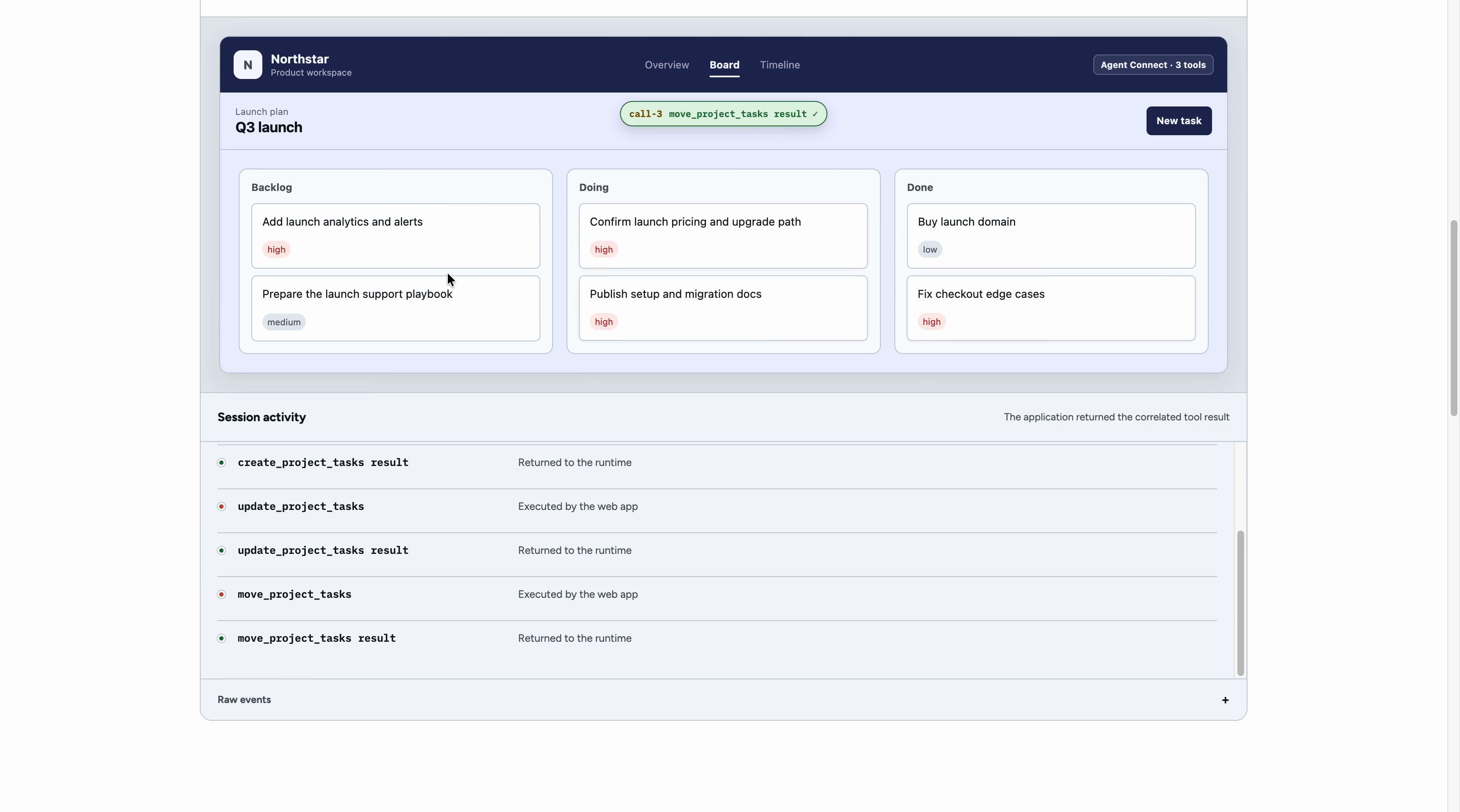
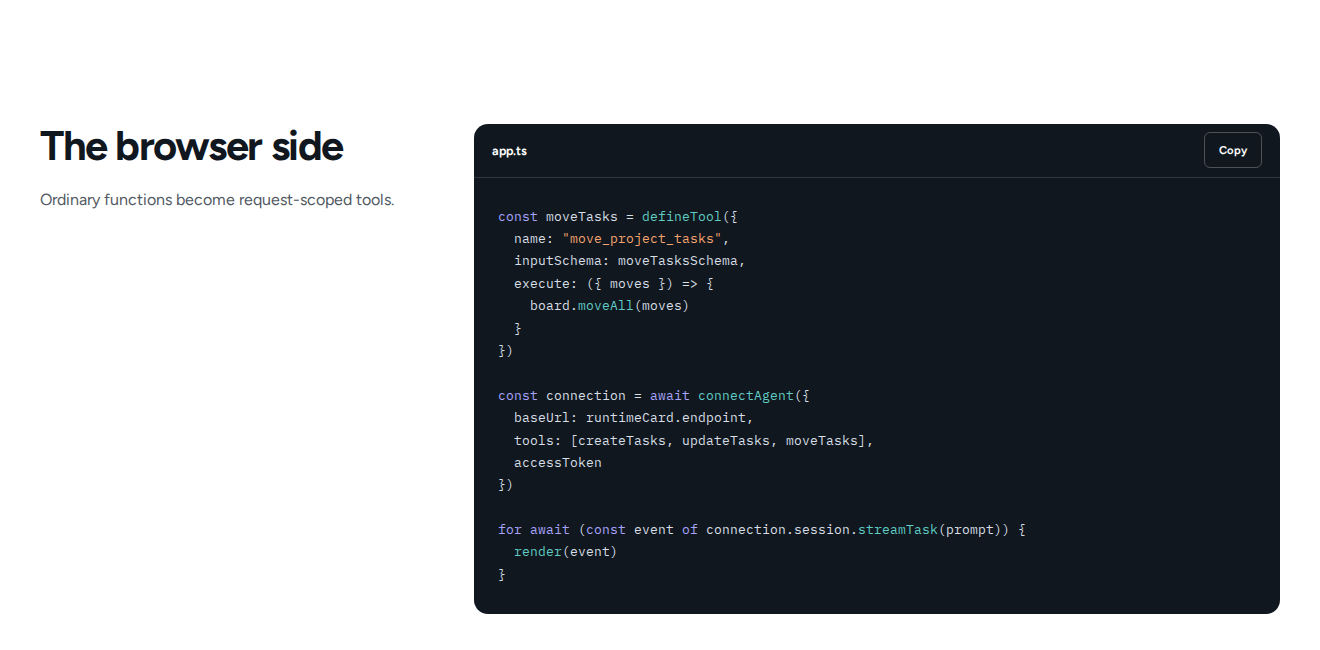
From an app developer's side, Agent Connect is an SDK. You define tools, attach a handler to each, pass in the identifying information needed to connect to a remote agent, and bam: AI features powered by users' coding agents.
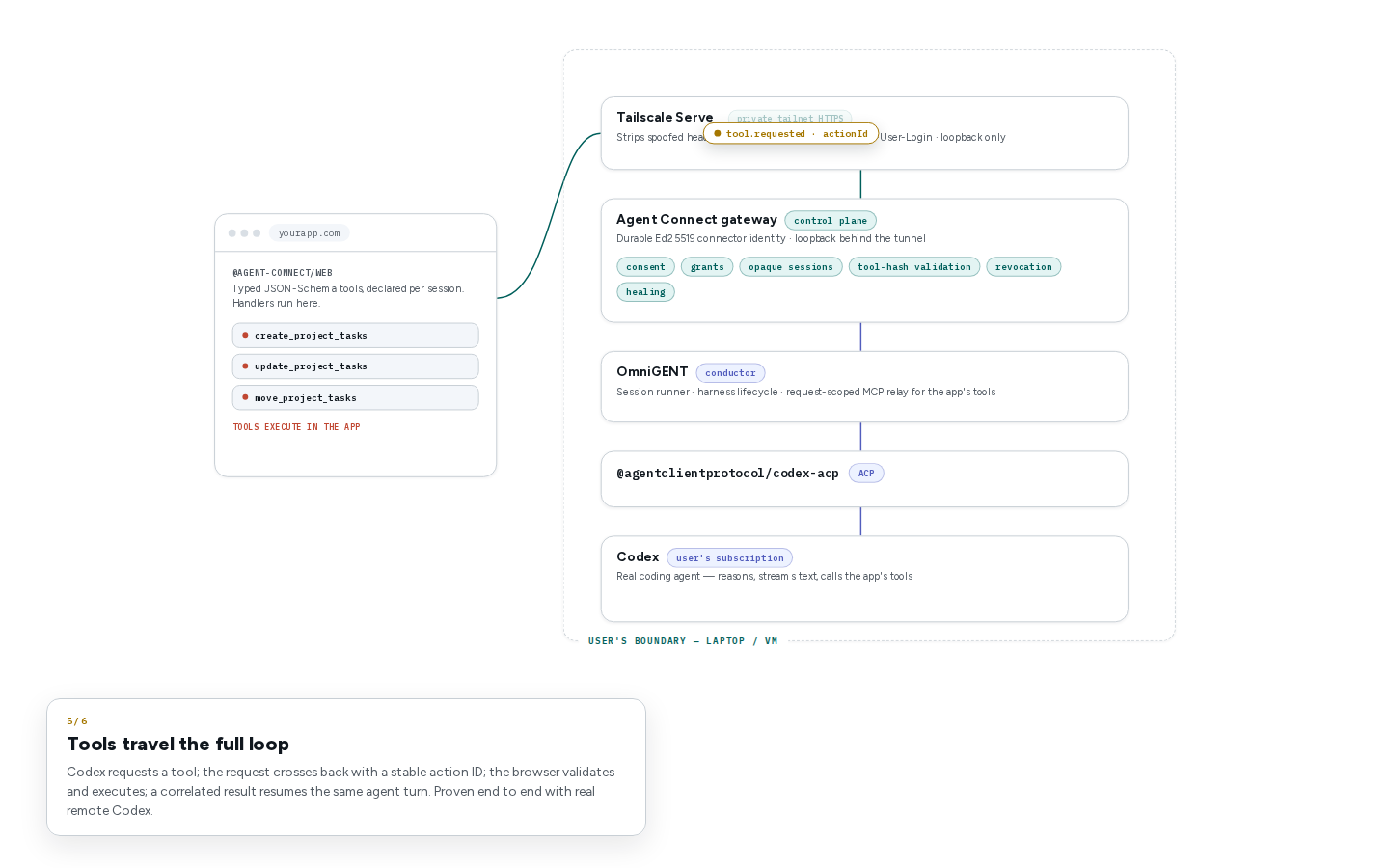
From a user's perspective, Agent Connect is a program you launch on your side: on your laptop, a remote VM, an ephemeral development environment, etc. It just needs to be made safely reachable through the internet. Tailscale fills this role in the MVP. This Agent Connect program acts as a gateway that handles authentication and manages an Omnigent instance, which itself orchestrates a Codex instance through ACP.
Once both exist, the user's flow is:
- Start the Agent Connect Gateway on your VM, laptop, etc.
- Save the generated runtime card and secret passphrase somewhere. A password manager is a good place for them (like Dashlane ❤️).
- Start Tailscale Serve to expose the Agent Connect Gateway privately within your tailnet.
- Now the user has an agent available for work anywhere on their tailnet.
- Open an app that implements tools and plugs them into the Agent Connect SDK.
- Enter the runtime card in the web app and get redirected to an authentication page served by the Agent Connect Gateway.
- Enter the secret passphrase and approve the permission grant being requested by the web app.
- Get redirected back to the web app with the material needed to establish an authorized connection to the Agent Connect Gateway.
- Now the user's agent is ready to interact with the app through remote tool calls 🎉🎉 All the user has to do is prompt, and the remote agent does its magic.
How I built it
This was built in close partnership with GPT-5.6 Sol through Codex. It started as a discussion, exploration, and research with subagents.
Are there standard protocols for this kind of thing that already exist? There is ACP, but full support for remote agents is still a work in progress. ACP was concieved so that IDEs could talk to coding agents on the same machine through stdio. It now also has a draft to define remote HTTP and WebSocket scenarios, so the shape isn't too far off from the idea.
I'd also recently heard about Omnigent, built by the Databricks team. At first, I'd dismissed it as unnecessary overhead for running coding agents. But the more I thought about the problems involved in orchestrating an agent, the more I understood the big value of something like Omnigent. I realized it already did a lot of what I wanted, such as orchestrating agents in a harness-agnostic-ish way. It seemed more and more like a good fit.
Then came the problem of "dynamic tools." The current common approach is to define tools in advance on the harness side, or at least install some kind of MCP server. What I was imagining required defining and presenting the tools from the client side to an already-running setup. Omnigent can handle this by setting up an MCP relay dynamically at the start of a session.
The next part was how to expose this on the internet so it could be called by some third-party app. For personal apps, Tailscale would probably have been enough, but if this was to become a library and utility, we needed to push security further.
I did some threat modeling by going back and forth with Codex. At its core, the problem is twofold:
- How does the user-owned agent setup know that it can trust and should act on tasks coming from external callers?
- How does the web app know that the agent it is being pointed at actually belongs to the user and can be trusted, at least to some extent?
Then, as one digs into the details, other security concerns pop up. We came up with an authentication flow to handle these. The goal was for both sides to authenticate each other.
The gateway checks which app origin is requesting access and shows the user the exact tools the app wants to lend to the agent.
The app uses a runtime card to target and verify the identity of the gateway. On first use, the browser leaves the app and opens a page served by the gateway. That is where the user enters the enrollment passphrase and approves the grant, so the app itself never sees the secret.
The resulting grant is bound to the app origin and the exact tool definitions the user approved. If the app changes its tools, it has to ask again. Access can also be revoked from the gateway.
Challenges we ran into
The first major challenge of this project was dynamically defining the tools available to an agent remotely. This ended up being solved mostly under the hood by Omnigent.
The second major challenge was security. At the end of the day, this project is about opening a remote execution channel to an agent running on the user's boundary. If the app is also made by the user and everything is running inside their own tailnet, then everything is fine. But if Agent Connect is meant to be made available to more people and you end up using it with third-party apps, the security story changes. We need to secure the channel and make sure everyone knows who is talking to whom.
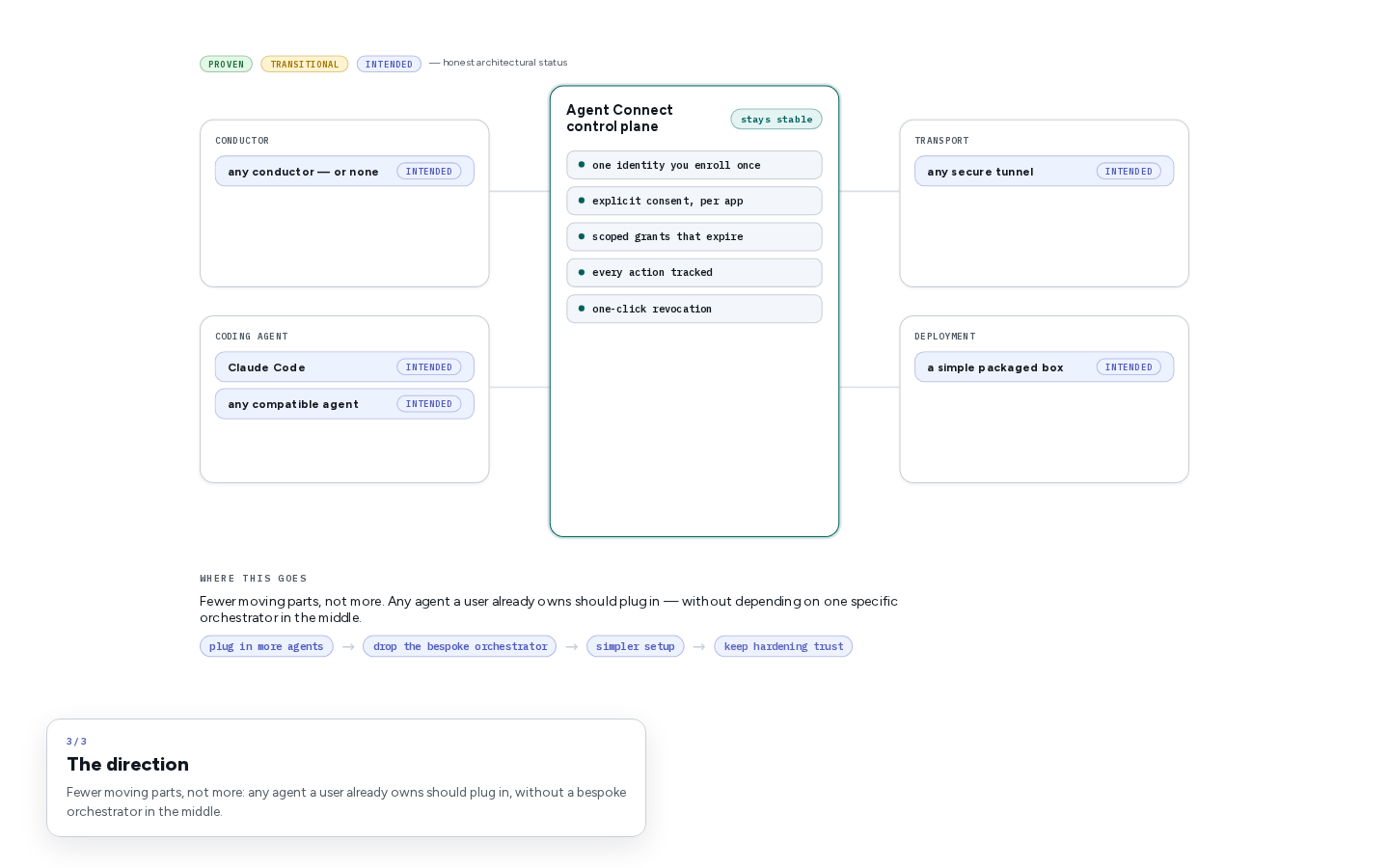
A third major challenge is that this domain is very young. I would have preferred to use an existing standard protocol for communication between the SDK and the Gateway, so the SDK could be more agnostic about what was being used behind the scenes to run the agent. The first gateway implementation in the hackathon MVP is tightly coupled internally with Omnigent, which isn't necessarily a bad thing, since Omnigent is awesome. But it means that people have to deploy Omnigent instead of being able to use anything that speaks ACP together with something like MCP-over-ACP (which isn't stable yet).
Accomplishments that I am proud of
Agent Connect actually works, and I now have AI features in my shopping list app, which I managed to convince some people close to me to actually use 🎉🎉
I think the security story is pretty solid, even if it's not perfect. Agent Connect cannot guarantee that the gateway environment hasn't been compromised or that a third-party app isn't malicious. A malicious app can implement whatever handlers it wants. But even so, I'm proud that the final shape cares about trying to protect the user to some extent.
What I learned
First, GPT-5.6 Sol on medium is absurdly capable. Almost the entire project was designed and implemented through it. It was especially interesting when, for the public demo, we had to move from the private Tailscale Serve setup to a public Tailscale Funnel. Codex found a security issue by itself: the grant page had suddenly become anonymously accessible. I would have expected it to catch something like that when prompted, but I didn't expect it to autonomously find the problem while implementing the alternative public version of the demo.
I also learned that Omnigent is awesome. The Databricks AI team and Neon have built a really cool open-source project. Its source is available on GitHub.
Finally, I learned a lot about the complexities of remotely managing an agent: its responses, its tool calls, keeping a session online, and thinking about how to deal with reconnects that have unfinished tool calls. It'll be an interesting future for this project for sure, but even in its current state, it's already usable and it feels great.
What's next for Agent Connect
The next step for the project is cleaning up all the AI "artifacts" that get created when a project is developed in this way with a coding harness. And there's definitely a lot of it to do.
Then I'd like to explore switching to a more open protocol like AG-UI for communication between the SDK and the Gateway, because it seems like a good fit.
I'd also like to write other profiles for connecting the SDK to the Gateway: for example, by using Microsoft's Remote Tunnels, like the ones used by VS Code; by targeting a locally running Gateway on the same laptop; or even by using a VM environment in a cloud provider to make it easy for a user who isn't super technical and doesn't want to maintain a remote VM with Tailscale. It's definitely doable.
Another important goal is make Agent Connect gateway deployment safer. In its current state it inherits a bit of the agent environmnet already set up. I imagine a future where Agent Connect handles some level of sandboxing and isolation to reduce the risks of 3rd party apps trying to abuse the underlying agent and its environment.
The underlying goal is to make Agent Connect easier to use and accessible to anyone, and safer, so that it can potentially become a common way of integrating AI features and making them available to any user who has an AI subscription, not only those who know how to set something like this up themselves. Good, simple packaging for something like this is essential.
Built With
- acp
- claudedesign
- codex
- omnigent
- tailscale
- vite

Log in or sign up for Devpost to join the conversation.