-
-
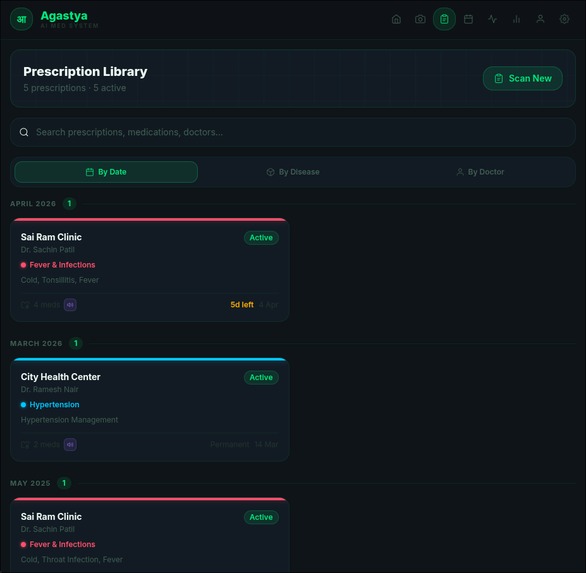
Prescription
-
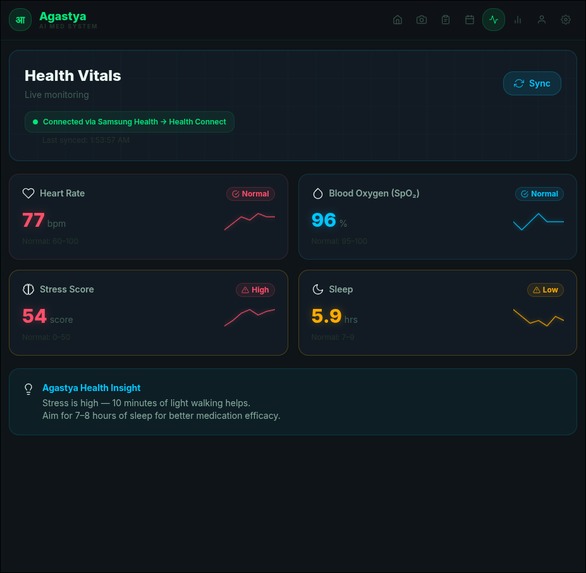
Health
-
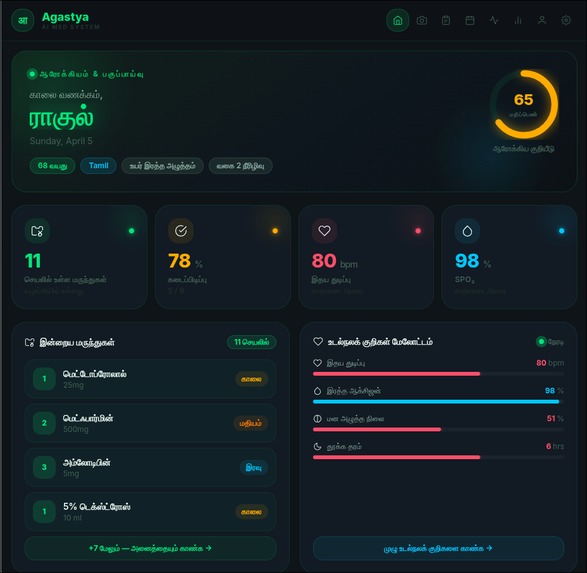
Home
-
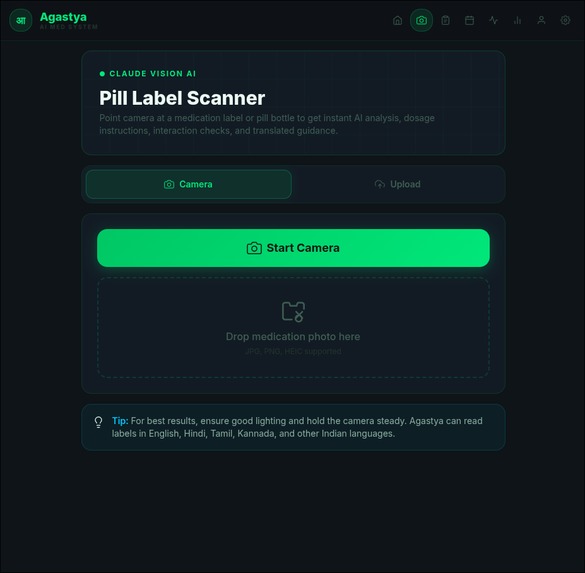
Scanner
-
Dispensing
Agastya — AI Medication Intelligence System
Knowledge · Care · Intelligence
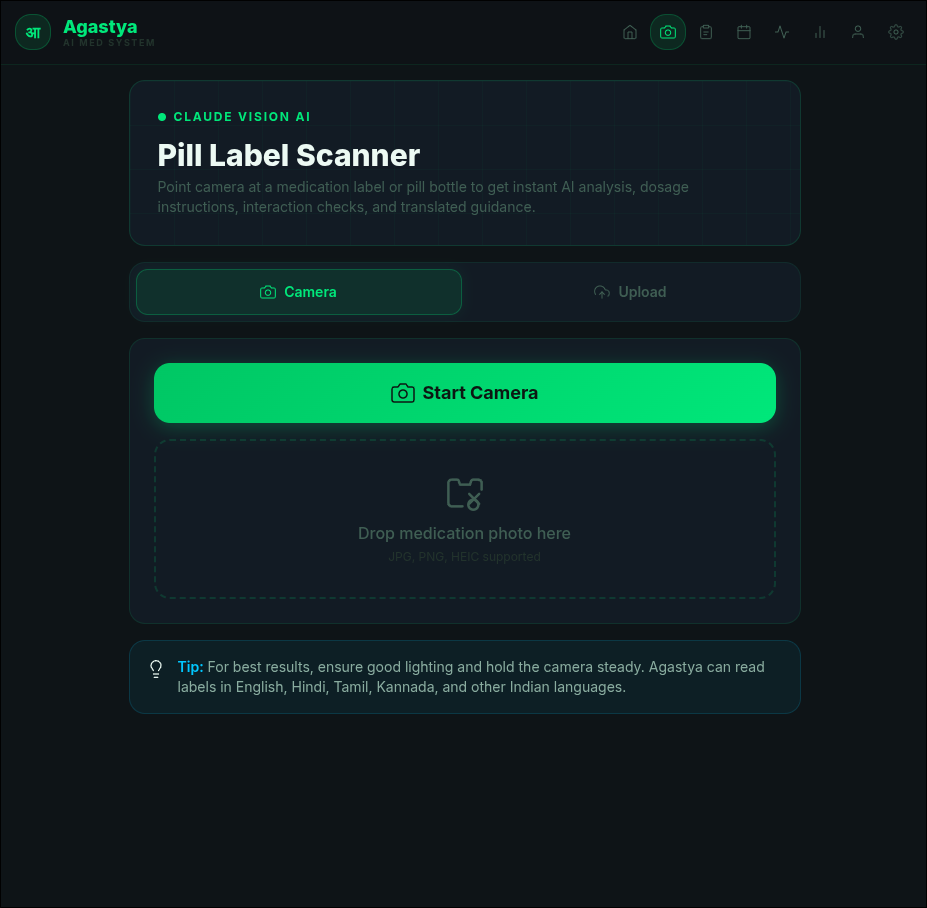
Agastya is an AI-powered medication management web app built for Indian households. It uses Claude AI vision to scan pill bottle labels and handwritten clinic prescriptions, manages a daily medication schedule with a smart physical dispenser integration, and supports multilingual voice output — making medication management accessible to elderly patients across language barriers.
Built in 24 hours for ScarlettHacks hackathon by ACM IIT.
Features
Medication Scanner
- Point the camera at any pill bottle label — Claude AI reads it and extracts the drug name, dosage, frequency, slot, and side effects
- Automatically checks for drug interactions with the patient's existing medications, rated by severity (high / medium / low)
- Generates simplified instructions in the patient's preferred language
- Supports live camera capture or file upload (JPG, PNG, HEIC)
Prescription Scanner
- Scans handwritten Indian clinic prescriptions, including mixed regional scripts — Kannada, Hindi, Tamil, and English
- Understands Indian prescription shorthand:
OD,BD,TDS,QID,HS,SOS - Extracts clinic name, doctor name, patient details, diagnosis, visit vitals, and all medications with dosages and durations
- Auto-calculates course expiry dates from duration codes (e.g.
x10 days,5D,1/52) - Lets you review and correct the AI extraction before saving
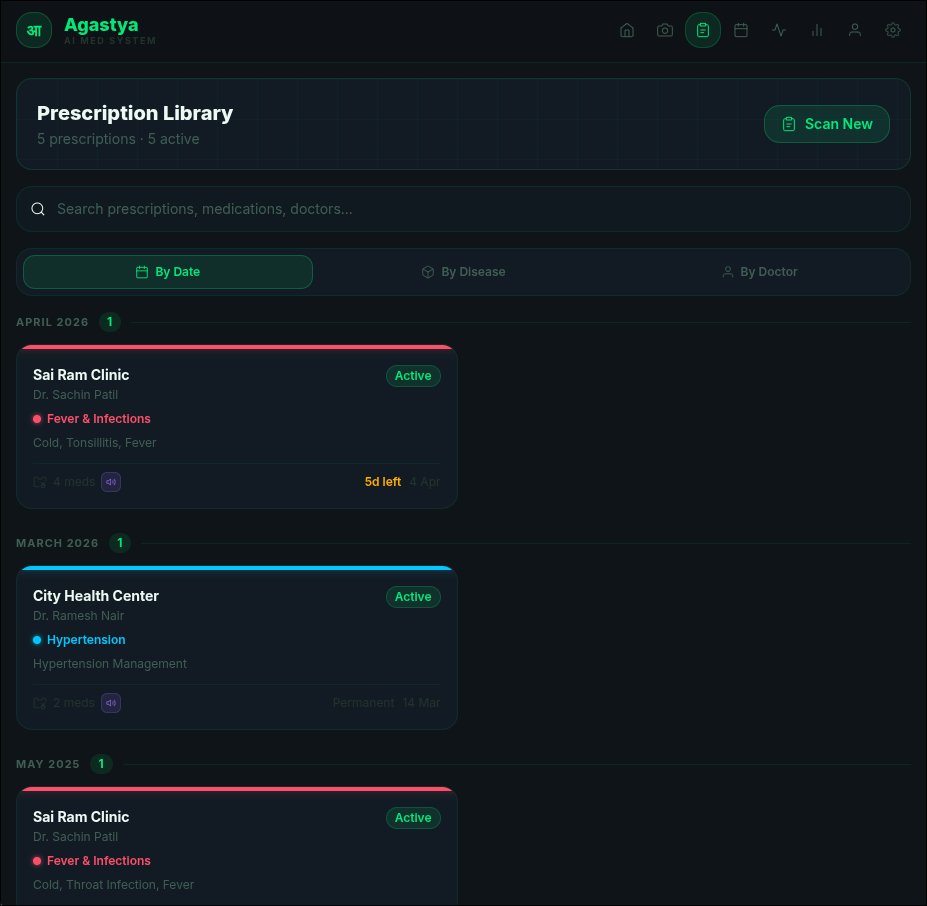
Prescription Library
- All scanned prescriptions stored locally in IndexedDB — no server required
- Browse prescriptions by date, diagnosis, or doctor
- Full detail view per prescription including all medications
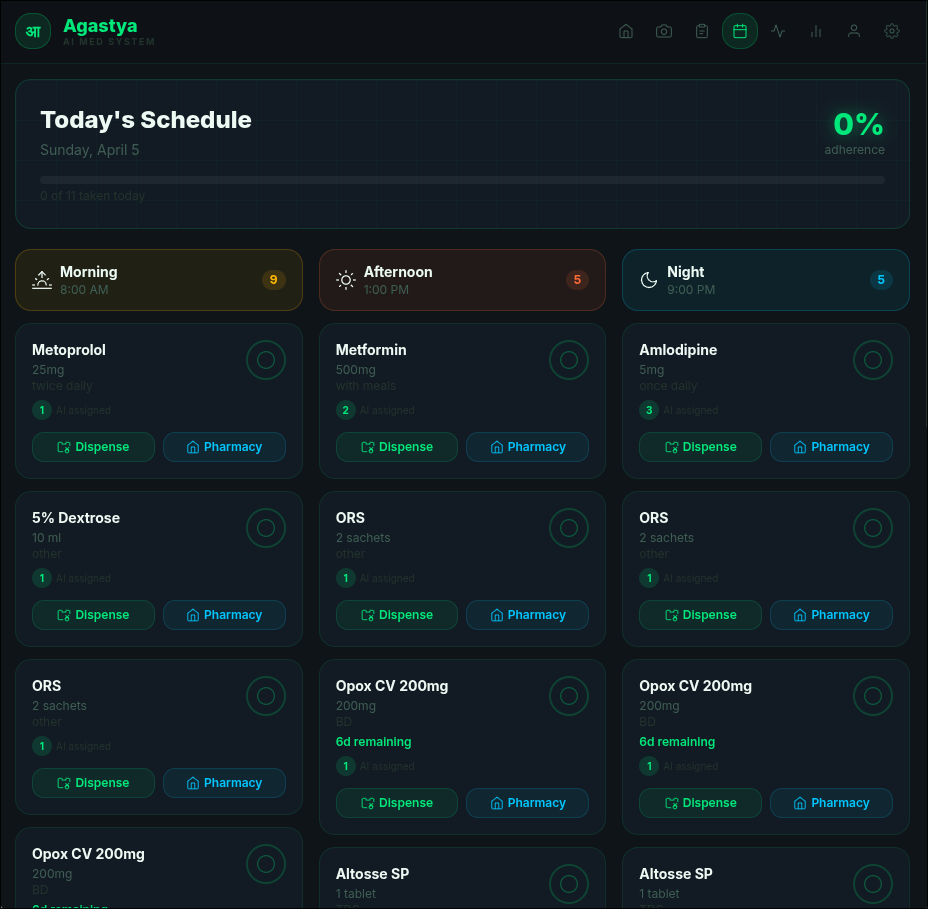
Medication Schedule
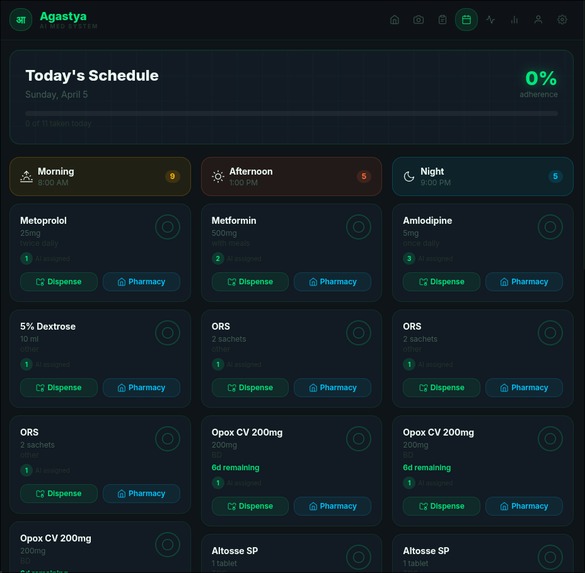
- Daily schedule split into Morning / Afternoon / Night slots
- Mark medications as taken with one tap — live adherence tracking
- Shows days remaining for time-limited courses
- Medications auto-expire and are removed from the schedule when their course ends
Smart Dispenser Integration
- Sends dispense commands to a physical IoT pill dispenser over local HTTP (
localhost:5000) - Each medication is assigned a compartment number (morning = 1, afternoon = 2, night = 3)
- A companion Flask bridge server (
dispenser-bridge/server.py) coordinates between the React app and a Blender 3D animation of the dispenser - Gracefully falls back when the dispenser is offline
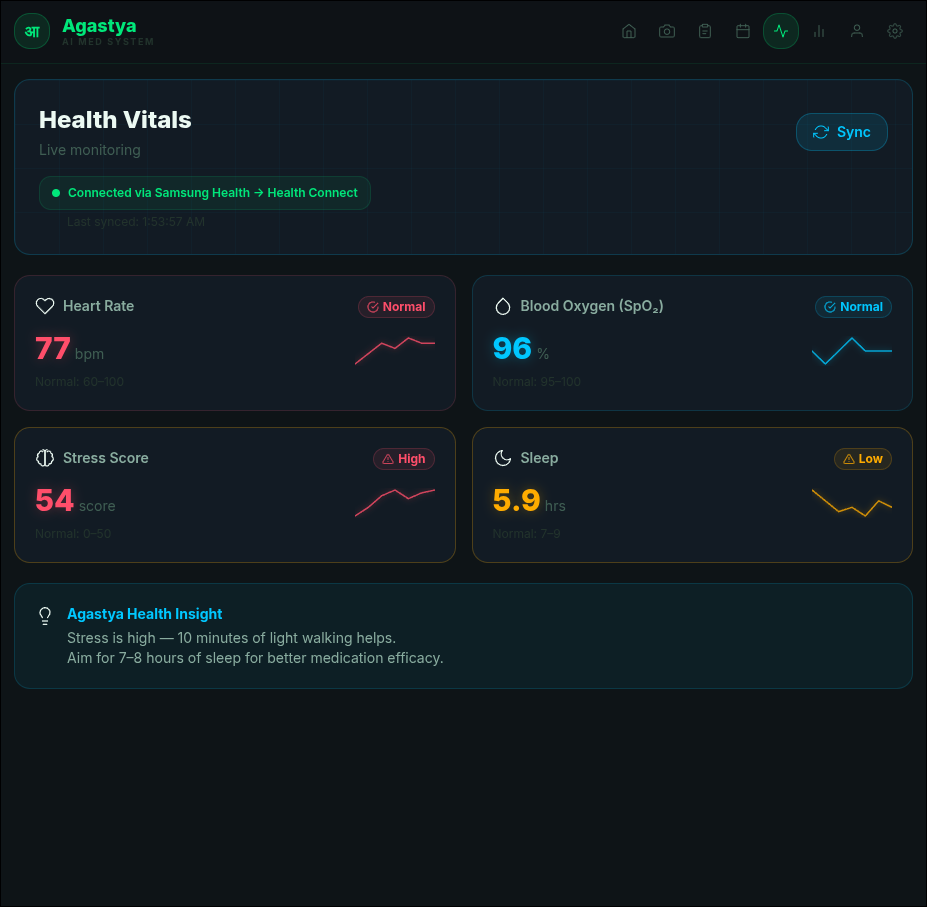
Health Vitals Dashboard
- Displays heart rate, SpO₂, stress score, and sleep quality
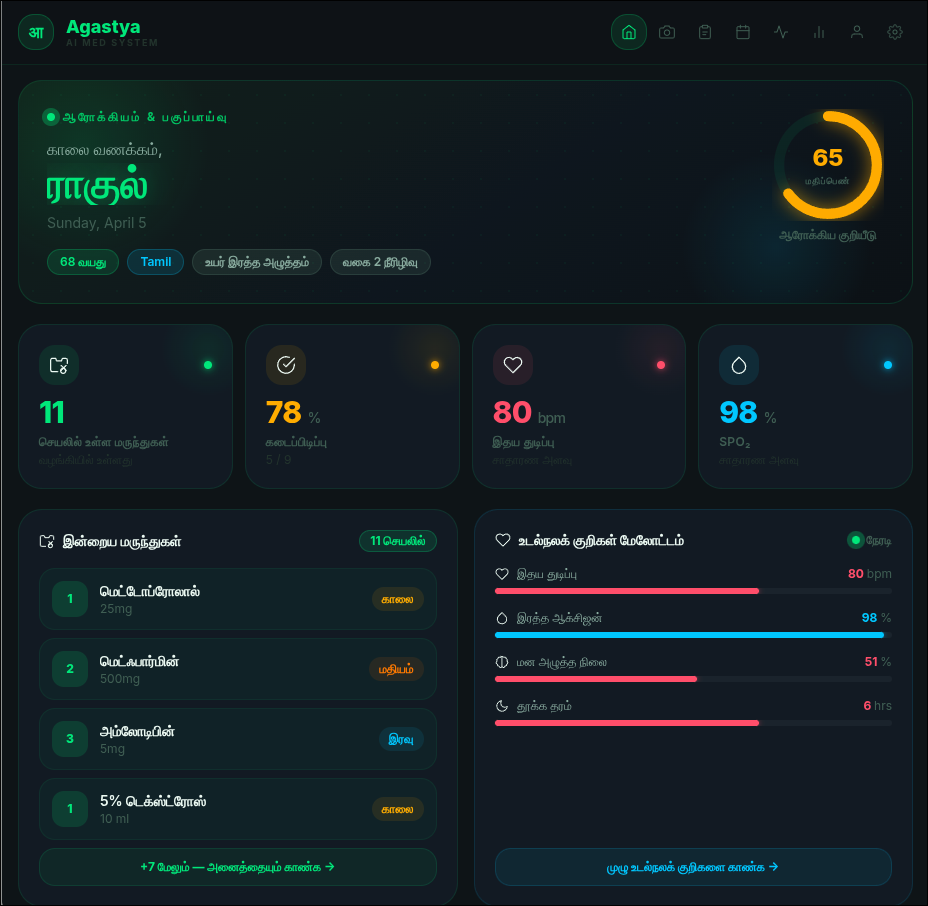
- Animated health score ring calculated from adherence + vitals status
- Designed to connect to Samsung Health via Health Connect
Adherence History
- 30-day adherence log showing taken on time / taken late / missed
- Summary statistics and visual bar breakdown
Caregiver Alerts
- AI-generated alert messages composed by Claude for a natural, personalised tone
- Sent via EmailJS to a registered caregiver email
Multilingual UI + Voice
- Full UI available in: English, Hindi, Tamil, Kannada, Spanish
- Claude AI transliterates medication and patient names into the patient's script
- Pharmacy Voice Mode — full-screen mode to show pharmacists, with voice readout of medication name and instructions in the patient's language
- Uses the Web Speech API with smart voice selection
Firebase Authentication
- Email/password sign-in and sign-up with email verification
- Password reset flow
- Auth state drives the entire app — unauthenticated users see a dedicated login page
Patient Profile
- Editable name, age, language, medical conditions, and caregiver contact
- Profile drives AI personalisation across all scans and translations
Tech Stack
| Layer | Technology |
|---|---|
| Frontend | React 18 + Vite 5 |
| Styling | Tailwind CSS 3 + custom CSS variables |
| AI / Vision | Claude API (claude-opus-4-5) — vision + text |
| Auth | Firebase Authentication |
| Local Storage | IndexedDB via idb (with localStorage fallback) |
| Email Alerts | EmailJS |
| Voice Output | Web Speech API (speechSynthesis) |
| Dispenser Bridge | Flask + Flask-CORS (Python) |
| Hardware | IoT pill dispenser + Blender 3D animation (optional) |
Project Structure
agastya/
├── src/
│   ├── App.jsx                        # Root — tab routing, global state, toast system
│   ├── main.jsx                       # React entry point + Firebase auth provider
│   ├── components/
│   │   ├── AuthPage.jsx               # Login / Signup / Password reset page
│   │   ├── Dashboard.jsx              # Home — health score ring, metric cards, quick actions
│   │   ├── Scanner.jsx                # Pill bottle camera/upload scanner
│   │   ├── MedAnalysis.jsx            # AI scan results — interactions, instructions, actions
│   │   ├── PrescriptionScanner.jsx    # Handwritten prescription scanner + review card
│   │   ├── PrescriptionLibrary.jsx    # All saved prescriptions list
│   │   ├── PrescriptionDetail.jsx     # Single prescription detail view
│   │   ├── Schedule.jsx               # Daily medication schedule by slot
│   │   ├── DispenserBridge.jsx        # Dispenser UI — countdown + polling
│   │   ├── DispenserSettings.jsx      # Manually add/remove/pause medications
│   │   ├── VitalsPanel.jsx            # Live vitals with sync
│   │   ├── AdherenceHistory.jsx       # Adherence history table
│   │   ├── PatientProfile.jsx         # Edit patient info + caregiver contact
│   │   ├── CaregiverAlert.jsx         # AI-generated caregiver email UI
│   │   ├── PharmacyVoice.jsx          # Full-screen pharmacy voice mode
│   │   ├── VoiceOutput.jsx            # Voice readout component
│   │   ├── Navbar.jsx                 # Responsive bottom nav bar
│   │   └── Icons.jsx                  # All SVG icon components
│   ├── utils/
│   │   ├── claudeApi.js               # All Claude API calls — scan, prescribe, translate, alert
│   │   ├── prescriptionDB.js          # IndexedDB CRUD + auto-expiry logic
│   │   ├── firebase.js                # Firebase app + auth initialisation
│   │   ├── dispenser.js               # IoT dispenser HTTP client
│   │   ├── emailAlert.js              # EmailJS caregiver alert sender
│   │   ├── voiceEngine.js             # Web Speech API wrapper (Chrome/Linux safe)
│   │   ├── healthData.js              # Vitals data + normal-range calculations
│   │   └── i18n.js                    # UI string translations (EN, HI, TA, KN, ES)
│   ├── contexts/
│   │   ├── AuthContext.jsx            # Firebase auth state provider + useAuth hook
│   │   └── LanguageContext.jsx        # Language provider + useT / useLang hooks
│   └── data/
│       ├── mockPatient.js             # Default patient seed data
│       ├── mockPrescriptions.js       # Sample prescriptions for first-run seeding
│       ├── mockVitals.js              # Mock vitals reference values
│       └── mockHistory.js             # 30-day adherence history seed data
├── dispenser-bridge/
│   ├── server.py                      # Flask bridge — coordinates React ↔ Blender dispenser
│   └── blender_dispenser.py           # Blender script — polls bridge + drives 3D animation
├── index.html
├── vite.config.js
├── tailwind.config.js
└── package.json
Running the Project
Prerequisites
- Node.js 18 or later
- npm 7 or later
- An Anthropic API key — get one at console.anthropic.com
- A Firebase project with Authentication enabled — console.firebase.google.com
- (Optional) Python 3.9+ with Flask for the physical dispenser bridge
1. Clone the repository
git clone https://github.com/TGMadhusoodhan/agastya.git
cd agastya
2. Install dependencies
npm install
3. Set up environment variables
Create a .env file in the project root (copy from .env.example):
cp .env.example .env
Then fill in your values:
# ── Anthropic (required) ───────────────────────────────────────────────
VITE_ANTHROPIC_API_KEY=sk-ant-...

# ── Firebase (required) ────────────────────────────────────────────────
VITE_FIREBASE_API_KEY=AIza...
VITE_FIREBASE_AUTH_DOMAIN=your-project.firebaseapp.com
VITE_FIREBASE_PROJECT_ID=your-project-id
VITE_FIREBASE_STORAGE_BUCKET=your-project.appspot.com
VITE_FIREBASE_MESSAGING_SENDER_ID=123456789
VITE_FIREBASE_APP_ID=1:123456789:web:abc123

# ── EmailJS (optional — for caregiver alerts) ──────────────────────────
VITE_EMAILJS_SERVICE_ID=your_service_id
VITE_EMAILJS_TEMPLATE_ID=your_template_id
VITE_EMAILJS_PUBLIC_KEY=your_public_key
Never commit your
.envfile. It is already listed in.gitignore.
Firebase setup
- Go to console.firebase.google.com and create a project.
- Under Authentication → Sign-in method, enable Email/Password.
- Under Project Settings → Your apps, add a Web app and copy the config values into your
.env.
4. Start the development server
npm run dev
The app opens at http://localhost:5173.
Optional: Run the Dispenser Bridge (physical hardware)
The bridge server coordinates between the React web app and the Blender 3D dispenser animation.
cd dispenser-bridge
pip install flask flask-cors
python server.py
The bridge runs at http://localhost:5000. Endpoints:
| Endpoint | Method | Description |
|---|---|---|
/dispense |
POST | Trigger a dispense (called by React) |
/pending |
GET | Poll for next command (called by Blender) |
/status |
GET | Poll animation status (called by React) |
/status |
POST | Update animation status (called by Blender) |
/health |
GET | Health check |
/log |
GET | Full dispense history |
Optional: Voice output on Linux
Install a TTS engine so the Web Speech API has voices to use:
# Arch / Manjaro
sudo pacman -S espeak-ng speech-dispatcher
systemctl --user enable --now speech-dispatcher

# Debian / Ubuntu
sudo apt install espeak-ng speech-dispatcher
Restart your browser after installing. Run diagnoseVoices() in the browser console (from src/utils/voiceEngine.js) to check detected voices.
Build for Production
npm run build
Output goes to dist/. Deploy to any static host — Netlify, Vercel, Nginx, etc.
EmailJS Setup (for Caregiver Alerts)
- Create a free account at emailjs.com
- Add an email service (Gmail, Outlook, etc.)
- Create a template with these variables:
{{caregiver_name}}   — caregiver's name
{{patient_name}}     — patient's name
{{patient_age}}      — patient's age
{{medication_name}}  — medication that triggered the alert
{{medication_dose}}  — dosage
{{alert_reason}}     — reason for the alert
{{message}}          — AI-generated message body
{{timestamp}}        — when the alert was sent
- Copy your Service ID, Template ID, and Public Key into
.env
What's Next
- [ ] PWA support — install to home screen + offline mode
- [ ] Browser push notifications for medication reminders
- [ ] Cloud sync — replace IndexedDB with a real backend for multi-device use
- [ ] Wearable integration — live data from Fitbit, Apple Watch, Galaxy Watch
- [ ] Physical dispenser firmware — Arduino / Raspberry Pi companion code
- [ ] Doctor portal — prescription verification and digital signing
- [ ] Refill reminders + nearby pharmacy locator
About
Agastya (आगस्त्य) is a revered sage in Indian tradition — a symbol of knowledge, care, and healing across generations. This project was built to help elderly Indian patients who manage multiple medications, often without a caregiver always present, and who may not read English.
Built in 24 hours at ScarlettHacks hackathon by ACM IIT.


Log in or sign up for Devpost to join the conversation.