-
-
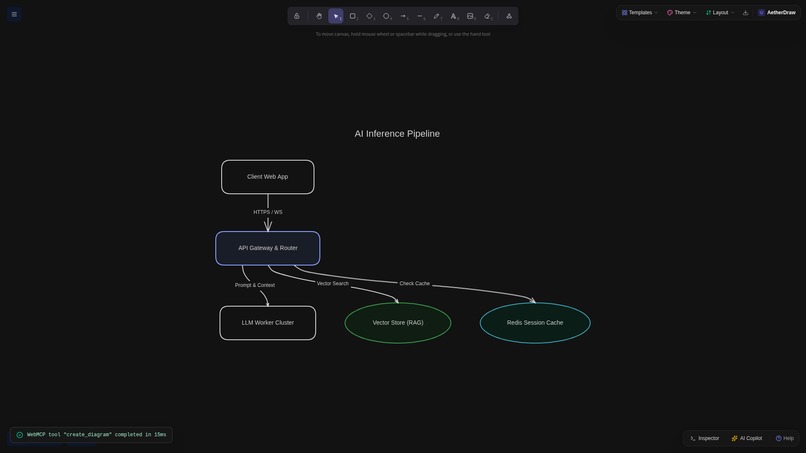
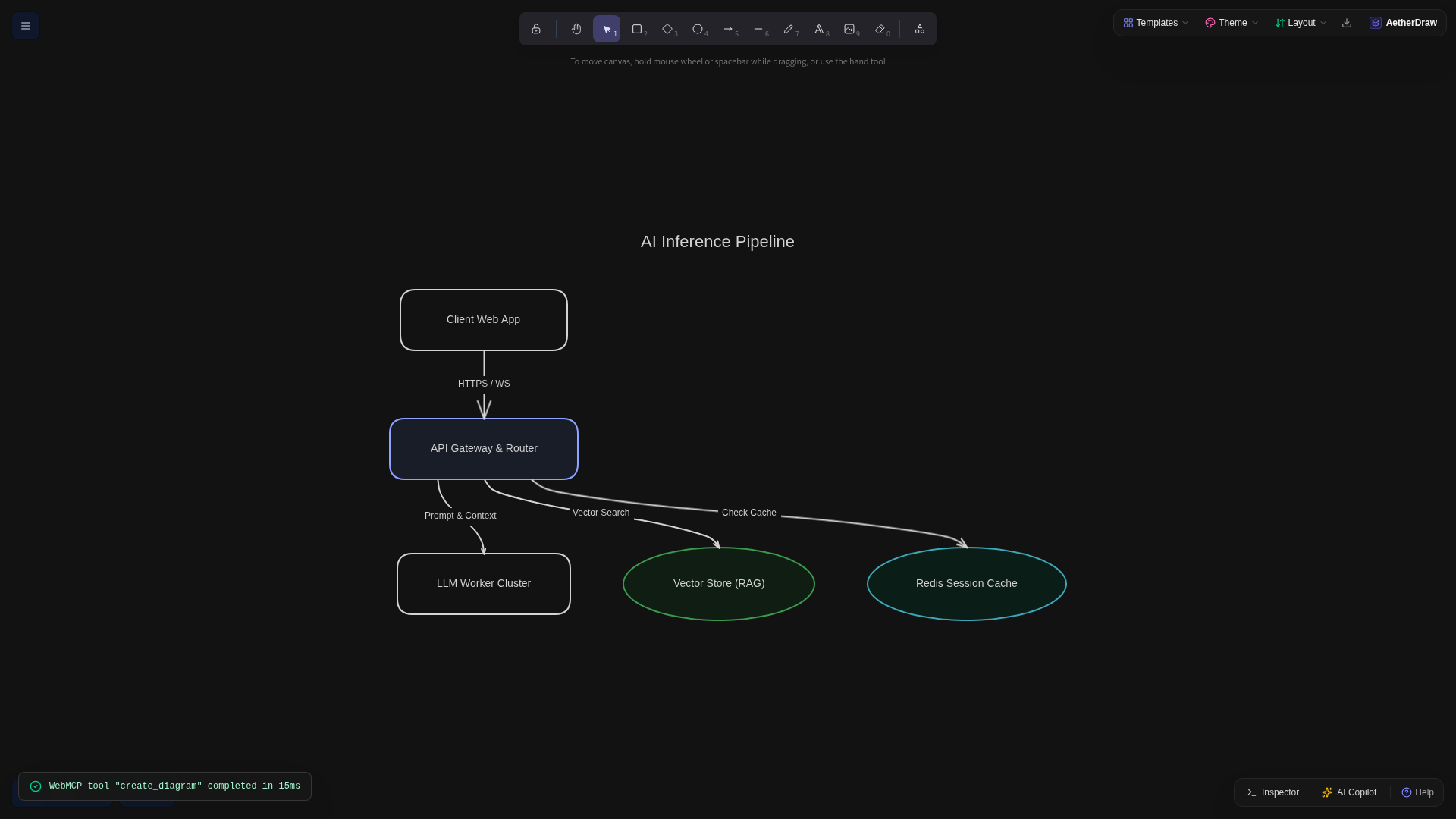
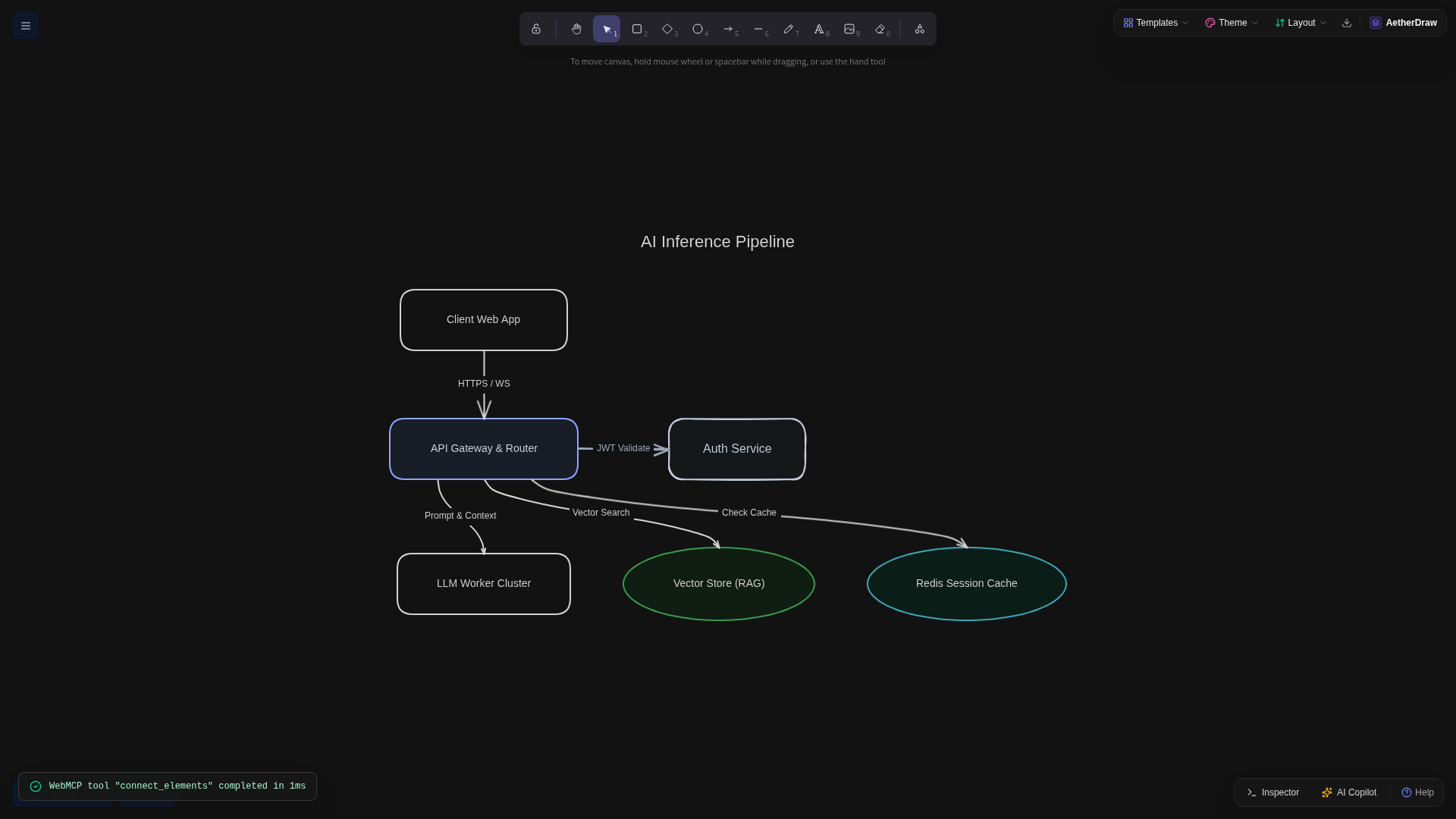
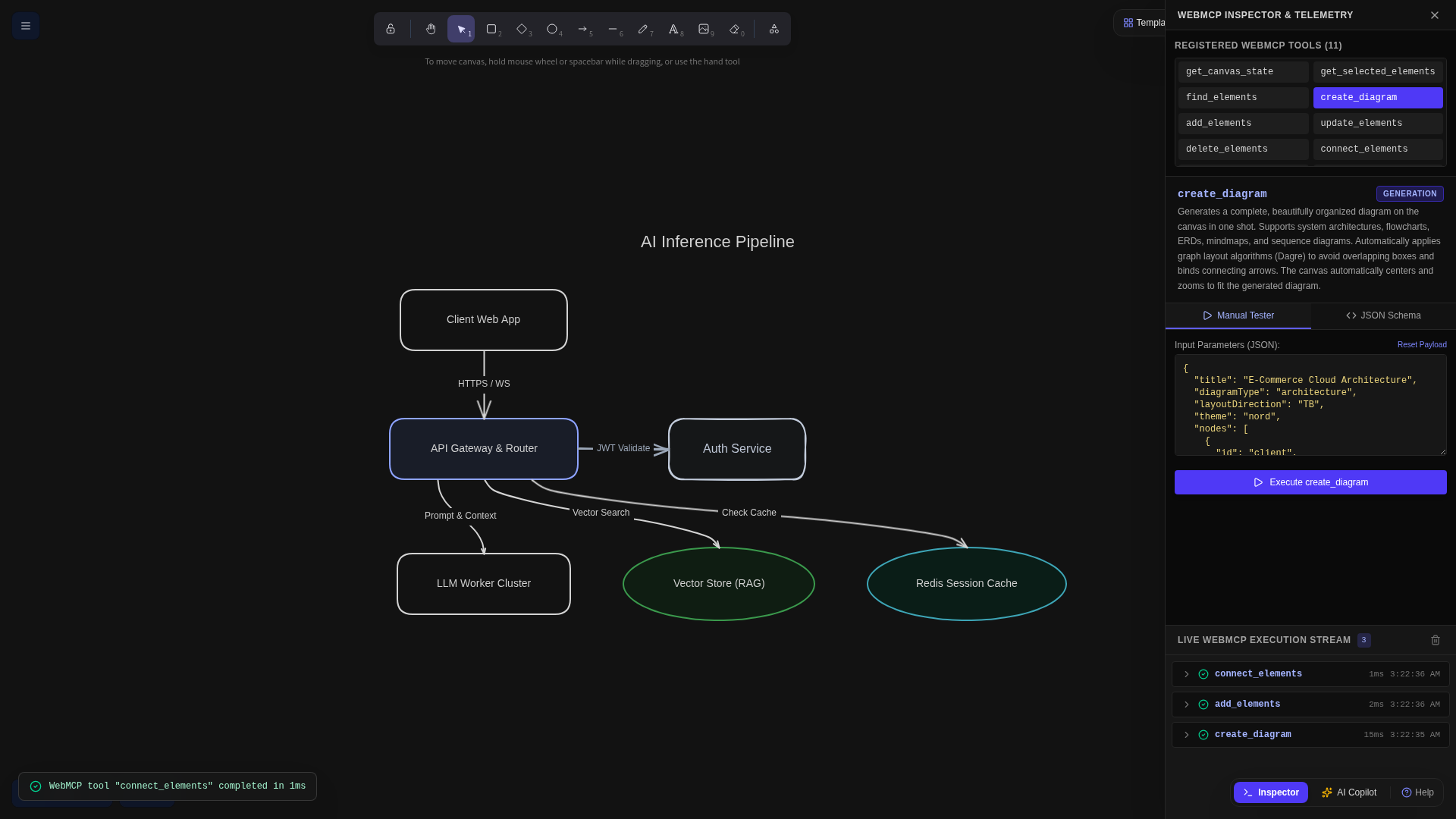
One-shot AI Inference Pipeline generated via create_diagram with automated Dagre layout, smooth cubic Bezier routing.
-
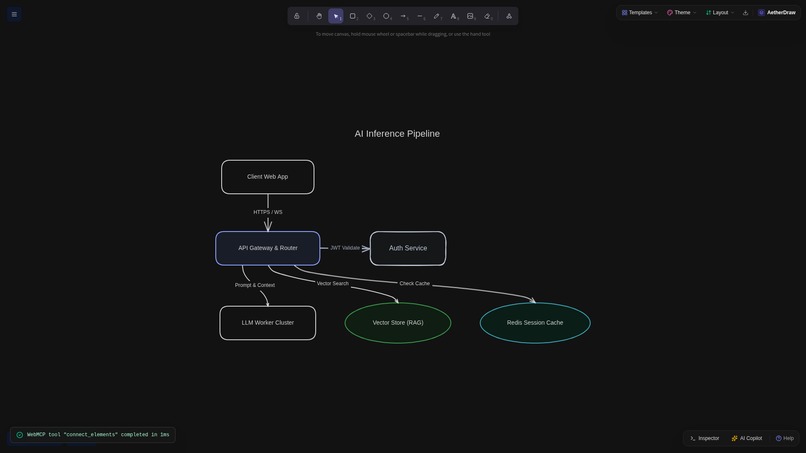
Bi-directional co-creation: Agent detects human-drawn Auth Service and routes a smart Bezier connector from API Gateway in 1ms.
-
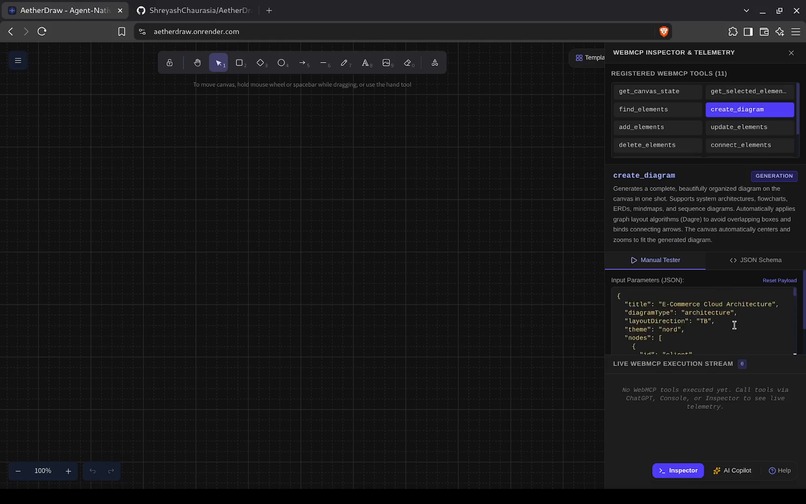
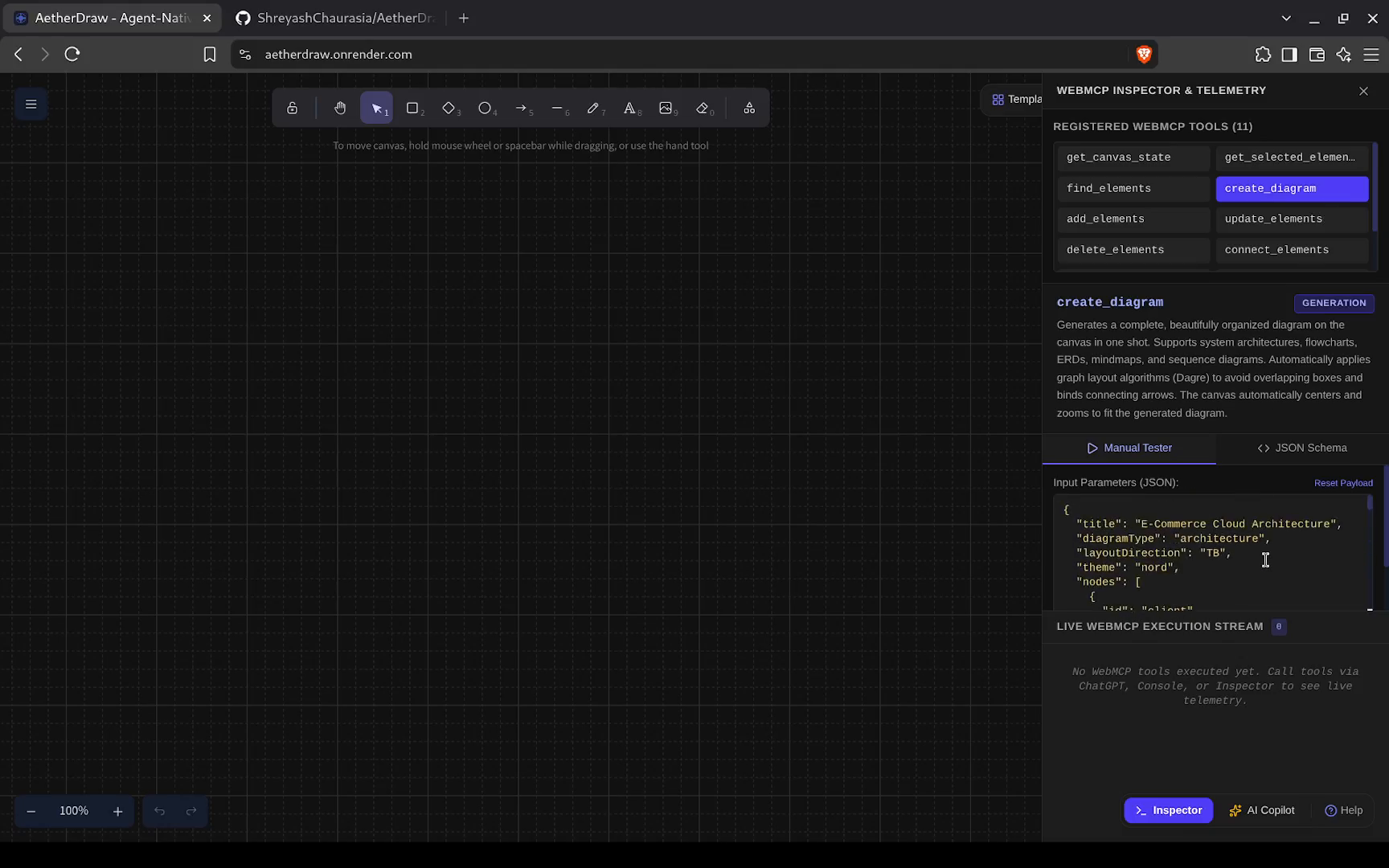
WebMCP Inspector drawer displaying all 11 registered browser tools, JSON parameter schemas, and real-time execution telemetry.
-
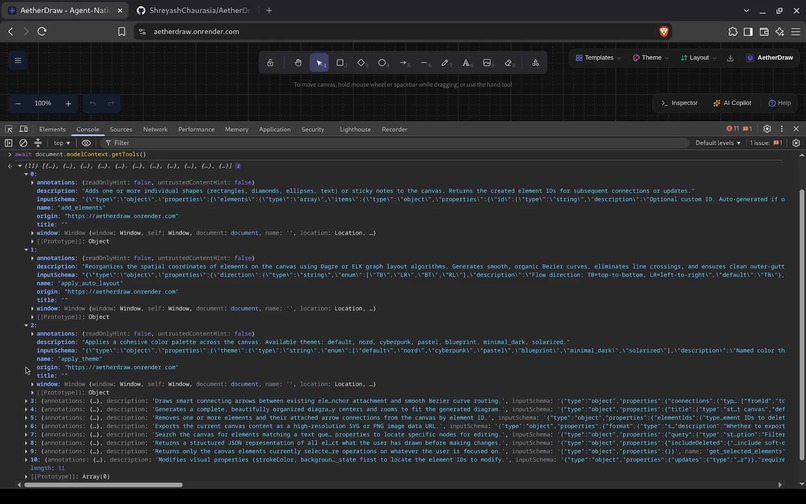
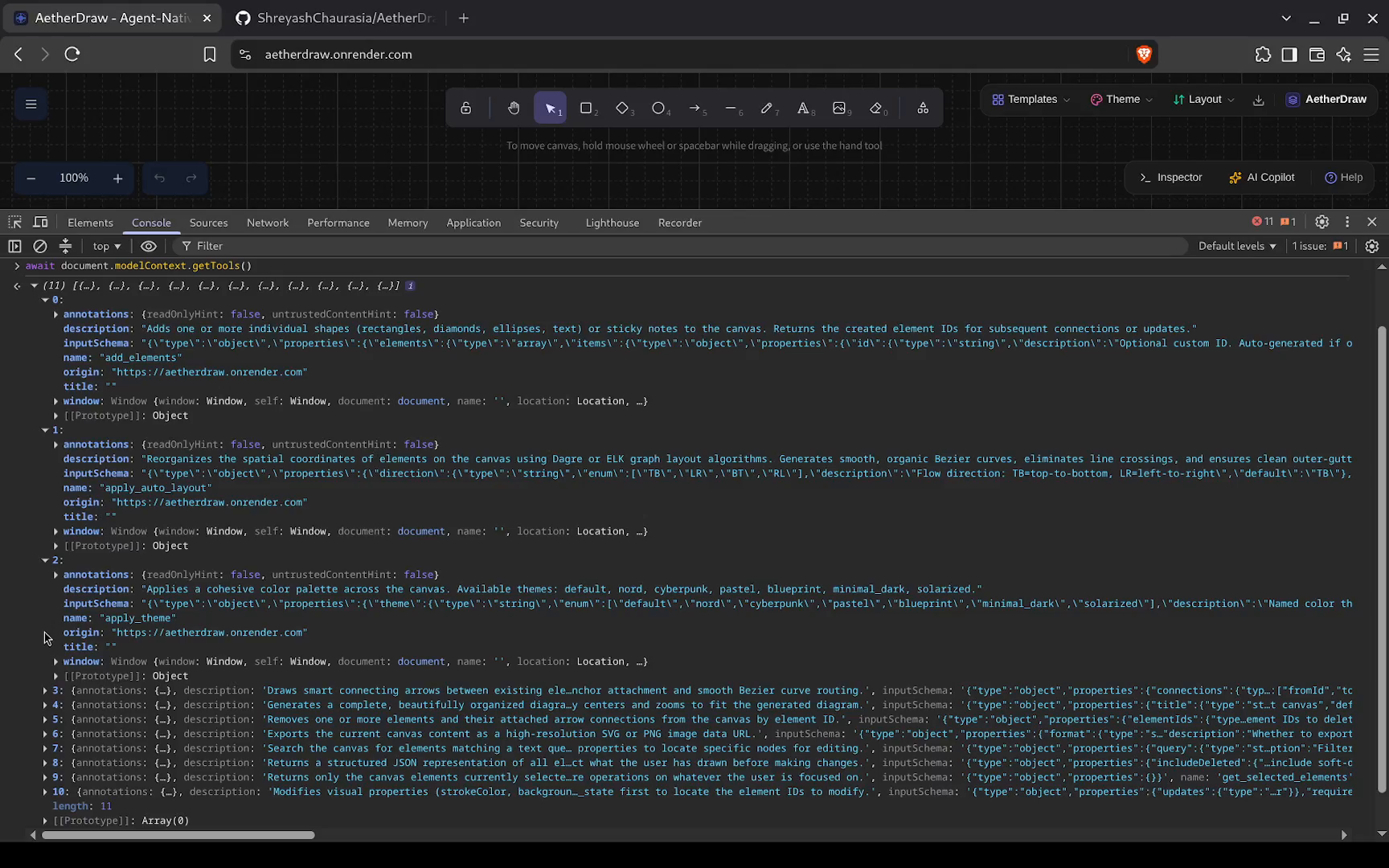
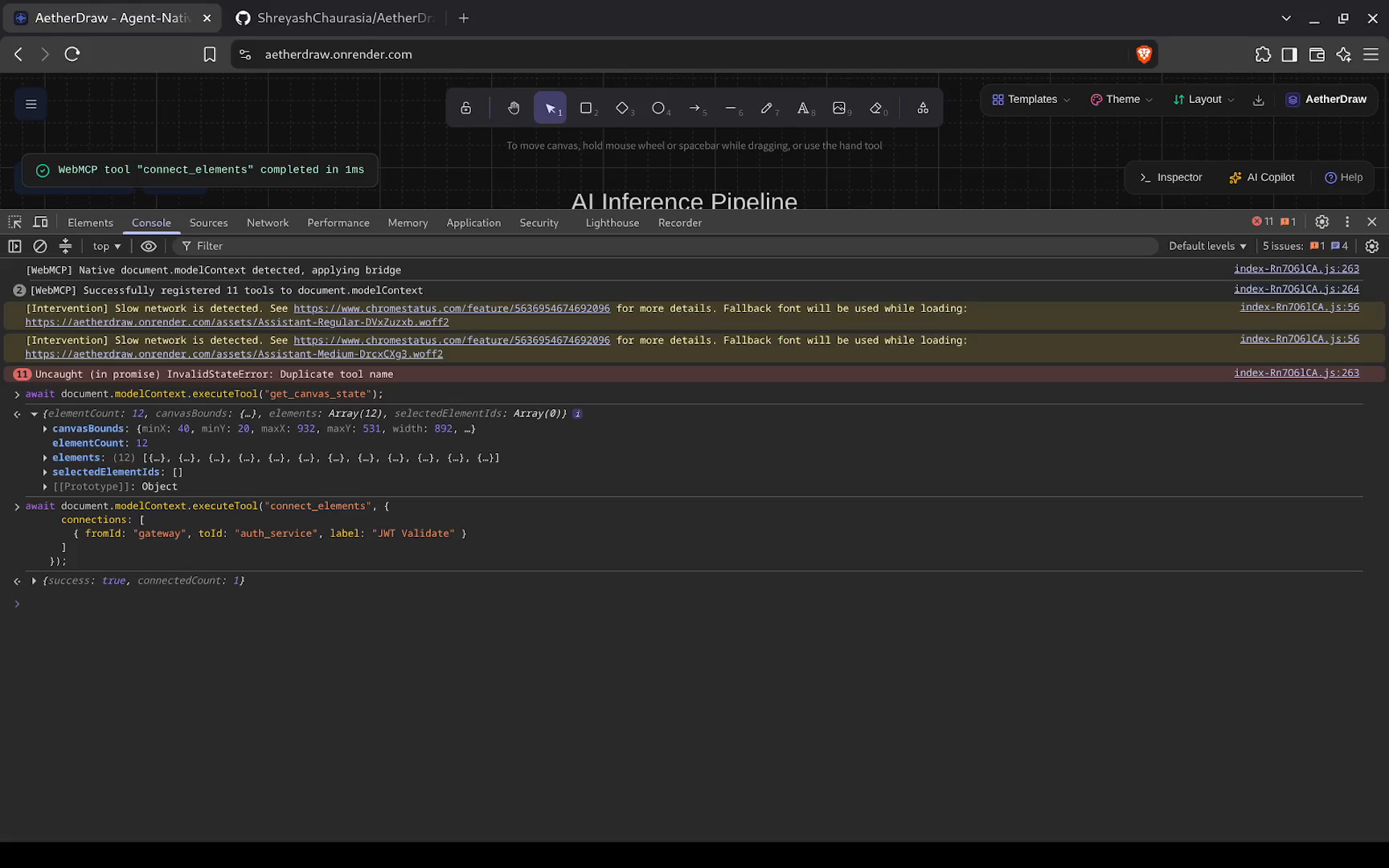
Console inspecting document.modelContext.getTools(), exposing typed WebMCP tool definitions directly to AI agents.
-
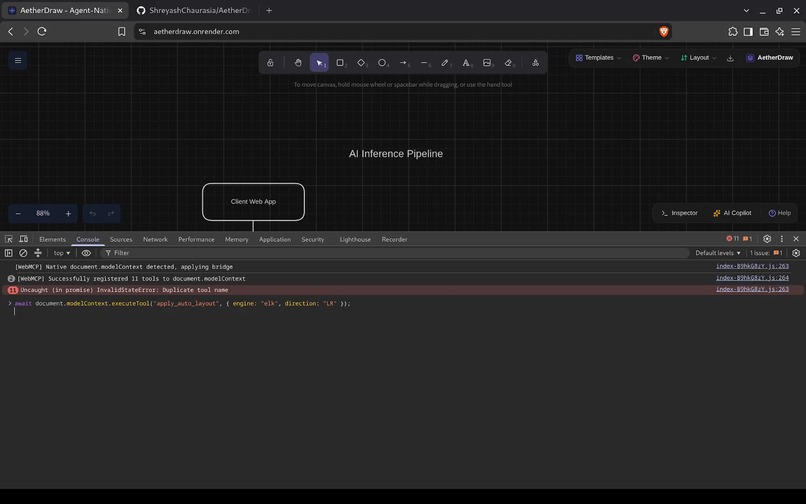
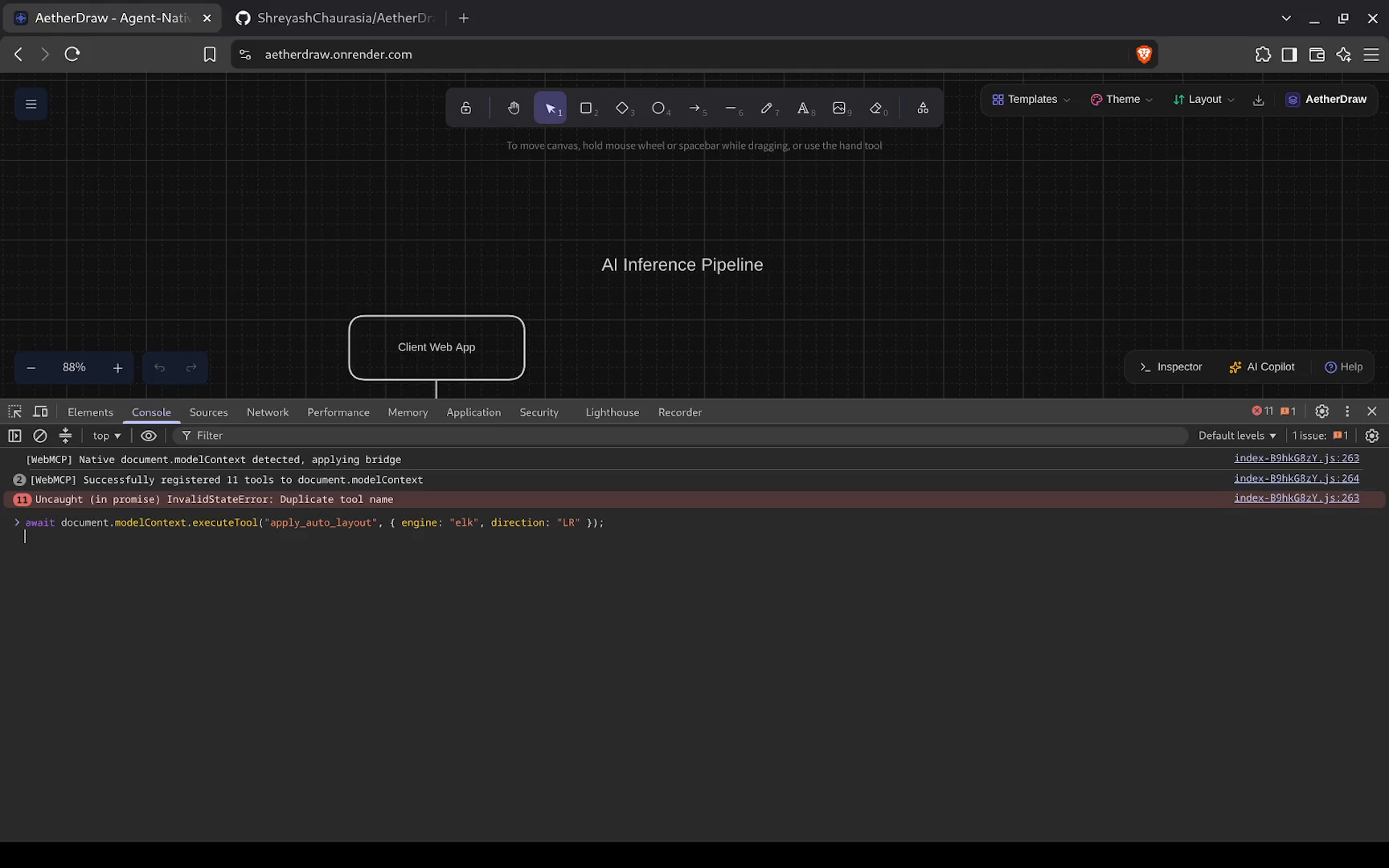
Autonomous diagram synthesis running directly inside the browser runtime via native WebMCP tool invocation.
-
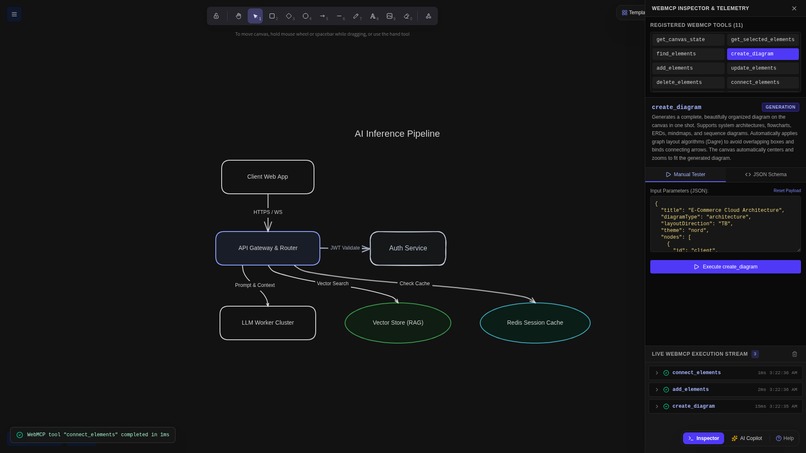
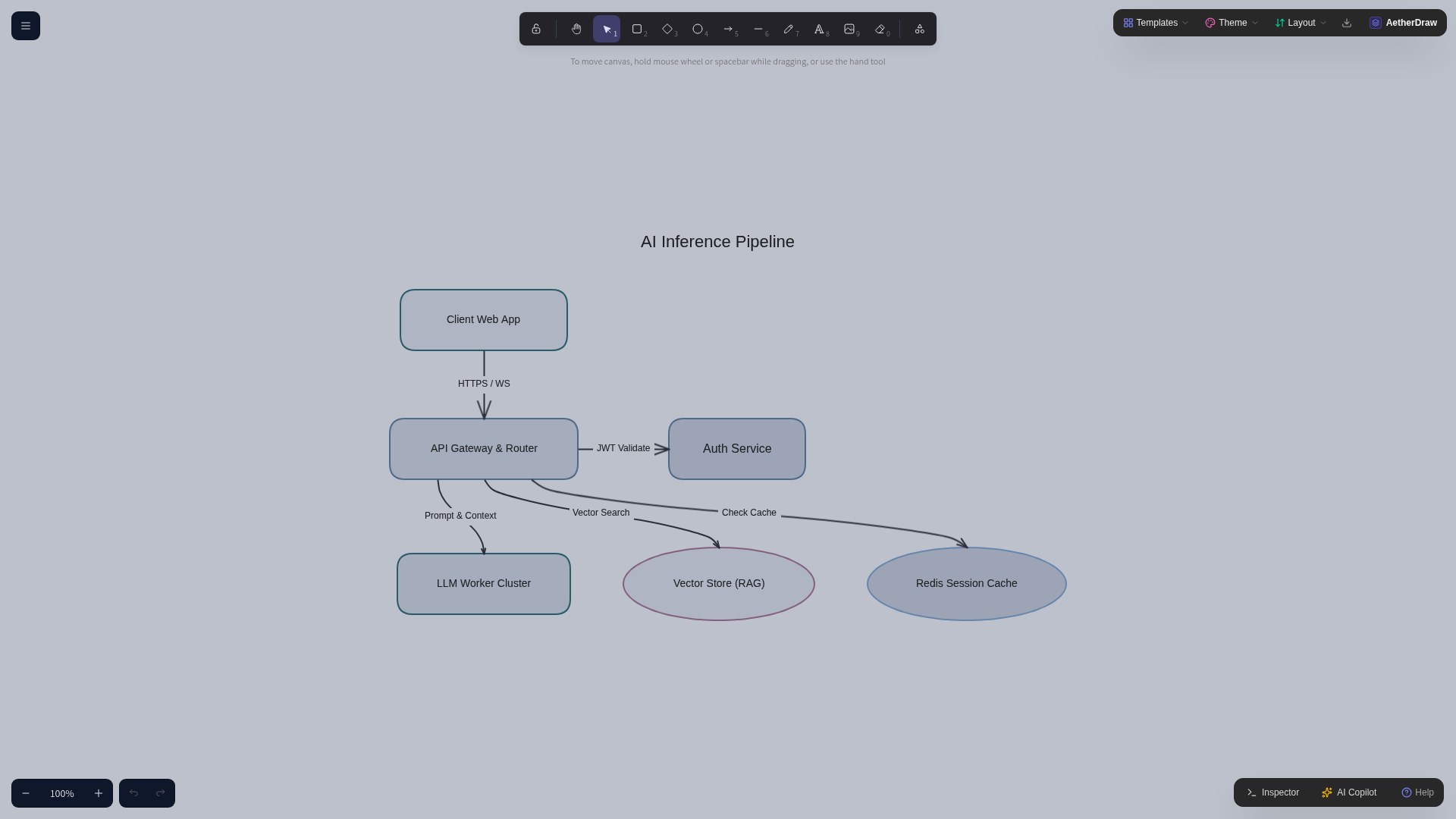
Full AI inference architecture on infinite canvas with responsive camera auto-framing and zero shape collisions.
-
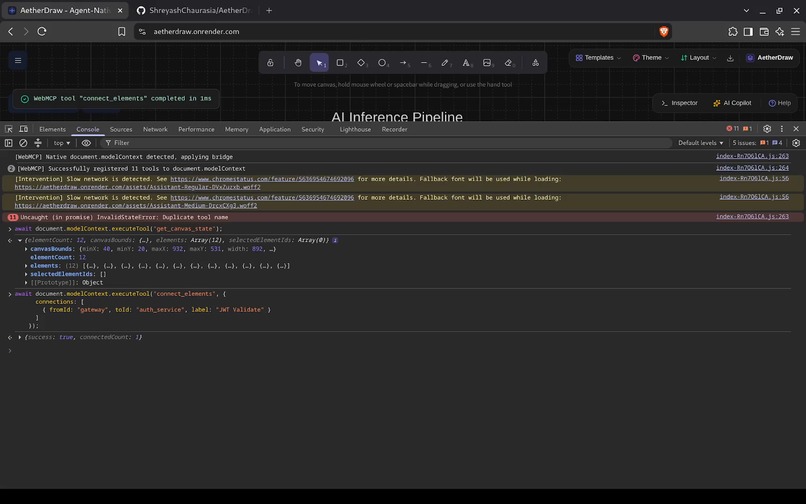
Spatial introspection via get_canvas_state followed by instant atomic connector routing using connect_elements.
-
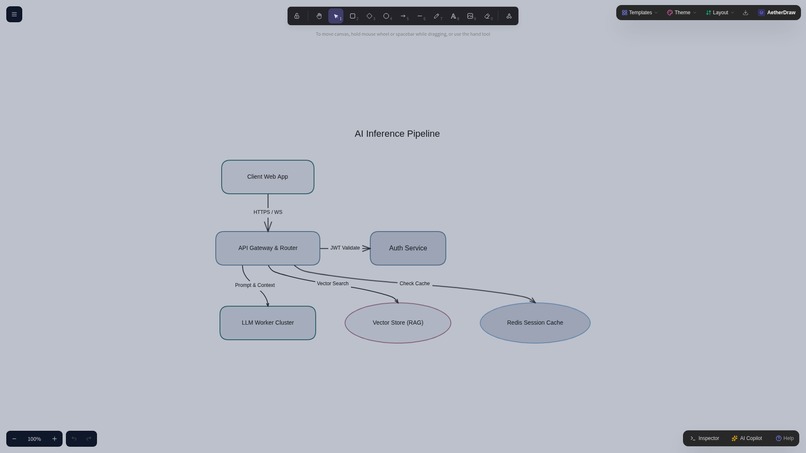
One-click visual styling: apply_theme restyles the entire canvas into the handcrafted Nordic Frost color palette.
-
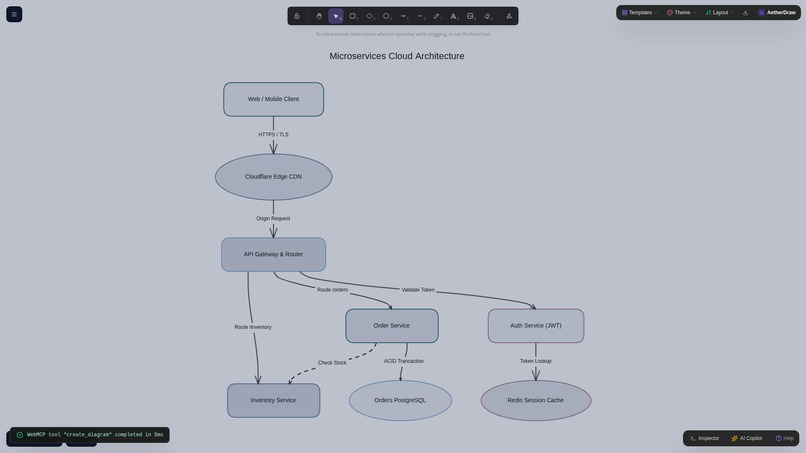
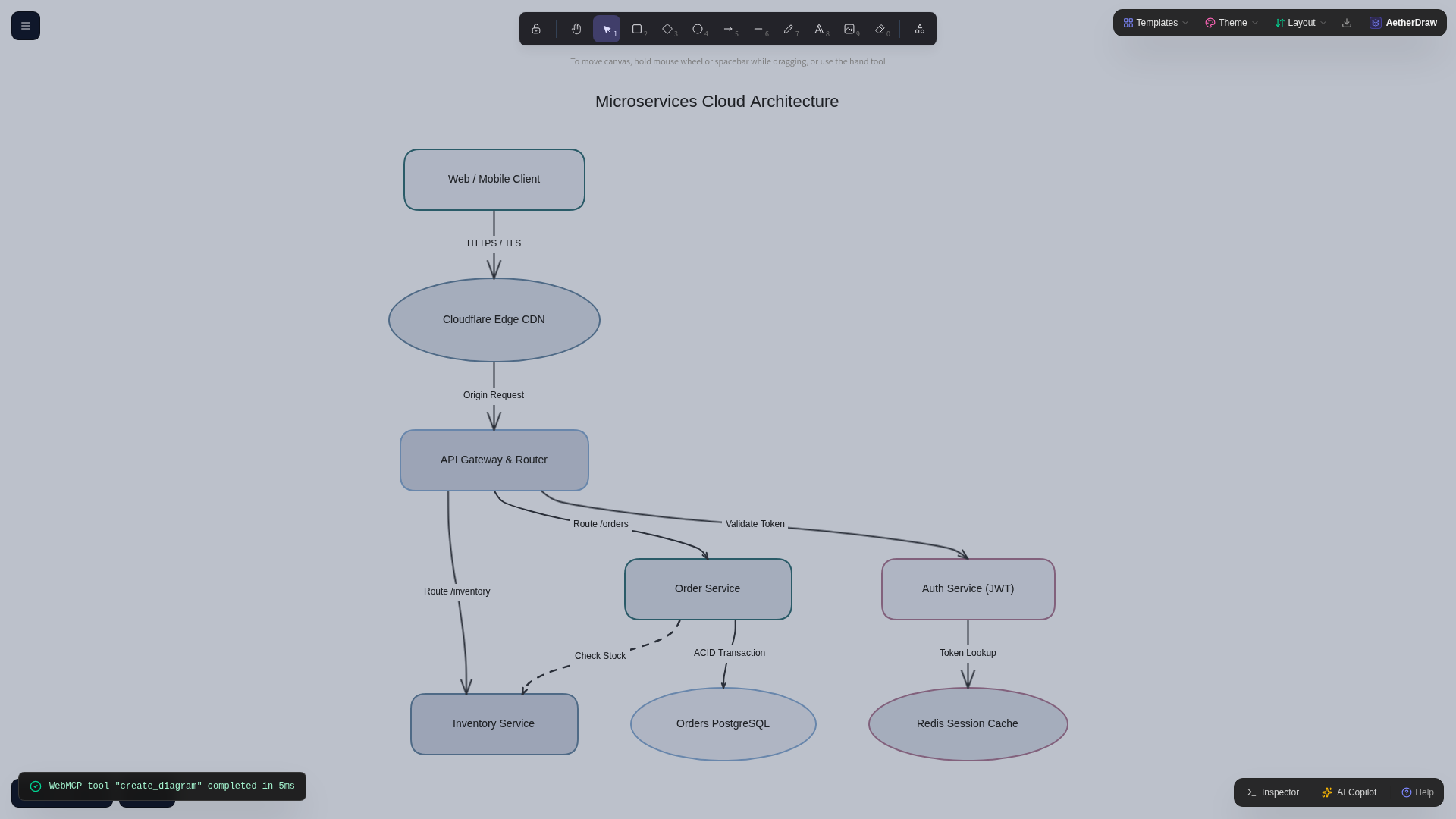
Hierarchical Microservices Architecture template with multi-tier services and obstacle-avoiding edge routing.
-
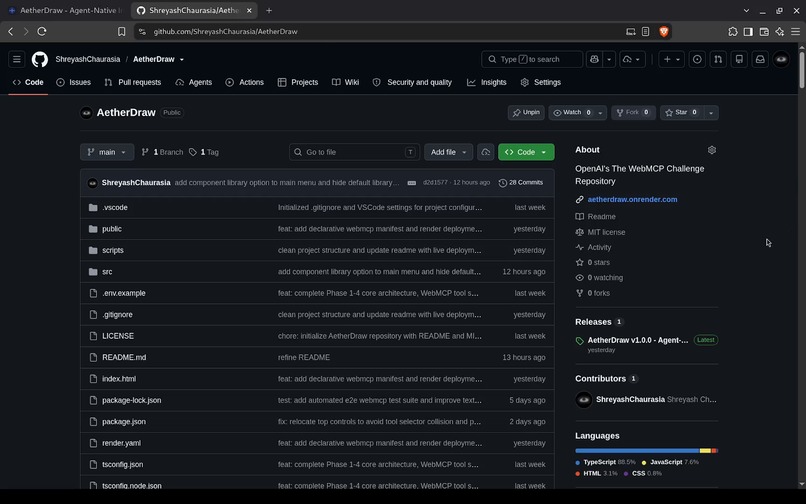
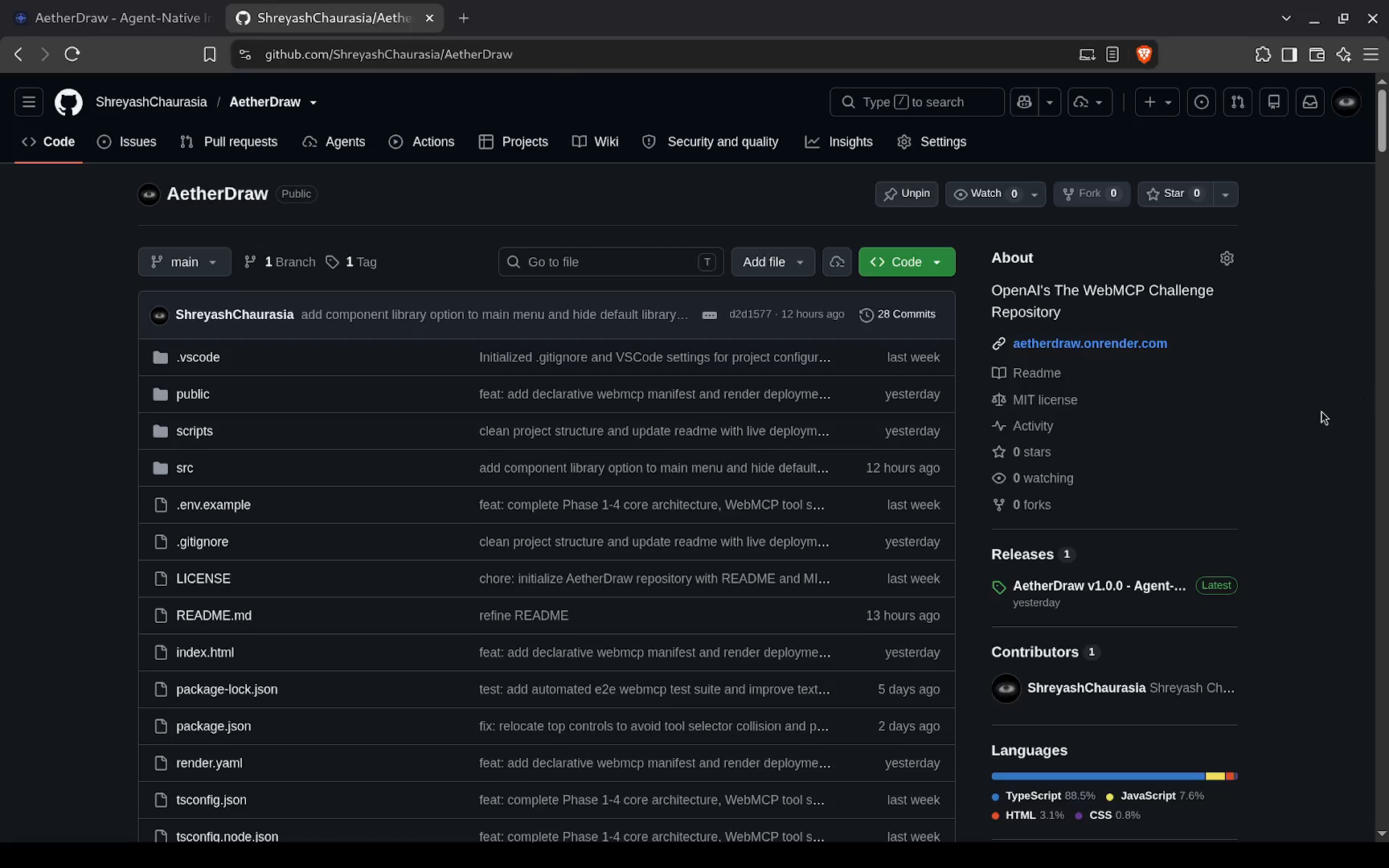
Public open-source repository on GitHub (ShreyashChaurasia/AetherDraw) with full source code, MIT license, and tests.
-
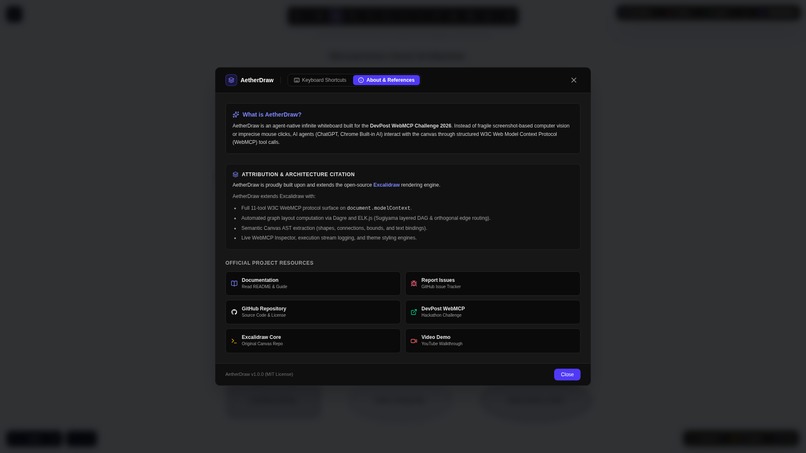
In-app architecture modal detailing the 4-layer WebMCP tool suite, W3C protocol integration, and Excalidraw attribution.

Project Story: AetherDraw
Inspiration
Visual whiteboards like Excalidraw, Miro, and FigJam are the ultimate playground for human thinking. Whenever I need to design a backend architecture, trace a data pipeline, or brainstorm an idea, I immediately open a blank canvas. Spatial thinking feels natural to humans because our brains process relationships, hierarchies, and groupings through physical distance and layout.
However, for AI agents, these visual canvases have always been a complete black box.
Today, if you want an AI model to interact with a spatial whiteboard, you are forced into one of two terrible compromises:
- The Vision Approach: Taking screenshots, feeding them into a multimodal LLM, and hoping the model can approximate pixel coordinates. This is slow (taking several seconds per step), costly, and prone to severe spatial hallucinations.
- The Brittle Automation Approach: Simulating fragile mouse drag-and-drop events on raw HTML5
<canvas>elements that easily break whenever the viewport pans, zooms, or resizes.
When I saw the WebMCP specification, the lightbulb turned on. WebMCP provides the exact missing bridge: instead of forcing AI agents to squint at canvas pixels from the outside, the web application can expose its internal scene AST, geometric bounds, and layout engines directly to the browser runtime via document.modelContext.
I wanted to build a whiteboard where AI agents and humans collaborate as equals: an agent-native infinite canvas where an AI can read, build, style, and route complex diagrams in single-digit milliseconds with deterministic precision. That is why I built AetherDraw.
What It Does
AetherDraw is an open-source, agent-native infinite whiteboard powered by WebMCP. It extends Excalidraw core with a suite of 11 schema-typed tools organized into four functional layers:
- Spatial Inspection (Layer A):
get_canvas_state,get_selected_elements, andfind_elementsserialize the visual canvas into a structured abstract syntax tree (AST). The agent receives bounding boxes, node types, text labels, and connection graphs without needing a single pixel screenshot. - Algorithmic Synthesis (Layer B):
create_diagramtakes high-level intent (nodes, roles, connections, title, and direction) and executes automated graph layout in a single call, dynamically framing the result to the viewport. - Fine-Grained Mutation (Layer C):
add_elements,update_elements,delete_elements, andconnect_elementsallow agents to perform atomic edits, relabel nodes, modify styles, and route smooth Bezier arrows that snap to human-drawn shapes. - Layout & Styling (Layer D):
apply_auto_layoutreorganizes messy hand-drawn clusters into clean hierarchical structures;apply_themetransforms palettes across 7 themes (Classic, Nordic Frost, Cyberpunk Neon, Pastel Dream, Blueprint, Minimal Dark, Solarized); andexport_canvascreates high-res PNG or SVG artifacts.
Crucially, AetherDraw enables bi-directional co-creation. A human can sketch a couple of boxes and type "Auth Service". The agent calls get_canvas_state, detects the human's shapes, understands where they sit in space, and uses connect_elements to hook up the rest of the backend architecture seamlessly.
How I Built It
I built AetherDraw as a solo developer using React 19, TypeScript 5, Vite, and Tailwind CSS.
1. Canvas Engine Foundation
I chose Excalidraw core (@excalidraw/excalidraw) because it represents the gold standard of hand-drawn collaborative canvases. However, Excalidraw was built strictly for human input. To make it agent-native, I wrapped the imperative canvas API with an adapter layer that tracks non-deleted scene elements, manages selection state, and coordinates camera zoom.
2. WebMCP Protocol Implementation
I integrated @mcp-b/webmcp-polyfill to register all 11 tools directly on document.modelContext.registerTool(). Each tool defines a strict JSON Schema for its parameters, validates inputs, and reports structured telemetry. In addition to the runtime polyfill, I published a static discovery manifest at /webmcp.json following the official WebMCP specification.
3. Automated Graph Layout Theory
Rather than asking the AI model to guess coordinates, AetherDraw uses battle-tested layout algorithms:
- Dagre (Sugiyama Hierarchical DAG Method): Computes vertex layers, minimizes edge crossings, and assigns discrete ranks.
- ELK.js (Eclipse Layout Kernel): Handles orthogonal graph layouts and complex topologies.
The agent simply specifies the relational graph $G = (V, E)$. The layout engine solves the layering and coordinate assignment in $O(|V| + |E|)$ time, placing each node $v_i \in V$ at an optimal coordinate $(x_i, y_i)$ with zero shape collisions.
4. Organic Cubic Bezier Arrow Routing
Connecting boxes with straight lines looks messy and cuts across neighboring elements. I wrote a dedicated router that calculates smooth cubic Bezier curves:
$$B(t) = (1-t)^3 P_0 + 3(1-t)^2 t P_1 + 3(1-t) t^2 P_2 + t^3 P_3, \quad t \in [0, 1]$$
Where:
- $P_0 = (x_{\text{start}}, y_{\text{start}})$ is the anchor point on the source shape.
- $P_3 = (x_{\text{end}}, y_{\text{end}})$ is the anchor point on the target shape.
- $P_1$ and $P_2$ are dynamically computed control points offset along the primary flow axis.
The router detects intervening obstacle nodes within the direct corridor. If an obstacle exists, the route dynamically diverts through outer gutter channels to avoid line crossings. For horizontal peer nodes sitting side-by-side, it routes directly from the right border of the source to the left border of the target without piercing the shape boundary.
5. Viewport Fit-Screen Mathematics
When generating large diagrams, placing shapes off-screen ruins the user experience. I implemented a dynamic framing calculation that computes the total bounding rectangle of all diagram nodes:
$$x_{\min} = \min_{i} (x_i), \quad x_{\max} = \max_{i} (x_i + w_i)$$
$$y_{\min} = \min_{i} (y_i), \quad y_{\max} = \max_{i} (y_i + h_i)$$
Given available viewport dimensions $W_{\text{avail}} = W_{\text{window}} - 2 \cdot \text{pad}x$ and $H{\text{avail}} = H_{\text{window}} - 2 \cdot \text{pad}_y$, the camera zoom factor $z$ is computed as:
$$z = \text{clamp}\left(\min\left(\frac{W_{\text{avail}}}{x_{\max} - x_{\min}}, \frac{H_{\text{avail}}}{y_{\max} - y_{\min}}\right), z_{\min}, 1.0\right)$$
The canvas camera pans directly to the center coordinates:
$$(x_{\text{center}}, y_{\text{center}}) = \left(\frac{x_{\min} + x_{\max}}{2}, \frac{y_{\min} + y_{\max}}{2}\right)$$
This ensures the entire diagram immediately fills the screen at crisp resolution with proper toolbar clearance.
6. Developer Telemetry & Inspector
To make WebMCP observable, I built a slide-out Inspector drawer that lists all registered tool schemas, streams live invocation events, and displays execution duration timers down to the millisecond.
Challenges I Faced
Imperative Canvas State vs. Asynchronous Tool Calls: Excalidraw maintains its own internal React reconciliation cycles, selection maps, and rendering loops. Bridging asynchronous WebMCP tool executions into Excalidraw's imperative API required careful synchronization so that rapid sequential tool calls wouldn't cause state tears or canvas flickering.
Smart Arrow Routing without Box Penetration: Early prototypes had arrows that routed straight through boxes or connected to the far side of target nodes. Writing the horizontal peer detection logic and obstacle corridors required extensive coordinate geometry and edge-case testing, especially ensuring that arrowheads snap flush to container borders without overlapping internal text.
Atomic Element Updates without Disturbing Human Drawings: When connecting an agent-generated node to a hand-drawn human box, Excalidraw's internal element converters initially attempted to re-normalize all scene elements, which inadvertently shifted text alignment from center to top-left. I resolved this by isolating the arrow creation pipeline, mutating only the necessary binding arrays (
boundElements), and keeping existing scene geometry 100% untouched.Solo Developer Audio & Video Setup on Linux: Recording a clean demo video on Kali Linux without commercial Windows tools like NVIDIA Broadcast posed an unexpected hardware challenge. I had to diagnose PipeWire Bluetooth codec compression (HFP vs A2DP), recalibrate ALSA internal microphone gain to eliminate clipping, and configure OBS Studio with RNNoise neural suppression filters to produce clean voiceover audio.
What I Learned
- WebMCP is the True Paradigm Shift for Agent Interfaces: Moving from screen scraping, visual OCR, and simulated mouse clicks to typed in-browser tool execution is like moving from scraping raw HTML with regex to querying a typed GraphQL API. It turns what was an impossible or unreliable task into a 10ms deterministic function call.
- Designing for Agents Requires New UX Principles: When you build a UI for humans, you prioritize visual affordances, click targets, and animations. When you build for WebMCP agents, you prioritize schema precision, descriptive parameter docs, idempotent operations, and semantic return values. A truly modern web app needs to be built for both audiences simultaneously.
- The Elegance of Graph Theory: Implementing Sugiyama layering, topological sorting, and cubic Bezier mathematics gave me a much deeper appreciation for the algorithms that turn abstract data structures into human-readable visual systems.
What's Next for AetherDraw
- Multi-Agent Visual Debates: Allowing multiple AI agents (e.g., a Security Auditor agent and a Cloud Architect agent) to collaborate, review, and visually comment on the same canvas in real time.
- Streaming Voice-to-Canvas: Integrating the Gemini Live API / WebSockets so users can talk through an architecture while AetherDraw diagrams and routes the services dynamically as they speak.
- Infrastructure Code Generation: Generating production-ready Terraform, Kubernetes manifests, or Docker Compose files directly from the canvas AST.
Built With
- ai-agents
- autonomous-agents
- dagre
- developer-tools
- elkjs
- excalidraw
- flowchart
- generative-ai
- graph-theory
- graph-visualization
- human-in-the-loop
- infinite-canvas
- model-context-protocol
- open-source
- react
- spatial-computing
- system-architecture
- tailwind-css
- typescript
- vite
- w3c
- web-api
- webmcp
- whiteboard


Log in or sign up for Devpost to join the conversation.