INSPIRATION
AeroPy, a visionary Windows gesture control project, draws inspiration from the imaginative realms of science fiction and STEM innovation to redefine the landscape of human-computer interaction. With a nod to sci-fi narratives such as Minority Report and Iron Man, AeroPy envisions a future where seamless gestural interfaces transform the way we engage with technology. In the educational sphere, AeroPy emerges as a transformative tool, providing an immersive platform for students to interact with digital content through dynamic hand gestures, fostering STEM innovation and cultivating a tech-savvy generation. Beyond education, AeroPy revolutionizes the interaction between computers and humans by leveraging MediaPipe and advanced hand tracking algorithms. This enables users to control Windows computers seamlessly through intuitive gestures—cursor movements, left and right-click actions, tab switching, and speech-to-text functionality, all in real-time, without traditional input devices. This signifies a paradigm shift in human-computer interaction, steering us toward a future where technology harmoniously integrates with our natural gestures, diminishing reliance on keyboards and mice. Moreover, AeroPy champions inclusivity and accessibility, breaking barriers for individuals with mobility challenges by offering a hands-free alternative. By addressing the limitations posed by traditional input devices for disabled users, AeroPy not only exemplifies the potential of STEM innovation in enhancing accessibility but also advocates for a more equitable and diverse technological landscape. In essence, AeroPy transcends the boundaries of conventional computing, propelling us into a future where technology becomes an extension of our natural gestures—intuitive, educational, and inclusive.
WHAT IT DOES
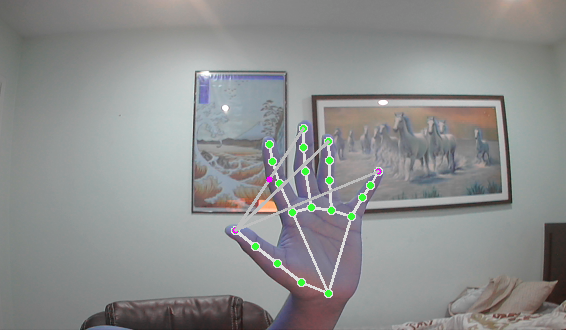
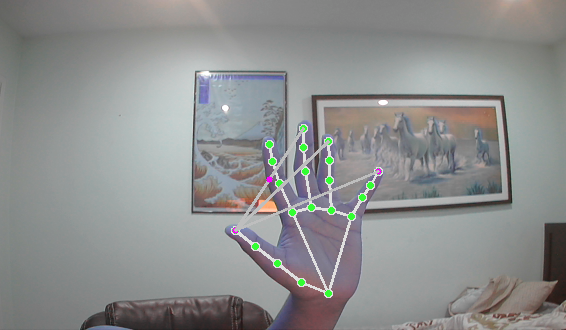
AeroPy is an innovative Windows gesture control project designed to revolutionize the way users interact with their computers. Leveraging the power of MediaPipe, the system employs advanced hand tracking algorithms to detect and interpret hand gestures, transforming them into meaningful commands. With AeroPy, users can seamlessly control various aspects of their Windows computers without the need for traditional input devices like keyboards and mice. The system enables cursor movement, left and right-click actions, tab switching, speech-to-text functionality, volume control, and more, all through intuitive hand gestures. AeroPY does all this with real time webcam input. This project not only enhances accessibility for users with mobility challenges but also introduces a futuristic and immersive way of engaging with technology.
HOW IT WAS BUILT
We used python to build the whole project. This allowed us to use OpenCV to get webcam input and preprocess each frame, then mediapipe detects the hands in each frame as well as the position of each finger, joint, etc. Then we use win32api, pyautogui, google speech recognition, etc to turn your hand gestures into commands/controls for your computer.
CHALLENGES WE FACED
We had to comb through pages upon pages of documentation not to mention the heaping pile of youtube tutorials to understand the proper usage of all of our numerous libraries. It was also difficult managing a lot of libraries and we didn't format our code perfectly. We had to make do and finish the hackathon with just one big file of python code, and no OOP due to time constraints.
ACCOMPLISHMENTS
We were able to bundle together a lot of cool features, and got through hundreds of bugs to finish a working product. We were able to do things like search for and play a funny cat video on youtube, switch between discord and homework etc. Using our project for things people would do in real life on their computer felt really satisfying.
WHAT WE LEARNED
We all learned a whole lot of new python libraries and just how versatile a high level programming language like python can be. None of us are really experienced at computer vision/ML so we faced a learning curve at first when dealing with libraries like openCV and MediaPipe but we managed to somewhat master those apis to use in future projects.
NEXT STEPS FOR AeroPy
Next we would like to
- Add a UI with customization options (turn on and off features, bind gestures, etc)
- Make the experience more smooth and less finicky (better detection, etc)
- Add more features like the ability to scroll, delete, add punctuation
- Package the application into an executable so it is easily downloadable on any windows machine and anyone with or without programming knowledge can use it
Built With
- google-web-speech-api
- mediapipe
- opencv
- python


Log in or sign up for Devpost to join the conversation.