AeroMaxx
Looksmaxx your aerodynamics. Streamline your life.
What is this?
Looksmaxxing is the practice of optimizing every measurable aspect of your physical presentation, popularized by Clavicular, a streamer. Most people focus on skin, hair, jaw.
AeroMaxx focuses on something far too ignored in the looksmaxxing community: how aerodynamic are you?
If you aren't aerodynamicmaxxing, then drag is constantly slowing you down and keeping you from reaching flowstate.
Looksmaxx your aerodynamics. Streamline your life.
- Upload a photo.
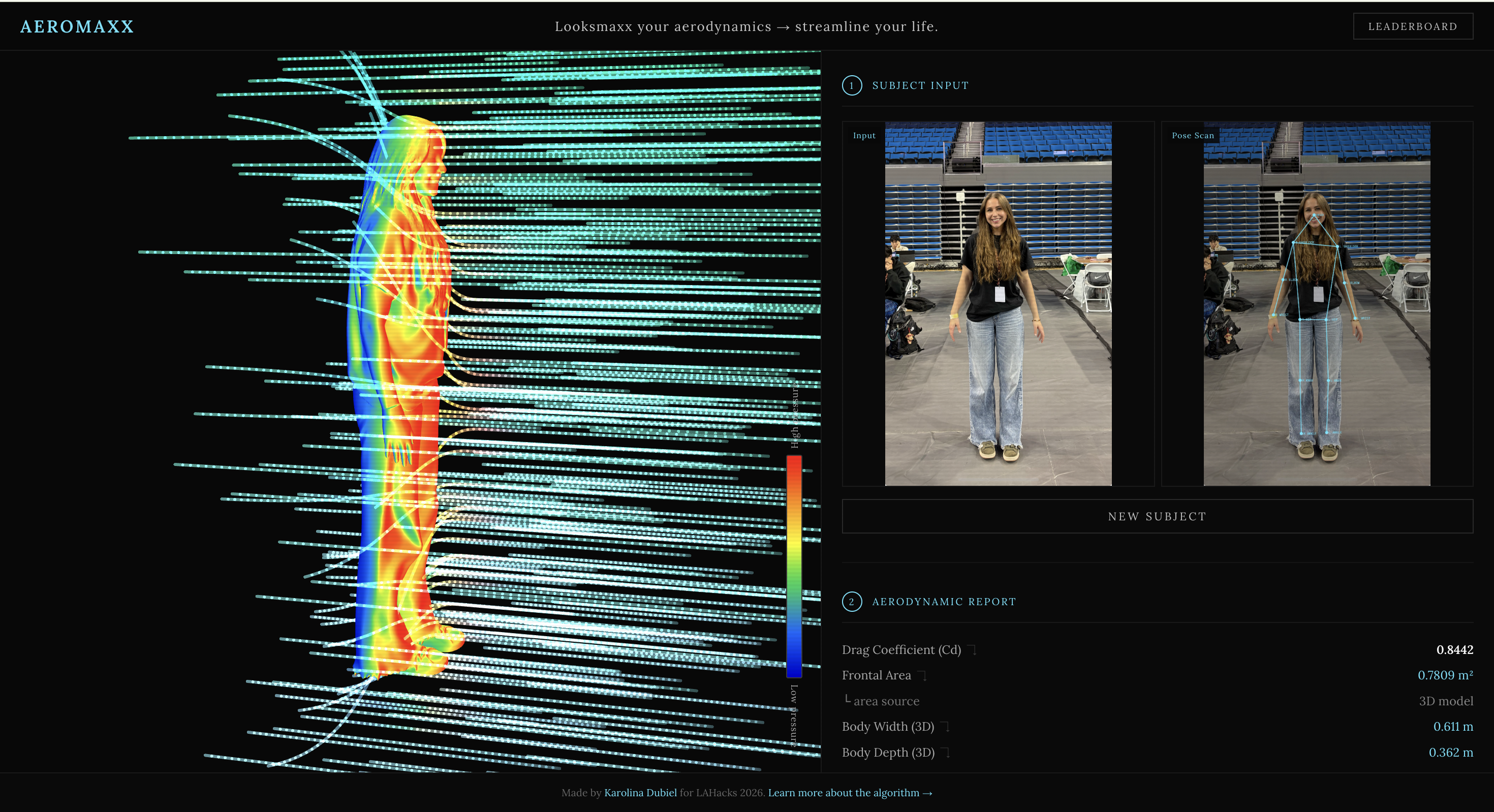
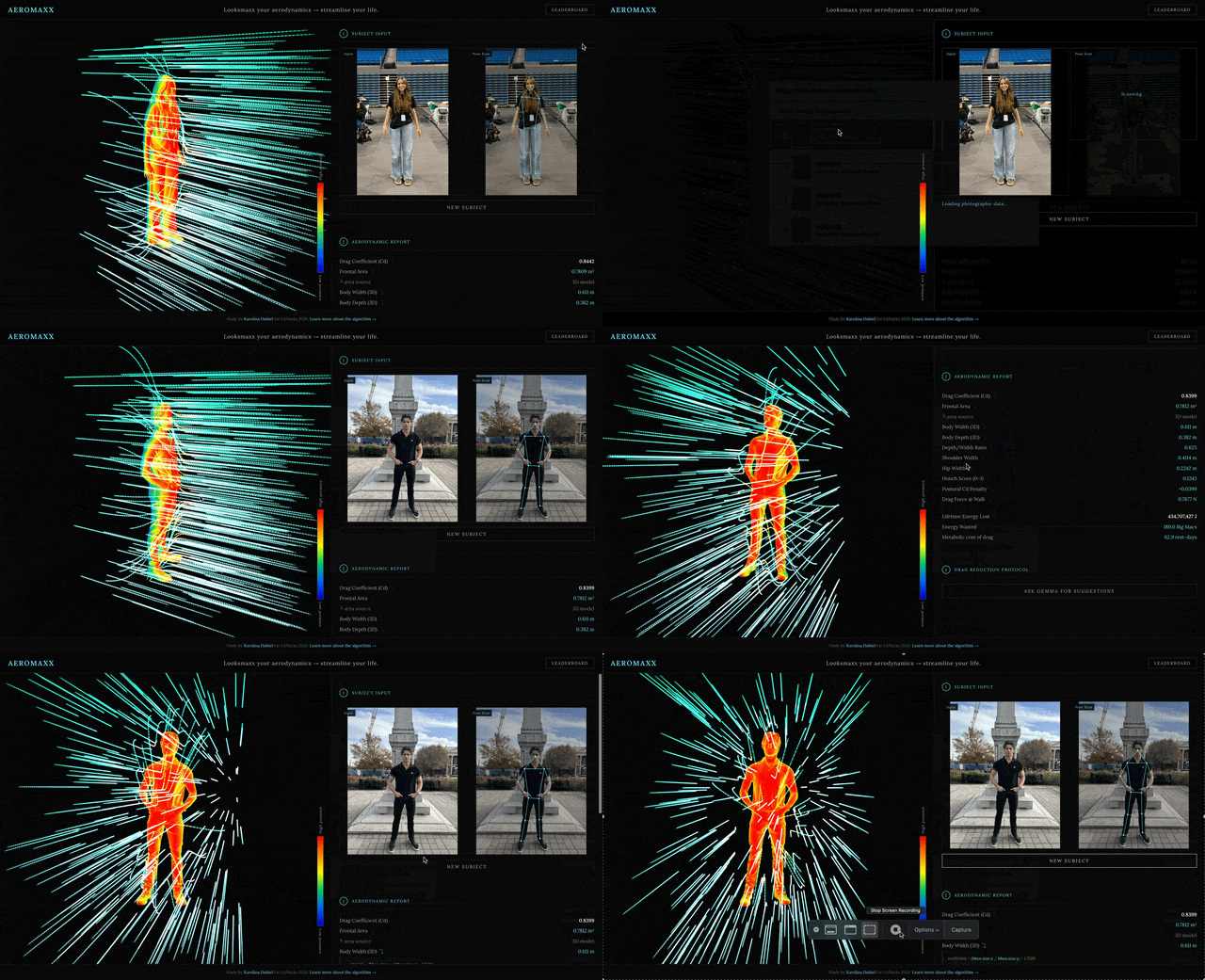
- Your stance gets analyzed. 2D measurements are extracted and crunched while a 3D model with aerodynamic drag visualized in real-time is generated.
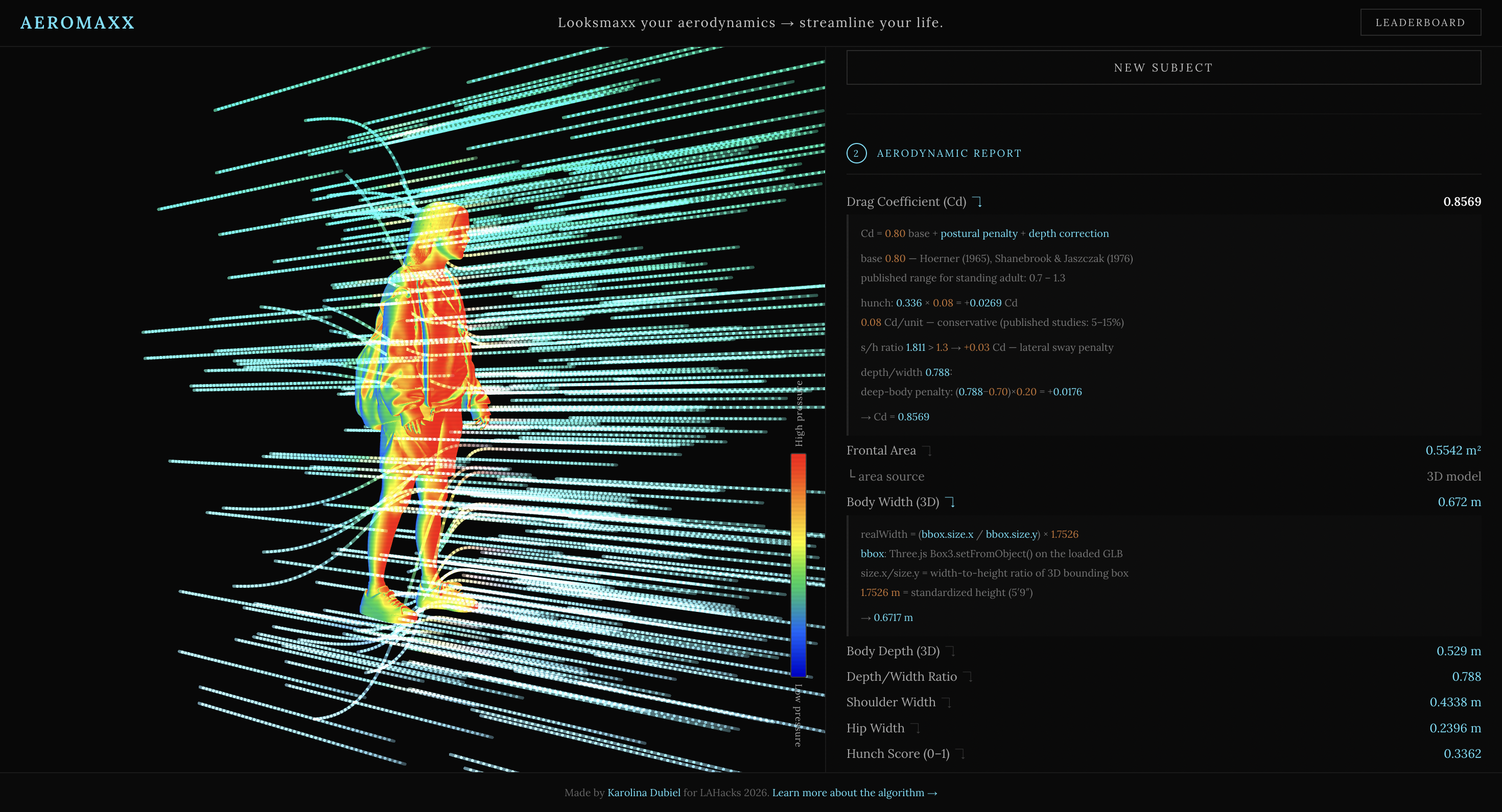
- Nothing is hardcoded. Every number in the aerodynamic report has a source-cited equation tooltip showing exactly which values were measured from your photo and which are published constants.
- A real, interactive, 3D aerodynamic model is generated from your uploaded photo. You can rotate and observe the aerodynamic flow around your form in the 3D viewer.
- All analysis data is given to Google Gemma, who provides a personalized drag reduction protocol (specific exercises, posture corrections, and clothing changes) ranked by projected percentage improvement to your Cd.
- Every subject is persisted to a global leaderboard (lowest Cd wins). You can reload any past entry to re-render its 3D model and re-run analysis.
The average person wastes hundreds of Big Macs worth of energy fighting air resistance over a lifetime. AeroMaxx quantifies exactly how much, and tells you what to do about it.

Sponsor Tracks
MLH: Best Use of Gemma
AeroMaxx uses Gemma as a domain reasoner. After MediaPipe extracts pose geometry and the drag pipeline runs, Gemma receives a structured numeric profile (Cd, frontal area, hunch score, postural penalty, shoulder-to-hip ratio, lifetime energy wasted) and outputs a ranked drag reduction protocol with specific exercises, posture corrections, and clothing changes tied to projected Cd improvements. The model runs in parallel with the 2-minute Meshy generation so its ~70s inference is fully hidden -- output appears the instant the 3D model renders. The integration is intentional enough that Gemma has its own very cute custom loading animation (!!) and a deferred on-demand mode for historical entries.
Example Gemma output of aerodynamicmaxxing advice:

Cloudinary Company Challenge
Cloudinary is the entry point for every subject media in AeroMaxx. The Cloudinary Upload Widget is embedded in the React app and handles all media ingestion (local file and camera). The returned secure_url is the single persistent identifier that flows through the entire pipeline: passed to MediaPipe for pose inference, submitted to Meshy as the source for 3D reconstruction, stored in Supabase as the canonical subject record, and rendered in the leaderboard for every entry. Every analysis (whether run fresh or replayed months later) pulls from the same Cloudinary-hosted, CDN-distributed URL.
Most Questionable Use of 36 Hours
A Clavicular-inspired drag coefficient analyzer for the human body that generates a real, interactive 3D model of you body.
With a real-time CFD pressure shader.
Actionable insights for you to aerodynamicmaxx, provided by Google Gemma.
Using peer-reviewed aerodynamics papers from 1965.
The output is measured in Big Macs.
There is a global leaderboard for who aerodynamicmaxxes the best.
This is that project.
Stack
| Layer | Technology |
|---|---|
| Frontend | React + TypeScript (Vite) |
| 3D Rendering | Three.js — custom GLSL CFD shader, Line2 streamlines |
| Pose Estimation | MediaPipe Tasks Vision — PoseLandmarker (GPU delegate) |
| 3D Reconstruction | Meshy AI image-to-3D (meshy-6) |
| AI Analysis | Google AI Studio — gemma-4-31b-it via OpenAI-compat endpoint |
| Asset Storage | Cloudinary (subject images) |
| Database & Storage | Supabase — PostgreSQL subjects table + Storage bucket (glb-models) |
Calculations
All drag quantities follow the standard aerodynamic drag equation:
F = ½ · ρ · v² · Cd · A
where ρ = 1.225 kg/m³ (ISA sea-level air density), v = 1.4 m/s (ACSM average adult walking speed), Cd is the drag coefficient, and A is frontal area in m².
Frontal area A is estimated two ways depending on what's available:
- 2D estimate:
A = shoulderWidth × 1.75 m × 0.73, where 0.73 is the fill factor from Kyle & Burke (1984) representing how much of the bounding rectangle a standing person actually occupies (range 0.68–0.78) - 3D model: bounding box dimensions from the generated GLB are normalized to real meters using a standardized 1.7526 m reference height (5′9″), giving a more accurate
realWidth × realDepthprojection
Drag coefficient Cd is built up from three components:
| Component | Formula | Source |
|---|---|---|
| Base | Cd = 0.80 |
Hoerner (1965), Shanebrook & Jaszczak (1976); published range for standing adult: 0.7–1.3 |
| Hunch penalty | += hunchScore × 0.08 |
conservative mid-range of 5–15% published increase from kyphosis |
| Depth correction | += (0.35 − r) × 0.40 if r < 0.35; += (r − 0.70) × 0.20 if r > 0.70 |
Hoerner (1965) bluff-body streamlining data; r = depth/width |
Hunch score is a normalized lateral offset: |shoulderMidX − hipMidX| / (shoulderWidth × 0.3), clamped to [0, 1]. A value of 1 means the shoulder midpoint is displaced by 30% of shoulder width relative to the hip midpoint — treated as maximal kyphotic posture.
Lifetime energy scales drag force over a modeled lifetime:
E = F × (v × 4 hr/day × 3600 s/hr × 365 days/yr × 75 yr)
4 hr/day is a walking-time estimate consistent with NHS physical activity guidelines; 75 years is the WHO 2023 global average lifespan. The resulting joule value is converted to Big Macs (550 kcal × 4,184 J/kcal = 2.3 MJ each) and to metabolic rest-days (E / (80 W × 86,400 s/day), where 80 W is a typical adult resting metabolic rate per Hall et al. 2012).
Every number shown in the UI has a ↴ toggle that expands its source equation with the exact plugged-in values.
(Heavy technical details) Logic Flow

1. Page renders with default .glb file loaded
 The default model is a
 .glb file from this repo
The default model is a .glb file from this repo
Three.js initializes a WebGLRenderer, PerspectiveCamera, and OrbitControls. A default .glb is loaded via GLTFLoader. Once loaded, a Box3 bounding box is computed, the mesh is scaled so its tallest axis = 2.0 world units, and a custom ShaderMaterial is applied across all meshes.
The vertex shader computes vWorldNormal = normalize(mat3(modelMatrix) * normal) in world space. The fragment shader maps the Z component to a pressure color (pressure = vWorldNormal.z), linearly interpolating through red → orange → yellow → green → blue → navy across [-1, 1]. Because the normal is in world space rather than view space, pressure colors stay fixed as you orbit.
280 streamlines are spawned as Line2 objects with additive blending, each advancing at a fixed speed per frame, deflected by an ellipsoidal body proxy using normalized ellipsoidal distance eDist = sqrt((dx/rx)² + (dy/ry)² + (dz/rz)²).
2. User uploads a photo → Cloudinary
The Cloudinary Upload Widget opens. On success it returns a secure_url — a Cloudinary-hosted image URL. Simultaneously two async pipelines fire.
3. Left branch — MediaPipe pose analysis
The image is drawn onto an offscreen canvas. MediaPipe's PoseLandmarker runs inference via the GPU delegate (WebGL), returning 33 normalized landmarks {x, y, z} in [0,1] image space. Key indices used: 0 (nose), 11/12 (shoulders), 23/24 (hips), 27/28 (ankles).
Pixel distances are computed as sqrt(((ax-bx)·W)² + ((ay-by)·H)²). Body height in pixels = nose-to-ankle-midpoint Euclidean distance. Scale factor: pixelsPerMeter = bodyHeight_px / 1.7526. From this, real-world measurements are derived and the drag pipeline runs (see Calculations above).
The landmarks are drawn back onto the canvas as a labeled skeleton and exported as a base64 JPEG.

Of MediaPipe's 33 landmarks, AeroMaxx uses 9 for measurement: nose (0), left/right shoulder (11, 12), left/right hip (23, 24), and left/right ankle (27, 28). Elbow (13, 14), wrist (15, 16), and knee (25, 26) are drawn in the skeleton overlay but not used for drag calculation.
Gemma also fires here — in parallel with Meshy, using only 2D measurements. Its result is held and only revealed once the 3D model finishes rendering.
4. Right branch — Meshy 3D generation
The image is converted to a base64 data URI and POSTed to https://api.meshy.ai/openapi/v1/image-to-3d with {model: "meshy-6", symmetry_mode: "on", enable_pbr: false}. Meshy returns a task ID. The task is polled every 3 seconds until status === "SUCCEEDED", at which point a signed GLB URL is returned.
That URL is proxied through Vite (/meshy-assets → https://assets.meshy.ai) to bypass CORS, fetched as a blob, and uploaded to Supabase Storage (glb-models bucket) for persistent hosting. The Supabase public URL becomes the canonical GLB reference going forward.

Meshy image generation takes 120–180 seconds, but the detail is pretty good. In this image, it detected my lanyard, bracelet, and wristband correctly.
5. GLB loads in viewer + geometry measurement
GLTFLoader fetches the Supabase GLB URL. On load, Box3.setFromObject() computes the tight axis-aligned bounding box. size.x = shoulder width, size.z = front-to-back depth, in normalized model units. Real-world scaling: realWidth = (size.x / size.y) × 1.7526 m. Frontal area and depth/width ratio are computed, Cd corrections applied (see Calculations), and the aerodynamic report updates.
The subject (image URL, GLB URL, Cd score) is then written to the Supabase subjects table. This write is skipped when loading an existing leaderboard entry to avoid duplicate records.
6. Insights sent to Gemma
Gemma runs in parallel with the Meshy pipeline using only 2D pose measurements — it does not wait for the 3D model. The response is held until the user's GLB finishes rendering, then revealed immediately. While Gemma is processing, a custom ASCII waveform cycles +, -, ', ` across a 9-character phase-shifted window at 90ms/tick with a live elapsed timer.

A custom loading animation that I made for Gemma.
For leaderboard and import loads, Gemma does not auto-run. An "Ask Gemma for suggestions" button appears in its place.
POSTs to https://generativelanguage.googleapis.com/v1beta/openai/chat/completions with model: "gemma-4-31b-it", temperature: 0.3, max_tokens: 500. Any <thought>...</thought> block is stripped from the response before display.
7. Leaderboard

Clicking on the leaderboard pulls up that user's profile and 3D model
Every analyzed subject is persisted to Supabase (subjects table, ordered by cd_score ASC). The leaderboard overlay opens from the header and paginates at 10 entries per page. Each entry stores the original photo URL, the Supabase GLB URL, and the Cd score.
Clicking an entry reloads the GLB into the viewer and re-runs pose analysis on the stored photo, without re-generating a 3D model or auto-querying Gemma.
Running locally
cp .env.example .env
# fill in VITE_CLOUDINARY_*, VITE_MESHY_API_KEY, VITE_GEMINI_API_KEY
# fill in VITE_SUPABASE_URL, VITE_SUPABASE_ANON_KEY
npm install
npm run dev
Built for LAHacks 2026 by Karolina Dubiel
Built With
- cloudinary
- gemma
- mediapipe
- meshy
- react
- supabase
- three.js
- vite


Log in or sign up for Devpost to join the conversation.