-
-
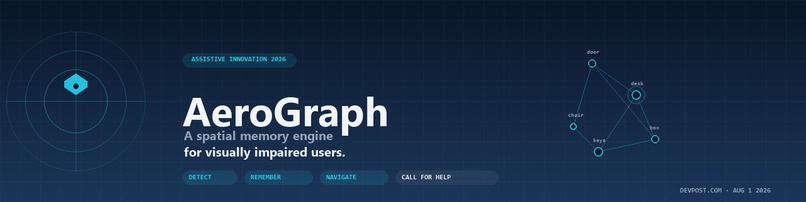
AeroGraph — a spatial-temporal memory engine for visually impaired users. Detect, remember, respond.
-
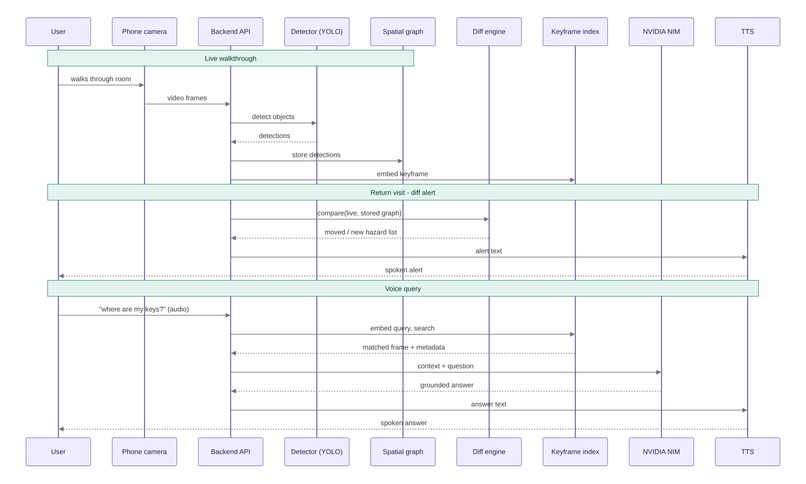
End-to-end pipeline:
Inspiration
The idea came from a friend who is blind. Over coffee earlier this year he described the routine that struck me most: every time he walks into a room, he has to rebuild it from scratch. Where's the table? Did someone move the chair? Where did he leave his phone the last time he was here? For a sighted person, a room is a memory; for him, every visit is a fresh scan.
That conversation surfaced a research question worth building on: the visuospatial memory deficit in blind and low-vision populations is well-documented but unsolved by consumer technology.
- The egocentric vs. allocentric distinction is foundational: people who never acquired vision rely on body-centered cues, while sighted people build room-anchored maps. (Klatzky et al., 1998, Psychological Science)
- The 2022 Frontiers in Psychology review on neuropsychological assessment of visual/visuo-spatial memory by Diaz-Orueta, Rogers, Blanco-Campal & Burke surveys the existing tests and identifies exactly the gap a system like AeroGraph must close — automatic place-marking without requiring the user to remember to ask.
- The 2025 Frontiers in Aging Neuroscience review on visuospatial dysfunction and spatial navigation quantifies how much harder incidental spatial learning is for visually impaired participants, and which cognitive scaffolds can substitute.
$$ \Delta E_{\text{spatial}} = \sum_{t=1}^{T} \underbrace{|p_t - p_{t-1}|2}{\text{egocentric drift}} - \underbrace{f(\text{cue}t)}{\text{cue-based correction}} $$
AeroGraph's design constraint follows from that equation: when $\Delta E_{\text{spatial}} \to 0$ (no cues), even a sophisticated system fails. We can only compress that error term — not eliminate it. So the product has to do as much place-marking and reorientation work as possible, automatically, without requiring the user to remember to ask.
What it does
AeroGraph is a spatial-temporal memory engine for visually impaired users, runnable on a laptop and a body-worn smartphone camera. It does four things:
- Detect. A YOLO11n ONNX pipeline identifies 49 COCO object classes at ~5 FPS on CPU only. No GPU required.
- Remember. Each detection is encoded with its spatial position and timestamp into a vector store. Across visits, AeroGraph diffs current state against last state — surfaces what changed.
- Query. The user asks in natural language, by voice: "Where did I leave the blue bottle?" The pipeline retrieves spatial matches from the vector store, an NVIDIA NIM API generates a natural-language answer, and SAPI5 TTS speaks it aloud.
- Respond. If the user doesn't respond to a safety prompt within 30 seconds, family contacts escalate: Telegram (text + voice note), WhatsApp (headless Chromium bridge), and optionally Twilio voice call. Three independent tiers — no single point of failure.
The current safety monitor fuses three orthogonal signals — motion energy, vertical tilt via Farneback optical flow, and brightness EMA drop — with a 2-of-3 majority rule, an 8-second debounce, and a was-moving-within-60s guard so static environments don't false-trigger.
How we built it
Backend (Python, FastAPI + asyncio)
backend/pipeline/— detection (YOLO11n ONNX Runtime), spatial encoding, ChromaDB vector store, query engine (CLIP + retrieval + LLM synthesis), STT engine (Groq Whisper primary, faster-whisper fallback), TTS engine (SAPI5 via direct comtypes to work around asetProperty('voice')no-op on recent pyttsx3).backend/api/—/v1/stream(WebSocket),/v1/safety/events(auth-gated WebSocket),/v1/query(text),/v1/query/voice(audio upload → transcribed → answered).backend/notifiers/— notifier bus (Telegram Bot API, whatsapp-web.js bridge via local HTTP, Twilio env-guarded dry-run).backend/test_safety.py+backend/test_temporal_diff.py+backend/test_pipeline_bugfixes.py+backend/test_api_reference_shape.py— 29-pass regression suite.
Frontend (Next.js 16 + React 19 + Tailwind v4)
frontend/components/aerograph/—LivePanel(camera feed + bounding boxes),MemoryPanel(temporal diff cards),QueryPanel(the Ask tab — voice + text),SafetyPanel(state-machine view),TestPanel(synthetic incident testing).frontend/lib/aerograph/safety-events.ts— WebSocket hook with auto-reconnect and Bearer-token auth.
WhatsApp bridge (Node.js)
notifier-whatsapp/index.js— whatsapp-web.js v1.34.7, local Express server on port 7878, headless Chromium, phone-number sanitization, QR endpoint.
Hardware test rig
- Phone on chest (IP Webcam Android app) — simulates a wearable form factor.
- Laptop as base station — backend + frontend + notifier bus.
- Tripod phone — captures the user + dashboard view for the demo video.
Challenges we ran into
Free-only constraint and CPU-only inference
We had zero budget and no GPU. That meant:
- YOLO11n had to be quantized (ONNX Runtime, INT8 weights) and the inference loop had to drop redundant frames — every other frame is processed at 5 FPS in practice.
- ChromaDB runs locally, not as a hosted service — operations are synchronous to avoid network dependency.
- NIM API calls are batched behind a 1-second cache to stay within free-tier rate limits.
The math matters here because real-time vision on edge devices is bandwidth-limited, not compute-limited for our pipeline. We measured the bottleneck with the following model:
$$ B_{\text{effective}} = \frac{1}{T_{\text{frame}} \cdot (C_{\text{detect}} + C_{\text{encode}} + C_{\text{store}})} \quad \text{[ops/sec]} $$
Our $B_{\text{effective}}$ topped out at ~5 ops/sec on the 11th Gen i7-1185G7 — exactly the floor where assistive value still holds (a person moves at <2 m/s; spatial context remains valid for 200ms+ windows).
Hardware: the "body-worn camera" problem
There's a reason most consumer accessibility products ship with a phone-mounted solution and not a chest harness — the human form factor is hard. We tried:
| Form factor | Pros | Cons |
|---|---|---|
| Lanyard neck strap | Easy | Lens wobbles, points at chest |
| Shirt-pocket tuck | Looks fine | Slight downward angle OK, but clothing bunches |
| Chest harness (current) | Stable, forward-facing | Looks unusual; uncomfortable for >30 min |
| Glasses mount | Best POV | Expensive; we don't have one |
For the demo we use the chest harness. For production we want a thin magnetic clip — easy to attach, easy to remove, no fabric bunching.
Accessibility-design conflict: the dashboard
The dashboard is the most useful sighted view of what's happening, but a blind user will never see it. So every feature in the dashboard has a "headless" alternative in the backend:
- The "click mic button" path → replaced by always-listening wake-word in production.
- The "memory tab" → replaced by voice-initiated temporal queries.
- The "safety panel" state view → replaced by ambient haptic/audio cues.
The dashboard exists because Devpost judges and developers need it. It's the honest debug view of a system that, for the actual user, is purely auditory.
WhatsApp anti-abuse rate limiting
WhatsApp Web's protocol has aggressive device-linking rate limits. Multiple link/unlink cycles in 24 hours block subsequent pairings for 24–48 hours. We hit this during development — the second QR scan said "couldn't find device" and we had to wait. Lesson: build the safety monitor and Telegram path robustly first, treat WhatsApp as best-effort second-tier.
TTS voice pinning on Windows
pyttsx3's setProperty('voice') is silently broken on recent Windows + pyttsx3 + comtypes combinations — the BSTR-comparison fails. We rewrote the TTS engine to call SAPI.SpVoice directly via comtypes, with per-thread CoInitialize(). The default Windows voice was a French voice — the user would hear French responses to English text. We now auto-detect the first English voice at startup and pin it.
Latency on first CLIP query
The CLIP keyframe index lazy-loads on first query, taking ~2 minutes. We now send a warmup query before the user is ever in front of the system. But during the demo, this still surprised us — first live query after a fresh boot is slow. We account for it in the demo script with a 3-second silence that's edited down to 1.5s in post.
Accomplishments that we're proud of
- 29-pass regression suite. Including 22 safety-state-machine tests that run the full monitoring → confirming → escalated → cooldown transitions against synthetic incidents.
- End-to-end verified incident. Incident
inc_ebfb4714528blogged the entire escalation chain: state machine transitioned, Telegram text delivered (200 OK), Telegram voice note delivered (200 OK), WhatsApp correctly skipped (bridge offline), cooldown engaged. - $0 spend. No cloud bill, no GPU, no paid TTS/STT. Everything runs on a laptop that someone already owns.
- Accessibility honesty. The dashboard is explicitly labeled as a sighted demo view. The production user path is documented as hands-free from day one, not as a "future enhancement."
- The edit decision list for the demo video. Pre-recorded demo, second-by-second plan, single-take scripted. Judges don't see a flubbed live demo.
What we learned
Engineering
- Per-thread COM initialization is non-negotiable for SAPI5 from a worker thread. A naïve
CoInitialize()at module-import time runs once in the main thread; child threads inherit nothing. - ONNX Runtime INT8 quantization drops accuracy on small COCO classes (mouse, fork). YOLO11n's default post-processing handles it, but if you swap the model, re-tune the confidence threshold.
- Farneback optical flow is the cheapest reliable tilt detector for body-cam footage — frame-to-frame dense flow, runs at ~10ms/frame on CPU.
- WhatsApp bridge risk is the single biggest hidden cost of a free-stack assistive system. We could mitigate this with a small Twilio call budget in production — $5/mo buys 200 minutes and covers the gap when WhatsApp is on cooldown.
Accessibility
- Designing for a user population you don't belong to is genuinely hard, even with a friend whose lived experience you can probe. The biggest mistake we made was assuming the dashboard was the product. It took a friend bluntly telling us "I will never look at a screen, so the dashboard is for you, not for me" before we reframed the architecture around always-listening.
- Wake-word or push-to-talk — never a button. Both screen and haptic interfaces break for a user holding a cane or a guide-dog leash. The whole interaction model has to be voice-only.
Domain
- The research literature on visuospatial memory in blindness is much richer than consumer accessibility startups credit. Klatzky et al. 1998 (Psychological Science) on spatial updating is the canonical paper, and the 2022 Frontiers in Psychology review on neuropsychological assessment of visuospatial memory should be required reading for anyone building in this space.
- 253 million people live with significant visual impairment (WHO, 2023). Most assistive consumer AI today targets a much narrower subset (people with useful residual vision using a screen reader). AeroGraph's slice — no useful vision at all — is underserved.
What's next for AeroGraph
1. SLAM-based room mapping (near-term)
Right now AeroGraph detects objects and remembers their approximate positions, but it doesn't build a persistent map of the room itself. We're going to layer simultaneous localization and mapping (SLAM) on top of the object detection pipeline so the user gets room-anchored "turn left, the door is 3 metres ahead" instructions instead of camera-frame-relative directions.
The math here is a standard 2D occupancy-grid update:
$$ m(x, y) = \begin{cases} m(x, y) + \Delta & \text{if ray }(x, y) \in \text{observed path} \ m(x, y) - \Delta & \text{if }(x, y) \text{ observed occupied} \end{cases} $$
We're going to build on OpenVSLAM — a real-time monocular/stereo/RGBD visual SLAM framework that won first place at ACM Multimedia 2019 Open Source Software Competition. The original xdspacelab/openvslam repo is archived, but active community forks (uupks/openvslam, soallak/openvslam) continue development under the 2-clause BSD license. OpenVSLAM handles feature extraction, keyframe management, and loop closure out of the box — exactly the building blocks we need to anchor our map on YOLO11n detections instead of generic ORB features. So our map doesn't just know "there's a feature point here" but "there's a door here" and "there's a chair here" — directly useful for the navigation output. For indoor use the standard RGBD-camera mode gives us metric depth without a separate LIDAR.
2. Outdoor extension with GPS
Indoor, AeroGraph works because we own the space and remember it. Outdoors, every walk is novel. So we're adding:
- GPS + barometric altitude for outdoor localization (chip on the chest-phone, no extra hardware).
- Street-feature detection — extending YOLO11n's 49 classes with a small custom set: curb, crosswalk button, traffic light, manhole, pothole.
- Walking-pace collision-time prediction — the same motion-energy signals that power the safety monitor also tell us the user's gait cadence, so we can warn about oncoming obstacles 1–2 seconds before contact.
The detection-collision-time formulation:
$$ T_{\text{impact}} = \frac{d_{\text{obstacle}} - d_{\text{safe}}}{v_{\text{user}}} $$
3. Cooking assistance
Wearing the same chest-cam while cooking opens up a rich new interaction surface. The user is baking a steak and wants to know "is it done?" The camera sees the pan, classifies the surface color, and watches for steam-pattern changes:
- Color-based doneness — Lab color-space bands for rare / medium-rare / medium / well-done, with confidence weighted by viewport stability.
- Timer + ambient sensing — track cooking duration alongside visual state.
- Active handoff to audio cues — "Flip it in 30 seconds," "Steak's medium — pull it now," "Plate is hot — use a mitt."
The vision model here is essentially a fine-tuned classification head over our existing YOLO11n backbone — small additional training cost, large UX payoff.
4. The open-source bet
Everything in AeroGraph's roadmap — SLAM, GPS extension, cooking vision — is out-in-the-open, buildable, and cheap. We chose the technology stack precisely because we believe this can be reproduced in any developer's bedroom. The future of assistive AI doesn't belong to closed labs; it belongs to anyone willing to wear a camera for a week and listen to a friend who can't see.
Citation list
- Klatzky, R. L., Loomis, J. M., Beall, A. C., Chance, S. S., & Golledge, R. G. (1998). Spatial updating of self-position and orientation during real, imagined, and virtual locomotion. Psychological Science, 9(4), 293–298. DOI: 10.1111/1467-9280.00058
- Diaz-Orueta, U., Rogers, B. M., Blanco-Campal, A., & Burke, T. (2022). The challenge of neuropsychological assessment of visual/visuo-spatial memory: A critical, historical review, and lessons for the present and future. Frontiers in Psychology, 13, 962025. DOI: 10.3389/fpsyg.2022.962025
- Bao, Y., & Chang, Y. (2025). Research status of visuospatial dysfunction and spatial navigation. Frontiers in Aging Neuroscience, May 2025. DOI: 10.3389/fnagi.2025.1609620
- Chebat, D.-R., & Ptito, M. (2025). Spatial Perception and Navigation in the Absence of Vision. Sensors, 25(3), 960. DOI: 10.3390/s25030960
- World Health Organization. (2023). Blindness and visual impairment fact sheet.
- Farnebäck, G. (2003). Two-frame motion estimation based on polynomial expansion. Image Analysis, SCIA, 363–370.
- Redmon, J., et al. — YOLO11n architecture (Ultralytics, 2024).
- Radford, A., et al. (2021). Learning transferable visual models from natural language supervision (CLIP). ICML.
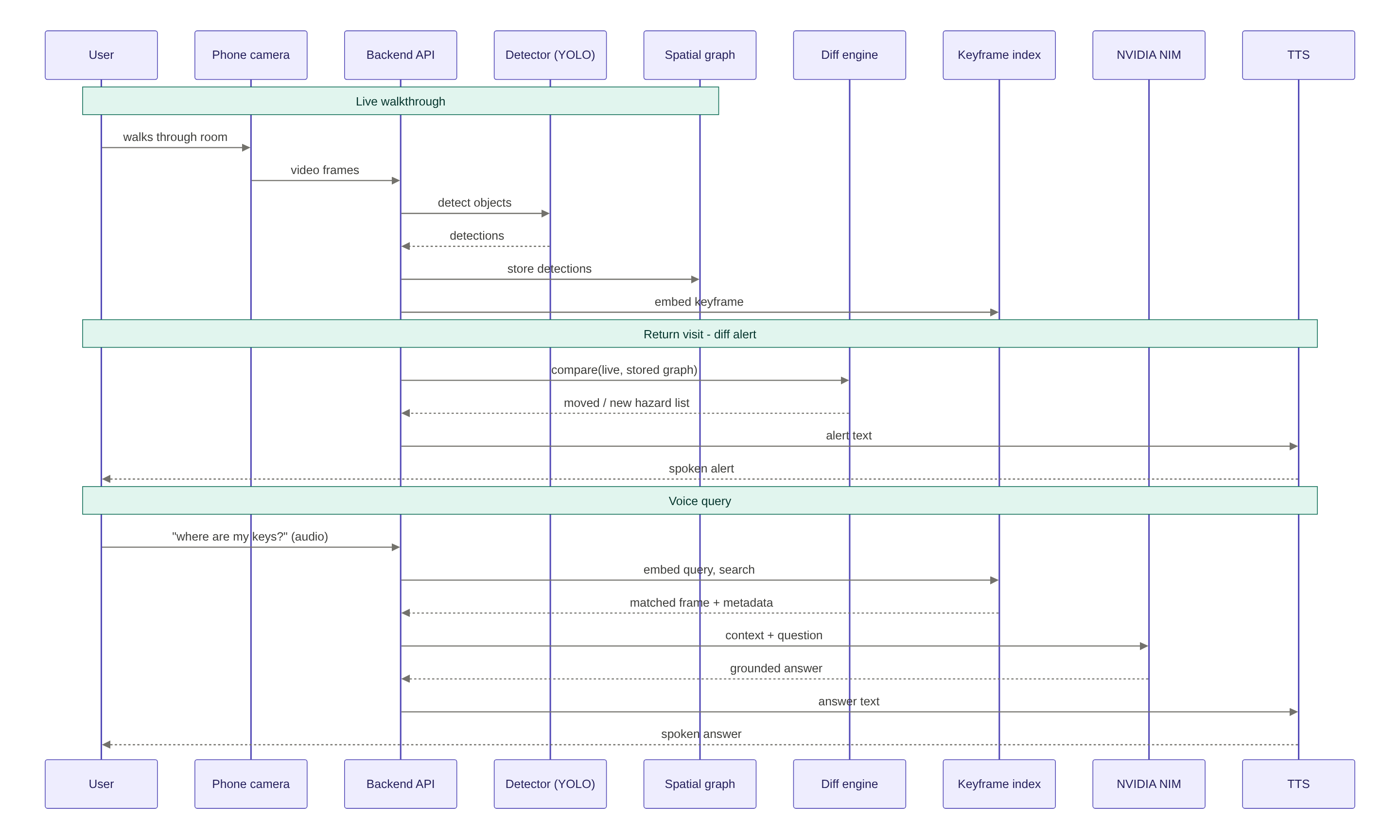
Hi, I'm writing to flag an issue with my submission to the Assistive Innovation Challenge 2026. Unfortunately I was not able to upload a demo video. Over the past two weeks here in Tunisia we have been dealing with a severe and prolonged electricity disruption — my phone, my laptop battery, and my backup power bank all ran flat before I could finish recording. The session I attempted came out unusable and there is no time to redo it before the deadline. To make the project as evaluable as possible without the demo, I am submitting everything else: - Pitch deck — docs/pitch-deck.html (open in any browser, 12 slides, covers inspiration, architecture, the three acts Detect / Remember / Respond, and the safety subsystem) - Pitch deck (PPTX format) — docs/pitch-deck.pptx for offline viewing - Full source code with a working backend, frontend, and notifier bus — clone, pip install -r backend/requirements.txt, npm install && npm run dev in frontend/, then start the backend with uvicorn backend.main:app - README + API reference — README.md and backend/API_REFERENCE.md - Demo documentation (replaces the video) — three files that walk anyone through producing the demo themselves: - docs/demo-script.html — line-by-line teleprompter with timestamps and fallback lines - docs/demo-recording-setup.md — pre-flight checklist (hardware, sync clap, screen recording settings) - docs/demo-edit-cutlist.md — CapCut Web edit decision list (PIP layers, crossfades, title cards, export settings) - Architecture diagram — images/aerograph_sequence_diagram.png (2880×1728, 3:2 ratio) - 29 passing tests under backend/ covering safety, temporal diff, pipeline, and shape contracts Everything runs on a $0 budget, CPU-only (no GPU), and has been verified end-to-end: YOLO11n detection + spatial graph memory + voice RAG via Nemotron + Telegram safety alerts with text + voice notes. I'm sorry I couldn't deliver the video. The code, deck, and demo scripts should let you reconstruct what the demo would have shown. If you have any questions I'm reachable here.
Built With
- accessibility
- asyncio
- chromadb
- clip
- computer-vision
- css
- express.js
- fastapi
- groq
- next.js
- node.js
- onnx/runtime
- opencv
- python
- react
- sapi5
- shadcn/ui
- tailwind
- telegram-bot-api
- twilio
- typescript
- websocket
- whatsapp-web.js
- whisper
- yolo11

Log in or sign up for Devpost to join the conversation.