Inspiration
Rocket design usually starts with a sketch on paper, but getting from that sketch to something you can test takes a lot of CAD work and simulation setup. I wanted to close that gap: draw the rocket, or just photograph the drawing you already made, and find out right away whether it flies.
What it does
AeroCraft is a rocket design and flight simulator that runs in the browser, with no server and nothing to install.
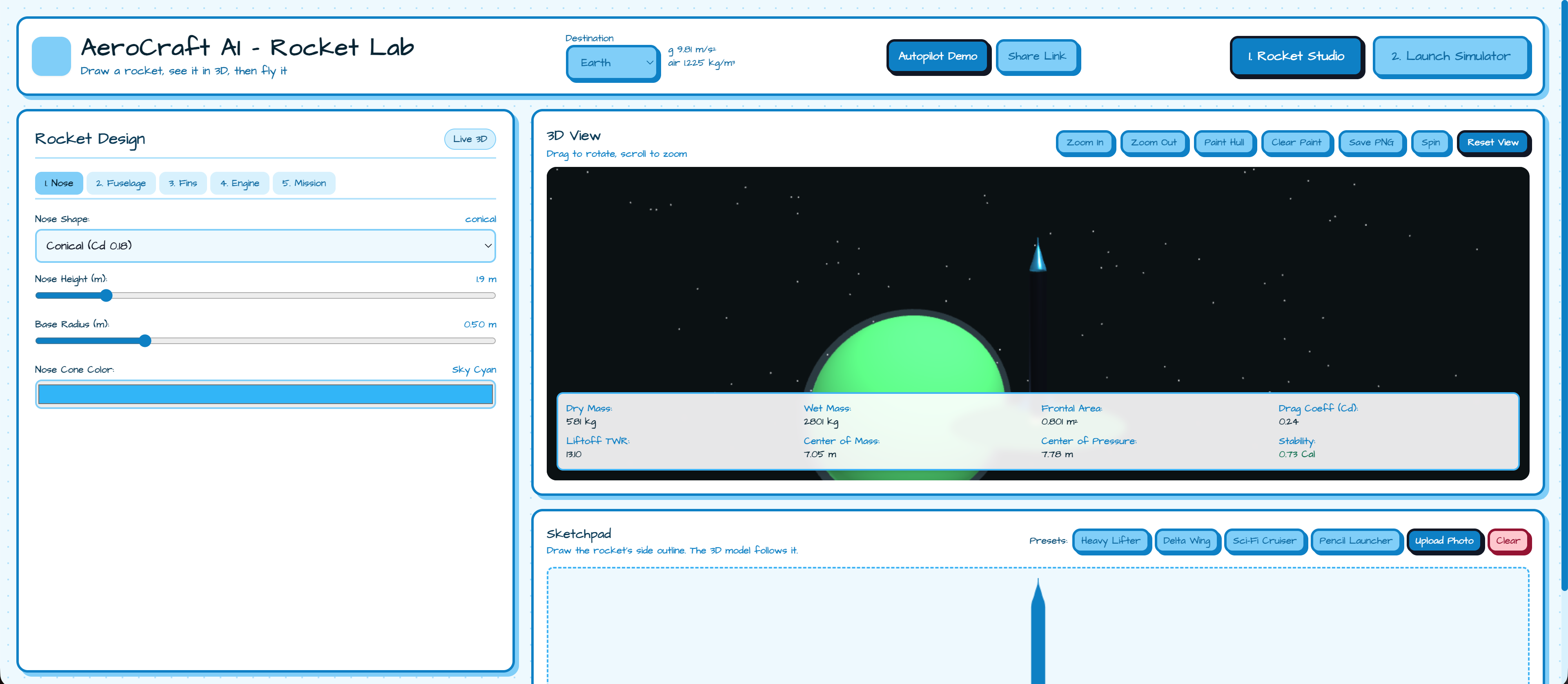
- Draw it, or photograph it. Sketch the side outline of a rocket, pick a preset, or upload a photo of a hand-drawn rocket on paper. The page turns the photo into a clean silhouette, then builds a 3D model from it. The body, the nose and every fin follow the drawing, and the proportions match what you drew.
- Tune it. Sliders control the nose, body, fins, engines, fuel, payload and parachute. A live design review shows stability, thrust-to-weight and a predicted apogee and landing speed as you edit.
- Paint it. Upload any picture and it wraps onto the rocket's hull as a texture, so every rocket can look like yours.
- Let it design for you. Pick a target altitude (3 km, 30 km or the 100 km Karman line) and Auto-Tune searches for the thrust, propellant and parachute settings that hit it and land safely.
- Pick a world. Switch between Earth, the Moon, Mars, Venus and Titan. Gravity, air density and drag change with the world, and so does the whole look of the app.
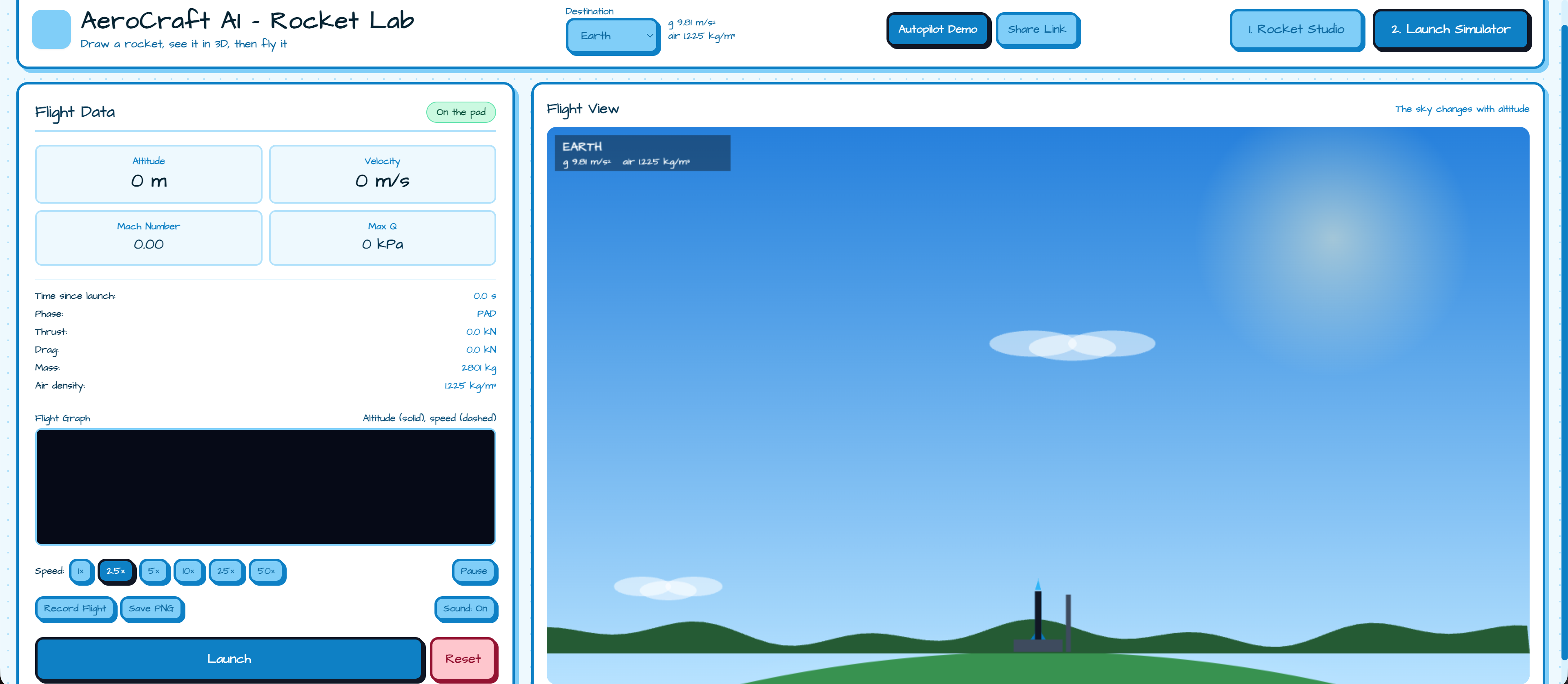
- Fly it. The launch simulator shows live telemetry, a flight graph and a sky that changes with altitude. A spoken T-minus countdown starts the flight, and the engine rumble follows the thrust and fades as the air thins. You can fast-forward up to 50x, and you get a flight report with a score out of 100.
- Record it and share it. Record Flight saves the launch as a video, and Save PNG saves a still. Share Link packs the design, planet and target into the URL, so you can send your rocket to a friend and it opens exactly as you left it.
- See it all in one click. The Autopilot Demo draws a rocket stroke by stroke, runs Auto-Tune, launches on Earth, then repeats on Mars with a landing burn. If you only have a minute, start there.
How I built it
The app is one HTML file with no build step. Three.js draws the 3D model, and the sketchpad, photo processing, graph and flight view use the Canvas API.
Sketch to rocket. The sketch reader scans the canvas row by row and records the width of the outline at every height. From that it finds the body width, where the nose ends, how curved the nose is, and which parts of the outline stick out past the body. The body is that outline revolved around the vertical axis. Each fin is the exact flared shape from the drawing, extruded flat and copied around the rocket. One pixel-to-metre scale is used for both axes, so the proportions stay true to the sketch.
Photo to rocket. A photo is shrunk and converted to grayscale. Ink is any pixel clearly darker than the average of its neighborhood, so shadows and uneven lighting don't break it. Small gaps in the pen line are closed, and whatever the outside can't reach with a flood fill is the inside of the rocket. The biggest blob is kept, stood upright if it was lying down, flipped so the nose is on top, then measured row by row and drawn onto the sketchpad. From there it uses exactly the same sketch-to-rocket pipeline.
Flight physics. Flight is a vertical simulation with a fixed 20 ms step. Gravity weakens with altitude, air density falls off exponentially, and mass drops as propellant burns. The main equations are drag and rocket mass flow rate equations.
Fast-forward that doesn't change the result. Speeding up only changes how many fixed steps run per frame, so a 50x flight gives the same numbers as a 1x flight.
Auto-Tune. It runs the same physics without drawing anything, as a random hill-climb of a few hundred tries over thrust, propellant, landing reserve, parachute size and deploy altitude. It's a search algorithm, not a trained model.
Sharing, recording and sound. Share links are a base64 encoding of every control value plus the sketch outline sampled at 48 heights, kept in the URL hash, so there's no backend. Flight video comes from MediaRecorder capturing the simulator canvas. Sound is built from the Web Audio API and the browser's speech synthesis.
I also wrote backend.py, a standalone OpenCV version of the sketch and photo analysis (blur, Canny edges, contour fill for sketches, and an adaptive threshold with a flood fill for photos, then the same width-profile logic). It isn't connected to the web app, which does all of this in JavaScript.
Challenges I ran into
- Matching the sketch exactly. Our first version normalised the outline and clamped the body, so the 3D model drifted from the drawing. Switching to one uniform scale and splitting the outline into a revolved body plus extruded fins fixed it.
- Fast-forward. Speeding up a simulation with variable time steps gives slightly different flights each time. Moving to a fixed step made every speed produce the same trajectory.
- Stroke thickness. Thick pen strokes made the rocket too wide until I subtracted half the stroke width from each measurement.
- Messy photos. Paper isn't evenly lit, pen lines have gaps, and people photograph rockets sideways or upside down. A fixed brightness cutoff failed, so ink is found relative to the local average, gaps are closed before filling, and the silhouette is turned upright and nose-up automatically. It still needs a clear, closed outline: faint pencil, heavy glare or a busy background can fail.
Accomplishments that I'm proud of
- The 3D rocket really does match the sketch, fins included, instead of just being inspired by it, and that holds for a photo of a drawing too.
- Fast-forward keeps results identical at every speed.
- The auto-tuner and the design review use the same physics as the live flight, so their predictions agree with what happens when you launch.
- The whole app is a single file you can open without installing anything, and a rocket can be sent to someone as a link.
What I learned
I learned a lot about turning a loose 2D drawing, or a messy photo of one, into reliable geometry, and about keeping a simulation deterministic. I also learned to be careful with claims: a simple, well-explained algorithm is better than a vague "AI" label.
What's next for Aerocraft AI - Rocket Lab
- Add wind and steering so stability affects the flight.
- Simulate real staging, instead of drawing stage rings only.
- Make photo input more forgiving, with pencil, glare and cluttered backgrounds, possibly by running
backend.pybehind a small server. - Include a painted hull in share links.


Log in or sign up for Devpost to join the conversation.