Inspiration
It started with a dumb mistake. I was reviewing a pull request on GitHub and accidentally pushed a commit with an AWS key sitting right there in a .env file. Caught it in maybe 30 seconds, rotated the key, but that feeling stuck with me — how many developers do this every single day and don't catch it?
That got me thinking about all the security blind spots we have as developers. We spend hours on code review, write tests, lint everything — but when it comes to the actual browser we're working in? We're basically flying blind. We visit random API docs, install npm packages without checking CVEs, browse Stack Overflow answers that sometimes have real credentials pasted in them. There's no unified tool that just watches your back while you code.
I looked at what's out there. There are enterprise SIEM tools that cost thousands. There are single-purpose extensions that check one thing. But nothing that sits quietly in your browser and gives you the full picture — headers, secrets, trackers, domain reputation, dependency vulnerabilities, and privacy exposure — all in one place, all in real-time, without requiring a PhD to use.
That gap is what AEGIS LENS was built to fill.
What it does
AEGIS LENS is a Chrome extension that turns your browser into a passive security operations center. It's built for developers who want to understand the security posture of every website they interact with, without breaking their workflow.
Here's what it actually does:
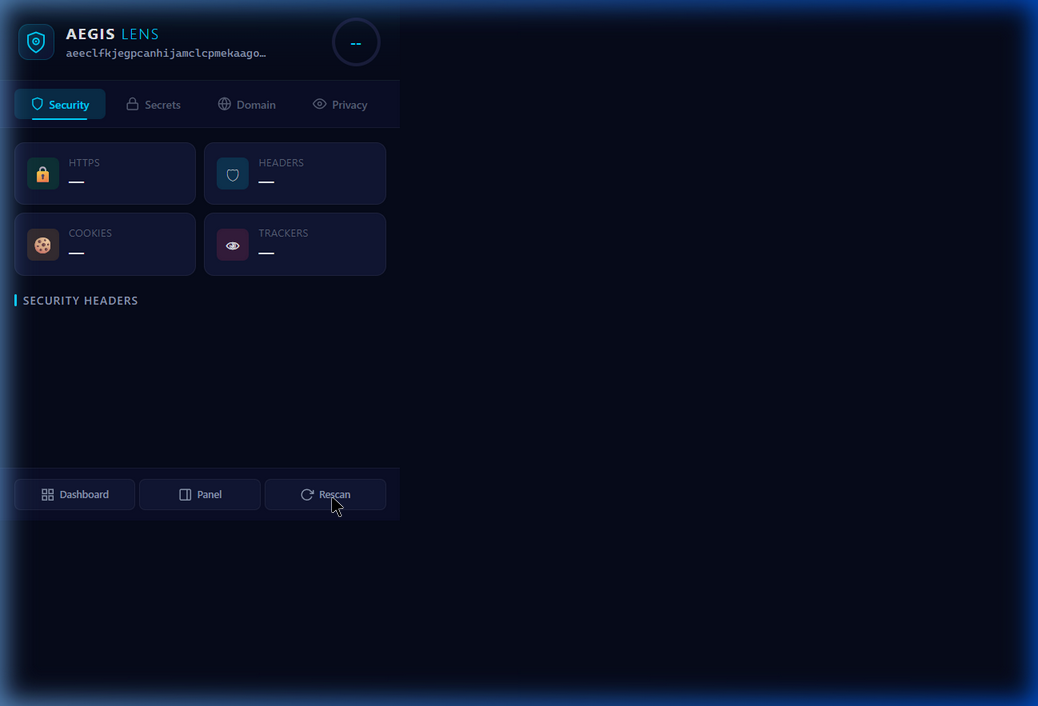
Network Sentinel — Every HTTP response that comes through your browser gets its security headers analyzed. Content-Security-Policy, HSTS, X-Frame-Options, cookie flags — all graded and scored in real-time. You get a security score from 0-100 right on the extension badge.
Secret Scanner — 30+ regex patterns scan page content for exposed credentials. AWS keys, GitHub tokens, Stripe API keys, JWTs, private RSA keys, database connection strings. When it finds something, it highlights it inline with a wavy underline and a tooltip explaining what was found. All of this runs locally — the page content never leaves your browser.
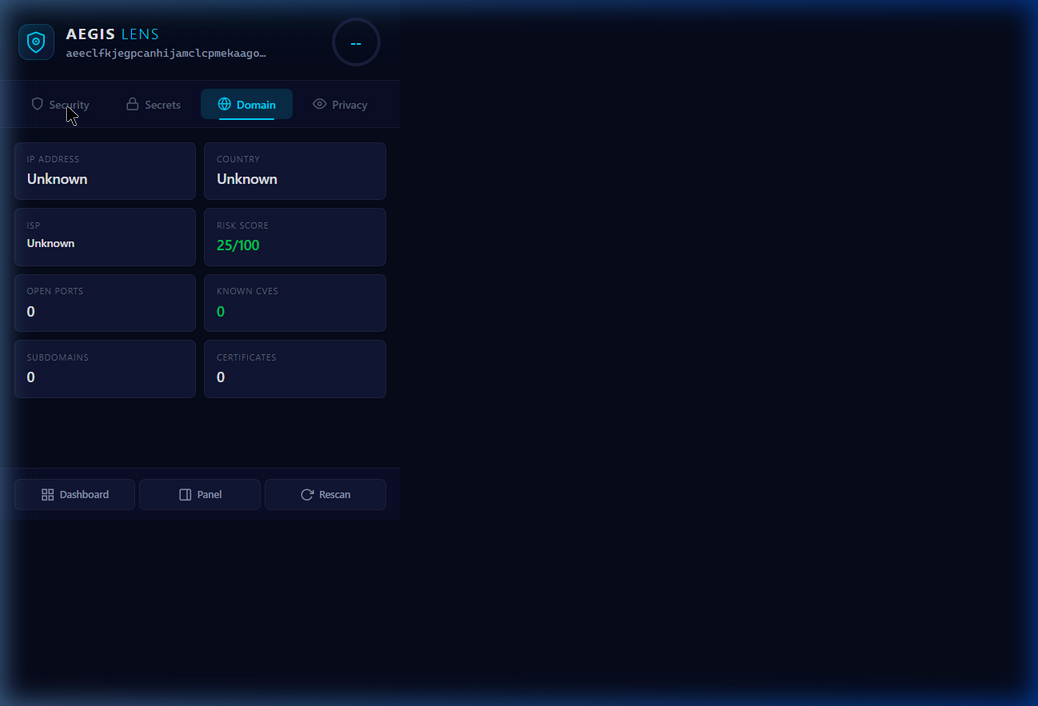
Domain Intelligence — Click the Domain tab and AEGIS queries Shodan InternetDB, crt.sh, ip-api, and Cloudflare DoH to build a profile of the domain you're on. Open ports, known CVEs, SSL certificates, subdomains, geolocation. This only runs when you explicitly ask for it — privacy first.
Dependency Auditor — Visit an npm or PyPI package page and AEGIS automatically checks for known vulnerabilities via the NVD database, injecting severity badges right into the page.
Privacy Fingerprint Analyzer — 12 different fingerprinting vectors (canvas, WebGL, audio context, fonts, WebRTC, navigator, screen resolution, timezone, etc.) are analyzed to tell you exactly how unique — and therefore trackable — your browser is.
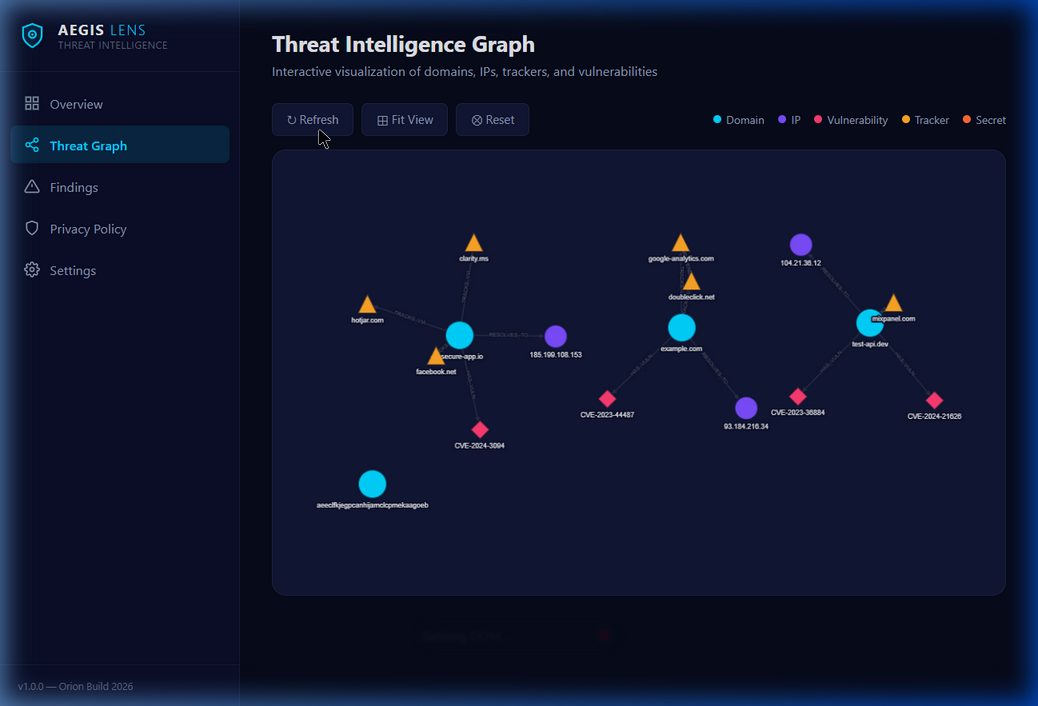
Threat Intelligence Graph — Everything connects into a force-directed graph visualization powered by Cytoscape.js. Domains link to IPs, IPs link to vulnerabilities, domains link to trackers. You can literally see the threat landscape of your browsing session. The graph data can optionally sync to a Neo4j Aura cloud instance for persistent storage and more advanced queries.
How we built it
No frameworks. No build tools. No webpack, no React, no Tailwind. Just raw JavaScript, vanilla CSS, and the Chrome Extension APIs.
This was a deliberate choice. Manifest V3 has strict Content Security Policy restrictions — no eval, no remote code, no inline scripts. Frameworks add complexity that fights against these constraints. By going vanilla, we got full control over every byte that runs in the extension, and anyone reviewing the code can read it straight through without needing to understand a framework's abstractions.
The architecture breaks down into three layers:
Background (Service Worker) — Six independent modules (Network Sentinel, Secret Scanner, Domain Intel, Dependency Auditor, Privacy Fingerprint, Threat Graph) coordinated by a central message router. Each module is self-contained with its own logic, and the service worker just dispatches messages between the UI and the modules. We used ES modules with import/export for clean dependency management.
Content Scripts — Injected into web pages to scan for secrets and collect fingerprint data. These are deliberately minimal and only run on-demand (when the user clicks Rescan) to respect privacy. The secret highlighter creates DOM overlays with severity-colored wavy underlines. The dependency badge injector detects npm/PyPI pages and adds inline vulnerability indicators.
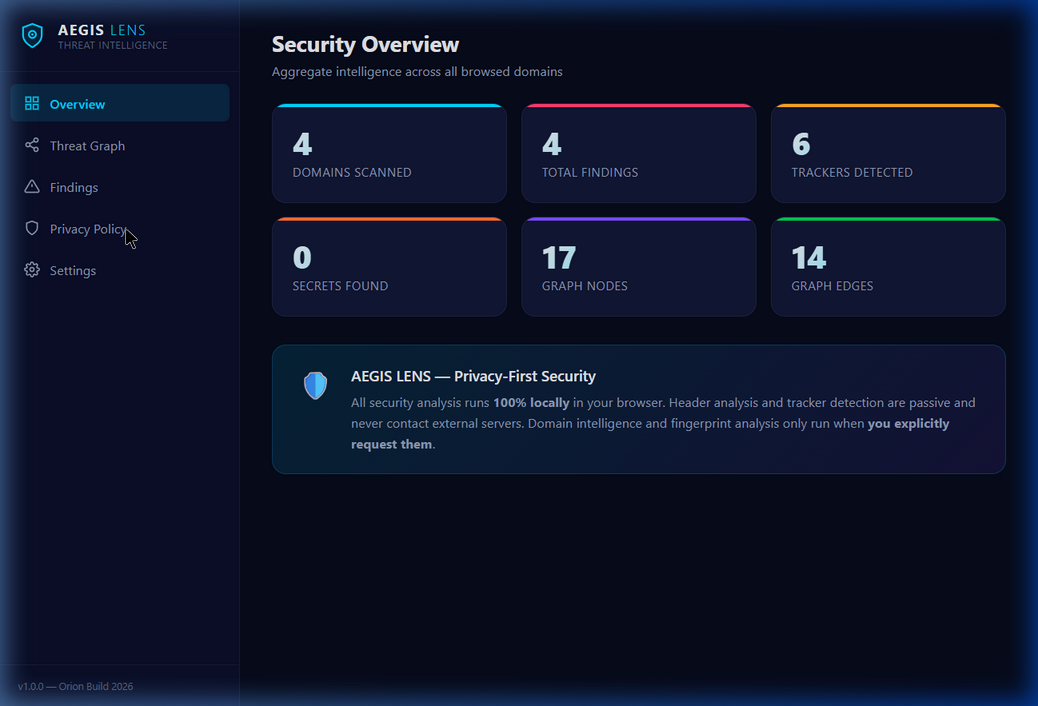
UI Layer — Three surfaces: a 400px popup with tabbed navigation (Security, Secrets, Domain, Privacy), a full-page dashboard with the Cytoscape.js threat graph, and a side panel for live monitoring. All styled with CSS custom properties for a consistent dark theme.
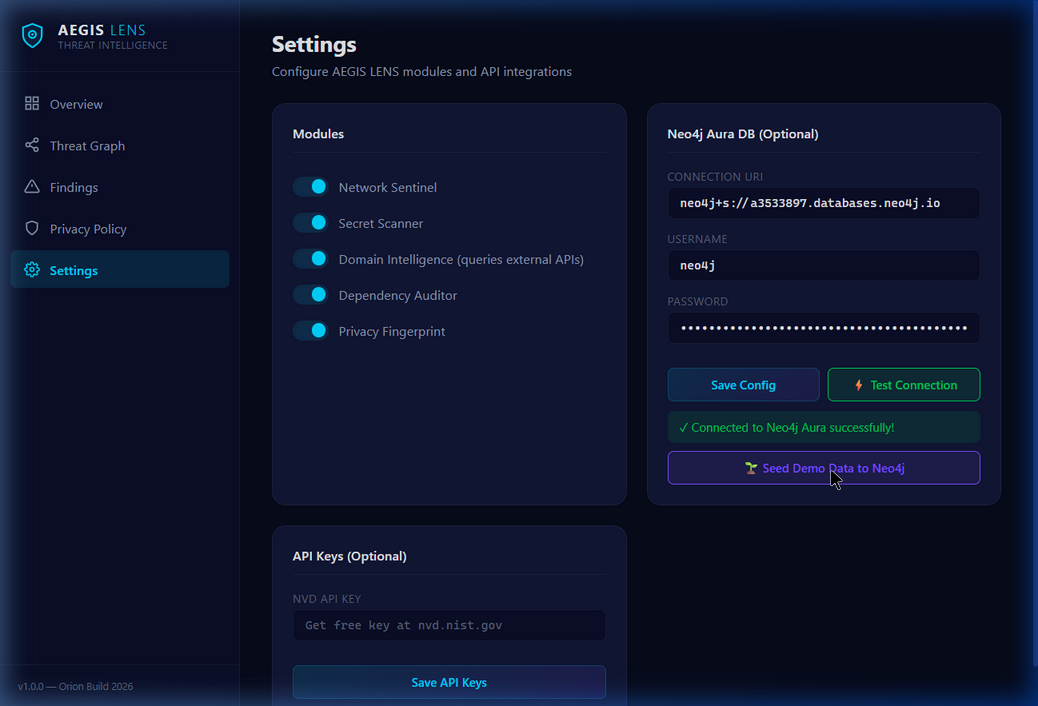
Storage uses a two-tier approach: IndexedDB for local persistent storage (graph nodes, edges, findings) with an in-memory TTL cache for API responses, and optional Neo4j Aura DB for cloud graph persistence. The Neo4j integration uses the HTTP Query API v2 with Basic auth — no driver needed, works perfectly from a service worker.
The API integrations were chosen specifically because they're all free and most don't require authentication:
Shodan InternetDB — no auth, returns ports/CVEs/hostnames for any IP crt.sh — no auth, certificate transparency logs ip-api.com — no auth, geolocation Cloudflare DoH — no auth, DNS over HTTPS NVD — free API key for higher rate limits
Challenges we ran into
Manifest V3 service worker lifecycle was the biggest headache. Service workers in MV3 are ephemeral — Chrome can kill them at any time after 30 seconds of inactivity. This means you can't hold state in global variables and expect it to survive. We had to build the in-memory cache with the assumption that it could be wiped at any moment, falling back to IndexedDB for anything important.
Content Security Policy restrictions blocked us from loading Cytoscape.js from a CDN. In MV3, you can't use unsafe-eval or load remote scripts. We had to vendor the library locally (374KB minified) and load it from the extension's own files. Same issue with any other library we might have wanted to use.
The Neo4j connection took a few iterations to get right. Aura DB uses neo4j+s:// protocol URIs, but from a service worker you can only make HTTP requests. We had to build a URI converter that transforms neo4j+s:// → https:// and constructs the correct Query API v2 endpoint (/db/neo4j/query/v2). There's no Neo4j JavaScript driver that works in a service worker context, so we rolled our own HTTP client with Basic auth.
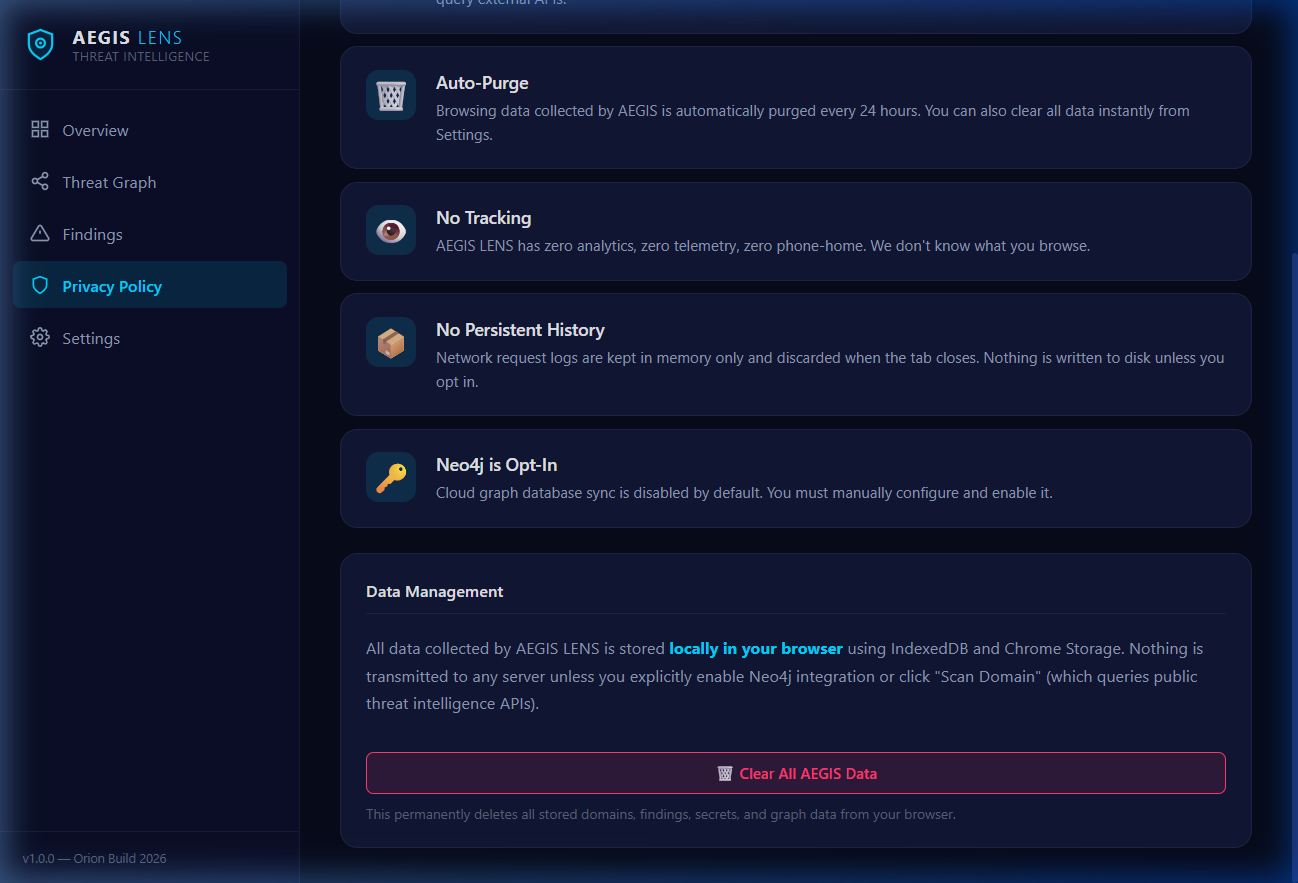
Balancing security with privacy was a real design tension. The whole point of the extension is to improve security, but it has permission which means it could see everything. We resolved this by making all analysis local by default — external API calls only happen when the user explicitly clicks a button. No auto-scanning, no phone-home, no telemetry. We added a full Privacy Policy page in the dashboard to be transparent about exactly what data goes where.
The regex-based secret scanner had to be carefully tuned to avoid false positives. A pattern that's too loose flags every base64 string as a potential API key. Too strict and you miss real secrets. We ended up with 30+ patterns, each with specific prefix matching (e.g., ghp_ for GitHub tokens, AKIA for AWS keys) to keep precision high.
Accomplishments that we're proud of
The threat graph. Seeing domains, IPs, vulnerabilities, and trackers laid out as an interactive force-directed graph — with real data from actual browsing sessions — is genuinely satisfying. It makes abstract security concepts tangible. You can literally see that insecure-app.io resolves to an IP that has 3 known CVEs and connects to 4 tracking domains. That visual immediately communicates risk in a way that no table or score ever could.
The privacy-first architecture. We could have taken the easy route and auto-scanned everything, sent every domain to every API on page load, stored complete browsing histories. Instead, we built the extension so that passive analysis is purely local, external queries require explicit user action, and there's a one-click "Clear All Data" button. This is how security tools should work.
The Neo4j Aura integration working from a service worker with no driver. We wrote a clean HTTP client that converts Aura URIs to HTTPS endpoints and runs Cypher queries over REST. The test connection button goes green, the demo data seeds into the cloud graph — it just works.
Zero dependencies. The entire extension is ~120KB of our code (plus 374KB for the vendored Cytoscape.js). No node_modules, no build step, no transpilation. Load it in Chrome, and it runs. That kind of simplicity is hard to achieve and easy to appreciate
What we learned
Manifest V3 is opinionated and that's okay. At first the restrictions felt limiting — no persistent background pages, no remote code, strict CSP. But they forced us into better architecture patterns. The event-driven service worker model with message passing is actually cleaner than the old persistent background page approach.
Free cybersecurity APIs are surprisingly powerful. Shodan InternetDB alone gives you open ports, known CVEs, and hostnames for any IP — no API key needed. Combined with crt.sh for certificate transparency and ip-api for geolocation, you can build a surprisingly comprehensive domain intelligence profile without spending a dollar.
Graph databases make threat data click. Relational tables of security findings are boring and hard to reason about. The moment we loaded the same data into a graph structure — domains connected to IPs connected to vulnerabilities connected to trackers — patterns became immediately visible. The graph isn't just visualization; it's a fundamentally better data model for threat intelligence.
Privacy and security are not opposites. The temptation with a security tool is to collect everything. But the best security tools are the ones people actually trust enough to install and keep running. Making AEGIS privacy-first wasn't a compromise — it was a feature.
What's next for AEGIS LENS — Real-Time Security & Privacy Intelligence Layer
Firefox and Edge ports — The core logic is browser-agnostic, just need to adapt the extension APIs Custom regex builder — Let users define their own secret patterns for organization-specific tokens Team threat sharing — Encrypted sharing of threat intelligence between team members via the Neo4j graph CI/CD integration — Export secret scanning as a pre-commit hook Compliance checking — Map security headers to SOC2, GDPR, and PCI-DSS requirements AI-assisted analysis — Use local models (via WebNN/ONNX) to prioritize findings and reduce false positives


Log in or sign up for Devpost to join the conversation.