🎧 Hackathon: Advancing 3D Reconstruction and Stereoscopic Visualization
Contact: [email protected]
🌟 Project Description
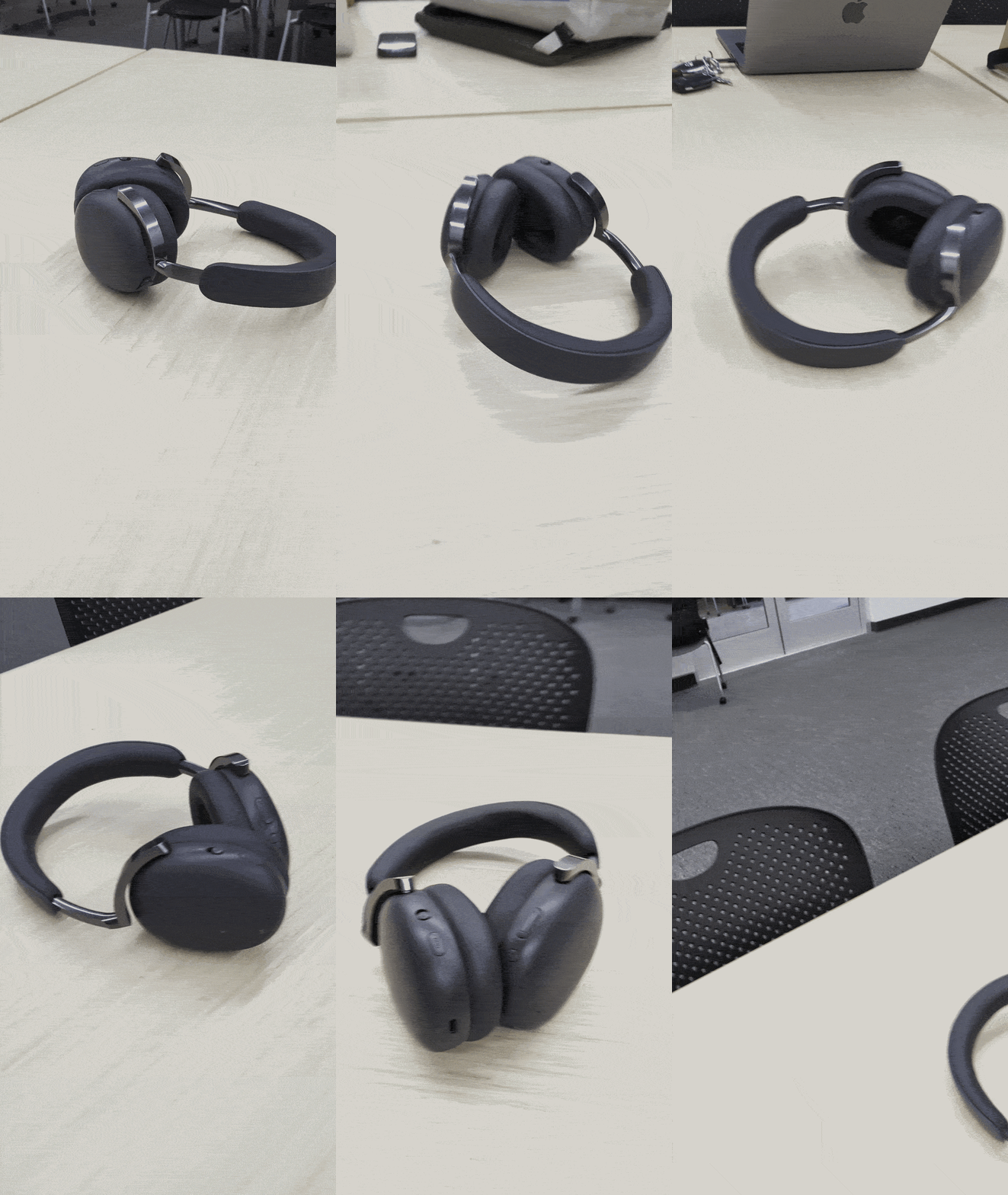
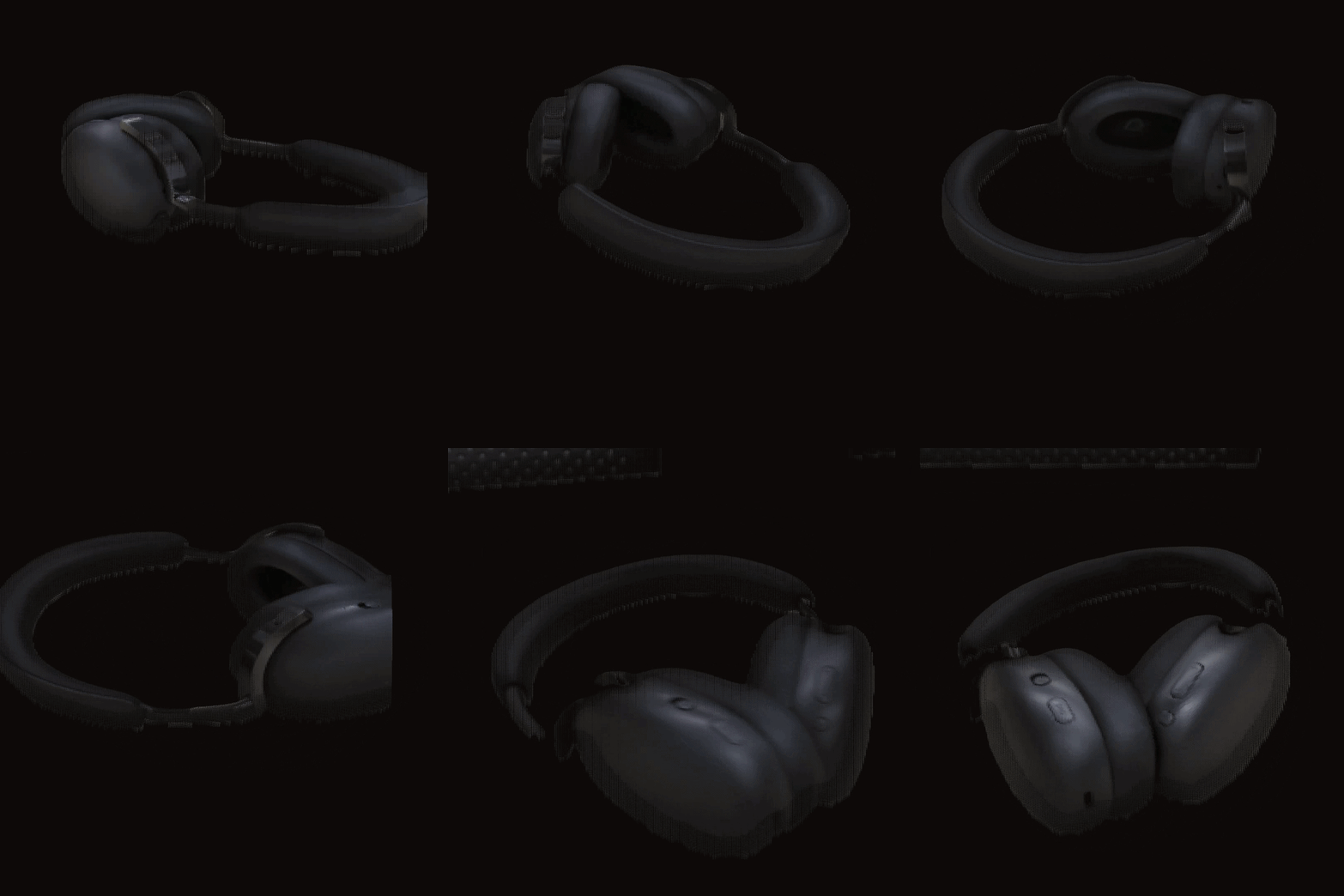
This project implements an end-to-end pipeline that transforms 2D video of a real-world object (headphones) into immersive 3D reconstructions and stereoscopic visualizations. By combining frame extraction, pixel-by-pixel analysis, depth estimation, and 3D point cloud rendering, we demonstrate a scalable approach to volumetric media creation — suitable for viewing on Google Cardboard.
Hero Preview: 3D Gaussian Splatting Reconstruction

📂 Project Structure
changbal_hackathon/
├── README.md                  # This file
├── LICENSE                    # Project license
├── extract_frames.py          # Main pipeline script (auto-discovers objects)
├── create_3d_video.py         # 3D floating rotating video generator
├── video/                     # ← Source videos organized by object
│   ├── banana/
│   │   └── PXL_20260620_172028913.mp4   # Banana + water bottle (~20s)
│   └── headphone/
│       └── video_headphone.mp4          # Headphones on desk (~9s)
└── pixel_frames/              # ← All generated outputs (per object)
    ├── banana/
    │   ├── banana_3d_reconstruction.mp4   # Centroid-stabilized 3D rotating showcase (1080x1080)
    │   ├── frames/                        # 63 extracted key frames
    │   ├── pixel_grid/                    # Pixel-by-pixel block visualizations
    │   ├── depth_maps/                    # Gradient-based depth estimations
    │   └── 3d_renders/                    # 3D point cloud SBS VR renders
    └── headphone/
        ├── headphone_3d_reconstruction.mp4   # Centroid-stabilized 3D rotating showcase (1080x1080)
        ├── frames/                           # 24 extracted key frames
        ├── pixel_grid/                       # Pixel-by-pixel block visualizations
        ├── depth_maps/                       # Gradient-based depth estimations
        └── 3d_renders/                       # 3D point cloud SBS VR renders
🎬 Pipeline Overview
The reconstruction pipeline consists of 5 stages, each building on the previous. It auto-discovers all object folders under video/ (e.g. video/headphone/) and creates matching output under pixel_frames/<object>/:
Stage 1: Frame Extraction
Extracts key frames at regular intervals from the source video (every 10th frame).
| Property | Value |
|---|---|
| Resolution | 1080 × 1920 (portrait) |
| Frame Rate | 30.0 fps |
| Total Frames (Headphone) | 274 (capping extraction at frame 240) |
| Duration | ~9.1 seconds |
Stage 2: Pixel-by-Pixel Visualization
Each frame is downscaled to a 64×64 pixel grid and then enlarged using nearest-neighbor interpolation. This reveals the individual pixel color blocks that make up the image — essential for understanding how pixel data maps to 3D space.

Stage 3: Depth Map Estimation
Depth is estimated from each frame using Sobel gradient operators and Gaussian smoothing. The result is visualized with the Inferno colormap — brighter regions indicate stronger depth edges.

Stage 4: 3D Point Cloud SBS VR Rendering (Google Cardboard)
Each frame's isolated foreground pixels are projected into 3D space using a dual-perspective camera setup to generate a stereoscopic Side-by-Side (SBS) pair compatible with the Google Cardboard SDK:
- 양안 3D 시점 (Yaw Parallax): Left eye (rotated -0.02 rad) and Right eye (rotated +0.02 rad) are rendered from true 3D volumetric point clouds.
- Centroid Stabilization: The object's center of mass is tracked in every frame, aligning it perfectly at the center of each eye channel to prevent drift or eye strain.
- Feathered Circular Splatting: Point sizes are scaled based on distance-to-boundary maps, and colors are blended with the dark background to produce butter-smooth edges.

Stage 5: Floating 3D Rotating Video Showcase
Removes all background elements (like tables, office chairs, wood desk textures) using 3D plane fitting on estimated relative depth maps combined with selective color HSV mask boundaries. Projects the isolated foreground into 3D space, and renders a smooth 360-degree rotation video.
- Centroid Stabilization: Keeps the object stationary in the center of the video while rotating, eliminating camera shakiness and vertical/horizontal sway.
- Output Path:
pixel_frames/<object>/<object>_3d_reconstruction.mp4
🏗 Project Scope
| Phase | Objective | Key Technology |
|---|---|---|
| Phase 1 | Video to 3D Rendering | Neural Radiance Fields (NeRF) / 3D Gaussian Splatting |
| Phase 2 | 3D Rendering to Stereoscopic View | Binocular disparity rendering (Left/Right eye projection) |
🔬 Technical Roadmap
1. Video to 3D Rendering
- Data Pre-processing: Frame extraction and camera pose estimation using Structure-from-Motion (SfM).
- Optimization: Utilizing 3D Gaussian Splatting for high-fidelity scene representation.
- Challenge: Managing temporal consistency and occlusions within dynamic scenes.
2. Stereoscopic Integration for Google Cardboard
To enable viewing on Google Cardboard, the pipeline will implement the following:
- Virtual Camera Setup: Implementing dual virtual cameras with a 64mm Inter-Pupillary Distance (IPD) offset.
- Viewport Configuration: Rendering the Left Eye view to the left 50% of the display and the Right Eye view to the right 50%.
- Distortion Correction: Applying a "barrel distortion" shader to compensate for the spherical lenses in the Cardboard headset, ensuring a corrected, linear image.
- Projection Strategy: Utilizing parallel projection to minimize vertical parallax and reduce user eye strain.
🚀 How to Run
Prerequisites
pip3 install opencv-python-headless Pillow numpy
Run the Pipeline
# Step 1: Extract frames and generate static 3D/stereo renders
python3 extract_frames.py

# Step 2: Generate floating 3D video for an object
python3 create_3d_video.py headphone
python3 create_3d_video.py banana
extract_frames.pyautomatically discovers all object folders undervideo/and generates static outputs.create_3d_video.pytakes the object folder name as an argument, segments the object out of the background, and generates a rotating 3D.mp4video.
Adding a New Object
To add a new object, simply create a folder under video/ with a video file inside:
mkdir video/my_new_object
cp my_video.mp4 video/my_new_object/
python3 extract_frames.py
📊 Evaluation Metrics
- Visual Fidelity: SSIM (Structural Similarity Index) and PSNR comparisons.
- Rendering Latency: Frames-per-second (FPS) output for real-time stereoscopic visualization.
- Spatial Accuracy: Precision of depth reconstruction in the final stereo pair.
📝 License
See LICENSE for details.


Log in or sign up for Devpost to join the conversation.