-
-
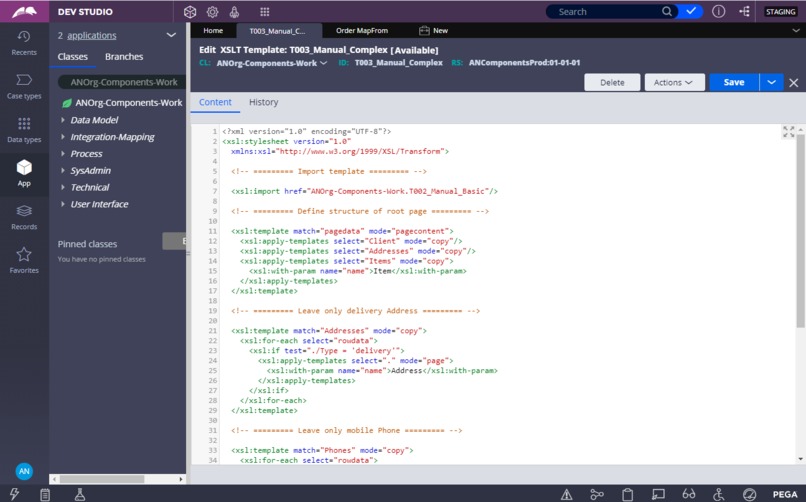
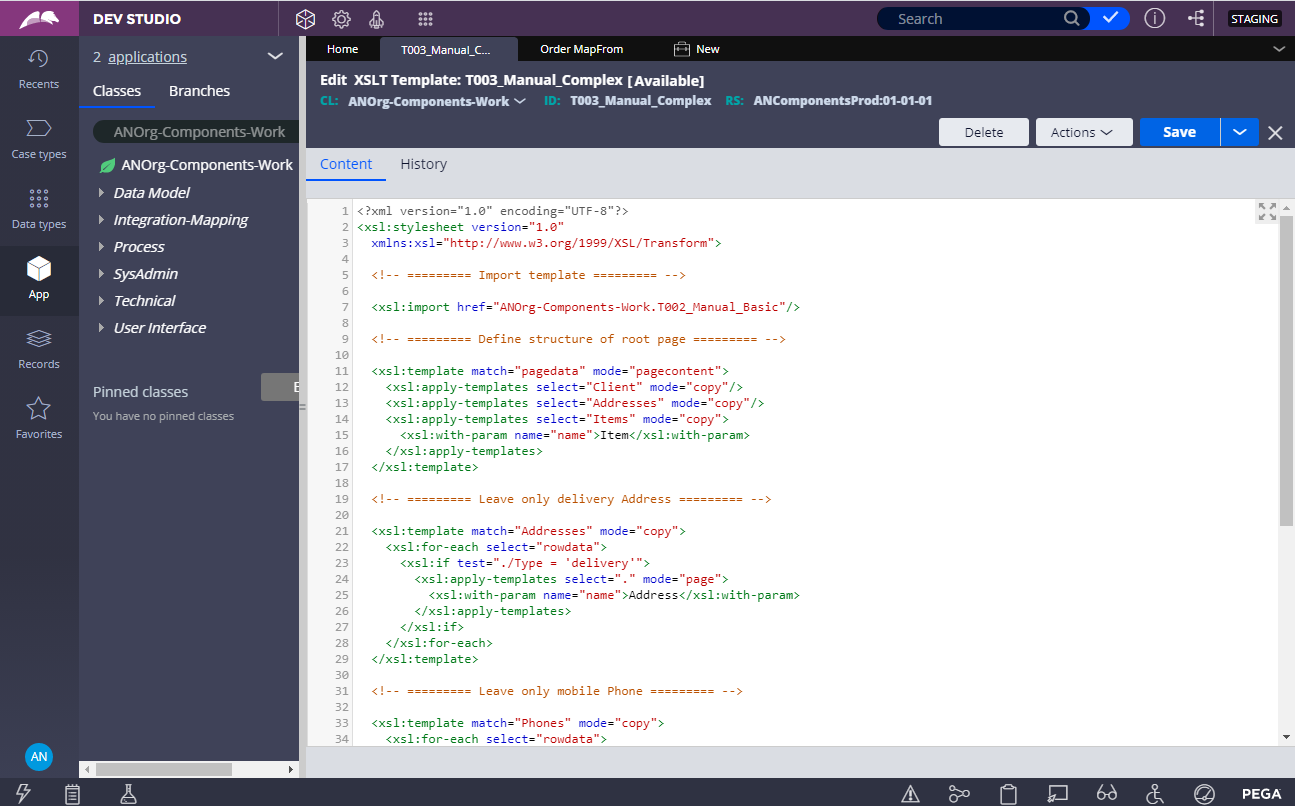
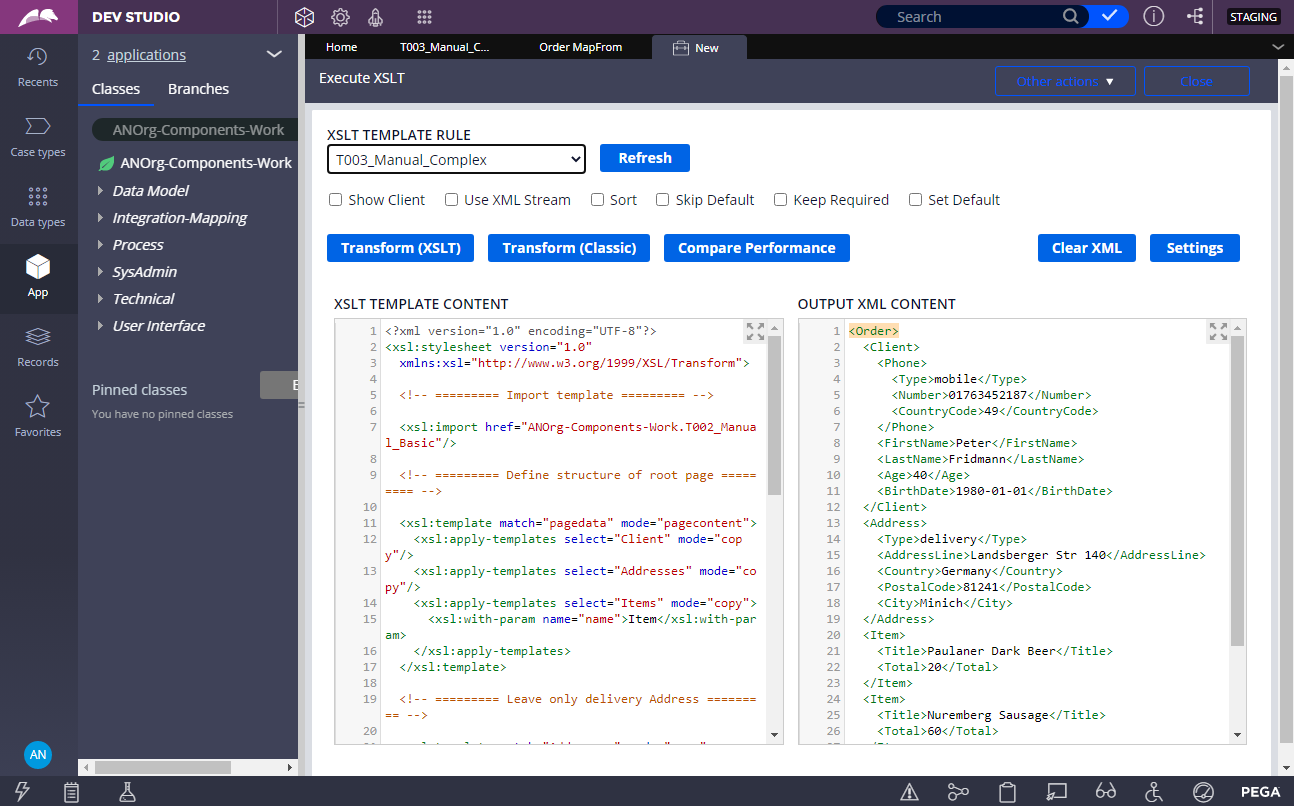
XSLT-template definition custom rule.
-
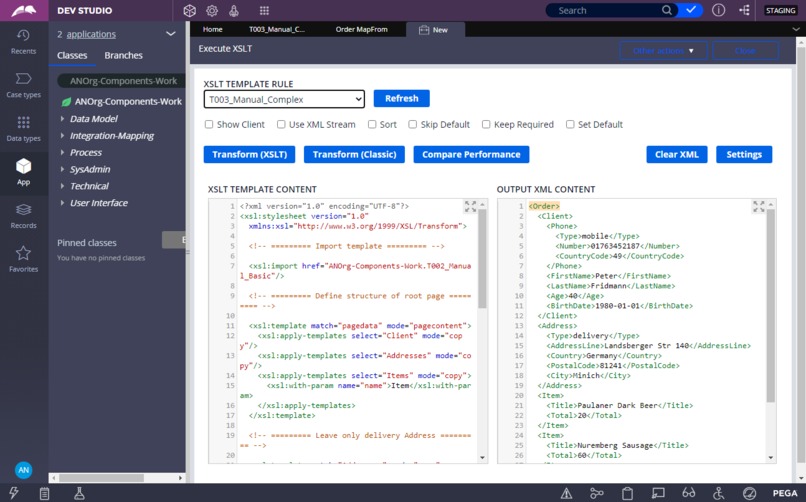
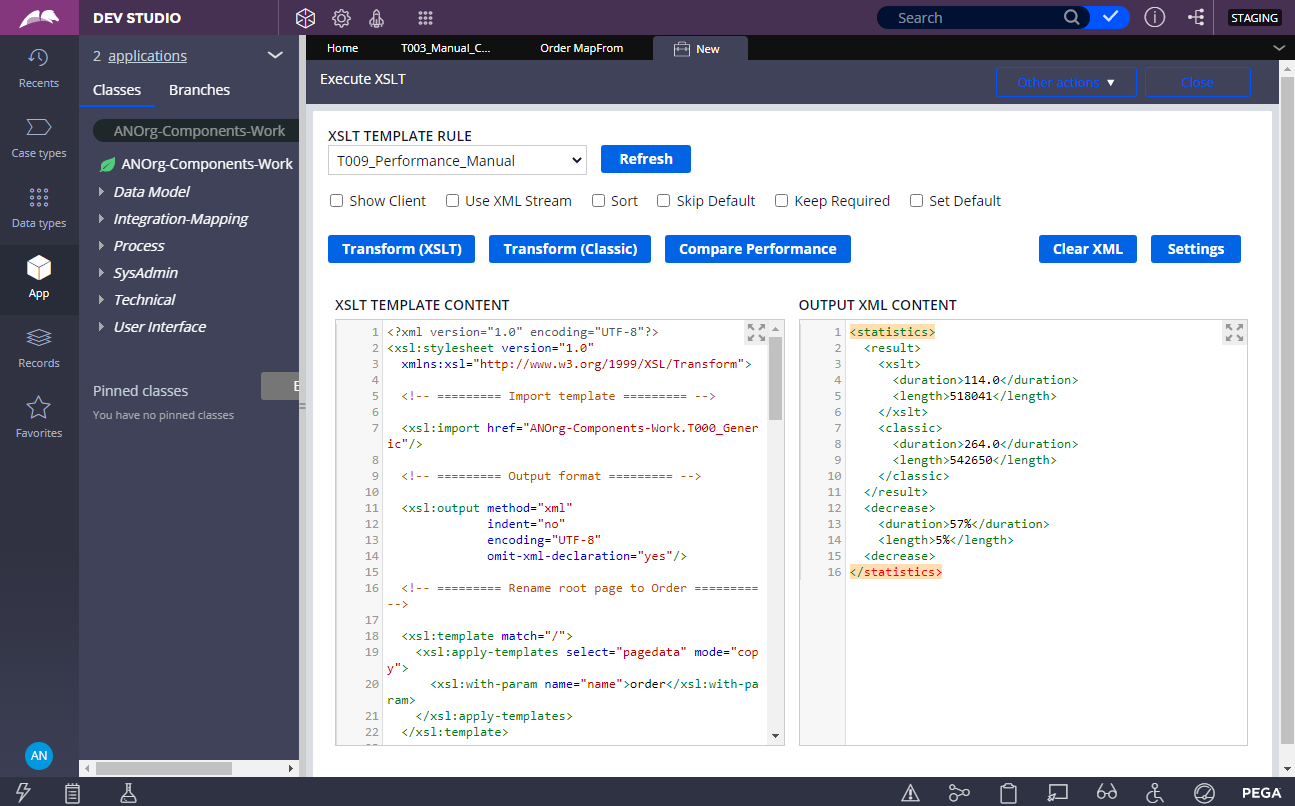
Results of Clipboard streaming to XML with help of XSLT-template.
-
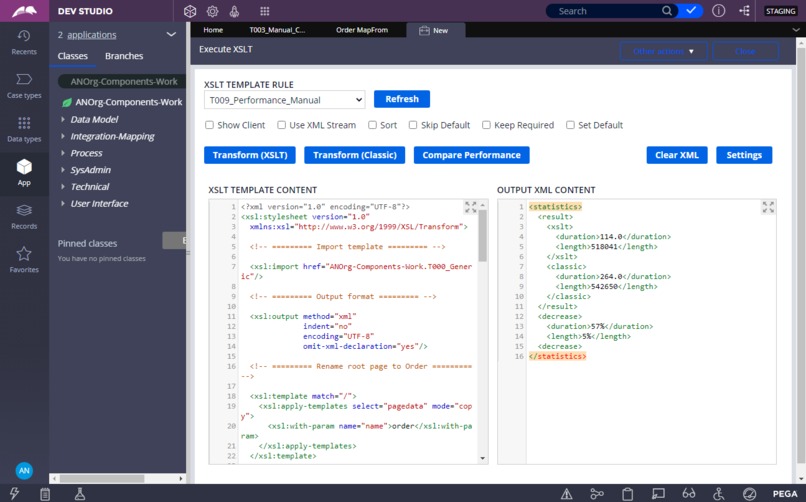
Results of performance comparison between classic Clipboard-to-XML streaming approach and streaming with help of XSLT-template.
Full demo video
Full demo video is accessible by the next link - Advanced XML Streaming Framework for Pega (full demo). In addition to basic project introduction, it provides advanced demo scenarios for such features as parameterized and multi-page transformations, XSD-driven transformations, transient properties and pages, performance comparison test and others.
Inspiration
From my previous experience almost each company-wide Pega implementation deals with XML- or SOAP-based services integration. And each project has its own specifics: huge XML-data amount to be transferred to/from the service, frequent data model changes, complicated and time consuming data transformation to be done and so on. In some cases, classic Pega approach for Clipboard-to-XML streaming during XML-based services integration is not giving the best possible result. That is why I started thinkig about alternative solution, which can be used in such situations.
Classic Pega Clipboard-to-XML streaming approach is represented on the next picture:
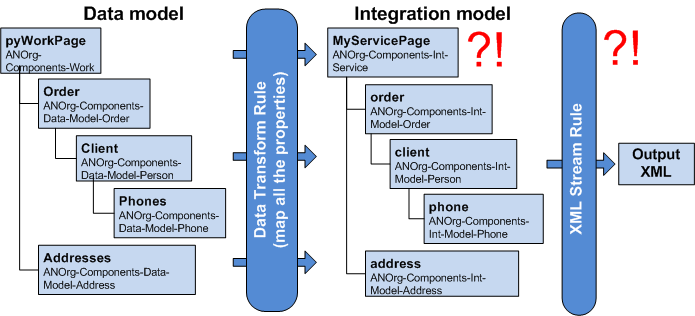
It consists of the next steps:
- Two types of data model are created: Business data model and Integration data model.
- Clipboard page is transformed from Business data model into Integration data model with help of Data Transform rules.
- Then Clipboard page is streamed from Integration data model into XML with help of XML Stream rules.
Motivation for this project was to improve this streaming process from the next prospective:
- Performance: there are two processing stages – mapping to Integration data model and steaming to XML. For big Clibpboard structures two stages are giving a performance overhead. Is it possible to have only one processing stage?
- Memory consumption: both Business and Integration data models are kept in memory during the processing. Is it possible to have only one data model in memory?
- Maintainability: even to add a new single property, all the layers must be modified – Data Transform rules, Integration data model and XML Stream rules. Is it possible to have only one point of modification?
What it does
To achieve improvements mentioned above, this project applies Extensible Stylesheet Language Transformations technology (XSLT):
- XSLT is an XML-based language, which can transform one XML Document Object Model (DOM) into another one.
- XSLT has enough expressiveness to perform transformation of any complexity.
- From performance prospective, JDK-embedded XSLT-processors have an XSLTC extension, which can generate native Java-code from XSLT-template and compile it into executable Java-class "on-the-fly".
- XSLT-technology fits perfectly into overall Pega concept of reusability and specialization: one XSLT-template can import all the transformation rules from another one and specialize any of them.
- Finally, this approach increases maintainability: XSLT-template is doing both transformation and streaming into XML, representing this way a single point of modification in the case of transformation changes.
The solution proposed applies XSLT-technology for efficient Clipboard pages streaming into XML.
How I built it
For XSLT-templates definition storage inside Pega a special custom Pega rule Integration-Mapping -> XSLT Template was developed. This rule enables XSLT-template content editing, as well as its validation with help of compilation attempt:

Main XSLT-transformation functionality is implemented as a reusable Java-function, which executes JDK-embedded XSLT-processor for transformation purposes (it supports Oracle JDK, IBM JDK and Open JDK):
@ANUtilities.StreamClipboardToXML(
  myStepPage,
  D_XSLT[Template: "ANOrg-Components-Work.T002_Manual_Basic"].Template,
  null,
  null
)
In the example above this function is called to transform myStepPage Clipboard page with help of XSLT-template, defined by custom rule ANOrg-Components-Work.T002_Manual_Basic. Access to XSLT-template is implemented through D_XSLT node-level Data Page rule. This Data Page compiles XSLT-template "on-the-fly" and caches its instance, so it can be reused for multiple transformations later.
XSLT-transformation function implements two execution approaches:
- Model-first approach: in this case application data model and XSLT-template to stream it to XML are created manually.
- XSD-first approach: in this case XSLT-template can do automatic transformation with help of output format description by XML Schema Definition (XSD).
XSD-first approach idea is originating from the next question: what if we have already an output XML description in the form of XSD-schema? Is it possible then to simplify XSLT-template development?
XSD-schema in Pega can be used to generate automatically data model and XML Stream rule. This data model then can be extended during the development with some additional properties, but an output XML format remains strictly defined by XML Stream rule. During the transformation phase this XML Stream rule can be used to automate processing:
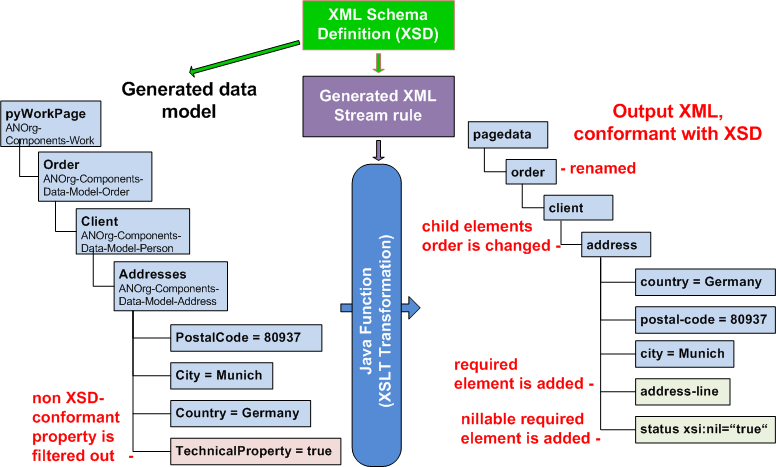
In this scenario next logic is executed:
- XSLT-transformer function is able to read XML Stream rule definition.
- And then it can automatically transform a Clipboard page according to this definition, which means – according to XSD-schema.
During this XSD-driven transformation the function is doing multiple things: renaming elements, sorting them, adding required fields and so on. That is an example, how XSLT-transformation function is called in this case:
@ANUtilities.StreamClipboardToXML(
  myStepPage,
  D_XSLT[Template: "ANOrg-Components-Work.T006_Automatic_Basic"].Template,
  D_Stream[Template: "ANOrg-Components-Work.Order.MapFrom"].Template,
  "sort|skip_default|required|set_default"
)
In this scenario the function receives two additional parameters:
- Reference to XML Stream rule to be used. Access to XML Stream rule is implemented through D_Stream node-level Data Page rule. This Data Page parses XML Stream rule definition "on-the-fly" and caches it as a java.util.Map class instance, so it can be reused for multiple transformations later.
- Optionally, a list of additional transformation modes can be provided, which controls such aspects as elements sorting, preserving required fields, setting default values and so on.
Challenges I ran into
Unfortunately XSLT-approach has one major performance issue, which is represented on the next picture:
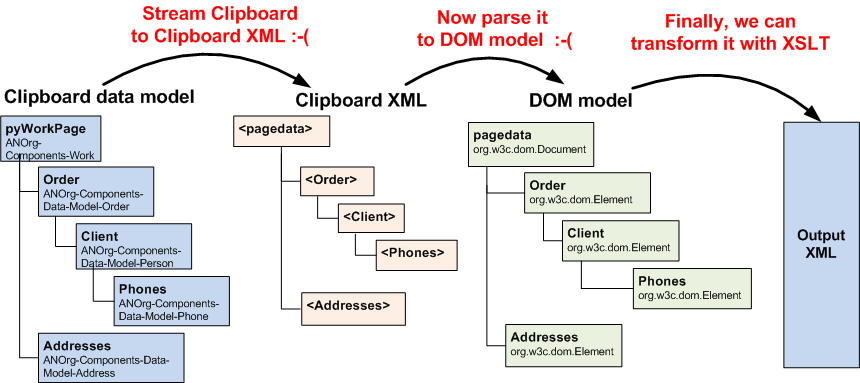
This problem happens because of the next reason:
- JDK-embedded free XSLT-processors can only use DOM model as an input for transformation.
- To convert Clipboard data model into DOM model we need at first to stream Clipboard page into Clipboard XML, then parse this XML into DOM model, and only after we can apply XSLT-transformation.
- These intermediate streaming and parsing steps neglect all the performance benefit, which can be achieved from XSLT-technology usage.
To mitigate this problem, next cornerstone solution was implemented:
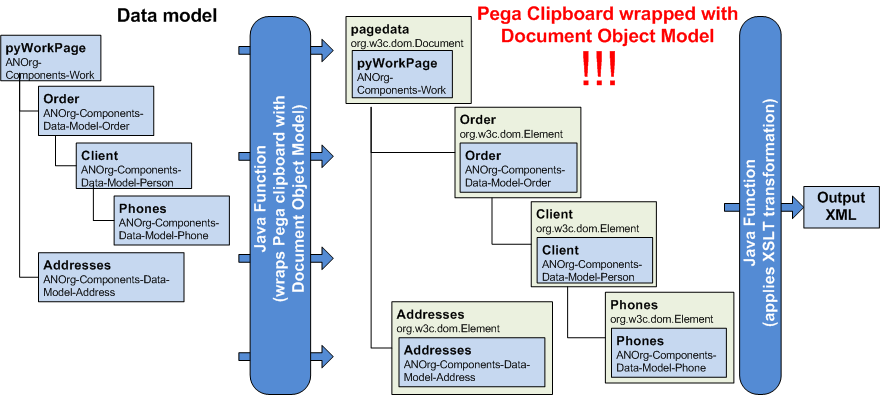
Its main idea is:
- At first XSLT-transformer Java-function "wraps" Clipboard page with DOM interfaces. Particular Clipboard property or page is wrapped "on-the-fly" – only if (and when) it is used by the transformation.
- And then this function applies compiled XSLT-template to this "wrapped” Clipboard page, as if it was an ordinary DOM structure.
- This way all the intermediate steps with streaming and parsing are eliminated, keeping performance at the highest possible level.
The first big challenge during this solution implementation was to understand, how XSLT-processor uses DOM interfaces to perform a transformation (which DOM interfaces and methods are used, in which sequence). I had to do a lot of extensive debugging and logging to find out, which DOM interfaces methods are really relevant for XSLT-transformation and must be implemented.
After getting this understanding, next complicated step was to implement these relevant DOM interfaces methods on top of a Clipboard object model - so XSLT-processor can use these methods transparently without any knowledge, that in reality it works with a Clipboard object model beneath. For me this task was a "deep dive" into Clipboard object model structure.
And finally, as long as XSLT-transformation should be able to work on top of Clipboard pages with thousands of properties without lack of efficiency, it was really challenging to "fine-tune" performance. I had to optimize every code block for the best efficiency: even with a single inefficient "if" condition, when it is used in thousand evaluations for thousand Clipboard properties, performance overhead can be really big.
Accomplishments that I'm proud of
As the main project achievements I consider:
- Better performance. A decrease in streaming duration for XSLT approach in comparison with a classic one ranges from 50% for simple demo scenario and up to 90% for real productive data model and complicated transformations. And XSLT approach efficiency increases continuously with an increase of data model and transformations complexity. This way the solution proposed helps to build very scalable applications, which can better utilize computational power and decrease overall infrastructural costs.
- Lower memory consumption. As long as XSLT transformation runs on top of the Business data model only, it consumes smaller memory amount, than a classic streaming approach. This way, application, which is doing in parallel a lot of calls to XML-based services, becomes more stable – it has a smaller probability to run "out-of-memory". And of course, lower memory consumption reduces infrastructural costs – it is especially important for Cloud-based solutions, when infrastructural costs are often calculated by providers on the basis of memory consumption.
- A single point of modification in the case of transformation changes. XSLT approach helps to reduce a complexity of integration solution maintenance. With a classic approach, a task of application switching to the new version of XML-based service for a complicated integration solution is usually assigned to senior developers, who are doing changes in all the integration layers. XSLT approach makes integration maintenance task available not only for senior developers, but for junior developers as well, reducing this way overall project costs.
- Both model-first and XSD-first approaches are supported. XSD-driven transformation approach makes maintenance of the integration solution even easier. Switching to the new version of XML-based service now is just generation of an updated data model and XML Stream rules from the new version of XSD-schema. And all the transformation rules, previously defined by XSLT-template, in the most cases will stay the same.
- Fits perfectly into overall Pega concept of reusability and specialization. When a company has a wide network of region-based or country-based divisions, it is highly important to have a central reusable application framework, and to be able to specialize it, if needed. And from integration layer prospective, XSLT approach gives a full flexibility in this area: it is possible to define generic transformation rules for company-wide data model in framework layer and specialize them for each division with a high level of granularity – up to a single property mapping rule.
What I learned
For me it was the first experience of the latest Pega 8.4 version usage, and I got very positive impression about new features of the Development Studio. Especially I would like to mention Unit Testing - now it is really easy to create comprehensive Unit Test scenarios and use them to control application quality!
During this project I got a deep knowledge about internal structure of Pega Clipboard: how to use Pega Engine API for Clipboard navigation, how to work with different types of properties, how to open Pega rules definitions and place them to Clpboard programmatically.
Another great opportunity for me was to learn how XSLT-processor works with DOM interfaces to perform transformation: which methods of which interfaces are called, in which sequence, how often. From this prospective it was a pleasant surprise for me how similar Pega Clipboard object model and XML DOM model are - so it was possible to "wrap" Clipboard page with DOM interfaces.
And finally, it was the first great experience for me with demo-movies making :-) So I know now which tools to use to record them, convert to desired format, combine from several parts and, finally, publish on the Internet - I am thankful to Pega Hackathon for this knowledge as well! I am sure, that any new experience is very valuable and can be applied in the future!
What's next for Advanced XML Streaming Framework for Pega
As next plans I would like to mention:
- Implement a direct parameterization of XSLT-transformer function by XSD-schema as an alternative to parameterization by XML Stream rule.
- XSLT is an open standard, so there are a lot of visual tools available for XSLT-templates editing – both free and commercial. So one of the next tasks can be to integrate some free tool for XSLT-templates visual editing into Pega.
- As the most important extension, I plan to implement a similar solution for an input XML parsing into Clipboard Business data model, improving this way an existing approach from performance, memory consumption and maintainability prospective as well. XML parsing extension will finalize implementation of the full "end-to-end" solution for Pega, which allows efficient integration with XML-based services.
- Finally, XSLT-framework can be extended to work with JSON as an input or output format for transformation too as long as XSLT 3.0 has a support for XML-to-JSON and JSON-to-XML conversion (https://www.w3.org/TR/xslt-30/#json). This way the solution proposed can bring additional efficiency for integration with REST/JSON services as well.
And the last one, and from my prospective a very promising new idea: wrapping of Pega Clipboard page with DOM interfaces "opens a door" for application of other XML-based technologies, like XPath or XQuery. For example, next possible usage can be implementation of reusable Java-function for fast access to specific property value inside a complicated Clipboard page with help of just a single XPath expression:
.ClientAddress = @xpath(
  "Order/Client[FirstName = 'John']/Addresses/rowdata[City = 'Munich']/LineAddress"
)


Log in or sign up for Devpost to join the conversation.