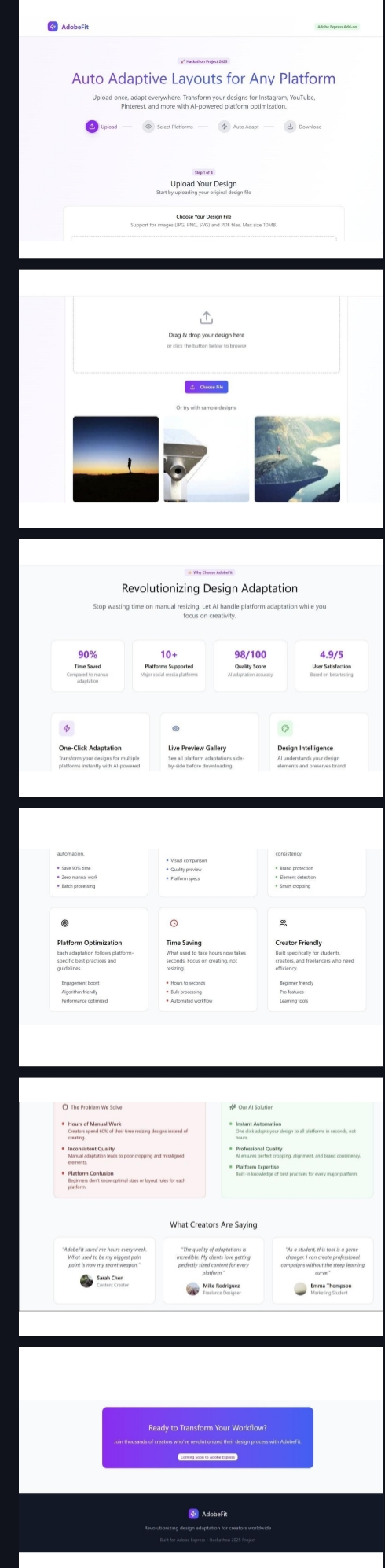
Being an Adobe Express user myself, I often found the process of creating content for multiple platforms exhausting That’s how AdobeFit was born — an AI-powered add-on that automates resizing, rewriting, and exporting your design for multiple platforms in just one click.
How platform-specific design requirements differ, and how to automate around them. How to use prompt engineering for AI tone rewriting and caption generation.The power of design consistency and accessibility in real-world tools. Personally it's my first hackathon being a first year student It also helped me sharpen my skills in product thinking and building with purpose,Build with Auto Resize – Fits all platform sizes Tone Rewriter – Adjusts voice per audience Caption Generator – AI-made platform captions Brand Memory – Remembers your brand style Accessibility Check – Ensures inclusive design standards Multi-Language – Translates content if needed One-Click Export – Instant download of all outputs
🧗♀️ Challenges I Faced
- Visual consistency across aspect ratios maintaining layout balance when resizing between square, vertical, and horizontal formats.
- Tone rewriting without context loss Making sure tone changes didn’t affect the original message or emotion.
- Scalability with customization Letting users control their brand identity while keeping automation smooth.
- Keeping it intuitive Ensuring the experience feels lightweight and beginner-friendly , no complex menus, just results.
5.With no mentor or prior experience, I built everything step by step using just online resources. As an Adobe user myself, I knew the real pain points and turned that into a working solution through self-learning. I built AdobeFit to solve a problem I lived through. It’s a tool that saves time, removes friction, and gives creators the power to scale their content without repeating the same steps over and over. From design to delivery — faster, smarter, everywhere.

Log in or sign up for Devpost to join the conversation.