Project Story
Inspiration
The advertising industry faces a $13.5B+ content production problem. Brands now produce 2,000+ visual assets per year, but existing AI tools lack fine-grained control, require regenerating everything for small changes, and produce inconsistent outputs. We built AdForge AI to solve this by enabling precise, reproducible, enterprise-grade visual production with a multi-agent AI pipeline.
What it does
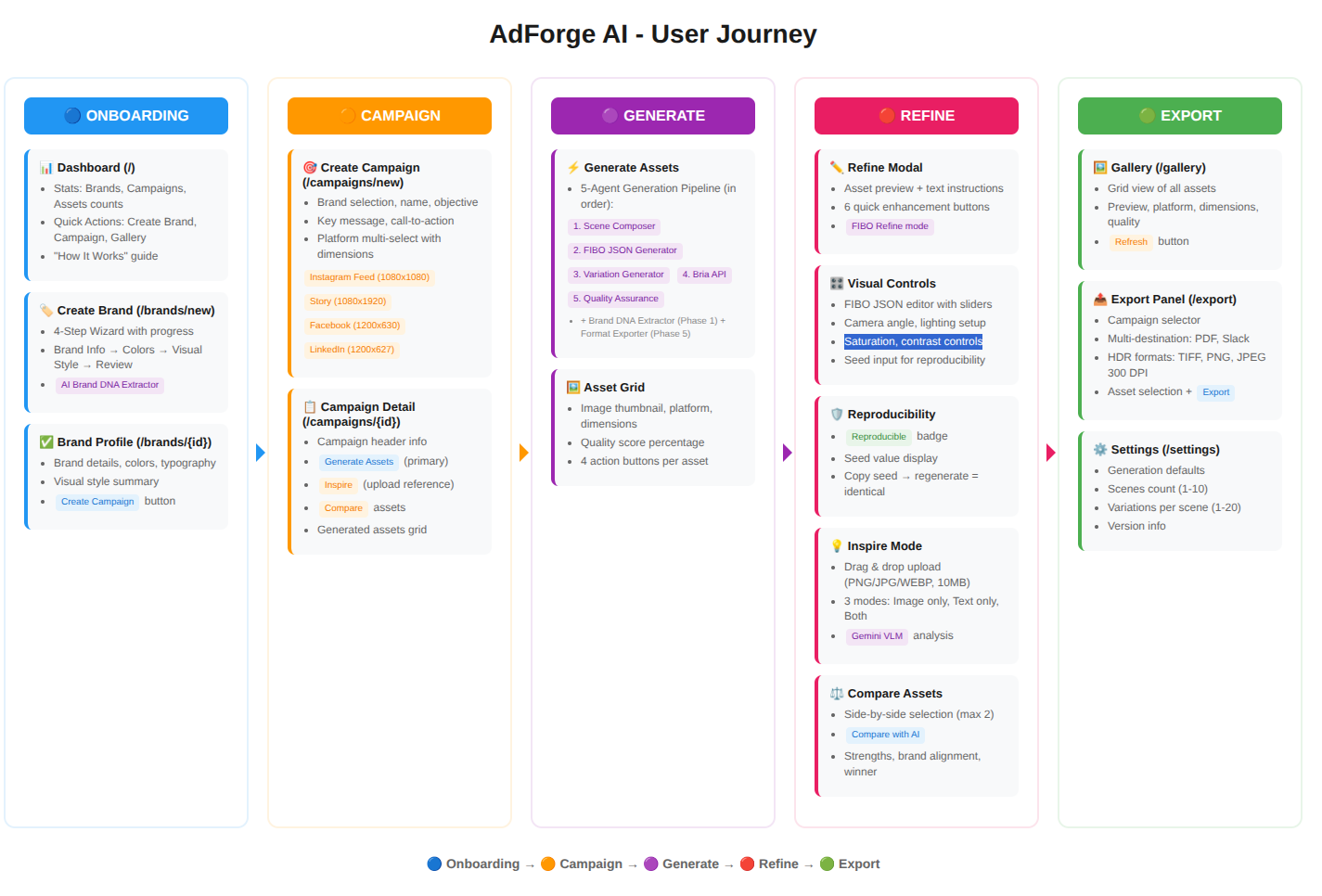
AdForge AI is a complete enterprise campaign visual production platform that transforms brand guidelines and campaign briefs into production-ready visual assets at scale.
Core Features
- Dashboard: Real-time stats (Brands, Campaigns, Assets counts) with Quick Actions to create brands, campaigns, or view assets
- 4-Step Brand Wizard: Guided workflow (Brand Info → Colors → Visual Style → Review) with AI-powered DNA extraction. Enter minimal info and our LLM expands it into complete brand guidelines
- AI Color Palette Expansion: Pick 3 brand colors and AI expands into a complete palette with primary, secondary, background, and text colors
- Campaign Creation: Select brand, set name, objective (awareness/conversion), key message, call-to-action, and target platforms (Instagram Feed/Story, Facebook Feed, LinkedIn Post, Google Display)
- Multi-Platform Generation: Automatically generates assets at correct dimensions for each platform (e.g., 1080×1080 for Instagram, 1200×627 for LinkedIn)
- Asset Gallery: Browse all generated assets with quality scores (100% = brand compliant) and platform dimensions
- Generation Settings: Configure number of scenes and variations per scene in Settings page
Image Generation Features
1. Generate Mode
- Text-to-image generation with structured JSON prompts containing:
- CameraSettings: angle (eye_level, low, high), FOV, focal_length, distance
- LightingSettings: setup (studio_soft, dramatic, golden_hour, natural), direction, intensity, color_temperature
- ColorSettings: brand color palette, temperature, saturation, contrast
- CompositionSettings: rule_of_thirds, depth_of_field, framing
- 5 camera presets and 5 lighting presets automatically applied based on scene analysis
2. Refine Mode
- Iterative asset modification via UI modal
- Enter instructions like "make the lighting warmer" or "change camera angle to low"
- Updates only specified attributes while preserving everything else
3. Inspire Mode (with Vision AI)
- Upload reference image OR enter creative direction OR both
- Gemini Vision AI analyzes reference images to extract visual characteristics
- Generates new images inspired by reference style
Visual Controls
- Direct parameter editing with visual sliders for camera angle, lighting setup, light direction, saturation, and contrast
- Advanced Options: Enter reproducibility seed to regenerate identical images
AI Compare (Campaign-Aware Asset Comparison)
- Select any 2 campaign assets for side-by-side comparison
- Gemini AI analyzes both images with campaign context and provides recommendations
Determinism Proof (Reproducibility)
- Every asset has a Shield icon showing seed value used for generation
- Copy seed → paste in Visual Controls → Regenerate = identical image
Export Panel
- PDF Storyboard: Professional PDF with all campaign assets
- Slack Notifications: Team alerts when campaigns are ready
- Print-Ready Formats: TIFF (300 DPI), PNG, JPEG for print campaigns
How we built it
Backend (Python/FastAPI):
- Multi-agent pipeline with 6 specialized AI agents:
- Brand DNA Extractor: Extracts complete brand identity from minimal input
- Scene Composer: Creates visual scene descriptions from campaign briefs
- JSON Generator: Builds structured prompts with camera, lighting, color, composition parameters
- Variation Generator: Creates multiple versions with parameter variations
- Quality Assurance: Validates brand compliance (shows quality % in Gallery)
- Format Exporter: Multi-format delivery (PDF, Slack, HDR)
- Image generation via Bria API with structured JSON prompts
- Vision AI integration using Google Gemini for Inspire mode and AI Compare
- LLM orchestration using Google Gemini for prompt translation
- SQLite database with async support
Frontend (React/Vite/TailwindCSS):
- Dashboard with stats and Quick Actions
- 4-step Brand Setup Wizard with color pickers
- Campaign creation with brand selection and platform checkboxes
- Refine Modal, Visual Controls, and Inspire Modal
- AI Compare page with campaign-aware analysis
- ConsistencyBadge for reproducibility proof
- Asset Gallery with quality scores
- Export Panel with PDF, Slack, HDR options
- Settings page for generation defaults
Challenges we ran into
- JSON Schema Design: Designing the precise JSON structure for structured image generation required careful experimentation
- Multi-Platform Aspect Ratios: Generating consistent brand visuals across 3+ platform dimensions while maintaining composition quality. Solved with platform-specific camera presets
- Vision-Based Inspire Mode: Integrated Gemini Vision AI to analyze reference images and build structured prompts from the analysis
- Reproducibility: Implemented seed-based deterministic generation with UI for copying and reusing seeds
Accomplishments that we're proud of
- All 3 Generation Modes: Generate, Refine, and Inspire fully integrated
- Structured JSON Control: Visual sliders for camera angle, lighting, saturation, contrast—directly mapped to generation parameters
- Vision-Powered Inspire Mode: Gemini analyzes reference images to build generation prompts
- Campaign-Aware AI Compare: Gemini compares assets with brand/campaign context
- Reproducibility Proof: Every asset has verifiable seed for exact recreation
- 6-Agent Architecture: Automated pipeline from brief to production assets
- 12 UI Pages/Modals: Dashboard, Brands (list/detail/wizard), Campaigns (list/detail/create), Gallery, Export, Settings, Compare, Refine Modal, Inspire Modal, Visual Controls, Determinism Proof
- Deployed and Working: Live on Vercel (frontend) and Render (backend)
What we learned
- Structured JSON-based image generation is a game-changer for enterprise workflows—deterministic control is essential for brand consistency
- Multi-agent systems are highly effective for complex, multi-step creative workflows
- Vision AI integration enables true "Inspire mode" by extracting visual DNA from reference images
- Real-world production tools need export capabilities (PDF, Slack, print formats) to be truly useful
What's next for AdForge AI
- Real-time Collaboration: Multi-user editing with live preview
- A/B Test Insights: Analytics on generated variations
- DAM Integration: Connect with existing Digital Asset Management systems
- Batch Processing: Generate hundreds of variations in parallel for large campaigns
- Enhanced Semantic Search: Natural language asset search using vector embeddings
Try It Out
- Frontend (Vercel): https://ad-forge-ai.vercel.app
- Backend API (Render): https://adforge-ai.onrender.com
- GitHub Repository: https://github.com/omkardongre/AdForge-AI

Log in or sign up for Devpost to join the conversation.