Inspiration
Creating a polished presentation from a blank page still requires a lot of repetitive work: structuring ideas, choosing layouts, finding visuals and maintaining consistency. ADAY (Assisted Deck Authoring for You), was inspired by the idea of making that process feel more like collaborating with a design partner than filling out a template.
What it does
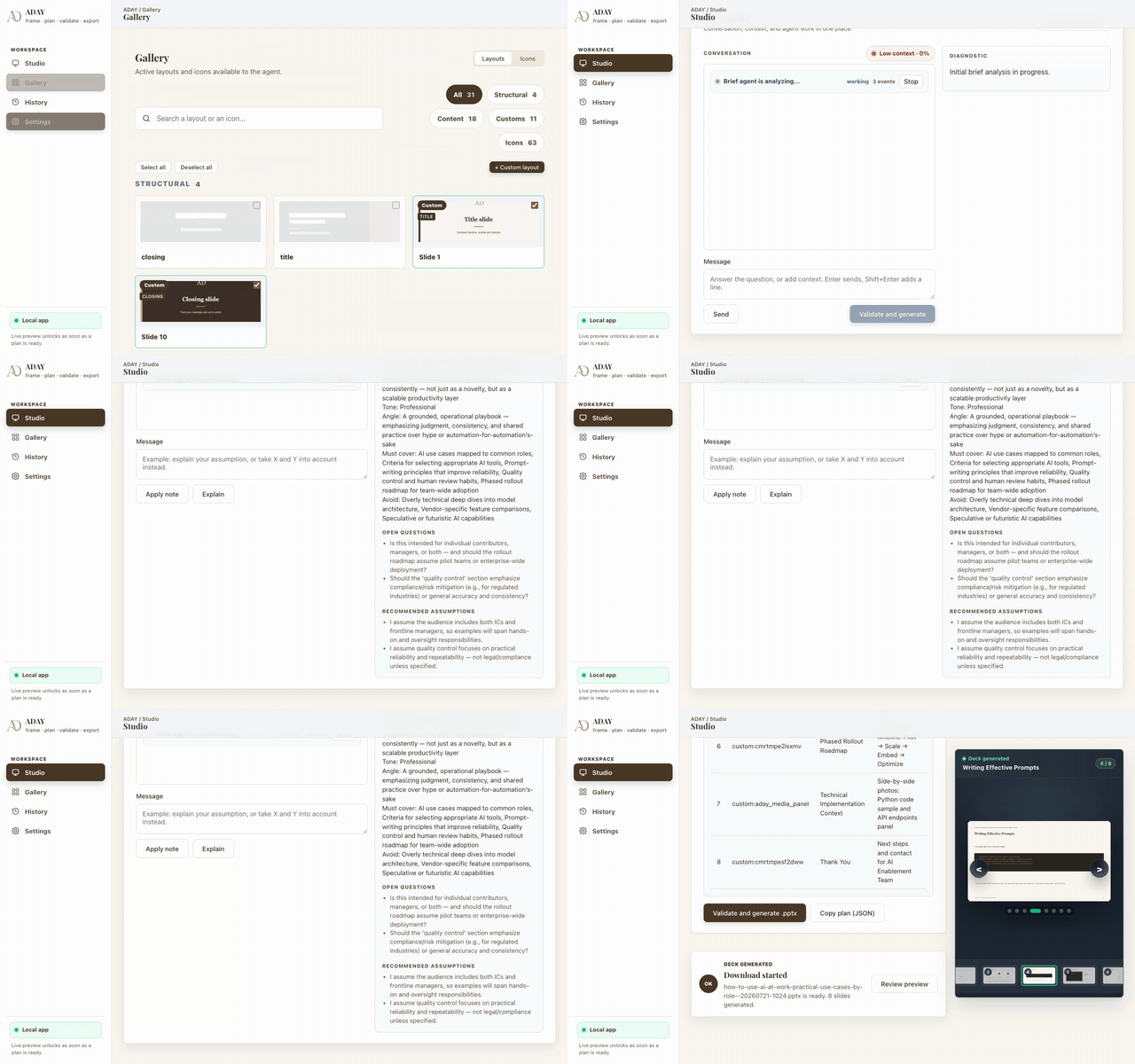
ADAY turns a brief into an editable PowerPoint presentation. It helps users: refine a brief and generate a structured slide plan; preview and validate the plan before rendering; generate editable PPTX slides with consistent visual styling; import images and existing PowerPoint layouts; reuse custom layouts, icons and photos; manage presentation history, speaker notes and local backups. Everything runs locally by default, with API keys and runtime data kept on the user’s machine.
How we built it
Codex was the primary engineering environment across the entire project lifecycle:
- Product and architecture planning: Sol 5.6 at MAX effort turned the initial idea into a complete implementation plan — the end-to-end experience, planner contracts, deterministic rendering pipeline, local persistence model, security constraints and validation strategy — before the build started.
- Full-stack implementation: Sol 5.6 and Terra 5.6 (GPT-5.6) implemented the browser Studio and Gallery, the planning and vision agents, the FastAPI backend, editable PPTX renderers, previews, imports, backups and local storage workflows.
- Repository-scale iteration: Codex explored and modified the codebase directly, traced behavior across the planner, preview and PowerPoint output, and removed incomplete features while preserving compatibility with existing formats.
- Debugging and verification: Codex reproduced failures, reasoned about edge cases and built the automated test suite: browser behavior, server security, all 20 renderers, preview generation and SmartArt-style PPTX imports.
- Open-source preparation: Codex reorganized the repository, wrote installation and architecture docs, added contribution and security material, audited the Git history for credentials and created reproducible Windows and Linux CI checks.
We retained the key product and design decisions — local-first, genuinely editable PowerPoint output, plan validation before rendering — and Codex accelerated turning those decisions into a coherent, tested product.
The stack: vanilla JavaScript frontend, Python/FastAPI local server, OpenAI-compatible language and vision models, PptxGenJS for editable PPTX, JSZip, deterministic asset packs, and Playwright/Python/Node test suites.
Build Week timeline
The entire submitted application was implemented during Build Week with Codex: the repository
was created on July 17 and the Build Week snapshot is preserved at the build-week tag
(github.com/nomage04/ADAY/tree/build-week). Commits after July 18 add provider integrations,
cloud deployment and hardening — the full history is public and dated.
Challenges we ran into
The hardest parts were making generated presentations feel visually coherent while keeping every element editable. We also had to solve: preserving decorative elements from imported PowerPoint layouts; converting SmartArt-like structures into reusable layout information; validating untrusted images, PPTX files and JSON data; keeping the local server loopback-only and preventing accidental exposure of secrets; maintaining compatibility with legacy backups while removing obsolete fields and incomplete features; ensuring the preview and final PPTX rendering stay consistent.
Accomplishments that we're proud of
We are proud that ADAY is an end-to-end workflow rather than just a text-to-slides prototype. It supports 20 built-in renderers, custom layout imports, image and PPTX analysis, previews, speaker notes, history, backups and a Gallery workflow. The project also has a reproducible validation pipeline covering unit tests, server tests, E2E flows, renderer smoke tests, preview rendering and SmartArt imports. Most importantly, the resulting decks remain editable PowerPoint files instead of flattened images.
What we learned
We learned that presentation generation is as much a systems problem as a prompting problem. Good results require: explicit layout contracts; deterministic rendering; strong validation at every boundary; careful handling of visual assets; clear separation between planning, rendering and persistence. We also learned that local-first design significantly improves user trust when working with private briefs, images and API keys.
What's next for ADAY
Next, we want to: make the public release easier to install and contribute to; improve visual consistency across more presentation styles; support more model providers and better model-specific capabilities; expand layout import and editing tools; improve accessibility and onboarding; explore collaboration and sharing workflows while preserving local privacy; add richer feedback loops so users can iteratively refine a deck with ADAY.
Built With
- fastapi
- javascript
- python


Log in or sign up for Devpost to join the conversation.