Inspiration
We have been building browser automation tools and skills for faster, cheaper agentic web use. Our previous open-source project, Showrun, taught us that known network requests executed inside an authenticated browser are often faster and more reliable than visual UI automation.
While experimenting with WebMCP, I noticed that most websites do not support it. This is especially limiting for authenticated and legacy platforms, where agents must repeatedly inspect and navigate the interface. Even when a website provides MCP or WebMCP tools, users may still need operations the official tools do not expose.
Based on these lessons, I built AdapTab from scratch for this hackathon.
What it does
AdapTab turns network-first knowledge and deterministic methods into injectable WebMCP adapters. It uses the browser session the user already trusts, reducing navigation, token usage, and execution time. It is expandable, configurable, and requires no per-site setup.
The user gives their agent one bootstrap URL. AdapTab then:
- resolves the target website, route, and task.
- selects the smallest compatible public or private adapter.
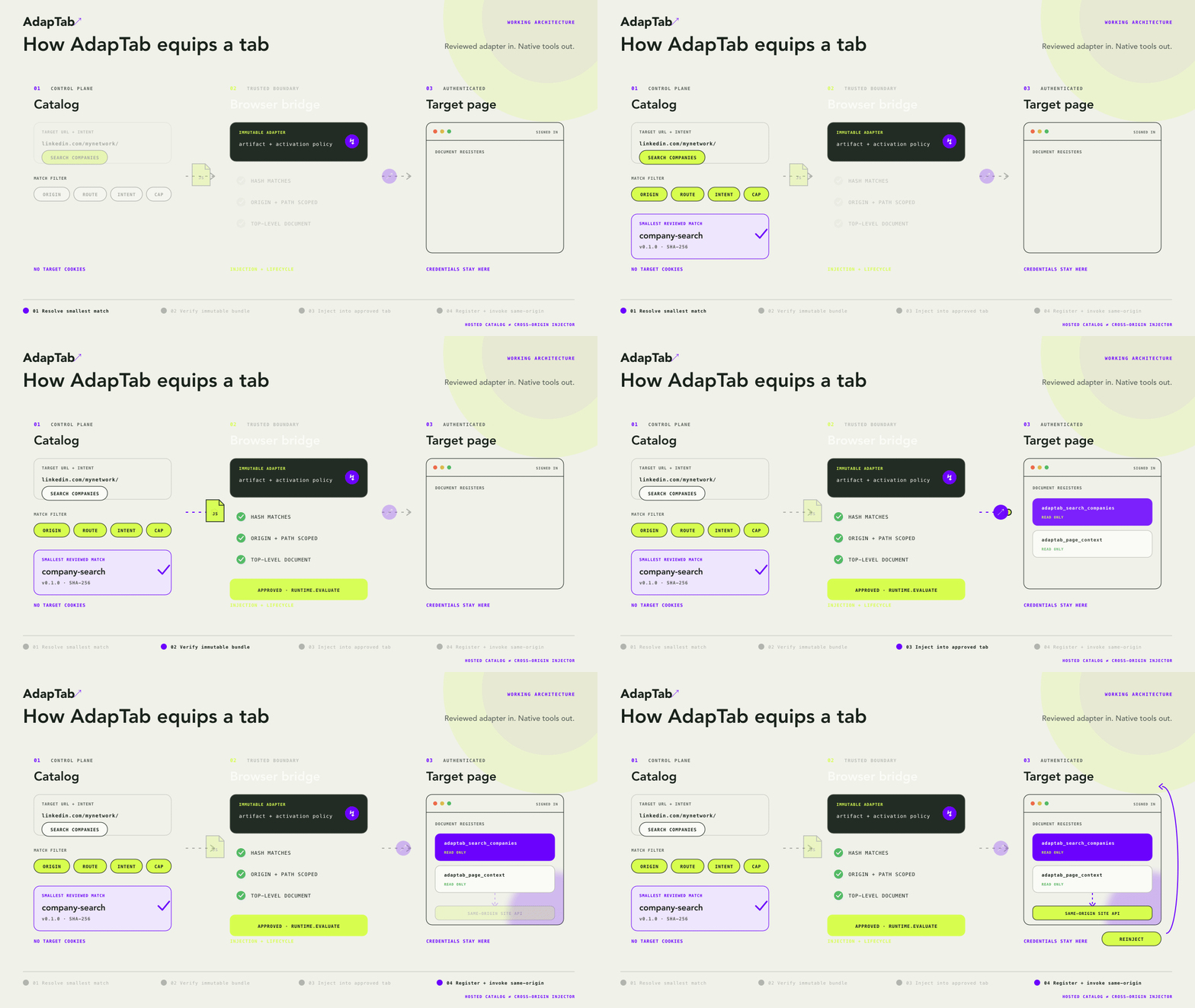
- returns a versioned installer with origin checks and a SHA-256 hash.
- uses an approved browser bridge, currently Chrome CDP, to inject it.
- registers the adapter as native WebMCP tools on the target page.
- executes known requests inside the authenticated tab without exporting credentials.
The current catalog contains a small set of demonstration adapters.
AdapTab also provides a private workspace for personal, internal, or custom tools. Custom source is encrypted in the browser, and the key remains in that browser profile.
If no adapter matches, the agent can submit a privacy-minimized request to the AdapTab backlog. This helps us and the community decide what to build next.
How I built it
I initially explored a browser extension, but it added installation and permission overhead. Live JavaScript injection through Chrome CDP worked without an extension, so I focused AdapTab on providing the adapters, metadata, and activation instructions.
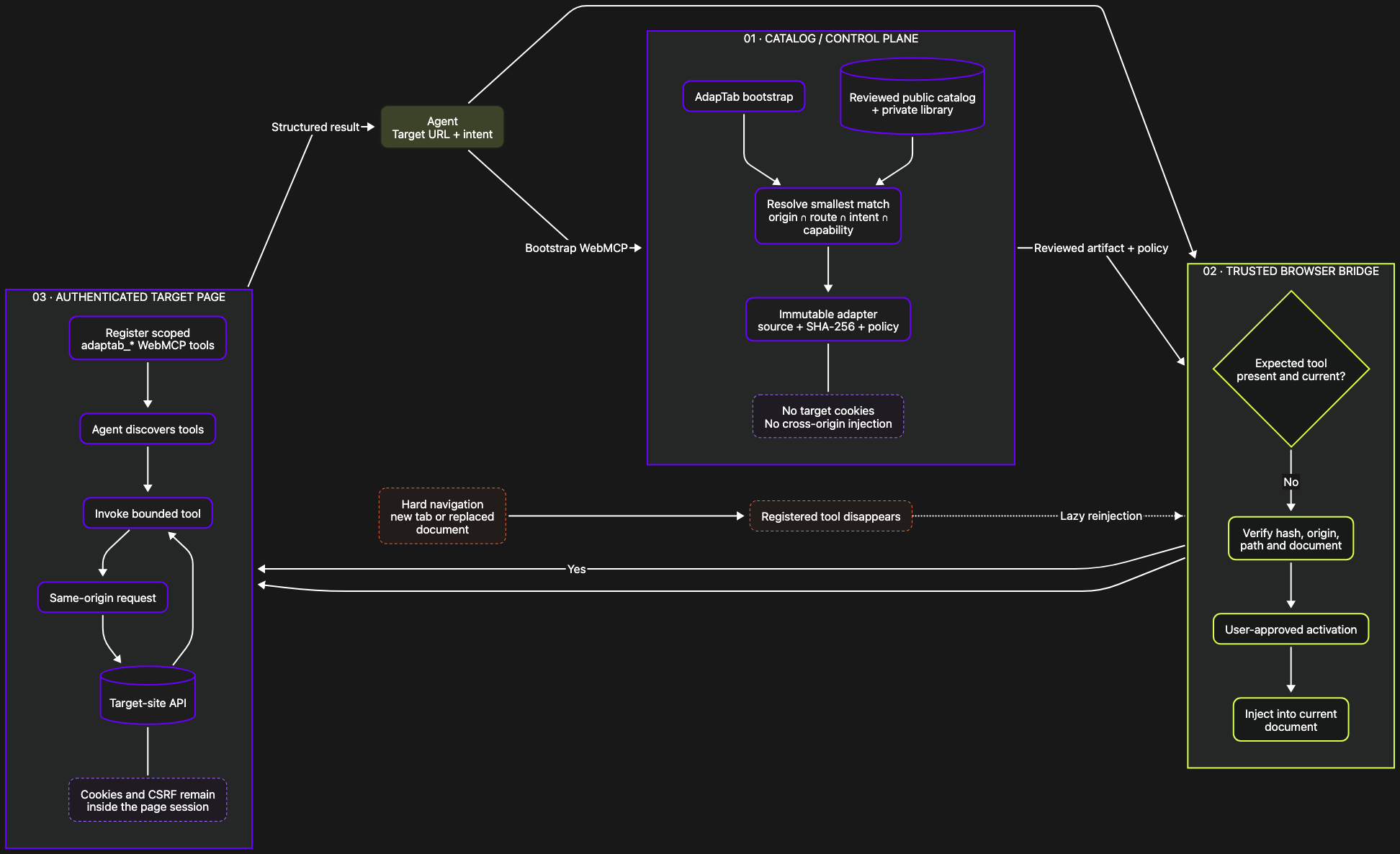
AdapTab separates three trust boundaries:
- Netlify selects and delivers adapter metadata and bundles.
- An approved browser bridge injects the adapter into the target tab.
- The injected runtime registers WebMCP tools and uses the page's existing session.
I built it with TypeScript, React, Vite, and Netlify. Netlify Functions handle resolution and delivery, Netlify Blobs stores private records and requests, and Netlify Identity provides authentication. Private source is encrypted with AES-GCM through the Web Crypto API.
Adapters are route-aware, versioned, origin-guarded, and integrity-addressed. Vitest covers resolution, security boundaries, private access, lifecycle behavior, and adapter execution.
Challenges I ran into
WebMCP tools belong to the current document, so refreshes and full navigations remove injected tools. AdapTab currently handles this through lazy reinjection.
A hosted page cannot inject into another origin directly. An approved browser bridge such as CDP must perform that step.
Authenticated platforms required keeping sessions inside the page while safely handling confirmation and ambiguous writes.
Combining public and private discovery required strict owner checks without leaking private metadata or source.
The biggest optimization came from small details: a lightweight agent bootstrap, explicit single-tab instructions, and guidance that tells agents to use injected requests instead of opening unnecessary pages.
Accomplishments that I'm proud of
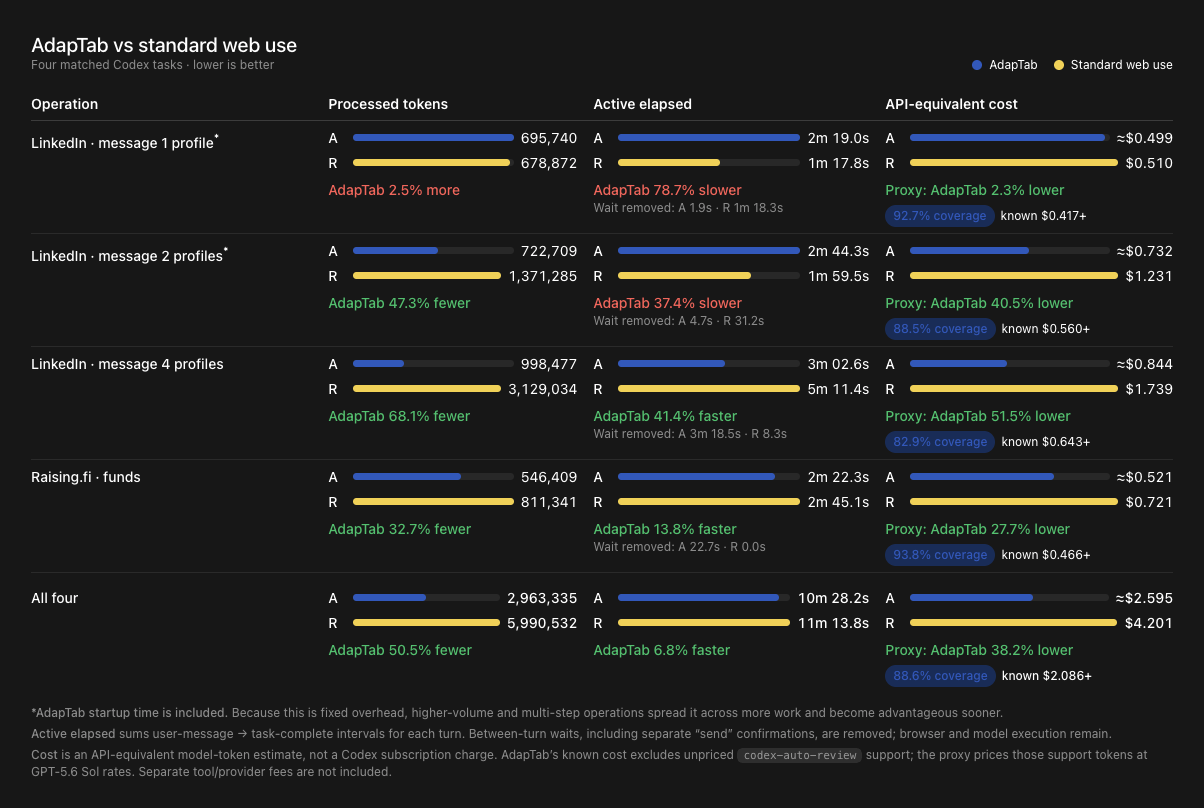
- In one LinkedIn test involving four profiles, AdapTab used about 70% fewer tokens and completed the workflow 1.8x faster than standard agent web use.
- The multi-step adapter performed better than having the agent discover and coordinate every operation independently.
- One bootstrap URL replaced per-site installation and setup.
- Public and private adapters work through the same discovery flow without exporting website credentials.
- Private custom source stays encrypted outside the user's browser.
- The project ships with six tested adapters and 69 passing automated tests.
What I learned
WebMCP and CDP solve different parts of the problem. WebMCP provides typed discovery and invocation, while CDP provides the privileged injection and lifecycle bridge. Together, they can bring WebMCP to existing websites without requiring those sites to modify their code.
Page-context execution is also a useful authentication boundary. The browser remains the cookie jar, and AdapTab never needs the user's website credentials.
Deterministic network requests reduce navigation, token consumption, and execution time. Tool descriptions alone are not enough, though. Adapters should also declare tab strategy, URL behavior, concurrency, side effects, and the reasons for any limits.
What's next for AdapTab
- A CDP supervisor engine for automatic reinjection after navigation
- A browser extension for environments without a CDP bridge
- An
adaptab-authorworkflow and community contribution system - Shareable links for public or private adapters
- Team workspaces for sharing internal workflows
- More private templates and workspace controls
- Native WebMCP conflict detection
- A general multi-step workflow engine
- Privacy-preserving analytics for adapter and website developers
Shareable adapters could let someone turn a successful browser workflow into a WebMCP tool and send it to a teammate's agent with one link.
Built With
- aes-gcm
- cdp
- chrome-devtools-protocol
- codex
- github
- graphql
- html5
- netlify
- netlify-blobs
- netlify-functions
- netlify-identity
- node.js
- react
- rest
- typescript
- vite
- vitest
- web-crypto-api
- webmcp

Log in or sign up for Devpost to join the conversation.