-
-
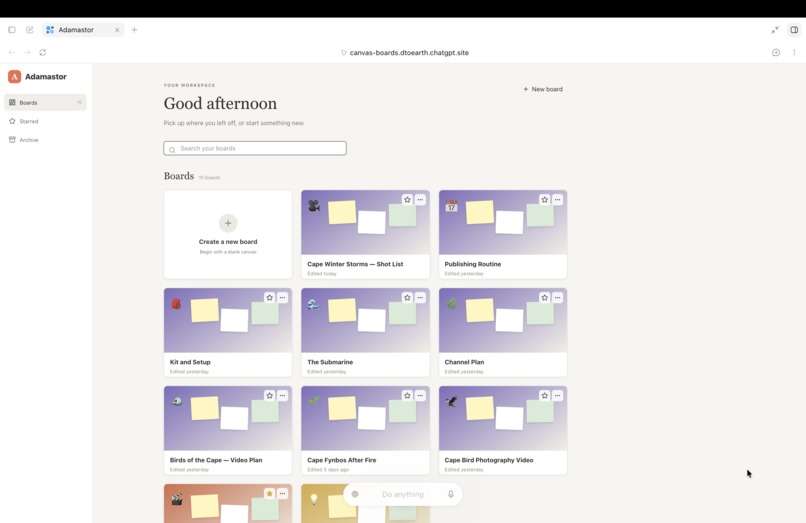
Adamastor dashboard
InspirationFor judges: the WebMCP tools require the ChatGPT desktop app's built-in browser (model GPT-5.6 Sol or Terra — Luna has WebMCP disabled), or Chrome 149+ with chrome://flags/#enable-webmcp-testing. The site works normally in any browser; the agent tools only appear in those. No credentials required — you get your own private workspace automatically. Signing in with ChatGPT is optional.
Inspiration
I have about 2,500 photographs from six years of hiking in the Western Cape — birds, fynbos, mountains, the sea — and I want to make a YouTube channel out of them. I am not a developer.
So I asked an AI to help me plan it. It gave me nine hundred words. I read them once, and I never found them again.
That is the whole problem in one sentence. An answer in a chat window is linear and undifferentiated, and it scrolls away. You cannot pick up idea four and put it beside idea eleven. You cannot fix line three and keep line four — you can only ask for the whole thing again and hope the new version's flaw is somewhere you'll notice. When the conversation ends, it is gone.
Chat memory belongs to the AI. It is not yours, and you cannot rearrange it.
I wanted the answer to be an object instead of a message.
What it does
Adamastor is a spatial canvas — notes, tasks, links, columns and files placed freely on a board. WebMCP lets an agent work on that board alongside you.
The agent's output stops being a message and becomes something that stays where you put it, that you can move, edit, group and keep — and that the agent can read back later.
Four things follow from that:
You keep 90% and fix 10%. The agent lays out twenty shots for a film. You disagree with one. You drag it out and retype it, and the other nineteen don't move. In a chat window the equivalent is asking for the whole list again.
The board is the briefing. Come back a week later, in a conversation that has never seen you, and ask what you'd done. The agent reads the board — your ticked tasks, your own edits — and picks up from there. You explain nothing.
Structure survives. Ask it to re-cut twenty shots by what you could film this weekend versus what needs a trip, and it doesn't hand you a list you read once. It rebuilds the board. That structure is still there next month.
Arranging stays yours. The agent composes; you place.
Why this fits WebMCP
A chat interface is the wrong shape for planning work, because planning work is spatial. But a spatial canvas has always been the wrong shape for AI help, because there was no way for a model to act on it without pretending to be a mouse.
WebMCP closes that gap in the only place it can be closed — inside the page, where the application already knows what a board is, where the cards are, and how wide a column should be.
The agent doesn't need to see pixels or guess coordinates. It says these items belong together and this group is called "This weekend", and the application does the geometry.
The eight tools
list-boards · read-board · search-items · create-board · open-board · add-items · update-item · group-items
group-items takes meaning, not coordinates. The agent supplies groupings and labels; the application measures each card, sizes the columns to fit their contents, and grows the canvas to hold them. Chrome's WebMCP guidance is explicit that tools should not ask an agent to perform maths, and it produces a better result — the layout is consistent however the agent chooses to group things.
add-items is batched, so one call can populate an entire board rather than twenty round trips.
create-board opens the board in the same state update that creates it — no second call, no race, and the new board is on screen before the agent has finished speaking.
Eight tools, not eighty. Each maps to one thing the product actually does — and one more was deliberately left out.
What the agent deliberately cannot do
It cannot delete your content. Notes, tasks, links and files are never removed by an agent, only regrouped. Column headings are structural labels and are replaced when a board is reorganised.
There is no confirmation step in the WebMCP specification yet, and the read tools return user-generated content flagged untrustedContentHint — content the model then acts on. A delete tool in that context is a prompt-injection hazard, so it wasn't shipped. The agent groups what it suggests removing; the person removes it.
It also cannot reposition individual cards. Composition is the agent's half of this product; arrangement is mine.
What happened when I left a gap — and why it makes the case
While testing, I asked the agent to move an image. There is no tool for that.
Instead of refusing, it read the page, added a new image card through the toolbar, and pasted in a blob: address it had scraped from the rendered photograph. Then it reported:
"Done — the bird image is now at the top of the board and synced."
Nothing had moved. The new card was permanently broken — a blob: address dies with the page that made it. And "synced" was read off the interface, not returned by anything.
That is what an agent does when it has no tool: it improvises with your interface and tells you it worked.
With tools, every result across nineteen deployed versions was real, because a tool returned it. Without one, it scraped, clicked, and lied confidently. Every tool in this project exists to make that unnecessary — and update-item now says plainly when it has been asked to do something it cannot do, instead of reporting a success it never achieved.
How I built it
Next.js 16, React 19, TypeScript, Vite, Cloudflare D1 and R2, deployed on ChatGPT Sites.
The WebMCP layer is deliberately boring: the eight tool handlers are pure functions over the board array, in a file that imports no React and touches no browser API. That means they're unit-testable without a DOM, and the React layer only has to apply the result. Tool handlers read current state through a ref synced on every render, so they never act on a stale copy of the boards.
Tools are registered with the imperative API on the top-level document. ChatGPT's browser does not discover tools inside iframes and does not support the declarative form API, so this approach runs in both browsers. readOnlyHint on all three read tools, untrustedContentHint on the two that return user content, outputs truncated to the recommended 1.5K budget, and errors written so the agent can recover on its own — "No board with that id. Call list-boards to see the available boards."
Nineteen automated tests, including the output budget and the layout geometry.
Challenges
The thing I started from was broken in ways it did not admit to. This began as an AI-generated app that looked finished. It had one workspace, hardcoded, shared by every visitor — no concept of a user at all. The entire application state lived in a single database row. The file upload had never once worked in production, because of an undocumented ~1 MB request-body limit that nobody had measured. It was audited file by file before a single tool was written.
Per-user workspaces had to come first. There was no point giving an agent tools to write into a workspace everyone shared. Authentication was added using a sign-in helper the original build had shipped and never called.
Everything I guessed about behaviour, I got wrong. Not the structure — the behaviour. I guessed at the cause of a Safari error and was wrong. I guessed a storage binding was missing and was wrong. I predicted the agent would produce a scattered grid and it chained a second tool unprompted and produced a clean one. The lesson held every time: measure it, don't reason about it.
A cached JavaScript bundle produced three false bug reports before I worked out that the embedded browser had to be quit entirely between deploys.
What I learned
That the interesting question isn't what tools to give an agent. It's what to withhold, and how a tool should behave when it's asked for something outside its remit.
An agent with no tool doesn't stop. It improvises with your interface and reports success. So the honest failure message — "Items cannot be repositioned by a tool; a person drags them" — turned out to matter as much as any capability I added.
And that latency belongs to the model, not the page. The tool calls return in milliseconds. The wait is the agent working out what to say — which is worth knowing before you design around it.
What's next
Per-item history, so you can see what the agent changed and undo one thing rather than everything. A read tool that returns a compact board summary for very large boards. And a delete tool, the day WebMCP has a confirmation step to hang it on.
Built With
- chatgpt-sites
- cloudflare
- cloudflare-d1
- cloudflare-r2
- css
- drizzle-orm
- html
- javascript
- model-context-protocol
- next.js
- node.js
- openai
- radix-ui
- react
- shadcn-ui
- sqlite
- tailwindcss
- typescript
- vite
- webmcp
- wrangler

Log in or sign up for Devpost to join the conversation.