Inspiration
Adamantite began with me and my friend encountering an issue on our Hytale server. We entered a portal, so think of entering the nether for Minecraft for reference. Me and him noticed that the world began to take a long time to generate chunks and the tick rate was very low. I wanted to figure out what was going on so I began searching for tools that could help.
I was already familiar with htop which is a system monitor, process viewer and manager (think an Activity Monitor for Windows but just in the terminal). I found that htop was too verbose and kinda overkill for what I was looking for.
I wanted a program/utility that would allow me to specifically watch my Hytale server and give me the information that I truly cared about.
At the time I wanted to learn Rust, so you can see where this is going.
What it does
Adamantite is a command line utility that monitors your Hytale servers.
Adamantite at a glance provides commands that:
- Track a system resource
- CPU
- RAM
- Pressure (shows how often a system's work is stalled due to a resource contention)
- IO
- Mem
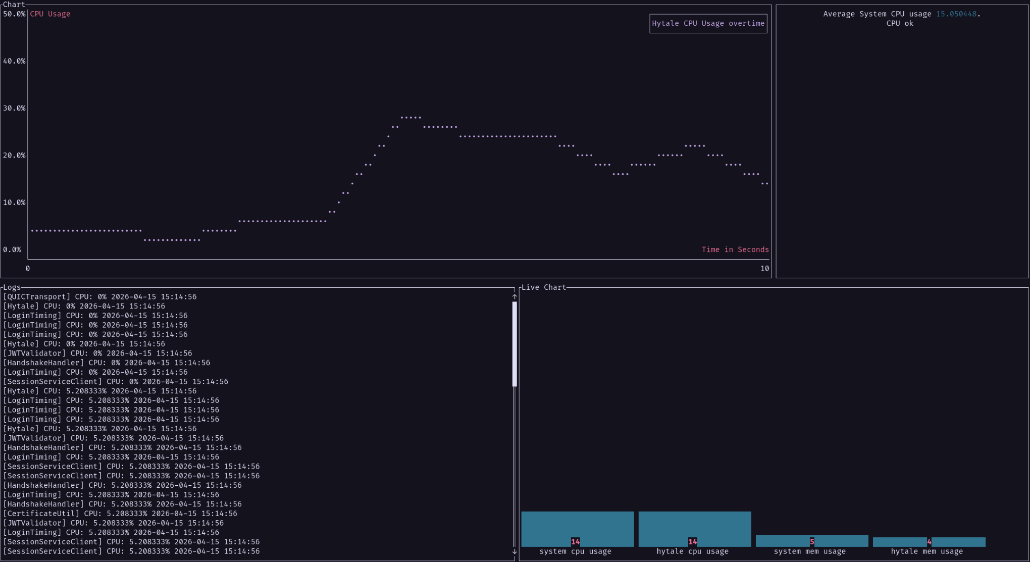
Adamantite live which shows:
- Live Hytale vs System metrics
- Live logs from the server
- A graph that shows a timeline of Hytale CPU usage
Adamantite config provides a way for you to set config options for Adamantite.
How I built it
Adamantite is built in pure Rust. The most important crates (libraries) that make Adamantite work are:
- Ratatui — Creating terminal user interfaces
- Clap — Command Line Argument Parser
- Sysinfo — Cross-platform tool for fetching system information
- Toml — TOML parser
- Chrono — Date and time library
Adamantite is built to track Hytale servers that are managed by systemd. Systemd allows Adamantite to view logs coming from a Hytale server and to quickly search for a Hytale server that is configured via Adamantite's configuration file.
Challenges we ran into
TL;DR: There must be a better way to find a Hytale PID and Hytale logs aren't as verbose as I thought.
The first main problem that I ran into was ideating the best way to find your Hytale server. What I mean by this is that on Linux, every process has a process ID (PID). Typically a Hytale server is a collection of 2 processes: the start.sh (script that configures the server) and a Java process that starts the actual Hytale world.
Adamantite looks for that Java process which spawns many threads that handle the Hytale world and each one of these threads will have its own amount of CPU, memory, and even disk utilization. Each of these threads will pass all that usage up to the Java process. For Adamantite to be able to understand how much CPU, memory, and disk usage that a Hytale server uses, we need the PIDs of both the start script and that Java process, as well as each of its threads, and accumulate all that information to show back to the user.
Where I am getting with this was that I needed a quick way to find the Hytale’s PID. My first iteration of this was pretty inefficient.
I went with listing out all processes running on your system, then pass that output into grep (a CLI utility for searching for text for lines that match a regex), then I would pass this output into awk (scripting language for text processing), and finally I would get the Java PID for Hytale.
The thing with this though, I would never verify if that PID was actually Hytale. So if you ran Adamantite with no Hytale server running, it would just track a random process but this behavior was majorly undefined.
Accomplishments that I’m proud of
I found in my journal a few days ago that I wanted to create a CLI tool and I did that. Not only that, I also learned a new language at the same time.
I'm also proud that Adamantite can give you a good estimate on how a Hytale server is performing in relation to your computer.
Lastly, I actually did find a better way to find a Hytale server on your system. In the case that you as the user have your Hytale server managed by systemd, Systemd’s suite actually has a CLI utility that allows you to search for specific services by name (running the command systemd-cgls -u <your_hytale_service_name>). So in Adamantite's configuration file you can specify the name of your Hytale service and it now only takes one command to find your Hytale PID.
What I learned
Resource tracking is a complex task.
What's next for Adamantite
I want Adamantite to improve on its resource tracking, more opportunities to track multiple servers, more opportunities to track servers that aren't managed by systemd.
I want to also add better verification of information in the realm of searching for PIDs. How can we make sure that the PID is actually the PID that we want and not just some random process.

Log in or sign up for Devpost to join the conversation.