-
-
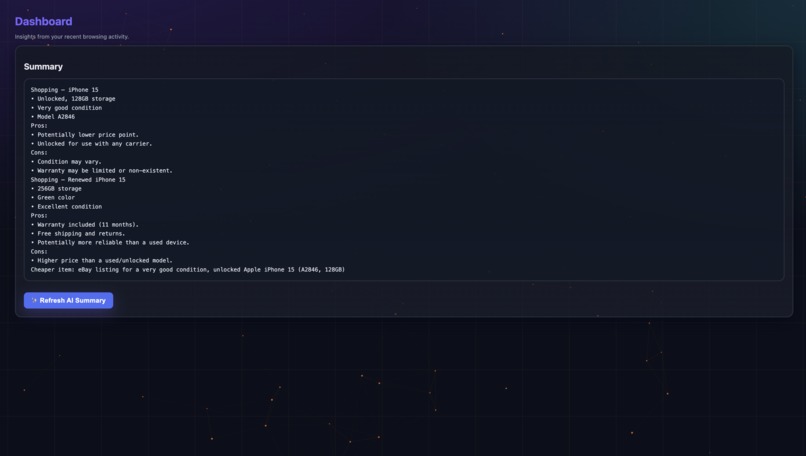
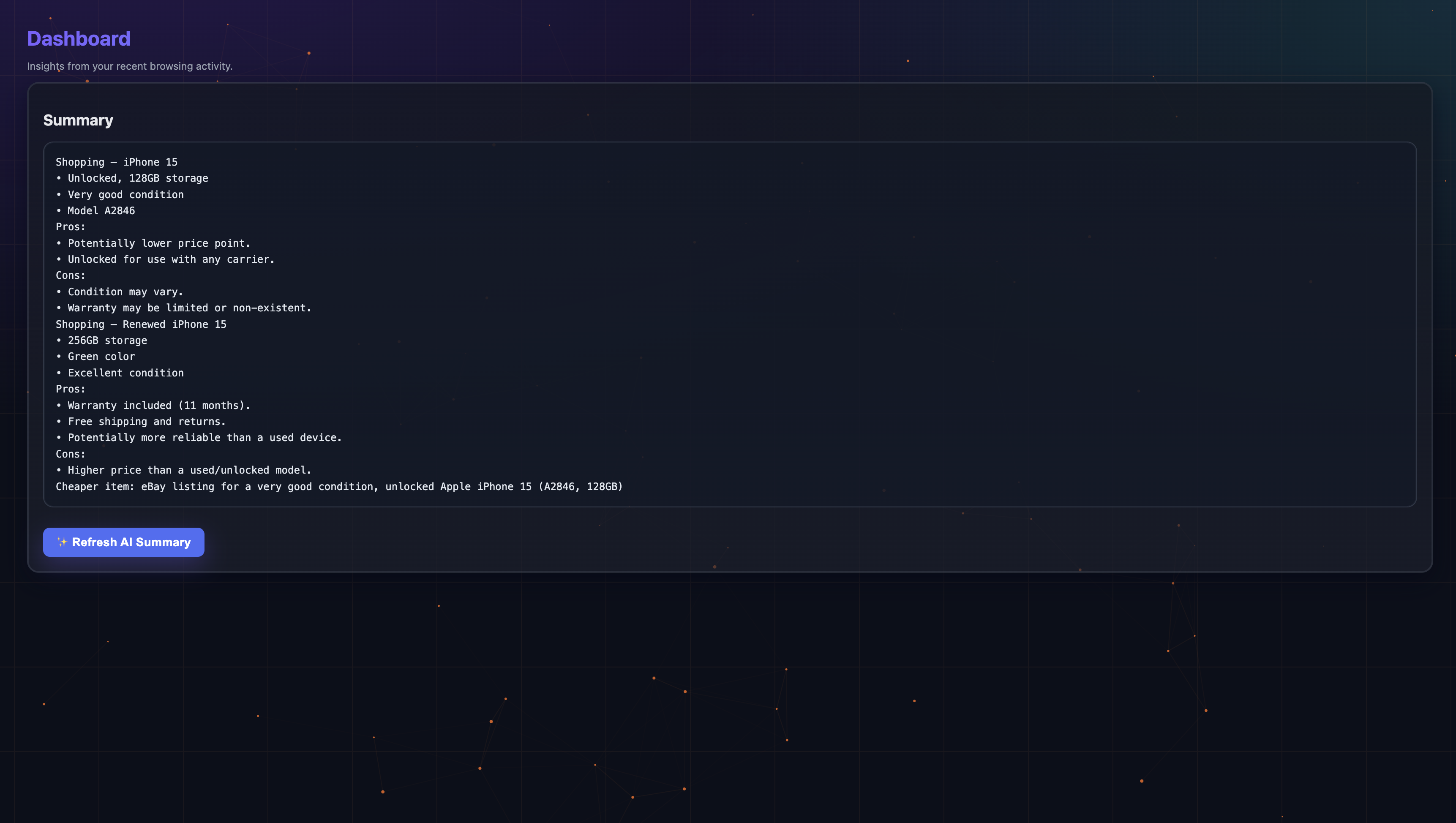
AI Generated summary identifying product insights
About the Project
ActionSense is a privacy-first Chrome extension that turns everyday browsing into momentum: it reads pages with on-device AI, surfaces clear next steps, and auto-organizes related tabs so you can stay in flow.
Inspiration
Modern browsing is a paradox—more knowledge at our fingertips, yet more friction turning it into action. We kept hitting the same pain points:
- Skimming too many tabs to figure out “what should I do next?”
- Losing context when jumping across shopping, learning, and research sites
- Cluttered tab bars that hide patterns we care about (focus vs. distraction)
ActionSense shrinks that gap—from page to progress—without sending your data to the cloud.
What It Does
- AI page understanding (on-device)
- One-tap summaries tailored to the page’s content
- Category classification (e.g., Learning, Shopping, Research)
- Action suggestions and “what I did” one-liners for later recall
- Smart tab grouping
- Automatically groups related tabs via a stable signature of category + title tokens
- Keeps groups labeled and color-coded as you browse
- Focus insights (Dashboard)
- At-a-glance breakdowns and AI-generated focus/study summaries
- Lightweight productivity signal tracking
- Polished, accessible UI
- Dark, glassy interface with a subtle live “tech wallpaper”
- Motion-safe: respects “reduced motion” system settings
How We Built It
Architecture
- Content script: extracts page signals (title, snippet, keywords, product hints) and relays them to the background
- Background service worker: central brain for snapshots, analytics, grouping, and badge updates
- Popup: fast per-tab view with AI status, summary, and actions
- Dashboard: aggregate insights, focus metrics, and an AI-crafted overview
- Utils: cohesive modules for AI, categorization, grouping, storage, and queueing
On-device AI
- Chrome’s LanguageModel/Summarizer APIs (Gemini Nano) for:
- Summaries (chunked + post-formatting for consistency)
- Category classification (robust JSON with heuristic fallback)
- Action suggestions and recall one-liners
- Focus/Study coach summaries based on recent activity
- Concurrency & stability
- Tiny async queue with tuned per-task timeouts
- Battery-aware gating (skip compute when battery is low)
- Clear, actionable error states (download pending, user activation, first-run latency)
Auto-Grouping (Tabs)
- Stable signature
- Normalize category + derive a compact title key (stopwords removed; first 2–3 strong tokens)
- Reuse or create a group with consistent title/color per category
- Gentle heuristics
- Skip restricted URLs; avoid churn when groups already match
- Persist lightweight metadata so groups stay predictable across sessions
UI/UX
- Dark, glass-effect surfaces with accessible contrast and crisp typography
- Interactive but calm animations; themed scrollbars and focus rings
- Live technical wallpaper (canvas: nodes + connections + grid)
- Throttled FPS, DPR-aware, disabled for “reduced motion”
- Dashboard variant supports a “fiery” theme with denser/faster motion
What We Learned
- On-device AI feels instant after initialization, but first run needs thoughtful guidance (downloads, user activation, timeouts)
- JSON-only prompts are brittle—ship fallback parsing and graceful degradation
- Chunked summarization + a unifying “optimistic” formatter yields consistent, readable results
- Tab grouping UX hinges on stable, human-readable titles and conservative reassignments
- Small touches—status pills, toasts, and a calm background—raise perceived speed and clarity
Challenges
- Handling model availability across Chrome versions and hardware
- Avoiding UI flicker during rapid content-script updates
- Preventing race conditions between AI writes and heuristic updates
- Keeping the UI beautiful without compromising performance on modest devices
Technical Notes (with a bit of math)
- Focus score (dashboard):
$$\text{Focus\%}=100 \cdot \frac{\text{productive}}{\text{productive}+\text{distraction}}$$
- Product insight scoring (concept):
$$s_i=\alpha \cdot z(\text{price})+\beta \cdot \text{rating}+\gamma \cdot \text{shipping_indicator}$$
- Wallpaper connection fade with distance (d):
$$\alpha_{\text{line}}=1-\left(\frac{d^2}{d_{\max}^2}\right)\quad \text{clamped to }[0,1]$$
- Complexity snapshots:
Group matching scans groups in a small window (\Rightarrow O(G)) per tab event.
AI tasks are serialized via a queue; per-task time is bounded by tuned timeouts.
Results
- Pages feel “explained” and actionable in seconds
- Tabs self-organize into stable, color-coded groups
- Dashboard summaries nudge you toward focus or study mode
What’s Next
- Optional cloud fallback (opt-in) when on-device AI isn’t available
- Deeper shopping insights: multi-retailer comparisons and price tracking
- Keyboard-centric popup and richer screen-reader support
- Additional wallpaper themes (grid, orbital rings, hex mesh)
Built With
Chrome Extensions (MV3), Chrome on-device AI (LanguageModel/Summarizer, Gemini Nano), TypeScript, Vite, Tailwind, IndexedDB/chrome.storage
Acknowledgements
- The Chrome team for on-device AI APIs and tab groups
- Open-source inspiration from the browser-extension community
- Early users who battle-tested builds and shaped the UX
Tagline: From page to progress — AI summaries, suggestions, and auto-organized tabs.
Inspiration
What it does
How we built it
Challenges we ran into
Accomplishments that we're proud of
What we learned
What's next for ActionSense
Built With
- analytics
- and-group-metadata-(no-external-db)-content-processing:-content-script-for-page-signals-(title
- canvas-2d-live-?tech-wallpaper?-data-&-storage:-chrome.storage.local-for-snapshots
- chrome.action-(badges)
- chrome.alarms
- chrome.runtime
- chrome.scripting
- chrome.storage
- chrome.tabgroups
- chrome.tts-on?device-ai:-chrome-ai-languagemodel-(gemini-nano)
- chromium-based-browsers-chrome-apis:-chrome.tabs
- css3-platform:-chrome-extensions-(manifest-v3
- glass-surfaces
- heuristics-in-categorize.js
- html5
- keywords
- motion?safe-transitions
- product-cues)
- service-worker-?type:-module?)
- snippet
- summarizer;-prompt-design-via-custom-utilities-ui/ux:-hand?rolled-dark-theme
- themed-scrollbars
- uilt-with-languages:-javascript-(es-modules)

Log in or sign up for Devpost to join the conversation.