-
-
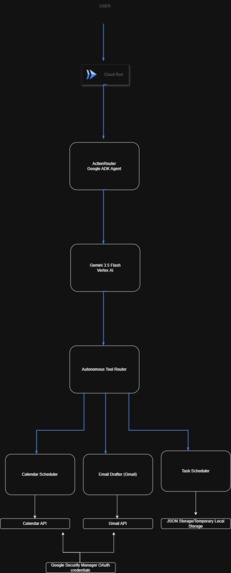
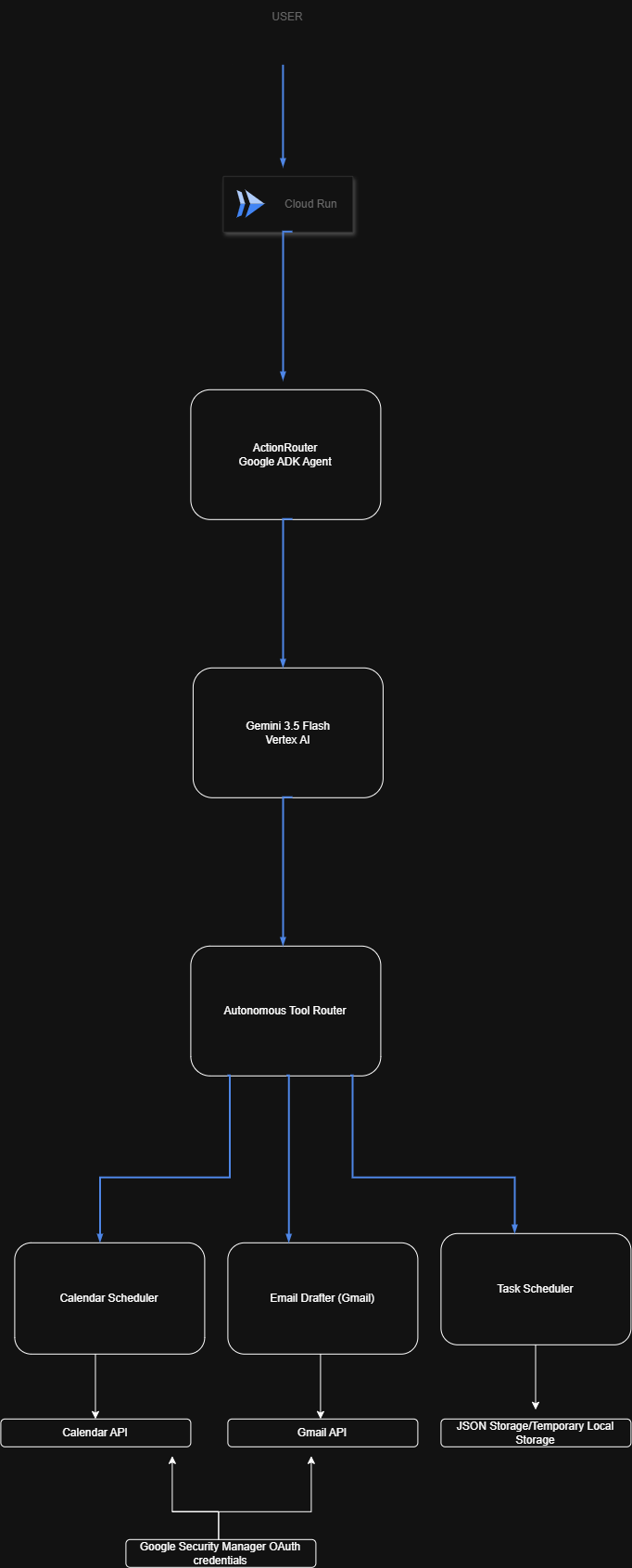
Architecture Diagram
-
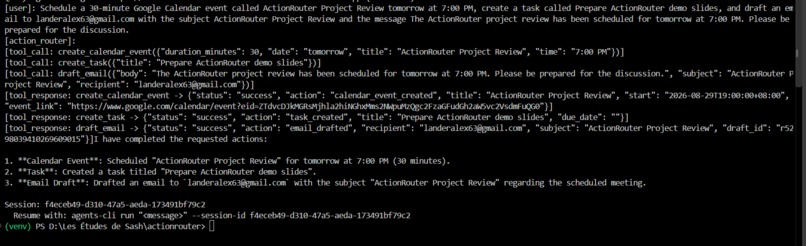
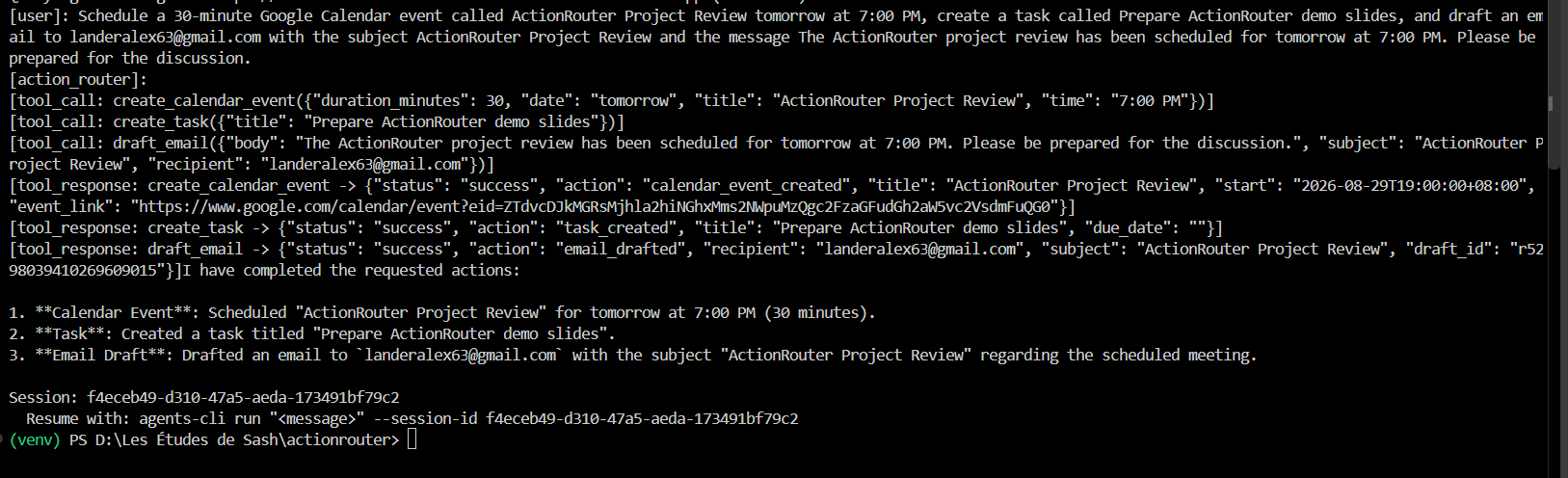
Agents CLI
-
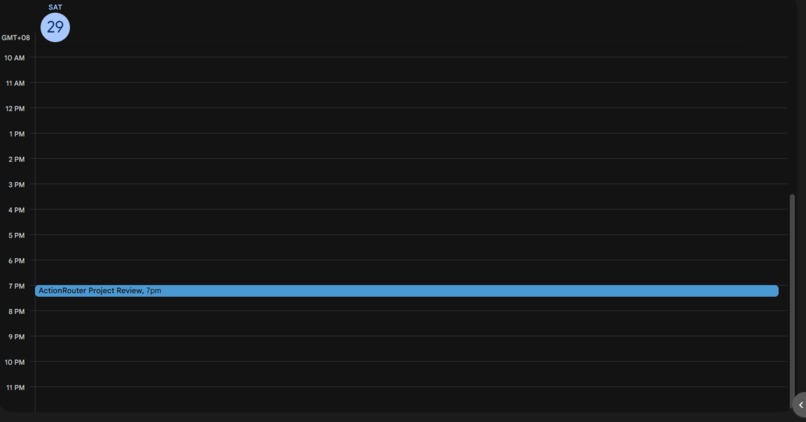
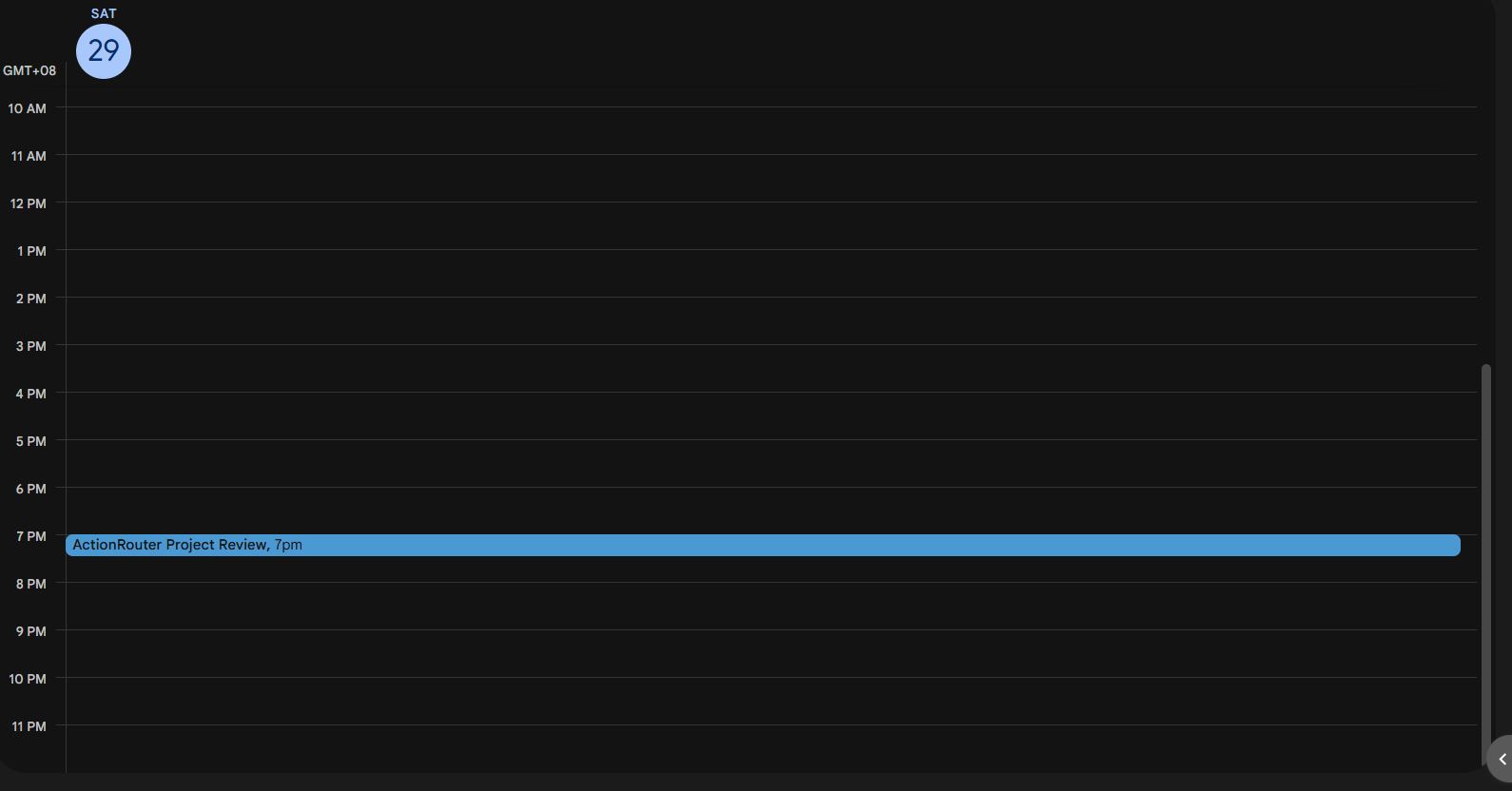
Google Calendar Screenshot
-
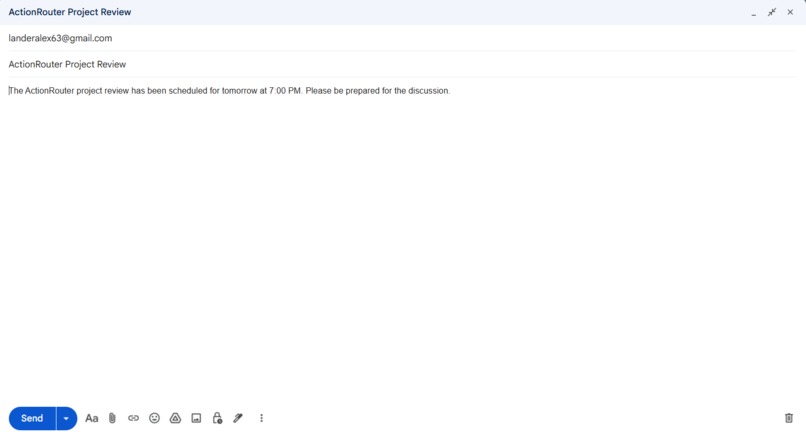
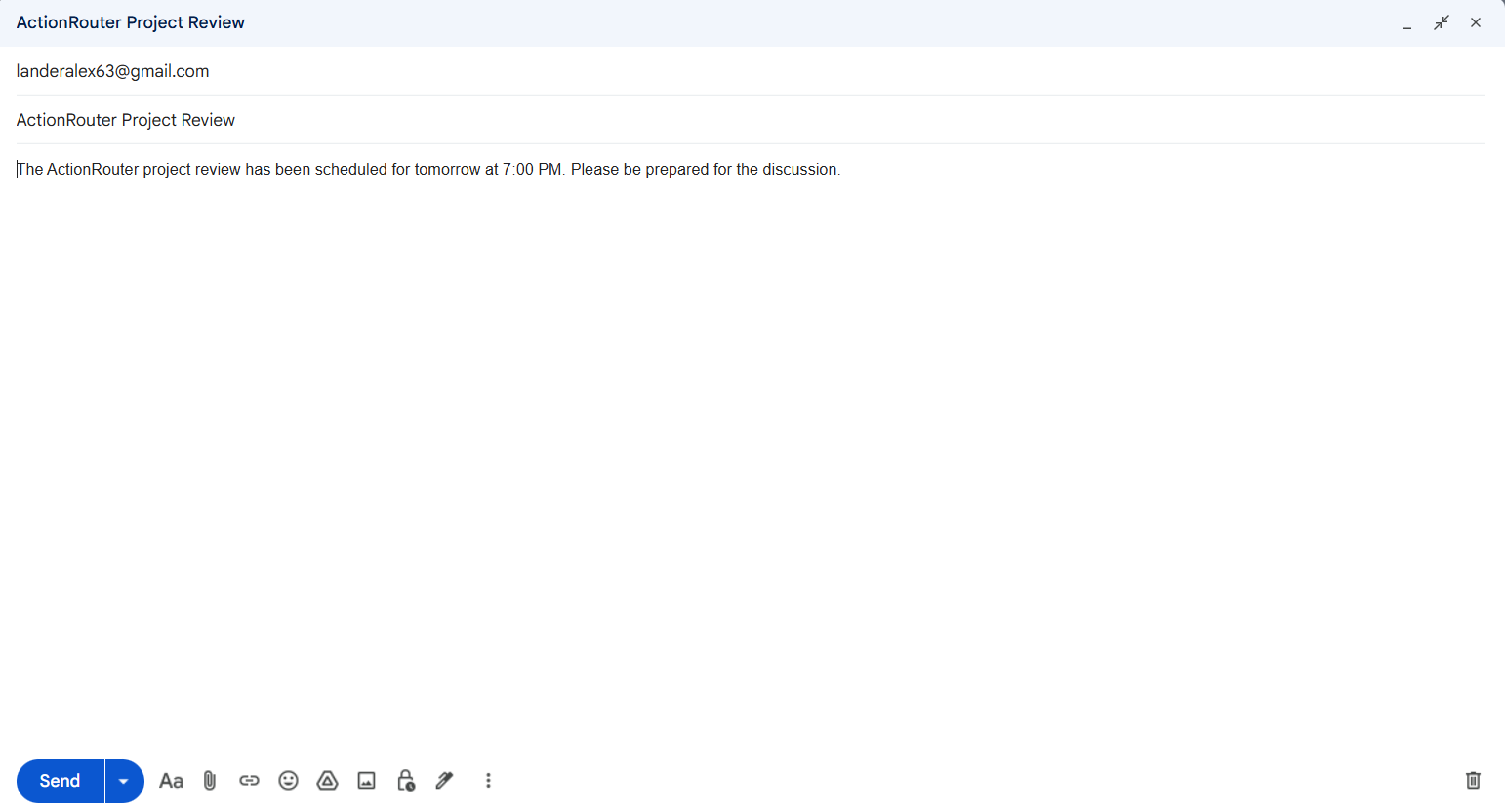
Gmail Draft Screenshot
Inspiration
Productivity workflows are often fragmented across multiple applications. A simple request such as scheduling a meeting, creating a follow-up task, and preparing an email can require switching between several tabs and manually repeating the same context.
I wanted to explore a different interaction model: instead of telling software which buttons to press, what if the user could simply describe the outcome they wanted?
That idea became ActionRouter — an AI agent that interprets an unstructured request, determines which actions are required, selects the appropriate tools, and executes a multi-step workflow.
What it does
ActionRouter converts a single natural-language request into coordinated actions across productivity tools.
For example, a user can ask:
Schedule a 30-minute project review tomorrow at 7 PM, create a task to prepare the demo slides, and draft an email confirming the meeting.
From that one request, ActionRouter can independently:
- create a Google Calendar event
- create a task
- generate a Gmail draft
- combine multiple tool calls into one workflow
- report what was completed
The user does not need to explicitly specify which functions should be called. Gemini interprets the intent and required arguments, while Google ADK orchestrates the tool execution.
For email workflows, ActionRouter intentionally creates a draft rather than automatically sending the message, keeping the final send action under human control.
How I built it
ActionRouter is written in Python and built using the Google Agent Development Kit (ADK).
The main agent exposes several Python functions as tools, including:
create_calendar_eventcreate_taskdraft_emailsave_summary
The agent uses Gemini 3.5 Flash through Vertex AI to understand the user's request and decide which tools need to be invoked.
Google ADK handles the agent orchestration and tool-calling lifecycle.
For real integrations:
- Google Calendar API creates calendar events.
- Gmail API creates email drafts.
- OAuth 2.0 provides delegated access to the user's Google services.
- Tasks are currently stored using lightweight JSON-based storage.
I deployed the ADK backend to Google Cloud Run, allowing ActionRouter to execute as a hosted agent rather than only on my local machine.
Sensitive OAuth credentials are stored using Google Secret Manager and provided to the Cloud Run service at runtime instead of being committed to the source repository.
The runtime flow is approximately:
User request
→ Cloud Run
→ Google ADK Agent
→ Gemini via Vertex AI
→ Autonomous tool selection
→ Calendar / Gmail / Task tools
→ Execution results
Challenges I ran into
One major challenge was moving from a locally working agent to a remotely deployed agent.
OAuth credentials and tokens that worked locally had to be handled differently in Cloud Run. Secret Manager mounts are read-only, while OAuth tokens may need to be refreshed, so I configured ActionRouter to securely load the token from Secret Manager and copy it into temporary writable runtime storage.
Another challenge was natural-language date and time handling. Inputs such as:
tomorrownext Friday7 PM12:00 AM- ISO-formatted dates
had to be normalized before they could reliably be passed to the Calendar API.
I also encountered invalid tool arguments generated from ambiguous prompts. For example, a phrase such as "my email address" is not a valid Gmail recipient. I added input validation so malformed email addresses are rejected before the Gmail API is called.
Deploying Gemini through Vertex AI also required configuring the correct model location and Google Cloud environment.
These issues pushed the project beyond simply calling an LLM and made me think about the reliability boundaries between probabilistic AI reasoning and deterministic software.
Accomplishments that I'm proud of
The biggest milestone was getting a complete multi-tool workflow running through the hosted Cloud Run agent.
A single request can trigger Calendar, task, and Gmail operations in sequence without the user manually choosing each tool.
I also successfully separated sensitive OAuth credentials from the repository using Secret Manager and verified the deployed agent independently using the Google Agents CLI.
What began as a simple productivity-agent idea became a functioning end-to-end system involving an LLM, an agent framework, real APIs, authentication, cloud infrastructure, and tool orchestration.
What I learned
Building ActionRouter taught me that creating an AI agent involves much more than prompting a language model.
I learned about:
- agent tool calling and orchestration
- Google ADK
- Gemini and Vertex AI
- OAuth 2.0 and authorization scopes
- Google Calendar and Gmail APIs
- environment variables and secret management
- Cloud Run deployment
- service accounts and IAM
- input validation and error handling
- date and time parsing
- local versus cloud runtime environments
- testing multi-step agent workflows
One of the most important lessons was that the LLM should be responsible for understanding intent, while deterministic software should still validate data and control interaction with external systems.
What's next for ActionRouter
ActionRouter is currently a focused prototype, but the same architecture could support many more productivity workflows.
Future improvements include:
- persistent task storage using a managed database
- additional productivity integrations
- configurable user permissions for agent actions
- confirmation policies for higher-risk actions
- improved natural-language date and scheduling support
- persistent agent memory
- workflow history and audit logs
- a dedicated web interface
- multi-user authentication
The longer-term goal is to make ActionRouter a general workflow layer where users describe outcomes rather than manually coordinating applications.
Built With
- agentic-ai
- gemini
- gmail-api
- google-adk
- google-calendar-api
- google-cloud
- google-cloud-run
- google-secret-manager
- oauth-2.0
- python
- vertex-ai

Log in or sign up for Devpost to join the conversation.