-
-
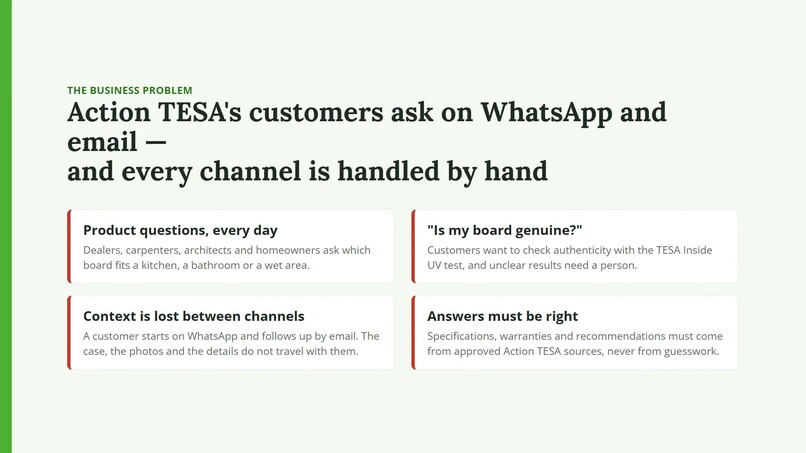
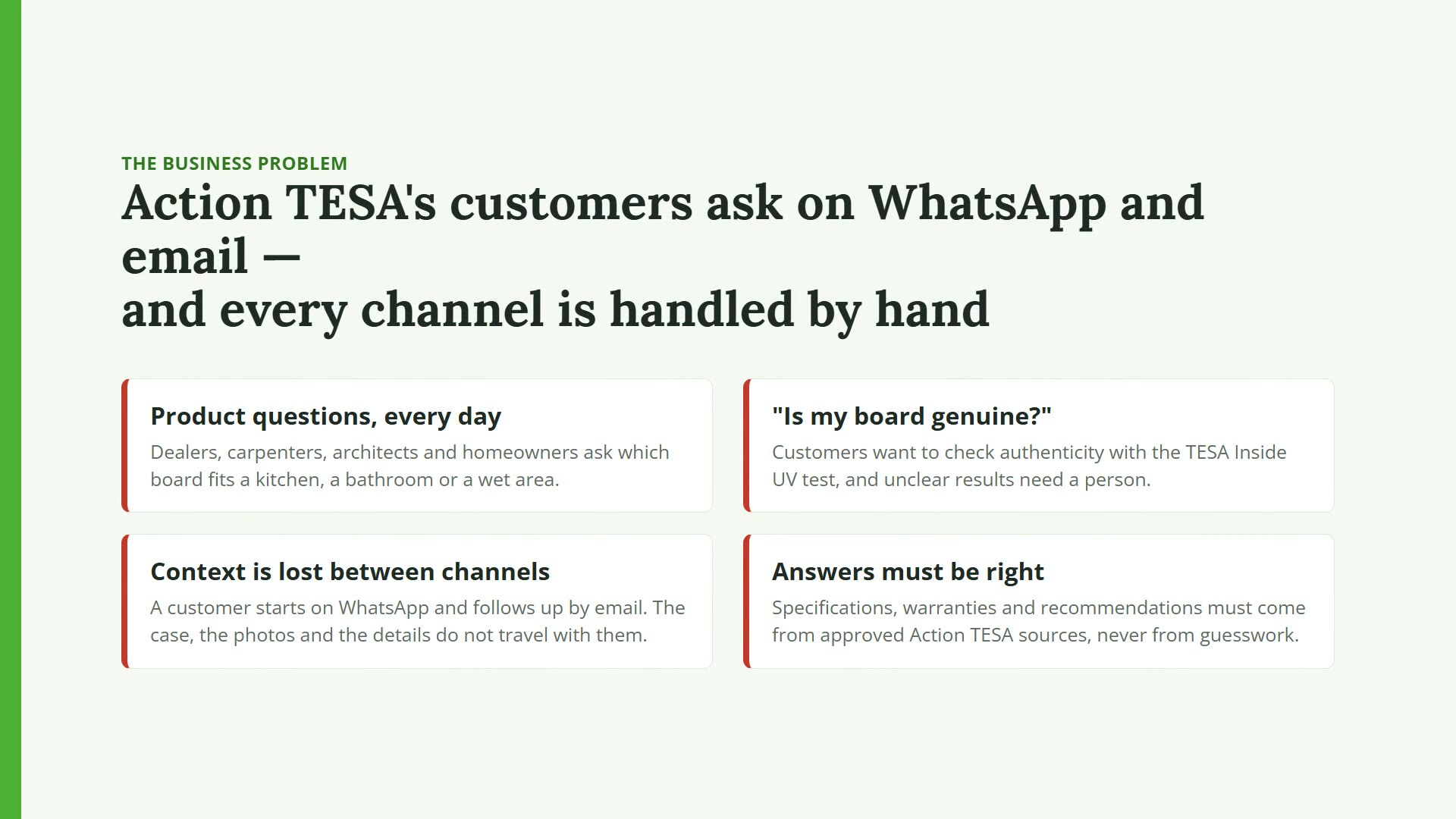
The business problem: product, authenticity and damage questions on WhatsApp and email, handled by hand today
-
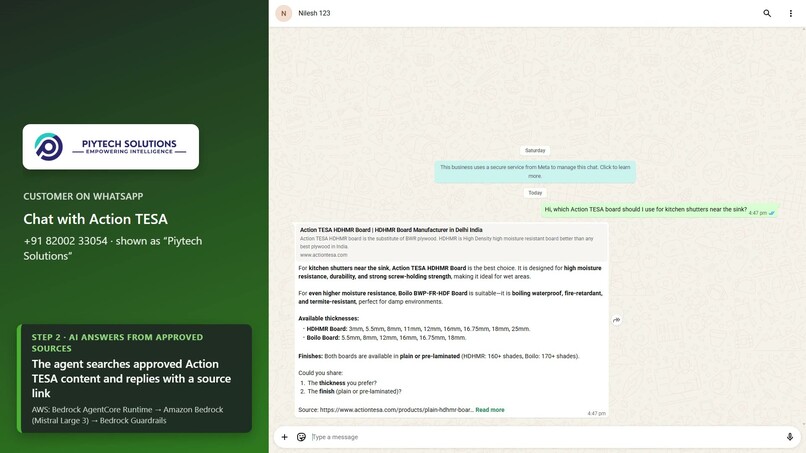
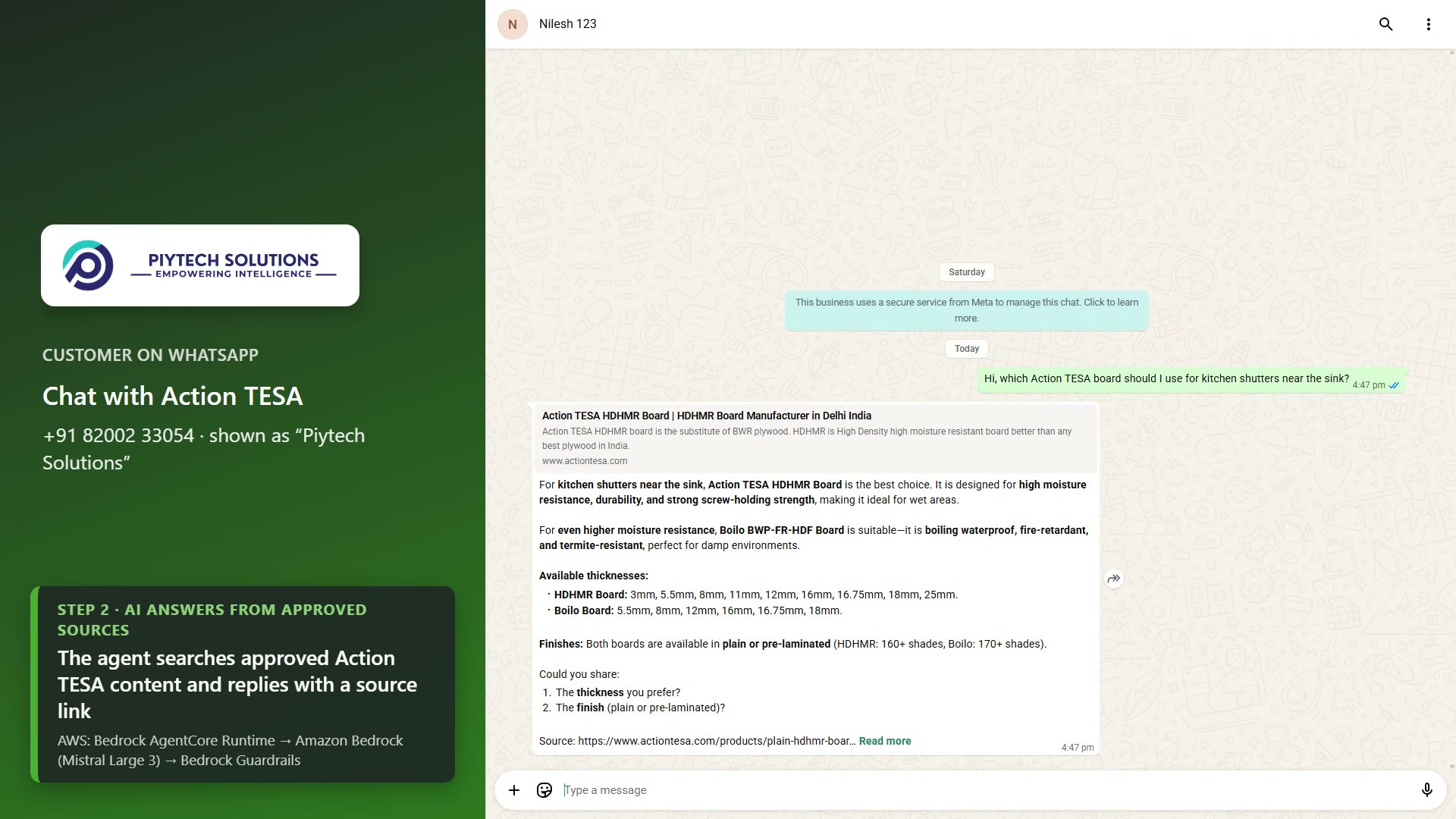
WhatsApp: the agent answers from approved Action TESA sources, with thicknesses from the brochure and a source link
-
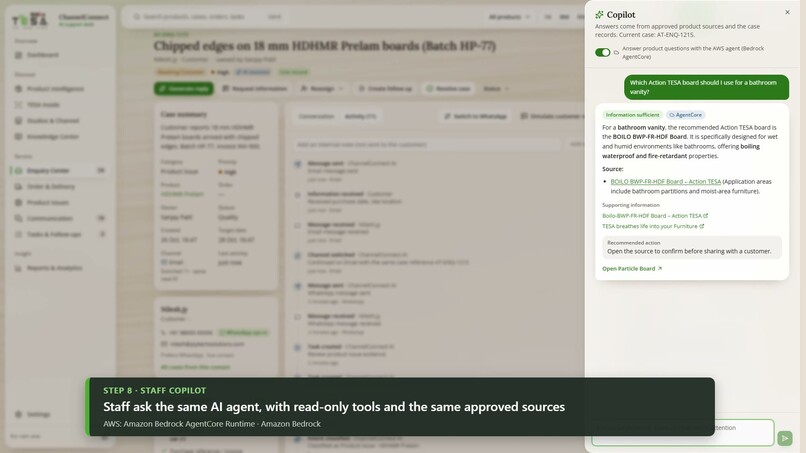
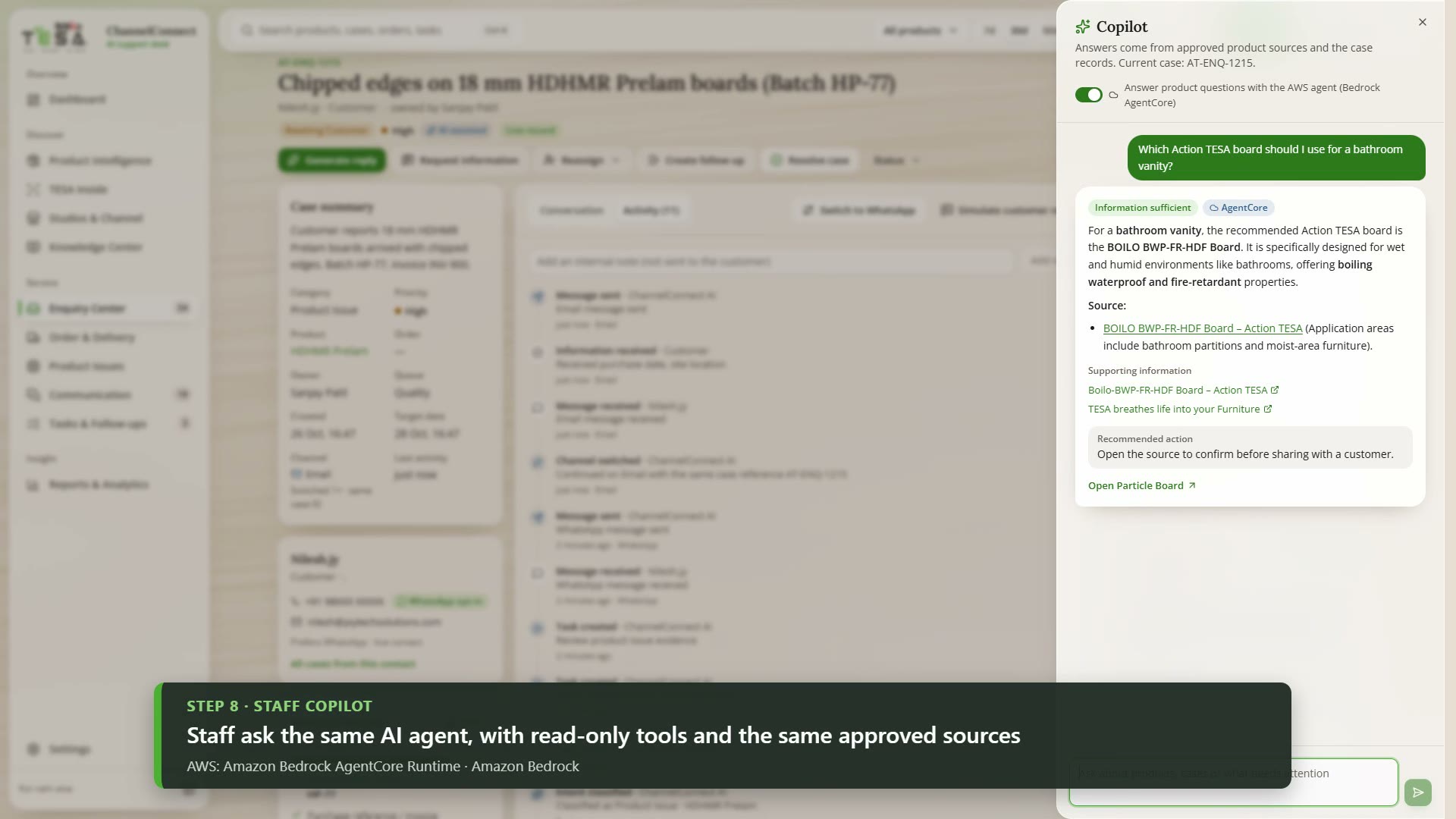
Staff Copilot: the same agent on AgentCore, with read-only tools and the same approved sources
-
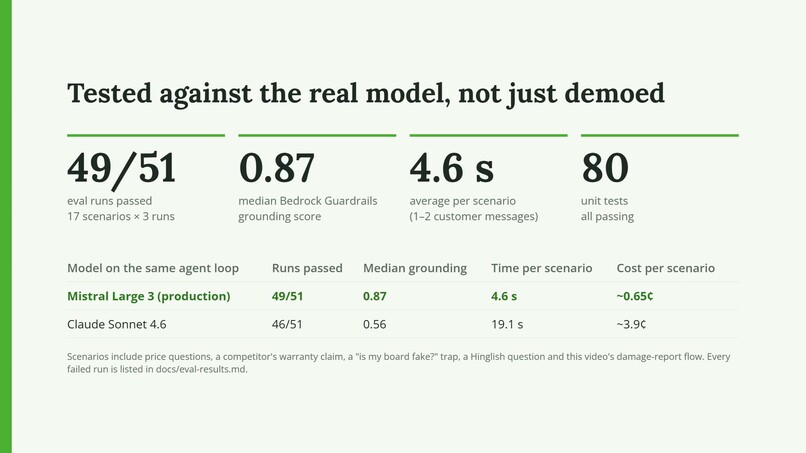
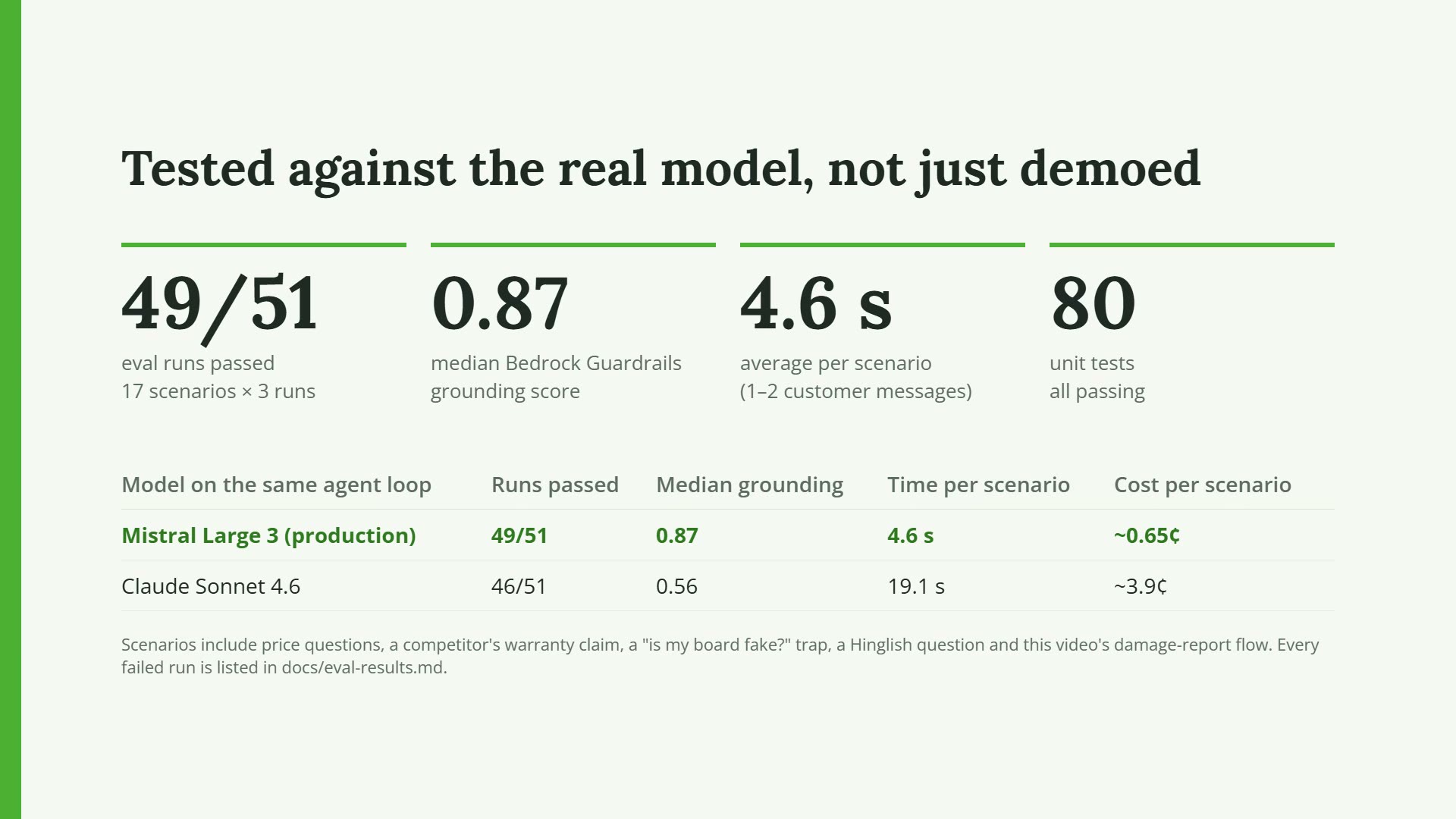
Evals against the real model: Mistral Large 3 passed 49 of 51 runs; every failure is listed in the repo
-
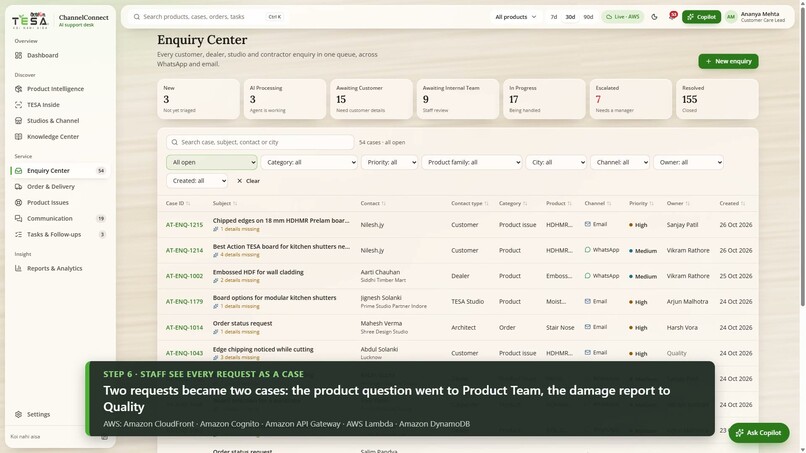
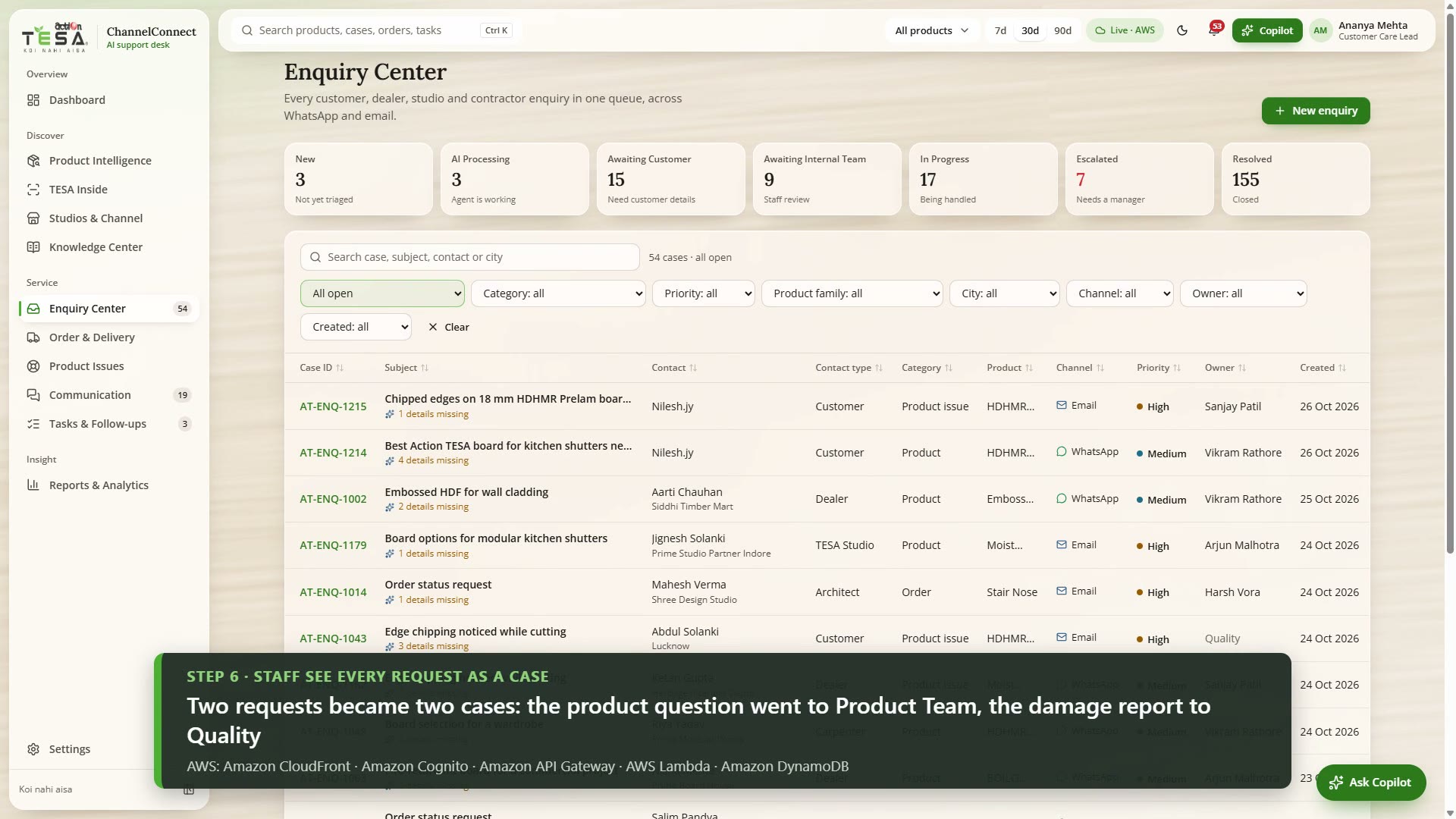
Staff console on live AWS data: two requests became two cases, each routed to its own team
-
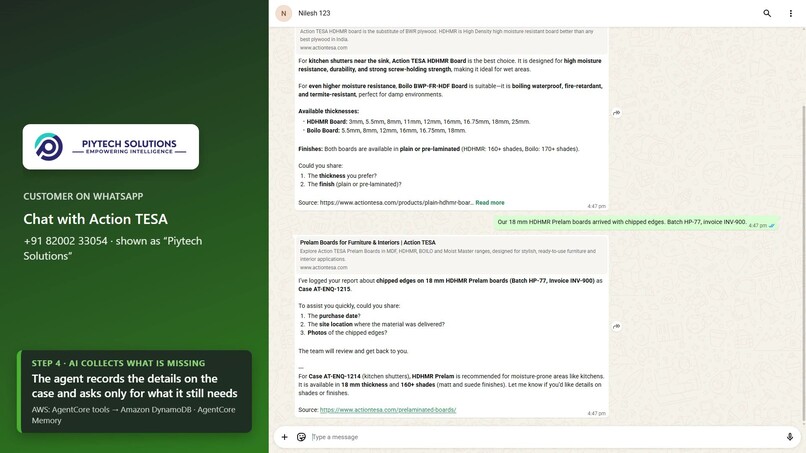
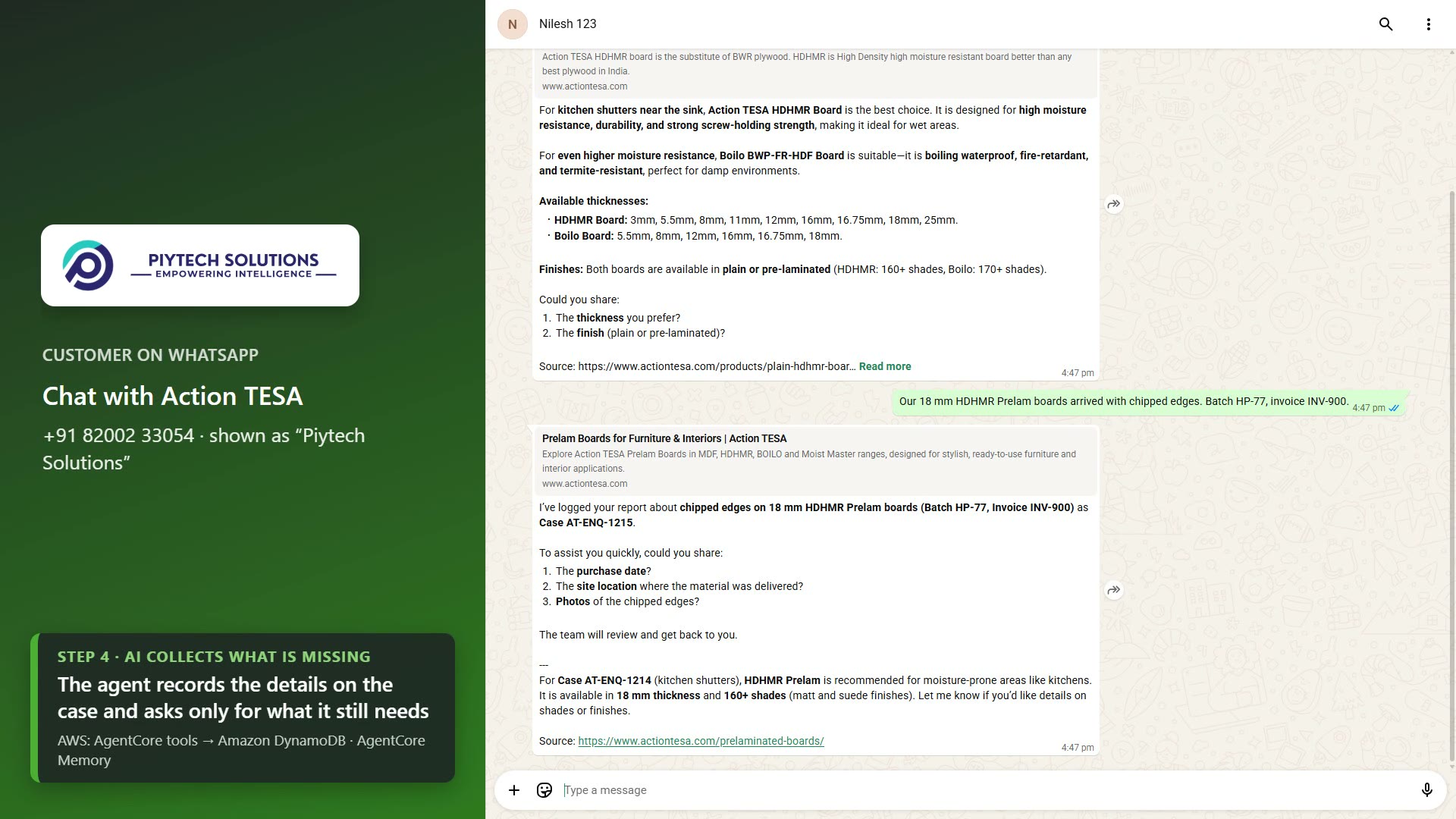
A damage report in the same chat opens its own case, and the agent asks only for the missing details
-
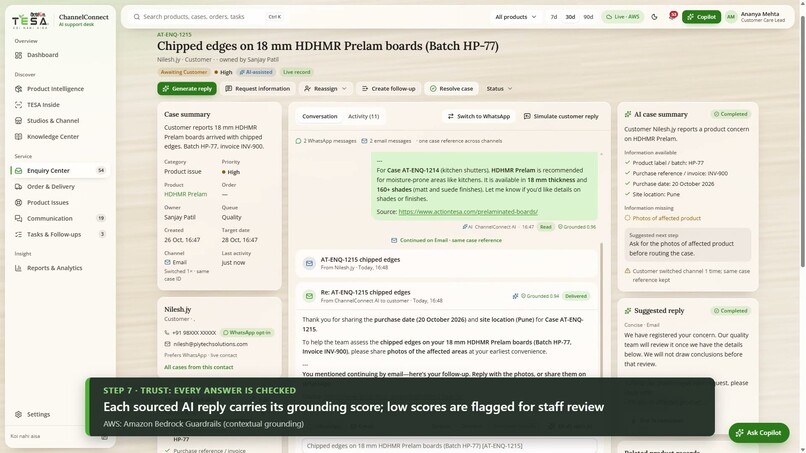
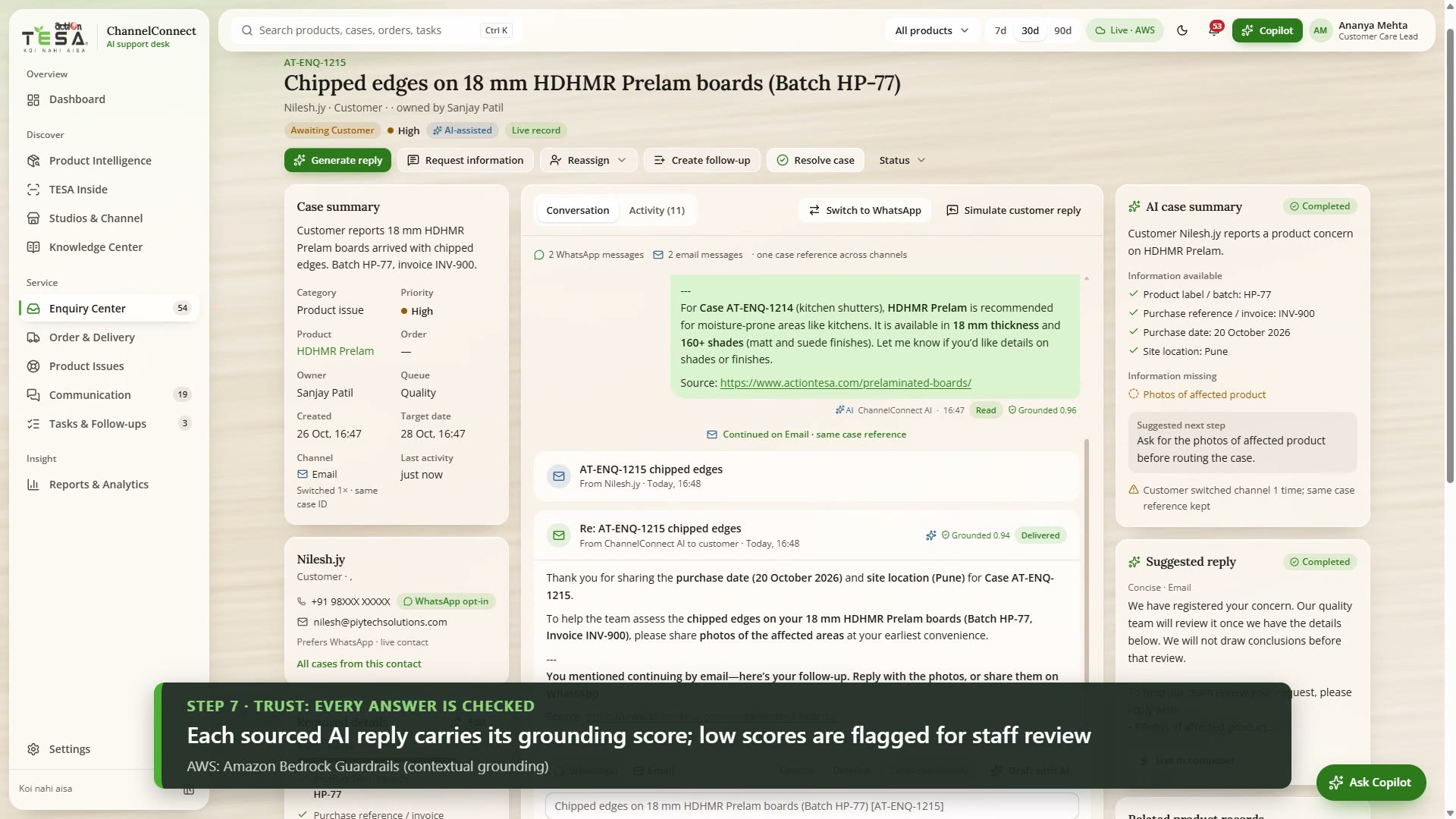
One case timeline across WhatsApp and email, with a Bedrock Guardrails grounding score on each sourced reply
-
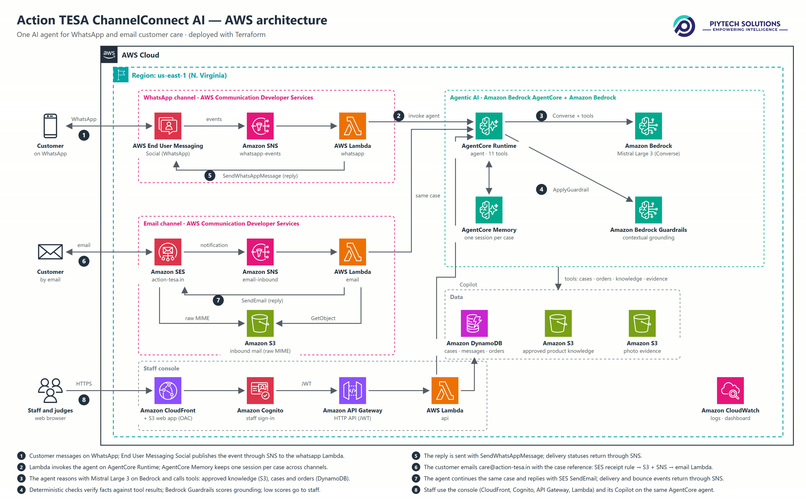
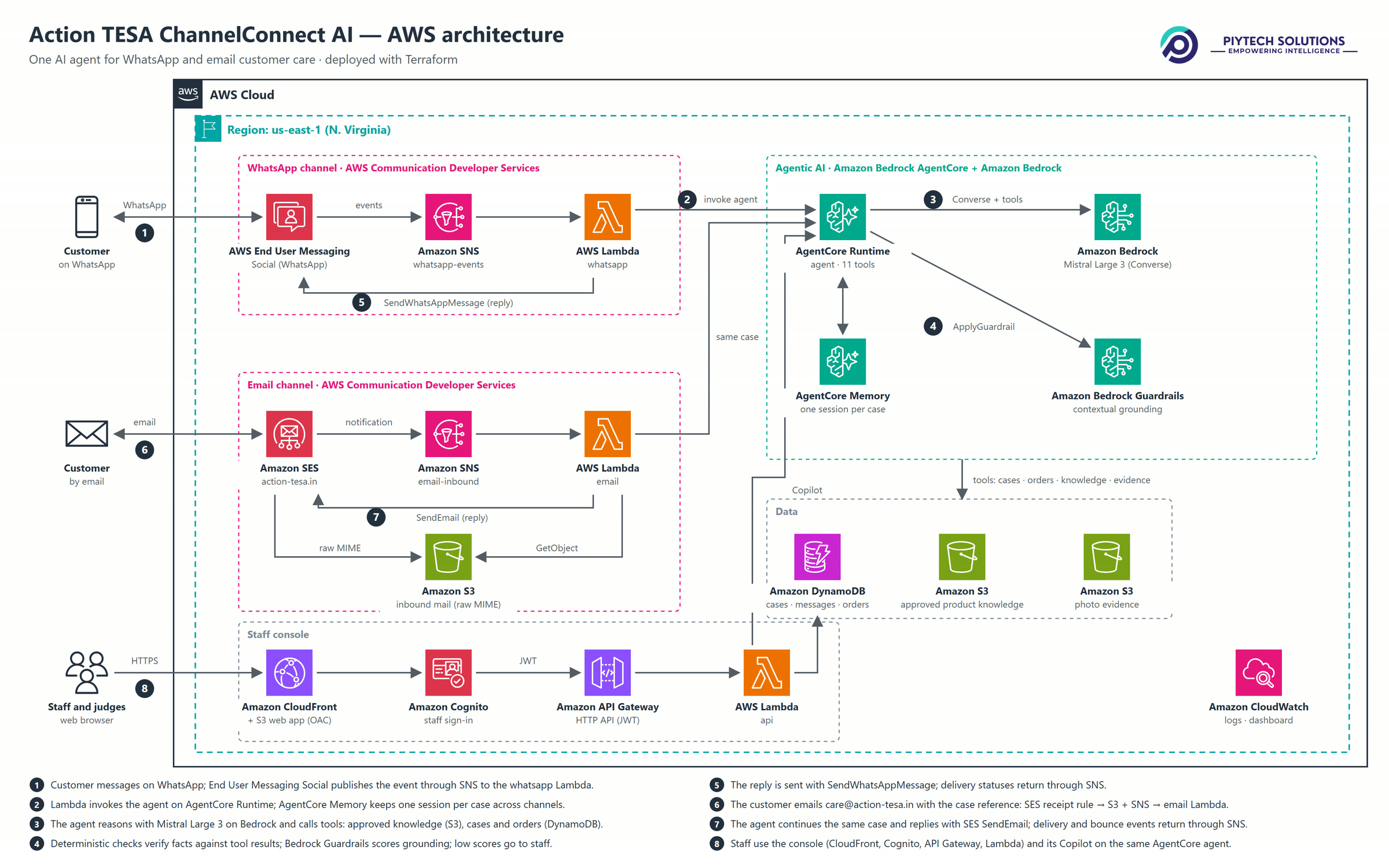
AWS architecture: WhatsApp and email in, one agent on Bedrock AgentCore with Mistral Large 3, cases in DynamoDB
Inspiration
Action TESA makes engineered wood panels in India: HDHMR, MDF, particle board, BOILO, pre-laminated and decorative boards, doors and flooring. The people who buy and specify them are dealers, TESA Studios, carpenters, contractors, architects, interior designers and homeowners. ChannelConnect AI takes their questions on WhatsApp and by email, and the questions are of a few kinds:
- Product: which board suits kitchen shutters near the sink, or a bathroom vanity; HDHMR or MDF for kitchen cabinets.
- Authenticity: how to check that a pre-laminated board is genuine, using Action TESA's published TESA Inside UV-torch check.
- Orders and problems: where an order is, or boards that arrived with chipped edges, with a photo, a batch number and an invoice.
A conversation can start on WhatsApp and continue by email, or the other way round. When the two channels are handled in separate inboxes, the context can get lost. The customer has to explain again, and the person answering cannot see what was already said. We wanted three things: one case per request whatever the channel, an agent that answers only from published product information, and decisions about quality, warranty, authenticity and pricing left to people.
What it does
For customers, on WhatsApp and email
- Answers product questions only from Action TESA's approved product pages, and includes a source link to actiontesa.com. When no approved source covers a question, it says it has no verified information and offers to raise it with the product team. It does not quote prices or stock. Instead it points the customer to a dealer or TESA Studio.
- Explains the TESA Inside check as Action TESA's guidance. It must not tell a customer that their board is fake or genuine, and the review gates reject replies that do. If the customer reports an unclear result, the code escalates the case to customer care automatically.
- Opens a case for each request that needs follow-up (product, authenticity, order, delivery or product issue). It asks only for details that are still missing, at most two at a time, and records them as they arrive. A photo sent on WhatsApp is saved to the case as evidence.
- Looks up orders, which are simulated demo records with no ERP behind them. It shares the recorded status and never promises a delivery date.
- Continues on the other channel without starting over. A customer who emails [email protected] and quotes the case reference lands on the same case, and the agent already has the WhatsApp conversation. A WhatsApp customer can also ask for the details by email, and the agent sends them from the same case.
For Action TESA staff, in the web console
- One case timeline across WhatsApp and email, with the channel switch marked. The case also shows its evidence, required details, owner queue and an activity log of everything the agent did.
- Each AI reply that used approved sources shows its Amazon Bedrock Guardrails grounding score. A reply that scores below 0.35 gets a "Needs review" badge, an activity note on the case and a staff notification.
- A Copilot that sends product and guidance questions to the same agent on AgentCore, with read-only tools. It shows the sources it used.
- Dashboard, enquiry lists, product finder and comparison, TESA Inside, orders and reports. The header shows whether the console is on "Live · AWS" data or local demo data.
In live mode the console reads from DynamoDB. That data is a seeded set of fictional customers, orders and cases, plus everything that arrives on the real WhatsApp number and email domain. Several console helpers are deterministic, rule-based code over the same approved catalogue, not model calls. They include the reply drafts, case and order summaries, the daily briefing, enquiry classification, and the product finder and comparison. Every automatic reply to a customer on WhatsApp and email comes from the agent on Amazon Bedrock, and so do the Copilot's product answers. Staff can also send replies from the console, and those are written by staff, optionally starting from the rule-based draft.
How we built it
Architecture
See the architecture diagram (docs/architecture.png).
- Web console: React 19, TypeScript, Vite, Tailwind CSS v4 and Zustand. It is served from a private S3 bucket through Amazon CloudFront with origin access control. Staff sign in with Amazon Cognito (hosted UI, authorization-code flow with PKCE).
- API: an Amazon API Gateway HTTP API with a Cognito JWT authorizer, in front of AWS Lambda (Python 3.13, arm64). One code package runs four functions: the staff API, inbound WhatsApp, inbound email and the data seeder.
- Data: one on-demand Amazon DynamoDB table for contacts, cases, conversations, messages, activity and notifications. An index on update time feeds the change feed, which the console polls every 8 seconds. Amazon S3 holds the approved product corpus, WhatsApp media evidence and raw inbound email.
- Events: Amazon SNS topics carry WhatsApp events, SES receipt notifications and SES delivery events to the Lambda functions.
- Agent: Amazon Bedrock AgentCore Runtime runs the agent as a Python 3.13 code package, and AgentCore Memory keeps the conversation turns. The model runs on Amazon Bedrock through the Converse API, and Amazon Bedrock Guardrails scores grounding.
- Operations: Amazon CloudWatch logs and a dashboard. The infrastructure is Terraform (7 modules), with default tags on every resource. The one manual step is linking the WhatsApp Business account in the End User Messaging Social console and choosing the SNS topic as its event destination.
The two AWS Communication Developer Services
WhatsApp: AWS End User Messaging Social (backend/src/channelconnect/messaging.py, abridged)
social = boto3.client("socialmessaging")
social.send_whatsapp_message(            # agent and staff replies, and read receipts
    originationPhoneNumberId=settings.whatsapp_phone_number_id,
    message=json.dumps(payload).encode(),
    metaApiVersion=settings.meta_api_version,
)
social.get_whatsapp_message_media(       # customer photos and documents -> S3 evidence bucket
    mediaId=media_id,
    originationPhoneNumberId=settings.whatsapp_phone_number_id,
    destinationS3File={"bucketName": settings.evidence_bucket, "key": key},
)
Inbound messages arrive through the WhatsApp Business account's event destination, an SNS topic that triggers the WhatsApp Lambda function.
Email: Amazon SES v2 (backend/src/channelconnect/messaging.py, abridged)
boto3.client("sesv2").send_email(
    FromEmailAddress="Action TESA ChannelConnect <[email protected]>",
    Destination={"ToAddresses": [customer_email]},
    ReplyToAddresses=["[email protected]"],   # per-case reply address
    Content={"Simple": {"Subject": ..., "Body": {"Text": ..., "Html": ...},
                        "Headers": [X-ChannelConnect-Case, In-Reply-To, References]}},
    EmailTags=[{"Name": "case", "Value": ...}],
    ConfigurationSetName=settings.ses_configuration_set,
)
- Inbound: an SES receipt rule for action-tesa.in stores the raw message in S3 and notifies an SNS topic. The email Lambda function parses the MIME and strips quoted text. It then finds the case from the per-case reply address, an
[AT-ENQ-…]tag in the subject, ourX-ChannelConnect-Caseheader or the body. - Delivery events: the configuration set requires TLS, uses the suppression list for bounces and complaints, and sends DELIVERY, BOUNCE, COMPLAINT and REJECT events back through SNS. A delivered email is marked Delivered. A permanent bounce or a complaint blocks the address for further sends. A reply that starts with STOP or UNSUBSCRIBE opts the address out of email.
Both services sit on the production paths. The inbound Lambda functions reply through them, staff replies from the console go through them, and the agent has send_email_to_customer and send_whatsapp_to_customer tools for channel switches. Seeded demo contacts are never messaged for real: their sends are recorded as "Simulated".
Amazon Bedrock AgentCore
- Runtime: the inbound Lambda functions and the staff API call
boto3.client("bedrock-agentcore").invoke_agent_runtime(...), with a runtime session ID derived from the case, or from the contact before a case exists. The runtime entry point (backend/agent/main.py) is aBedrockAgentCoreApp. If the runtime call fails, the Lambda function runs the same agent code inline. - Memory:
create_eventandlist_events, with actorId set to the contact and sessionId set to the case ID (or to the contact ID until a case exists). Because the session is the case and not the channel, the WhatsApp turns are already in context when the same case continues by email. Case state (status, owner, fields) stays in DynamoDB, and memory holds only what was said. Events expire after 30 days.
Amazon Bedrock
- Agent loop: our own code on the Converse API, with no agent framework.
bedrock-runtimeconversegets 11 tools: search approved knowledge, get, create and update a case, look up an order, TESA Inside guidance and outcome, update the contact, send email, send WhatsApp, and escalate to a human. A turn takes at most 10 model steps, at temperature 0.2. The staff Copilot gets only the 4 read-only tools. - Model: production runs Mistral Large 3 (
mistral.mistral-large-3-675b-instruct). Claude Sonnet 4.6 (global.anthropic.claude-sonnet-4-6) runs through the same loop, with prompt caching on the system prompt and tools. We evaluated it but did not put it in production (see Challenges). Switching models means changing one Terraform variable,model_id. - Retrieval: keyword and synonym search over an approved corpus built from actiontesa.com pages and the brochures published there, stored as JSON in S3. It is not vector search. Every passage and product carries its source URL.
Quality design
Product facts must come from the tools. Before a customer sees a reply, the code checks its figures and claims against what the tools returned.
- Review gates. These checks are deterministic (
agent.py_review,grounding.py). Every figure in a reply (mm, degrees, %, years, kg, layers, ratings such as 2H, and time promises such as "within 48 hours"), every phone number and every warranty or guarantee claim must appear in that turn's evidence, meaning the tool results plus what the customer wrote. The other checks reject authenticity verdicts, products named without a check of the approved sources, two products merged into one name (such as "Moist Master HDHMR"), any claim that a message was sent unless the provider accepted it, a claim that a photo arrived when none was sent, case or order references the tools never returned, a reply that quotes a different case from the one it is filed on, a claim that a case was escalated when it was not, and an admission of fault or a promise of a replacement or refund (only staff decide those). A reply that fails gets up to two corrective turns, and lines that still fail are dropped. The send tools refuse to send a message that fails the checks. - Bedrock Guardrails contextual grounding. Each customer reply that used sources is scored with
apply_guardrail. The grounding source is that turn's evidence (the tool results plus what the customer wrote) and the query is the customer's message. The score is stored on the message, and below 0.35 the reply is flagged for staff. The score is an audit signal, not a gate (see Challenges). - Policies in code, not in the prompt. An unclear TESA Inside result always escalates to customer care. An order question gets its own case, and so does a different kind of request. When a reply that used sources names a product or TESA Inside but has no link, the code adds the source link, and it adds only actiontesa.com links.
- Evals.
backend/evals/run_eval.pyruns 17 scenarios against the real model, with DynamoDB and S3 mocked by moto, so no customer is messaged. Each scenario checks the required tools, expected and forbidden phrases, the case count and status, source links and figure grounding. The scenarios include price questions, a dealer's warranty claim about BOILO, a TESA Inside "is it fake?" trap, a switch to email, a Hinglish question, an out-of-scope request, a damage report with a photo, and the demo video's flow (a product question, then a damage report that must open its own case). - Unit tests. 80 tests (pytest and moto) cover seeding, case routing, WhatsApp and email parsing, threading, the review gates, TESA Inside escalation, SES delivery events, WhatsApp delivery statuses, STOP handling and the admin-only data reset. They also check that seeded contacts never get real messages and that a failed or simulated send is never reported as sent.
Challenges we ran into
A grounding score made a poor gate. At first we used the Bedrock Guardrails contextual grounding check as a gate, so a low score sent the reply back for a rewrite. In the evals it also flagged correct replies, and rewriting them made those answers worse. During calibration, invented content scored about 0.1 to 0.15 and correct short replies scored 0.42 to 0.98, so we set the threshold at 0.35 and changed what the score does. It is now stored on every AI message that used sources, and a low score asks a person to check the reply. The rules that must hold every time are deterministic checks against the turn's tool results: figures, warranty claims, authenticity verdicts, product names, "sent" and "photo received" claims, and case references. We also dropped the Guardrails relevance filter. It misread Hinglish questions and caught nothing that the grounding check missed.
Choosing the model on measured results. Both models ran the same 17 scenarios 3 times each, through the same loop:
| Mistral Large 3 | Claude Sonnet 4.6 | |
|---|---|---|
| Eval runs passed | 49/51 (1 of the 2 failures was the grader) | 46/51 (3 of the 5 failures were the grader, 1 was throttling at our 10 requests/minute quota) |
| Median grounding score | 0.87 | 0.56 |
| Average time per scenario (one or two customer messages) | 4.6 s | 19.1 s |
| Model cost per scenario | about 0.65 US cents | about 3.9 US cents |
Both columns come from one run of each model on the production code; the raw output and every failure are in docs/eval-results.md. "The grader" means the reply was correct but a phrase check matched it, for example "not available in matte" matching the check for "available in matte". We report those runs as failures and fixed the checks afterwards. Mistral Large 3 runs in production. Claude Sonnet 4.6 stays integrated.
Live runs found what the evals missed. Recording the demo end to end on real WhatsApp and email turned up problems that no scenario covered: an invented customer care phone number; a reply that quoted the earlier case after a tool had opened a new one; a case detail recorded as "20 October 2024" when the customer wrote "20 October 2026"; and an "[image attached]" marker that the model wrote into a case detail, which then made the photo check believe a photo had arrived. Each one became a deterministic check with a unit test, and the demo flow became an eval scenario.
Email in the SES sandbox. The SES domain action-tesa.in is verified with DKIM. Inbound mail, the configuration set and the bounce and complaint handling are all live. But the account is still in the SES sandbox, and our production-access request had not been approved at the time of writing. In the sandbox, SES delivers only to verified addresses. If you email [email protected] from your own address, the agent still reads the email, works on the case and writes the reply. SES then rejects the send, and the console shows that reply as Failed. The demo video uses an inbox that we verified in SES.
Clean customer messages. Models glued footnote numbers to words ("cabinets1,3") and links to words, and after a corrective turn they sometimes left revision notes such as "Here is the complete reply:". The code cleans these up, and the evals fail any reply that still has a link glued to a word or a revision note. The code also converts the model's Markdown to WhatsApp formatting and to HTML and plain-text email.
Threading across channels. Customers do not always reply to our email. They write a new one, or they type the case reference into the body. The case lookup therefore tries the per-case reply address, the subject tag, our header and finally the body.
The WhatsApp sender name. The number belongs to Piytech's WhatsApp Business account, so customers see "Piytech Solutions", not Action TESA. A display-name change needs Meta review, so we have not changed it yet.
Accomplishments that we're proud of
- With Mistral Large 3, 49 of 51 eval runs passed (17 scenarios × 3 runs); one of the two failures was the grader rejecting a correct refusal. The median Bedrock Guardrails grounding score was 0.87, a scenario took 4.6 s on average and cost about 0.65 US cents in model usage.
- We evaluated Claude Sonnet 4.6 through the same loop: 46/51 passed (3 failures were the grader and 1 was throttling), with a median grounding score of 0.56, 19.1 s per scenario and about 3.9 US cents per scenario.
- 80 unit tests pass.
- Both CDS services run on the production paths. The demo video is one live take on the production code, on the real WhatsApp number and the real SES domain: a WhatsApp question, a damage report that opens its own case, then an email follow-up on that case. Photo evidence from WhatsApp was tested live the same way before.
- We have not run it with real customers, so we make no claims about time saved or other business impact.
What we learned
- Put the rules that must always hold in code, and test them against the real model. An early reply described matte versions of a high-gloss board. That mistake became an eval scenario and a prompt rule that every finish must belong to its own product.
- A grounding score is a good review signal and a poor hard gate.
- Key memory to the business object, not the channel. Using the case as the AgentCore Memory session made the channel switch simple.
- Test models on your own scenarios. On ours, the cheaper model was faster and scored higher.
- Start channel onboarding early. SES production access, WhatsApp templates and display-name changes all depend on outside reviews.
What's next for Action TESA ChannelConnect AI
- SES production access, so that replies reach any customer's inbox.
- Approved WhatsApp templates. Today the agent sends only free-form replies, which work only inside WhatsApp's 24-hour customer-service window. Templates would let staff and the agent message a customer outside that window.
- STOP handling on WhatsApp, to match email.
- Prompt-attack and content filters on customer input, with adversarial eval scenarios.
- Real order data in place of the simulated demo orders.
- Moving the remaining rule-based console helpers to the agent.
- A pilot with real customer-care staff, measured against a baseline (first-response time, and how often customers have to repeat themselves) before we claim any savings.
How we use WhatsApp (AWS End User Messaging Social)
WhatsApp is the main customer channel, and AWS End User Messaging Social is one of the two AWS CDS services we use (the other is Amazon SES).
- Number: the business number +91 82002 33054 is linked to AWS End User Messaging Social through a WhatsApp Business account. The display name is "Piytech Solutions".
- Inbound: the account's event destination is an SNS topic that triggers a Lambda function. For each message, the function finds or creates the contact by phone number and finds their open case. It records the message, sends a read receipt with
SendWhatsAppMessageand passes the text to the agent on AgentCore. Repeat deliveries are ignored by Meta message ID. The function handles text, image, document, video, interactive, button and location messages. - Photos and documents:
GetWhatsAppMessageMediacopies them straight to the S3 evidence bucket. They are attached to the case, and on a product-issue case they fill the "Photos of affected product" detail. - Replies:
SendWhatsAppMessagesends text messages with link previews on. The code converts the model's Markdown to WhatsApp formatting and the prompt keeps replies under 90 words. Replies come from the agent, from staff in the console, or from the agent'ssend_whatsapp_to_customertool when an email customer asks to continue on WhatsApp. - Status:
ListLinkedWhatsAppBusinessAccountsshows the link status on the console's integrations page. - Safety: only live contacts (created from real inbound messages, or added by staff in the live console) and numbers on an explicit test allow-list receive real WhatsApp messages. Seeded demo contacts never do.
- Limits today: conversations are customer-initiated. There are no templates yet, so business-initiated messages outside the 24-hour window are not supported.
Try it
- WhatsApp: message +91 82002 33054. For example: "Which Action TESA board should I use for a bathroom vanity?", "How do I check if my pre-laminated board is genuine Action TESA?" or "What is the status of my order AT-ORD-1007?" (a simulated demo order).
- Email: write to [email protected] with the case reference from WhatsApp (AT-ENQ-…) in the subject. While SES is in the sandbox, the reply appears on the case in the console but does not reach your inbox (see Challenges).
- Console: https://d1czxqt05hnpay.cloudfront.net. The judge sign-in details are in the repository README, under "Judge access".
Disclosure
- The project uses these open-source libraries: React, React Router, Vite, Tailwind CSS, Radix UI with shadcn/ui-style components, Zustand, Recharts, TanStack Table, lucide icons, motion, sonner, date-fns, cmdk, class-variance-authority, clsx, tailwind-merge and tw-animate-css in the console; boto3, the Bedrock AgentCore SDK and the Anthropic SDK in the backend; and pytest and moto for tests. No other pre-existing code is included.
- The product information, product images, logo and TESA Studio listings come from Action TESA's public website. The customers, orders and cases in the demo data are fictional. Action TESA is Piytech's customer and agreed to the use of its name, logo, product images and catalogue content in this project.
Built With
- amazon-api-gateway
- amazon-bedrock
- amazon-bedrock-agentcore
- amazon-bedrock-guardrails
- amazon-cloudfront
- amazon-cloudwatch
- amazon-cognito
- amazon-dynamodb
- amazon-ses
- amazon-sns
- amazon-web-services
- aws-end-user-messaging-social
- aws-lambda
- boto3
- mistral-large-3
- python
- react
- tailwindcss
- terraform
- typescript
- vite
- zustand

Log in or sign up for Devpost to join the conversation.