-
-
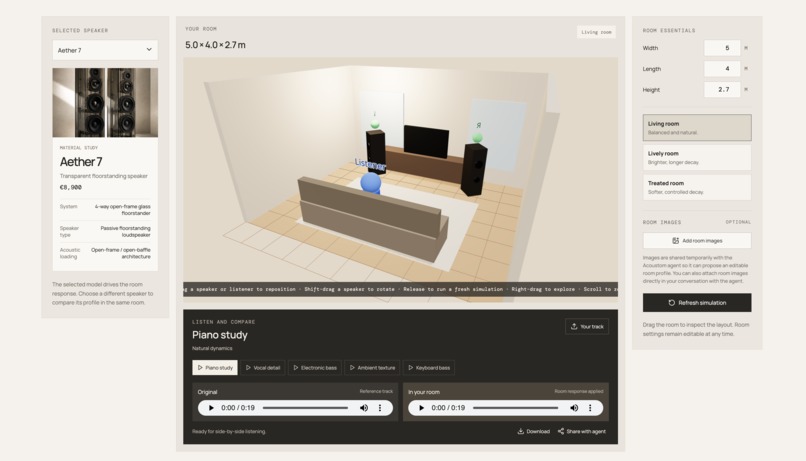
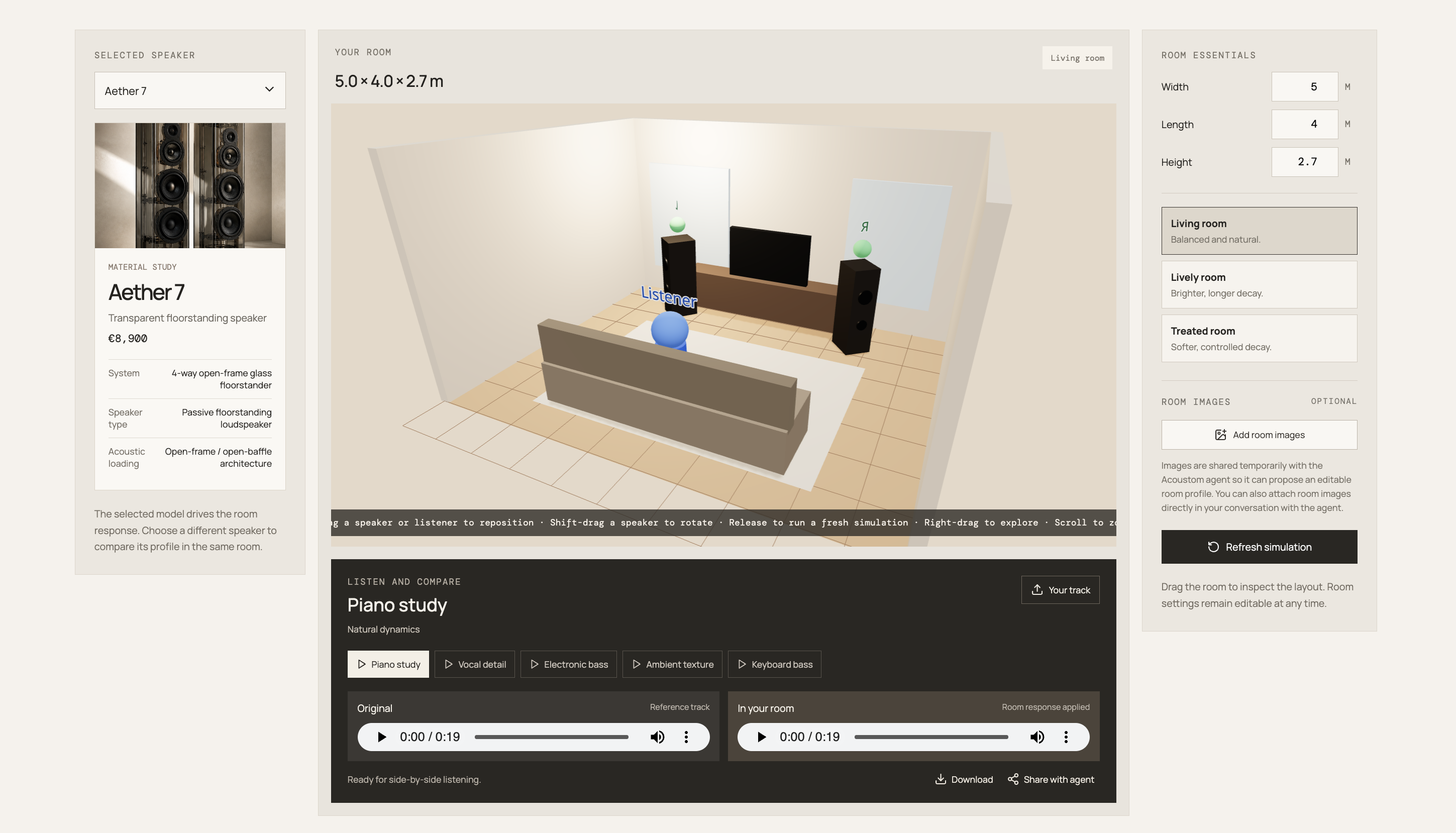
Room Audio Simulation
-
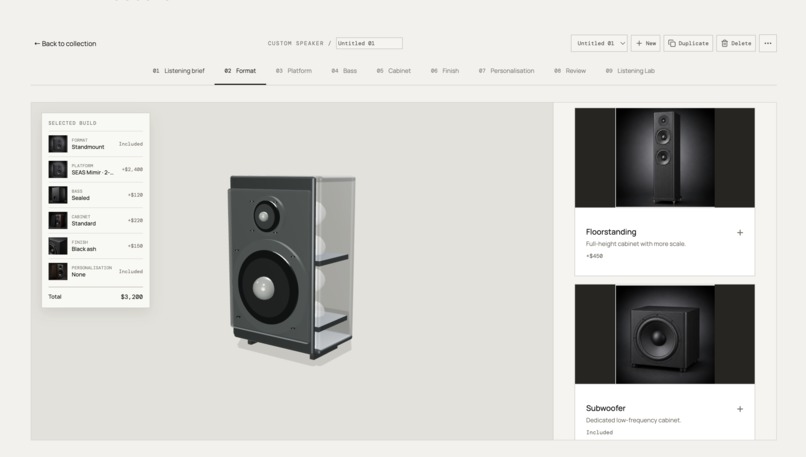
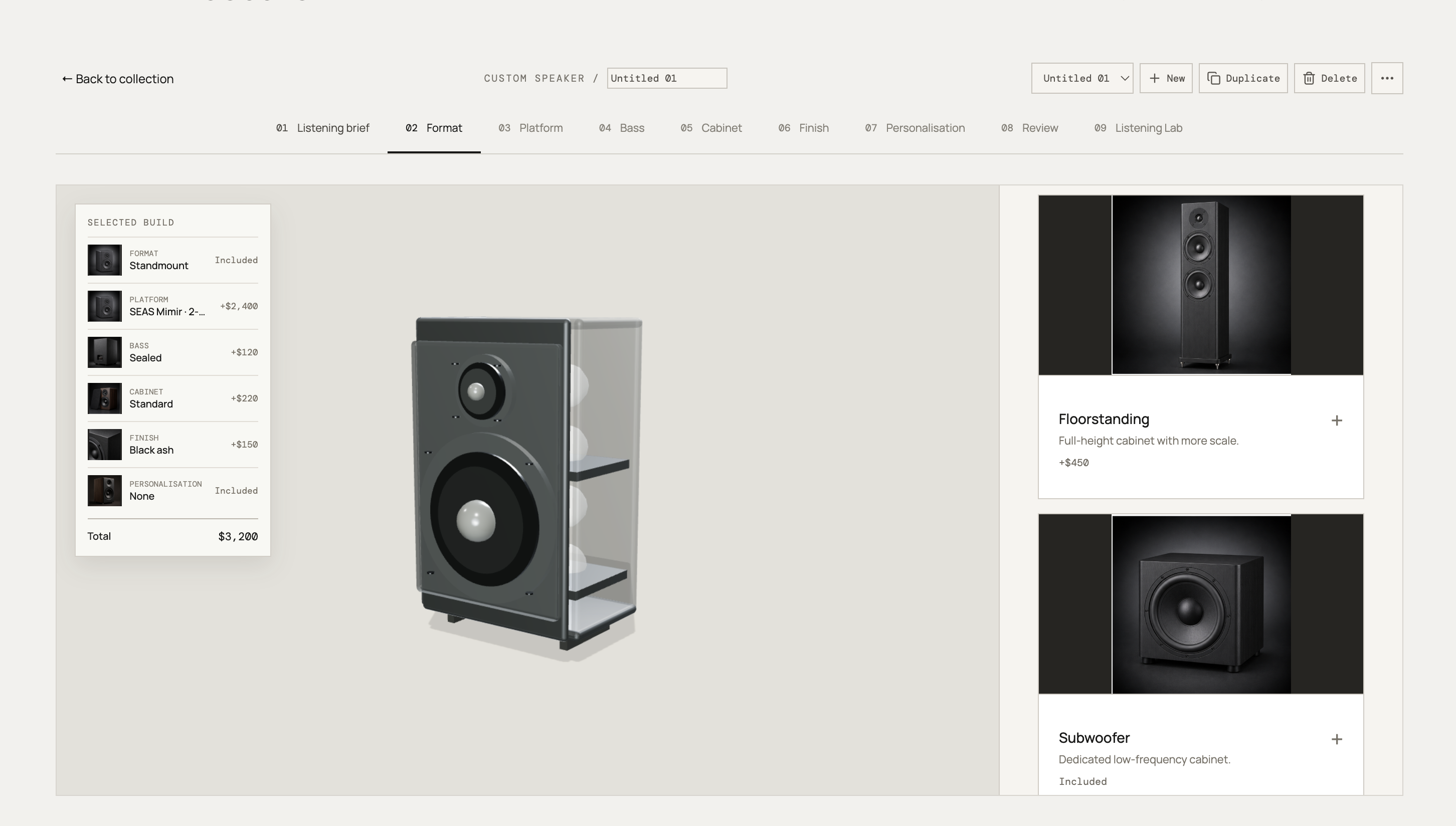
Custom Speaker Builder
Acoustom — Great sound is personal. Acoustom takes the guesswork out of buying decisions.
Acoustom is an AI-assisted speaker builder and listening-room simulator that helps people find the setup that best fits their room, music, budget, equipment, and preferences.
With WebMCP, an agent can bring relevant user context into Acoustom, guide the user through the experience, build and customize products with them, explore technically compatible alternatives, test them through simulation, compare the trade-offs, and recommend the strongest option — all in the same shared interface.
At a glance
Personalized to the listener
Acoustom works around the user's room, music, budget, aesthetics, existing equipment, and priorities rather than offering a generic “best speaker” ranking.
Bring your context with you
The agent can bring in relevant context from services the user has already connected to their AI environment such as room information from Google Drive, or listening preferences from Spotify history without Acoustom needing a native integration with every platform.
Privacy stays with the user
The user's own agent works with data that user decides to share rather than asking user for personal data or source files. The user stays in control of what is shared with Acoustom,
Navigate and guide through the shared experience
The agent can navigate visibly through Acoustom's catalog, product details, builder, room setup, simulation, and comparison views while explaining what it is doing and why. The user follows the same journey, sees the progress, collaborate and can redirect the agent at any point.
Build and customize together in 3D
The agent can actively build and customize a speaker inside Acoustom's shared 3D builder — selecting components and configuration, and iterating on the design while the user watches, evaluates, and makes changes alongside it.
Generate and test alternatives quickly
Instead of building one option at a time, the agent can rapidly configure several viable builds in one workflow, test them, eliminate weaker options, and refine the strongest candidates.
Simulation-backed recommendations and trade-offs
Acoustom uses technical data and simulation to test candidate builds before recommending them. The agent weighs sound, size, price, aesthetics, power requirements, room suitability, and compatibility with existing equipment against the user's priorities, then recommends the strongest overall option and explains the trade-offs. Users can inspect the evidence visually, technically, and through simulated audio using a standard reference track or their own audio.
Technical complexity, simplified
The agent turns specifications, compatibility constraints, and simulation results into practical explanations such as better bass but a larger enclosure, or a smoother response from your listening position.
Explore before you commit
Users and their agents can browse the catalog, enter the builder, configure speakers, run simulations, and compare options without creating an account until the purchase step.
The workflow
Bring context → explore → build together → generate alternatives → check compatibility → simulate & compare → explain trade-offs → optimize → recommend → refine → decide

The problem
Buying or building the right speaker is difficult because the listening experience is shaped by far more than the speaker itself.
A speaker that sounds great in a showroom, in a reviewer's room, or on a specification sheet may sound very different once it is placed in the user's own space. Room size, wall distance, furniture, listening position, amplifier, enclosure, and component choices all affect the result.
That often turns the buying process into expensive trial and error:
research → compare → buy → set up → listen → discover it sounds different → adjust or return → try again
For custom speakers, the problem is even harder. Drivers, crossovers, amplification, enclosure design, placement, and room conditions interact with one another, so changing one choice can affect several others. Finding a good combination can require repeated configuration, compatibility checks, and testing.
Most users do not have the time or technical knowledge to explore all of those combinations confidently.
The context needed to make that decision personal may already exist elsewhere such as room plans and measurements in Google Drive, existing equipment details in Shopify shopping history, or listening preferences reflected in Spotify history.
Traditional shopping experiences usually leave the user to connect all of these pieces themselves, and go through the process repeatedly while the real answer only becomes clear after the product arrives.
Acoustom is designed to reduce that uncertainty before the user buys or builds.
What I built
Acoustom is a WebMCP-powered custom speaker builder, product catalog, and virtual listening-room simulator.
Users can browse products and components, build and customize a speaker in 3D, configure their room and listening position, compare alternatives, and hear simulated differences through the normal visual interface.
With WebMCP, an agent can work directly with those same structured capabilities.
It can understand the user's requirements, move through the product experience, build and modify configurations in the shared builder, propose compatible alternatives, test them through Acoustom's simulation, compare the trade-offs, and recommend the option that best matches the user's priorities.
The key difference is that the agent does not stop at a plausible recommendation.
It tests the proposal using Acoustom's technical data and simulation before recommending it.
That turns the process from product search into:
understand → build → test → validate → compare → optimize
The core Acoustom experience is also intentionally open.
Users do not need to create an account before browsing the catalog, entering the builder, configuring a speaker, exploring the room simulator, or comparing alternatives.
That matters even more in an agent-assisted experience. The agent can start helping immediately — bringing in relevant context, guiding the user through the experience, configuring options, running tests, and explaining the results — without interrupting the journey with registration before the user has received any value.
The experience starts with exploration and product immersion, not account creation.
A realistic demo scenario
Imagine someone wants compact speakers for a home office.
They open Acoustom without creating an account and ask:
I have a floor plan and photos of my office in Google Drive.

Use them to understand my room and desk space. Consider the kind of music
I listen to, and build three compact options under $1,000 that work with
my existing amplifier.

Test the strongest options and recommend the best trade-off.
With the user's permission, the agent uses context from their connected services.
It does not need to pass Acoustom the user's entire Google Drive files, music history, or broader personal profile. Instead, it translates that context into the design constraints Acoustom needs:
- available room and desk space
- approximate listening position
- existing equipment
- budget
- listening preferences
- size or aesthetic priorities
The agent then guides the user visibly through Acoustom.
It navigates to the relevant products, enters the builder, and begins creating candidate designs. Inside the shared 3D builder, the user sees the builds take shape and can intervene as the agent works.
The complete flow is:
- understand the user's context and constraints
- navigate to the relevant products and builder
- create several viable speaker configurations in the 3D builder
- check cross-component and system compatibility
- configure the room and listening position
- simulate the strongest candidates
- compare sound, size, price, aesthetics, power requirements, room suitability, and compatibility with existing equipment
- eliminate weaker alternatives
- explain the important trade-offs
- recommend the strongest overall fit based on the user's priorities and simulation results
The user can compare the finalists using the same standard reference audio, then upload a familiar track and repeat the comparison using their own music.
After listening, they might say:
I prefer the second one, but it is still too large.

Keep what works about that design, make it smaller, and stay under $800.
The agent does not start over.
It returns to the existing build, preserves the relevant choices, modifies the design in the shared builder, reruns the required tests, and shows the updated comparison.
The interaction becomes an iterative optimization loop:
build → test → compare → refine → rebuild → retest
Key Features
- Personalized speaker design based on room, listening preferences, budget, aesthetics, and existing equipment
- Context from user-authorized connected services without requiring Acoustom to build every integration
- Agent-guided navigation through catalog, builder, room setup, simulation, and comparison
- Collaborative product customization inside the shared 3D builder
- System-level and cross-component compatibility reasoning
- Agent-generated alternatives rapidly configured and tested in one workflow
- Simulation-backed recommendations based on technical results and user-specific trade-offs
- Visual and simulated-audio comparison using standard or user-uploaded reference audio
- Plain-language explanation of complex technical data
- Catalog, builder, simulator, bag, and wishlist accessible without required sign-in
Why this is a strong fit for WebMCP
WebMCP is a strong fit for Acoustom because the agent and the website bring different capabilities to the same decision.
The agent understands the user.
With permission, it can use context already available through services connected to the user's AI environment, for example:
- room dimensions, layouts, or photos from Google Drive
- existing equipment information from documents
- listening preferences reflected in music history
- budget, size, aesthetic, and other preferences expressed in conversation
Acoustom does not need to integrate directly with every possible service or receive the user's entire personal context.
The user's own agent acts as the bridge. Because the user controls which connected services and information the agent can use, they also control what context is shared with the Acoustom.
Instead, the agent can distill that broader context into the constraints Acoustom actually needs:
room size, available space, listening position, budget, existing equipment, sound preferences, and design priorities.
Acoustom contributes the domain-specific capability.
It knows the product catalog, component specifications, compatibility constraints, current build, room configuration, placement, and simulation results.
In simple terms:
the agent understands the user → Acoustom understands the speaker system → WebMCP lets them solve the decision together
WebMCP also gives the agent a shared application environment instead of reducing the interaction to a final answer.
The agent can move through the same experience the user sees, take them to the relevant product or configuration step, and explain what matters along the way. Once inside the builder, it can work on the product itself — selecting components, changing configuration parameters, modifying the 3D build, adjusting the room setup, and iterating visibly with the user.
That creates two distinct kinds of collaboration:
Navigation helps the user understand and move through the process.
Shared building lets the user and agent create and refine the solution together.
This is especially valuable because speaker design is a system-level optimization problem.
Changing one component can affect enclosure requirements, amplification, crossover behavior, cost, physical size, acoustic performance, and the suitability of other components.
An agent can explore those relationships much faster than a user rebuilding each possibility manually. Rather than simply clicking through a configurator, it can use Acoustom as a specialized environment to build, test, compare, and refine possible solutions.
Better experience for people and agents
A person can still use Acoustom normally: browse products, configure a speaker in the 3D builder, adjust the room, compare alternatives, listen to results, and change any decision manually.
The agent adds assistance without replacing that experience.

The agent can navigate and guide
The agent can move through Acoustom's workflow while keeping the user oriented. It can open a relevant product, move into the builder, switch to the room view, run a simulation, and open the comparison while the user sees the same pages and progress.
For example:
“I've narrowed this to three suitable drivers. I'm opening the builder now so we can compare how they affect the enclosure.”
Navigation becomes part of the explanation instead of hidden automation.
The agent can build and customize with the user
Inside the 3D builder, the agent can assemble and modify the product while the user watches the design evolve.
Because both are working with the same application state, the user can intervene, change a preference, or keep part of an existing design and ask the agent to refine the rest.
The builder becomes a shared design space, not just a form the agent fills out on the user's behalf.
The agent can explore more options faster
Speaker building is a system-level problem. Components, enclosure design, amplification, placement, room conditions, and existing equipment all affect one another.
The agent can reason across those relationships and rapidly explore several viable configurations instead of forcing the user through a long sequence of manual trial and error.
generate alternatives → check compatibility → simulate → compare → refine → recommend
This makes a technical, iterative process much faster and easier to manage.
Simulation validates the recommendation
Simulation is part of the decision process, not just a visualization.
The agent can test candidate configurations, compare how they behave, remove weaker options, and validate the strongest candidates before recommending one.
It can weigh factors such as sound performance, size, price, aesthetics, power requirements, room suitability, and compatibility with existing equipment against the user's priorities.
The recommendation is grounded in three layers:
Technical data establishes the facts and constraints.
Simulation tests how the proposed configuration behaves.
The agent interprets those results against the user's priorities and recommends the best trade-off.
See and hear the difference
Users can inspect candidate builds visually and compare simulated audio.
A common reference track makes the comparison consistent, while user-uploaded audio lets them repeat the test with music they already know.
This makes the technical results easier to understand in terms of the actual listening experience.
Technical complexity becomes understandable
The user does not need to interpret every specification, compatibility rule, or acoustic graph on their own.
The agent can translate technical results into practical, user-relevant trade-offs while keeping the underlying data available for anyone who wants the detail.
A lower-friction product journey
Three parts of the experience reinforce each other.
Bring context without re-entering it.
The user's agent can carry relevant information from services they already use.
Keep control of what gets shared. The user decides which connected context the agent can use and what information is shared with Acoustom.
Start immediately without an account wall.
The user can experience the catalog, builder, and simulator before being asked to identify themselves.
Navigate, build, and evaluate together.
The agent can guide the user through the experience and actively work in the same shared interface.
Together, these make the experience more personalized, transparent, immediate, and immersive.
The user reaches the useful part of Acoustom faster:
arrive → bring context → explore → build together → test → compare → refine → decide
Supported WebMCP tools
Acoustom registers 48 WebMCP tools with document.modelContext.registerTool(). The tools below make up the live application surface in apps/frontend/src/hooks/useWebMcp.ts.
| Capability | Registered tools | What the agent can do |
|---|---|---|
| Orientation and shared state | get_acoustom_overview, list_acoustom_skills, get_acoustom_skill, list_webmcp_tools, get_webmcp_tool_contract, get_user_context, get_acoustom_workflow |
Learn the site, discover available workflows and tools, inspect a tool contract, and read the current visible application state. |
| Navigation | get_navigation_context, navigate_acoustom |
Read and change the user-visible page and carry product, build, speaker, comparison, or reference-track context into that view. |
| Catalog and recommendations | recommend_speakers, list_products, get_product, compare_speakers, set_comparison_selection |
Find products, retrieve structured specifications, generate requirement-based recommendations, compare speakers, and set the visible comparison set. |
| Listening preferences and reference audio | list_reference_tracks, set_reference_track, upload_reference_audio, set_music_preferences |
List and select standard reference tracks, load agent-provided base64 audio into the browser-local listening lab, and store the user's stated listening preferences. |
| Room and listening setup | get_room_simulation_presets, get_room_estimate_contract, attach_room_reference_images, get_room_reference_images, apply_agent_room_estimate, get_current_room_spec, set_listening_lab_speaker, refresh_room_simulation |
Inspect room-input guidance and presets, attach and retrieve user-provided room images, apply an agent-provided room estimate, read the current room spec, select the lab speaker, and refresh the simulation. |
| Simulation and audio evidence | get_live_simulation_result, get_shared_simulated_audio, simulate_speaker_in_room, simulate_custom_speaker_in_room |
Read simulation results, retrieve shared simulated audio, and test catalog or custom speakers in the configured room. |
| Custom speaker builder | get_custom_speaker_builder_options, fill_custom_builder_form, validate_custom_speaker_build, generate_custom_build_sheet |
Inspect builder choices, populate the shared custom-build form, validate a configuration, and generate its build sheet. |
| Saved builds | list_saved_custom_configurations, get_saved_custom_configuration, save_custom_configuration, delete_saved_custom_configuration, list_local_builds, save_local_build, delete_local_build, rename_local_build |
List, inspect, save, rename, and delete custom configurations and local builder drafts. |
How I implemented WebMCP
Acoustom exposes its structured application capabilities through WebMCP using document.modelContext.registerTool().
The frontend hook keeps a reference to that browser API as context, checks that WebMCP is available, and registers the app's tools with a shared AbortSignal.
For example, the catalog tool follows this pattern:
const context = document.modelContext;

if (!context?.registerTool) return;

const controller = new AbortController();

const listProductsTool = {
  name: "list_products",
  title: "List speakers",
  description:
    "Returns the current Acoustom catalog: name, type, price, tone, and category.",
  inputSchema: {
    type: "object",
    properties: {},
    additionalProperties: false,
  },
  annotations: { readOnlyHint: true, untrustedContentHint: false },
  execute: () =>
    products.map(({ name, type, price, tone, category }) => ({
      name,
      type,
      price,
      tone,
      category,
    })),
};

await context.registerTool(listProductsTool, { signal: controller.signal });

// The app registers all tools this way and aborts registration on unmount.
return () => controller.abort();
In the live hook, products is read from the latest React state and the complete tool list is registered with Promise.all. Tool contracts use object input schemas with additionalProperties: false, read-only annotations where appropriate, and execute functions that read from or update the same application stores used by the visible UI.
That shared state is the important part.
When the agent navigates to another stage, changes the 3D build, modifies the room, runs a simulation, or compares alternatives, the changes appear in the normal Acoustom interface. The user and agent are working with the same application state rather than separate representations of the task.
The responsibilities are deliberately split:
The agent contributes user context, reasoning, navigation, exploration, and interpretation.
Acoustom contributes structured product data, engineering constraints, the interactive builder, configuration, simulation, and the visual and audible environment used to evaluate the result.
WebMCP is the interface that lets those capabilities work together.
Product recommendations using audio simulation
Acoustom combines technical product data and real application state with modeled acoustic behavior.
The recommendation draws on three different kinds of evidence:
Technical data
Product specifications, component characteristics, dimensions, prices, compatibility constraints, and other source data.
Calculated and simulated results
The modeled behavior produced by Acoustom for a particular build, room, placement, and listening configuration, including the simulated audio comparison where applicable.
Agent interpretation
Why one option is recommended over another based on the technical evidence and the user's stated priorities.
Its purpose is to test proposed configurations consistently, reveal meaningful differences, validate assumptions, compare alternatives, and provide additional evidence before the user makes a decision.
Why it matters
Most AI shopping experiences stop at recommendations.
Acoustom lets the agent build and test the recommendation before asking the user to trust it.
The agent can bring relevant personal context into a specialized product environment, guide the user through the workflow, customize the product with them, generate multiple technically viable options, test them quickly, compare the results, explain the trade-offs, and refine the solution together.
Each side contributes what it does best.
The agent understands the user's context, preferences, goals, and constraints and can rapidly explore alternatives.
Acoustom understands speaker products, component relationships, configuration, compatibility, room setup, 3D customization, and acoustic simulation.
The user brings judgment, preferences, and the final decision.
Because all three work through the same visible product experience, the process stays understandable and controllable.
Three UX advantages reinforce each other:
The user's context travels with them.
The user can start exploring without an account wall.
The agent can navigate, build, test, and explain through the same interface the user sees.
The result is a lower-friction journey:
explore without signing in → bring context → navigate together → build together → validate compatibility → simulate & compare → understand trade-offs → refine → decide → authenticate only when ready to buy
Acoustom turns speaker selection from guesswork into a personalized, evidence-backed, collaborative decision process.
Testing
Open the live app in ChatGPT's in-app browser or Chrome with WebMCP enabled.
A representative end-to-end flow demonstrates:
- browsing the catalog and entering the builder without authentication
- bringing relevant user context into the workflow
- visibly navigating between catalog, builder, room, simulation, and comparison
- creating and modifying a product inside the shared 3D builder
- configuring multiple candidate builds
- checking component and system compatibility
- running the simulation workflow for the strongest candidates
- comparing technical, visual, and simulated-audio results
- explaining user-relevant trade-offs in plain language
- changing a constraint and modifying the existing build rather than starting over
- comparing candidates using standard reference audio
- repeating the comparison using user-provided reference audio
- loading and comparing agent-provided reference audio

Log in or sign up for Devpost to join the conversation.