AccessScan - Project Description
Inspiration
Accessibility assessment has long been an expensive, time-consuming process requiring expert consultants and on-site visits. This creates barriers for property owners, advocates, and communities who need to understand accessibility issues but lack the resources for professional assessments.
We were inspired by the potential of AI vision models to democratize accessibility evaluation. The idea came from recognizing that many accessibility barriers—like steps, narrow doorways, and missing signage—are visually identifiable in photos. If we could combine AI image analysis with structured assessment frameworks, we could make accessibility evaluation:
- Fast: Minutes instead of days or weeks
- Accessible: No expensive expert consultations required
- Transparent: Evidence-backed reports that can be shared publicly
- Actionable: Prioritized fixes with cost and time estimates
AccessScan aims to empower anyone with a smartphone to document and assess accessibility barriers, whether they're property managers planning improvements, advocates building cases, or community members raising awareness.
What it does
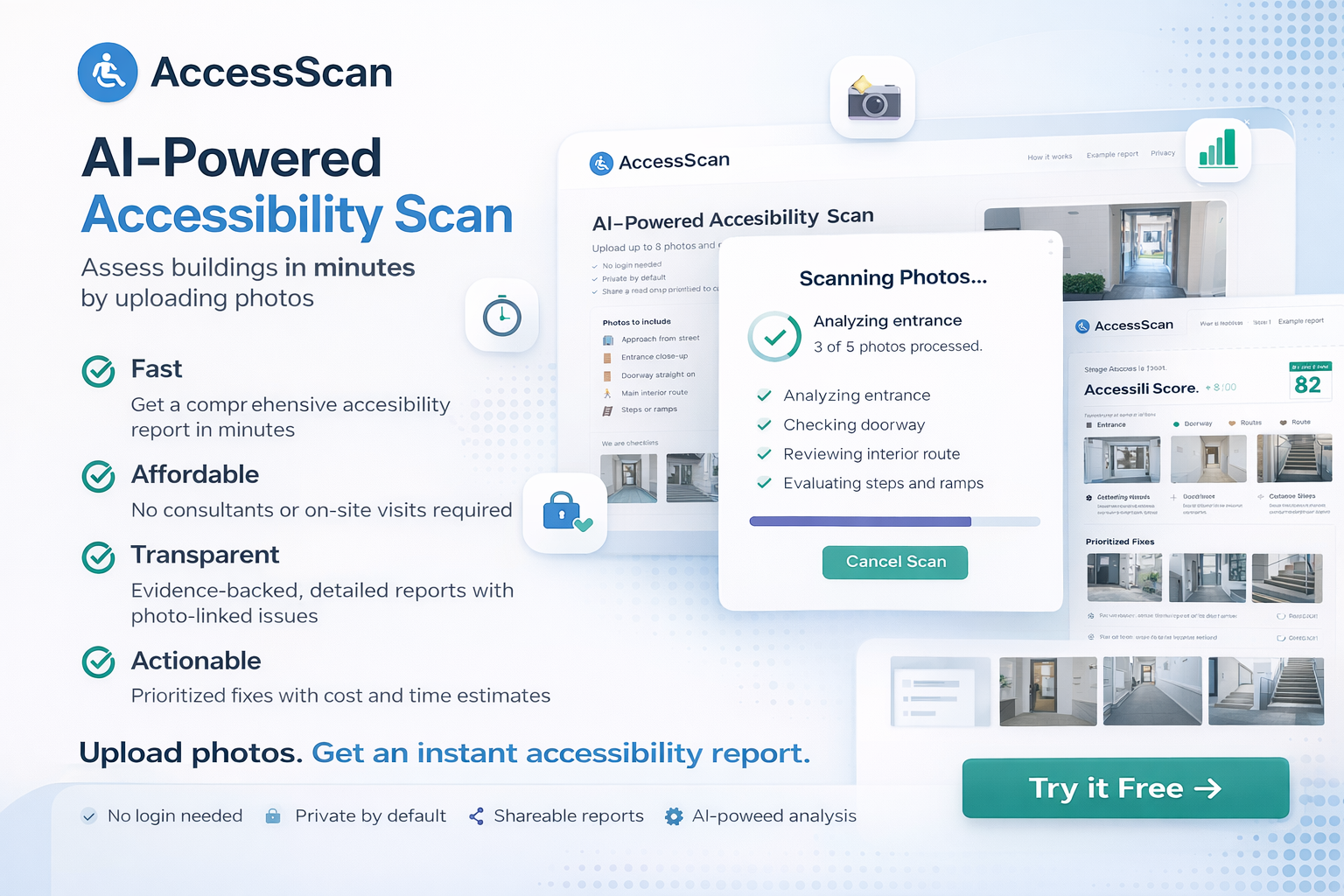
AccessScan is an AI-powered web application that automatically assesses the accessibility and ADA compliance of physical spaces by analyzing photos. Users upload 1-8 photos of a building or space, and within minutes, receive a comprehensive accessibility report.
Key Features:
- Automated Scanning: Upload photos and get an AI-powered analysis in minutes
- Comprehensive Reports:
- Overall accessibility score (0-100)
- Categorized issues (entrance, doorway, route, stairs, lighting, signage)
- Prioritized fixes with cost and time estimates
- Photo-linked evidence for each issue
- Uncertainties and requested additional photos
- Public Sharing: Generate shareable links for stakeholders, legal teams, or public records
- Privacy-First: No login required, private by default
- Evidence-Based: Every issue links to specific photo evidence
Use Cases:
- Property managers quickly assessing their buildings
- Accessibility advocates documenting barriers
- Legal professionals reviewing accessibility cases
- Architects planning accessible designs
- Real estate professionals evaluating properties
How we built it
Frontend:
- Next.js 14 (App Router) - React framework with server-side rendering
- TypeScript - Type-safe development
- Tailwind CSS - Modern, responsive styling
- React Dropzone - Drag-and-drop file uploads
Backend:
- Next.js API Routes - Serverless API endpoints
- Supabase PostgreSQL - Database for reports and metadata
- Supabase Storage - Direct client-to-cloud file uploads
- Google Gemini 3 Flash Preview - AI image analysis and accessibility assessment
Key Technical Decisions:
Two-Pass AI Analysis:
- Pass 1: Per-image observations with minimal thinking (fast, cost-effective)
- Pass 2: Aggregate analysis with structured output (comprehensive, organized)
- This balances speed and accuracy while controlling API costs
Direct Client Uploads:
- Files upload directly from browser to Supabase Storage
- Eliminates server bottleneck for large image files
- Faster uploads and reduced server costs
Structured Schema Enforcement:
- Zod schemas ensure AI output matches expected structure
- Prevents empty or malformed results
- Type-safe end-to-end from API to UI
Print-Optimized Public Reports:
- Public report pages designed for printing
- Judge-friendly formatting for legal contexts
- Clean, professional layout suitable for stakeholders
Evidence-First Design:
- Every issue links to specific photo evidence
- Users can see exactly what the AI identified
- Builds trust through transparency
Challenges we ran into
AI Output Consistency
- Problem: Gemini API sometimes returned low-confidence results or inconsistent JSON structures
- Solution: Implemented strict Zod schema validation, enforced required fields (image_notes, uncertainties, requested_photos), and added fallback logic for edge cases
Two-Pass Analysis Optimization
- Problem: Balancing analysis depth with API costs and response time
- Solution: Used Gemini 3 Flash with minimal thinking for observations, low thinking for aggregation. This provided detailed analysis while keeping costs and latency manageable
Environment Variable Management
- Problem: Next.js environment variables not loading correctly in API routes
- Solution: Explicitly set
runtime = 'nodejs'for all API routes, improved error messages to identify missing variables, created comprehensive troubleshooting guides
Database Schema Visibility
- Problem: Supabase couldn't see tables even after schema was run
- Solution: Used explicit
public.schema prefixes, addedCREATE EXTENSION IF NOT EXISTS "pgcrypto", ensured correct data types and defaults
Low-Confidence Result Handling
- Problem: AI sometimes couldn't assess everything from photos, leading to incomplete reports
- Solution: Built "uncertainties" and "requested_photos" fields into the schema, created UI that clearly communicates what couldn't be assessed and why, added guidance for better photos
Gemini Model Migration
- Problem: Needed to upgrade from Gemini 1.5 to Gemini 3 models and new SDK
- Solution: Migrated to
@google/genaiSDK, updated togemini-3-flash-previewmodel, rewrote API integration with thinking level controls
Accomplishments that we're proud of
Complete End-to-End System
- Built a fully functional application from photo upload to detailed reports
- Integrated multiple services (Supabase, Gemini API) seamlessly
- Created a polished, professional UI that matches design mockups
Smart AI Integration
- Implemented two-pass analysis strategy that balances speed and accuracy
- Created robust schema validation that ensures reliable output
- Built graceful error handling for AI edge cases
Evidence-First Architecture
- Every issue in the report links to specific photo evidence
- Users can verify AI assessments by viewing source photos
- Builds trust through transparency
Privacy & Accessibility
- No login required - lowers barrier to entry
- Private by default, shareable when needed
- Public reports optimized for printing (judge-friendly)
Developer Experience
- Comprehensive documentation (setup guides, troubleshooting, application description)
- Type-safe codebase (TypeScript + Zod)
- Clear error messages and debugging tools
Real-World Usability
- Reports include prioritized fixes with cost/time estimates
- Identifies what couldn't be assessed and requests better photos
- Shareable links for stakeholders and legal contexts
What we learned
AI Vision Models Are Powerful But Need Structure
- Gemini 3 can identify accessibility barriers effectively, but requires careful prompting and schema enforcement
- Two-pass analysis (observe then analyze) produces better results than single-pass
- Thinking level controls are crucial for balancing quality and cost
Schema Validation Is Essential
- Zod schemas catch AI output inconsistencies before they reach the UI
- Enforcing required fields prevents empty results even in low-confidence scenarios
- Type safety from API to UI prevents runtime errors
Direct Client Uploads Are Faster
- Uploading directly from browser to storage eliminates server bottlenecks
- Reduces server costs and improves user experience
- Requires careful security configuration (signed URLs, RLS policies)
Evidence Builds Trust
- Linking every issue to photo evidence makes reports more credible
- Users need to verify AI assessments, not just trust them
- Judge-friendly formatting matters for legal/professional contexts
Error Handling Requires Thought
- Low-confidence results aren't failures - they're opportunities for clarity
- Uncertainty is information: tell users what couldn't be assessed and why
- Guide users toward better inputs (e.g., "upload clearer photos")
Next.js API Routes Need Explicit Configuration
- Edge runtime doesn't support all Node.js APIs
- Explicit
runtime = 'nodejs'prevents subtle bugs - Environment variable handling requires careful configuration
What's next for AccessScan
Short-Term (MVP+)
- Photo Viewer Modal: Full-screen photo viewer with navigation and evidence callouts
- Real Image Thumbnails: Connect to Supabase Storage URLs for actual photo display
- Mobile Optimization: Enhanced responsive design and mobile UX polish
- Skeleton Loading States: Better loading UX throughout the application
Medium-Term
- PDF Report Generation: Downloadable PDF reports for offline use
- Report Comparison: Compare accessibility scores over time (track improvements)
- Batch Processing: Support for multiple properties/locations
- Email Reports: Send reports via email to stakeholders
Long-Term Vision
- Multi-Language Support: Reports in multiple languages
- Accessibility Standards: Support for WCAG, ADA, local building codes
- AI Model Fine-Tuning: Custom model trained on accessibility assessment data
- Community Features: Public database of accessibility assessments
- Integration APIs: Connect with property management systems, legal case management tools
- Mobile App: Native iOS/Android apps for on-site scanning
- AR Overlay: Augmented reality features showing accessibility issues in real-time
Technical Improvements
- Caching Strategy: Cache AI results for similar photos
- Image Optimization: Automatic compression and optimization
- Performance Monitoring: Track API costs, response times, user flows
- A/B Testing: Test different AI prompts and analysis strategies
- Accessibility Audit: Ensure the tool itself is accessible (WCAG compliance)
Demo / Screenshots
Note: Add screenshots of key features: upload page, scanning progress, results page with tabs, public report view
Try It Out
- Live Demo: [Your deployed URL]
- GitHub Repository: [Your repo URL]
- Documentation: See
README.mdandSETUP.mdfor setup instructions
Team
Add team member names and roles
Technologies Used
- Next.js 14
- TypeScript
- Tailwind CSS
- Supabase (PostgreSQL + Storage)
- Google Gemini 3 API
- React Dropzone
- Zod
Built With
- google-gemini-3
- nextjs
- react
- react-dropzone
- supabase
- tailwindcss
- typescript


Log in or sign up for Devpost to join the conversation.