-
-
Logo
-
Homepage
Accessiblent
A Smart Agentic Web Accessibility Remediator — empowering visually challenged users to experience the web without barriers.
About the project
Introduction
Accessiblent scans any public webpage, auto-fixes accessibility issues (alt text, ARIA, contrast, structure), re-verifies improvements, and explains the reasoning — all backed by TiDB Serverless with Vector Search. It builds a memory of WCAG rules and prior fixes to improve quality over time.
Demo video: https://youtu.be/NwucK5dSAcY
Code Repo: https://github.com/codersbeyondborders/accessiblent
Inspiration
Accessibility compliance is a legal and moral necessity, but most tools only audit. Developers are left fixing issues manually. We wanted to go beyond “red Xs” to a loop that learns and explains — enabling faster adoption of inclusive design. This gives users with visual impairments to easily access web.
What it does
- Crawls any public URL.
- Audits for WCAG issues (missing alt, ARIA, contrast, labels).
- Applies safe HTML transforms and re-verifies improvements.
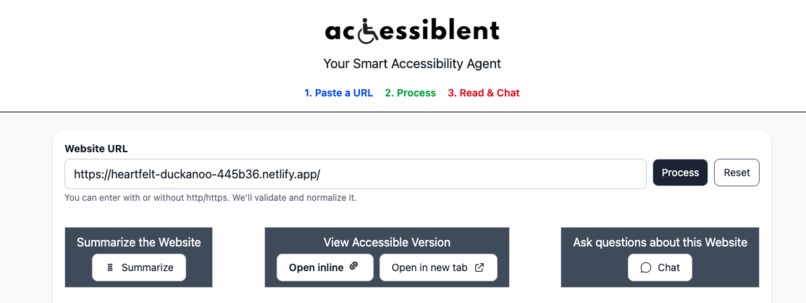
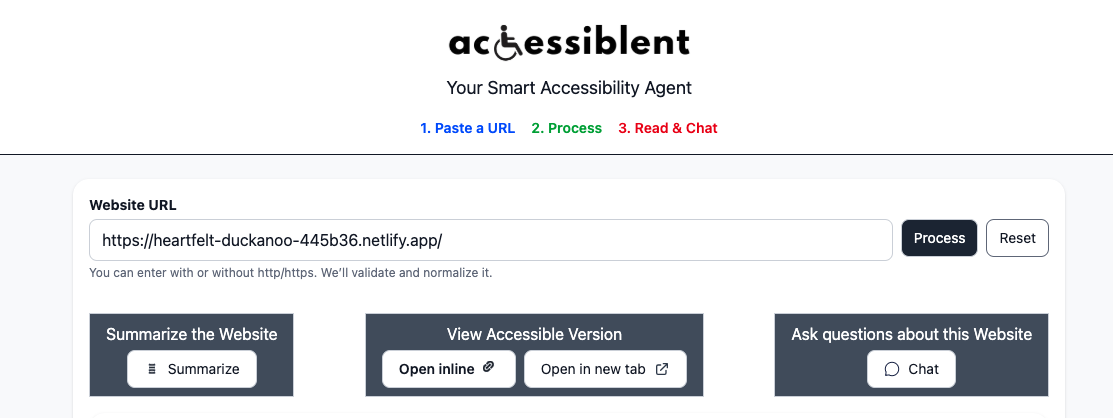
- Returns a fixed page which can be opened inline or in a new tab.
- Lets users chat with the page + WCAG memory for clarity.
How I built it
- Frontend: SvelteKit (toggles: Summary | Inline Preview | New Tab | Chat).
- Backend: Python FastAPI orchestrator with multi-step agents.
- External tools: axe-core for audits, contrast checks, HTML parsing.
- Vector Search: TiDB stores page chunks, WCAG rules, fix snippets, rationales.
- SQL Store: TiDB tracks runs, issues, fixes, telemetry, and caching.
- LLM: Generates alt text and ARIA labels with human-like explanations.
Data Flow & Integrations
- User Input (SvelteKit) → User submits a website URL.
- Crawl & Audit (FastAPI + Playwright + axe-core) → Fetch page, run accessibility checks.
- Ingest & Index (TiDB Serverless) → Store page chunks & embeddings (Vector) + issues & runs (SQL).
- Search & Retrieve (RAG over TiDB) → Pull relevant WCAG rules & prior fixes.
- Propose & Apply Fixes (Agents + Tools + LLM optional) → Transform HTML (alt text, ARIA, contrast).
- Verify & Persist → Re-audit, confirm improvements, save fixes & rationales in TiDB.
- User Output → Fixed HTML download, report, and explainable chat with WCAG citations.
Integrations:
- Frontend: SvelteKit
- Backend: Python FastAPI
- Database: TiDB Serverless (SQL + Vector)
- Tools: Playwright, axe-core, contrast checker
- Optional AI: LLM for alt text & ARIA suggestions
🚀 Run Instructions
Follow these steps to launch and test the demo:
- Clone the repo
bash
git clone https://github.com/yourusername/websibility-agent.git
cd websibility-agent
- Set up TiDB Serverless
- Create a TiDB Serverless cluster on TiDB Cloud.
Copy your connection string (DSN) and credentials.
Backend (Python FastAPI)
Copy code
cd backend
cp .env.example .env   # Add TIDB_DSN and optional OPENAI_API_KEY
pip install -r requirements.txt
uvicorn app.main:app --reload```
- Frontend (SvelteKit)
bash
Copy code
cd frontend
npm install
npm run dev
Open http://localhost:5173 in your browser.
- Usage
- Paste a website URL into the app.
- Click Audit to see accessibility issues.
- Click Auto-Fix to generate a remediated HTML page.
- Use toggles to view Summary | Inline Preview | New Tab | Chat.
- Download the fixed HTML or explore explanations via chat.
Judges can also view the hosted demo here: https://accessiblent-px4adcmw7-wajidcodersbeyondborders-8173s-projects.vercel.app?_vercel_share=DMrBAaZWtkGqaD9o0cLTMoWpAOosYnuW
Note: Access already provided to [email protected]
How it satisfies AgentX building blocks
- Ingest & Index Data — Crawl URL, chunk DOM, embed into TiDB Vector.
- Search Your Data — RAG over WCAG rules, prior fixes, and page content.
- Invoke External Tools — Playwright + axe-core + contrast analysis.
- Build a Multi-Step Flow — Audit → Classify → Retrieve → Propose → Apply → Verify → Persist → Chat.
- Chain LLM Calls — For alt text, ARIA labels, and rationale.
What judges will love
- End-to-end flow: audit → auto-fix → verify → learn, not just scanning.
- Explainability: every fix cites WCAG and past successful patterns.
- UX: accessible UI with clear toggles, chat, and read-aloud support.
- Balanced stack: strong backend logic, accessible frontend design, and TiDB as the “brain.”
TiDB specifics
- Vector tables:
page_chunks(DOM embeddings),knowledge(WCAG + fix snippets). - SQL tables:
runs,issues,fixes,telemetry,projects. - Hybrid search: vector similarity + keyword for accurate citations.
- Learning loop: prior fixes retrieved from TiDB to improve future performance.
Challenges I ran into
- Normalizing noisy DOM while preserving semantic chunks.
- Balancing deterministic HTML fixes with AI-generated suggestions.
- Designing schema for hybrid SQL + vector use in TiDB.
- Keeping verification fast while re-running audits.
- Performance issues
Accomplishments that I am proud of
- Built a fully working agentic pipeline from scratch.
- Leveraged TiDB’s unified SQL + Vector capabilities effectively.
- Delivered an accessible, explainable, and visually clean SvelteKit UI.
- Created a demo flow that anyone can try in under 2 minutes.
What I learned
- How to design retrieval-augmented, agentic workflows with TiDB.
- The power of unifying vector + transactional SQL in one system.
- Accessibility remediation requires both determinism and creativity.
- Documentation and explainability are as important as raw fixes.
What's next for Accessilent
- caching via content hash; retrieval improves speed.
- Expand to handle dynamic SPAs and authenticated pages.
- Add multi-language alt text generation.
- Train a feedback loop to auto-rank fix strategies by success.
- Offer APIs for integration with CMS, CI/CD, and design systems.
- Deploy as a browser extension for real-time accessibility checks.
Built With
- openai
- python
- svelte
- tailwind
- tidb

Log in or sign up for Devpost to join the conversation.