-
-
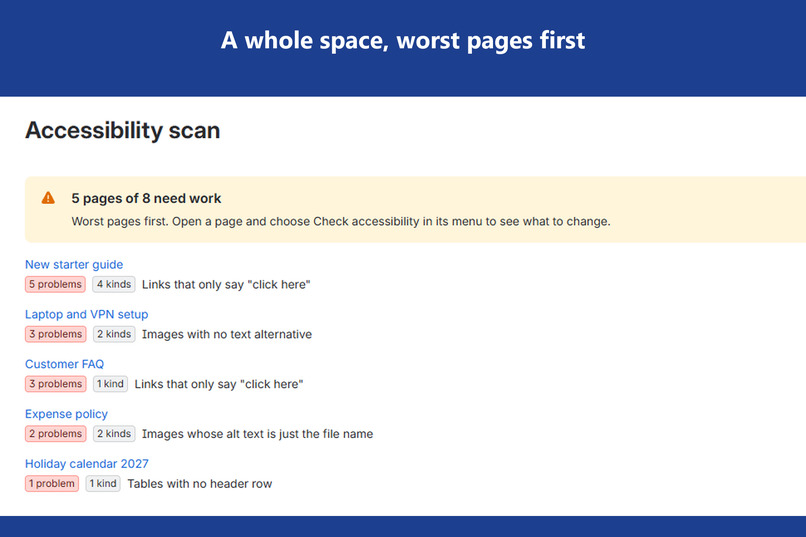
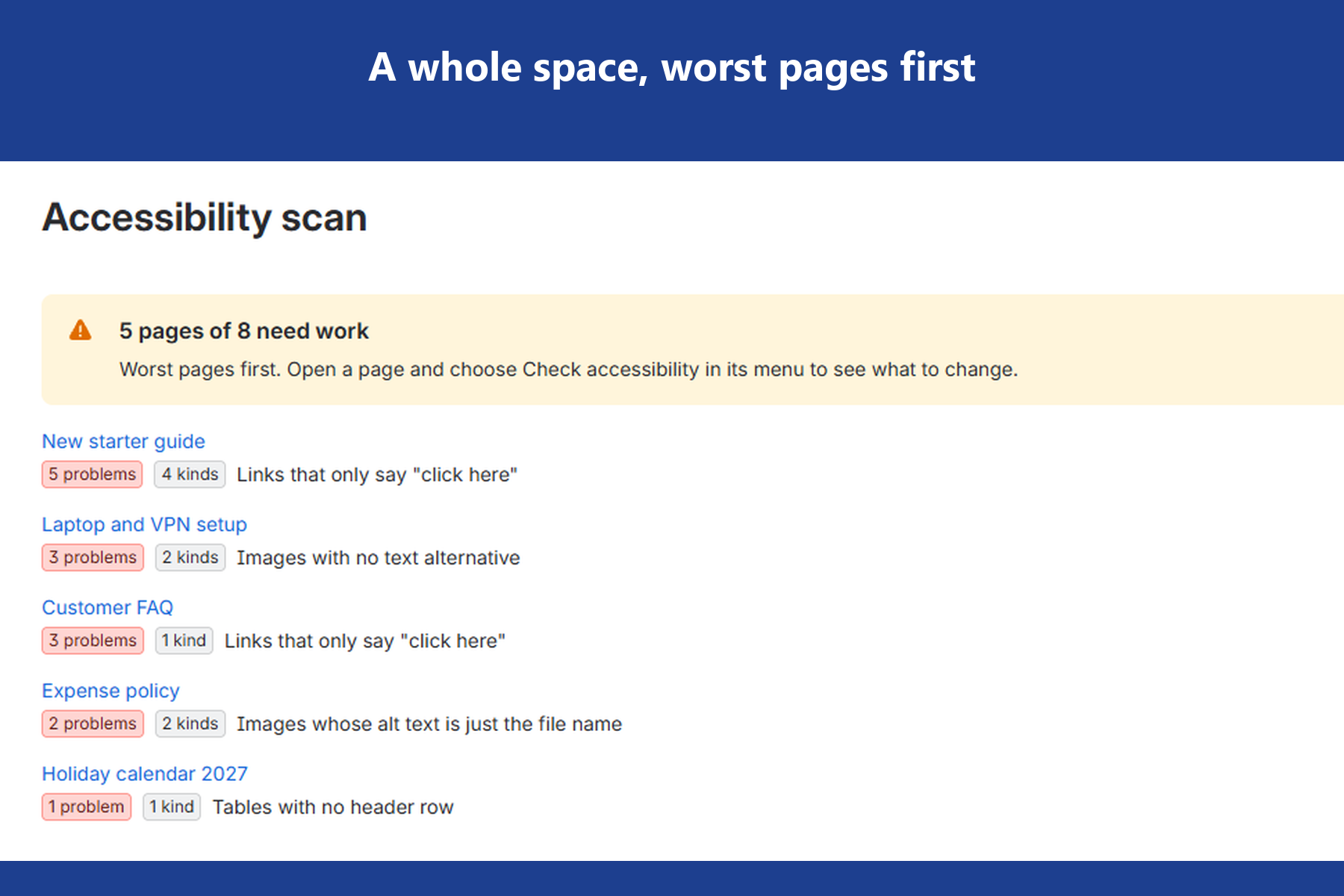
Space scan of an 8-page team handbook: 5 pages need work, listed worst first with each page's top issue.
-
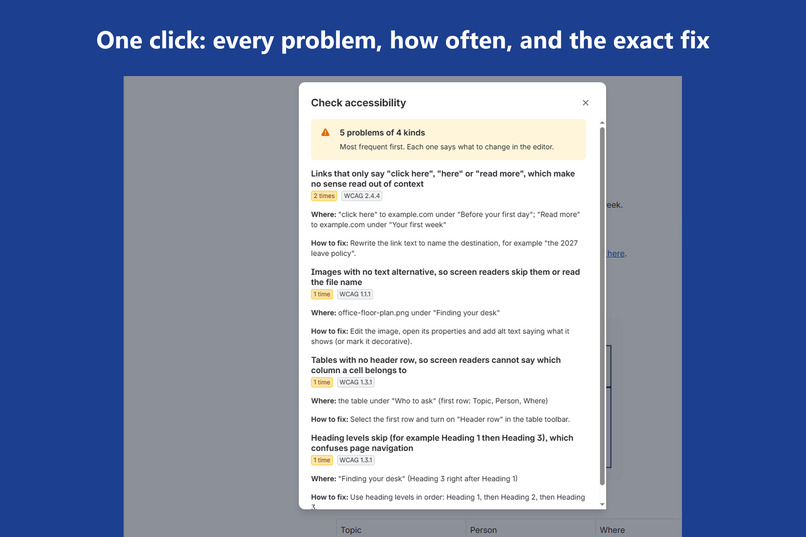
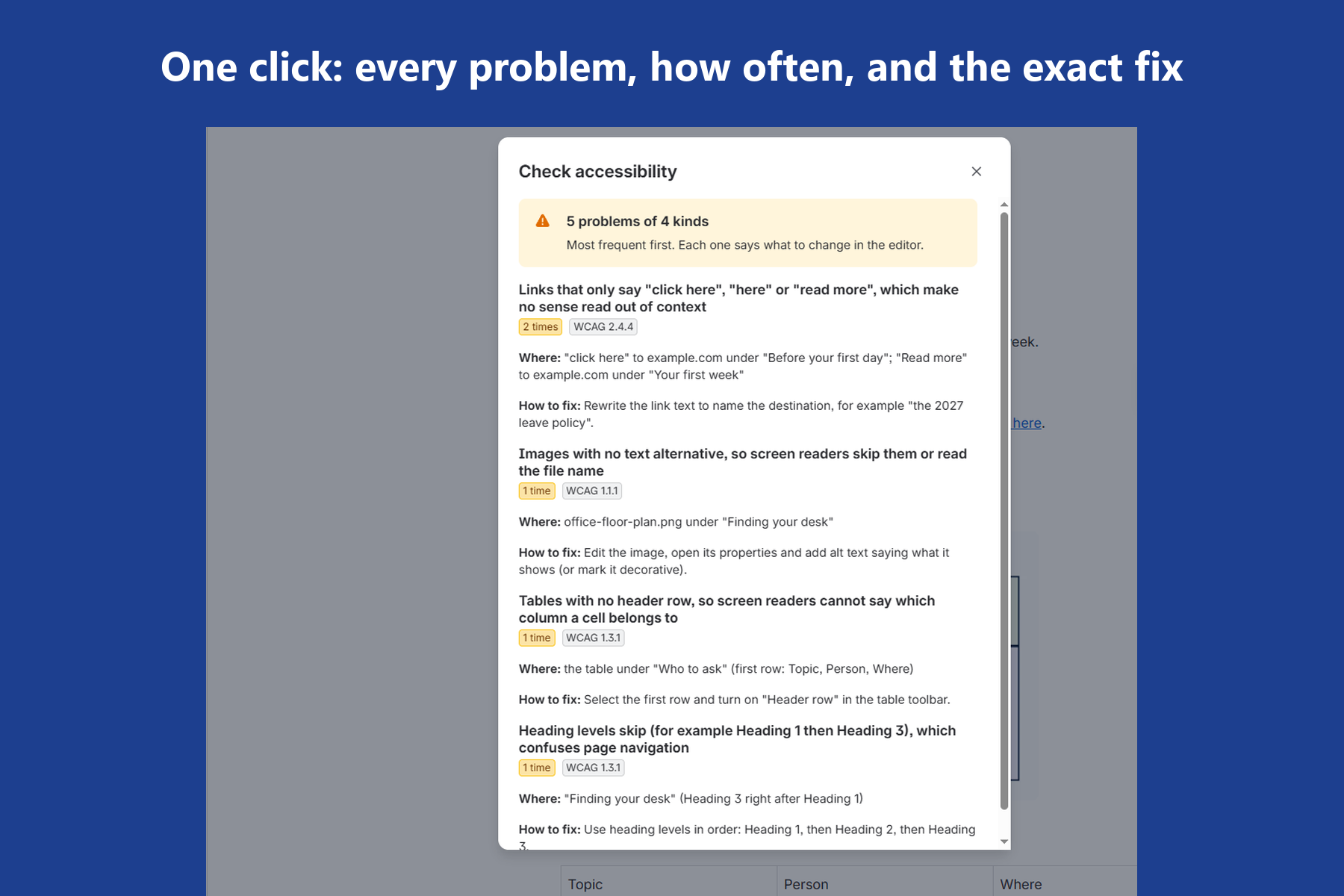
Page check on a team onboarding page: 5 problems of 4 kinds, each with where it is, the fix and the WCAG criterion.
-
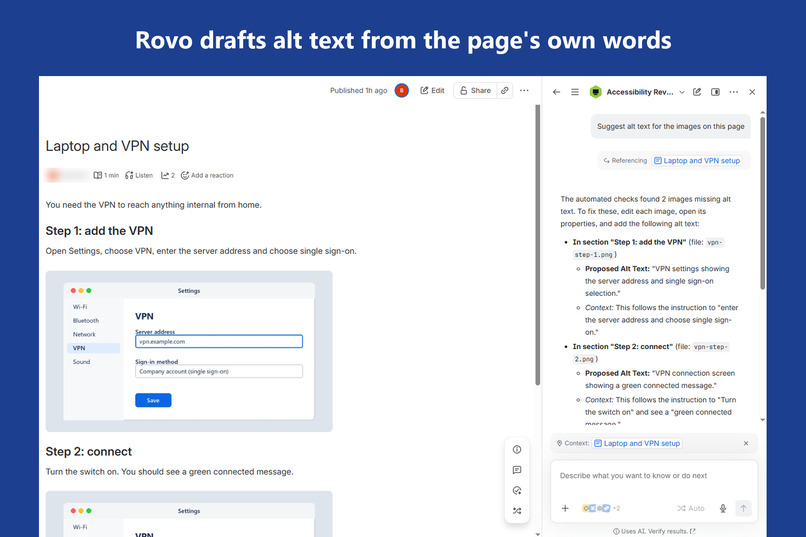
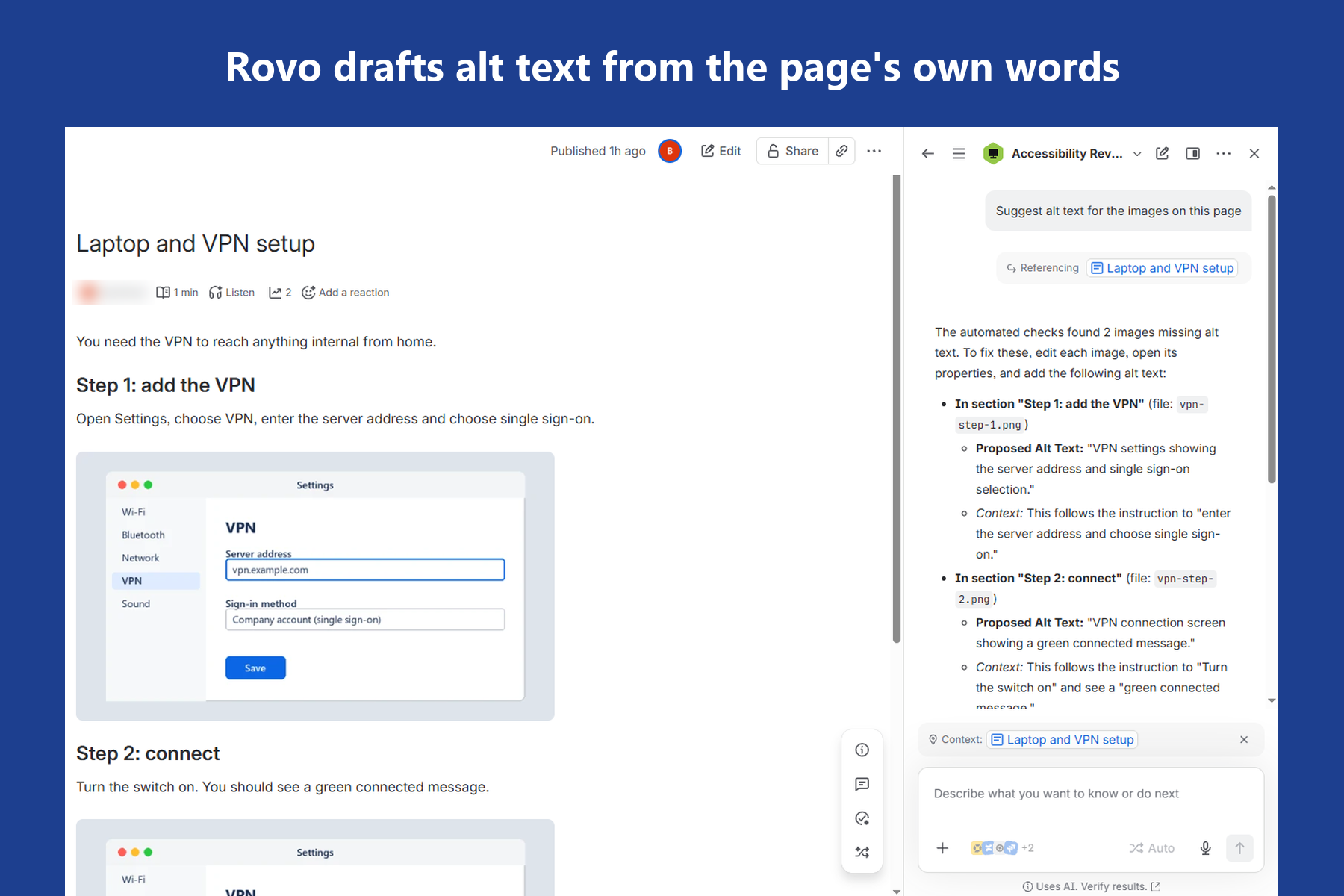
Rovo's Accessibility Reviewer drafting alt text for two screenshots from the text around them on the page.
-
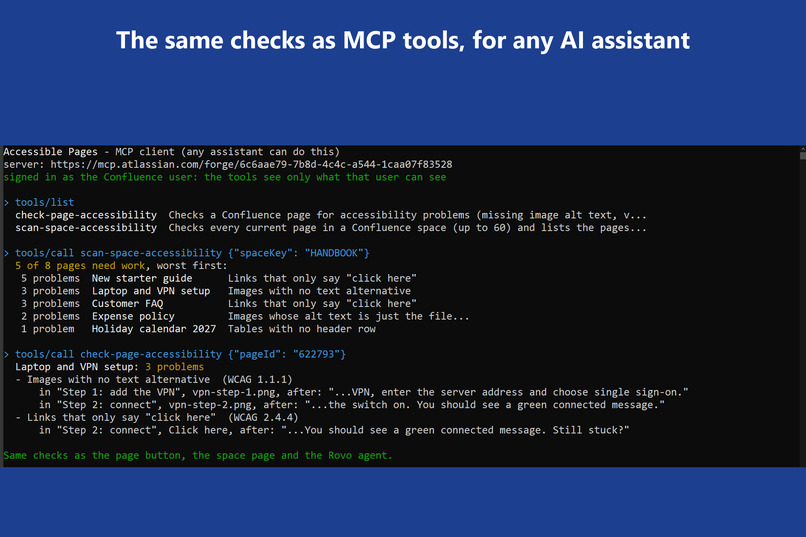
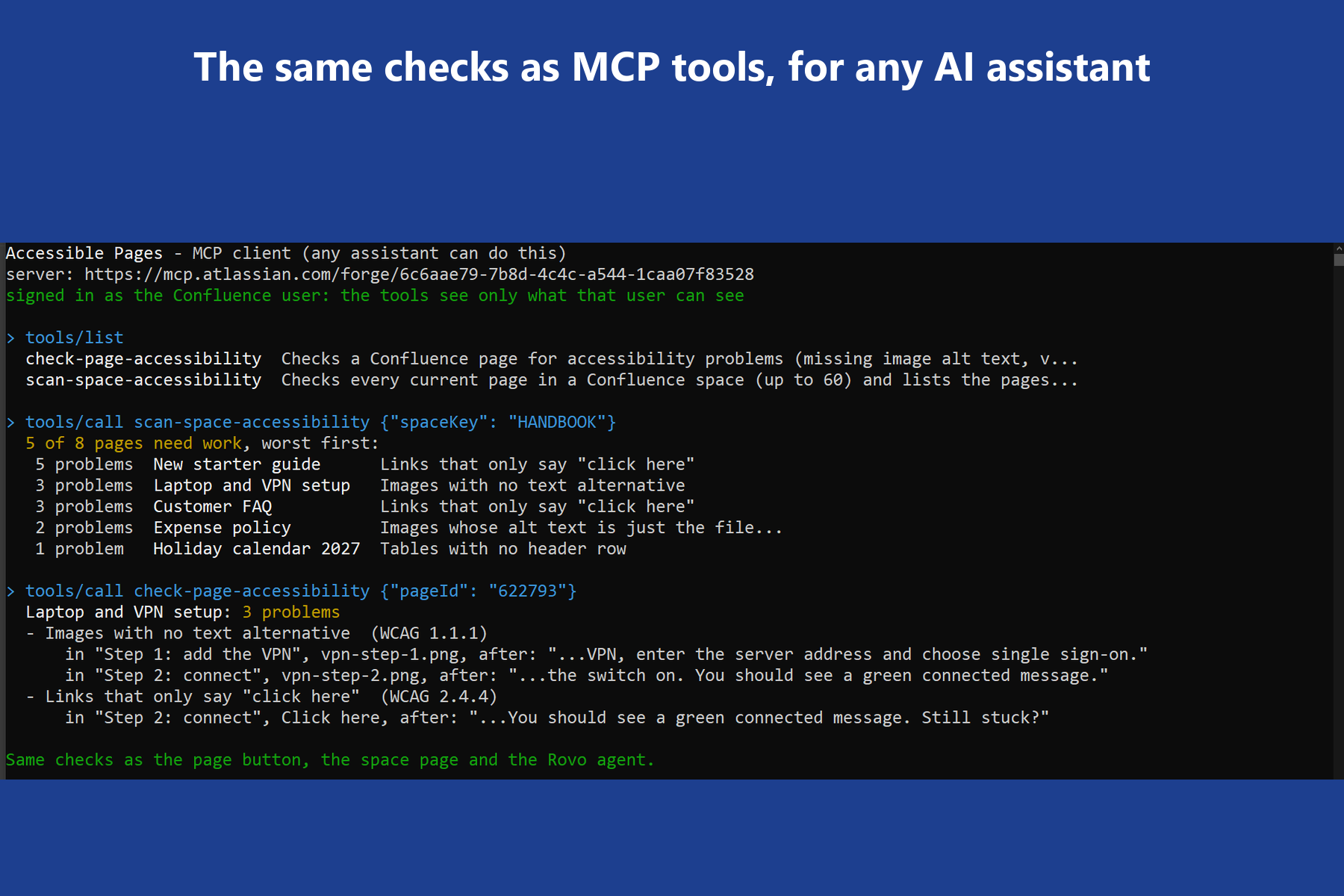
A plain MCP client listing the two tools, scanning a space and checking a page through the Atlassian MCP server.
Inspiration
Teams write their policies, onboarding guides, FAQs and help articles in Confluence. Very few of those writers know that a "click here" link, an image with no description or a table with no header row makes a page hard or impossible to use with a screen reader. The people who could fix a page in thirty seconds are not the people who run accessibility audits.
Atlassian built an early-access accessibility checker for the Confluence Data Center editor, then stopped work on it because it caused performance problems that could not be resolved. We found no built-in checker in Confluence Cloud. Meanwhile the rules keep tightening. In the United States, the Department of Justice's 2024 rule holds state and local government web content to WCAG 2.1 Level AA (the Web Content Accessibility Guidelines), with compliance dates now April 26, 2027 for larger entities and April 26, 2028 for smaller ones. The European Accessibility Act has applied since June 28, 2025. Ontario's accessibility law has required WCAG 2.0 Level AA public websites from public bodies and organizations with 50 or more employees since 2021.
How common is this? We ran the finished checker over 378 recently edited pages of five public Confluence Cloud wikis (OpenMRS, LF ONAP, Hyperledger, LF Edge and Anuket). 186 of them (49%) had at least one problem. The most common: images with no alt text at all (27% of pages), or whose only alt text is a file name like "image-20261103-060044.png" (20%).
We wanted the check to live where the writing happens, and to speak the writer's language: not "1.3.1 failure", but "select the first row and turn on Header row".
What it does
One checker, three ways in:
- Check accessibility (page menu). One click from any page's "..." menu lists that page's problems, most frequent first. Each one says what is wrong in plain words, where it is (the section, plus the image, link or table), how many times it happens, the exact editor step that fixes it, and the WCAG success criterion it relates to.
- Accessibility scan (space page). Checks every current page in a space and lists them worst first, with the problem count and the biggest issue on each page, so a docs owner knows where to start. On our demo space: "5 pages of 8 need work".
- Accessibility Reviewer (Rovo agent). Ask "How do I fix the problems on this page?" and the agent calls the checker, explains each problem and drafts the fix from the page's own words: it points at the actual "click here" link and proposes link text that names the destination. It never claims a page is fully accessible and never edits the page.
- MCP tools. The same two checks,
check-page-accessibilityandscan-space-accessibility, are exposed through the Atlassian MCP server with therovo:mcpmodule, so an outside assistant can run them too. Tested from a standalone MCP client: OAuth sign-in with dynamic client registration and PKCE, thentools/listreturned both tools with their input schemas, andtools/callreturned "5 problems" for the starter guide and "5 of 8 pages need work" for the space, matching the in-Confluence results. An open-source skill file (accessible-pages.pages.dev/skill.md) tells an assistant when to call each tool and how to present the fixes.
What it checks, on the page as readers actually receive it:
- images with no text alternative, or alt text that is just a file name (WCAG 1.1.1)
- links with no words, and links that only say "click here", "here" or "read more" (WCAG 2.4.4)
- tables with no header row (WCAG 1.3.1)
- empty headings (WCAG 1.3.1 and 2.4.6) and skipped heading levels (best practice under 1.3.1)
- embedded content with no title, and buttons with no words (WCAG 4.1.2)
What it does not do, and says so: colour contrast, keyboard use and reading order still need a person.
How we built it
- Forge, end to end. UI Kit (
@forge/react) for the page report and the space page, a resolver for the backend, and two Rovoactionmodules that therovo:agentand therovo:mcpmodule both use. Runtime: Node.js 24 on arm64. - Reads as the viewer. Every fetch is
api.asUser().requestConfluence(...)against the Confluence REST API v2, so the app sees exactly what the person using it can see, and nothing more. It needs only two permissions (read:page:confluence,read:space:confluence), stores nothing and calls nothing outside Atlassian. The production version is eligible for the Runs on Atlassian program. - Checks the rendered page, not the editor format. The checker reads
body-format=view, the HTML a reader's browser and screen reader actually receive. That is what lets it skip Confluence's own markup correctly (emoticons, for example, render as images with alt text such as "(smile)"). - A small, dependency-free checker. It began as the static checker behind a public-sector accessibility self-check page and was compared against axe-core there. Here it runs inside the Forge function in milliseconds.
- Built for the agent. The actions return structured findings plus the first matching HTML snippet for each problem. That snippet is the difference between Rovo saying "a link" and Rovo saying "the 'click here' link to the IT checklist".
- Space scan within Forge's time limit. Cursor pagination through the space's pages, then batches of 10 pages checked in parallel, capped at 60 pages per run. The page says so when it stops.
Who built it: a one-person company. The code was written by AI coding agents working for the company; the owner set the scope and checked the results. Every screenshot and number here comes from runs on a real Confluence Cloud site.
Challenges we ran into
- The agent guessed what images showed. Our first Rovo answer for "Suggest alt text for the images on this page" described one screenshot as "a VPN client login window showing username and password fields". It was nothing of the kind. The action only handed the agent one HTML snippet per problem, so the model filled the gap. Now every occurrence comes with its section heading, the text just before and after it, and the file name or link target, and the agent is told to write fixes only from those words. The same question now gets "VPN settings showing the server address and single sign-on selection", quoting the sentence it came from. For accessibility, a confident wrong alt text is worse than none, so this was the most important fix we made.
- Content we didn't write found two false positives. On a brand-new site, Confluence's own welcome page first scored 21 problems. Read line by line, two were Confluence's placeholders for embeds it could not render, and five were one-cell layout tables that need no header. Neither is something a reader meets. The checker now skips render placeholders and only asks for a header row on tables with at least two rows and two columns; the real 14 remain (images with no alt text, and alt text that is a file name like "spaces.png").
- Pagination that silently stopped. Confluence's "next page" cursor link is a full path with a query string. Forge's
routetag escapes it, so the scan quietly checked only the first batch. Confluence-issued links now go throughassumeTrustedRoute, and only those. - A late permission is a major version. Adding
read:space:confluencefor the space scan made the deploy stop for an explicit approval, and every install then needed an upgrade that confirms the new permission. - False positives would kill trust. We built a page out of Confluence's own features (table of contents, info, note and panel boxes, status labels, emoticons, task lists, expand sections, code blocks, a table with a header row, anchor links) and required zero findings on it. Along the way the checker caught something real: an image's alt text we had set through the API did not survive the save, and the rendered page had none. The "no alt text" finding was right.
- Long criterion names did not fit. WCAG names were cut off inside UI Kit lozenges; the tag now shows only the criterion numbers and the plain description carries the meaning.
Accomplishments that we're proud of
- Zero false positives on a page made of Confluence's built-in features, and exact agreement between the app's results and the same checker run outside Confluence on every test page.
- Installed from the sharing link on a fresh site exactly as a judge would, and it worked first time, including on Confluence's new live docs; a 70-page space scans in under 10 seconds and says when it stops at 60.
- One checker behind four surfaces (page menu, space page, Rovo agent, MCP tools), so the numbers always match.
- Measured on real pages, not only our demo: 378 public Confluence Cloud pages from five wikis. The first run exposed one false positive (attachment cards, which reach the API as a bare thumbnail), fixed and covered by a test the same evening; a second run on three more wikis found none.
- A Rovo agent that gives page-specific fixes grounded in the page's own words, instead of a generic accessibility lecture.
What we learned
- Check what readers receive. The storage format and the rendered page are different documents, and only the rendered page matters to a screen reader.
- An agent is only as useful as its action's output. Returning one concrete example per problem changed the answers more than any prompt wording did.
- Least privilege is a feature: reading as the user, with two read permissions and no storage, is easy to explain to a site admin.
What's next for Accessible Pages
- One-click fixes the writer approves first (header rows, link text), behind a separate write permission that is off by default.
- A weekly space report for docs owners, and Jira Service Management knowledge base articles.
- More static checks: list markup, page language, and one link text pointing to different places.
