Inspiration
Every Slack thread is written for the people already in the room.
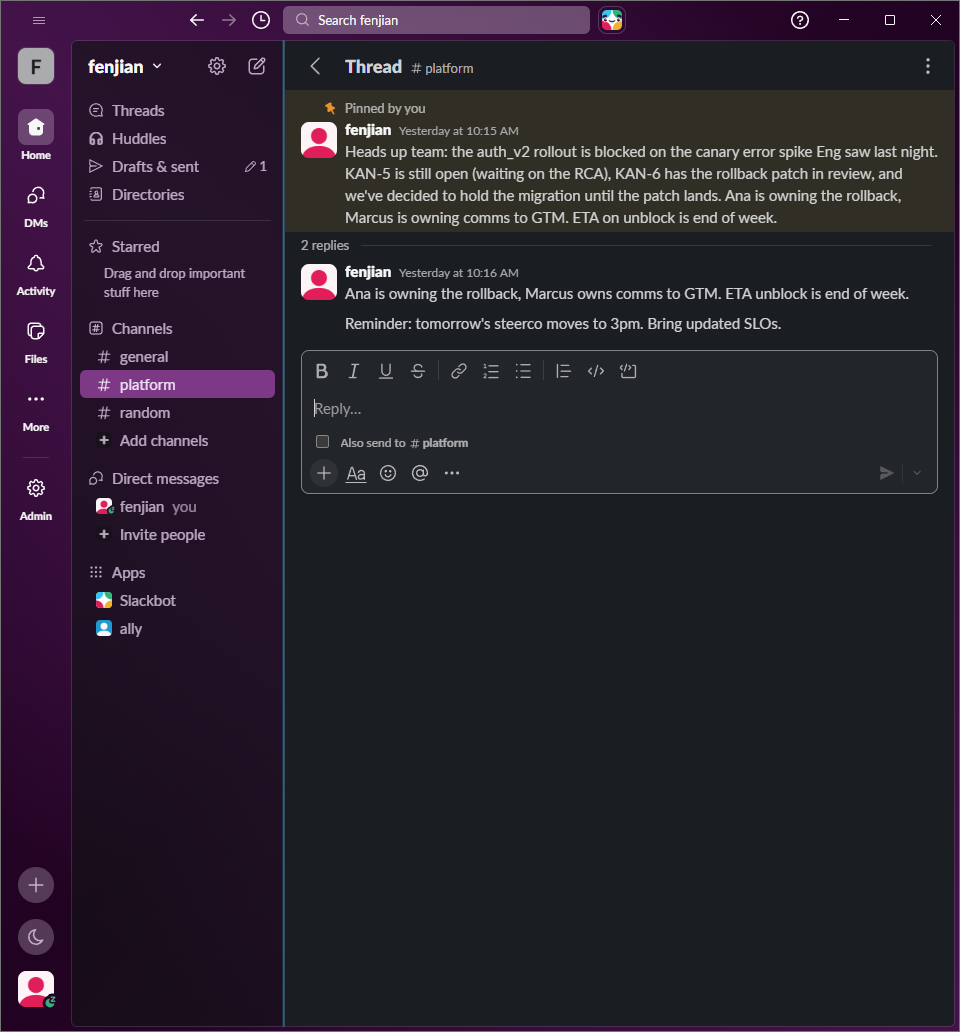
Open #backend-platform cold and you'll find a wall of auth_v2, KAN-5, "the RCA from last Tuesday," and @ana-shaped decisions implied by absence. If you're the PM dropped in to chase a launch date, the new hire on day three, the screen-reader user trying to find the actual decision in a thread of emoji reactions and link previews, or the ESL teammate parsing nested idioms, you are doing the translation in your head.
That cost — the cost of understanding — is invisible to the people writing the messages and crushing for the people reading them. We wanted to lower it without asking anyone to write differently. The thread stays the way it was written for the team that already knows. Ally rewrites it for you.
The accessibility framing came first. Once we wrote the "Simplify" mode for screen-reader and ESL users — short sentences, defined acronyms, no decorative emoji — we realized the same engine, with a different system prompt, was exactly what a visiting PM or a new hire needed. Accessibility wasn't a niche feature. It was the default shape of a good summary.
What it does
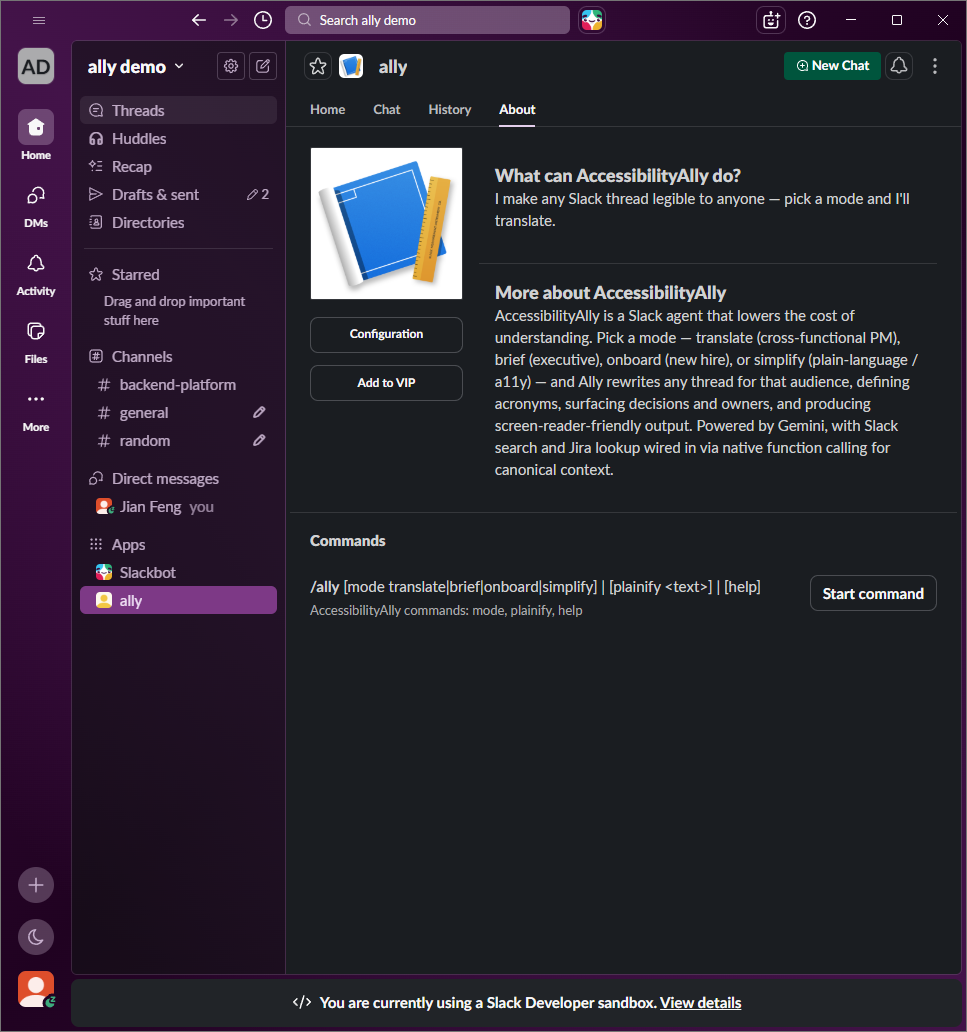
AccessibilityAlly is a Slack agent that translates any thread, channel, or DM for the person reading it.
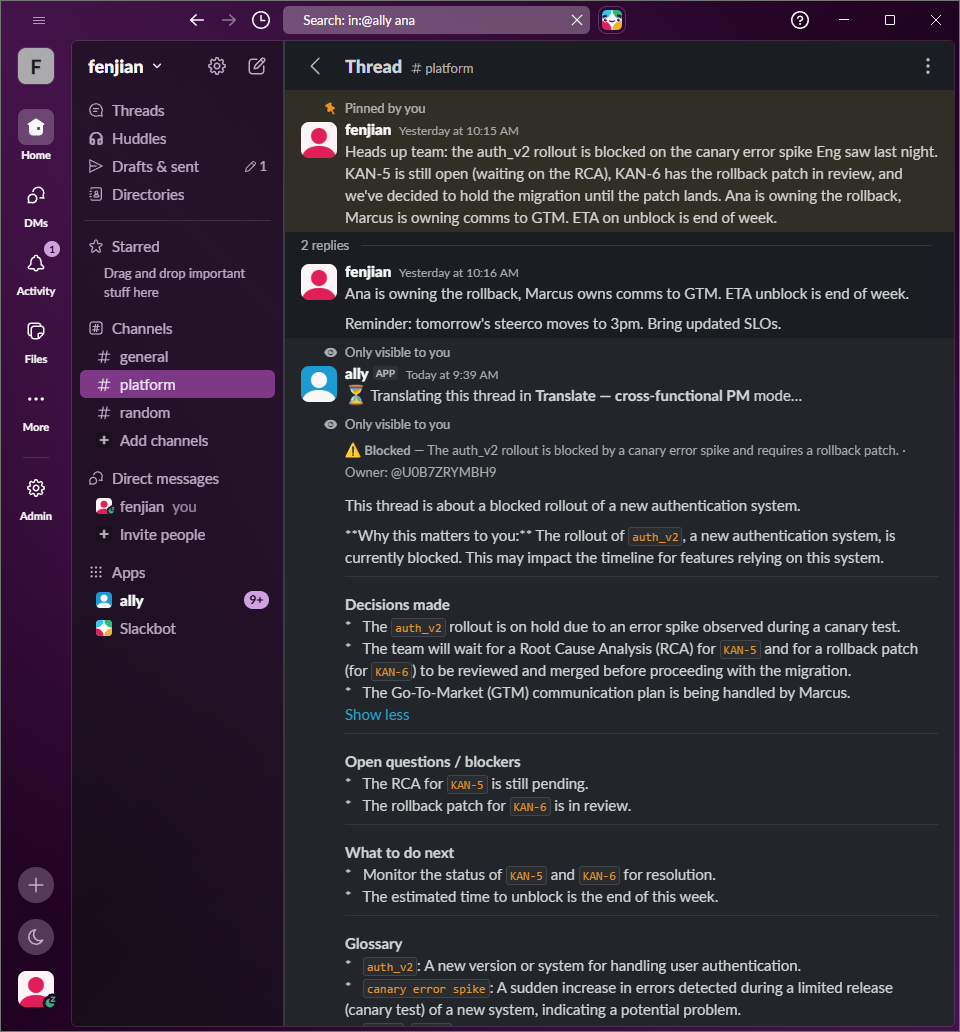
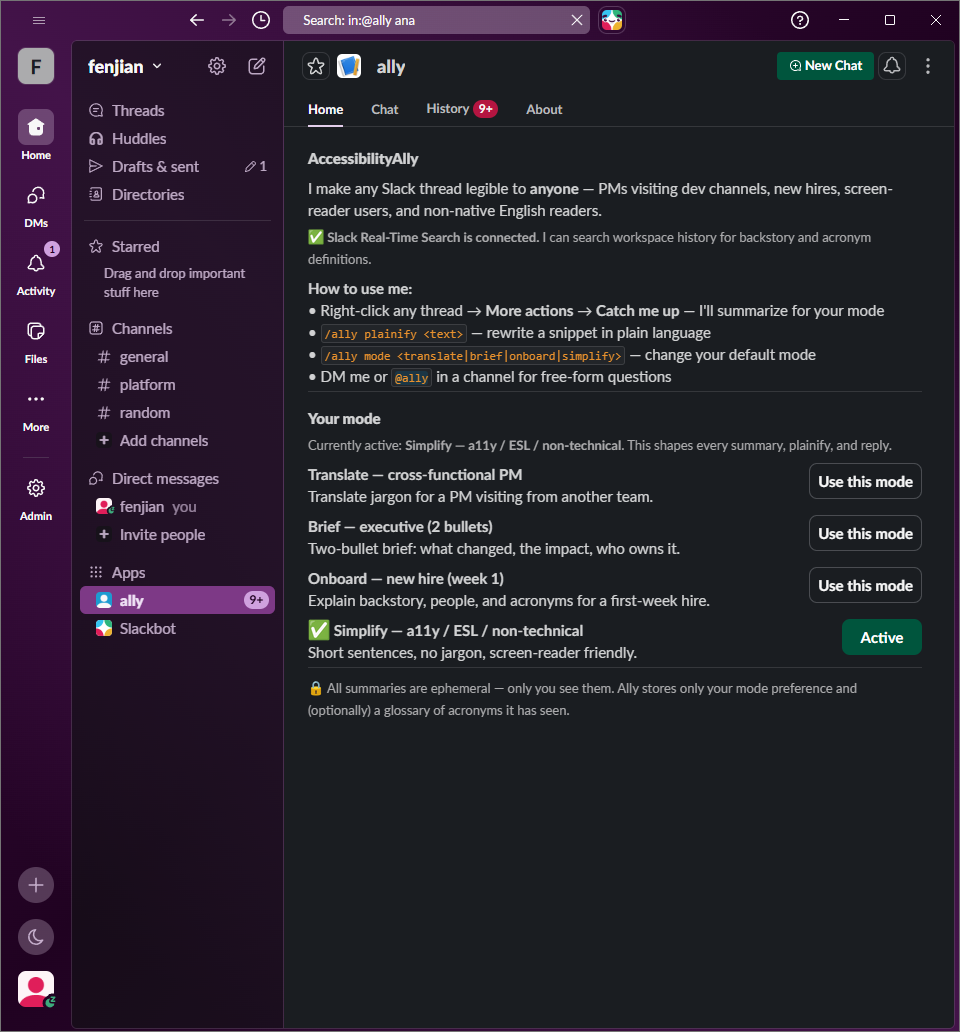
- Pick a mode, hit a shortcut. Right-click any message → Catch me up → choose one of four modes:
- Translate — for a cross-functional PM visiting a technical channel.
- Brief — for an exec who needs the decision and the risk in two bullets.
- Onboard — for a week-one new hire with zero tribal knowledge.
- Simplify — short sentences, defined acronyms, no idioms — friendly to screen readers, ESL, and neurodivergent readers.
- Same thread, different summary. The mode changes the shape of the answer (bullets vs. backstory vs. plain language), not just the tone.
- Grounded, not guessing. Ally calls Slack's Real-Time Search to pull in related messages from across the workspace and a Jira MCP tool to fetch ticket status, assignee, and link — then writes one answer with sources.
- Ephemeral by default. Every summary is
chat.postEphemeral— only the requester sees it. The original thread stays exactly as it was. - Glossary, always. Every reply ends with a glossary of every acronym, codename, ticket, or person mentioned, defined in one line.
- Alt text on upload. When someone drops a screenshot or chart into the channel, Ally auto-generates short alt text in the thread so screen-reader users get the same context as everyone else.
- App Home control panel. A radio of four mode cards, a live status row for Real-Time Search, and a privacy note — switch modes in one click.
/ally plainify. Paste a single jargon-heavy line, get a plain-language rewrite in your current mode.
How we built it
Stack in one breath: Slack Bolt for JS (Socket Mode) → Gemini 2.5 Flash Lite with native function calling → Slack Web API + a Jira MCP-style tool.
A few of the design moves we're proud of:
- Modes as system-prompt fragments, not separate models.
lib/modes.jsdeclares fourModeobjects. Each one is a one-liner audience description plus apromptthat gets appended to the agent's system prompt. Adding a fifth mode is a 10-line PR, not a refactor. - One agent loop, two tools.
agent/agent.jsis a smallgenerateContentloop with a hard 4-iteration cap. The model decides when to callsearch_slack(Slack Real-Time Search as the calling user) orfetch_jira_issue(Jira REST behind a tool boundary). No narration of tool calls — the user just sees a grounded answer. - Markdown that actually renders. Slack's
mrkdwnis its own dialect (*bold*, not**bold**) and Gemini emits CommonMark. We render every LLM reply through Slack'smarkdownblock (the block type added for AI apps) vialib/reply-blocks.js, which also splits the reply on headings into one block per section with dividers — better for skimming and for screen-reader navigation. - One streamer call, not two. Bolt's
sayStreamlooked like the right surface for streaming replies. We learned the hard way thatstreamer.stop({ blocks })includes both the buffered markdown and the final blocks — which rendered the reply twice. Fixed by skippingappendentirely and finalizing the stream with a singlestop({ blocks }). - App Home that survives re-renders. Clicking a mode pill calls
views.publish, which scrolls App Home back to the top. We hoisted the Real-Time Search status row above the mode cards so it never falls below the fold. - Two install paths. app.js runs Socket Mode for
slack runlocal dev. app-oauth.js wraps the same listeners in OAuth with aFileInstallationStore, plus a bot-token fallback so App Home renders before the first OAuth install completes. - A thread-state classifier.
agent/classifier.jslabels the thread (decided/blocked/open/stale) so the catch-me-up reply leads with a one-glance badge before the summary. - Tests on the deterministic seams.
chunkReplyBlocks, the mode picker, the App Home view, the catch-me-up modal, the feedback blocks — all covered bynode --test. The agent loop is small enough to read.
Every reply path goes back to Slack as either an ephemeral message (Catch me up, plainify, status toasts) or a threaded message with markdown blocks + feedback buttons (DM / @mention). Nothing modifies the original thread.
What we learned
- Slack
mrkdwnand CommonMark are not the same thing. Themarkdownblock was the right answer once we found it. Without it, every**bold**from the model would render literally. chat.stopStreamsemantics matter. The Bolt streamer concatenates buffered text and final blocks. If your agent is non-streaming, skipappendand juststop.views.publishresets scroll on App Home. Status indicators and warnings belong above the action area, not buried below it.- A mode is a prompt, not a model. Audience-shaped system-prompt fragments outperformed any prompt-engineering wrestling match. They also made the "Brief = exactly two bullets" promise tractable, because the MODE explicitly overrides the default template.
- Accessibility-first writing is a forcing function for clarity. "Simplify" mode raised the floor for every other mode. Once we required defined acronyms and a glossary by default, the Translate and Onboard outputs got better without us touching their prompts.
- Slack's developer surface is unusually generous for agents. Socket Mode + assistant threads + ephemeral replies + the
markdownblock + Real-Time Search add up to a UX that hides almost all of the agent plumbing from the end user.
Challenges we ran into
- Markdown rendering. Three different surfaces (
text:notification field,mrkdwnincontextelements,markdownblocks) accept three different markup dialects. We had to audit every place LLM output reached Slack and route each through the right surface — or in the alt-text case, constrain the prompt to produce plain text. - Duplicate replies from the streamer. Spent a while staring at a "phantom" second message before tracing it through
node_modules/@slack/web-api/dist/chat-stream.js. - Tool-call discipline. The agent wanted to narrate ("Let me search Slack for that…"). The system prompt now explicitly forbids it: "Use tools when they would change your answer. Do not narrate that you are using them."
- Bot-token fallback in OAuth mode. Bolt clears
SLACK_BOT_TOKENwhen OAuth options are present, which broke App Home before anyone had installed the app. We wrote a wrappedInstallationStorethat falls back to the env-var token until the first real install. - Demoing an agent. Tool calls are the most impressive part and the hardest part to film. The DEMO_SCRIPT.md explicitly stages the dense thread, the Jira ticket, and the cross-channel reference so the agent has something real to find.
Accessibility, on purpose
- Ephemeral by default. The summary belongs to the requester, not the channel.
- Semantic structure. Headings, lists, and dividers, not bold-as-pseudo-headers — so screen readers can navigate.
- Glossary, always. No reader is expected to know
KAN-5orauth_v2to understand the answer. - No information through emoji or color alone. When Ally posts a state badge, the text spells out what the emoji means.
- Alt text on every uploaded image, without anyone having to ask.
What's next
- A canvas view that pins the running glossary of every acronym Ally has defined in a channel, so the workspace builds up its own translator over time.
- A "daily catch-up" scheduled summary per user, in their chosen mode, across the channels they care about.
- More MCP integrations (Linear, GitHub) so the same grounded-answer pattern works for any work tracker, not just Jira.
- Per-channel mode defaults for shared accessibility commitments (e.g.
#all-companydefaults to Simplify).

Log in or sign up for Devpost to join the conversation.