Inspiration
Standard navigation apps assume everyone moves through the world the same way. They give a wheelchair user the same route as someone who can sprint up a flight of stairs, and they give a blind user distances in meters when what they actually need is a step count. We wanted to build something that asks "how do you move?" before it tells you where to go, and that listens, narrates, and adapts instead of just displaying a map
What it does
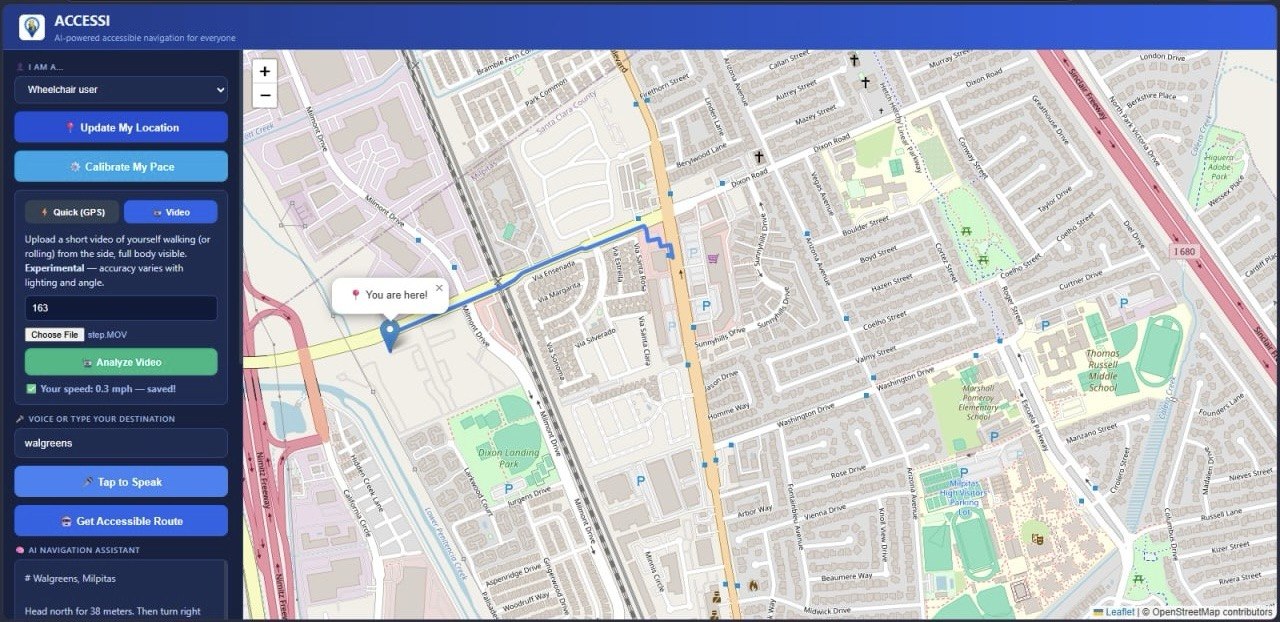
ACCESSI lets a user speak their destination, then plans a route tailored to how they actually move through the world and not a generic walking or driving route.
Speak your destination instead of typing it. ACCESSI transcribes your voice and finds the right place even handling tricky cases like chains and franchises (e.g. making sure "Safeway" or "99 Ranch" resolves to the correct nearby branch, not just the most "popular" one).
*Routes adapt to the traveler. * Select wheelchair, blind, elderly, disabled, or stroller, and ACCESSI picks the right routing profile wheelchair-accessible paths that avoid stairs and curbs, or standard walking routes where that's the safer/better option.
AI-narrated directions, rewritten by Claude into short, warm, spoken-style guidance. Every turn paired with a clear distance ("in 10 meters, turn left"), ramps and stairs flagged for wheelchair users, pacing/rest suggestions for elderly users, and step-counts instead of meters for blind users.
Personal step-length calibration. Instead of guessing that "1 step ≈ 0.75m" for every user, ACCESSI can analyze a short self-recorded video (using the person's height as a real-world scale reference) to estimate that specific user's actual stride length or wheelchair rolling speed — making step-count narration far more accurate.
AI accessibility score. Before you even start walking, ACCESSI estimates how accessible a route is likely to be (based on turn count, distance, and route shape) and explains why in plain language. Obstacle reporting, with a warm, AI-generated acknowledgment and safety tip when someone flags a hazard.
Tech Stack
Backend / Framework
Python + Flask — the web server Flask-CORS — cross-origin support so frontend/backend can talk python-dotenv — manages API keys via environment variables
AI / Language
Anthropic Claude API (Claude Haiku 4.5) — used in three places:
Turning raw turn-by-turn directions into warm, spoken-style narration tailored to the user's disability type Estimating an accessibility "safety score" (0–100) for a route based on its shape (turns, distance, duration) Generating warm acknowledgments when a user reports an obstacle
Speech
Deepgram API
Speech-to-text (model: nova-2) — lets users speak their destination instead of typing Text-to-speech (model: aura-2-thalia-en) — reads directions back out loud
Maps / Routing
OpenRouteService (ORS)
Geocoding (text → coordinates, and coordinates → address) Turn-by-turn directions, with routing profiles that adapt to the user (wheelchair, foot-walking)
Computer Vision
OpenCV (cv2) — video frame processing Media pipe Pose Land marker — detects body landmarks from video NumPy — math for the calibration calculations Used to calibrate a user's real walking stride length or wheelchair speed from a short self-filmed video, using their height as a real-world scale reference
Challenges we ran into
Geocoding chains like "Safeway" kept returning the wrong branch. Fixed it by only ranking by distance among results that were already strong name matches. Keeping AI-narrated directions safe was another one — every instruction has to include a distance, no exceptions. Estimating stride length from video is naturally imprecise, so we kept the messaging honest about that instead of overselling accuracy. We also made sure the app never hard-crashes if an API call fails.
Accomplishments that we're proud of
Routes that actually adapt to five different mobility needs. AI narration with real safety rules built in, not just nice wording. Step-by-step guidance calibrated to the actual user, not an average person.
What we learned
Writing prompts for safety-critical output is different from writing prompts for normal chat — small wording changes decide whether the directions are actually safe to follow. We also learned how messy "correct" results get with maps APIs once you factor in real user context, not just text matching.
What's next for ACCESSI
Live narration while walking, not just one summary upfront. Crowdsourced obstacle reports feeding into the accessibility score. More real-world accessibility data, actual curb cuts, ramps, sidewalk conditions. Better stride calibration with longer or multi-angle video.
Built With
- claude
- claudeapi
- claudecode
- css
- deepgram
- html
- javascript
- notejs
- ors.api
- python


Log in or sign up for Devpost to join the conversation.