-
Home
Inspiration
Many students rely on web-based learning tools, but most platforms assume constant internet access, powerful devices, and high bandwidth. In reality, that isn’t always available. At the same time, many study apps are overloaded with features, animations, and distractions that reduce focus. I wanted to build something simple: A clean, browser-based study companion that runs independently without backend services, prioritizes accessibility, and keeps students focused. AccessAI Lite was built around clarity, accessibility, and progressive learning without unnecessary complexity.
What it does
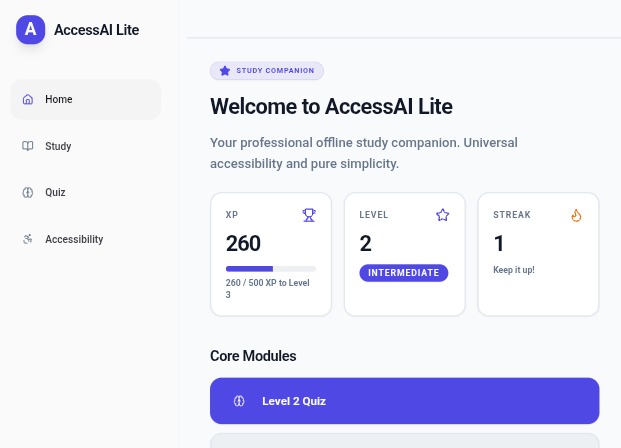
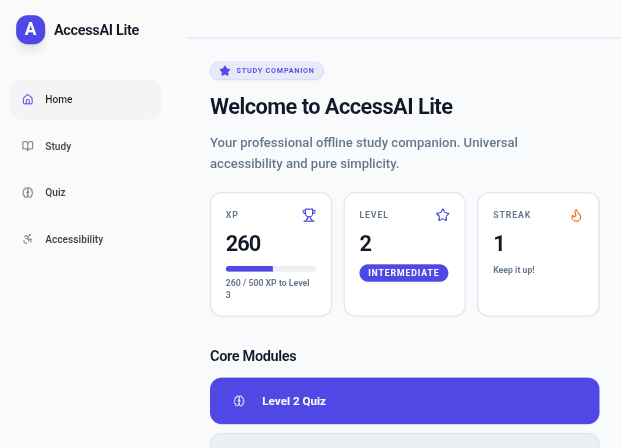
AccessAI Lite is a browser-based study application that combines: Structured study summaries Level-based quizzes Lightweight gamification (XP, streaks, levels) Built-in accessibility tools Key Features
- Level-Based Quiz System Level 1 – Beginner (10 questions) Level 2 – Intermediate (15 questions) Level 3 – Advanced (20 questions) Unlock the next level with ≥ 80% score Each level increases in depth and difficulty. Immediate feedback is given after every question.
- Accessibility-First Design Accessibility is built into the core experience: On-demand Text-to-Speech (user controlled) Large Font toggle (instant scaling using relative units) High Contrast mode (#111 background / #fff text) Large touch-friendly buttons Clean, readable layout All progress (XP, streaks, levels) is stored locally in the browser using LocalStorage.
- Study Mode Users can review concise summaries including: Photosynthesis Pythagoras Theorem Essay Writing Tips Climate Change Basic Coding Concepts Each card contains 4–6 short sentences and optional read-aloud support.
- Minimal Gamification Inspired by engagement systems used in learning apps, but intentionally simplified: +10 XP per correct answer Daily streak tracking 3-level progression Clean progress bar No flashy animations. No clutter. Motivation without distraction.
How I built it
AccessAI Lite was built using MeDo as the primary development platform. The application runs entirely in the browser and does not rely on backend services or external APIs. All user data is stored locally using LocalStorage. Core technologies include: HTML CSS JavaScript LocalStorage I focused on: Designing a mobile-first layout Implementing scalable quiz progression logic Ensuring accessibility features toggle instantly Maintaining a strict 3-color minimalist design system Keeping the UI spacious and readable Using MeDo allowed me to iterate quickly while concentrating on UX decisions, accessibility structure, and progression logic.
Challenges I ran into
- Balancing Gamification and Simplicity It was easy to add more visual rewards and features. However, each addition risked cluttering the interface. I intentionally reduced the system to only XP, streak, and levels.
- Maintaining Layout Stability with Large Font Mode Increasing root font size can break layouts. I redesigned spacing using rem units to ensure consistency across scaling.
- Designing for Accessibility Without Overcomplication Accessibility features needed to be instant and intuitive, not hidden or overwhelming. Finding that balance required multiple layout adjustments.
Accomplishments that I'm proud of
Built a polished, professional UI with strict design constraints Implemented scalable level-based quiz logic Integrated accessibility as a core system feature Maintained simplicity while adding meaningful progression Designed a distraction-free learning experience Built everything as a single structured browser-based application
What I learned
Simplicity requires discipline Accessibility improves usability for everyone Constraint-driven design improves clarity Local browser storage can power meaningful experiences Good UX often means removing features rather than adding them This project strengthened my understanding of frontend architecture, user experience design, and state management with LocalStorage.
What's next for AccessAI Lite – Offline Study Companion
Future improvements could include: Additional subject modules Adaptive difficulty scaling Progressive Web App (PWA) installation support Expanded study card libraries Export/import of local progress My long-term goal is to evolve AccessAI Lite into a lightweight, installable study tool suitable for students in low-connectivity environments.
Built With
- css
- html
- javascript
- localstorage
- medo
- speechsynthesis

Log in or sign up for Devpost to join the conversation.