
Inspiration
Our journey began at the Haqqathon in Manchester, hosted by Ihsaan. We were presented with a challenge by the Manchester City Council: they needed a way to measure the actual effectiveness of digital literacy programs. While many initiatives teach people how to use the internet, the council lacked a way to quantify if users were actually gaining confidence and independence. We were inspired to move beyond static tutorials and create a "living" assistant that treats the entire web as a interactive classroom.
What it does
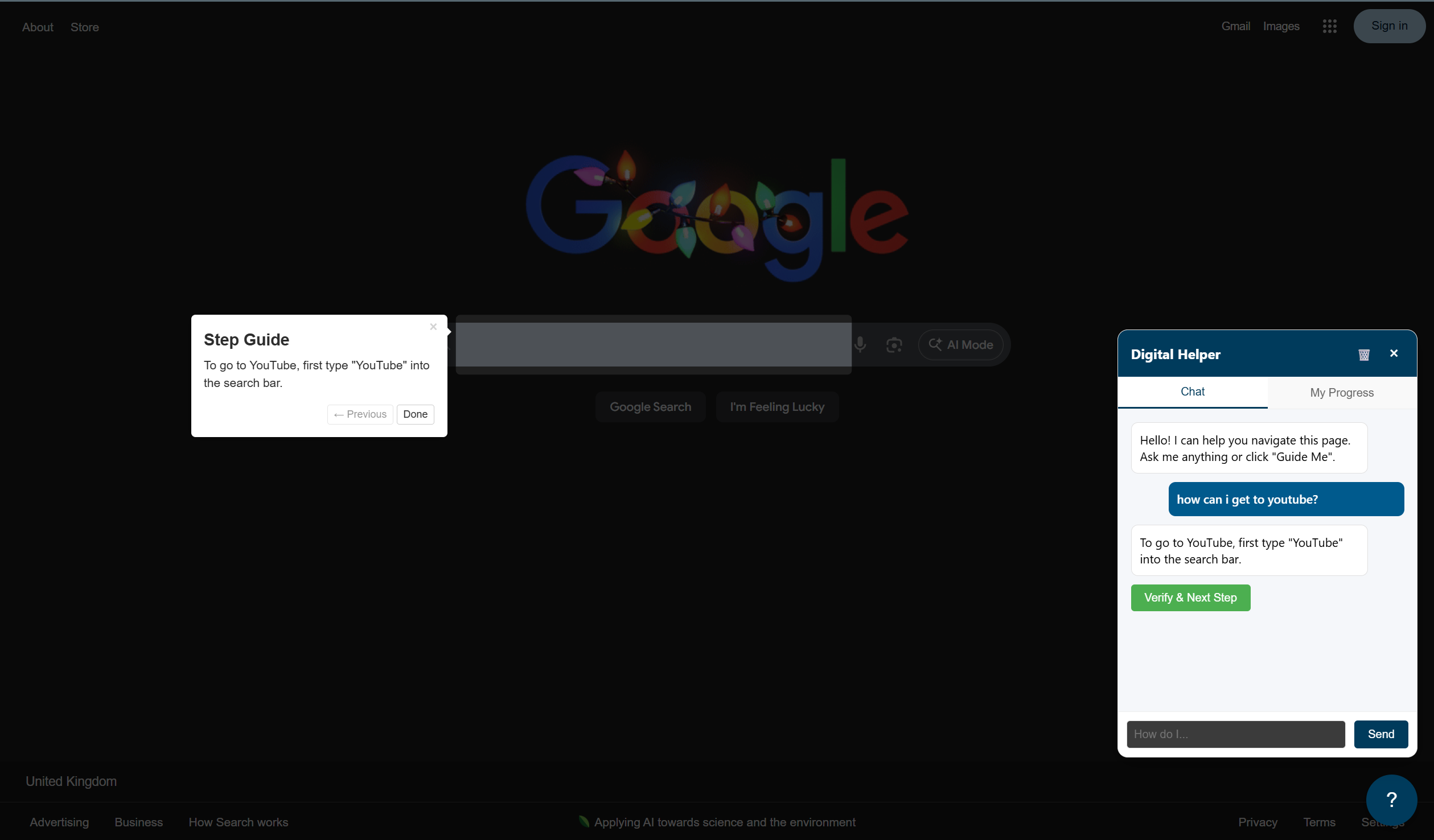
The Digital Inclusion Assistant is a two-fold solution consisting of a Chrome Extension and an Analytics Dashboard:
- The AI Companion: A sidebar that lives on any website. Users can ask questions like "How do I pay my council tax?" or "How do I book a GP appointment?"
- Context-Aware Guidance: The AI doesn't just talk; it looks. It captures a screenshot of the user's current page, analyzes it using Google Gemini, and uses a spotlight effect (via Driver.js) to highlight exactly where the user needs to click.
- The "Independence" Tracker: This is our core innovation. The system tracks whether a user takes an action because they were told to (Prompted) or if they figured it out on their own (Unprompted).
- Council Dashboard: City staff can view data visualizations that show a user’s "Digital Independence Level" growing over time, providing concrete proof that their inclusion programs are working.
How we built it
We utilized a modern, high-performance stack to ensure the AI could "see" and "react" in near real-time:
- The Brain (Backend): Built with FastAPI and Python. We integrated Google Gemini (2.5 Flash) to perform multimodal analysis, allowing the AI to understand both the visual screenshot and the intent of the user.
- The Guide (Extension): Developed using Manifest V3 and a Shadow DOM to ensure our UI never conflicts with the styling of the websites the user visits.
- The Metrics (Frontend): A React (Vite) dashboard styled with Tailwind CSS and Shadcn UI. We used Recharts to map the ratio of guided vs. organic interactions.
- Development Environment: The project was "VIBE Coded" using Google’s Antigravity IDE.
Challenges we ran into
- The "Verify and Advance" Logic: It was difficult to get the AI to stay in "teacher mode." Often, LLMs want to perform the whole task at once. We had to engineer a strict protocol where the AI must first verify the user completed the previous step before showing the next one.
- Visual Context: Capturing a screenshot, sending it to the backend, and having the AI identify the exact coordinates or elements to highlight required precise prompt engineering and synchronization.
- State Management: Keeping track of a user's progress across multiple tabs and page refreshes required a robust event-tracking system to ensure data integrity for the analytics dashboard.
Accomplishments that we're proud of
- Quantifying Confidence: We successfully moved "digital confidence" from a subjective feeling to a measurable data point (Prompted vs. Unprompted actions).
- Technical Execution: We built a fully functional end-to-end prototype—from a browser extension to an AI-driven backend and a data-rich frontend—within the high-pressure environment of a hackathon.
- Educational Guardrails: We created a system that refuses to do the work for the user, ensuring that actual learning and retention take place.
What we learned
We learned that the biggest barrier to digital inclusion isn't just a lack of knowledge, but a fear of making a mistake. By providing a "safety net" that confirms every correct move, we can significantly reduce that anxiety. On the technical side, we gained deep experience in multimodal AI and how to bridge the gap between high-level LLM reasoning and low-level browser DOM manipulation.
What's next for Access Project
- Privacy First: Implementing automated PII (Personally Identifiable Information) redaction to blur out sensitive data in screenshots before they are processed by the AI.
- Cost Optimization: Transitioning to smaller, open-source multimodal models to make the tool more affordable for local governments and non-profits.
- Offline Support: Creating "pre-baked" navigation flows for the most common government services so the tool remains functional on slower connections.
- Voice Integration: Adding speech-to-text capabilities to allow users to speak to the assistant, further lowering the barrier to entry.

Log in or sign up for Devpost to join the conversation.