Inspiration
With the switch to remote learning, we observed that a wide range of students faced a challenge in regards to education. We thought of creating a tool that helps remove some of those barriers that many students may face in these times.
What it does
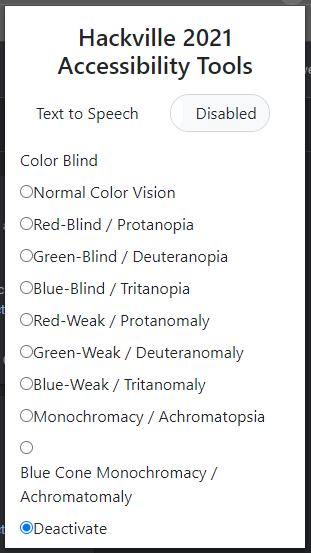
This tool gives the chance to the user to either get any given/selected text on the screen to be read by the computer. Furthermore, it also gives the opportunity for other students to either change the colour in which the text is displayed to get a further understanding of some challenges some students may be facing due to being visualimpaired.
How we built it
We build the tool using HTML/CSS as front-end and javascript/jquery in the back-end systems. We used the google speech synthesis API to be able to get any given text to be spoken by a machine. However, since we are dealing with chrome extension, we had to ensure that the selected string was injected into our extension to be given as a parameter to our speak function.
For a web page to change the colour, we used an open-source code that was able to change the colour of the web page based on different types of colour blindness.
Challenges we ran into
We faced various challenges throughout this process
- Coming up with an idea!
- Getting selected text
- Getting colour scheme to work
- UI
- Getting the audio to interact with the button
... and many more!
Accomplishments that we're proud of
We are proud to have a working product (although it contains some bugs). We are also proud to be able to achieve this project in under 24 hours.
What we learned
- Usage of jquery
- Teamwork makes the dream work!
- Debugging web page is a pain
What's next for Access For All
- sleep?
- improve the UI
- Fix bugs (such as deactivate the speaker)
- Add several functionalities
- Deployment


Log in or sign up for Devpost to join the conversation.