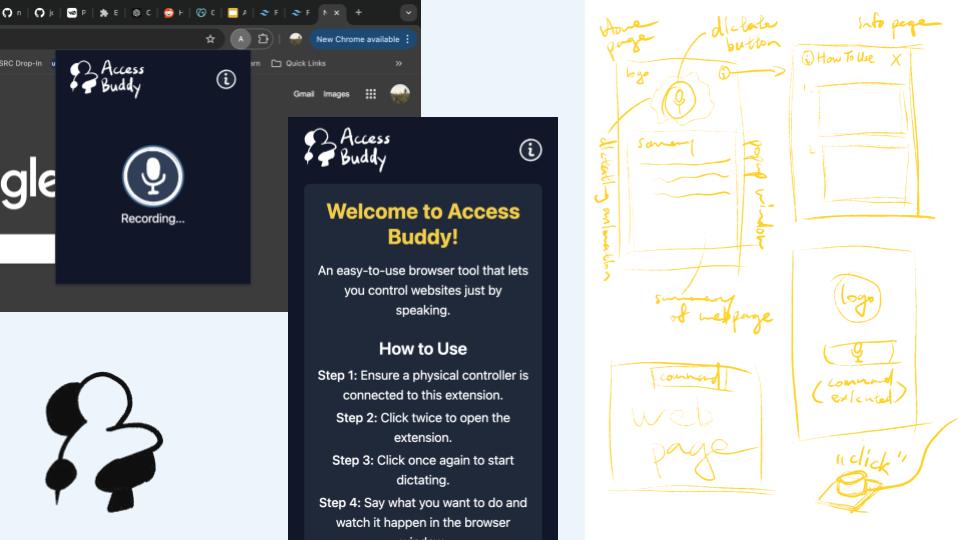
Access Buddy turns natural language into website actions like clicks, typing, and scrolling. It allows all actions to be done with a button click through voice commands. Designed for accessibility, it empowers users with physical and visual impairments to browse effortlessly.
Inspiration 🌟
Research has shown that:
- About 6% of school-aged kids have motor difficulties that negatively impact their development and their progress in school
- About 7% of working-age adults have severe dexterity issues
- About 50% of people over 70 struggle with tasks that require manual dexterity
Navigating the web can be a daunting task for these individuals with accessibility challenges. Is it possible to enable everyone to experience the internet with the same ease and efficiency? So we thought, what if there is a tool that allows people to control the webpage with just their voice? Our goal with this project is to bridge the accessibility gap and make the digital world more inclusive for all.
What It Does 💻
Access Buddy is a Chrome extension that converts natural language into website actions such as:
- Performs searches seemlessly
- Scroll on pages
- Open new tabs
- Summarize pages
With its simple and intuitive interface, Access Buddy is designed to help individuals with accessibility needs navigate the web seamlessly, ensuring they can harness the full potential of the internet.
design detail: through preliminary research, we found that 99% of people who are colourblind have red-green colourblindness.
How We Built It 🛠️
Backend:
- Vosk for speech-to-text transcription.
- sounddevice for real-time audio capture.
- OpenAI API (GPT4o-mini) for understanding user commands.
- PyAutoGUI to perform automatic actions.
Frontend:
- React and Tailwind CSS for styling.
- Custom designed, hand-drawn graphics for the UI.
Challenges We Ran Into 🚧
- Backend-frontend integration was a major challenge as we had multiple servers and ran into issues with cross-origin requests and making requests between servers.:
- Integrating the physical button into our program and translating presses into system actions
- Working with GPT-4o API to process and analyze screen information
Accomplishments That We're Proud Of 🏆
- Designing a meaningfully simplistic and unique user interface
- Integrated OpenAI ChatGPT into the tool, proving to be a powerful tool in assisting in increasing web accessibility
- Speech-to-text and text-to-speech functionality to improve
- Took a risk in diving into unfamiliar technology and learning new skills, tackling challenges with persistence, which has paid off in creating a platform that makes surfing the web more accessible
What We Learned 📚
Through this project, we gained valuable insights into:
- Developing Chrome extensions and leveraging browser APIs.
- Integrating natural language processing with real-world applications.
- Addressing accessibility challenges through user-centered design.
- Hardware (Arduino 101) integration with Chrome extension.
- Prompt engineering and fine-tuning with GPT-4o
What's Next for Access Buddy 🚀
This is just the beginning for Access Buddy! Here’s what we envision next:
- Adding more supported browser actions (download files, click specific buttons).
- Extending compatibility to other browsers beyond Chrome.
- Adding multilingual support to cater to a global audience.
- Live transcriptions allowing users to see their speech translate to text in real-time.
With Access Buddy, we’re committed to making the web a more inclusive space, one command at a time. 🌐
References:
Ability Central. “Dexterity and Fine Motor Skills: What Causes Dexterity Issues?” Ability Central, 17 Apr. 2024, abilitycentral.org/article/dexterity-and-fine-motor-skills-what-causes-dexterity-issues#:~:text=In%20fact%2C%20about%206%25%20of,tasks%20that%20require%20manual%20dexterity.
Built With
- arduino
- express.js
- flask
- node.js
- openai
- python
- react
- tailwind
- typescript


Log in or sign up for Devpost to join the conversation.