-
-
Logo
-

Logo
-
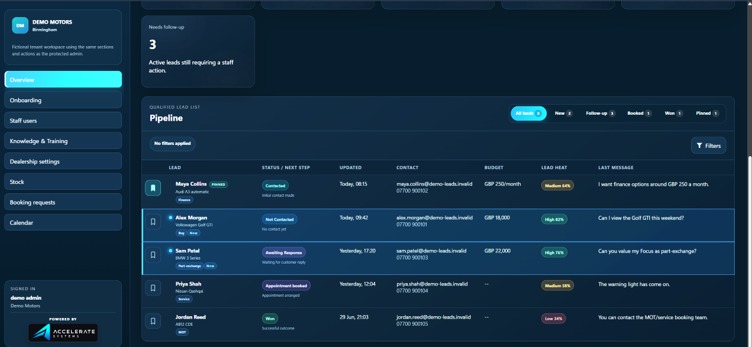
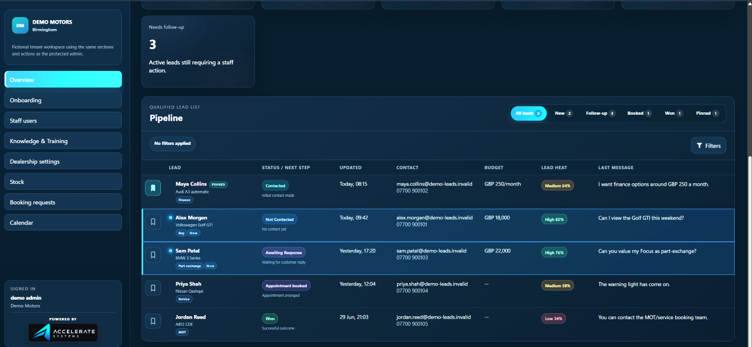
Our admin dashboard
-
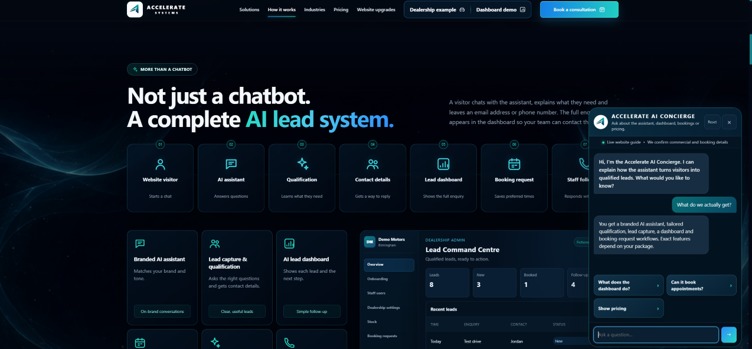
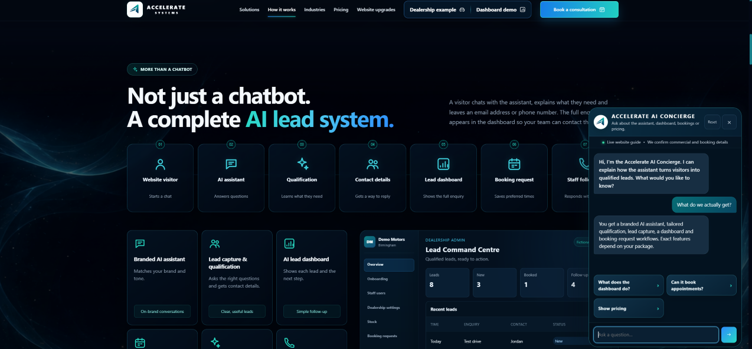
Chat bot demo in use
-
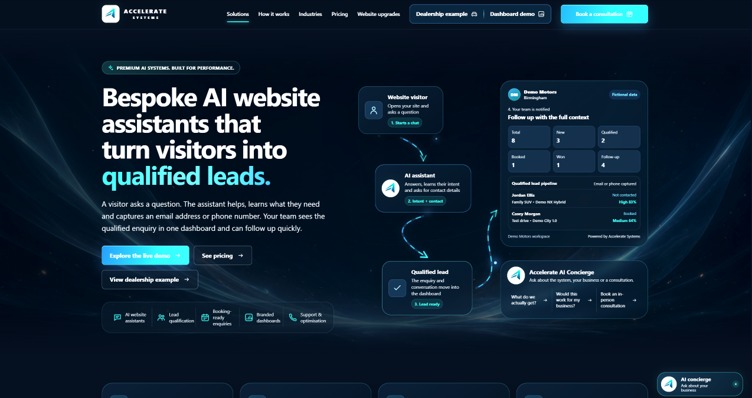
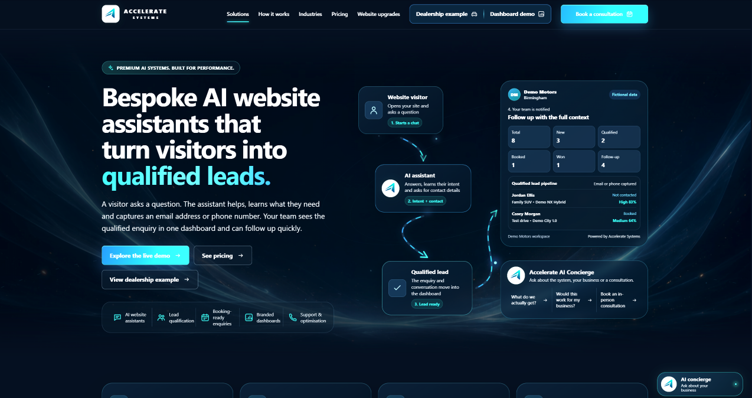
Our website

Inspiration
What it does
About Accelerate Systems
Inspiration
Accelerate Systems was inspired by a common problem faced by car dealerships and other sales-focused businesses: potential customers regularly visit a website, browse available products and leave without making direct contact.
Many dealership websites provide basic enquiry forms or simple live-chat tools, but these often require the customer to do most of the work. The dealership may receive an incomplete message such as “Is this available?” without knowing the customer’s budget, preferred vehicle, purchase timeframe, finance requirements or contact preference.
This creates additional administrative work for sales teams and can result in valuable enquiries being missed or followed up too slowly.
We wanted to build something more useful than a standard chatbot. Our aim was to create an AI-powered sales assistant that could:
- Speak naturally with website visitors.
- Understand what each customer is looking for.
- Ask relevant questions without making the conversation feel like a form.
- Recommend possible vehicles from the dealership’s real stock.
- Capture useful customer and vehicle information.
- Turn conversations into organised, qualified leads.
- Give dealership staff everything they need to follow up quickly.
This became Accelerate Systems: a platform for building bespoke AI website assistants that convert website traffic into actionable sales opportunities.
The automotive dealership assistant is our first major implementation, but the underlying platform has been designed so the same approach can later be adapted for other industries.
What It Does
Accelerate Systems adds a branded AI assistant to a dealership’s existing website.
A customer can ask about buying, financing, leasing, part-exchanging, selling or servicing a vehicle. The assistant identifies the customer’s intent and gradually gathers the information needed by the dealership.
Depending on the conversation, this can include:
- Name and contact details.
- Preferred contact method.
- Vehicle type, make and model.
- Cash or monthly budget.
- Deposit and finance preferences.
- Purchase timeframe.
- Transmission, fuel type and mileage requirements.
- Part-exchange vehicle information.
- Service or MOT requirements.
- Preferred appointment dates.
- Additional requirements and notes.
The assistant asks one relevant question at a time and avoids requesting personal details before enough useful information has been gathered.
When a customer becomes a qualified lead, their details and conversation are securely stored and displayed in the dealership’s dashboard. The dealership can then review the lead, see the full transcript, assign it to a member of staff, add internal notes and move it through the sales pipeline.
How We Built It
AI Conversation System
The assistant uses an OpenAI model to understand the customer’s message and produce both:
- A short, natural-language reply.
- Structured data describing the customer and the next action the system should take.
The model is instructed to return a predictable JSON response containing:
- The customer-facing reply.
- Newly discovered lead information.
- The recommended next action.
- A confidence score.
This allows the conversation to feel natural while still producing structured information that can be used by the rest of the application.
We created separate conversation paths for common dealership enquiries, including:
- Buying a vehicle.
- Vehicle finance.
- Rental and leasing.
- Selling a vehicle.
- Part-exchange.
- Servicing and MOT bookings.
The system does not rely entirely on the AI model. Model outputs are validated, normalised and merged with previously collected information. Deterministic logic checks the current lead state and calculates the next required action when the model response is incomplete or invalid.
This hybrid approach gave us the flexibility of generative AI without allowing the core business workflow to depend entirely on unpredictable model behaviour.
Lead Qualification
We created a clear qualification rule so that incomplete conversations do not overwhelm the dealership dashboard.
A lead is stored when the system has:
[ \text{Contact Method} \land \text{Useful Dealership Information} ]
In practical terms, this means the customer must provide a phone number or email address, together with at least one useful detail such as:
- A clear purchase or service intent.
- A vehicle preference.
- A budget.
- Part-exchange information.
- Service or MOT information.
This helps ensure that the dashboard contains actionable enquiries rather than every visitor who simply says “hello”.
Vehicle Stock Integration
Dealership staff can manage their vehicle inventory directly through the administration dashboard.
Each stock record can include:
- Make and model.
- Variant.
- Registration.
- Stock reference.
- Year.
- Mileage.
- Cash price.
- Monthly price.
- Fuel type.
- Transmission.
- Body type.
- Colour.
- Number of doors and seats.
- Description.
- Vehicle and image URLs.
- Availability status.
The system compares the customer’s conversation and lead information against active vehicle stock.
A simplified representation of the matching process is:
[ S = M + V + B + F + T + P ]
Where:
- (M) represents the make match.
- (V) represents the model match.
- (B) represents the body-type match.
- (F) represents the fuel-type match.
- (T) represents the transmission match.
- (P) represents price or monthly-budget suitability.
Higher-scoring vehicles can be provided to the AI assistant as possible matches.
The assistant is deliberately cautious. It does not guarantee that a vehicle is still available, that finance will be approved or that an appointment has been booked. Instead, it tells the customer that the vehicle may be suitable and that the dealership team can confirm the final details.
Stock can also be imported and exported using CSV files, allowing dealerships to manage larger inventories without entering every vehicle manually.
Dealership Dashboard
We built a complete dealership administration dashboard rather than stopping at the chatbot itself.
The dashboard provides:
- A list of qualified leads.
- Lead searching, filtering and sorting.
- Lead stages and pipeline management.
- Lead heat scoring.
- Full conversation transcripts.
- Customer and vehicle summaries.
- Internal notes.
- Staff ownership and assignment.
- Activity timelines.
- Stock management.
- Dealership settings.
- Staff account management.
- CSV exports.
- Website integration code.
Leads can be moved through stages such as:
- New.
- Contacted.
- Qualified.
- Appointment booked.
- Won.
- Lost.
The lead heat score gives dealership staff a quick indication of how complete and actionable an enquiry is. Contact details, budgets, timeframes, vehicle information and booking details all increase the score.
Multi-Tenant Architecture
Accelerate Systems is designed to support multiple dealerships from one platform.
Each dealership is assigned a unique tenant identifier. Lead records, conversations, users, stock, settings and allowed website origins are all scoped to that tenant.
This means one dealership cannot access another dealership’s:
- Customer information.
- Conversations.
- Vehicle stock.
- Staff accounts.
- Settings.
- Lead pipeline.
Each tenant can customise its own:
- Dealership name.
- Contact information.
- Address.
- Opening hours.
- Brand colour.
- Widget title.
- Greeting message.
- Handover message.
- Website URL.
- Privacy-policy URL.
- Notification email.
- Sales and service team names.
A separate platform administration area allows Accelerate Systems to register dealerships and manage their approved website origins.
Security and Access Control
Because the platform handles customer contact details, security was an important part of the build.
We implemented:
- Authenticated dealership dashboards.
- Secure, signed session cookies.
- Password hashing.
- Tenant-scoped access checks.
- Role-based permissions.
- Separate platform and dealership administrator sessions.
- Allowed-origin validation.
- Protected lead endpoints.
- Server-side permission enforcement.
- Restricted staff-account management.
Dealership administrators have full tenant-level access, while staff users can be given more limited permissions.
We also created strict origin controls so that a dealership’s assistant can only be used from approved websites. This helps prevent another website from embedding the assistant and submitting enquiries under the wrong dealership.
Notifications
The system can automatically email the dealership when a qualified lead is captured.
The notification includes:
- The customer’s intent.
- Vehicle interest.
- Budget information.
- Contact details.
- Part-exchange or service information.
- Recent transcript messages.
- A link to the administration dashboard.
To prevent repeated emails, the system creates a hash of the meaningful lead information. Another notification is only sent when the lead has changed in a useful way.
Technology
The current platform uses:
- Python for the backend.
- FastAPI for API endpoints and web routing.
- OpenAI models for conversation understanding and response generation.
- Pydantic for request and response validation.
- SQLite for tenant settings, leads, conversations, users and stock.
- HTML, CSS and JavaScript for the widget and administration interfaces.
- SMTP for qualified-lead email notifications.
- CSV import and export for stock and lead management.
Database migrations are versioned so that existing installations can be upgraded without creating a second or conflicting data-storage system.
Challenges We Faced
Making the Assistant Helpful Without Making It Feel Like a Form
One of the biggest challenges was balancing lead qualification with a natural conversation.
If the assistant asked too many questions at once, it felt like a traditional enquiry form. If it asked too few, the dealership received an enquiry without enough information to act on.
We improved this by instructing the assistant to:
- Ask one question at a time.
- Acknowledge the customer naturally.
- Avoid requesting contact information too early.
- Follow different question paths for different enquiry types.
- Keep replies to one to three short sentences.
- Avoid repeating the customer’s exact wording.
Controlling Unpredictable AI Output
Generative models do not always return perfectly structured data.
During development, we had to handle:
- Invalid JSON.
- Missing properties.
- Incorrect data types.
- Numbers returned as text.
- Empty values replacing useful information.
- Unsupported next-action values.
- Lists being returned as comma-separated strings.
We solved this by adding validation and normalisation around the model. Values such as budgets and mileage are converted into usable numbers, list fields are cleaned and invalid actions are replaced using deterministic workflow logic.
Preventing Invented Stock Information
The assistant must never invent vehicles or claim that something is available when it is not present in the dealership’s stock data.
We created strict prompting and backend stock context so that specific vehicles can only be mentioned when they have been retrieved from active tenant stock.
Even when a match is found, the assistant describes it as a possible option rather than guaranteeing availability.
Maintaining Tenant Isolation
Supporting multiple dealerships increased the complexity of nearly every area of the project.
Every request had to be checked for:
- The correct tenant.
- The correct authenticated user.
- The correct permissions.
- The correct website origin.
- The correct lead, conversation and stock scope.
We had to ensure that both the API and administration dashboard enforced these restrictions server-side rather than relying only on what the user interface displayed.
Turning a Prototype Into a Usable Product
Creating a chatbot demonstration was relatively straightforward. Turning it into something a real dealership could use required much more work.
We needed to build:
- Authentication.
- Staff roles.
- Lead storage.
- Database migrations.
- Tenant settings.
- Lead stages.
- Searching and filtering.
- Stock tools.
- Notifications.
- CSV exports.
- Website integration.
- Error handling.
- Responsive dashboard layouts.
This taught us that the AI conversation is only one part of an AI product. The operational tools surrounding the AI are just as important.
What We Learned
AI Works Best Alongside Deterministic Software
We learned that AI is excellent for interpreting human language and creating natural conversations, but critical business decisions should still be supported by traditional application logic.
The model handles flexible language, while deterministic code handles:
- Validation.
- Qualification.
- Permissions.
- Tenant isolation.
- Stock filtering.
- Database operations.
- Notification deduplication.
- Workflow fallbacks.
This combination made the platform more reliable than using a model-only approach.
Data Quality Determines Business Value
A long conversation is not automatically a valuable lead.
The most useful enquiries contain the right combination of:
- Contact information.
- Intent.
- Vehicle or service requirements.
- Budget.
- Timeframe.
- Clear next steps.
Designing the assistant around the information needed by the dealership made the project much more practical.
The Dashboard Is as Important as the Assistant
The website visitor sees the AI assistant, but the dealership experiences the product through the dashboard.
A good dashboard must make it immediately clear:
- Who the customer is.
- What they want.
- How valuable or urgent the enquiry may be.
- What has already been discussed.
- Who should follow it up.
- What should happen next.
This changed our focus from building only a chatbot to building a complete lead-management system.
Security Must Be Designed From the Beginning
Once a system contains customer names, phone numbers, email addresses and conversation transcripts, authentication and data isolation cannot be treated as optional finishing touches.
Developing the tenant and permission architecture early helped us avoid building a platform that would later be difficult to secure.
What We Are Proud Of
We are proud that Accelerate Systems is more than a visual chatbot demonstration.
The platform currently connects the full process:
[ \text{Website Visitor} \rightarrow \text{AI Conversation} \rightarrow \text{Qualification} \rightarrow \text{Stock Matching} \rightarrow \text{Lead Dashboard} \rightarrow \text{Human Follow-Up} ]
It gives customers a faster and more helpful website experience while giving dealership staff organised information that can be acted on immediately.
Most importantly, the system does not try to replace dealership staff. It handles repetitive initial conversations, gathers useful information and helps the sales or service team focus their time on customers who are ready for human support.
What Is Next
Our next steps for Accelerate Systems include:
- Deeper CRM integration.
- Google Calendar and Microsoft Outlook connections.
- Direct appointment scheduling.
- WhatsApp and SMS follow-up.
- Improved analytics and conversion reporting.
- More advanced stock-feed integrations.
- Automated follow-up sequences.
- AI-generated call summaries and talking points.
- Additional industry-specific assistant templates.
- Further dashboard improvements for mobile devices.
- Expanded onboarding and installation tools.
Our long-term goal is to make Accelerate Systems a flexible platform that allows businesses to deploy a specialised AI assistant without replacing their existing website or operational processes.
The project began with a simple question:
How can we make a business website actively help convert visitors rather than simply display information?
Accelerate Systems is our answer.
How we built it
Challenges we ran into
Accomplishments that we're proud of
What we learned
What's next for Accelerate-Systems
Built With
- codex

Log in or sign up for Devpost to join the conversation.