-
-
AbleSpace

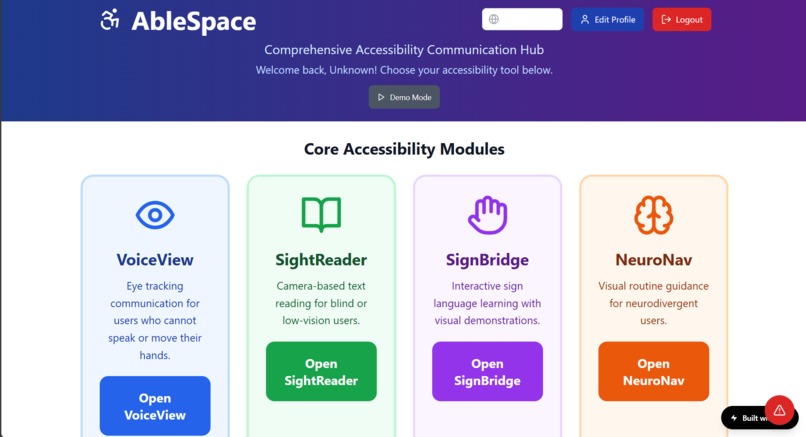
Create a fully functional, browser-based accessibility web application called AbleSpace that supports a wide range of disabilities and is capable of winning first place at a global-level hackathon. The app must be developed with no backend, collect no personal data, use no tracking, and rely only on open-source libraries and open-license or original assets. It must be fully responsive and deployable through services like Vercel or Netlify. All accessibility standards must be strictly followed, including full keyboard navigation support, large readable text, high color contrast, screen reader compatibility, and clearly labeled focus states on all clickable and interactive elements. The application must include a login system with a clearly labeled clickable "Login" button and a "Logout" button that lets users sign in and out locally. After logging in, users must be able to click an "Edit Profile" button, which opens a visible settings panel allowing them to update their name, language preference, default startup module, and choose between light mode, dark mode, or high-contrast themes. All profile settings must be stored locally in the browser. There must also be an optional paid version available for $30 per year or $3 per month, which can be activated via a clearly labeled and clickable “Upgrade to Premium” button within the profile section. Premium users must receive access to premium features such as expanded communication libraries, custom visual themes, advanced routine tools, caregiver support options, calming modes, and multi-language support. Free users must retain full access to core functionality without restrictions. Note: the premium version must also offer a single annual payment option for $20 per year as a discounted alternative to monthly payments. The app must include four core modules. The first is VoiceView, designed for users who cannot speak or use their hands. This module must use WebGazer.js to track the user's gaze via webcam. On screen, a single word or phrase such as “Help,” “Water,” “Yes,” or “No” must be displayed. The word must change automatically every 20 seconds. If the user stares at the word for 10 continuous seconds, the word must be visually highlighted with a color change or border and spoken aloud using the browser’s speechSynthesis API. The module must begin with a simple calibration step, triggered by a clearly labeled and clickable “Start Calibration” button. A “Customize Words” button must also be present and clickable, allowing users to add or remove words from the gaze cycle. Premium users should have access to extended phrase sets and alternate voices. The second module, SightReader, is for blind or low-vision users and must use the webcam and Tesseract.js to detect printed text in real time. The module must scan automatically every 10 seconds and also allow users to initiate a scan manually by pressing a clearly labeled and clickable “Scan Now” button. Detected text must be displayed in large, high-contrast fonts and read aloud using speechSynthesis. A “Zoom In” button must be clearly visible and clickable to increase text size. All elements must be accessible by keyboard and screen reader. Premium users may select different reading languages, adjust reading speed and voice, and access a local history of scanned texts. The third module, SignBridge, must assist deaf or non-speaking users by teaching sign language. One word or phrase such as “Thank you,” “I’m happy,” or an alphabet letter must be shown on screen alongside an animation, video, or image demonstrating the corresponding sign. Written instructions explaining how to perform the sign must also be shown. Users must advance through signs using a clearly labeled and clickable “Next” button. There must be no timed transitions in this module. Users must also be able to click a clearly labeled “Change Sign Language” button to switch between different sign languages such as ASL, BSL, or ISL. Premium users should be able to unlock extended sign vocabularies, quizzes, and comparison modes. The fourth module, NeuroNav, must help neurodivergent users such as individuals with autism or ADHD complete daily routines through a sequence of clear visual task cards. Each card must contain an image and instruction and include a clearly labeled and clickable “Done” button to mark the step as complete. A “Next Step” button or automatic step transition must guide users through the process. A clickable “Focus Mode” button must allow users to dim background elements and reduce visual distractions. An “Edit Routine” button must be visible and clickable, allowing the user to add, remove, or rearrange task steps. Premium users must be able to save multiple routines, activate voice prompts, and use ambient music or soundscapes for calming purposes. In addition to the four required modules, several optional modules must be added to make the app more competitive and inclusive. The TouchSpeak module must assist users with cognitive disabilities or low literacy by allowing them to create phrases using draggable symbol-based icons. Users must be able to drag icons like “I want,” “Water,” or “Sleep” into a sentence bar and then click a clearly labeled “Speak Sentence” button to hear the phrase spoken aloud. A “Clear” button must remove all icons from the bar. Premium users should be able to access a larger library of symbols and organize them into custom categories. The MoodBoard module must help non-verbal users express emotions using large, clearly labeled clickable buttons such as “Happy,” “Sad,” “Angry,” or “Tired.” When a user selects a mood, the background color must change, the emotion must be read aloud, and a clearly labeled “More Info” button must offer suggestions like “Would you like a break?” or “Do you want to talk?” Premium users may add custom moods, save mood history locally, and enable periodic emotion check-ins. The NoiseGuard module must provide visual warnings for users with sound sensitivities by detecting loud noises using the microphone. A circular indicator on the screen must glow green for safe levels and red when noise exceeds the threshold. A clickable “Adjust Sensitivity” slider must allow users to change the detection level. When a loud sound is detected, a visible text notification such as “High noise detected” must appear. Premium users can assign specific sounds to custom alerts, like barking, alarms, or shouting. The ColorLens module must help users with color blindness by applying real-time visual overlays. A clearly labeled and clickable “Color Assist” panel must provide filters like grayscale, red-green separation, and high-contrast mode. Users must be able to preview changes in real time and apply them with a single click. Premium users may save filter presets and create custom overlays. The AssistMode module must simplify the entire app interface for elderly users or those unfamiliar with technology. When AssistMode is active, all UI elements must enlarge, advanced features must be hidden, and every page must include a clearly labeled and clickable “What Is This?” button that reads an explanation of the current screen aloud. Navigation must be persistent with “Go Home” and “Go Back” buttons always visible. Premium users may customize the assistant voice and set up automatic reminders. An additional caregiver-focused feature called DualCare Mode must be included. This mode must allow a second user such as a parent or teacher to monitor the primary user’s progress on a shared screen or view. The caregiver must be able to send short encouragement messages, adjust difficulty settings, and take notes. Caregivers must use clearly labeled and clickable buttons such as “Send Message,” “Edit Routine,” and “View Notes.” All data remains stored locally without internet syncing. Premium features for this mode include multiple caregiver profiles, local alerts, and the ability to schedule interactions. Finally, the app must include additional enhancements to improve engagement and user experience. A clearly visible and always accessible “Emergency” button must appear on all screens. When clicked, it must speak aloud pre-set phrases like “I need help” or “Call someone now.” Premium users may customize these phrases. An optional “Achievements” system may reward users with badges for completing actions like learning a new sign or finishing a routine. A “Progress” screen must be available and accessible with a clearly labeled clickable button. The app interface must also include a language selector at startup, allowing users to switch between at least five supported languages using a clickable dropdown or flag selector. A “Demo Mode” setting must allow hackathon judges to test each module quickly without setup. Offline functionality must be fully enabled after first load, including speech synthesis, animations, and routines. All features and buttons must be visually distinct, include descriptive text, and follow best practices for global accessibility design.


Log in or sign up for Devpost to join the conversation.