-
-
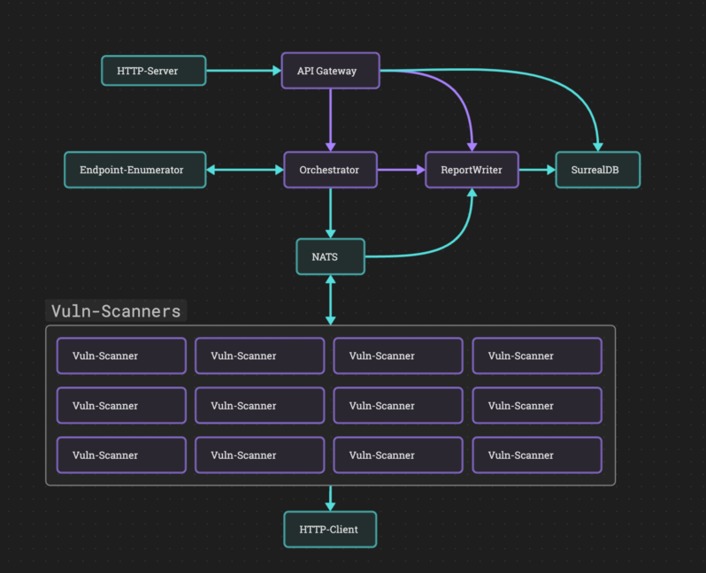
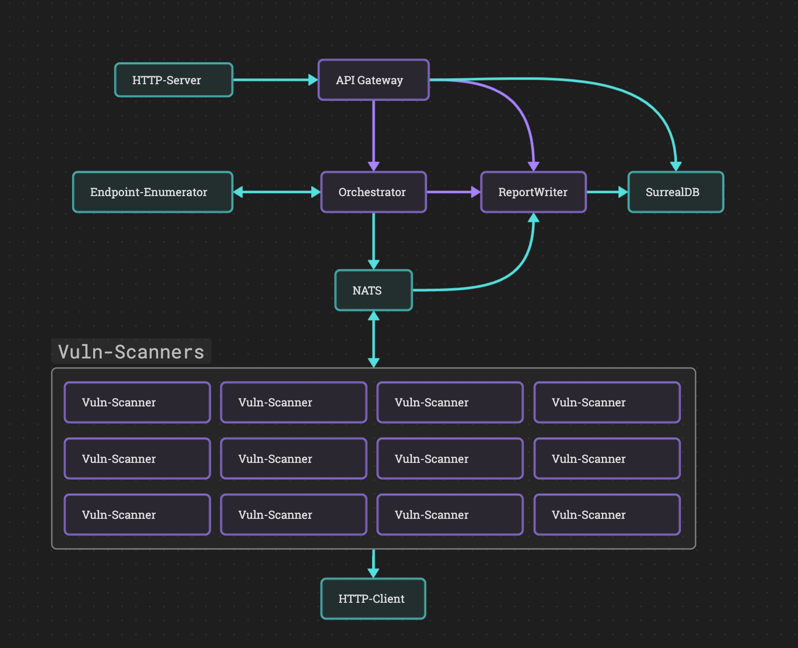
Architecture
-
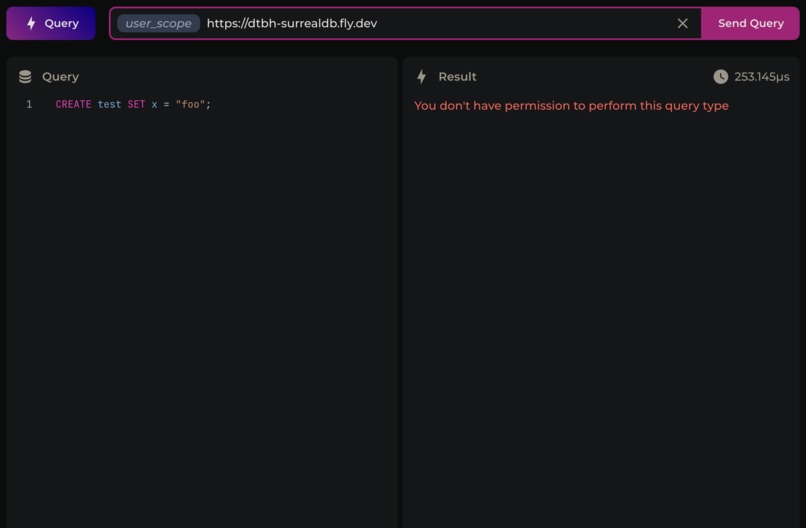
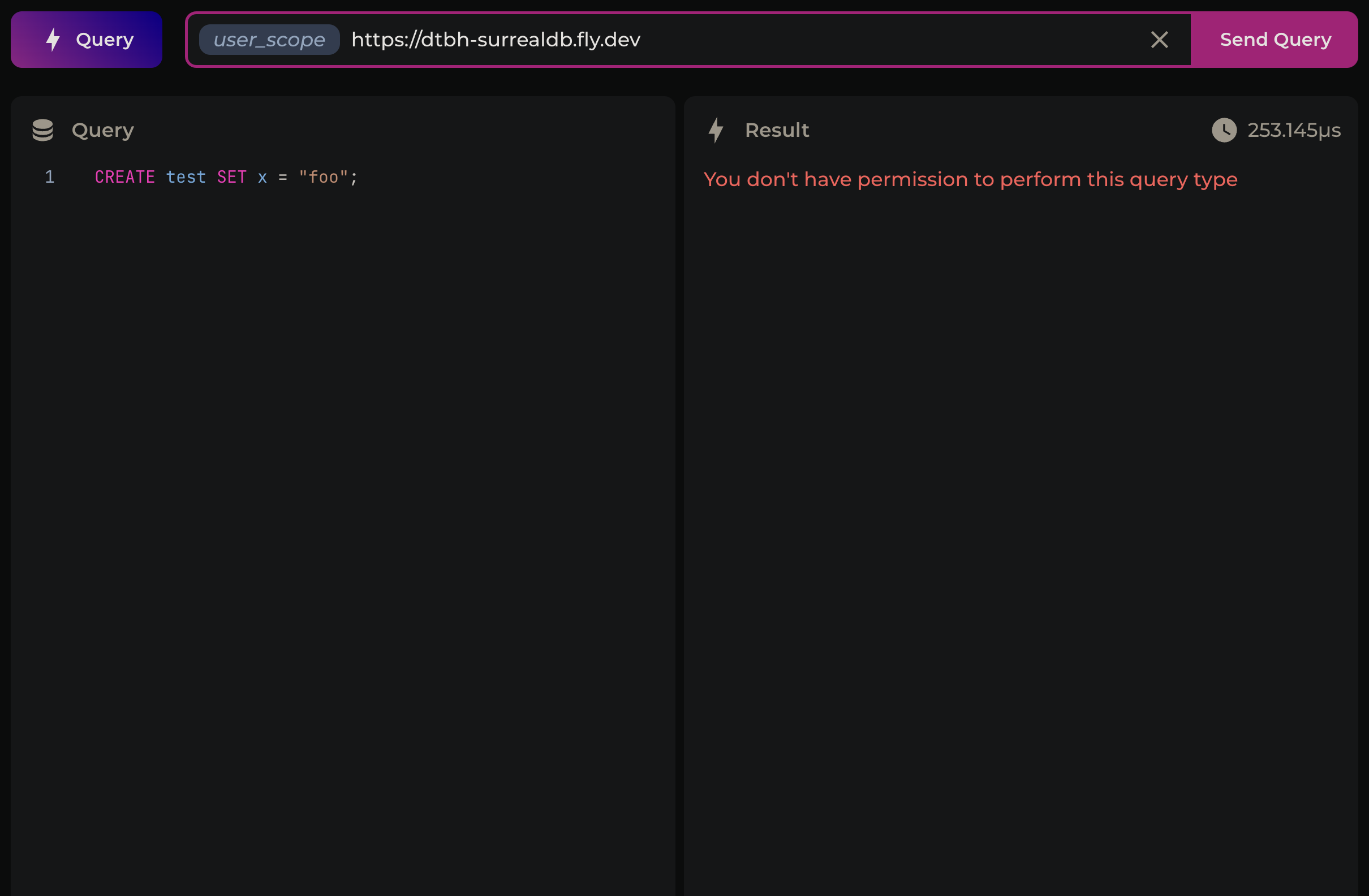
User can't create tables
-
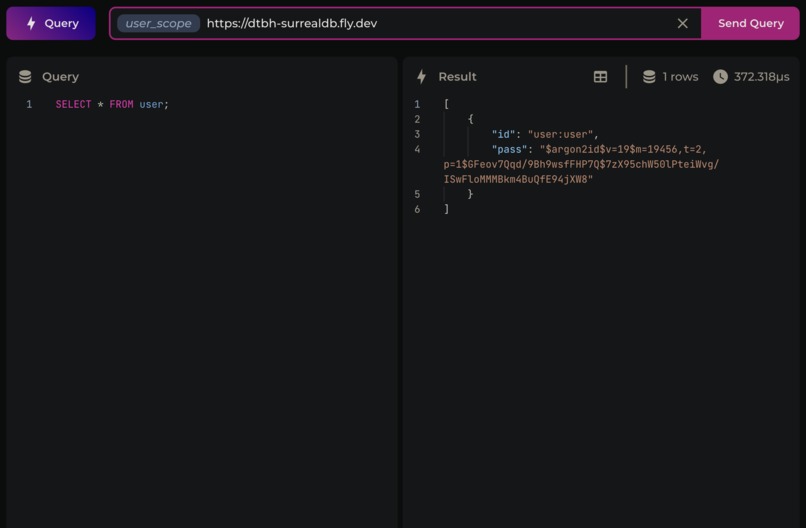
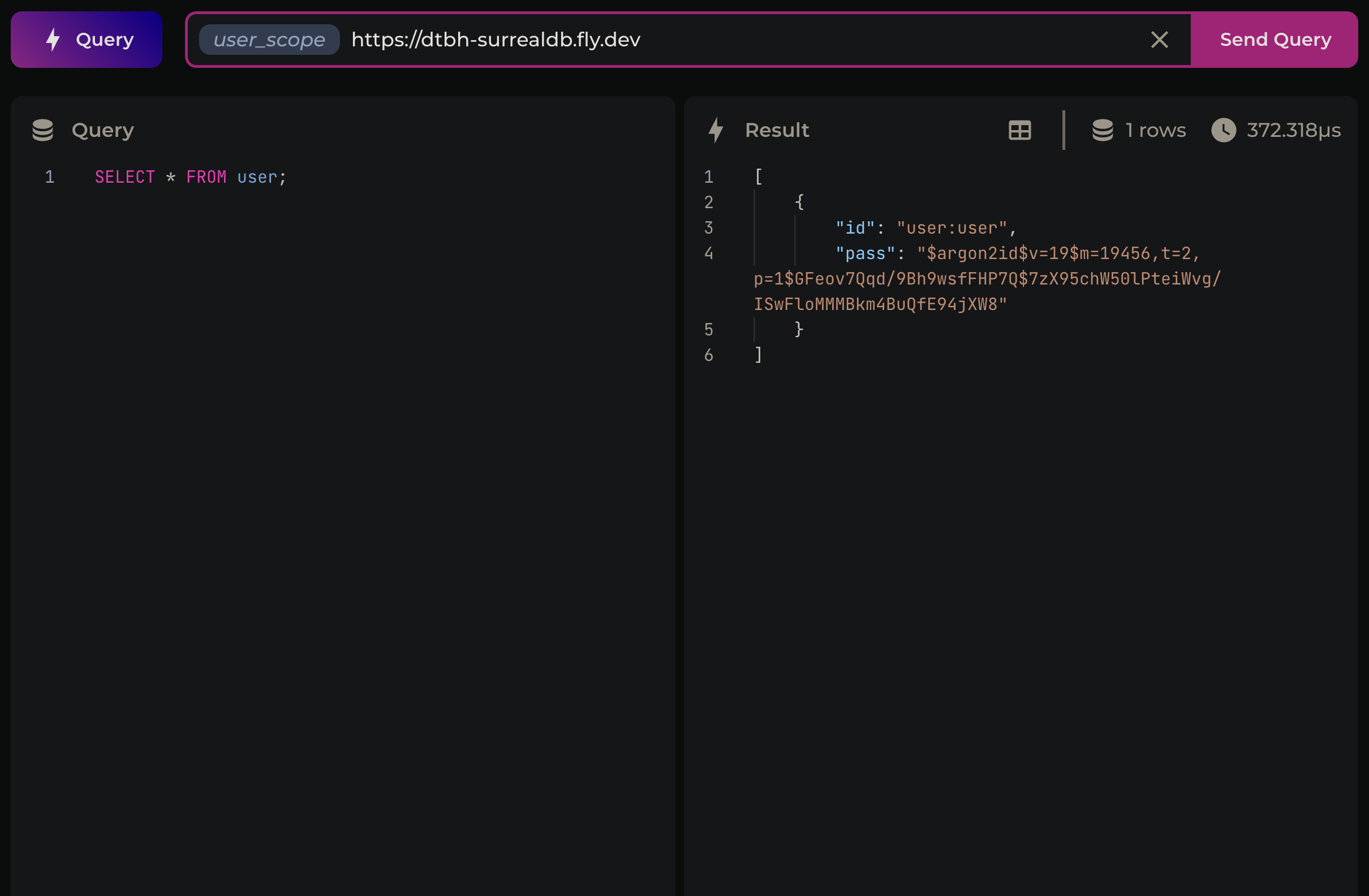
User can only view their own details in the user table
-
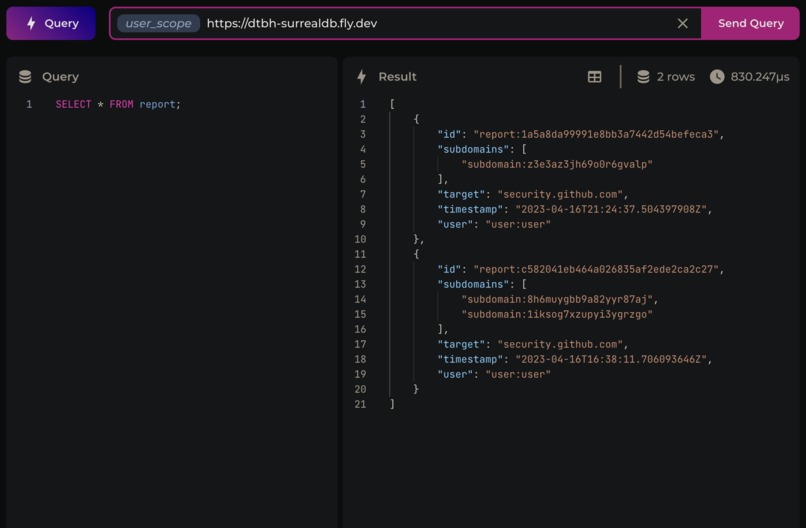
User can only view their own reports in the report table

Inspiration
Around the same time I found out about wasmCloud/Cosmonic, I had also decided to get into bug bounties on websites such as HackerOne.
This made me wonder whether I could build automated vulnerability scanning tools on Cosmonic, so they could be instantly scaled up when needed (for example, if I have a lot of targets to scan).
What it does
It's just a proof of concept at the moment, but the modular nature of wasmCloud makes it quite simple to add new scanner modules.
You send a scan request to the api endpoint (after signing up/signing in and getting a JWT), then later on when it's finished scanning you simply retrieve the reports with the /reports endpoint. You can send it a whole list of targets and it'll scan them all in the background.
How I built it
The actors are quite simple. I decided to use NATS Pub/Sub messaging for scanner task queues, which simplifies managing a worker pool of scanners with a shared task queue. It also gets around the RPC timeout. If a scanner finds a vulnerability, it publishes it to dtbh.reports.in and the report-writer actor updates the relevant SurrealDB report entry with the new findings.
I also had to build two custom providers:
Endpoint-Enumerator
Because enumerating endpoints (subdomains + open ports) can be fairly costly, I figured it would be easier to do it with a multithreaded provider rather than a single threaded actor.
Enumerating all the endpoints of a target can take anywhere from one second to one hour (depending on the target), so I had to use a callback system to get around the RPC timeout. The orchestrator actor sends a request to the provider, and once the provider has finished enumeration it makes an RPC call back to the actor.
SurrealDB
I wanted to use SurrealDB because it can handle the authentication side of things as well as storing data, and it can also publish events to a websocket when new data is entered which will make subscribing to a report much easier (although I didn't have time to actually implement this yet). Unfortunately, there's no capability provider for SurrealDB so I had to make my own one. It's fairly basic, with only 4 RPC methods (Query, SignIn, SignUp and Authenticate) , but it gets the job done.
User scopes in SurrealDB
To show what I mean about it handling authentication, after you sign up for an account via curl (instructions are further down), you can actually sign in to the database directly.
- Go to surrealist
- Open a new "tab" in surrealist, and click the connection bar at the top (should default to localhost:8000)
- Modify the connection details with the following:
- Endpoint url:
https://dtbh-surrealdb.fly.dev - Namespace:
ns - Database:
db - Authentication mode:
Scope Authentication - Scope:
user_scope
- Endpoint url:
- Click
Edit scope data, add the following two fields, and set their values to your username and passwordusernamepassword
- You should be able to connect directly to the DB and send whatever queries you want.
If you run the following queries:
SELECT * FROM user;
SELECT * FROM report;
You'll see that it only returns results for the user you've signed in as, and you can't modify tables (unless you're modifying your own report entry, but that's fine).
Every query that's sent from the backend server to the database is sent as a scoped query, which means if a user doesn't sign in but somehow gets a query sent to the database, it won't execute.
If a user somehow performs SQL injection, they'll be restricted to viewing their own data anyway.
Challenges I ran into
I encountered a lot of strange serialisation issues with SurrealDB, but managed to solve them all in the end.
At the very last minute though, after testing everything locally with it all working fine, I encountered an issue when deploying to Cosmonic. For some reason (which I haven't figured out yet), the report-writer actor doesn't receive the NATS messages, so it can't update reports with new findings. I've checked everything, and subscribed to the dtbh.reports.in channel using a local leaf node, but I can't figure out why this is happening. The link definition is fine (SUBSCRIPTION=dtbh.reports.in), the scanners are publishing everything to the correct channel, and the report-writer works fine otherwise.
Because of that final hurdle, this isn't a fully functional project (unless you deploy it all on a local wasmCloud host).
UPDATE: I fixed it by deleting the link definition and remaking it again with the same values. Not sure how that fixed it but I'm not going to complain.
It's now fully functional, although the time I spent debugging this is time I would have rather spent on a CLI.
Accomplishments that I'm proud of
I'm quite proud of the SurrealDB provider, especially seeing as I had never used SurrealDB before so I learnt a lot in the process of building it. It needs a lot of polishing and documentation, but after that I think it would be a valuable capability provider for the wider community.
What I learned
That struct fields in wasmCloud are serialised to camelCase. If I'd realised this sooner, it would have saved me a lot of hassle when I was implementing the database. Turns out, a lot of my problems stemmed from the fact the serialised struct sent to SurrealDB had no field named open_ports, because it was actually openPorts.
What's next for DTBH
CLI- Polish the SurrealDB provider/interface and publish it as a standalone thing
Figure out why the report-writer actor doesn't work properly on a Cosmonic hostI didn't figure out why this happened but I fixed it at least.- Write a bunch of extra scanner modules
- Scale it up if needed
How to use it
CLI
Install it:
cargo install dtbh-cli
Check the help output:
dtbh-cli help

# or just this
dtbh-cli
It should be pretty self explanatory from there. Just use the signup command, then it should write your JWT to a file so you can use the scan and reports commands. Obviously you need to run some scans first before you'll have any reports to look at.
dtbh-cli sign-up --username <username> --password <password>
dtbh-cli scan --target example1.com --target example2.com
dtbh-cli scan reports
Depending on how many endpoints your target has it may take a while for any report to be written to the database, and I didn't get a chance to implement a live update feature (once v1.0.0 of surrealDB comes out it will be as simple as using their "Live Query" feature within the CLI app).
Curl
Endpoints
Sign up with a username and password to get a JWT
Begin scanning a target or list of targets
Retrieve your reports
Sign in with your username and password to get your JWT
Instructions
Because I didn't have time to build a CLI (thanks to the issue with the report-writer on Cosmonic), you have to use curl at the moment.
Sign Up
Run this
curl -X POST https://divine-ocean-2029.cosmonic.app/sign_up --json '{"username": "<your_username>", "password": "<your_password>"}' -v
You'll see jwt=someveryverylongstring in your response. You can save this to an environment variable
export COOKIE="jwt=someveryverylongstring"
Then attach it to all subsequent requests with -b $COOKIE
Sign In
Same as signing up, except with a username and password combination that has already been signed up.
Scan
curl -X POST https://divine-ocean-2029.cosmonic.app/scan --json '{"targets": ["target1.com", "target2.com", "target3.com"]}' -b $COOKIE -v
Currently there's no real way to track the progress of the scan (that's something I was going to implement with the CLI).
Reports
The body of a reports request looks like this:
{
    "target": ["target1.com", "target2.com"],
    "startTimestamp":
        {
            "sec": 1681490325,
            "nsec": 0
        },
    "endTimestamp":
        {
            "sec": 1682361815,
            "nsec": 0
        }
}
If you leave either (or both) of the timestamps blank, then that just removes the timestamp constraint. So if you leave out the endTimestamp, but include a startTImestamp, it will get every report for these targets after the startTimestamp, and vice versa.
If you leave target array empty then it will get the reports for all of your targets.
curl -X GET https://divine-ocean-2029.cosmonic.app/reports --json '{"target": []}' -b $COOKIE -v
Unfortunately you'll just receive a bunch of bytes, one purpose of the CLI is to output the response in a readable format.
You can use this rather inelegant solution if you insist of using curl though:
curl -s -X GET https://divine-ocean-2029.cosmonic.app/reports --json '{"target": []}' -b $COOKIE | python3 -c "import sys, json; print(''.join(chr(x) for x in json.load(sys.stdin)))" | jq
Piping the bytes into that python command, and then to jq, will give you an output that looks like this:
[
  {
    "subdomains": [
      {
        "openPorts": [
          {
            "findings": [],
            "isOpen": true,
            "port": 80
          },
          {
            "findings": [],
            "isOpen": true,
            "port": 443
          }
        ],
        "subdomain": "api.security.github.com"
      }
    ],
    "target": "security.github.com",
    "timestamp": {
      "sec": 1681680277,
      "nsec": 0
    },
  },
  {
    "subdomains": [
      {
        "openPorts": [
          {
            "findings": [],
            "isOpen": true,
            "port": 80
          },
          {
            "findings": [],
            "isOpen": true,
            "port": 443
          }
        ],
        "subdomain": "api.security.github.com"
      },
      {
        "openPorts": [
          {
            "findings": [],
            "isOpen": true,
            "port": 80
          },
          {
            "findings": [],
            "isOpen": true,
            "port": 443
          }
        ],
        "subdomain": "www.api.security.github.com"
      }
    ],
    "target": "security.github.com",
    "timestamp": {
      "sec": 1681663091,
      "nsec": 0
    },
  }
]
Built With
- cosmonic
- fly.io
- rust
- surrealdb
- wasm
- wasmcloud


Log in or sign up for Devpost to join the conversation.