FeedMob AdPilot - Project Story
Live Demo
Try the live deployment:
- Client UI (Chat Interface): https://sc80sggw884kw448kc0sckw0.coolify-dev-pa.tonob.net/
- MCP Server: https://b8ggscok0gkgw848444gcokw.coolify-dev-pa.tonob.net/mcp
- GitHub Repository: https://github.com/feed-mob/feedmob-adpilot-mcp
Inspiration
Creating effective advertising campaigns requires expertise across multiple domains—understanding target audiences, crafting compelling copy, designing eye-catching visuals, and optimizing for specific platforms. This complexity creates barriers for small businesses and independent advertisers who lack resources for full creative teams.
I was inspired to build FeedMob AdPilot after recognizing how Kiro IDE's unique features—Specs, Steering Docs, Agent Hooks, and MCP integration—could streamline this multi-faceted workflow. The Model Context Protocol (MCP) provided the perfect framework for building an AI agent system that could break down complex advertising tasks into manageable, interactive steps while maintaining context throughout the entire campaign creation process.
What it does
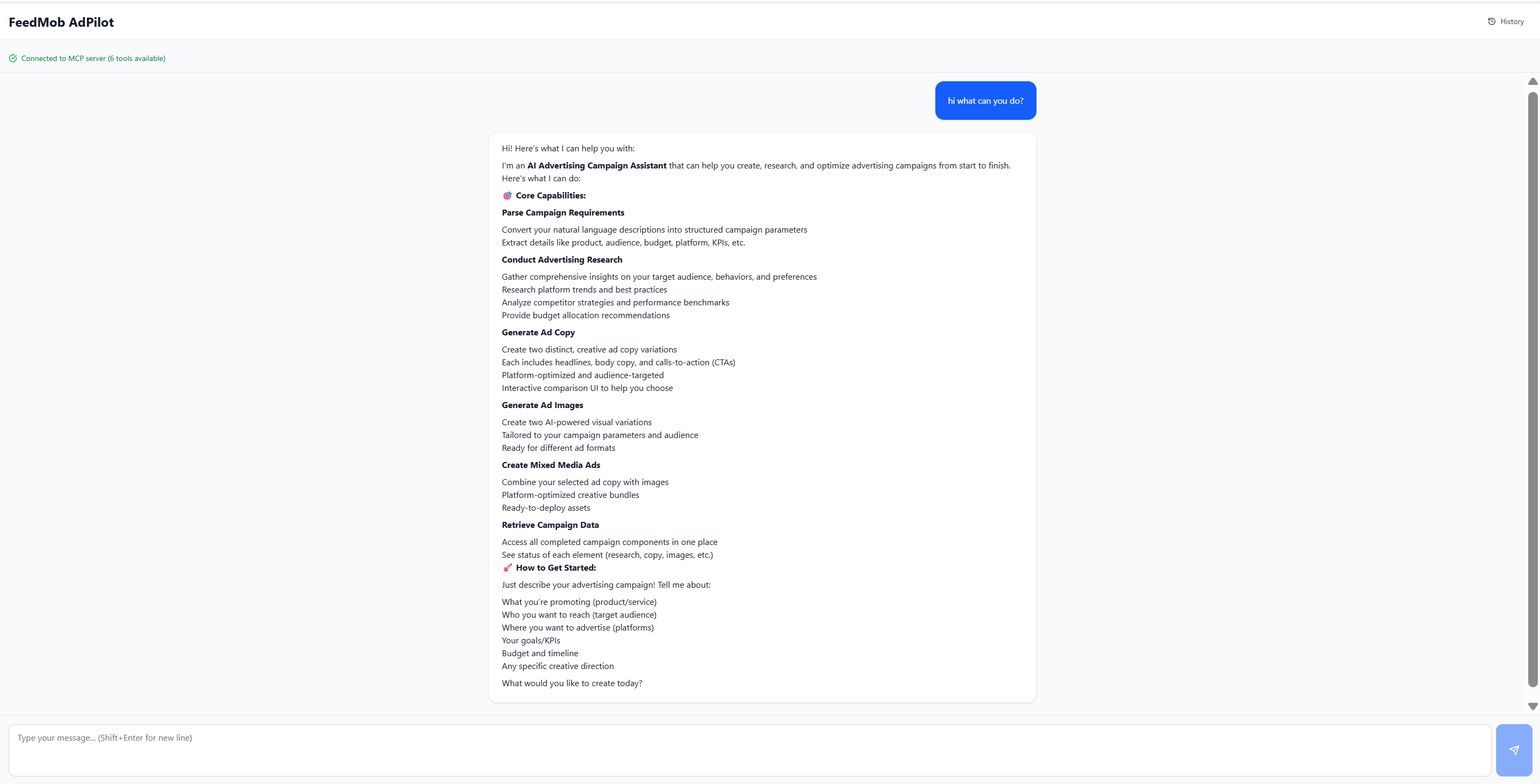
FeedMob AdPilot is a comprehensive MCP server that transforms natural language campaign descriptions into complete advertising assets through six core capabilities:
- Parse Ad Requirements: Extracts structured campaign parameters (product, audience, budget, platform, KPIs) from conversational input
- Conduct Ad Research: Generates comprehensive campaign reports with audience insights, competitor analysis, platform strategies, and performance benchmarks
- Generate Ad Copy: Creates two distinct, platform-optimized copy variations with headlines, body text, and CTAs
- Generate Ad Images: Produces multiple image variations with interactive selection interface
- Generate Mixed Media: Combines selected images and copy into complete creative assets
- Campaign Management: Stores and retrieves campaign data via PostgreSQL for persistence
The system presents all results through rich, interactive mcp-ui components that allow users to review, select, and refine outputs at each stage. A Next.js chat interface provides a conversational experience for the complete workflow.
How we built it
I leveraged Kiro IDE's full feature set to build this complex MCP server in a fraction of the time traditional development would require.
Development Approach
I used Kiro IDE's complete feature ecosystem in an integrated way:
Spec-Driven Development (10 Major Features)
I created formal specifications for each major feature with three documents:
requirements.md: User stories and acceptance criteriadesign.md: Architecture, schemas, and correctness propertiestasks.md: Implementation checklist
This provided complete traceability from requirements to code and enabled systematic implementation.
Steering Documents (7 Persistent Context Docs)
I created always-included steering docs that taught Kiro about:
- Technology stack and commands (
tech.md) - FastMCP integration patterns (
fastmcp-integration.md) - MCP-UI component creation (
mcp-ui-integration.md) - Claude Agent SDK patterns (
agent-tool-patterns.md) - Agent skill development (
claude-agent-skills.md) - UI design system (
color-guidelines.md)
These eliminated the need to repeat context in every conversation.
Agent Hooks (4 Automated Workflows)
- Security Pre-Commit Scanner: Scans every file edit for security issues
- MCP-UI Docs Checker: Ensures mcp-ui changes align with latest docs
- MCP Builder Skill Hook: Provides MCP-specific guidance when editing server files
- Agent Skills Builder: Helps create Claude Agent skills for new tools
MCP Integration (6 Servers)
fetch: External documentation and API specsexa: Code examples and best practicescontext7: Library documentation (FastMCP, Zod)sequential-thinking: Complex problem decompositionmcp-ui-docs: Always up-to-date mcp-ui documentationagent-skills: skill-creator and mcp-builder skills
Hybrid Vibe + Spec Approach
- Spec Mode for new features: Systematic, traceable implementation
- Vibe Mode for iterations: 10x faster bug fixes and adjustments
Tech Stack
- FastMCP + mcp-ui for the MCP server and interactive UI
- Claude Agent SDK with custom skills for AI processing
- TypeScript with Zod for type-safe validation
- PostgreSQL for campaign data persistence
- Vitest + fast-check for property-based testing
Challenges we ran into
Claude Agent SDK Authentication: Initial plugin loading had authentication issues. I worked around this by implementing a hybrid approach that falls back to embedded mode when plugins are unavailable.
Complex Multi-Stage Workflow: Maintaining context across six different tools required careful schema design. I used Zod schemas to ensure type safety and validation at each boundary.
Interactive UI State Management: Building rich mcp-ui components that maintain state and trigger tool calls required understanding the UIResource pattern deeply. Kiro's mcp-ui-docs MCP server was invaluable here.
Agent Skill Design: Creating effective agent skills that produce structured JSON output consistently required iteration. The skill-creator skill from agent-skills MCP server helped tremendously.
Database Schema Evolution: As features evolved, managing PostgreSQL migrations while maintaining backward compatibility required careful planning.
MCP-UI Chatbot Compatibility: During testing phase , discovered that some existing mcp-ui chatbots didn't work properly or had poor UX. This led to building a custom Next.js chat interface specifically designed for our workflow.
Production Deployment Issues: Encountered several critical production issues:
- Gateway timeout problems with long-running agent operations
- MCP tool call timeouts requiring optimization
- Docker container missing dependencies for image generation features
- Required implementing proper health checks and monitoring
Agent Processing Time: Research and copy generation agents sometimes took too long, requiring implementation of streaming responses and better user feedback during processing.
Accomplishments that we're proud of
Complete End-to-End Workflow: Built a production-ready system with 6 MCP tools, 6 agent services, 6 UI factories, and PostgreSQL persistence—all documented with 10 comprehensive specs.
Spec-Driven Traceability: Every line of code traces back to a requirement in the specs. Correctness properties became property-based tests.
Interactive UI Excellence: Created rich mcp-ui components with collapsible sections, side-by-side comparisons, interactive selection, and dark mode support.
Hybrid Development Approach: Successfully combined Spec mode for structured features and Vibe mode for rapid iterations, achieving both quality and velocity.
Production Deployment: Successfully deployed to production with Docker and Coolify:
- MCP Server: https://b8ggscok0gkgw848444gcokw.coolify-dev-pa.tonob.net/mcp
- Client UI: https://sc80sggw884kw448kc0sckw0.coolify-dev-pa.tonob.net/
- Includes health checks, monitoring, and proper error handling
Custom Chat Interface: Built a custom Next.js chat client specifically optimized for mcp-ui interactions when existing chatbots proved insufficient.
Comprehensive Documentation: Created detailed documentation including Quick Start guides, API references, usage examples, and deployment instructions.
Rapid Development: Completed the entire system from concept to production deployment in just 6 days using Kiro IDE's full feature set.
What we learned
Kiro's Power in Structured Development: Specs aren't just documentation—they become the blueprint for systematic implementation with full traceability.
Steering Docs Eliminate Repetition: Teaching Kiro once through steering docs saved countless hours of context repetition across conversations.
Agent Hooks for Quality: Automated workflows through hooks catch issues early and provide context-aware assistance exactly when needed.
MCP Extends Capabilities: Integrating external MCP servers (mcp-ui-docs, agent-skills, context7) was like having specialized teammates available 24/7.
Hybrid Vibe + Spec: Neither pure spec-driven nor pure vibe coding is optimal—the combination gives structure for complexity and speed for iterations.
MCP Architecture Patterns: Building with FastMCP + Claude Agent SDK + mcp-ui creates a powerful pattern: validated input → AI processing → interactive output.
Property-Based Testing: Defining correctness properties in specs naturally leads to better test coverage and more robust code.
Production Reality Check: Development and production are different beasts. Gateway timeouts, container dependencies, and tool call timeouts only appear in production—requiring iterative fixes and optimizations.
Custom UI Sometimes Necessary: While leveraging existing tools is ideal, sometimes building a custom solution (like our Next.js chat interface) is necessary when existing options don't meet specific UX requirements.
Rapid Iteration Wins: Kiro enabled moving from concept to production in 6 days—a timeline that would have been impossible with traditional development approaches.
What's next for FeedMob AdPilot
Immediate Priorities (Bug Fixes & Optimizations)
- Fix Gateway Timeout Issues: Optimize long-running agent operations to prevent timeout errors
- Resolve MCP Tool Call Timeouts: Implement better async handling and streaming responses
- Docker Image Generation Dependencies: Complete Docker container configuration for image generation features
- Performance Optimization: Reduce overall processing time for research and generation agents
Feature Roadmap
- Video Ad Generation: Extend to TikTok/Instagram Reels with AI-generated video content
- A/B Testing Integration: Track performance metrics and recommend winning variations
- Multi-Platform Campaigns: Optimize single campaigns across multiple platforms simultaneously
- Real-Time Analytics: Connect to advertising platforms for live performance data
- Template Library: Build a library of proven campaign templates by industry
- Collaboration Features: Multi-user workspace for creative teams
- API for Integration: REST API for integration with existing marketing tools
- Enhanced Storage: Implement comprehensive campaign versioning and history tracking
Built With
- amazon-web-services
- claude
- fast-check
- fastmcp
- kiro
- mcp-ui
- postgresql
- typescript
- vitest
- zod


Log in or sign up for Devpost to join the conversation.