-
-
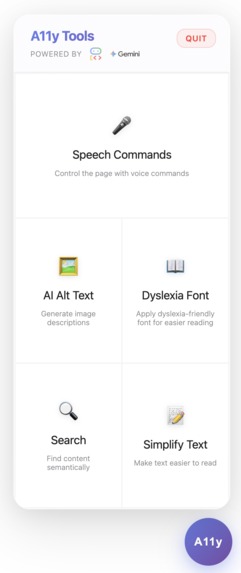
A11y Tools Main UI Screenshot
Inspiration
We recognize that there are millions of people with cognitive or physical impairments who would benefit greatly by tech that could aid in their perception and comprehension of web pages. A11y is an extension that that makes web pages more accessible to those with perceptive special-needs and other traits of neurodivergence.
What it does
Serving as a guide for neurodivergent people, A11y is an extension that can benefits these groups of people, but are not limited to these groups of people, with 5 main features : Speech Commands, AI Alt Text, CSS Adjust, Search, and Simplify Text. Features:
AI Alt Text - Complements the perception of sight. A user can use the extension to click on an image, and the image would be described in detail by to the user.
Simplify Text - Complements those with learning disabilities or young children. This feature changes a section of highlighted text's reading level to use simpler language.
Speech Commands - Complements those with limited mobility (such as those missing functional limbs) and allows them to interact with parts of the web page by recording their voice. This includes automatic Google Form detection, which triggers a script that seamlessly integrates the Speech-to-Instruction feature with Google Forms.
Search - Complements those with cognitive difficulties. A user can pair this feature with the typed user input to search for specific concepts or contents that appear in the current web page, and ask Search to show the user where the content is.
Dyslexia Font - Complements people with dyslexia. This feature replaces all text with a special font catered towards dyslexic people, allowing the text to be easily read.
How we built it
What are the specific benefits of using a loop and/or parallel agent architecture for your chosen use case? We are using a loop agent architecture to iterate through all input fields and submit button in a Google form. The input fields can be most types, including text, radio, checkbox, etc. - the LLM understands the user input and populates the fields automatically. This allows our agent to dynamically loop through the form after a page scrape instead of hard-coding the fields.
Which features in the ADK and/or A2A protocol did you use, and why were they critical to your agent's design and success? The main ADK features that were critical to our project were the multi-modal and streaming capabilities. The agent(s) can take text, images, or even recorded audio as input to run tools. Specifically, we used ADK's InMemoryRunner/LiveRequestQueue to stream recorded audio input to the Agent. Our target users for the Speech to Instruction feature are those who are unable to use a physical mouse or keyboard. Having the Agent accept recorded audio input (in addition to written text) to output an event the client would use to interact with the web page was a critical requirement for this feature in particular. These events were generated from generic Python functions used as tools in the ADK, which is a helpful abstraction. If the Agent fails, the extension falls back to native Chrome speech-to-text.
Challenges we ran into
A challenge we ran into when building this application was hitting Gemini API Quota limits. On the last night of the hackathon and the following morning, some of our agents would repeatedly throw API Quota errors (which was exacerbated by the streaming nature of the application). With this bug, some of our team members were reaching the limits of API calls to test our extension, which added to the challenges of the night. To avoid invoking the LLM during development, we attempted to use "before_agent_callback" and/or "before_model_callback" callback functions as per the Google ADK documentation to mock LLM responses when the application was running in development mode, but the callback function was never called. We suspect this is due to the streaming nature of Speech to Instructions.
An individual function that could have been fleshed out was the Search function. We wanted Search to move the text cursor to the specific area of the webpage that the user is searching for, but that proves difficult as it involved complex scraping of the html tags or natural language processing that we did not have the time to implement.
Accomplishments that we're proud of
We are proud of being able to integrate a lot of Google's technology such as building our own extension, Google Form integration, and using cutting-edge technology like Google's ADK.
We are very proud of our idea to make web pages more accessible using AI. Having an Agent perform tasks for a user levels the playing field for all. We also feel the utility of this project is not restricted to people with disabilities: using human language (written or spoken) to interact with an application is useful for anybody and is likely where Agentic AI is headed.
None of us had any experience with Google ADK/A2A or creating browser extensions before this hackathon, so we are proud we climbed such a steep learning curve in a very short time frame.
What we learned
Duc - While building out the functionalities of Search I learned that there can be really interesting ways to solve a problem with Search and Rankings that uses concepts from the NLP space, but sometimes a certain problem statement does not really need an overengineered solution, especially when there are time and budget constraints.
Abe - Working on this accessibility tools project was an incredible full-stack learning experience. We built everything from scratch - a Chrome extension with real-time audio streaming using Web Audio API and AudioWorklets, a FastAPI backend with Google's Agent Development Kit (ADK) integration, and five accessibility tools including speech commands, AI alt text generation, dyslexia-friendly fonts, semantic search, and text simplification. The biggest challenge was coordinating real-time PCM audio streaming between the browser and backend via Server-Sent Events, while managing agent sessions and handling API quotas with proper retry logic. I learned Chrome extension development with manifest v3, shadow DOM state management, and how to structure effective AI prompts for different accessibility use cases. This project taught me how to build complete systems that bridge many technologies - from browser audio APIs to Google's Gemini models - to create tools that genuinely help users with different accessibility needs navigate the web more effectively.
Remi - I had never even heard of Google ADK/A2A before the Shellhacks announcement email on Wednesday. I have experience developing Agentic applications with frameworks like LangChain/LangGraph, but this framework was completely new to me and had a bit of a skill curve, especially when streaming audio. Additionally, I had no idea how to create a browser extension going into this project. I also learned how to use Cursor, I had never tried it before Friday. I can confidently put these skills on my LinkedIn/resume now!
What's next for A11y
In its current state, the user must select the specific feature from the extension popup. Ideally, the user would simply describe the nature of their impairment, which would automatically configure the extension and backend Agent. The Agent would automatically get useful Sub-Agents to enhance the user experience. I.e., each of the independent Agents we developed in this project could be Sub-Agents the main Agent uses to perform tasks.
For example, if the user says they are blind, the backend might automatically add the Speech-to-Instruction Sub-Agent and the Image to Alt Text Sub-Agent to the Main Agent, and use audio input/output by default.
Built With
- agent-based
- css
- fastapi
- gemini
- google-cloud-ai
- googleadk
- html
- javascript
- python
- restapi


Log in or sign up for Devpost to join the conversation.