-
-
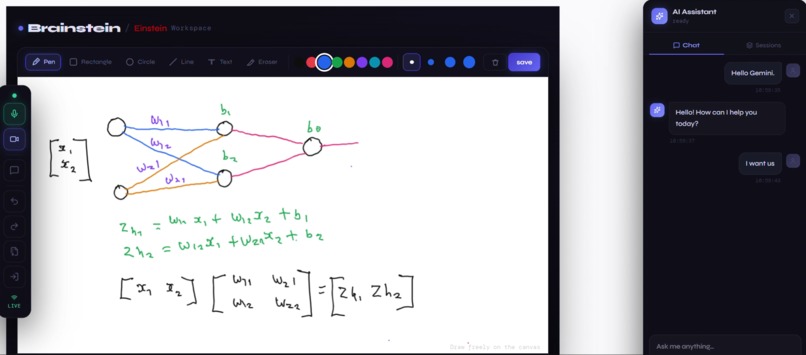
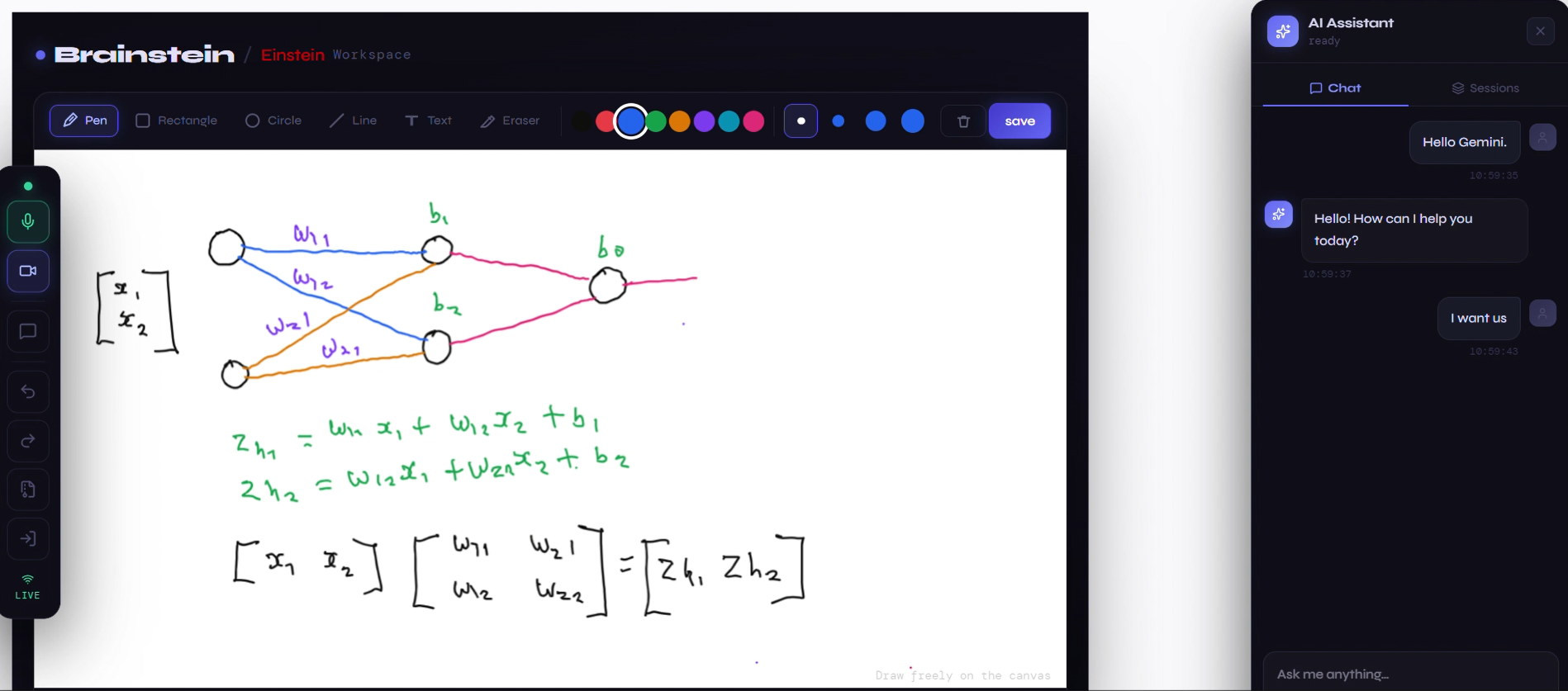
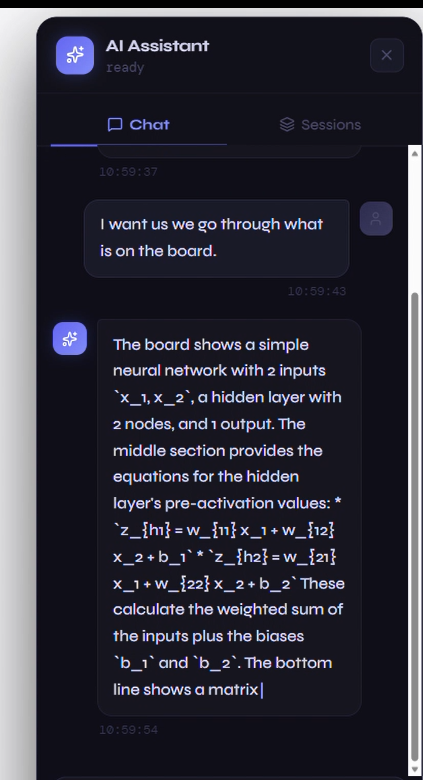
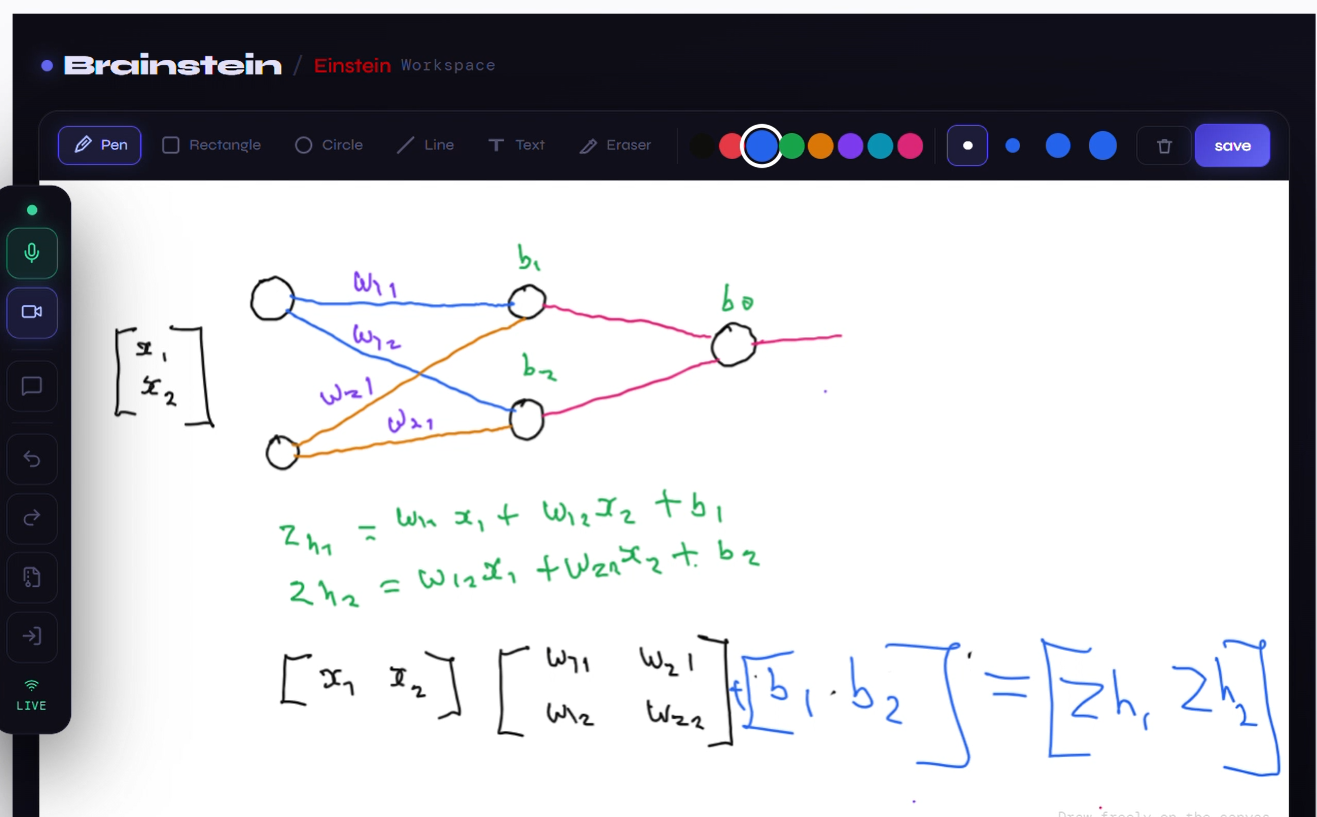
the ai analyzes and explains what is on the board
-
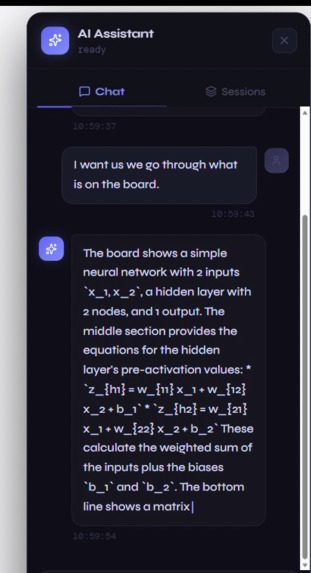
user and ai transcripts are displayed on a chat area
-
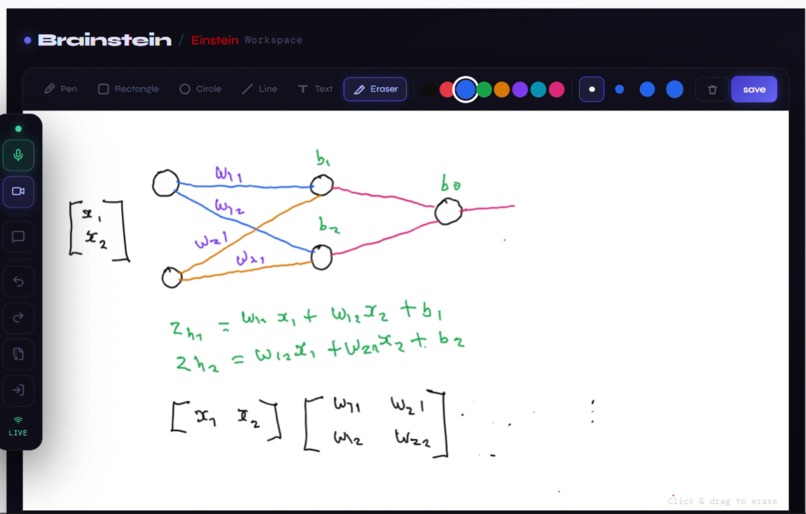
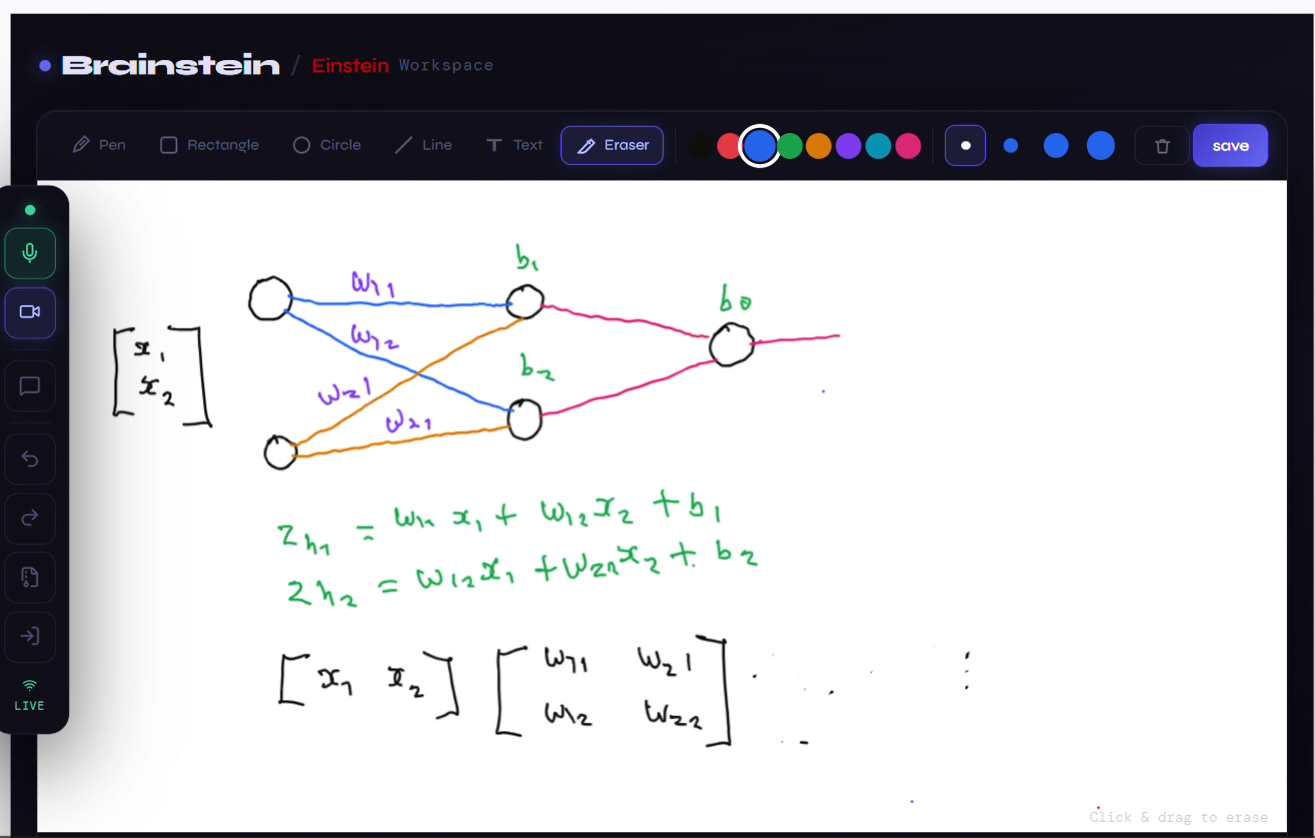
it spots an error and tells explains how to correct
-
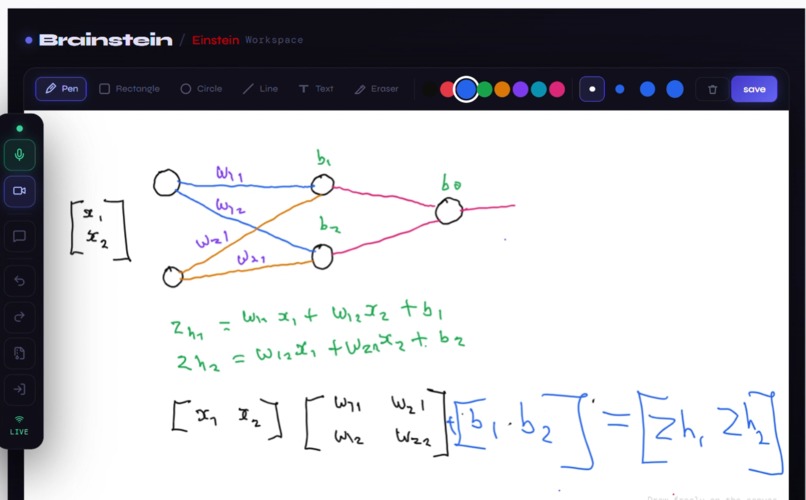
confirms correction and explains what next after this
-
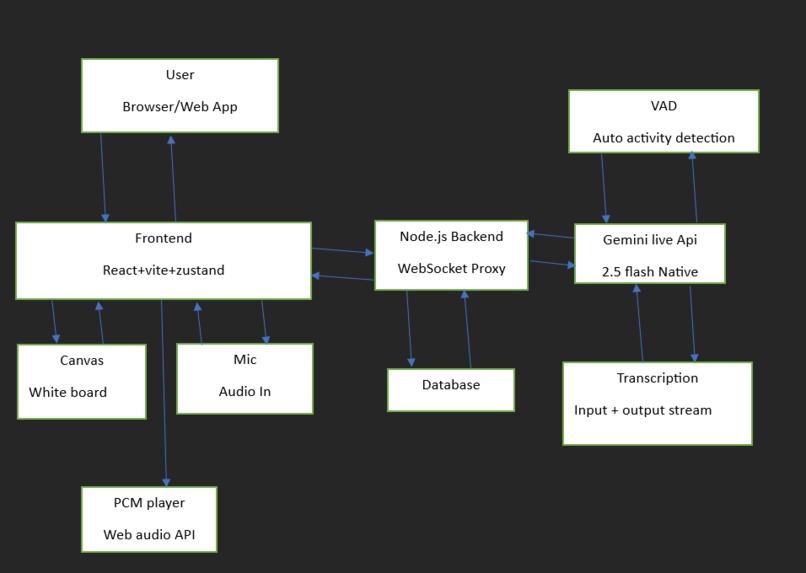
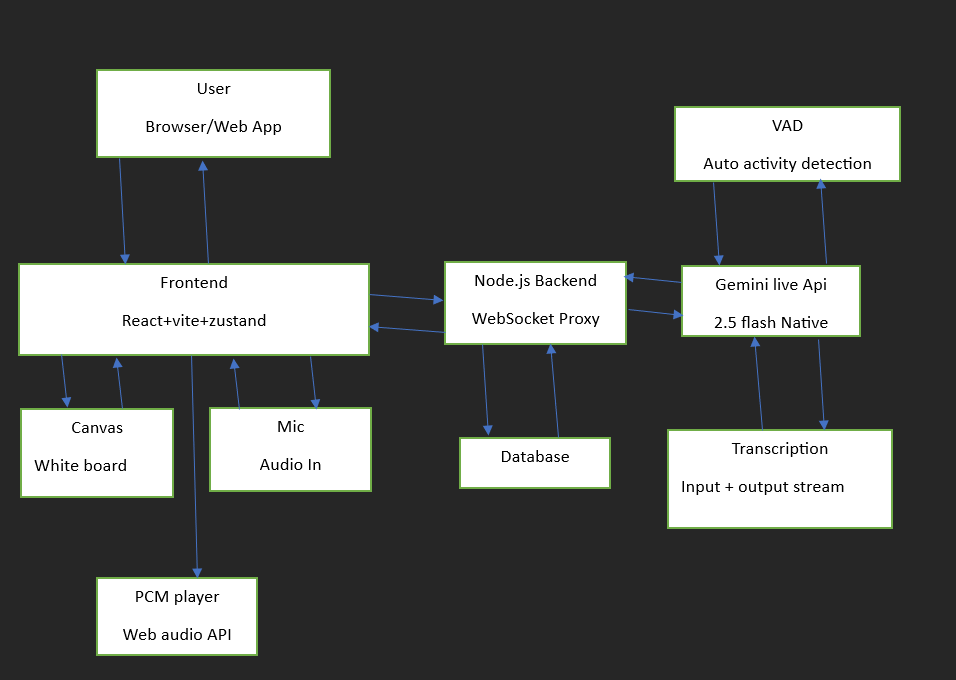
system flowchart
Brainstein — Project Story
Inspiration
It started with a sketchbook, a pencil, and a two-layer neural network.
I was trying to understand how a neural network learns to solve the XOR problem — one of those foundational exercises every ML student goes through. I was sketching out the math by hand: the forward pass, the loss, the backpropagation gradients flowing back through each layer.
Forward pass through a 2-layer network:
$$z^{[1]} = W^{[1]}X + b^{[1]}, \quad a^{[1]} = \sigma(z^{[1]})$$
$$z^{[2]} = W^{[2]}a^{[1]} + b^{[2]}, \quad \hat{y} = \sigma(z^{[2]})$$
Loss (Binary Cross-Entropy):
$$\mathcal{L} = -\frac{1}{m} \sum_{i=1}^{m} \left[ y^{(i)} \log \hat{y}^{(i)} + (1 - y^{(i)}) \log(1 - \hat{y}^{(i)}) \right]$$
Backpropagation:
$$dW^{[2]} = \frac{1}{m} \, dz^{[2]} \cdot a^{[1]T}, \quad dW^{[1]} = \frac{1}{m} \, dz^{[1]} \cdot X^{T}$$
I had made mistakes — wrong shapes in the matrix multiplications, a sign error in the gradient, a misunderstanding of how $\delta$ flows back through the activation. But I didn't know that. My sketchbook had no way to tell me. So I translated my flawed sketch into code, ran it, and got nonsense. I spent hours debugging code that was never going to work — because the real bug was in the sketch.
That moment stuck with me. What if my sketchbook could see what I was drawing and just tell me where I went wrong?
That thought became Brainstein.
What it does
Brainstein is a real-time AI-powered smart whiteboard assistant that watches what you draw and listens to what you say — then responds through voice and live transcription.
You open the board and start working: sketching a system architecture, deriving an equation, designing a UI layout, or mapping out a concept. Every 3 seconds, Brainstein captures what is on the board and streams it to Gemini alongside your microphone audio. The AI sees your work in progress, understands the context, and speaks back — pointing out errors, explaining concepts, suggesting better approaches, or simply thinking alongside you.
It supports three modes of interaction simultaneously:
- Canvas vision — Gemini continuously watches the whiteboard through JPEG snapshots streamed every 3 seconds
- Voice conversation — speak naturally and Gemini responds in synthesized audio with no push-to-talk required
- Text chat — type messages that are grounded in the visual context of the current board state
Everything the AI says is transcribed live into a streaming chat history panel, so you can follow the conversation visually even while listening.
How we built it
Brainstein is a full-stack real-time application built entirely solo.
Architecture
Frontend — React + Vite with an HTML5 Canvas whiteboard. Canvas snapshots are captured as JPEG every 3 seconds. Microphone audio is captured as raw PCM at 16kHz via the Web Audio API. Both streams are sent over a WebSocket connection to the backend. Zustand manages global state including chat history, audio playback, and connection status.
Backend — A Node.js WebSocket server acting as a proxy between the browser and the Gemini Live API. It uses the official @google/genai SDK to maintain a persistent bidirectional session with Gemini, routing audio frames, video snapshots, and text in — and streaming PCM audio chunks and transcripts back out to the client.
Gemini Live API — The intelligence layer. The model gemini-2.5-flash-native-audio-preview receives the canvas stream and mic audio simultaneously, processes them in real time, and responds with synthesized voice at 24kHz alongside streaming transcriptions.
Audio Pipeline
Mic → MediaRecorder → PCM Int16 → base64 → WebSocket → Gemini (16kHz)
Gemini → PCM base64 chunks → WebSocket → AudioContext buffer queue → playback (24kHz)
Chunks are not played individually as they arrive — they are appended to a scheduled AudioContext buffer timeline so playback is seamless and gapless even as new chunks stream in.
Voice Activity Detection
Gemini's built-in VAD handles end-of-speech detection automatically:
realtimeInputConfig: {
  automaticActivityDetection: {
    startOfSpeechSensitivity: 'START_SENSITIVITY_HIGH',
    endOfSpeechSensitivity:   'END_SENSITIVITY_HIGH',
    silenceDurationMs:        500,
  }
}
Speak, pause, and Brainstein responds — no buttons, no push-to-talk.
Challenges we ran into
Response modality constraints — The native audio model does not support TEXT as a response modality. Getting text transcriptions required enabling outputAudioTranscription and inputAudioTranscription separately in the session config — a non-obvious distinction that cost hours of debugging.
The dual drain problem — Audio responses arrive as a continuous stream outside of formal turns. A single message handler was not enough. The solution required two parallel loops: a handleTurn() promise for structured text conversations, and a persistent drainInterval that continuously drains the response queue for real-time audio chunks that would otherwise pile up and never reach the client.
Transcript fragmentation — Transcription messages arrive as tiny fragments rather than complete sentences. The Zustand store had to accumulate and append each chunk token-by-token, only finalising the display text on turn_complete.
API key security — Calling the Gemini Live API directly from the browser exposes the key in client-side code. This required rearchitecting into a server-side proxy — which also unlocked better message routing and stream control.
Building solo under time pressure — Every layer of this stack — frontend, backend, audio pipeline, WebSocket protocol, state management, and UI — was built by one person. Knowing what to cut and when to stop polishing was its own discipline.
Accomplishments that we're proud of
- Truly seamless multimodal streaming — audio, video, and text all flowing simultaneously in a single live Gemini session with no perceptible lag
- Gapless PCM audio playback — smooth, continuous voice responses with no stutters even as chunks stream in asynchronously over WebSocket
- Token-by-token transcript streaming — the chat history fills in live as Gemini speaks, character by character
- A genuine origin story — Brainstein was not built to show off a technology. It was built to solve a problem I personally experienced, and it actually solves it
- Clean frontend architecture — zero AI libraries on the client side; all intelligence flows through the backend proxy keeping the frontend lightweight and fast
What we learned
- Multimodal streaming APIs require a fundamentally different mental model — you are not making requests and waiting for responses, you are managing continuous event streams, message queues, and turn state in parallel
- Audio is a deep rabbit hole — PCM encoding, sample rates, buffer scheduling, and gapless playback are each their own domain with real depth
- The best project ideas come from real frustration — Brainstein was not brainstormed in a session. It was remembered from a specific night when a sketchbook could not talk back
- Documentation deserves slow reading — many of the hardest bugs came from assumptions about the API that a careful read of the spec would have corrected in minutes
- A backend proxy is more than a security layer — it unlocked message filtering, stream splitting, and per-type routing that would have been impossible in a direct browser-to-API connection
What's next for A space where thinking evolves with AI
- Equation error detection — automatically identifying mathematical mistakes on the board and highlighting them visually before the user even asks
- Annotation overlay — Brainstein draws directly on the canvas to mark errors, label components, or suggest corrections in real time
- Session replay — record and replay a full board + voice session for later review or sharing with a teacher
- Google Cloud deployment — hosting the backend on Cloud Run for public, scalable access
- Multi-user collaboration — shared boards where a tutor and student work together with Brainstein as an always-on AI teaching assistant
- Subject-aware modes — specialised system prompts for mathematics, software architecture, physics, and design to give sharper, more targeted feedback per domain
Brainstein was built because a sketchbook couldn't tell me my matrix dimensions were wrong. Now it can.
Built With
- audio
- express.js
- fabric.js
- gemini
- gemini-live-api
- lucide
- mediarecorder
- node.js
- sdk
- tailwind
- vite
- web
- websocket
- zustand


Log in or sign up for Devpost to join the conversation.