A.R.I.A. — Academic Resource Intelligence Assistant
Inspiration
Navigating university is overwhelming. Students constantly context-switch between Canvas to check grades, Rate My Professors to vet instructors, messy PDF degree audits to plan prerequisites, and LinkedIn to hunt for internships. Each task lives in a separate tab, a separate login, a separate mental model. We wanted to collapse all of that into a single, voice-first interface — an AI that doesn't just fetch links, but actually talks to you, understands your academic situation, and shows you exactly what you need on screen. Inspired by J.A.R.V.I.S. from Iron Man, we set out to build A.R.I.A. — an Academic Resource Intelligence Assistant that feels like having a brilliant advisor available 24/7.
What it does
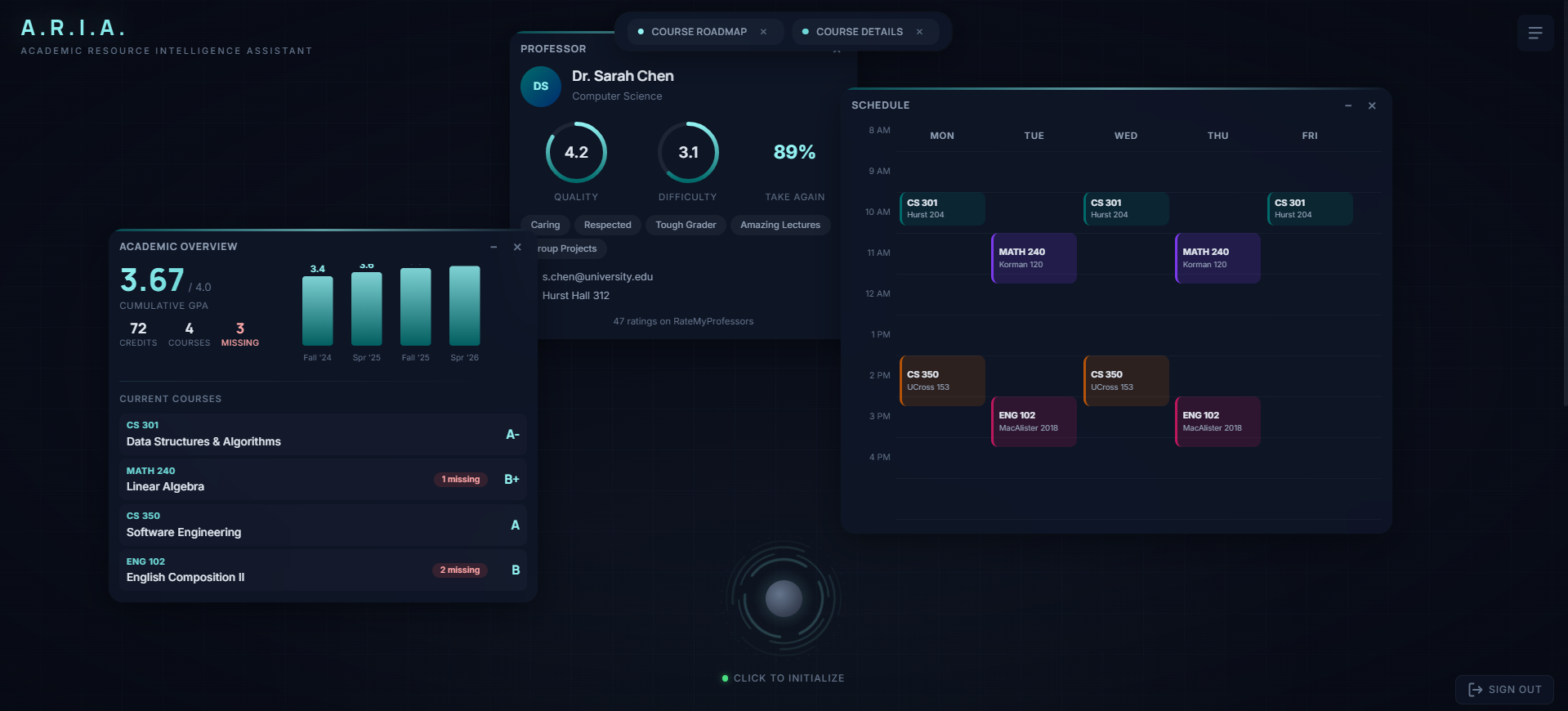
A.R.I.A. is a real-time, voice-activated AI assistant for university students. You speak to her naturally — "How are my grades looking?" or "Find me a data science internship" — and she responds out loud with personalized advice. But she's not just a voice. While she speaks, she dynamically materializes interactive widgets on a dark, glassmorphic HUD canvas:
- Academic Overview — your cumulative GPA trend chart, current courses with letter grades, and flagged missing assignments, all pulled live from Canvas LMS.
- Degree Roadmap — a directed acyclic graph of your entire degree path with prerequisite edges, completion status, and clickable wildcard elective slots you can fill by browsing real course options. Exportable to PDF for advisor meetings.
- Course Details — a focused card for any course in the catalog, found via natural language semantic search ("courses about machine learning").
- Professor Ratings — quality, difficulty, would-take-again percentage, and top student tags sourced from Rate My Professors.
- Job Listings — live internship and job postings with company, salary, tech stack, and apply links from TheirStack.
Everything is voice-driven. A.R.I.A. decides which tools to call, fetches the data, narrates a concise summary, and renders the right widget — all in a single conversational turn.
How we built it
Custom AI Agent Pipeline
At the core of A.R.I.A. is a custom-built agentic pipeline — not an off-the-shelf chatbot framework. We wrote the entire orchestration layer from scratch:
Voice In — ElevenLabs Scribe v2 Realtime runs client-side for real-time speech-to-text using voice activity detection (VAD) with auto-commit. Committed transcripts are sent to the backend over a persistent WebSocket with exponential backoff reconnection (capped at 8 seconds, up to 3 retries).
Reasoning & Tool Calling — Google Gemini 2.5 Flash receives the conversation history and decides, autonomously, whether to call one or more tools before responding. We explicitly disabled automatic function calling and implemented our own multi-round tool execution loop (up to 5 rounds) that supports chained tool calls — the AI can call a tool, inspect the result, and decide to call another tool in the same turn. We cap output at 250 tokens to force concise, advisor-style responses rather than LLM monologues.
Custom Tool Suite — We built five purpose-built tools that the AI can invoke through Gemini's function-calling interface. Each tool wraps a custom scraper or data pipeline we wrote ourselves:
get_canvas_courses— hits the Canvas LMS REST API to pull live grades, scores, and late assignment stats.lookup_professor— queries the Rate My Professors GraphQL API to retrieve ratings, difficulty, tags, and review counts.search_job_listings— calls the TheirStack jobs API with title and technology filters to find relevant postings.get_cs_degree_roadmap— loads a hand-built degree prerequisite graph (JSON DAG with 40+ nodes) and dynamically populates wildcard elective slots with real course options from the catalog using semantic search (e.g., "CS Elective" triggers a RAG query for upper-level CS courses).search_available_courses— a RAG pipeline we built using sentence-transformers (all-MiniLM-L6-v2) and NumPy. All 1,138 courses in the university catalog are embedded into 384-dimensional vectors offline. At query time, the student's natural language question is encoded and matched via cosine similarity usingnp.argpartitionfor efficient top-k retrieval — no SQL filters, just pure semantic search.
Voice Out — Gemini's text response is split at sentence boundaries using regex and streamed sentence-by-sentence to ElevenLabs TTS (
eleven_flash_v2_5, voice: Alice) over a second WebSocket. We use an adaptive chunk length schedule of[80, 120, 200, 260]— smaller chunks early for ~75ms time-to-first-byte, larger chunks later for efficiency. Audio chunks are base64-encoded and forwarded to the browser in real time via the main WebSocket, so the student hears A.R.I.A. speaking as she thinks. Sentence-level batching ensures natural prosody rather than the choppy output you get from naive token-level streaming.Widget Selection & Rendering — After tool execution, a resolution step picks which result to display. When a single tool type was called, we use the last result. When multiple distinct tools fired in one turn, we make a second Gemini call to select the most relevant widget — preventing widget spam while preserving all tool data in the transcript. The selected result is formatted into a structured widget payload and sent to the frontend as a single
{"type": "widget", ...}message.
Frontend
The frontend is a single-page React 19 + TypeScript app built with Vite. The entire UI is custom — no component libraries. Key design decisions:
- Glassmorphic HUD Canvas — Dark theme with a JARVIS-inspired background grid and vignette. Every panel uses backdrop blur, translucent borders, and soft glow effects.
- Draggable Widgets — Pointer capture for smooth drag behavior. Widgets auto-place into a 3×2 grid zone system with ±20px random jitter to break visual symmetry. Z-index increments on focus so the active widget is always on top. A collapsible WidgetDock at the bottom lets you minimize and restore widgets.
- Voice Orb — The central interaction element is an SVG arc-reactor with 4 concentric rotating ring layers (38–56px radii), a teal-to-cyan gradient, and a radial glow core. It acts as a state machine:
inactive→idle(breathing animation) →listening(pulse) →processing(overdrive). Partial transcripts preview above the orb as you speak. - Streaming Audio Playback — We use the MediaSource Extensions API to concatenate incoming MP3 chunks into a seamless audio stream. Base64 chunks are decoded to
Uint8Arrayand appended to aSourceBuffer, withupdateendevent handling to prevent buffer overrun. Audio starts playing on the first received chunk. - Degree Roadmap Visualization — A topological layering algorithm (
computeLayers) assigns each course a depth equal to 1 + max(prerequisite depths). Courses render as color-coded nodes (teal for completed, amber for wildcard electives, blue for available) connected by prerequisite edges. Wildcard nodes expand into dropdowns populated by the RAG pipeline. The entire roadmap is exportable to PDF via html2canvas + jsPDF. - Authentication — Supabase Auth with a React context provider (
useAuthhook). The login screen gates all functionality; session state is reactive to sign-in/out events.
WebSocket Protocol
All communication flows over a single persistent WebSocket. We defined a typed message protocol to multiplex five concurrent data streams:
| Direction | Type | Purpose |
|---|---|---|
| Frontend → Backend | transcript |
Committed STT text |
| Backend → Frontend | text |
Streaming LLM response chunks |
| Backend → Frontend | audio |
Base64 TTS audio chunks |
| Backend → Frontend | tool_call |
Tool invocation metadata |
| Backend → Frontend | tool_result |
Tool execution results |
| Backend → Frontend | widget |
Structured widget payload |
| Backend → Frontend | done |
Turn completion signal |
Challenges we ran into
Real-time stream synchronization was the hardest engineering problem. We had to orchestrate four concurrent async streams — incoming STT transcripts, streaming Gemini responses, outbound TTS audio chunks, and widget JSON payloads — all over a single WebSocket connection. Widgets needed to appear on screen at the exact moment A.R.I.A. started talking about them, which required careful async sequencing in the Python pipeline.
Gemini's tool-calling quirks cost us hours. We discovered that Gemini 2.5 Flash silently drops tool calls when the system prompt contains response templates or formatting instructions. The fix was to disable automatic function calling entirely and build our own detection-and-execution loop — more code, but 100% reliable tool invocation.
Building the RAG course search was non-trivial. We scraped the entire 1,138-course catalog into SQLite, generated 384-dimensional embeddings for every course using all-MiniLM-L6-v2, and had to tune the retrieval to return genuinely relevant results across departments. The challenge was building a text representation per course (code + name + description + professor + credits) that captured enough semantic signal for cross-departmental queries like "courses about data visualization" to surface results from CS, Math, and Art departments.
TTS prosody was surprisingly tricky. Naively streaming tokens to TTS produced choppy, unnatural speech with mid-word breaks. We solved this by buffering complete sentences (splitting on [.!?] boundaries) before sending to ElevenLabs, with flush logic to ensure no orphaned text lingers if the response ends mid-sentence. The adaptive chunk schedule ([80, 120, 200, 260]) balances latency against audio quality.
MediaSource API edge cases required careful handling — buffer overrun from rapid chunk arrival, autoplay policies blocking first playback, and graceful degradation when MSE isn't available. The updateend event-driven append queue solved the concurrency issues.
Accomplishments that we're proud of
We're incredibly proud that talking to A.R.I.A. feels completely natural — the voice latency is low enough (~75ms TTFB) that the conversation flows without awkward pauses. The custom agent pipeline reliably picks the right tool for each question and chains tools together when needed, up to 5 rounds deep.
The UI is stunning: widgets glide onto the canvas with glassmorphic blur effects, the arc-reactor orb pulses with state through 4 animated SVG ring layers, and the degree roadmap DAG with clickable elective pickers is genuinely interactive and exportable to PDF. All of this with zero external UI component libraries — every pixel is hand-crafted.
The semantic course search is a standout. You can ask "what courses teach me about neural networks?" and get relevant results from across departments, because we're matching on meaning, not keywords. The wildcard elective system that automatically populates real course options into the degree roadmap is something we haven't seen in any existing advising tool.
Most importantly, this is a tool we would actually use — it solves a real, daily pain point for every student.
What we learned
We learned how to architect an asynchronous, event-driven backend around WebSockets using FastAPI, coordinating multiple external API calls and audio streams concurrently. We gained deep hands-on experience with LLM function calling — specifically prompt engineering Gemini to reliably call the right tool, interpreting structured results, and implementing multi-round tool execution loops with manual function-call detection.
Building the RAG pipeline taught us about embedding models, vector similarity search, and the tradeoffs between semantic retrieval and traditional SQL filtering. We learned that the text representation you embed matters as much as the model — concatenating course code, name, description, professor, and credits into a single string gave dramatically better results than embedding descriptions alone.
On the frontend, we learned how to build a real-time streaming UI that renders data the instant it arrives using MediaSource Extensions, rather than waiting for full responses. We also learned the nuances of pointer capture for smooth dragging, SVG animation state machines, and grid-zone placement algorithms that make auto-layout feel organic rather than robotic.
The biggest meta-lesson: building a real-time voice AI is 20% LLM work and 80% plumbing. The hard part isn't getting Gemini to answer questions — it's synchronizing audio streams, managing WebSocket lifecycle, handling browser autoplay policies, and making the whole thing feel instantaneous.
Built With
| Technology | Purpose |
|---|---|
| React 19 | Frontend UI framework — no external component libraries |
| TypeScript | Type-safe frontend development |
| Vite 5 | Dev server with WebSocket/API proxy to backend |
| FastAPI | Python backend HTTP + WebSocket server |
| Google Gemini 2.5 Flash | Core LLM for reasoning, conversation, and autonomous tool calling |
| ElevenLabs Scribe v2 | Real-time client-side speech-to-text (STT) with VAD |
| ElevenLabs Flash v2.5 | Streaming text-to-speech via WebSocket (voice: Alice) |
| Supabase | User authentication and session management |
| sentence-transformers | Embedding model (all-MiniLM-L6-v2, 384-dim) for course catalog RAG |
| NumPy | Cosine similarity vector search over 1,138 course embeddings |
| Canvas LMS API | Live student grades, course enrollment, and assignment data |
| Rate My Professors GraphQL | Professor ratings, difficulty, tags, and reviews |
| TheirStack API | Job and internship listing search with tech stack filters |
| SQLite | Local course catalog database (1,138 courses) |
| WebSockets | Bidirectional real-time communication (frontend ↔ backend ↔ TTS) |
| MediaSource Extensions | Seamless client-side MP3 streaming and concatenation |
| html2canvas + jsPDF | Degree roadmap PDF export |
| Python 3.12 (uv) | Backend runtime and dependency management |
Built With
- canvas
- elevenlabs
- fastapi
- gemini
- numpy
- python
- react
- sqlite
- supabase
- theirstack
- typescript
- websockets


Log in or sign up for Devpost to join the conversation.