-
-
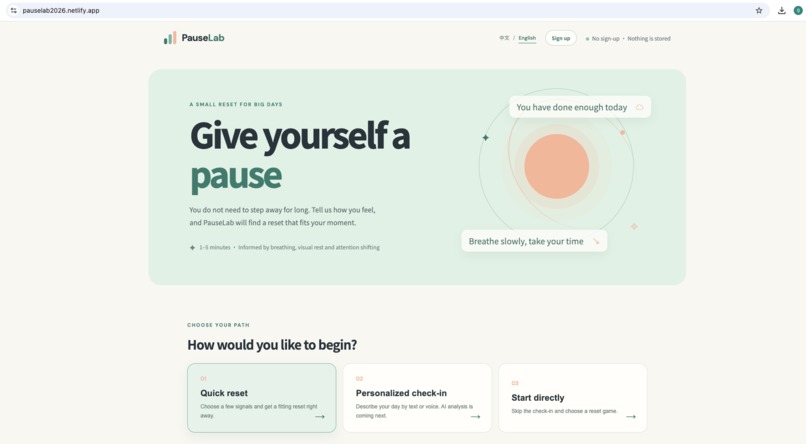
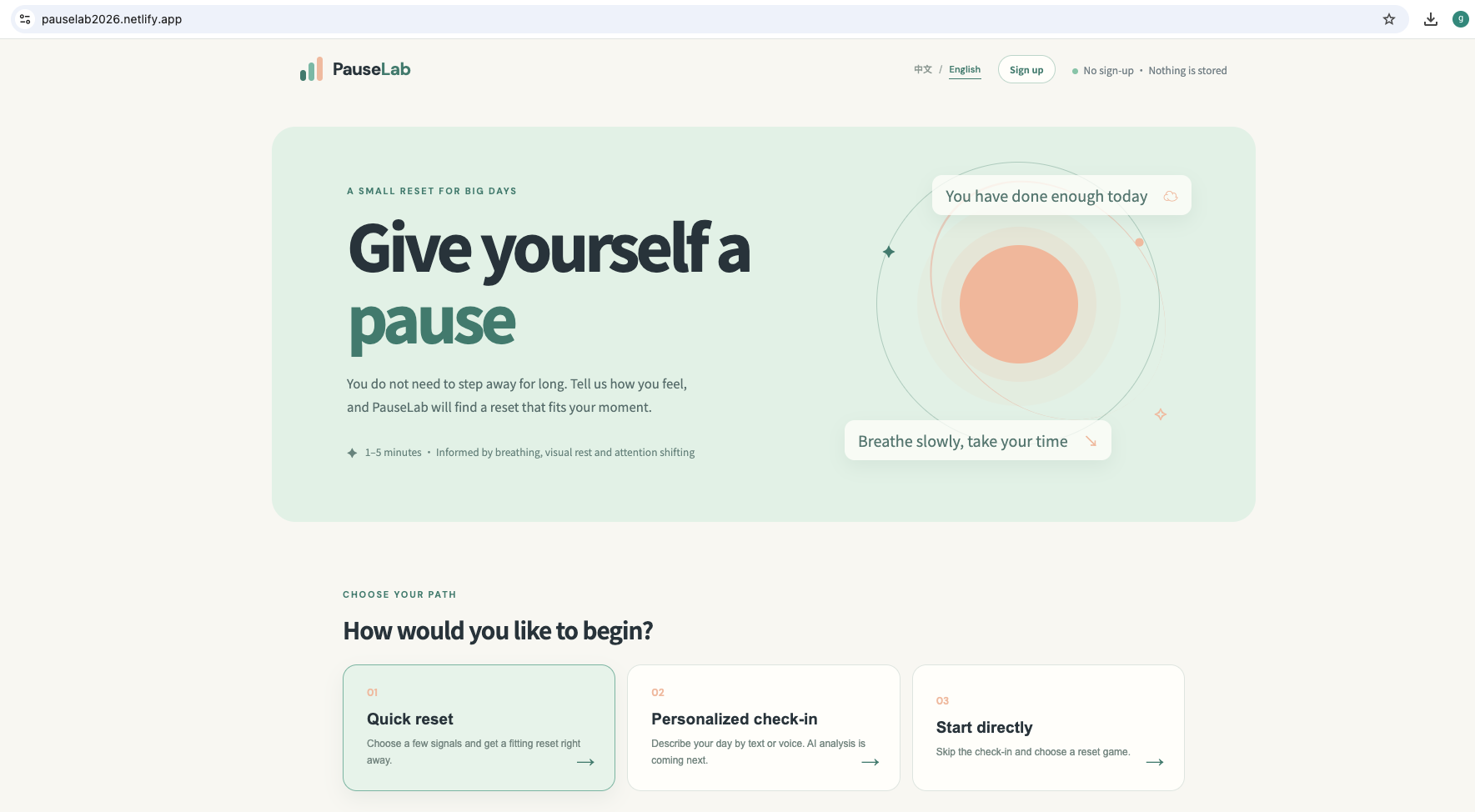
Landing Page – Start without signing up and choose your relaxation path.
-
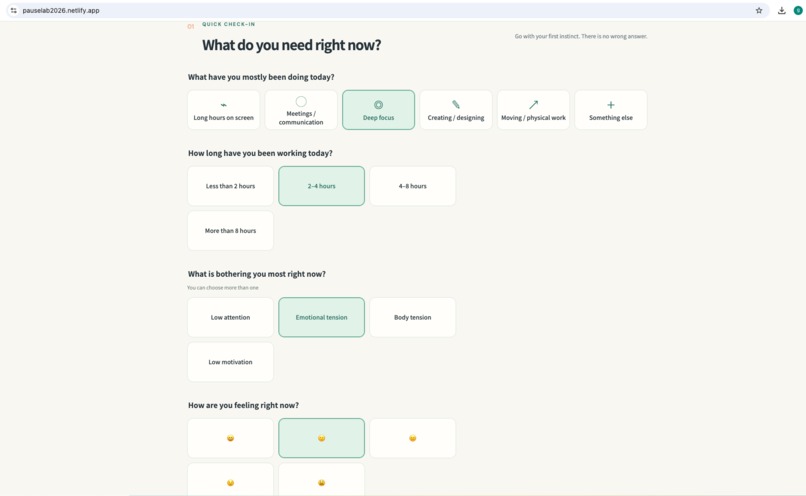
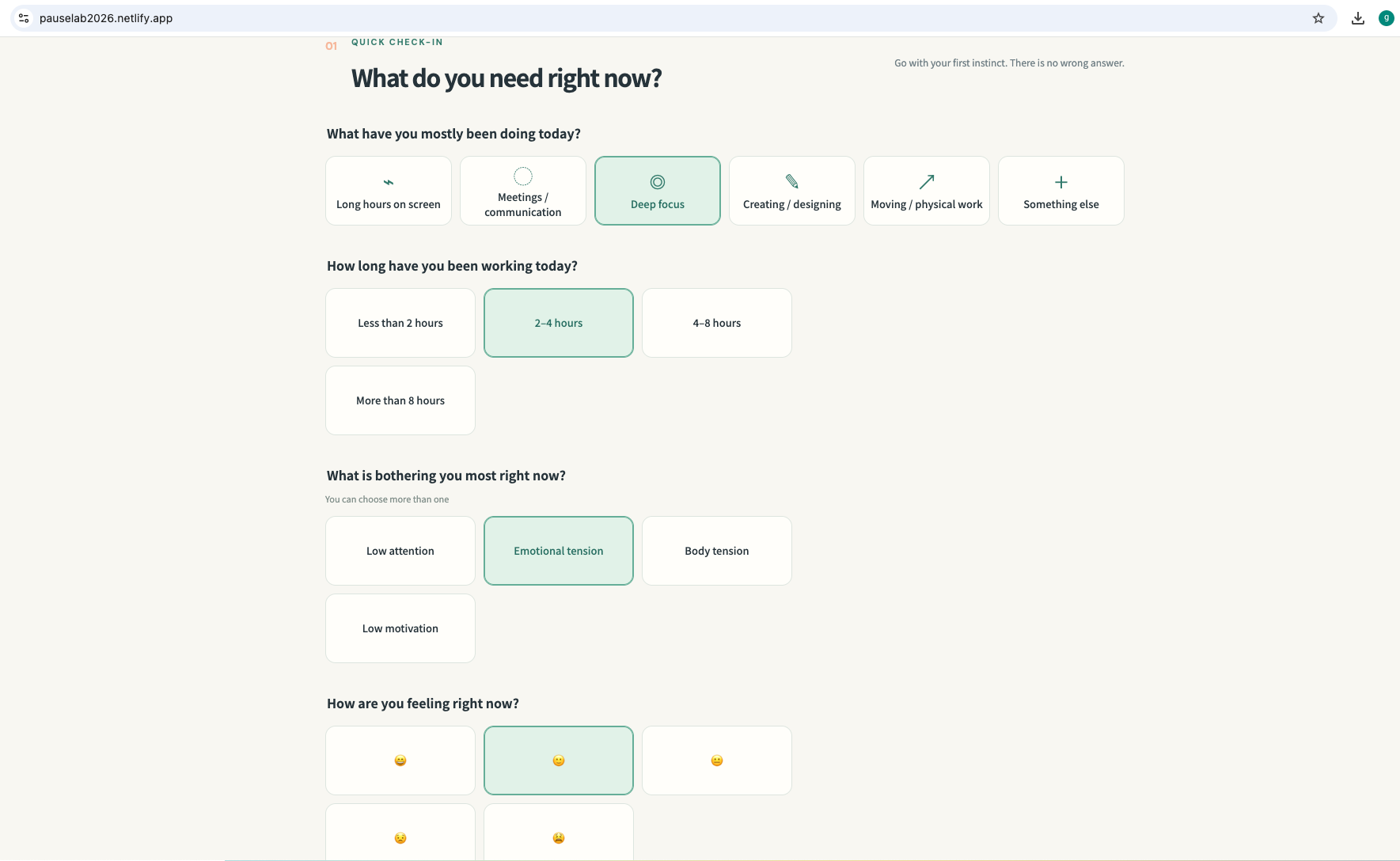
Quick Check-in – A 30-second assessment to understand your current state.
-
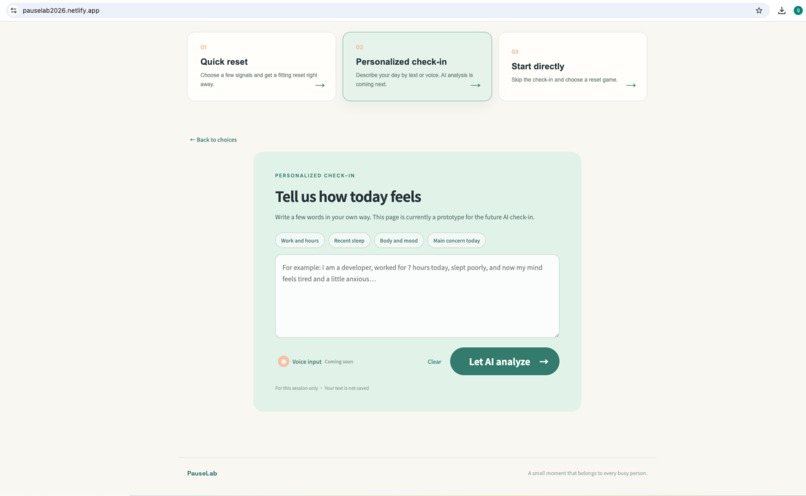
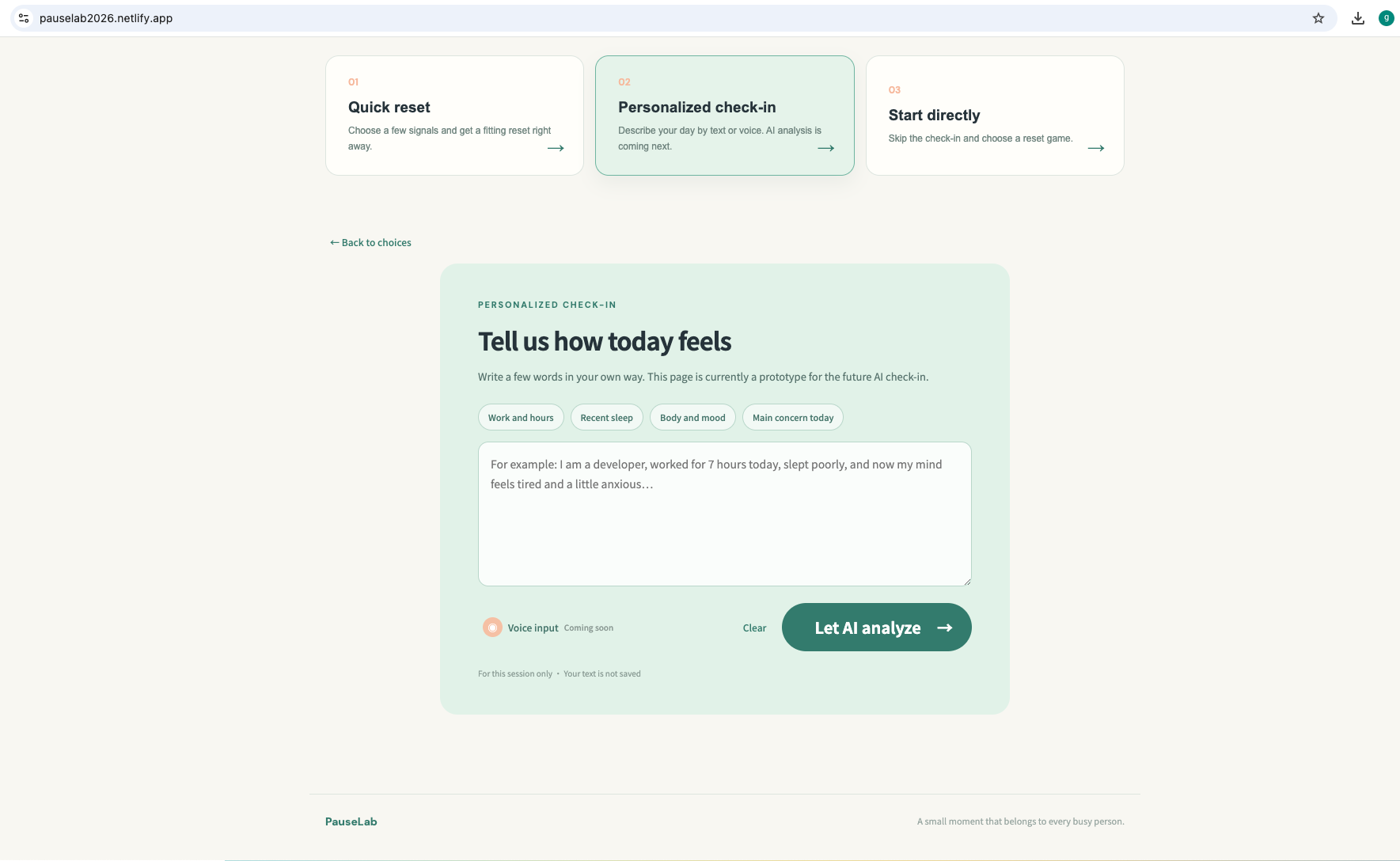
AI Analysis – Describe your day in your own words and receive personalized recommendations.
-
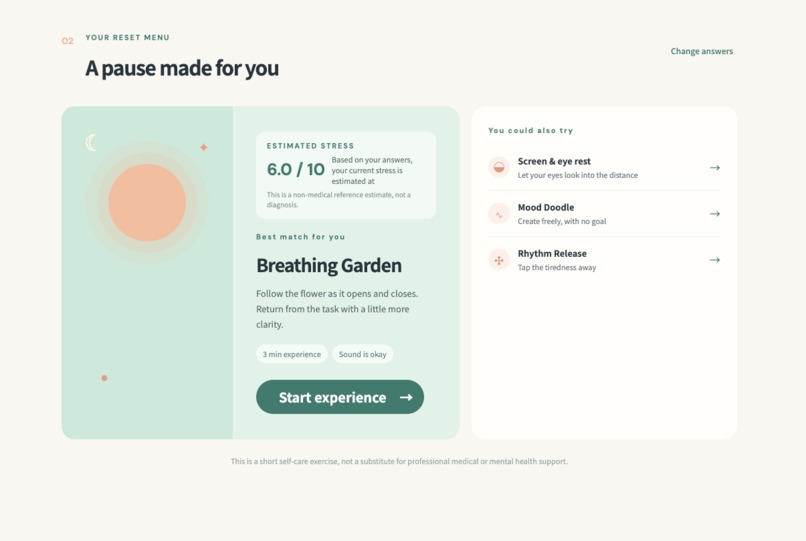
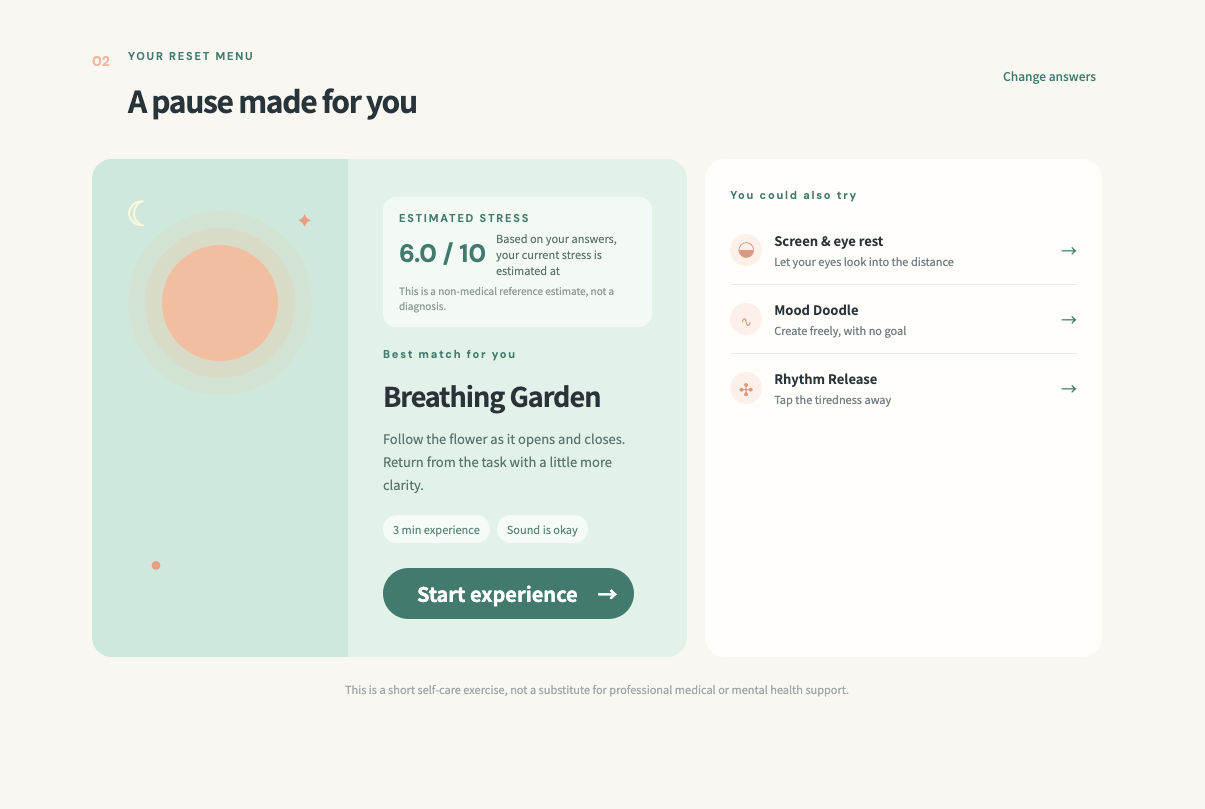
AI Recommendation – PauseLab recommends a relaxation activity based on your stress profile.
-
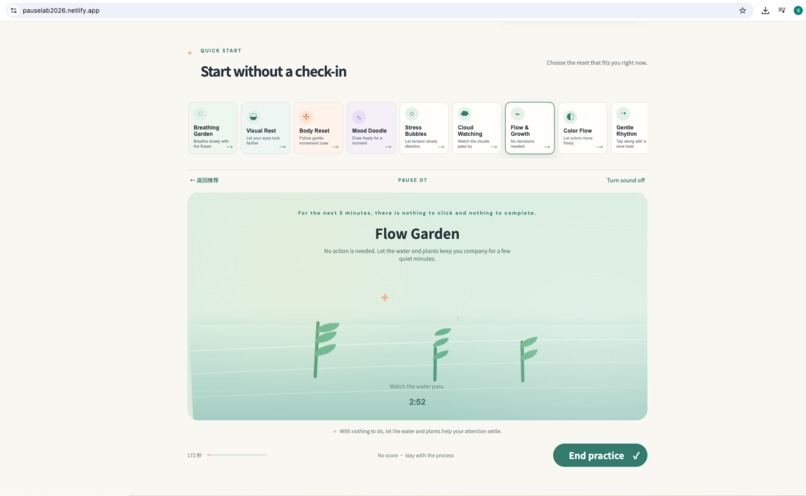
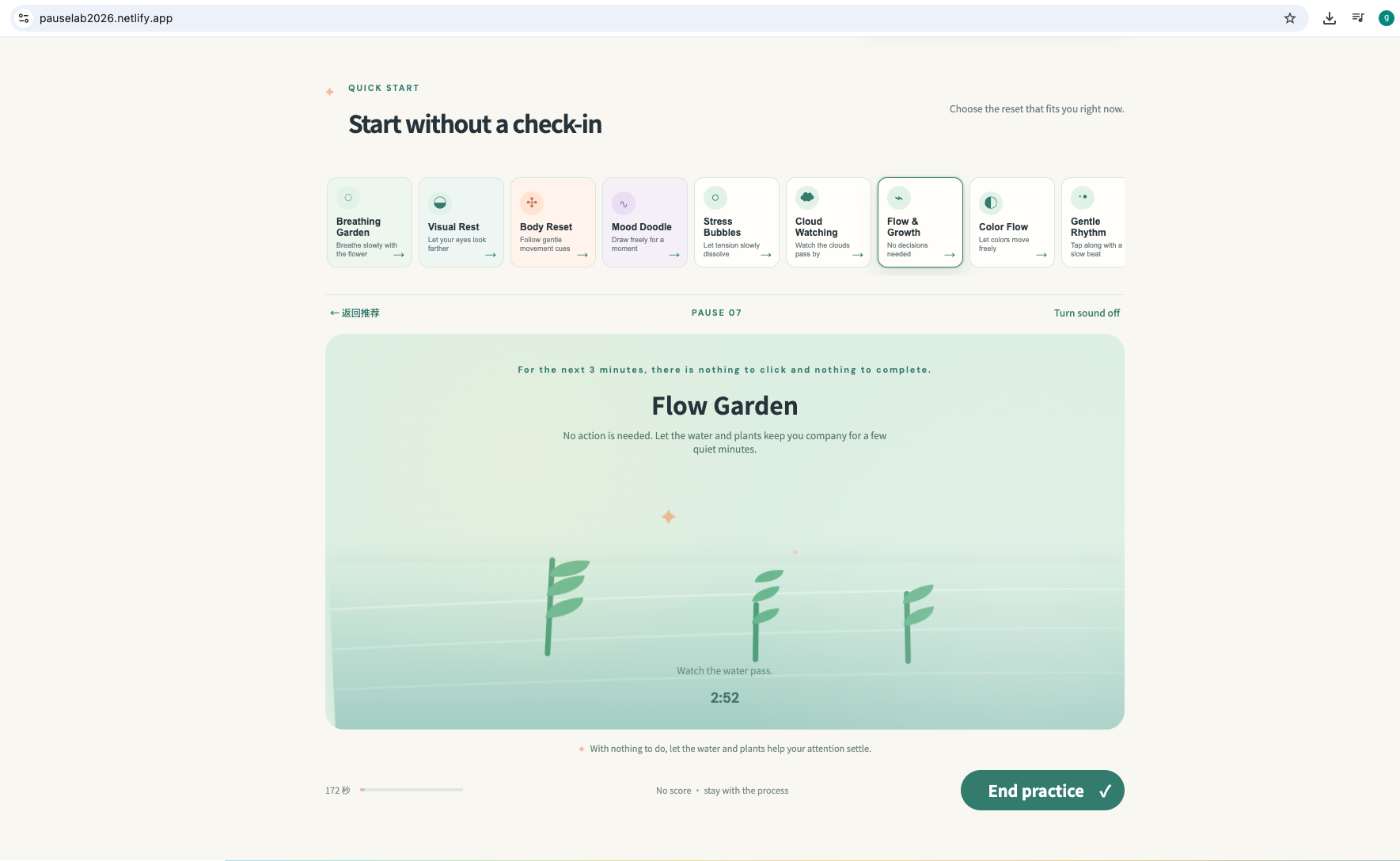
Flow Garden – A calming interactive experience designed to reduce cognitive fatigue.
-
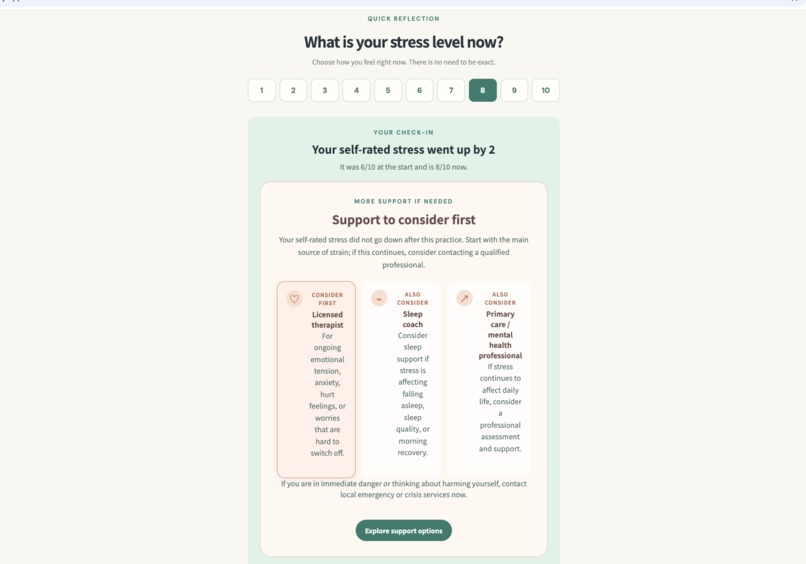
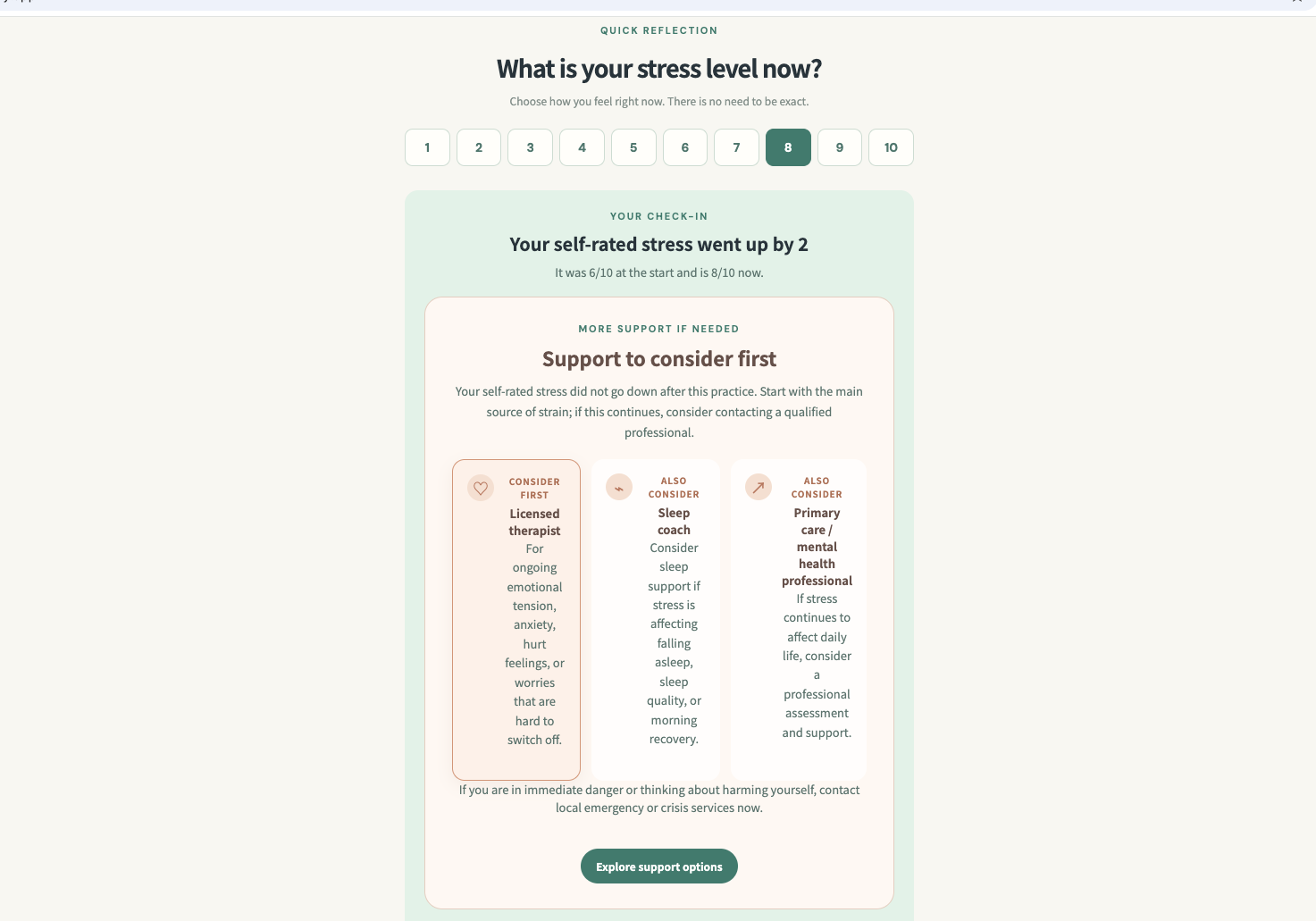
Reflection – Compare your stress level before and after the session.
-
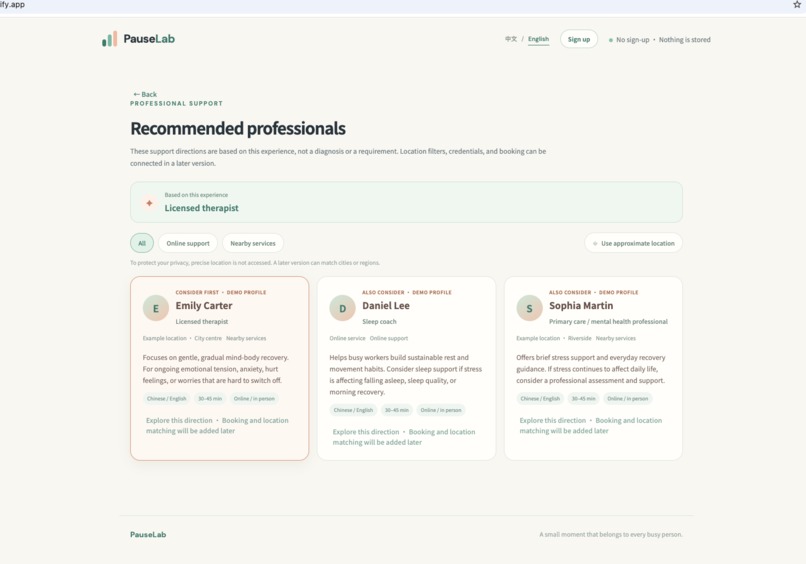
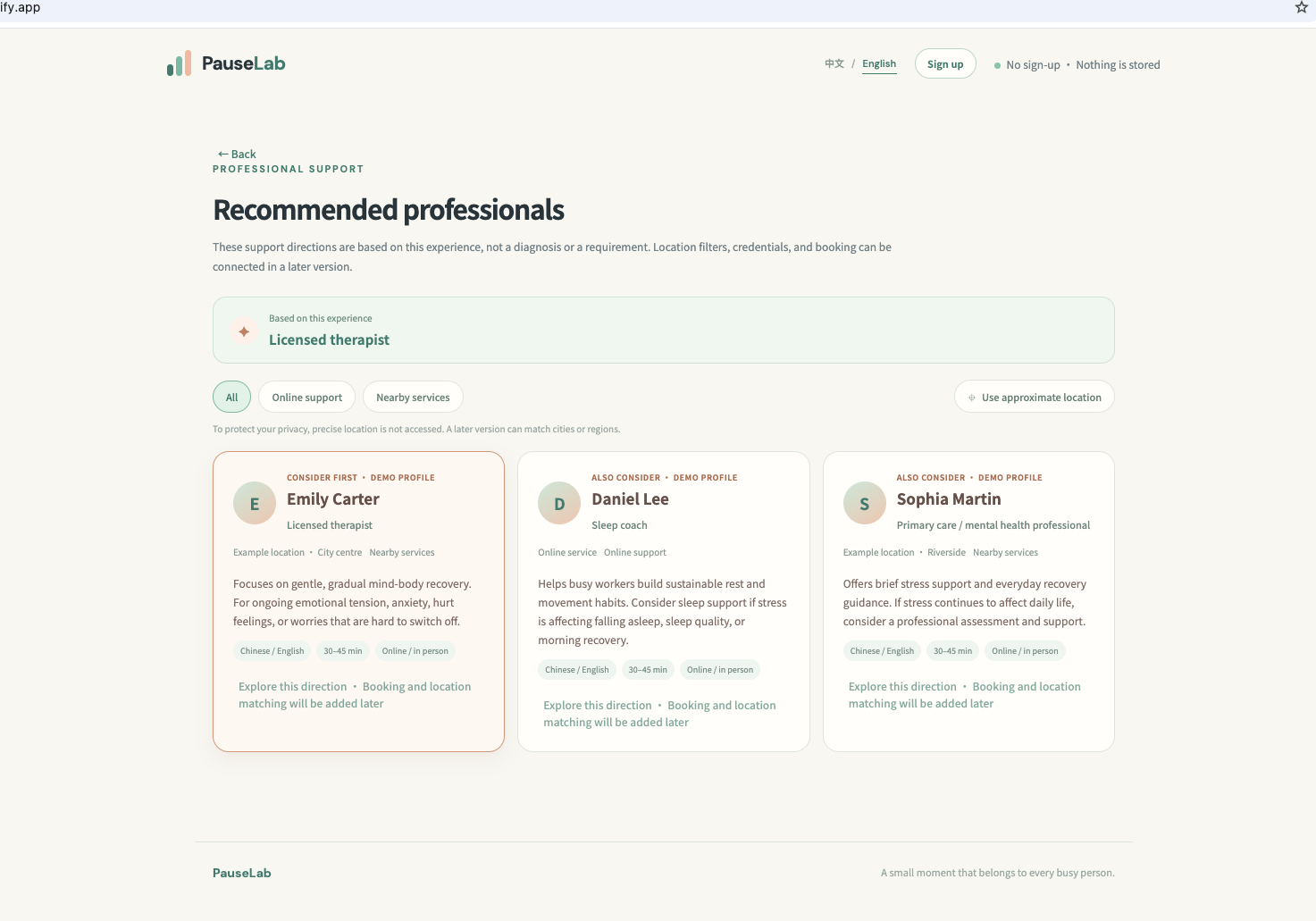
Professional Support – If stress remains high, PauseLab suggests appropriate professional resources.
PauseLab — Devpost submission draft
Category
Apps for Your Life
Project description
PauseLab is a bilingual, zero-signup web app designed to give busy professionals a meaningful break during their workday.
Through a brief check-in, users share their tasks, working hours, current bottlenecks, mood, sleep quality, time limit, and audio preferences. Driven by transparent front-end logic, PauseLab evaluates a non-clinical stress level and matches the user with a tailored 1–5 minute micro-reset.
The app unlocks interactive experiences like Breathing Garden, Visual Rest, Body Reset, Mood Doodle, Stress Bubbles, Cloud Watching, Flow & Growth, Color Flow, or Gentle Rhythm. Each session features a clear timer, progress tracking, optional sound, and a judgment-free self-reflection check. It also offers gentle safety guidance and support resources for prolonged high stress.
Built privacy-first, PauseLab requires no backend, accounts, analytics, location data, or clinical claims. The personalized text input currently runs as a fully offline prototype with deterministic logic—no user data is ever sent to an external API.
Project Story
What inspired me
I am a programmer building a startup, and I often experience the pressure of long work sessions: tired eyes, reduced attention, emotional tension, and the feeling that I need a break but do not have enough time for a full wellness routine. That led to a simple question: could a small web app help someone choose a useful pause in the few minutes they actually have?
PauseLab was inspired by that personal need. It is designed for people who are working, studying, or building something under pressure and want a gentle reset without signing up, tracking a streak, or completing a long questionnaire.
How I built it
I built the project conversationally with Codex and GPT-5.6. I communicated with Codex entirely in Chinese and did not manually write the application code. I described the product idea, user problem, desired flow, visual direction, and interaction details in natural language. Codex helped turn those ideas into a working front-end, and I repeatedly opened the app, tried the experience, reported what felt unclear, and asked for the next iteration.
At the beginning, Codex helped me organize the product architecture, feature list, safety boundaries, and MVP scope into a living product design manual. Whenever I thought of a new activity, business idea, or future feature, I discussed it with Codex and recorded it in the manual. This gave the project a clear source of truth and prevented the MVP from becoming an unstructured collection of ideas.
The implementation is a dependency-free static web app. It includes a bilingual interface, a lightweight check-in, explainable recommendation rules, nine short activities, timers, pause/resume controls, progress indicators, local drawing, optional sound, and post-session reflection. The app can run offline from a static server and does not require an API key.
What I learned
The most important lesson was that personalization does not need to begin with an opaque AI system. A small set of clearly explained rules can already make the experience feel relevant when it combines work context, fatigue signals, available time, and sound preference.
I also learned to separate wellness support from medical claims. PauseLab uses non-medical stress references and self-reflection rather than diagnosis. If stress remains high, the product points toward qualified professional support instead of implying that another game will solve the problem.
Codex also helped me explore the science-informed design behind the activities. Different fatigue patterns call for different low-pressure experiences: Visual Rest for screen and attention fatigue, Breathing Garden or Stress Bubbles for emotional tension, and Body Reset for physical tension. Audio design became part of the same principle: gentle browser-generated tones and local ambient tracks support the experience, but sound remains optional and stops when the activity is paused or finished.
Challenges and how I solved them
The biggest challenge was balancing breadth with focus. I had many ideas for games, profiles, professional support, accounts, and business models. The product manual helped separate the current experience—Assess → Relax → Reflect—from later ideas such as long-term trends, workplace wellness, and professional-service partnerships.
Another challenge was making the experience safe and low-pressure. I avoided scores that imply clinical accuracy, failure states, leaderboards, and forced choices. The recommendation engine stays local and explainable, while the personalized text-entry screen is clearly labeled as an offline prototype rather than a live medical AI.
During browser testing, Codex helped investigate audio restrictions, local-storage compatibility, responsive behavior, and a startup MutationObserver loop that repeatedly rewrote the same timer text and made the page unresponsive. Adding a change check fixed the loop. This was a good example of the conversational workflow: I reported the observed behavior, Codex investigated the likely cause, I tested the fix, and we refined the implementation.
The final result is a working MVP that started from a personal problem and grew through continuous conversation, testing, and product decisions. Codex and GPT-5.6 accelerated the path from idea to working software, while I directed the product vision, safety boundaries, and final user experience.
How Codex and GPT-5.6 accelerated the build
Codex with GPT-5.6 was the primary build partner. I built PauseLab through conversation rather than manually writing the application code, and I communicated with Codex entirely in Chinese. I described the product idea, user flow, visual direction, and desired interactions in natural language; Codex implemented each iteration; I ran and reviewed the result; and I gave feedback for the next change. This conversational loop took the project from a product concept to a working single-page app and showed how friendly the workflow can be for multilingual developers.
Codex helped translate the product manual into the bilingual content system and recommendation engine, build the responsive visual system, add timers/audio/canvas interactions, and handle edge cases such as pause/resume, switching activities, mobile layout, and browser audio restrictions.
Where Codex accelerated the workflow
From an early idea to a structured product plan — I asked Codex to organize the initial idea into the site architecture, user flows, feature list, safety boundaries, and MVP scope. We kept the decisions in a living product manual. New ideas were discussed with Codex, recorded as future options or implemented features, and used as a checklist during development.
Fast visual prototyping and iteration — Codex quickly produced a working visual demo. I opened the app, tried the flow, described what felt unclear, and asked for the next change. This created a short idea → working prototype → feedback loop and accelerated the bilingual UI, direct activity entry, timers, pause/resume, progress states, and responsive refinements.
Product and business-model exploration — Through conversation, Codex helped explore target users, product value, and possible B2C freemium, workplace wellness, and professional-support models. I made the final decisions about what belongs in the MVP and kept commercial exploration separate from diagnosis, treatment claims, and individual workplace monitoring.
Research-informed recommendation design — Codex helped synthesize wellness design references and map different fatigue signals to bounded activities and durations. Screen and attention fatigue map to Visual Rest, emotional tension to Breathing Garden or Stress Bubbles, and physical tension to Body Reset. These are transparent wellness suggestions rather than clinical conclusions; I chose to keep the first recommendation engine local and rule-based.
Audio and interaction design — Codex helped design gentle browser-generated tones, timing cues, and local ambient audio options. It also helped implement silent-mode controls and the rule that audio stops when an activity is paused or finished. This kept audio supportive rather than distracting.
Testing and debugging — I tested each iteration in the browser and reported issues conversationally. Codex helped investigate browser audio restrictions, local-storage compatibility, mobile behavior, and a
MutationObserverstartup loop that could make the page unresponsive. GPT-5.6 accelerated the investigation and implementation of fixes, while I directed the product and safety decisions.
The key product decisions were made through this collaboration: keep the first recommendation engine explainable and bounded, keep the break short and low-pressure, make privacy the default, and route sustained high stress toward professional support rather than diagnosis. GPT-5.6 and Codex accelerated implementation and refinement, while I directed the product decisions and reviewed the working experience. The shipped MVP does not call the OpenAI API at runtime.
Demo video plan (<3 minutes)
Problem and entry
“PauseLab is for busy people who need a short reset but do not want a long wellness program. It opens instantly, requires no sign-up, and does not save personal information.”
Check-in
Choose long hours on screen, a tired mood, body or attention tension, three minutes, and a sound preference. Explain that the result is a transparent, non-medical estimate, not a diagnosis.
Recommendation and activity
Show why Breathing Garden is the best match, start it, demonstrate the breathing animation, optional audio, timer, pause/resume, and progress.
Reflection and safety
Finish the activity, select a new self-rated stress level, and show the before/after reflection and support language.
Breadth and build story
Switch to Direct Start and quickly show Mood Doodle or Cloud Watching. Explain that I built the app conversationally with Codex and GPT-5.6: I described what I wanted, reviewed the running result, and iterated through feedback without manually writing the application code. The MVP keeps personalization local and explainable.
Links to fill before submission
- Public code repository: https://github.com/Milktea-DE/pause-lab
- Live demo: https://pauselab2026.netlify.app/
- Public YouTube demo: https://youtu.be/ZptB4eGsBQ4
/feedbackCodex Session ID — core functionality build:019f6a50-10c7-7b92-bf18-c98ca2383e7e- Additional feedback ID for submission-upload work (not the primary Devpost ID):
019f841a-d571-7af1-a8bd-7b38eb0232e9
Final submission checklist
- [ ] Push the project,
README.md,LICENSE, andPRODUCT_DESIGN_MANUAL.mdto a public repository, or share a private repository with[email protected]and[email protected]. - [ ] Test the repository from a clean clone using the README instructions.
- [ ] Record and upload a public YouTube demo shorter than three minutes with audio.
- [ ] Say clearly in the video how Codex and GPT-5.6 were used.
- [ ] Submit the repository URL, category, description, YouTube URL, and
/feedbackSession ID.
Built With
- chatgpt
- codex
- javascript
- python

Log in or sign up for Devpost to join the conversation.