-
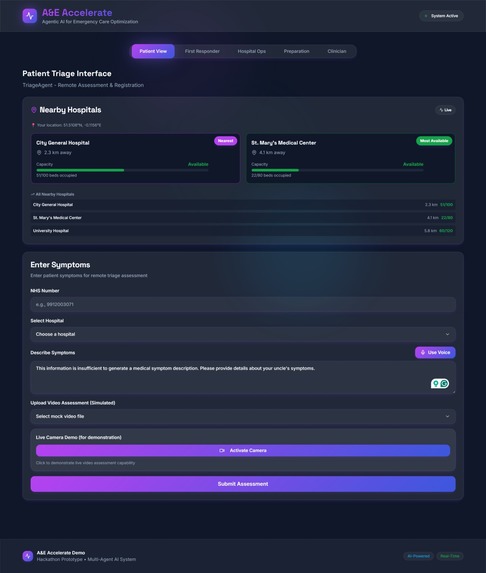
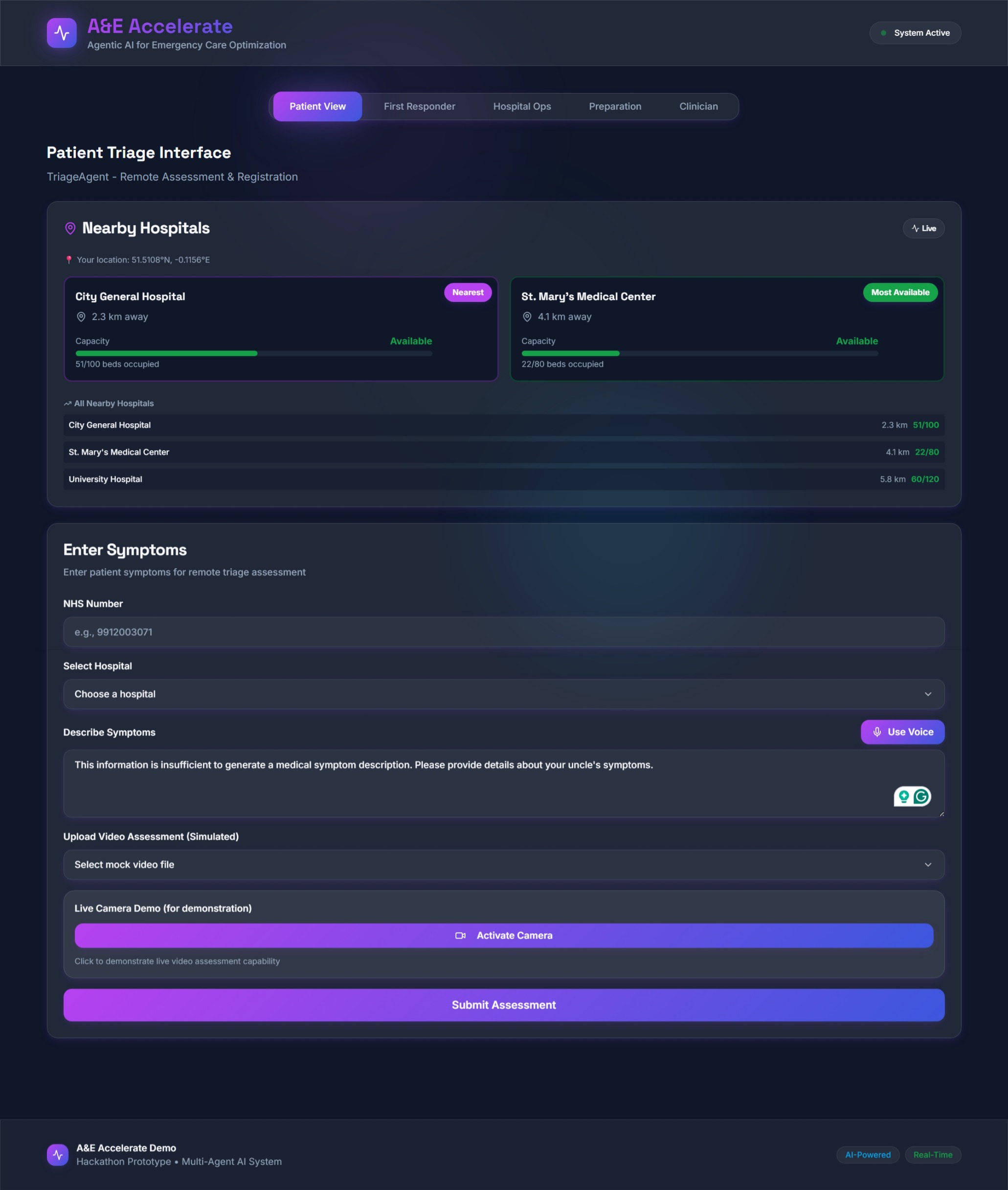
Patient View of System
-
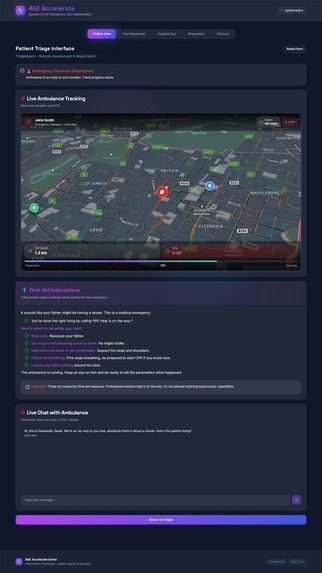
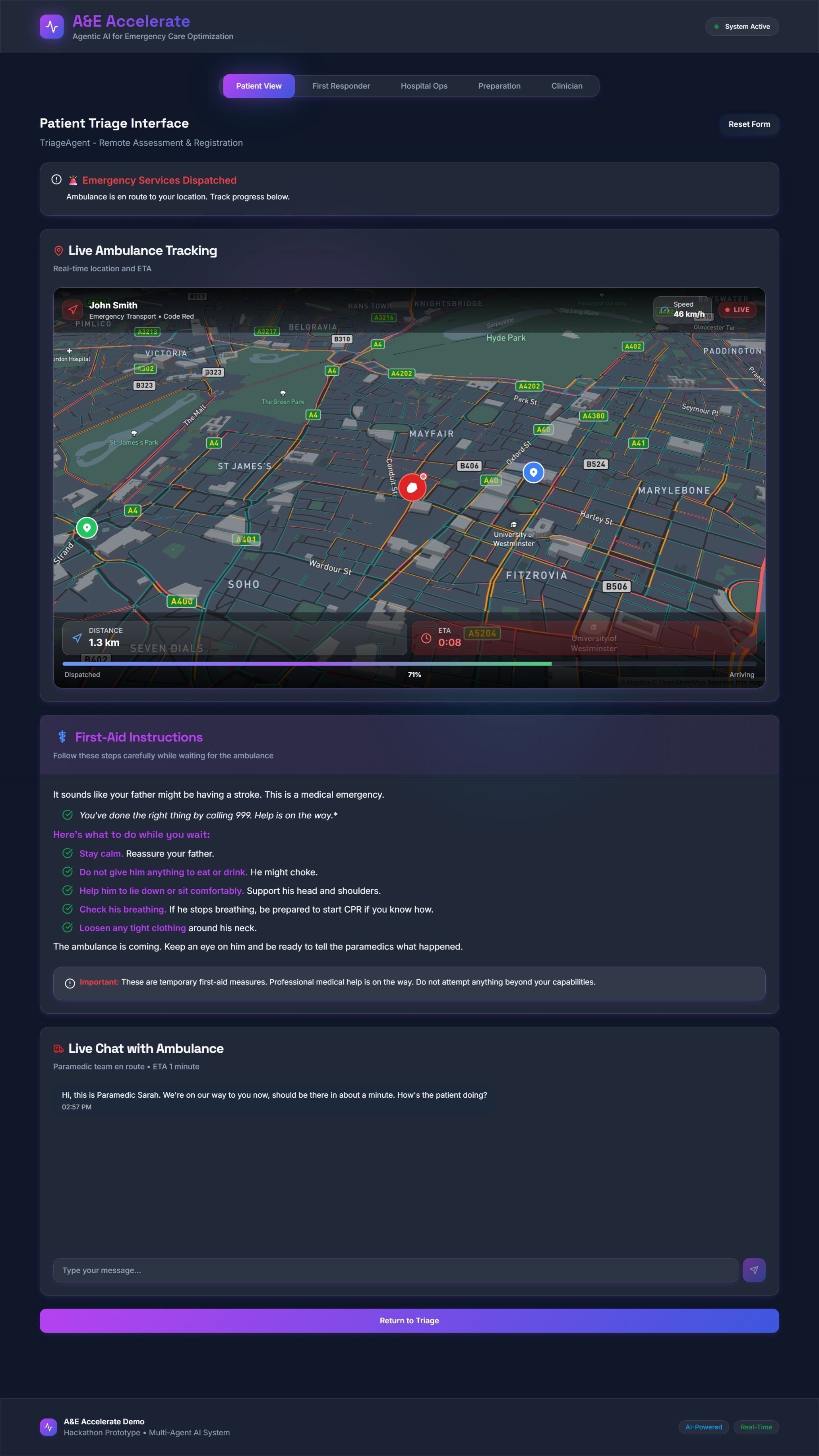
Live Ambulance Tracking (Patient View)
-
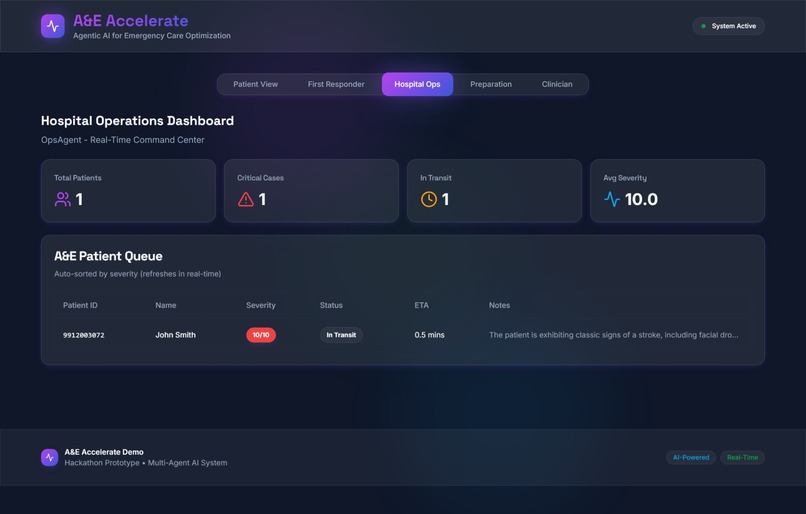
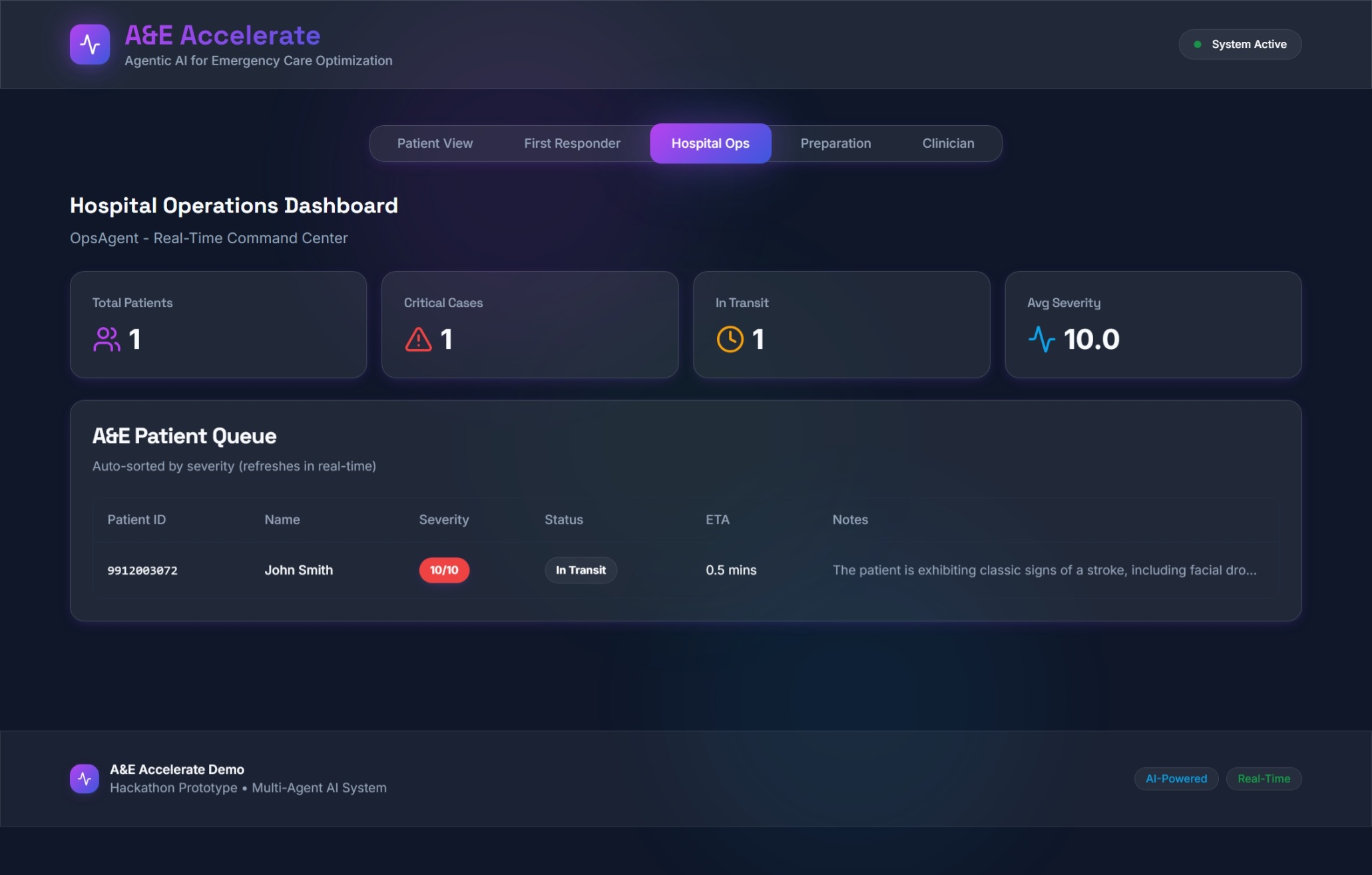
Hospital Operations View
-
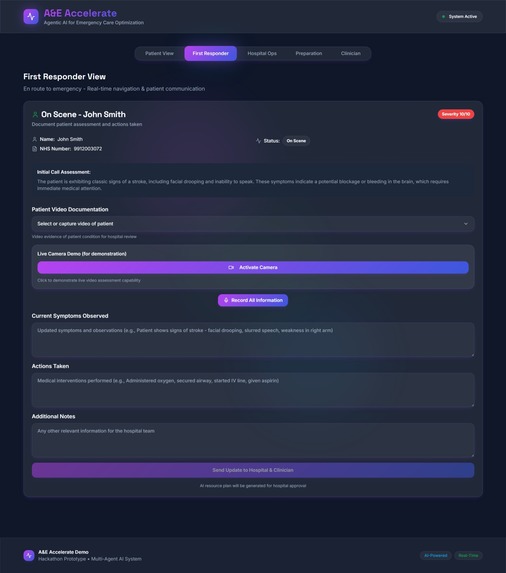
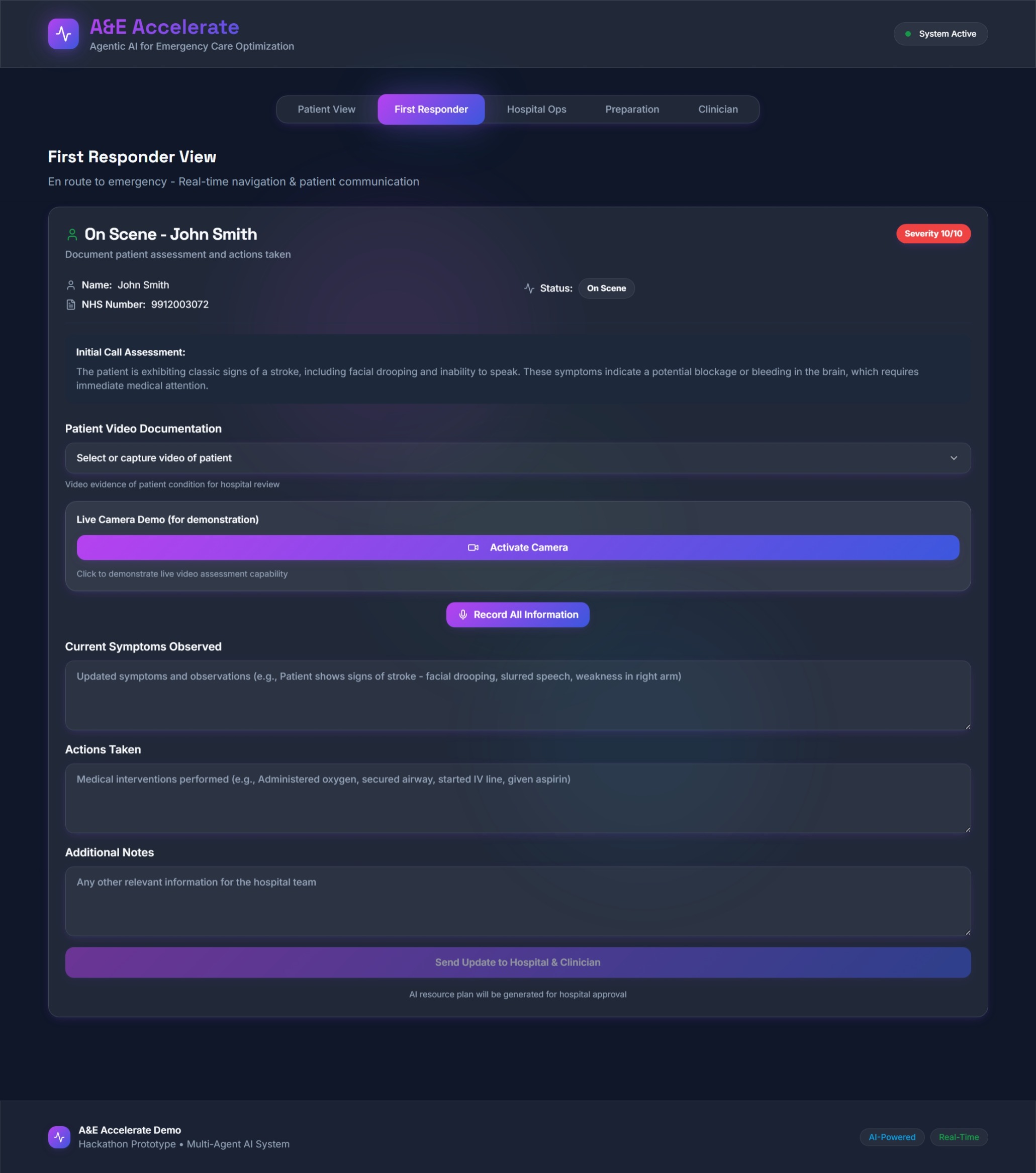
First Responder Update View
-
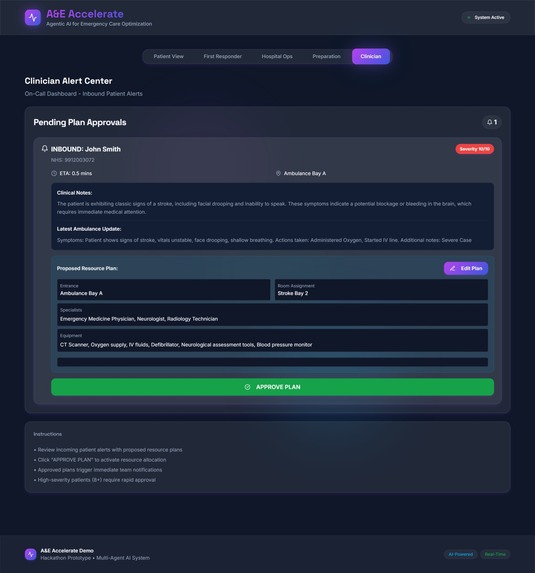
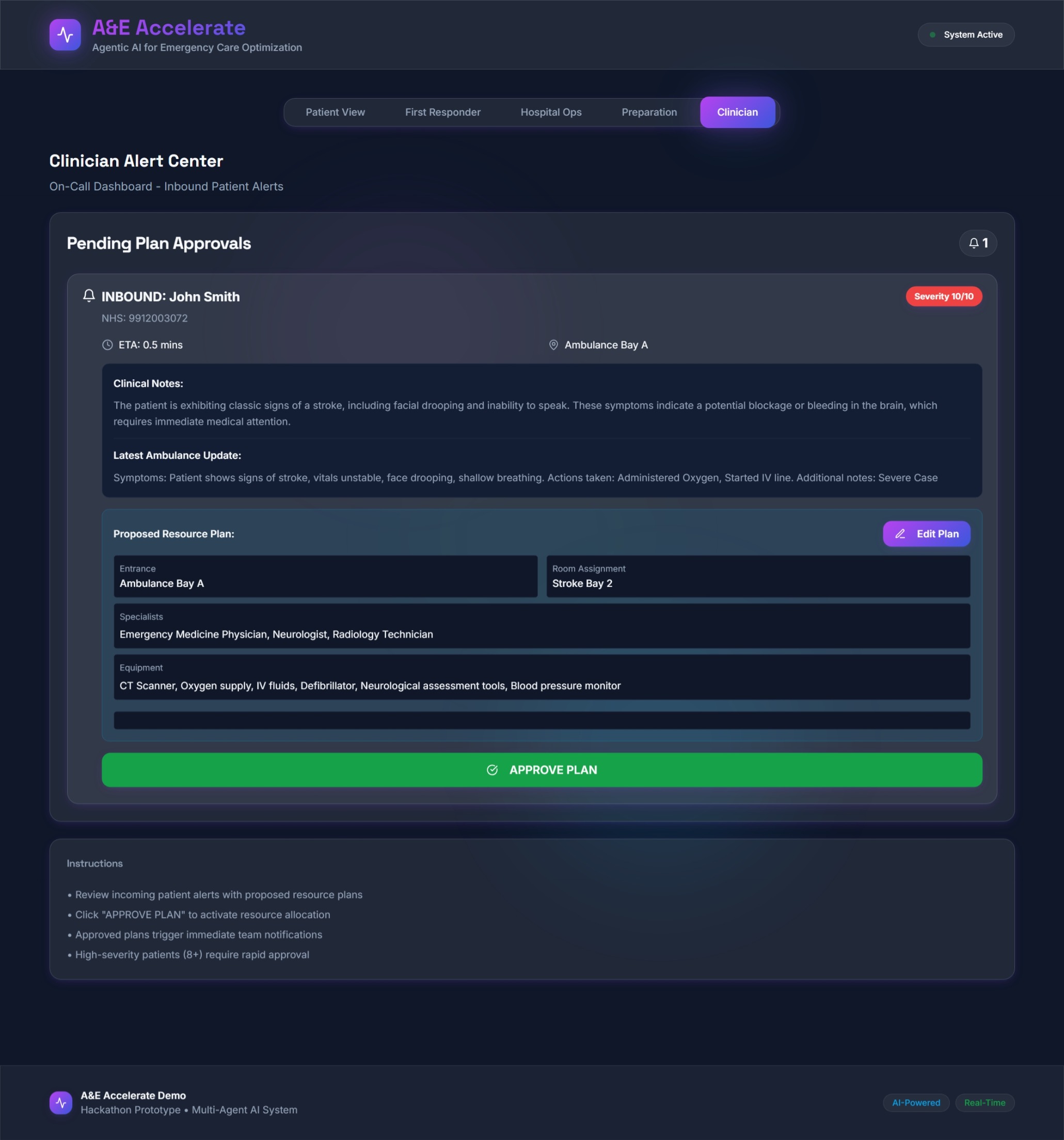
Clinician Approval View
🏥 A&E Accelerate: Enhanced Edition with Uber-Style Tracking
A&E Accelerate is a high-fidelity prototype of an agentic AI system designed to solve the UK's A&E "gridlock". This enhanced version features realistic Uber-style ambulance tracking with Mapbox GL integration and comprehensive UI/UX polish.
🔗 Live Demo: https://ae-accelerate.lovable.app
✨ What's New in Enhanced Edition
🗺️ Realistic Uber-Style Map Tracking
- Interactive Mapbox GL Maps with real street-level visualization
- 3D Building Rendering for realistic depth perception
- Smooth Ambulance Animation along actual road routes
- Real-time Progress Tracking with gradient route visualization
- Dynamic Camera Following (Uber-style perspective with tilt)
- Custom Markers for ambulance, patient location, and hospital
- Live Speed Indicator and distance calculations
- Traffic-aware Routing visualization
🎨 Enhanced UI/UX Polish
- Premium Glassmorphism Effects throughout the application
- Smooth Animations & Transitions on all interactive elements
- Improved Loading States with skeleton screens
- Enhanced Color Gradients and visual hierarchy
- Micro-interactions (hover effects, scale animations, glow effects)
- Responsive Design optimized for all screen sizes
- Accessibility Improvements (ARIA labels, keyboard navigation, focus states)
- Custom Scrollbars with smooth styling
- Advanced CSS Animations (shimmer, glow, fade-in, slide-in)
⚡ Performance Improvements
- Optimized Bundle Size for faster loading
- Smooth 60fps Animations with hardware acceleration
- Progressive Enhancement for better user experience
- Better Error Handling with user-friendly messages
🚀 The Core Concept
The core problem in UK emergency care is not just long triage queues; it is a systemic "exit block" that leads to A&E overcrowding and ambulance handover delays.
Our solution is not just another "triage app" (which would only optimise the queue for a blocked system).
It is a multi-agent ecosystem that manages the entire patient journey with realistic tracking visualization.
Its goal is to parallelise emergency care — converting ambulance transit time from "dead time" into active "preparation time" and reducing the congestion of physical waiting rooms by introducing a virtual waiting lobby for low-severity cases.
This system is built on a Human-in-the-Loop model, ensuring a clinician is always in control of the final, critical decisions.
🤖 The Multi-Agent Architecture
Our prototype simulates four distinct agents communicating in a shared environment (the app's central state, managed in Index.tsx).
Each tab in the demo represents the view for a different agent:
🧍♂️ TriageAgent (Patient View tab)
- The "digital front door" for the public.
- Uses AI (
triage-assessmentfunction) to conduct a multimodal assessment (text, and simulated video/voice). - Autonomously registers the patient in the correct hospital queue.
🚑 EMSAgent (First Responder tab)
- The "remote diagnostic sensor" in the field.
- Used by paramedics to send high-fidelity data (vitals, notes, on-scene video) back to the hospital.
- Features realistic ambulance tracking on the map.
🏥 OpsAgent (Hospital Ops & Preparation tabs)
- The central "brain" of the hospital.
- Ingests data from all agents, manages the master patient queue.
- Triggers the resource-planning AI to generate detailed preparatory plans.
- Real-time map visualization shows ambulance location and ETA.
👩⚕️ ClinicianAgent (Clinician tab)
- The "human-in-the-loop" decision-maker.
- Receives the AI's proposed plan and provides the 1-Button Approval to activate hospital resources.
💻 How to Use the Demo
Prerequisites
- Node.js (v18 or higher recommended)
- npm or bun
- Mapbox API token (included in
.env)
Quick Start
Install Dependencies
npm install
# or
bun install
Environment Setup The
.envfile is already configured with:- Supabase credentials (for AI agents)
- Mapbox API token (for realistic maps)
Run Development Server
npm run dev
# or
bun dev
Open Browser Navigate to
http://localhost:5173
🎯 Demo Scenarios
🩹 Scenario 1: Low-Acuity Patient (The "Student" Scenario)
Simulates a low-priority case and shows how the OpsAgent correctly de-prioritises it.
- Go to the Patient View tab.
- NHS Number:
9912003071(mock patient Jane Doe). - Select Hospital: "St. Mary's Medical Center".
- Describe Symptoms: "My friend twisted their ankle at a party."
- Upload Video: Ankle Injury – Limp (Mock Video).
- Click Submit Assessment.
- The AI triage-assessment agent runs.
- The AI identifies it as low severity (≈4/10) and places the patient in queue.
- The AI triage-assessment agent runs.
- Go to the Hospital Ops tab.
- Observe Jane Doe added to the bottom of the queue with status "Waiting (Remote)".
⚡ Scenario 2: High-Acuity Patient with Uber-Style Tracking (The "Stroke Patient" Scenario)
Demonstrates the full, life-saving multi-agent workflow with realistic map tracking.
- Return to Patient View (Reset Form if needed).
- NHS Number:
9912003072(John Smith). - Select Hospital: "City General Hospital".
- Describe Symptoms: "My father's face is drooping and he can't speak."
- Upload Video: Suspected Stroke Symptoms (Mock Video).
- Click Submit Assessment.
- AI flags HIGH SEVERITY DETECTED (10/10).
- AI flags HIGH SEVERITY DETECTED (10/10).
- Click Confirm 999 Dispatch.
- Live ambulance tracking appears with Uber-style map visualization
- Real streets, buildings, and 3D perspective
- Smooth animated ambulance movement
- Real-time ETA and speed indicator
- Go to Hospital Ops tab.
- John Smith now appears at the top of the queue as "Ambulance Dispatched".
- Interactive map shows ambulance location and route
- John Smith now appears at the top of the queue as "Ambulance Dispatched".
- Go to First Responder tab.
- Fill in on-scene updates and click Send Update to Hospital & Clinician.
- Fill in on-scene updates and click Send Update to Hospital & Clinician.
- Go to Clinician tab.
- Alert appears for "INBOUND: John Smith".
- OpsAgent AI proposes a Resource Plan (e.g., "Reserve Stroke Bay 2", "Prep CT Scanner").
- Alert appears for "INBOUND: John Smith".
- Click APPROVE PLAN → activates hospital preparation.
- Go to Preparation tab.
- Hospital team sees the full plan and live ETA with map visualization
- Watch the ambulance move in real-time on the Uber-style map
- Camera automatically follows the ambulance
- Arrival alert triggers when ambulance reaches hospital
- Finally, check Hospital Ops tab again.
- John Smith status: "In Transit" -> "Prep Ready" -> "Arrived" -> "In Operation Theatre". ✅
🧠 Challenges & Solutions
| Challenge | Initial Problem | Agentic Solution | Enhanced Edition |
|---|---|---|---|
| 🌀 The "Triage Trap" | A simple triage app feeds a blocked system; the real NHS issue is exit block. | Pivoted to a multi-agent system (TriageAgent, EMSAgent, OpsAgent) managing full patient flow. | ✅ Same |
| ⚙️ Technical Feasibility | Diagnosing internal injuries from a phone video is unsafe. | Switched to functional assessment (e.g., gait analysis + text fusion) for triage safety. | ✅ Same |
| 📊 Real-World Data | No access to NHS APIs for patient data or capacity. | Simulated with mockData.ts, using real functional AI agents via Supabase. | ✅ Same |
| 🎙️ AI for Voice | Voice input is messy and unstructured. | Built a multimodal voice pipeline (VoiceRecorder.tsx → STT → structured JSON parser). |
✅ Same |
| ⚖️ Legal & Ethical Liability | Fully autonomous AI creates accountability gaps. | Designed a Human-in-the-Loop system: AI proposes, clinician approves. | ✅ Same |
| 🗺️ Basic Map Visualization | Original SVG-based map looked unrealistic and static. | N/A in original | ✨ NEW: Integrated Mapbox GL with Uber-style tracking, 3D buildings, smooth animations |
| 🎨 UI/UX Polish | Interface lacked professional polish and consistency. | N/A in original | ✨ NEW: Premium design system with glassmorphism, advanced animations, micro-interactions |
🛠️ Technology Stack
Frontend: React, TypeScript, Vite, Tailwind CSS, shadcn/ui
Maps: Mapbox GL JS (NEW - Uber-style tracking)
Backend (AI Agents): Supabase Edge Functions
AI Models:
- OpenAI (gpt-4o-mini): Resource-planning, triage-assessment
- Google Gemini-2.5-flash: Real-time chat and first-aid tasks
- Eleven Labs: Speech-to-text transcription
State Management: Local React State (useState in Index.tsx)
New Libraries:
mapbox-gl- Interactive map visualization- Enhanced Tailwind utilities for animations
- Custom loading components
📁 Project Structure
src/
├── components/
│   ├── AmbulanceMap.tsx          # ✨ Enhanced with Mapbox GL
│   ├── PatientView.tsx
│   ├── FirstResponderView.tsx
│   ├── HospitalOpsView.tsx
│   ├── HospitalPrepView.tsx
│   ├── ClinicianView.tsx
│   └── ui/
│       ├── loading.tsx           # ✨ NEW: Loading states
│       └── ...                   # shadcn/ui components
├── pages/
│   └── Index.tsx                 # Main app with tab navigation
├── lib/
│   ├── mockData.ts
│   └── utils.ts
└── index.css                     # ✨ Enhanced with animations

supabase/
└── functions/                    # AI agent implementations
    ├── triage-assessment/
    ├── resource-planning/
    ├── first-aid-instructions/
    └── ...
🚀 Deployment
Build for Production
npm run build
# or
bun run build
The dist folder will contain the production-ready files.
Deploy to Vercel/Netlify
- Connect your repository
- Set environment variables:
VITE_MAPBOX_TOKENVITE_SUPABASE_URLVITE_SUPABASE_PUBLISHABLE_KEY
- Deploy!
🔑 Environment Variables
Create a .env file in the root directory:
VITE_MAPBOX_TOKEN=your_mapbox_token_here
VITE_SUPABASE_URL=your_supabase_url_here
VITE_SUPABASE_PUBLISHABLE_KEY=your_supabase_key_here
Note: The project comes with pre-configured credentials for demo purposes.
🎨 Design Features
Premium Visual System
- Glassmorphism - Frosted glass effects throughout
- Color Gradients - Vibrant multi-color gradients
- Shadows & Glow - Depth with premium shadows
- Typography - Inter + Space Grotesk font pairing
Animation System
- Fade In / Out - Smooth content transitions
- Slide In - Directional entry animations
- Scale - Hover and interaction feedback
- Shimmer - Loading and progress effects
- Glow - Pulsing attention indicators
- Pulse - Continuous breathing animations
Accessibility
- ARIA labels on interactive elements
- Keyboard navigation support
- Focus visible states
- Color contrast compliance
- Screen reader friendly
📝 License
This is a hackathon prototype for demonstration purposes.
👥 Credits
Original Concept: A&E Accelerate Team
Enhanced Edition: Improved with Uber-style tracking and premium UI/UX polish
Powered by:
- Mapbox GL JS
- Supabase
- OpenAI
- Google Gemini
- Eleven Labs
- shadcn/ui
Built with ❤️ for saving lives through better technology
Built With
- elevenlabs-api
- openai-api
- react-native
- supabase


Log in or sign up for Devpost to join the conversation.