-
-

logo
-
logo
-
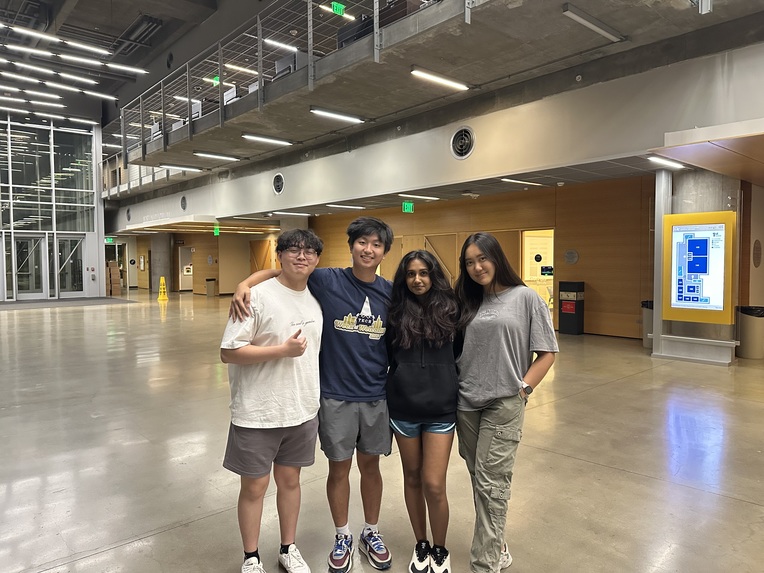
kalm - the developers of 90°
-
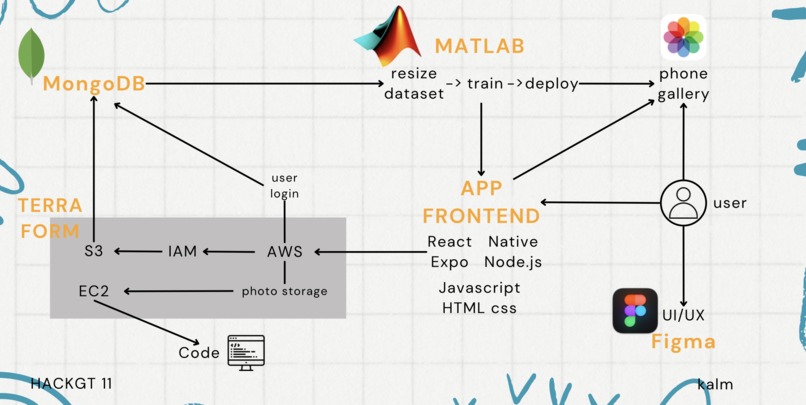
how 90° works

90° - https://www.90-degrees.co/
Ever dread having to take pictures because people can never seem to get your angles right? You hand over your phone, spend ages just explaining how you want things to be, treading the line between instructions and being ungrateful, just to end up with 258 terrible pictures in your photo gallery. Not one perfect picture.
But don't worry now! We are here to help you always capture your right angles.
📑Table of Contents
- 💁Meet the Team
- 📍The Problem
- 🛠️The Solution
- 🔌The Tech
- 💢Challenges
- 🚀Try it Out
- 🎯Target Audience
- 🧠What we learned -💡Accomplishments we are proud of
- 🚀Future Prospects
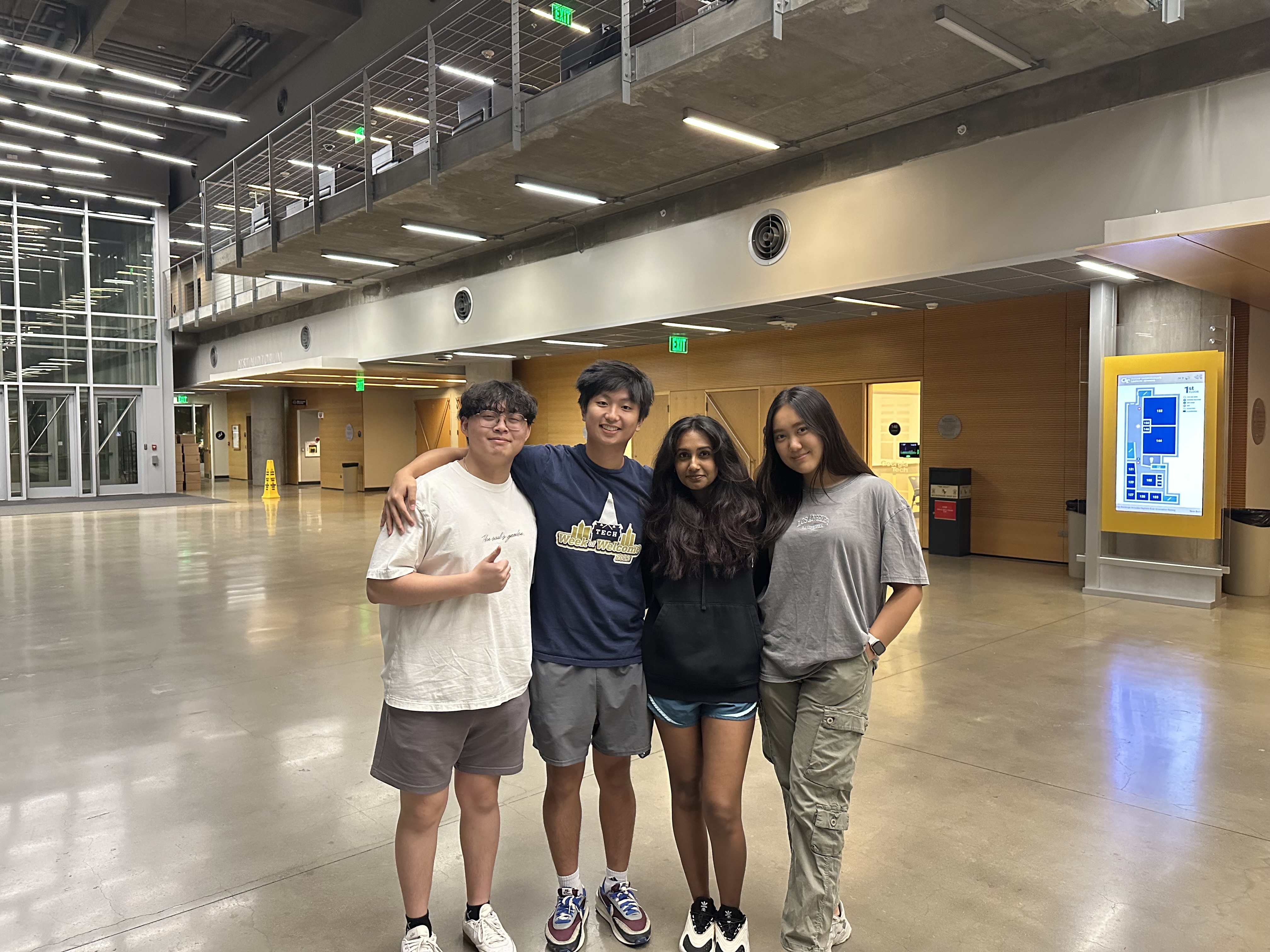
💁Meet the Team
-Andy Vo (Full-Stack Developer)
Andy is our all-around full-stack developer who seamlessly integrates both front-end and back-end systems. His expertise ensures that every feature of the 90° app functions smoothly, providing users with a reliable and dynamic experience.
-Katniss Min (UI/UX Designer)
Katniss is our creative UI/UX designer, crafting intuitive and visually striking interfaces. Her attention to user-centred design makes 90° easy to navigate, ensuring a seamless and enjoyable experience for users.
-Leo Zheng (Full-Stack Developer)
Leo brings technical versatility to the team as a full-stack developer. He handles everything from UI functionality to server-side logic, ensuring that our app delivers an optimal user experience from start to finish.
-Mythri Muralikannan (AI/ML Dev Ops)
Mythri specialises in ML/AI deployment and automation, providing the intelligence behind 90°. Her expertise ensures our AI-powered features run efficiently and adapt to user preferences, making every shot perfectly aligned with individual needs.
📍The Problem
We’ve all experienced the frustration of handing our phone to a friend for a photo, only to end up with hundreds of unusable pictures. Explaining your preferred angles can be awkward, and no matter how detailed the instructions, the result is often disappointing. The process is time-consuming and tedious, leaving you with less-than-perfect memories. 90° addresses this issue by providing real-time, AI-driven guidance for photographers, ensuring that every shot captures your best angles without the need for long explanations or repeated attempts.
🛠️The Solution
Use 90° to upload your favourite photos, get guidelines when taking photos, and end up with the perfect photos!
🤖What is 90°?
90° is an app that provides innovative photo solutions, allowing people to take the perfect photos based on the perfect angles.
📝What is the process?
The app interface is pretty straightforward and super user-friendly. Let's break it down step by step:
Create an account: Start by downloading our app and creating an account with your email.
Upload new photos: Upload all the photos you took. You can categorise them into our pre-made categories, such as “full body”, “half-body”, or you can also make your own category.
Like your photos: Sort through the uploaded photos and choose your favourites. Our machine learning program will learn your photos to provide you with the perfect guideline.
Take new photos: Open up the camera and try to take a picture. Guidelines appear on the screen to help as a visual aid to the person with the camera. All they need to do is make sure that you are within the guidelines and then click a bunch of pictures!
🧠Why does it work?
So how does 90° answer these Problems?
Automated Angle Detection: 90° uses a Machine Learning model to identify your best angles based on your preferences, ensuring every shot is your favourite.
Customizable Preferences: You can set up specific angles and framing preferences, so anyone using your phone will capture photos exactly how you want them, without long explanations.
Guided Photography: With real-time guidance, 90° directs the photographer to position the camera at the optimal angle, minimising the risk of bad shots.
Time-Saving: No more sifting through hundreds of unusable photos - 90° guarantees the perfect picture in fewer attempts.
User-Friendly Interface: The app is simple to use for both the subject and the photographer, ensuring a stress-free photo-taking experience.
✏️Design Thinking Process
Our thought process for developing 90° was driven by a user-centric approach, as we wanted to address the frustrations people experience when getting the perfect photo.
1. Empathise: Having experience with endless struggles to communicate our preferred angles and getting unsatisfactory results after multiple attempts really helped us get in the shoes of our app’s users.
2. Define: The core problem was how difficult it is to consistently capture flattering photos without wasting time and effort. This helped us focus on creating a solution that would make the photo-taking process intuitive and reliable for both users and photographers.
3. Ideate: Our team brainstormed multiple solutions to simplify the process. We explored using AI and machine learning to detect ideal angles, personalised user preferences, and real-time guidance for photographers.
4. Prototype: We built a functional prototype of 90°, integrating customizable preferences and guided photography features. This allowed us to test the major functionalities in a real-world setting.
5. Test: To make sure that our app runs seamlessly, we will be testing with more users and fine-tune the app based on the feedback we receive. We will gather feedback from multiple potential users, and make sure to address their needs effectively. Through such, we aim to be the app people can rely on to take their stress out of photography.
🔌The Tech
🖥️Backend
The Backend utilises MongoDB to store data and Mongoose to integrate MongoDB interactions with JavaScript. We used three important endpoints for our application: one for user registration, one for logging in users, and the last for uploading and storing images. To ensure the safety of our users, we used bcrypt to add a salt to the passwords in case our database is accessed by a malicious actor. We also implemented AWS as part of our Backend to store user images, allowing quick access of data using AWS servers and secure storage of user information.
🖱️Frontend
Our front end comprised two distinct components: Figma and React Native.
In Figma, we crafted a prototype to visualise the app's design, focusing on branding and personal toolkit elements. React Native then materialised this prototype into our fully functional app.
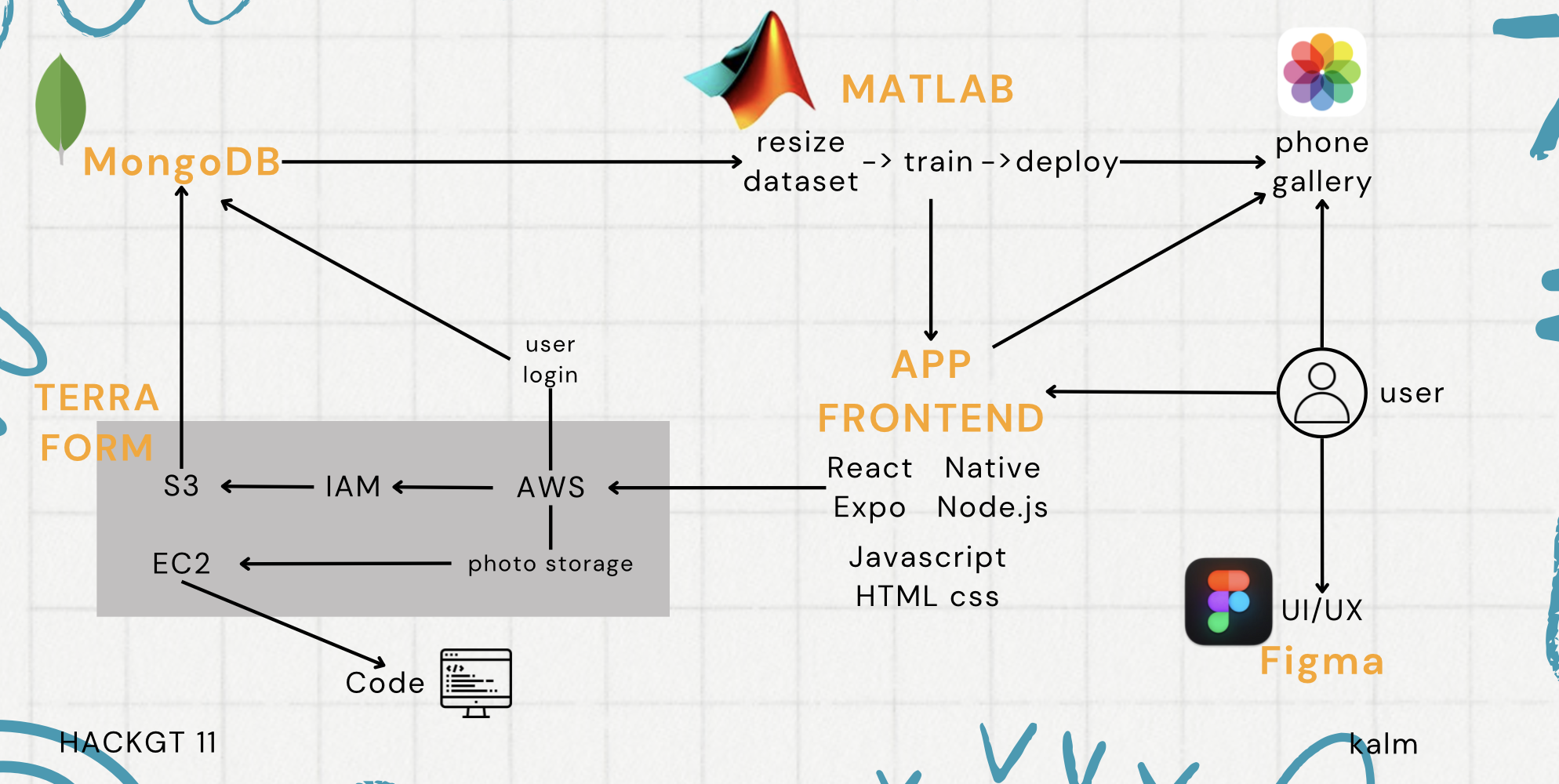
Our Integrated Process
User
- Interacts with the App frontend on their phones
- To get a better feel of the UI/UX they can access our figma
Terraform
- Terraform is used to define our infrastucture model and make use of AWS to include:
- IAM: for defining roles and policies
- S3: to store the state of the environment and pictures
- EC2: to be the server created with all the required packages installed
MongoDB
- Each time a new user is created via the frontend of the app, their login data and authentication is stored here
- For each user, the photos stored in S3 are categorized and also stored in MongoDB
MATLAB
- The ML model is traned based on the data provided via MongoDB of good and bad pictures.
Additionally the pictures clicked are automatically stored in the User's ohone gallery.
🍃Machine Learning Model
Our model effectively combines deep learning (for feature extraction via AlexNet) and classical machine learning (SVM) to classify the images in your dataset.
- Supervised binary classifier: Class 0 and Class 1.
- Dataset is split into 80% training and 20% testing.
- Uses AlexNet (a pretrained CNN) to extract features from images using the 'fc7' fully connected layer.
- Features are extracted from both the training and test sets via the 'fc7' layer.
- A linear Support Vector Machine (SVM) classifier is trained on the extracted training features.
- Model predicts labels for test images, and accuracy is calculated by comparing predictions with actual labels.
- A confusion matrix is computed, and a confusion chart is plotted to visualize performance.
- The trained classifier, AlexNet, and feature extraction layer are saved for future use in deployment.
🔮Terraform
https://drive.google.com/file/d/1AoAbIwdtFBxKC9_TU8Agc15NkmT_UZ3B/view?usp=sharing
Why did we use Terraform?
- terraform defines infrastructure using code and helps making infrastructure changes version-controlled and easier to review.
- it automates the deployment and management of all required resources.
Our Motive
- to use Terraform as the next step after app prototyping as a strategic move to transition from a development phase to a scalable, maintainable, and production-ready infrastructure.
Our Uses Our final deployment model is called final_deploy_terraform and the rest are just initial versions that we tested out python and matlab models on. We had a few more EC2 instances but that data was lost and we don't have access to any pictures anymore.
- backend.tf: enables remote state management -- terraform state is stored in S3, enabling collaboration and locking with DynamoDB to prevent simultaneous updates.
- variables.tf: file helps centralize configuration values. defined to easily adjust values like the AWS region, EC2 instance type, MongoDB credentials, and SSH key.
- s3.tf: sets up an S3 bucket to store ML models and data, with versioning and server-side encryption for security.
- iam.tf: defines IAM roles and policies, providing Lambda functions with necessary permissions to access and manipulate data in the S3 bucket.
- landa.tf: deploys the Lambda function that processes ML models, with permissions to access the S3 bucket. currently implemented in JS --> goal is for centralization via lambda functions
- ec2.tf: sets up an EC2 instance for the ML environment, installing Python, dependencies, and MATLAB runtime.
- mongodb.tf: integrates MongoDB Atlas, creating a MongoDB cluster, users, and configuring IP whitelisting.
- Integrating these versatile Terraform capabilities to demonstrate robust, scalable, and automated infrastructure management for our deployment.
📊MATLAB
https://drive.google.com/file/d/1I6-bOCwL-JyrnUvwhjeBCEymVhUD_GNf/view?usp=sharing https://drive.google.com/file/d/1Kw85iNO44HHcxagics6f_k16qZXf_qwt/view?usp=sharing
Why MATLAB, not Python?
- 35 min vs. 1 min: Longer training with data-intensive tasks (PyTorch/TensorFlow).
- Low vs. high accuracy: Accuracy varies based on precision.
- Confusion Matrix: Shows impact of low number precision on accuracy.
4 different scripts
- create_dataset: helps in creating large dataset for training on computer
- photo_resize_matlab: resizes and prepares dataset from pictures uploaded by users (mongodb integrated)
- training: trains the model
- deployment: (mimics the camera on the app) real-time feedback GOOD or BAD angle.
💢Challenges
Throughout our hackathon journey, integrating all the components of 90° was the biggest challenge for the team. Bringing together the front-end, back-end, AI/ML models, and deployment processes in a coherent matter brought several issues and technical blocks to our team. Ensuring that the AI-driven angle detection interacts smoothly with the user interface, while also managing real-time camera functions, proved to be complex. We found that high volumes of localised code and datasets were not supported by Github, which made the whole process a little difficult as well. Moreover, we also lost some data along with the ec2 server, which caused difficulties as well.
Additionally, one of our teammates’s AWS ‘super secret key’ accidentally got leaked onto a public GitHub repository, which caused an unexpected delay in our hacking journey. Luckily, we were able to fix it as soon as possible and did not have further security breaches. Through this situation, we learned the critical importance of safeguarding sensitive information, such as API keys and credentials, especially when collaborating on public platforms like GitHub.
Despite these insane situations, we were still able to come through all situations and display our final app - 90°.
🚀Try it Out
Here’s the link to our Figma prototype: https://www.figma.com/proto/POstEeFOL4tMNcIxw6VO98/90-degrees?node-id=55-3&starting-point-node-id=55%3A3
If you want to run this yourself, clone the repository and run "npm install" in the server and app directories. You can run the mobile app with "npm run start" and the server with "npm run dev." For the server to work, you will likely need to create your own firebase project and link it with a JSON certificate.
🎯Target Audience
We made this app for anyone who wants good photos of themselves. Just download our app, select your favourites, and hand the phone over to anyone for the most perfect photo of your life.
🧠What we learned
Through the development of 90°, we learned the importance of seamless collaboration between various tech components, such as front-end, back-end, and machine learning models, and how to overcome challenges in real-time deployment. This was a new experience when it came to handling large local files and overall integration. We were so used to relying on Git that this was a new challenge when it was too large to be supported.
We also gained valuable experience in securing sensitive data, handling unforeseen issues like AWS key leaks, and understanding the power of Terraform for managing scalable infrastructure. Contacting the AWS staff made us understand the risks and possible threats to personal information that could be created when such data is leaked.
The project also deepened our understanding of AI integration for user experience design, focusing on creating user-friendly and innovative solutions. It was our first time working with such large sets of data, and we realized the importance of the computational power of the platform we were using, thus we made the decision to switch from Python to MATLAB, which resulted in a more accurate and efficient model. The training time drastically changed from 35 minutes to barely 2 minutes. The stress on the processors was also drastically reduced by the lightweight matrix storage provided by MATLAB.
💡Accomplishments we are proud of
We are proud of integrating everything successfully onto Terraform for deployment, which shows us a bright future for our next steps. Our AI model also worked successfully on a large group of users (a bunch of our friends!), and the data training process was seamless.
We are proud of successfully building and launching the 90° app prototype with a successful log-in, user authentication which is backed by MongoDB, along with a fully functioning camera feature which saves pictures into AWS. The smooth integration of our AI-driven angle detection, the user-friendly interface, and overcoming significant challenges like real-time deployment and data loss were remarkable accomplishments.
Despite setbacks, such as losing server data and encountering security breaches, we persevered and showcased a functional, innovative app that delivers on its promise of providing you with the right angle.
🚀Future Prospects
- Accessibility: We want to make our app accessible to people hard of hearing and sight as we aim to include anyone in our target audience.
- Automated lighting sensor: We want to train the AI further so that it recognises good and bad lighting when taking photos.
- Application to non-human objects: We aim to add a feature where we let users know what the optimal angle is when taking photos that are non-human.
Built With
- amazon-web-services
- css
- ec2
- expo.io
- figma
- html
- iam
- javascript
- keras
- matlab
- matlabdeeplearningmodel
- mongodb
- node.js
- numpy
- opencv
- python
- pytorch
- react-native
- s3
- tensorflow
- terraform


Log in or sign up for Devpost to join the conversation.