-
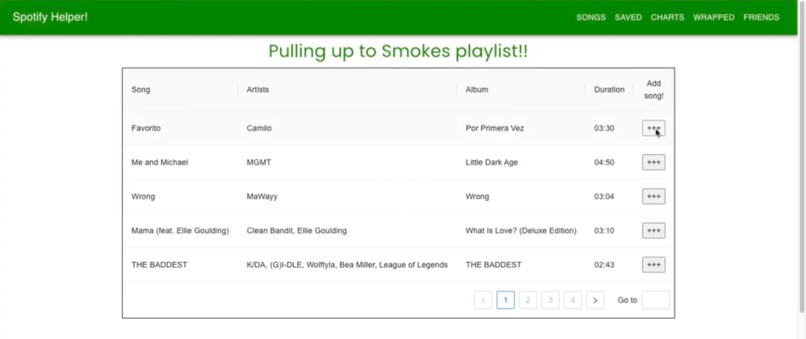
Recommendations by mood
-
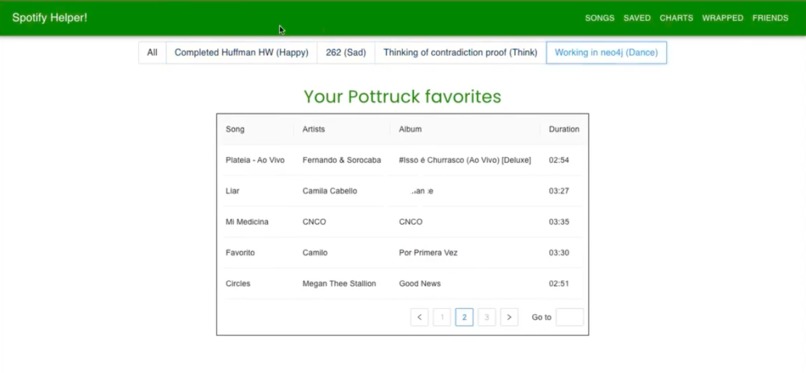
Saved songs
Architecture
Our application consists of a stack of various libraries and packages:, MySQL, Express JS, React, Material UI, Node.js, Canvas.js. The code is also separated into clear modules. Our backend is located in the server folder, where routes and queries are being executed. The client folder contains the front end of our app that is shown to the user, along with a app.css file that we created and modified to add custom components and styling that would make our application more user-friendly. We separated the application code by Pages: Charts page, Charts page, Friends page, Login page, Register page, Saved page, Songs page, Warped page. The “forms” used for login and register are also stored in a separate folder called “utilities”.
Data
We used two main datasets: for the project, a “Spotify songs” database and a “charting songs” database. Dataset 1: https://www.kaggle.com/datasets/rodolfofigueroa/spotify-12m-songs Dataset containing audio features of 1.2m songs obtained from Spotify. I.e., each song has, e.g., an associated danceability, loudness, and energy rating. This dataset contains all the metadata with unique spotify ID, explicitness, other artists, albums. We used it to gather useful metadata for more complex features such as recommending songs for a current mood.
Size Statistics/Summary Statistics: 1.2 million rows, 345mb, 24 attributes 7% are explicit songs, the mean danceability is .49, the mean energy is .51, the mean loudness is -11.8dB, the mean speechiness is .08
Dataset 2: https://www.kaggle.com/datasets/dhruvildave/spotify-charts
Dataset containing all songs featured on the "Top 200" and "Viral 50" charts published by Spotify starting January 1, 2017 (updated every couple of days). For each song, there is info on the current position in the chart and change in position from last chart. This was used to join with the Spotify charts database. Size Statistics/Summary Statistics: 165k rows, 3.48 gb, 9 attributes Mean rank is 80.9, mean date is Aug 20, 2019, the mean number of streams is 55
Web App Description
The user first encounters the login page, where they have a choice to log-in with their email or click on “sign up now” to be redirected to the registration page. The registration page has a built-in email verifier that checks if a valid email was entered and then stores that email.
After clearing the login/registration, the user enters the main “Songs” page, in which they see a playlist of recommended songs. These are songs that the user has not yet saved, that are recommended to them based on their preferences and their charting status. There are two separate playlists with different moods, one focusing more on high-energy and danceability music, while the other focuses more on lower energy and acoustic qualities. Any of these songs can be “saved”, after which they are added to the Saved section and removed from the first page of “recommendations”.
The “Saved” section contains all songs that the user has saved, with an ability to group them in groups with the radio buttons above the playlist. The “Charts” section contains the current popular songs that are charting, broken down by region. Your region is in the center as the most relevant to you, while a few more regions are added for more exposure to different music. The “Wrapped” section shows different characteristics of your music taste, namely:
How your saved songs perform in charts and how many regions they have charted in. How your music taste compares to your friends with a percentile score of similarity for categories “Avg Loudness, Avg Energy, Avg Danceability, Avg Acousticness” A list of your most featured artists A graphical representation showing your scores for your music characteristics compared against your friends’ scores
Lastly, the “Friends” page contains a list of recommended friends who are paired with you for having a similar music taste
Built With
- ant-design
- express.js
- javascript
- mui
- mysql
- node.js
- pandas
- react

Log in or sign up for Devpost to join the conversation.